Lights CHEVROLET BLAZER 2023 User Guide
[x] Cancel search | Manufacturer: CHEVROLET, Model Year: 2023, Model line: BLAZER, Model: CHEVROLET BLAZER 2023Pages: 360, PDF Size: 17.34 MB
Page 193 of 360
Chevrolet Blazer Owner Manual (GMNA-Localizing-U.S./Canada/Mexico-
16401961) - 2023 - CRC - 5/17/22
192 Driving and Operating
Caution (Continued)
.Avoid making hard stops for the first
300 km (200 mi) or so. During this
time the new brake linings are not yet
broken in. Hard stops with new linings
can mean premature wear and earlier
replacement. Follow this breaking-in
guideline every time you get new
brake linings.
.Do not tow a trailer during break-in.
SeeTrailer Towing 0238 for the trailer
towing capabilities of the vehicle and
more information.
Following break-in, engine speed and load
can be gradually increased.
On new vehicles, the various mechanical and
electrical systems experience a “break-in”
period during the first 6 400 km (4,000 mi)
of routine driving. As the vehicle is driven,
the mechanical systems adjust to provide
optimal fuel economy and transmission shift
performance.
Electrical systems will adapt and calibrate
during the break-in period. A one-time
occurrence of clicks and similar vehicle
noises is normal during this process. Normal driving charges the vehicle’s battery
to achieve the best operation of the vehicle,
including fuel economy and the Stop/Start
System. See
Stop/Start System 0194.
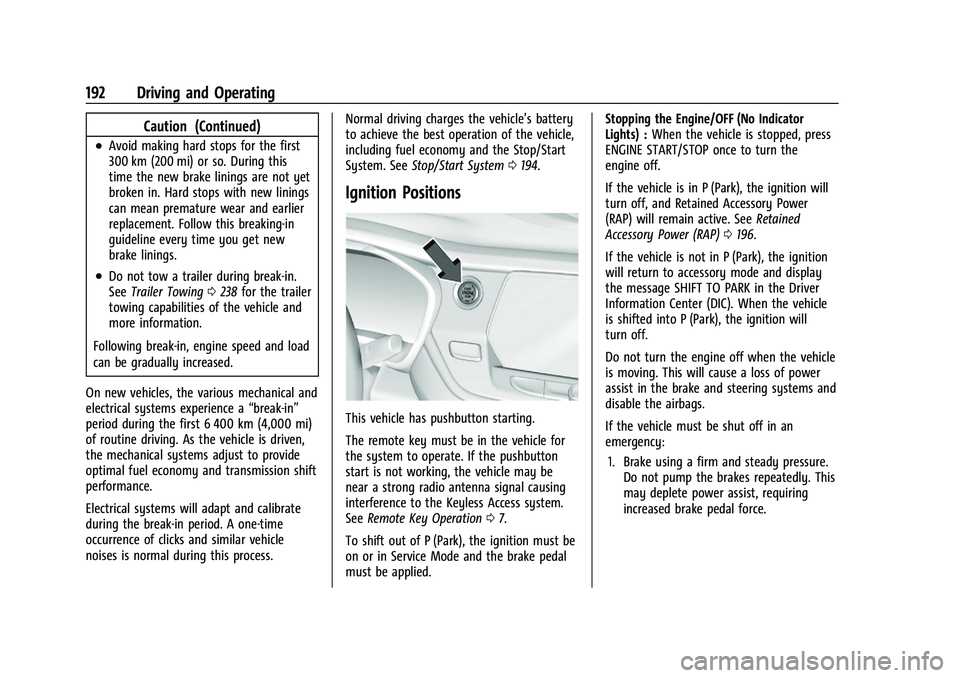
Ignition Positions
This vehicle has pushbutton starting.
The remote key must be in the vehicle for
the system to operate. If the pushbutton
start is not working, the vehicle may be
near a strong radio antenna signal causing
interference to the Keyless Access system.
See Remote Key Operation 07.
To shift out of P (Park), the ignition must be
on or in Service Mode and the brake pedal
must be applied. Stopping the Engine/OFF (No Indicator
Lights) :
When the vehicle is stopped, press
ENGINE START/STOP once to turn the
engine off.
If the vehicle is in P (Park), the ignition will
turn off, and Retained Accessory Power
(RAP) will remain active. See Retained
Accessory Power (RAP) 0196.
If the vehicle is not in P (Park), the ignition
will return to accessory mode and display
the message SHIFT TO PARK in the Driver
Information Center (DIC). When the vehicle
is shifted into P (Park), the ignition will
turn off.
Do not turn the engine off when the vehicle
is moving. This will cause a loss of power
assist in the brake and steering systems and
disable the airbags.
If the vehicle must be shut off in an
emergency: 1. Brake using a firm and steady pressure. Do not pump the brakes repeatedly. This
may deplete power assist, requiring
increased brake pedal force.
Page 224 of 360
Chevrolet Blazer Owner Manual (GMNA-Localizing-U.S./Canada/Mexico-
16401961) - 2023 - CRC - 5/17/22
Driving and Operating 223
If the Park Assist System does not activate
due to a temporary condition, a system off
message is shown on the display. This can
occur under the following conditions:
.The driver has disabled the system.
.An object is currently blocking the rear
sensors (for example, bike rack, tailgate,
trailer hitch, etc.). Once the object is
removed, Park Assist will return to normal
operation.
.The bumper is damaged. Take the vehicle
to your dealer for repairs.
.Other conditions, such as vibrations from
a jackhammer or the compression of air
brakes on a very large truck, are affecting
system performance.
Rear Cross Traffic Alert (RCTA)
System
If equipped, Rear Cross Traffic Alert (RCTA)
displays a red warning triangle with a left
or right pointing arrow on the infotainment
display to warn of traffic coming from the
left or right. This system detects objects
coming from up to 20 m (65 ft) from the left
or right side of the vehicle. When an object
is detected, either three beeps sound from
the left or right or three Safety Alert Seatpulses occur on the left or right side,
depending on the direction of the detected
vehicle.
Driving With a Trailer
Use caution while backing up when towing
a trailer. The RCTA feature is automatically
disabled when a trailer is attached to the
vehicle.
Turning the Features On or Off
The
Xbutton on the center console is
used to turn on or off Rear Park Assist (RPA)
and RCTA at the same time. The indicator
light in the button comes on when the
features are on and turns off when the
features have been disabled.
RCTA can be turned on or off using the
infotainment system. To view available
settings for this feature, touch the Settings
icon on the infotainment home page. Select
“Vehicle” to display the list of available
options and select “Collision/Detection
Systems”.
Assistance Systems for Driving
If equipped, when driving the vehicle in a
forward gear, Forward Collision Alert (FCA),
Lane Departure Warning (LDW), Lane Keep
Assist (LKA), Side Blind Zone Alert (SBZA), Lane Change Alert (LCA), Automatic
Emergency Braking (AEB), and/or the Front
Pedestrian Braking (FPB) System can help to
avoid a crash or reduce crash damage.
Forward Collision Alert (FCA)
System
If equipped, the FCA system may help to
avoid or reduce the harm caused by
front-end crashes. When approaching a
vehicle ahead too quickly, FCA provides a
red flashing alert on the windshield and
rapidly beeps or pulses the driver seat. FCA
also lights an amber visual alert if following
another vehicle much too closely.
FCA detects vehicles within a distance of
approximately 60 m (197 ft) and operates at
speeds above 8 km/h (5 mph). If the vehicle
has Adaptive Cruise Control (ACC), it can
detect vehicles to distances of approximately
110 m (360 ft) and operates at all speeds.
See
Adaptive Cruise Control (Advanced)
0 209.
Page 230 of 360
Chevrolet Blazer Owner Manual (GMNA-Localizing-U.S./Canada/Mexico-
16401961) - 2023 - CRC - 5/17/22
Driving and Operating 229
Lane Change Alert (LCA)
If equipped, the LCA system is a
lane-changing aid that assists drivers with
avoiding lane change crashes that occur with
moving vehicles in the side blind zone (or
spot) areas or with vehicles rapidly
approaching these areas from behind. The
LCA warning display will light up in the
corresponding outside mirror and will flash
if the turn signal is on.
{Warning
LCA does not alert the driver to vehicles
outside of the system detection zones,
pedestrians, bicyclists, or animals. It may
not provide alerts when changing lanes
under all driving conditions. Failure to use
proper care when changing lanes may
result in injury, death, or vehicle damage.
Before making a lane change, always
check mirrors, glance over your shoulder,
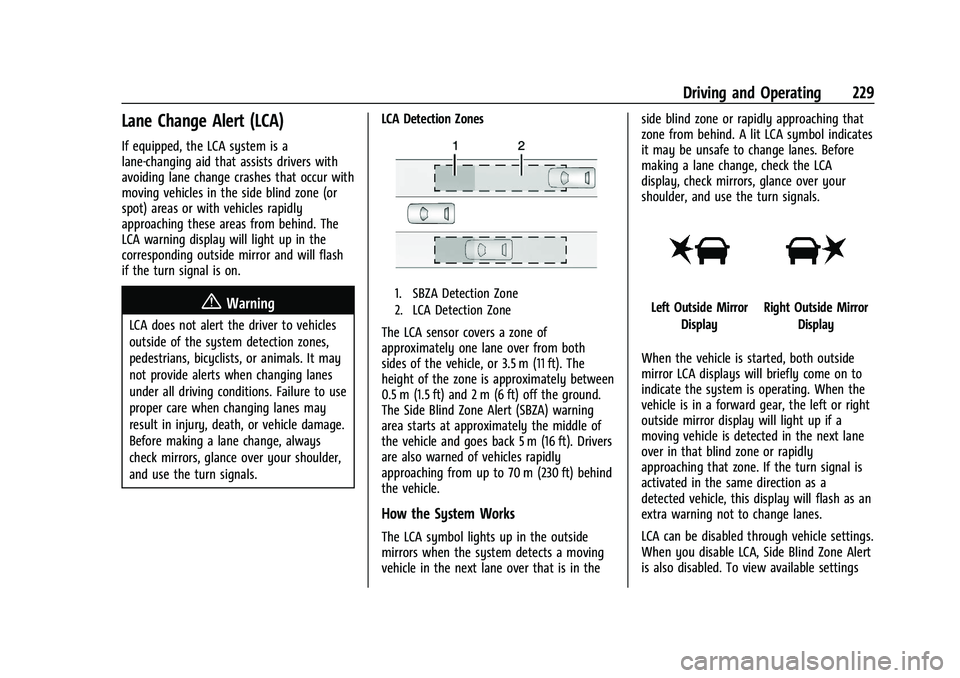
and use the turn signals.LCA Detection Zones
1. SBZA Detection Zone
2. LCA Detection Zone
The LCA sensor covers a zone of
approximately one lane over from both
sides of the vehicle, or 3.5 m (11 ft). The
height of the zone is approximately between
0.5 m (1.5 ft) and 2 m (6 ft) off the ground.
The Side Blind Zone Alert (SBZA) warning
area starts at approximately the middle of
the vehicle and goes back 5 m (16 ft). Drivers
are also warned of vehicles rapidly
approaching from up to 70 m (230 ft) behind
the vehicle.
How the System Works
The LCA symbol lights up in the outside
mirrors when the system detects a moving
vehicle in the next lane over that is in the side blind zone or rapidly approaching that
zone from behind. A lit LCA symbol indicates
it may be unsafe to change lanes. Before
making a lane change, check the LCA
display, check mirrors, glance over your
shoulder, and use the turn signals.
Left Outside Mirror
DisplayRight Outside Mirror Display
When the vehicle is started, both outside
mirror LCA displays will briefly come on to
indicate the system is operating. When the
vehicle is in a forward gear, the left or right
outside mirror display will light up if a
moving vehicle is detected in the next lane
over in that blind zone or rapidly
approaching that zone. If the turn signal is
activated in the same direction as a
detected vehicle, this display will flash as an
extra warning not to change lanes.
LCA can be disabled through vehicle settings.
When you disable LCA, Side Blind Zone Alert
is also disabled. To view available settings
Page 304 of 360
Chevrolet Blazer Owner Manual (GMNA-Localizing-U.S./Canada/Mexico-
16401961) - 2023 - CRC - 5/17/22
Vehicle Care 303
4. Turn the ignition off. Turn off all lightsand accessories in both vehicles, except
the hazard warning flashers if needed.
{Warning
An electric fan can start up even when
the engine is not running and can injure
you. Keep hands, clothing, and tools
away from any underhood electric fan.
{Warning
Using a match near a battery can cause
battery gas to explode. People have been
hurt doing this, and some have been
blinded. Use a flashlight if you need
more light.
Battery fluid contains acid that can burn
you. Do not get it on you. If you
accidentally get it in your eyes or on
your skin, flush the place with water and
get medical help immediately.
{Warning
Fans or other moving engine parts can
injure you badly. Keep your hands away
from moving parts once the engine is
running.
5. Connect one end of the red positive (+) cable to the discharged battery
positive (+) terminal.
6. Connect the other end of the red positive (+) cable to the good battery
positive (+) terminal.
7. Connect one end of the black negative (–) cable to the good battery negative
(–) terminal.
8. Connect the other end of the black negative (–) cable to the discharged
battery negative (–) grounding point.
9. Start the engine in the vehicle with the good battery and run the engine at idle
speed for at least four minutes.
10. Try to start the vehicle that had the dead battery. If it will not start after a
few tries, it probably needs service.
Caution
If the jumper cables are connected or
removed in the wrong order, electrical
shorting may occur and damage the
vehicle. The repairs would not be covered
by the vehicle warranty. Always connect
and remove the jumper cables in the
correct order, making sure that the cables
do not touch each other or other metal.
Jumper Cable Removal
Reverse the sequence exactly when
removing the jumper cables.
After starting the disabled vehicle and
removing the jumper cables, allow it to idle
for several minutes.
Towing the Vehicle
Transporting a Disabled Vehicle
Caution
Incorrectly transporting a disabled vehicle
may cause damage to the vehicle. Use
proper tire straps to secure the vehicle to
the flatbed tow truck. Do not strap or
(Continued)
Page 320 of 360
Chevrolet Blazer Owner Manual (GMNA-Localizing-U.S./Canada/Mexico-
16401961) - 2023 - CRC - 5/17/22
Service and Maintenance 319
suitable service maintenance intervals for
your vehicle, please contact your
authorized GM Dealer.
Extreme service is for vehicles mainly
driven off-road in four-wheel drive or used
in farming, mining, forestry, or snow
plowing.
Additional Required Services—Severe
Service
Every 72 000 km (45,000 mi)
.Change automatic transmission fluid.
Every 120 000 km (75,000 mi)
.Change rear axle fluid, if equipped with
AWD. Do not directly power wash the
transfer case and/or front/rear axle
output seals. High pressure water can
overcome the seals and contaminate the
transfer case fluid. Contaminated fluid will
decrease the life of the transfer case and/
or axles and should be replaced.
Owner Checks and Services
Every Five Years
.Replace brake fluid. Every Seven Years
.Replace Air Conditioning Desiccant and
perform air conditioning system
maintenance every seven years. This
service requires replacement of the
desiccant to help the longevity and
efficient operation of the air conditioning
system. This service can be complex. See
your dealer.
Multi-Point Vehicle
Inspection (MPVI)
A Multi Point Vehicle Inspection (MPVI)
completed by a GM dealer technician is a
maintenance assessment of your vehicle.
The benefit of the MPVI is to identify and
inform the customer of service items that
require immediate attention and those that
may require attention in the future.
The technician will perform the following
checks on your vehicle. For a complete list
of checks, inspections, and services, see your
dealer.
Some items may not apply to your vehicle
and/or region.
Diagnostics
.OnStar active, if equipped
.Service history/recall check
Engine Oil and Filter
.Engine oil
.Oil life monitor
‐
Reset oil life monitor
Exterior Lights
.Visual inspection
Windshield and Wipers
.Visual inspection
Battery
.Battery visual inspection
.Battery test results
.Battery cables and connections
Systems, Fluids, and Visible Leak
Inspection
.Engine oil
.Transmission
.Drive axle
.Transfer case
.Engine cooling system
.Power steering, if equipped
.Fuel system
.Windshield washer fluid
Page 353 of 360
Chevrolet Blazer Owner Manual (GMNA-Localizing-U.S./Canada/Mexico-
16401961) - 2023 - CRC - 5/17/22
352 Index
Fuel (cont'd)Gauge . . . . . . . . . . . . . . . . . . . . . . . . . . . . . . . . . . 96
Low Fuel Warning Light . . . . . . . . . . . . . . . 107
Management, Active . . . . . . . . . . . . . . . . . . . 198
Prohibited Fuels . . . . . . . . . . . . . . . . . . . . . . . 233
Recommended . . . . . . . . . . . . . . . . . . . . . . . . . 232
Top Tier . . . . . . . . . . . . . . . . . . . . . . . . . . . . . . . 232
Fuses Engine Compartment Fuse Block . . . . . . . 270
Fuses and Circuit Breakers . . . . . . . . . . . . . 269
Instrument Panel Fuse Block . . . . . . . . . . . 273
Rear Compartment Fuse Block . . . . . . . . . 275
G
Garage Door Opener . . . . . . . . . . . . . . . . . . . . . . 115Programming . . . . . . . . . . . . . . . . . . . . . . . . . . . 115
Gas Strut(s) . . . . . . . . . . . . . . . . . . . . . . . . . . . . . . 267
Gauges
Engine Coolant Temperature . . . . . . . . . . . . 97
Engine Oil Temperature . . . . . . . . . . . . . . . . . 97
Fuel . . . . . . . . . . . . . . . . . . . . . . . . . . . . . . . . . . . . . 96
Odometer . . . . . . . . . . . . . . . . . . . . . . . . . . . . . . 95
Speedometer . . . . . . . . . . . . . . . . . . . . . . . . . . . 95
Tachometer . . . . . . . . . . . . . . . . . . . . . . . . . . . . . 96
Trip Odometer . . . . . . . . . . . . . . . . . . . . . . . . . . 96
Voltmeter . . . . . . . . . . . . . . . . . . . . . . . . . . . . . . . 98
Warning Lights and Indicators . . . . . . . . . . 91 General Information
Service and Maintenance . . . . . . . . . . . . . . 316
Towing . . . . . . . . . . . . . . . . . . . . . . . . . . . . . . . . 235
Vehicle Care . . . . . . . . . . . . . . . . . . . . . . . . . . . 247
Global Positioning System (GPS) . . . . . . . . . 148
Glove Box . . . . . . . . . . . . . . . . . . . . . . . . . . . . . . . . 79
GM Mobility Reimbursement Program . . . . . . . . . . . . . . . . . . . . . . . . . . . . . . . 332
Guidance Problems with the Route . . . . . . . . . . . . . . 148
H
Hazard Warning Flashers . . . . . . . . . . . . . . . . . 121
HD Radio Technology . . . . . . . . . . . . . . . . . . . . . 132
Head Restraints . . . . . . . . . . . . . . . . . . . . . . . . . . . 34
HeadlampsAiming . . . . . . . . . . . . . . . . . . . . . . . . . . . . . . . . 267
Automatic . . . . . . . . . . . . . . . . . . . . . . . . . . . . . 120
Daytime Running Lamps (DRL) . . . . . . . . . 120
Flash-to-Pass . . . . . . . . . . . . . . . . . . . . . . . . . . . 120
High-Beam On Light . . . . . . . . . . . . . . . . . . . 108
High/Low Beam Changer . . . . . . . . . . . . . . . 119
Lamps On Reminder . . . . . . . . . . . . . . . . . . . 108
Heated Mirrors . . . . . . . . . . . . . . . . . . . . . . . . . . . . . . . . . 27
Rear Seats . . . . . . . . . . . . . . . . . . . . . . . . . . . . . . 45
Steering Wheel . . . . . . . . . . . . . . . . . . . . . . . . . 85
Ventilated Front Seats . . . . . . . . . . . . . . . . . . 41 Heater
Engine . . . . . . . . . . . . . . . . . . . . . . . . . . . . . . . . . 195
Heating . . . . . . . . . . . . . . . . . . . . . . . . . . . . . . . . . . . 173
High Voltage Devices and Wiring . . . . . . . . 268
High-Beam On Light . . . . . . . . . . . . . . . . . . . . . 108
High-Speed Operation . . . . . . . . . . . . . . . . . . . 284
Hill and Mountain Roads . . . . . . . . . . . . . . . . 186
Hill Start Assist (HSA) . . . . . . . . . . . . . . . . . . . . 204
Hood . . . . . . . . . . . . . . . . . . . . . . . . . . . . . . . . . . . . 248
Hooks Shopping Bag . . . . . . . . . . . . . . . . . . . . . . . . . . . 81
Horn . . . . . . . . . . . . . . . . . . . . . . . . . . . . . . . . . . . . . . 86
How to Wear Seat Belts Properly . . . . . . . . . 46
HVAC . . . . . . . . . . . . . . . . . . . . . . . . . . . . . . . . . . . . . 173
I
If the System Needs Service . . . . . . . . . . . . . 149
Ignition Positions . . . . . . . . . . . . . . . . . . . . . . . . 192
Immobilizer . . . . . . . . . . . . . . . . . . . . . . . . . . . . . . . .25
Indicator Pedestrian Ahead . . . . . . . . . . . . . . . . . . . . . . 105
Vehicle Ahead . . . . . . . . . . . . . . . . . . . . . . . . . 104
Indicators Warning Lights and Gauges . . . . . . . . . . . . . 91
Infants and Young Children, Restraints . . . . 63
Information Publication Ordering . . . . . . . . . . . . . . . . . . . 336
Page 354 of 360
Chevrolet Blazer Owner Manual (GMNA-Localizing-U.S./Canada/Mexico-
16401961) - 2023 - CRC - 5/17/22
Index 353
InfotainmentUsing the System . . . . . . . . . . . . . . . . . . . . . . 128
Infotainment System . . . . . . . . . . . . . . . . . . . . 339
Inspection Multi-Point Vehicle . . . . . . . . . . . . . . . . . . . . 319
Instrument Cluster . . . . . . . . . . . . . . . . . . . . 92, 94
Instrument Panel Overview . . . . . . . . . . . . . . . . 4
Interior Rearview Mirrors . . . . . . . . . . . . . . . . . .27
Introduction . . . . . . . . . . . . . . . . . . . . . . . . . . . 2, 125
J
Jack Auxiliary . . . . . . . . . . . . . . . . . . . . . . . . . . . . . . . . 137
Jump Starting - North America . . . . . . . . . . . . . . . 301
K
Keys . . . . . . . . . . . . . . . . . . . . . . . . . . . . . . . . . . . . . . . 6Remote . . . . . . . . . . . . . . . . . . . . . . . . . . . . . . . . . . 7
Remote Operation . . . . . . . . . . . . . . . . . . . . . . . 7
L
Labeling, Tire Sidewall . . . . . . . . . . . . . . . . . . . 278
LampsCourtesy . . . . . . . . . . . . . . . . . . . . . . . . . . . . . . . 122
Daytime Running (DRL) . . . . . . . . . . . . . . . . 120
Dome . . . . . . . . . . . . . . . . . . . . . . . . . . . . . . . . . . 122
Exterior Controls . . . . . . . . . . . . . . . . . . . . . . . . 118
Exterior Lamps Off Reminder . . . . . . . . . . . 119 Lamps (cont'd)
Exterior Lighting Battery Saver . . . . . . . . 124
Flash-to-Pass . . . . . . . . . . . . . . . . . . . . . . . . . . . 120
High/Low Beam Changer . . . . . . . . . . . . . . . 119
Malfunction Indicator (Check
Engine) . . . . . . . . . . . . . . . . . . . . . . . . . . . . . . 101
On Reminder . . . . . . . . . . . . . . . . . . . . . . . . . . 108
Reading . . . . . . . . . . . . . . . . . . . . . . . . . . . . . . . . 122
Lane Change Alert (LCA) . . . . . . . . . . . . . . . . . . . . . 229
Keep Assist (LKA) . . . . . . . . . . . . . . . . . . . . . . 230
Keep Assist Light . . . . . . . . . . . . . . . . . . . . . . 104
Lap-Shoulder Belt . . . . . . . . . . . . . . . . . . . . . . . . . 48
LATCH System Replacing Parts after a Crash . . . . . . . . . . . 74
LATCH, Lower Anchors and Tethers for
Children . . . . . . . . . . . . . . . . . . . . . . . . . . . . . . . . . 68
LED Lighting . . . . . . . . . . . . . . . . . . . . . . . . . . . . . 268
Liftgate . . . . . . . . . . . . . . . . . . . . . . . . . . . . . . . . . . . .18
Lighting Entry . . . . . . . . . . . . . . . . . . . . . . . . . . . . . . . . . . 123
Exit . . . . . . . . . . . . . . . . . . . . . . . . . . . . . . . . . . . . 123
Illumination Control . . . . . . . . . . . . . . . . . . . . 121
LED . . . . . . . . . . . . . . . . . . . . . . . . . . . . . . . . . . . . 268
Lights Airbag Readiness . . . . . . . . . . . . . . . . . . . . . . . 99
Antilock Brake System (ABS)
Warning . . . . . . . . . . . . . . . . . . . . . . . . . . . . . 104 Lights (cont'd)
Brake System Warning . . . . . . . . . . . . . . . . 102
Charging System . . . . . . . . . . . . . . . . . . . . . . 101
Check Engine (Malfunction
Indicator) . . . . . . . . . . . . . . . . . . . . . . . . . . . . 101
Cruise Control Light . . . . . . . . . . . . . . . . . . . . 108
Door Ajar . . . . . . . . . . . . . . . . . . . . . . . . . . . . . . 109
Driver Mode Control . . . . . . . . . . . . . . . . . . . 106
Electric Parking Brake . . . . . . . . . . . . . . . . . . 103
Engine Coolant Temperature Warning . . . . . . . . . . . . . . . . . . . . . . . . . . . . . 106
Engine Oil Pressure . . . . . . . . . . . . . . . . . . . . 107
Gauges and Indicators . . . . . . . . . . . . . . . . . . 91
High-Beam On . . . . . . . . . . . . . . . . . . . . . . . . . 108
Lane Keep Assist . . . . . . . . . . . . . . . . . . . . . . . 104
Low Fuel Warning . . . . . . . . . . . . . . . . . . . . . 107
Seat Belt Reminders . . . . . . . . . . . . . . . . . . . . 99
Security . . . . . . . . . . . . . . . . . . . . . . . . . . . . . . . . 108
Service Electric Parking Brake . . . . . . . . . . 103
StabiliTrak OFF . . . . . . . . . . . . . . . . . . . . . . . . . 105
Tire Pressure . . . . . . . . . . . . . . . . . . . . . . . . . . . 106
Traction Control System
(TCS)/StabiliTrak . . . . . . . . . . . . . . . . . . . . . 105
Traction Off . . . . . . . . . . . . . . . . . . . . . . . . . . . . 105
Locks Automatic Door . . . . . . . . . . . . . . . . . . . . . . . . . . 17
Delayed Locking . . . . . . . . . . . . . . . . . . . . . . . . . 17
Door . . . . . . . . . . . . . . . . . . . . . . . . . . . . . . . . . . . . . 15
Page 359 of 360
Chevrolet Blazer Owner Manual (GMNA-Localizing-U.S./Canada/Mexico-
16401961) - 2023 - CRC - 5/17/22
358 Index
TrailerSway Control (TSC) . . . . . . . . . . . . . . . . . . . . 244
Towing . . . . . . . . . . . . . . . . . . . . . . . . . . . . . . . . 238
Transmission Automatic . . . . . . . . . . . . . . . . . . . . . . . . . . . . . 199
Fluid, Automatic . . . . . . . . . . . . . . . . . . . . . . . 255
Transportation Program, Courtesy . . . . . . . 334
Transporting
a Disabled Vehicle . . . . . . . . . . . . . . . . . . . . . 303
Trip Odometer . . . . . . . . . . . . . . . . . . . . . . . . . . . . 96
TTY Users Customer Assistance . . . . . . . . . . . . . . . . . . . 331
Turn and Lane-Change Signals . . . . . . . . . . . . 121
U
Uniform Tire Quality Grading . . . . . . . . . . . . 292
Universal Remote System . . . . . . . . . . . . . . . . . 115 Operation . . . . . . . . . . . . . . . . . . . . . . . . . . . . . . . 117
Programming . . . . . . . . . . . . . . . . . . . . . . . . . . . 115
Updates Map Data . . . . . . . . . . . . . . . . . . . . . . . . . . . . . . 149
Software . . . . . . . . . . . . . . . . . . . . . . . . . . . . . . . . 131
USB Port . . . . . . . . . . . . . . . . . . . . . . . . . . . . . . . . . . 135
Using Infotainment System . . . . . . . . . . . . . . . . . . 128
Navigation System . . . . . . . . . . . . . . . . . . . . . 138
This Manual . . . . . . . . . . . . . . . . . . . . . . . . . . . . . 2
V
VehicleAhead Indicator . . . . . . . . . . . . . . . . . . . . . . . . 104
Alarm System . . . . . . . . . . . . . . . . . . . . . . . . . . 24
Canadian Owners . . . . . . . . . . . . . . . . . . . . . . . . 2
Control . . . . . . . . . . . . . . . . . . . . . . . . . . . . . . . . 180
Data Recording and Privacy . . . . . . . . . . . . 338
Identification Number (VIN) . . . . . . . . . . . . 325
Load Limits . . . . . . . . . . . . . . . . . . . . . . . . . . . . 188
Messages . . . . . . . . . . . . . . . . . . . . . . . . . . . . . . . 114
Positioning . . . . . . . . . . . . . . . . . . . . . . . . . . . . 148
Remote Start . . . . . . . . . . . . . . . . . . . . . . . . . . . 14
Security . . . . . . . . . . . . . . . . . . . . . . . . . . . . . . . . . 24
Speed Messages . . . . . . . . . . . . . . . . . . . . . . . . 115
Symbols . . . . . . . . . . . . . . . . . . . . . . . . . . . . . . . . . 3
Vehicle Care Tire Pressure . . . . . . . . . . . . . . . . . . . . . . . . . . . 283
Ventilation, Air . . . . . . . . . . . . . . . . . . . . . . . . . . . 177
Visors . . . . . . . . . . . . . . . . . . . . . . . . . . . . . . . . . . . . . .32
Voice Recognition . . . . . . . . . . . . . . . . . . . . . . . . 149
Voltage Devices and Wiring . . . . . . . . . . . . . 268
Voltmeter Gauge . . . . . . . . . . . . . . . . . . . . . . . . . 98
W
Warning Brake System Light . . . . . . . . . . . . . . . . . . . . 102
Caution and Danger . . . . . . . . . . . . . . . . . . . . . 2
Hazard Flashers . . . . . . . . . . . . . . . . . . . . . . . . . 121 Warning (cont'd)
Lights, Gauges, and Indicators . . . . . . . . . . 91
Washer Fluid . . . . . . . . . . . . . . . . . . . . . . . . . . . . 262
Wheels Alignment and Tire Balance . . . . . . . . . . . . 293
Different Size . . . . . . . . . . . . . . . . . . . . . . . . . . 292
Replacement . . . . . . . . . . . . . . . . . . . . . . . . . . . 294
When It Is Time for New Tires . . . . . . . . . . . 290
Where to Put the Restraint . . . . . . . . . . . . . . . 67
Windows . . . . . . . . . . . . . . . . . . . . . . . . . . . . . . . . . 30 Power . . . . . . . . . . . . . . . . . . . . . . . . . . . . . . . . . . 30
Windshield
Replacement . . . . . . . . . . . . . . . . . . . . . . . . . . . 266
Wiper/Washer . . . . . . . . . . . . . . . . . . . . . . . . . . 86
Winter Driving . . . . . . . . . . . . . . . . . . . . . . . . . . . . . . . . 187
Tires . . . . . . . . . . . . . . . . . . . . . . . . . . . . . . . . . . . 278
Wiper Blade Replacement . . . . . . . . . . . . . . . . . . . . 265
Rear Washer . . . . . . . . . . . . . . . . . . . . . . . . . . . . 87
Wireless Charging . . . . . . . . . . . . . . . . . . . . . . . . 89
Wiring, High Voltage Devices . . . . . . . . . . . . 268