sport mode CHEVROLET BLAZER 2023 Owners Manual
[x] Cancel search | Manufacturer: CHEVROLET, Model Year: 2023, Model line: BLAZER, Model: CHEVROLET BLAZER 2023Pages: 360, PDF Size: 17.34 MB
Page 107 of 360
Chevrolet Blazer Owner Manual (GMNA-Localizing-U.S./Canada/Mexico-
16401961) - 2023 - CRC - 5/17/22
106 Instruments and Controls
your dealer as soon as possible. A Driver
Information Center (DIC) message may
display.
The light flashes when the TCS and/or the
StabiliTrak/ESC system is actively working.
SeeTraction Control/Electronic Stability
Control 0204.
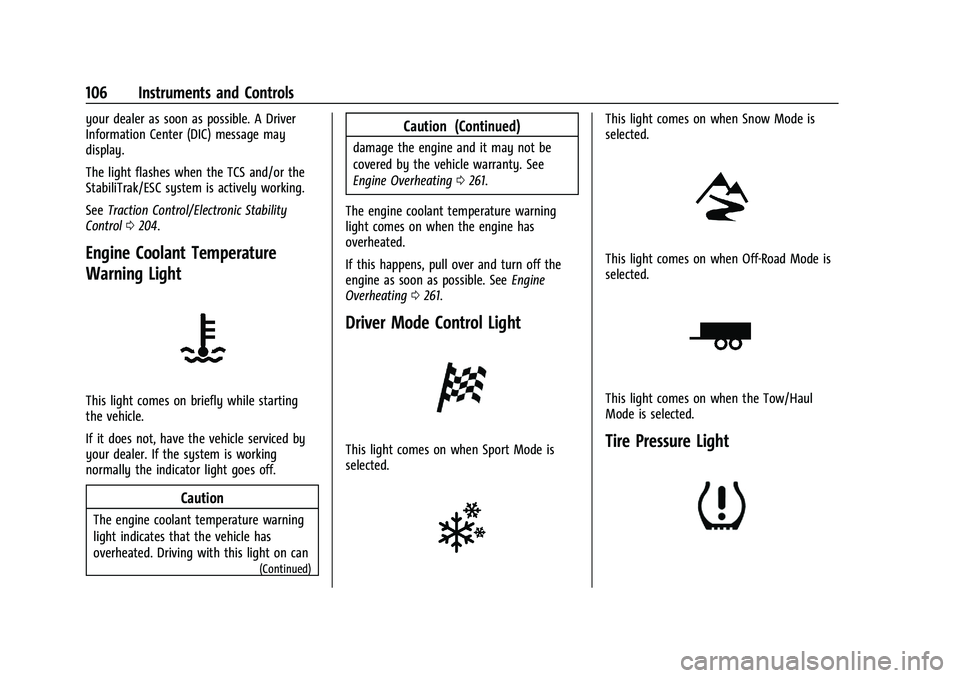
Engine Coolant Temperature
Warning Light
This light comes on briefly while starting
the vehicle.
If it does not, have the vehicle serviced by
your dealer. If the system is working
normally the indicator light goes off.
Caution
The engine coolant temperature warning
light indicates that the vehicle has
overheated. Driving with this light on can
(Continued)
Caution (Continued)
damage the engine and it may not be
covered by the vehicle warranty. See
Engine Overheating 0261.
The engine coolant temperature warning
light comes on when the engine has
overheated.
If this happens, pull over and turn off the
engine as soon as possible. See Engine
Overheating 0261.
Driver Mode Control Light
This light comes on when Sport Mode is
selected.
This light comes on when Snow Mode is
selected.
This light comes on when Off-Road Mode is
selected.
This light comes on when the Tow/Haul
Mode is selected.
Tire Pressure Light
Page 189 of 360
Chevrolet Blazer Owner Manual (GMNA-Localizing-U.S./Canada/Mexico-
16401961) - 2023 - CRC - 5/17/22
188 Driving and Operating
To save fuel, run the engine for short
periods to warm the vehicle and then shut
the engine off and partially close the
window. Moving about to keep warm also
helps.
If it takes time for help to arrive, when
running the engine, push the accelerator
pedal slightly so the engine runs faster than
the idle speed. This keeps the battery
charged to restart the vehicle and to signal
for help with the headlamps. Do this as
little as possible, to save fuel.
If the Vehicle Is Stuck
Slowly and cautiously spin the wheels to
free the vehicle when stuck in sand, mud,
ice, or snow.
If stuck too severely for the traction system
to free the vehicle, turn the traction system
off and use the rocking method. See
Traction Control/Electronic Stability Control
0204.
{Warning
If the vehicle's tires spin at high speed,
they can explode, and you or others
could be injured. The vehicle can
(Continued)
Warning (Continued)
overheat, causing an engine compartment
fire or other damage. Spin the wheels as
little as possible and avoid going above
56 km/h (35 mph).
For All-Wheel Drive (AWD), select Off-Road
or AWD mode. See Driver Mode Control
0 206 and
All-Wheel Drive 0201.
Rocking the Vehicle to Get it Out
Turn the steering wheel left and right to
clear the area around the front wheels. Turn
off any traction system. Shift back and forth
between R (Reverse) and a low forward gear,
spinning the wheels as little as possible. To
prevent transmission wear, wait until the
wheels stop spinning before shifting gears.
Release the accelerator pedal while shifting,
and press lightly on the accelerator pedal
when the transmission is in gear. Slowly
spinning the wheels in the forward and
reverse directions causes a rocking motion
that could free the vehicle. If that does not
get the vehicle out after a few tries, it
might need to be towed out. If the vehicle
does need to be towed out, see Transporting
a Disabled Vehicle 0303.
Vehicle Load Limits
It is very important to know how much
weight the vehicle can carry. This
weight is called the vehicle capacity
weight and includes the weight of all
occupants, cargo, and all
nonfactory-installed options. Two labels
on the vehicle may show how much
weight it may properly carry, the Tire
and Loading Information label and the
Certification/Tire label.
{Warning
Do not load the vehicle any heavier
than the Gross Vehicle Weight Rating
(GVWR), or either the maximum
front or rear Gross Axle Weight
Rating (GAWR). This can cause
systems to break and change the
way the vehicle handles. This could
cause loss of control and a crash.
Overloading can also reduce stopping
performance, damage the tires, and
shorten the life of the vehicle.
Page 207 of 360
Chevrolet Blazer Owner Manual (GMNA-Localizing-U.S./Canada/Mexico-
16401961) - 2023 - CRC - 5/17/22
206 Driving and Operating
To turn TCS on again, press and releaseg.
The Traction Off light
idisplayed in the
instrument cluster will turn off.
If TCS is limiting wheel spin when
gis
pressed, the system will not turn off until
the wheels stop spinning.
To turn off both TCS and StabiliTrak/ESC,
press and hold
guntil the Traction Off light
iand StabiliTrak/ESC OFF lightgcome on
and stay on in the instrument cluster. A DIC
message may display.
To turn TCS and StabiliTrak/ESC on again,
press and release
g. The Traction Off light
iand StabiliTrak/ESC OFF lightgin the
instrument cluster turn off.
StabiliTrak/ESC will automatically turn on if
the vehicle exceeds 56 km/h (35 mph).
Traction control will remain off.
Adding accessories can affect the vehicle
performance. See Accessories and
Modifications 0247.
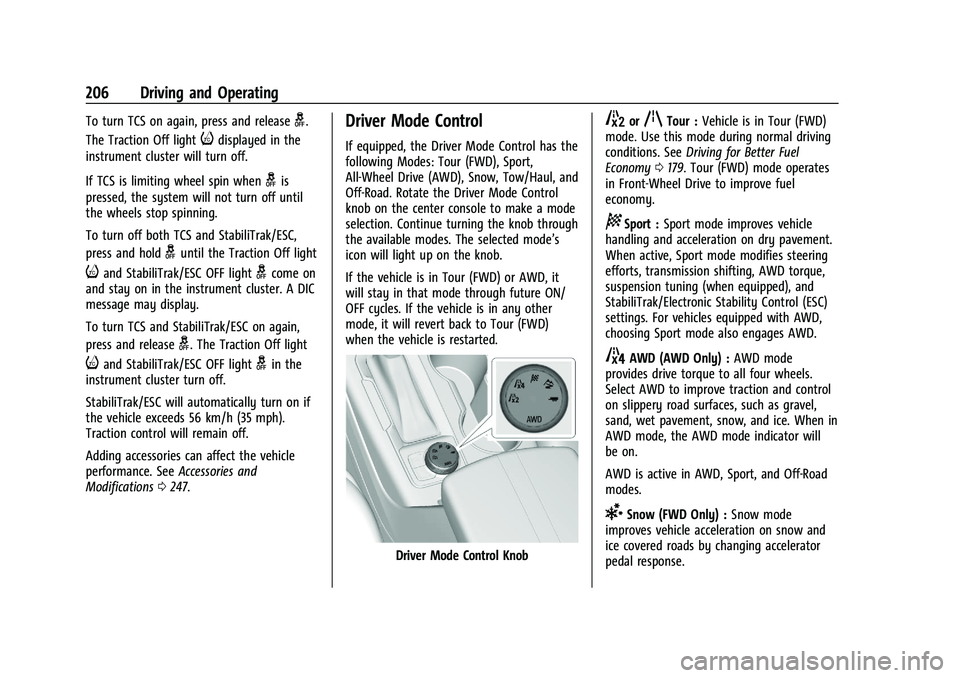
Driver Mode Control
If equipped, the Driver Mode Control has the
following Modes: Tour (FWD), Sport,
All-Wheel Drive (AWD), Snow, Tow/Haul, and
Off-Road. Rotate the Driver Mode Control
knob on the center console to make a mode
selection. Continue turning the knob through
the available modes. The selected mode’s
icon will light up on the knob.
If the vehicle is in Tour (FWD) or AWD, it
will stay in that mode through future ON/
OFF cycles. If the vehicle is in any other
mode, it will revert back to Tour (FWD)
when the vehicle is restarted.
Driver Mode Control Knob
5orqTour : Vehicle is in Tour (FWD)
mode. Use this mode during normal driving
conditions. See Driving for Better Fuel
Economy 0179. Tour (FWD) mode operates
in Front-Wheel Drive to improve fuel
economy.
8Sport : Sport mode improves vehicle
handling and acceleration on dry pavement.
When active, Sport mode modifies steering
efforts, transmission shifting, AWD torque,
suspension tuning (when equipped), and
StabiliTrak/Electronic Stability Control (ESC)
settings. For vehicles equipped with AWD,
choosing Sport mode also engages AWD.
4AWD (AWD Only) : AWD mode
provides drive torque to all four wheels.
Select AWD to improve traction and control
on slippery road surfaces, such as gravel,
sand, wet pavement, snow, and ice. When in
AWD mode, the AWD mode indicator will
be on.
AWD is active in AWD, Sport, and Off-Road
modes.
6Snow (FWD Only) : Snow mode
improves vehicle acceleration on snow and
ice covered roads by changing accelerator
pedal response.
Page 338 of 360
Chevrolet Blazer Owner Manual (GMNA-Localizing-U.S./Canada/Mexico-
16401961) - 2023 - CRC - 5/17/22
Customer Information 337
Customer literature publications available for
purchase include owner’s manuals, warranty
manuals, and portfolios. Portfolios include an
owner’s manual, warranty manual,
if applicable, and zip lock bag or pouch.
Current and Past Models
Service manuals and customer literature are
available for many current and past model
year GM vehicles.
To order, call 1-800-551-4123 Monday–Friday,
8:00 a.m.–6:00 p.m. Eastern Time
For credit card orders only (VISA,
MasterCard, or Discover), see Helm, Inc. at:
www.helminc.com.
To order by mail, write to:
Helm, Incorporated
Attention: Customer Service
47911 Halyard Drive
Plymouth, MI 48170
Make checks payable in U.S. funds.
Radio Frequency Statement
This vehicle uses license-exempt transmitters
/ receivers / systems that operate on a
radio frequency that complies with Part 15/
Part 18 of the Federal Communications
Commission (FCC) rules and with Innovation,Science and Economic Development (ISED)
Canada's license-exempt RSS(s) / RSP-100 /
ICES-GEN.
Operation is subject to the following two
conditions:
1. The device may not cause harmful interference.
2. The device must accept any interference received, including interference that may
cause undesired operation of the device.
Changes or modifications to any of these
systems by other than an authorized service
facility could void authorization to use this
equipment.
Reporting Safety Defects
Reporting Safety Defects to the
United States Government
If you believe that your vehicle has a
defect which could cause a crash or
could cause injury or death, you should
immediately inform the National
Highway Traffic Safety Administration
(NHTSA) in addition to notifying General
Motors. If NHTSA receives similar complaints, it
may open an investigation, and if it
finds that a safety defect exists in a
group of vehicles, it may order a recall
and remedy campaign. However, NHTSA
cannot become involved in individual
problems between you, your dealer,
or General Motors.
To contact NHTSA, you may call the
Vehicle Safety Hotline toll-free at
1-888-327-4236 (TTY: 1-800-424-9153); go
to
https://www.safercar.gov;or write to:
Administrator, NHTSA
1200 New Jersey Avenue, S.E.
Washington, D.C. 20590
You can also obtain other information
about motor vehicle safety from
https://www.safercar.gov.
Reporting Safety Defects to the
Canadian Government
If you live in Canada, and you believe
that the vehicle has a safety defect,
notify Transport Canada immediately,
Page 351 of 360
Chevrolet Blazer Owner Manual (GMNA-Localizing-U.S./Canada/Mexico-
16401961) - 2023 - CRC - 5/17/22
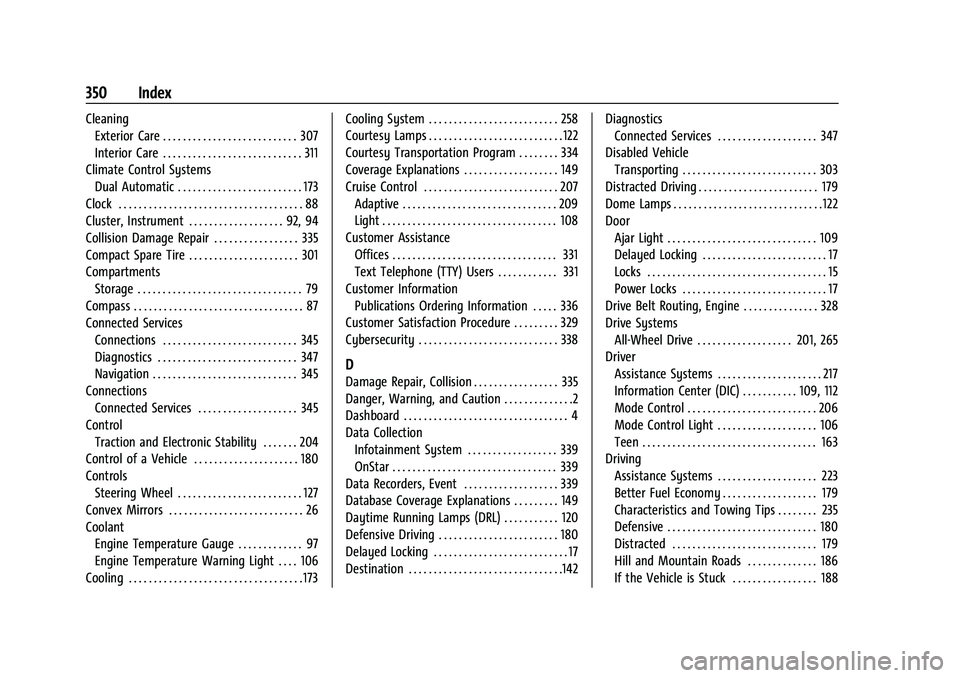
350 Index
CleaningExterior Care . . . . . . . . . . . . . . . . . . . . . . . . . . . 307
Interior Care . . . . . . . . . . . . . . . . . . . . . . . . . . . . 311
Climate Control Systems Dual Automatic . . . . . . . . . . . . . . . . . . . . . . . . . 173
Clock . . . . . . . . . . . . . . . . . . . . . . . . . . . . . . . . . . . . . 88
Cluster, Instrument . . . . . . . . . . . . . . . . . . . 92, 94
Collision Damage Repair . . . . . . . . . . . . . . . . . 335
Compact Spare Tire . . . . . . . . . . . . . . . . . . . . . . 301
Compartments Storage . . . . . . . . . . . . . . . . . . . . . . . . . . . . . . . . . 79
Compass . . . . . . . . . . . . . . . . . . . . . . . . . . . . . . . . . . 87
Connected Services Connections . . . . . . . . . . . . . . . . . . . . . . . . . . . 345
Diagnostics . . . . . . . . . . . . . . . . . . . . . . . . . . . . 347
Navigation . . . . . . . . . . . . . . . . . . . . . . . . . . . . . 345
Connections Connected Services . . . . . . . . . . . . . . . . . . . . 345
Control Traction and Electronic Stability . . . . . . . 204
Control of a Vehicle . . . . . . . . . . . . . . . . . . . . . 180
Controls
Steering Wheel . . . . . . . . . . . . . . . . . . . . . . . . . 127
Convex Mirrors . . . . . . . . . . . . . . . . . . . . . . . . . . . 26
Coolant Engine Temperature Gauge . . . . . . . . . . . . . 97
Engine Temperature Warning Light . . . . 106
Cooling . . . . . . . . . . . . . . . . . . . . . . . . . . . . . . . . . . . 173 Cooling System . . . . . . . . . . . . . . . . . . . . . . . . . . 258
Courtesy Lamps . . . . . . . . . . . . . . . . . . . . . . . . . . . 122
Courtesy Transportation Program . . . . . . . . 334
Coverage Explanations . . . . . . . . . . . . . . . . . . . 149
Cruise Control . . . . . . . . . . . . . . . . . . . . . . . . . . . 207
Adaptive . . . . . . . . . . . . . . . . . . . . . . . . . . . . . . . 209
Light . . . . . . . . . . . . . . . . . . . . . . . . . . . . . . . . . . . 108
Customer Assistance Offices . . . . . . . . . . . . . . . . . . . . . . . . . . . . . . . . . 331
Text Telephone (TTY) Users . . . . . . . . . . . . 331
Customer Information
Publications Ordering Information . . . . . 336
Customer Satisfaction Procedure . . . . . . . . . 329
Cybersecurity . . . . . . . . . . . . . . . . . . . . . . . . . . . . 338
D
Damage Repair, Collision . . . . . . . . . . . . . . . . . 335
Danger, Warning, and Caution . . . . . . . . . . . . . .2
Dashboard . . . . . . . . . . . . . . . . . . . . . . . . . . . . . . . . . 4
Data Collection Infotainment System . . . . . . . . . . . . . . . . . . 339
OnStar . . . . . . . . . . . . . . . . . . . . . . . . . . . . . . . . . 339
Data Recorders, Event . . . . . . . . . . . . . . . . . . . 339
Database Coverage Explanations . . . . . . . . . 149
Daytime Running Lamps (DRL) . . . . . . . . . . . 120
Defensive Driving . . . . . . . . . . . . . . . . . . . . . . . . 180
Delayed Locking . . . . . . . . . . . . . . . . . . . . . . . . . . . 17
Destination . . . . . . . . . . . . . . . . . . . . . . . . . . . . . . .142 Diagnostics
Connected Services . . . . . . . . . . . . . . . . . . . . 347
Disabled Vehicle Transporting . . . . . . . . . . . . . . . . . . . . . . . . . . . 303
Distracted Driving . . . . . . . . . . . . . . . . . . . . . . . . 179
Dome Lamps . . . . . . . . . . . . . . . . . . . . . . . . . . . . . . 122
Door Ajar Light . . . . . . . . . . . . . . . . . . . . . . . . . . . . . . 109
Delayed Locking . . . . . . . . . . . . . . . . . . . . . . . . . 17
Locks . . . . . . . . . . . . . . . . . . . . . . . . . . . . . . . . . . . . 15
Power Locks . . . . . . . . . . . . . . . . . . . . . . . . . . . . . 17
Drive Belt Routing, Engine . . . . . . . . . . . . . . . 328
Drive Systems All-Wheel Drive . . . . . . . . . . . . . . . . . . . 201, 265
Driver Assistance Systems . . . . . . . . . . . . . . . . . . . . . 217
Information Center (DIC) . . . . . . . . . . . 109, 112
Mode Control . . . . . . . . . . . . . . . . . . . . . . . . . . 206
Mode Control Light . . . . . . . . . . . . . . . . . . . . 106
Teen . . . . . . . . . . . . . . . . . . . . . . . . . . . . . . . . . . . 163
Driving
Assistance Systems . . . . . . . . . . . . . . . . . . . . 223
Better Fuel Economy . . . . . . . . . . . . . . . . . . . 179
Characteristics and Towing Tips . . . . . . . . 235
Defensive . . . . . . . . . . . . . . . . . . . . . . . . . . . . . . 180
Distracted . . . . . . . . . . . . . . . . . . . . . . . . . . . . . 179
Hill and Mountain Roads . . . . . . . . . . . . . . 186
If the Vehicle is Stuck . . . . . . . . . . . . . . . . . 188