wiper CHEVROLET BLAZER 2023 Owners Manual
[x] Cancel search | Manufacturer: CHEVROLET, Model Year: 2023, Model line: BLAZER, Model: CHEVROLET BLAZER 2023Pages: 360, PDF Size: 17.34 MB
Page 6 of 360
Chevrolet Blazer Owner Manual (GMNA-Localizing-U.S./Canada/Mexico-
16401961) - 2023 - CRC - 5/17/22
Introduction 5
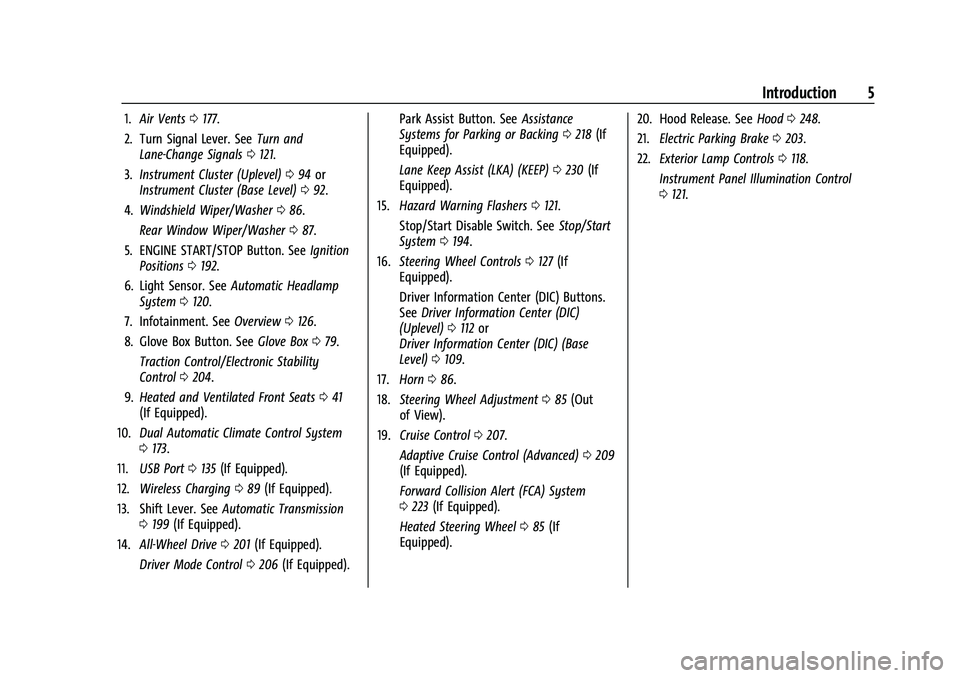
1.Air Vents 0177.
2. Turn Signal Lever. See Turn and
Lane-Change Signals 0121.
3. Instrument Cluster (Uplevel) 094 or
Instrument Cluster (Base Level) 092.
4. Windshield Wiper/Washer 086.
Rear Window Wiper/Washer 087.
5. ENGINE START/STOP Button. See Ignition
Positions 0192.
6. Light Sensor. See Automatic Headlamp
System 0120.
7. Infotainment. See Overview0126.
8. Glove Box Button. See Glove Box079.
Traction Control/Electronic Stability
Control 0204.
9. Heated and Ventilated Front Seats 041
(If Equipped).
10. Dual Automatic Climate Control System
0173.
11. USB Port 0135 (If Equipped).
12. Wireless Charging 089 (If Equipped).
13. Shift Lever. See Automatic Transmission
0 199 (If Equipped).
14. All-Wheel Drive 0201 (If Equipped).
Driver Mode Control 0206 (If Equipped). Park Assist Button. See
Assistance
Systems for Parking or Backing 0218 (If
Equipped).
Lane Keep Assist (LKA) (KEEP) 0230 (If
Equipped).
15. Hazard Warning Flashers 0121.
Stop/Start Disable Switch. See Stop/Start
System 0194.
16. Steering Wheel Controls 0127 (If
Equipped).
Driver Information Center (DIC) Buttons.
See Driver Information Center (DIC)
(Uplevel) 0112 or
Driver Information Center (DIC) (Base
Level) 0109.
17. Horn 086.
18. Steering Wheel Adjustment 085 (Out
of View).
19. Cruise Control 0207.
Adaptive Cruise Control (Advanced) 0209
(If Equipped).
Forward Collision Alert (FCA) System
0 223 (If Equipped).
Heated Steering Wheel 085 (If
Equipped). 20. Hood Release. See
Hood0248.
21. Electric Parking Brake 0203.
22. Exterior Lamp Controls 0118.
Instrument Panel Illumination Control
0 121.
Page 30 of 360
Chevrolet Blazer Owner Manual (GMNA-Localizing-U.S./Canada/Mexico-
16401961) - 2023 - CRC - 5/17/22
Keys, Doors, and Windows 29
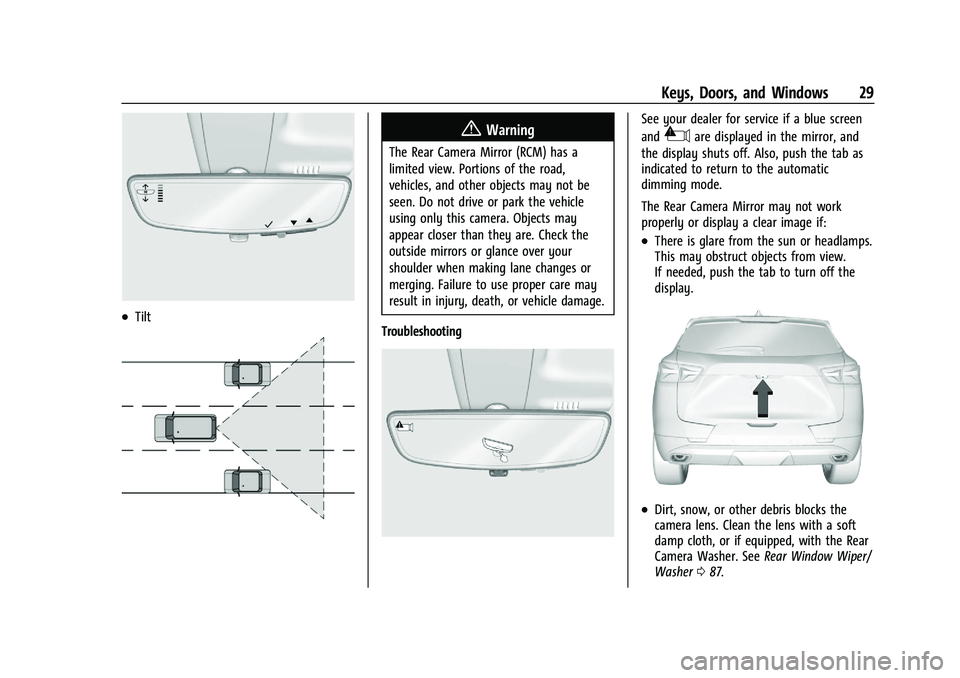
.Tilt
{Warning
The Rear Camera Mirror (RCM) has a
limited view. Portions of the road,
vehicles, and other objects may not be
seen. Do not drive or park the vehicle
using only this camera. Objects may
appear closer than they are. Check the
outside mirrors or glance over your
shoulder when making lane changes or
merging. Failure to use proper care may
result in injury, death, or vehicle damage.
Troubleshooting
See your dealer for service if a blue screen
and
3are displayed in the mirror, and
the display shuts off. Also, push the tab as
indicated to return to the automatic
dimming mode.
The Rear Camera Mirror may not work
properly or display a clear image if:
.There is glare from the sun or headlamps.
This may obstruct objects from view.
If needed, push the tab to turn off the
display.
.Dirt, snow, or other debris blocks the
camera lens. Clean the lens with a soft
damp cloth, or if equipped, with the Rear
Camera Washer. See Rear Window Wiper/
Washer 087.
Page 85 of 360
Chevrolet Blazer Owner Manual (GMNA-Localizing-U.S./Canada/Mexico-
16401961) - 2023 - CRC - 5/17/22
84 Instruments and Controls
Instruments and Controls
Controls
Steering Wheel Adjustment . . . . . . . . . . . . 85
Heated Steering Wheel . . . . . . . . . . . . . . . . . 85
Horn . . . . . . . . . . . . . . . . . . . . . . . . . . . . . . . . . . . 86
Windshield Wiper/Washer . . . . . . . . . . . . . 86
Rear Window Wiper/Washer . . . . . . . . . . . 87
Compass . . . . . . . . . . . . . . . . . . . . . . . . . . . . . . . . 87
Clock . . . . . . . . . . . . . . . . . . . . . . . . . . . . . . . . . . . 88
Power Outlets . . . . . . . . . . . . . . . . . . . . . . . . . . 88
Wireless Charging . . . . . . . . . . . . . . . . . . . . . . 89
Warning Lights, Gauges, and Indicators
Warning Lights, Gauges, andIndicators . . . . . . . . . . . . . . . . . . . . . . . . . . . . . 91
Instrument Cluster (Base Level) . . . . . . . . . 92
Instrument Cluster (Uplevel) . . . . . . . . . . . . 94
Speedometer . . . . . . . . . . . . . . . . . . . . . . . . . . . 95
Odometer . . . . . . . . . . . . . . . . . . . . . . . . . . . . . . 95
Trip Odometer . . . . . . . . . . . . . . . . . . . . . . . . . 96
Tachometer . . . . . . . . . . . . . . . . . . . . . . . . . . . . 96
Fuel Gauge . . . . . . . . . . . . . . . . . . . . . . . . . . . . . 96
Engine Oil Temperature Gauge (Uplevel only) . . . . . . . . . . . . . . . . . . . . . . . . 97
Engine Coolant Temperature Gauge . . . . 97
Voltmeter Gauge (Uplevel only) . . . . . . . . 98
Seat Belt Reminders . . . . . . . . . . . . . . . . . . . . 99
Airbag Readiness Light . . . . . . . . . . . . . . . . . 99
Passenger Airbag Status Indicator . . . . . 100 Charging System Light . . . . . . . . . . . . . . . . . 101
Malfunction Indicator Lamp (Check
Engine Light) . . . . . . . . . . . . . . . . . . . . . . . . . 101
Brake System Warning Light . . . . . . . . . . 102
Electric Parking Brake Light . . . . . . . . . . . . 103
Service Electric Parking Brake Light . . . . 103
Antilock Brake System (ABS) Warning Light . . . . . . . . . . . . . . . . . . . . . . . . . . . . . . . . . 104
Lane Keep Assist (LKA) Light . . . . . . . . . . . 104
Vehicle Ahead Indicator . . . . . . . . . . . . . . . 104
Pedestrian Ahead Indicator . . . . . . . . . . . . 105
Traction Off Light . . . . . . . . . . . . . . . . . . . . . . 105
StabiliTrak OFF Light . . . . . . . . . . . . . . . . . . . 105
Traction Control System (TCS)/ StabiliTrak Light . . . . . . . . . . . . . . . . . . . . . 105
Engine Coolant Temperature Warning Light . . . . . . . . . . . . . . . . . . . . . . . . . . . . . . . . 106
Driver Mode Control Light . . . . . . . . . . . . . 106
Tire Pressure Light . . . . . . . . . . . . . . . . . . . . 106
Engine Oil Pressure Light . . . . . . . . . . . . . . 107
Low Fuel Warning Light . . . . . . . . . . . . . . . 107
Security Light . . . . . . . . . . . . . . . . . . . . . . . . . 108
High-Beam On Light . . . . . . . . . . . . . . . . . . . 108
Lamps On Reminder . . . . . . . . . . . . . . . . . . . 108
Cruise Control Light . . . . . . . . . . . . . . . . . . . 108
Door Ajar Light . . . . . . . . . . . . . . . . . . . . . . . . 109
Information Displays
Driver Information Center (DIC) (Base Level) . . . . . . . . . . . . . . . . . . . . . . . . . . . . . . . . 109 Driver Information Center (DIC)
(Uplevel) . . . . . . . . . . . . . . . . . . . . . . . . . . . . . 112
Vehicle Messages
Vehicle Messages . . . . . . . . . . . . . . . . . . . . . . 114
Engine Power Messages . . . . . . . . . . . . . . . 114
Vehicle Speed Messages . . . . . . . . . . . . . . . 115
Universal Remote System
Universal Remote System . . . . . . . . . . . . . . 115
Universal Remote SystemProgramming . . . . . . . . . . . . . . . . . . . . . . . . . 115
Universal Remote System Operation . . . 117
Page 87 of 360
Chevrolet Blazer Owner Manual (GMNA-Localizing-U.S./Canada/Mexico-
16401961) - 2023 - CRC - 5/17/22
86 Instruments and Controls
To turn this feature on or off, select Settings
> Vehicle > Comfort and Convenience >
Heated Steering Wheel > Select ON or OFF.
Horn
Pressaon the steering wheel pad to
sound the horn.
Windshield Wiper/Washer
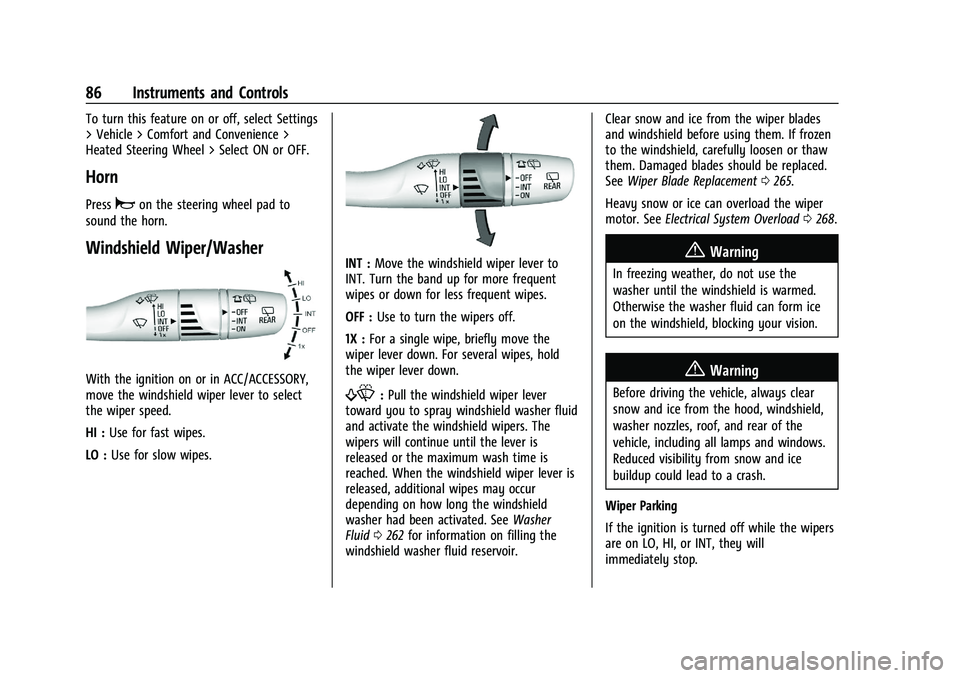
With the ignition on or in ACC/ACCESSORY,
move the windshield wiper lever to select
the wiper speed.
HI : Use for fast wipes.
LO : Use for slow wipes.
INT : Move the windshield wiper lever to
INT. Turn the band up for more frequent
wipes or down for less frequent wipes.
OFF : Use to turn the wipers off.
1X : For a single wipe, briefly move the
wiper lever down. For several wipes, hold
the wiper lever down.
f: Pull the windshield wiper lever
toward you to spray windshield washer fluid
and activate the windshield wipers. The
wipers will continue until the lever is
released or the maximum wash time is
reached. When the windshield wiper lever is
released, additional wipes may occur
depending on how long the windshield
washer had been activated. See Washer
Fluid 0262 for information on filling the
windshield washer fluid reservoir. Clear snow and ice from the wiper blades
and windshield before using them. If frozen
to the windshield, carefully loosen or thaw
them. Damaged blades should be replaced.
See
Wiper Blade Replacement 0265.
Heavy snow or ice can overload the wiper
motor. See Electrical System Overload 0268.
{Warning
In freezing weather, do not use the
washer until the windshield is warmed.
Otherwise the washer fluid can form ice
on the windshield, blocking your vision.
{Warning
Before driving the vehicle, always clear
snow and ice from the hood, windshield,
washer nozzles, roof, and rear of the
vehicle, including all lamps and windows.
Reduced visibility from snow and ice
buildup could lead to a crash.
Wiper Parking
If the ignition is turned off while the wipers
are on LO, HI, or INT, they will
immediately stop.
Page 88 of 360
Chevrolet Blazer Owner Manual (GMNA-Localizing-U.S./Canada/Mexico-
16401961) - 2023 - CRC - 5/17/22
Instruments and Controls 87
If the windshield wiper lever is then moved
to OFF before the driver door is opened or
within 10 minutes, the wipers will restart
and move to the base of the windshield.
If the ignition is turned off while the wipers
are performing wipes due to windshield
washing, the wipers continue to run until
they reach the base of the windshield.
Rear Window Wiper/Washer
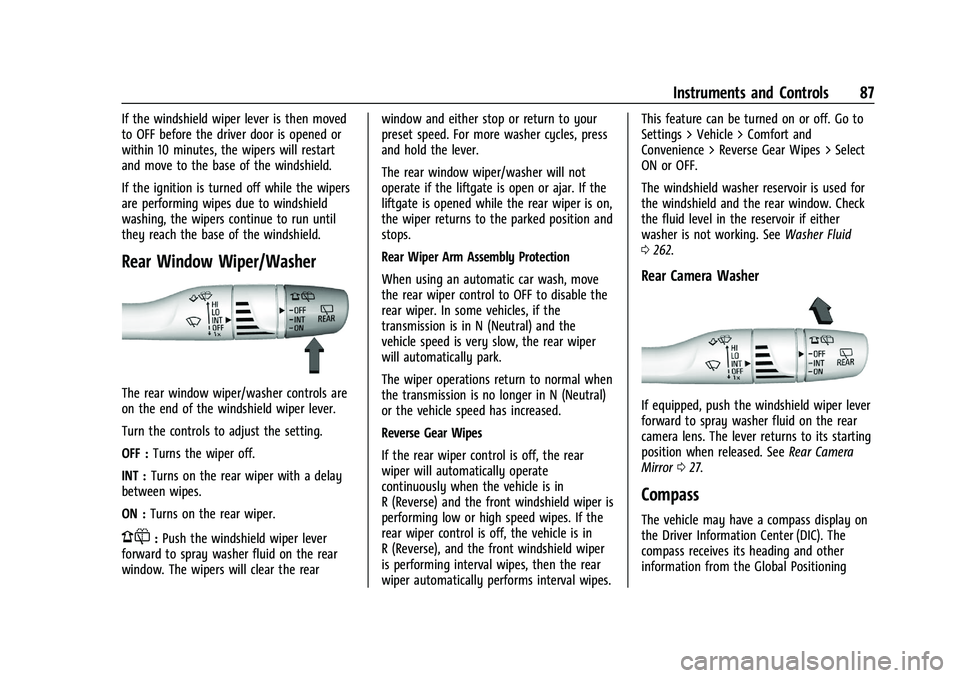
The rear window wiper/washer controls are
on the end of the windshield wiper lever.
Turn the controls to adjust the setting.
OFF :Turns the wiper off.
INT : Turns on the rear wiper with a delay
between wipes.
ON : Turns on the rear wiper.
1:Push the windshield wiper lever
forward to spray washer fluid on the rear
window. The wipers will clear the rear window and either stop or return to your
preset speed. For more washer cycles, press
and hold the lever.
The rear window wiper/washer will not
operate if the liftgate is open or ajar. If the
liftgate is opened while the rear wiper is on,
the wiper returns to the parked position and
stops.
Rear Wiper Arm Assembly Protection
When using an automatic car wash, move
the rear wiper control to OFF to disable the
rear wiper. In some vehicles, if the
transmission is in N (Neutral) and the
vehicle speed is very slow, the rear wiper
will automatically park.
The wiper operations return to normal when
the transmission is no longer in N (Neutral)
or the vehicle speed has increased.
Reverse Gear Wipes
If the rear wiper control is off, the rear
wiper will automatically operate
continuously when the vehicle is in
R (Reverse) and the front windshield wiper is
performing low or high speed wipes. If the
rear wiper control is off, the vehicle is in
R (Reverse), and the front windshield wiper
is performing interval wipes, then the rear
wiper automatically performs interval wipes.This feature can be turned on or off. Go to
Settings > Vehicle > Comfort and
Convenience > Reverse Gear Wipes > Select
ON or OFF.
The windshield washer reservoir is used for
the windshield and the rear window. Check
the fluid level in the reservoir if either
washer is not working. See
Washer Fluid
0 262.
Rear Camera Washer
If equipped, push the windshield wiper lever
forward to spray washer fluid on the rear
camera lens. The lever returns to its starting
position when released. See Rear Camera
Mirror 027.
Compass
The vehicle may have a compass display on
the Driver Information Center (DIC). The
compass receives its heading and other
information from the Global Positioning
Page 115 of 360
Chevrolet Blazer Owner Manual (GMNA-Localizing-U.S./Canada/Mexico-
16401961) - 2023 - CRC - 5/17/22
114 Instruments and Controls
Top Consumers :Shows a list of the features
that are currently impacting the fuel
economy, in order from highest to lowest.
If a feature is turned off, it will be removed
from the list.
Economy Trend : Shows history of the
Average Fuel Economy from the last 50 km
(30 mi). Each bar represents about 5 km
(3 mi) of driving. During driving the bars will
shift to always reflect the most recent
distance on the right side. Press and hold
the thumbwheel to clear the graph or press
Tto reset through the menu.
Speed Signs : Shows sign information, which
comes from a roadway database in the
onboard navigation.
Off Road : Displays vehicle pitch and roll
information, road wheel angle, and
four-wheel drive (4WD) status.
Following Distance : The following distance
to a moving vehicle ahead in your path is
indicated in following time in seconds. See
Forward Collision Alert (FCA) System 0223.
Transmission Fluid Temperature Gauge :
Shows the temperature of the automatic
transmission fluid in either degrees Celsius (°
C) or degrees Fahrenheit (°F).
Blank Page : Shows no information.
Vehicle Messages
Messages displayed on the Driver
Information Center (DIC) indicate the status
of the vehicle or some action that may be
needed to correct a condition. Multiple
messages may appear one after another.
The messages that do not require
immediate action can be acknowledged and
cleared by pressing the thumbwheel. The
messages that require immediate action
cannot be cleared until that action is
performed.
All messages should be taken seriously;
clearing the message does not correct the
problem.
If a SERVICE message appears, see your
dealer.
Follow the instructions given in the
messages. The system displays messages
regarding the following topics:
.Service Messages
.Fluid Levels
.Vehicle Security
.Brakes
.Steering
.Ride Control Systems
.Driver Assistance Systems
.Cruise Control
.Lighting and Bulb Replacement
.Wiper/Washer Systems
.Doors and Windows
.Seat Belts
.Airbag Systems
.Engine and Transmission
.Tire Pressure
.Battery
Engine Power Messages
ENGINE POWER IS REDUCED
This message displays when the vehicle's
propulsion power is reduced. A reduction in
propulsion power can affect the vehicle's
ability to accelerate. If this message is on,
but there is no observed reduction in
performance, proceed to your destination.
Under certain conditions the performance
may be reduced the next time the vehicle is
driven. The vehicle may be driven while this
message is on, but maximum acceleration
and speed may be reduced. Anytime this
message stays on, or displays repeatedly,
the vehicle should be taken to your dealer
for service as soon as possible.
Page 121 of 360

Chevrolet Blazer Owner Manual (GMNA-Localizing-U.S./Canada/Mexico-
16401961) - 2023 - CRC - 5/17/22
120 Lighting
Flash-to-Pass
To flash the high beams, pull the turn signal
lever toward you, and release.
Daytime Running Lamps (DRL)
DRL can make it easier for others to see the
front of your vehicle during the day. Fully
functional DRL are required on all vehicles
first sold in Canada.
The dedicated DRL will come on when all of
the following conditions are met:
.The ignition is on.
.The exterior lamp control is in AUTO.
.The light sensor determines it is daytime.
The taillamps, sidemarker lamps, instrument
panel lights, and other lamps will not be on.
When it begins to get dark, the automatic
headlamp system switches from DRL to the
headlamps.
To turn off the DRL, turn the exterior lamp
control to
Oand then release. For vehicles
sold in Canada, this control only works
when the vehicle is parked.
Automatic Headlamp System
When the exterior lamp control is set to
AUTO and it is dark enough outside, the
headlamps come on automatically.
There is a light sensor on top of the
instrument panel. Do not cover the sensor.
The system may also turn on the headlamps
when driving through a parking garage or
tunnel.
If the vehicle is started in a dark garage, the
automatic headlamp system comes on
immediately. If it is light outside when the
vehicle leaves the garage, there is a slight
delay before the automatic headlamp
system changes to the Daytime Running Lamps (DRL). During that delay, the
instrument cluster may not be as bright as
usual. Make sure the instrument panel
brightness control is in the full bright
position. See
Instrument Panel Illumination
Control 0121.
When it is bright enough outside, the
headlamps will turn off or may change
to DRL.
The automatic headlamp system turns off
when the exterior lamp control is turned to
Oor the ignition is off.
Lights On with Wipers
If the windshield wipers are activated in
daylight with the engine on, and the
exterior lamp control is in AUTO, the
headlamps, parking lamps, and other
exterior lamps come on. The transition time
for the lamps coming on varies based on
wiper speed. When the wipers are not
operating, these lamps turn off. Move the
exterior lamp control to
Oor;to disable
this feature.
Page 247 of 360
Chevrolet Blazer Owner Manual (GMNA-Localizing-U.S./Canada/Mexico-
16401961) - 2023 - CRC - 5/17/22
246 Vehicle Care
Vehicle Care
General Information
General Information . . . . . . . . . . . . . . . . . . . 247
California Perchlorate MaterialsRequirements . . . . . . . . . . . . . . . . . . . . . . . . 247
Accessories and Modifications . . . . . . . . . 247
Vehicle Checks
Doing Your Own Service Work . . . . . . . . 247
Hood . . . . . . . . . . . . . . . . . . . . . . . . . . . . . . . . . . 248
Engine Compartment Overview . . . . . . . . 250
Engine Oil . . . . . . . . . . . . . . . . . . . . . . . . . . . . . 253
Engine Oil Life System . . . . . . . . . . . . . . . . . 255
Automatic Transmission Fluid . . . . . . . . . . 255
Engine Air Filter Life System . . . . . . . . . . 256
Engine Air Cleaner/Filter . . . . . . . . . . . . . . 256
Cooling System . . . . . . . . . . . . . . . . . . . . . . . . 258
Engine Overheating . . . . . . . . . . . . . . . . . . . . 261
Washer Fluid . . . . . . . . . . . . . . . . . . . . . . . . . . 262
Brakes . . . . . . . . . . . . . . . . . . . . . . . . . . . . . . . . . 263
Brake Fluid . . . . . . . . . . . . . . . . . . . . . . . . . . . . 263
Battery - North America . . . . . . . . . . . . . . . 264
All-Wheel Drive . . . . . . . . . . . . . . . . . . . . . . . . 265
Park Brake and P (Park) Mechanism Check . . . . . . . . . . . . . . . . . . . . . . . . . . . . . . . . 265
Wiper Blade Replacement . . . . . . . . . . . . . 265
Windshield Replacement . . . . . . . . . . . . . . 266
Gas Strut(s) . . . . . . . . . . . . . . . . . . . . . . . . . . . 267
Headlamp Aiming
Front Headlamp Aiming . . . . . . . . . . . . . . . 267
Bulb Replacement
LED Lighting . . . . . . . . . . . . . . . . . . . . . . . . . . . 268
Electrical System
High Voltage Devices and Wiring . . . . . 268
Electrical System Overload . . . . . . . . . . . . 268
Fuses and Circuit Breakers . . . . . . . . . . . . 269
Engine Compartment Fuse Block . . . . . . 270
Instrument Panel Fuse Block . . . . . . . . . . . 273
Rear Compartment Fuse Block . . . . . . . . . 275
Wheels and Tires
Tires . . . . . . . . . . . . . . . . . . . . . . . . . . . . . . . . . . . 277
All-Season Tires . . . . . . . . . . . . . . . . . . . . . . . . 277
Winter Tires . . . . . . . . . . . . . . . . . . . . . . . . . . . 278
Summer Tires . . . . . . . . . . . . . . . . . . . . . . . . . 278
Tire Sidewall Labeling . . . . . . . . . . . . . . . . . 278
Tire Designations . . . . . . . . . . . . . . . . . . . . . . 280
Tire Terminology and Definitions . . . . . . 281
Tire Pressure . . . . . . . . . . . . . . . . . . . . . . . . . . 283
Tire Pressure for High-Speed Operation . . . . . . . . . . . . . . . . . . . . . . . . . . . 284
Tire Pressure Monitor System . . . . . . . . . 285
Tire Pressure Monitor Operation . . . . . . 286
Tire Inspection . . . . . . . . . . . . . . . . . . . . . . . . 289
Tire Rotation . . . . . . . . . . . . . . . . . . . . . . . . . . 289
When It Is Time for New Tires . . . . . . . . 290
Buying New Tires . . . . . . . . . . . . . . . . . . . . . . 291 Different Size Tires and Wheels . . . . . . . 292
Uniform Tire Quality Grading . . . . . . . . . 292
Wheel Alignment and Tire Balance . . . . 293
Wheel Replacement . . . . . . . . . . . . . . . . . . . 294
Tire Chains . . . . . . . . . . . . . . . . . . . . . . . . . . . . 294
If a Tire Goes Flat . . . . . . . . . . . . . . . . . . . . . 295
Tire Changing . . . . . . . . . . . . . . . . . . . . . . . . . 296
Compact Spare Tire . . . . . . . . . . . . . . . . . . . . 301
Jump Starting
Jump Starting - North America . . . . . . . . 301
Towing the Vehicle
Transporting a Disabled Vehicle . . . . . . . 303
Recreational Vehicle Towing . . . . . . . . . . . 305
Appearance Care
Exterior Care . . . . . . . . . . . . . . . . . . . . . . . . . . 307
Interior Care . . . . . . . . . . . . . . . . . . . . . . . . . . . 311
Floor Mats . . . . . . . . . . . . . . . . . . . . . . . . . . . . . 314
Page 263 of 360
Chevrolet Blazer Owner Manual (GMNA-Localizing-U.S./Canada/Mexico-
16401961) - 2023 - CRC - 5/17/22
262 Vehicle Care
Warning (Continued)
speed and you could be burned. Never
turn the cap when the cooling system,
including the pressure cap, is hot. Wait
for the cooling system and pressure cap
to cool.
If No Steam Is Coming from the Engine
Compartment
If an engine overheat warning is displayed
but no steam can be seen or heard, the
problem may not be too serious. Sometimes
the engine can get a little too hot when the
vehicle:
.Climbs a long hill on a hot day.
.Stops after high-speed driving.
.Idles for long periods in traffic.
If the overheat warning is displayed with no
sign of steam: 1. Turn the air conditioning off.
2. Turn the heater on to the highest temperature and to the highest fan
speed. Open the windows as necessary.
3. When it is safe to do so, pull off the road, shift to P (Park) or N (Neutral), and
let the engine idle. If the engine coolant temperature gauge is
no longer in the overheated area, the
vehicle can be driven. Continue to drive the
vehicle slowly for about 10 minutes. Keep a
safe distance from the vehicle in front. If the
warning does not come back on, continue to
drive normally and have the cooling system
checked for proper fill and function.
If the warning continues, pull over, stop, and
park the vehicle right away.
If there is no sign of steam, idle the engine
for three minutes while parked. If the
warning is still displayed, turn off the
engine until it cools down.
Washer Fluid
What to Use
When windshield washer fluid is needed, be
sure to read the manufacturer's instructions
before use. If operating the vehicle in an
area where the temperature may fall below
freezing, use a fluid that has sufficient
protection against freezing.
Adding Washer Fluid
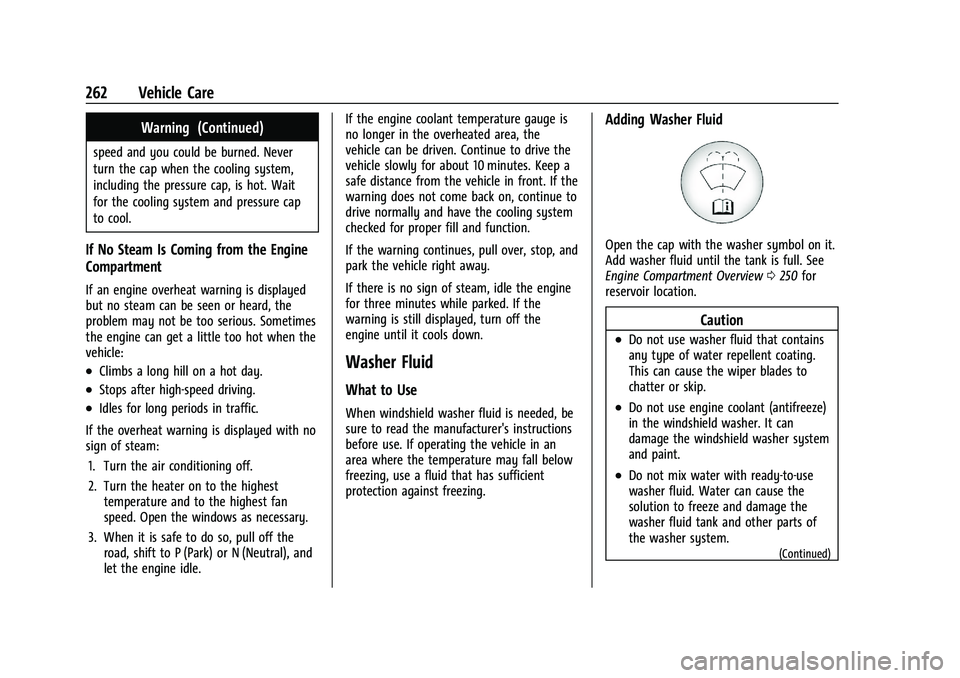
Open the cap with the washer symbol on it.
Add washer fluid until the tank is full. See
Engine Compartment Overview
0250 for
reservoir location.
Caution
.Do not use washer fluid that contains
any type of water repellent coating.
This can cause the wiper blades to
chatter or skip.
.Do not use engine coolant (antifreeze)
in the windshield washer. It can
damage the windshield washer system
and paint.
.Do not mix water with ready-to-use
washer fluid. Water can cause the
solution to freeze and damage the
washer fluid tank and other parts of
the washer system.
(Continued)
Page 266 of 360
Chevrolet Blazer Owner Manual (GMNA-Localizing-U.S./Canada/Mexico-
16401961) - 2023 - CRC - 5/17/22
Vehicle Care 265
Warning (Continued)
compounds, which are known to the
State of California to cause cancer and
birth defects or other reproductive harm.
Wash hands after handling. For more
information go to
www.P65Warnings.ca.gov.
See the warning on the back cover.
Vehicle Storage
{Warning
Batteries have acid that can burn you and
gas that can explode. You can be badly
hurt if you are not careful. See Jump
Starting - North America 0301 for tips on
working around a battery without
getting hurt.
Infrequent Usage: Remove the black,
negative (−) cable from the battery to keep
the battery from running down.
Extended Storage: Remove the black,
negative (−) cable from the battery or use a
battery trickle charger.
All-Wheel Drive
Transfer Case
Under normal driving conditions, transfer
case fluid does not require maintenance
unless there is a fluid leak or unusual noise.
If required, have the transfer case serviced
by your dealer.
Park Brake and P (Park)
Mechanism Check
{Warning
When you are doing this check, the
vehicle could begin to move. You or
others could be injured and property
could be damaged. Make sure there is
room in front of the vehicle in case it
begins to roll. Be ready to apply the
regular brake at once should the vehicle
begin to move.
Park on a fairly steep hill, with the vehicle
facing downhill. Keeping your foot on the
regular brake, set the parking brake.
.To check the parking brake's holding
ability: With the engine running and the
transmission in N (Neutral), slowly remove foot pressure from the regular brake
pedal. Do this until the vehicle is held by
the parking brake only.
.To check the P (Park) mechanism's holding
ability: With the engine running, shift to
P (Park). Then release the parking brake
followed by the regular brake.
Contact your dealer if service is required.
Wiper Blade Replacement
Windshield wiper blades should be replaced
periodically. See Maintenance Schedule
0 317.
Replacement blades come in different types
and are removed in different ways. For
proper type and length, see Maintenance
Replacement Parts 0322.
Caution
Allowing the wiper arm to touch the
windshield when no wiper blade is
installed could damage the windshield.
Any damage that occurs would not be
covered by the vehicle warranty. Do not
allow the wiper arm to touch the
windshield.