lock CHEVROLET BOLT EV 2017 Owner's Manual
[x] Cancel search | Manufacturer: CHEVROLET, Model Year: 2017, Model line: BOLT EV, Model: CHEVROLET BOLT EV 2017Pages: 16, PDF Size: 2.5 MB
Page 2 of 16
2
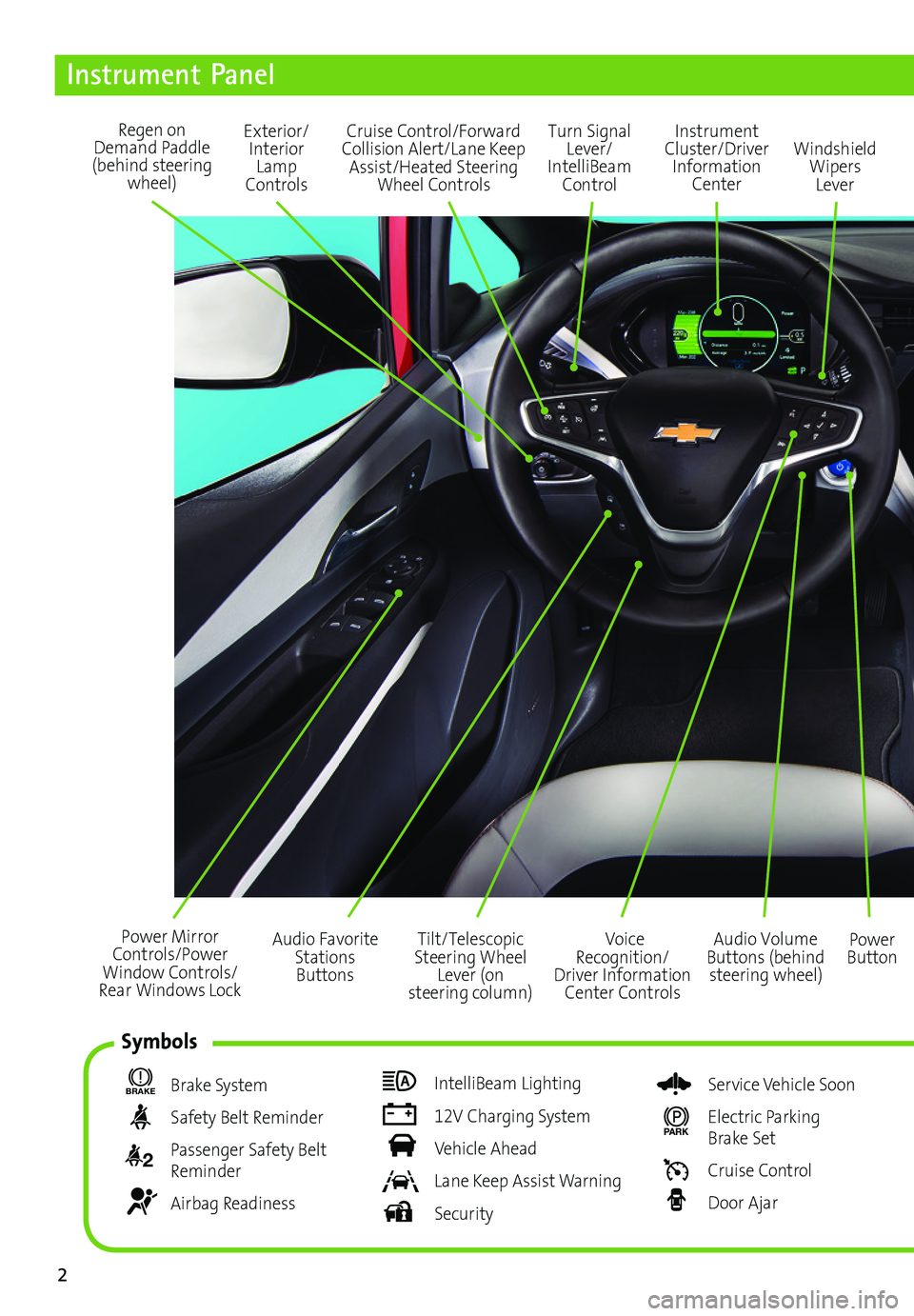
Power Mirror Controls/Power Window Controls/Rear Windows Lock
Exterior/Interior Lamp Controls
Turn Signal Lever/ IntelliBeam Control
Regen on Demand Paddle (behind steering wheel)
Audio Volume Buttons (behind steering wheel)
Voice Recognition/Driver Information Center Controls
Power Button
Cruise Control/Forward Collision Alert/Lane Keep Assist/Heated Steering Wheel Controls
Instrument Panel
BRAKE Brake System
Safety Belt Reminder
2 Passenger Safety Belt Reminder
Airbag Readiness
IntelliBeam Lighting
12V Charging System
Vehicle Ahead
Lane Keep Assist Warning
Security
Service Vehicle Soon
PARK Electric Parking Brake Set
Cruise Control
Door Ajar
Instrument Cluster/Driver Information Center
Windshield Wipers Lever
Tilt/Telescopic Steering Wheel Lever (on steering column)
Audio Favorite Stations Buttons
Symbols
Page 3 of 16
3
Refer to your Owner Manual to learn about the information being relayed by the lights, gauges and indicators of the instrument cluster.
See In Brief in your Owner Manual.
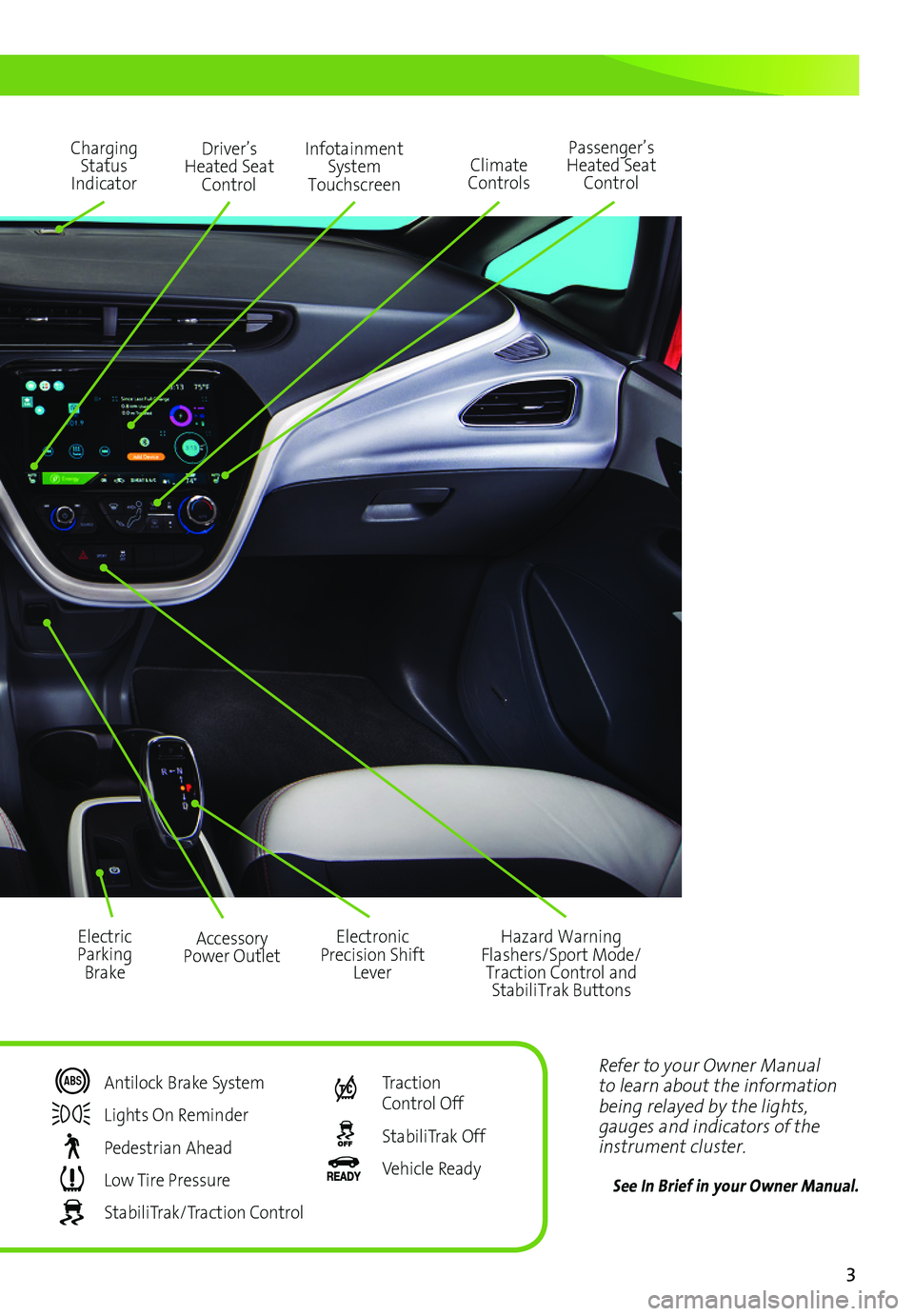
Driver’s Heated Seat Control
Infotainment System Touchscreen
Passenger’s Heated Seat ControlClimate Controls
Hazard Warning Flashers/Sport Mode/Traction Control and StabiliTrak Buttons
Accessory Power Outlet
Charging Status Indicator
Electric Parking Brake
Electronic Precision Shift Lever
Antilock Brake System
Lights On Reminder
Pedestrian Ahead
Low Tire Pressure
StabiliTrak/Traction Control
Traction Control Off
StabiliTrak Off
Vehicle Ready
Page 4 of 16
4
Getting Started
Remote Keyless Entry (RKE)
The RKE transmitter (key fob) performs several remote functions and must be in the vehicle to start the Bolt EV.
Keyless Access
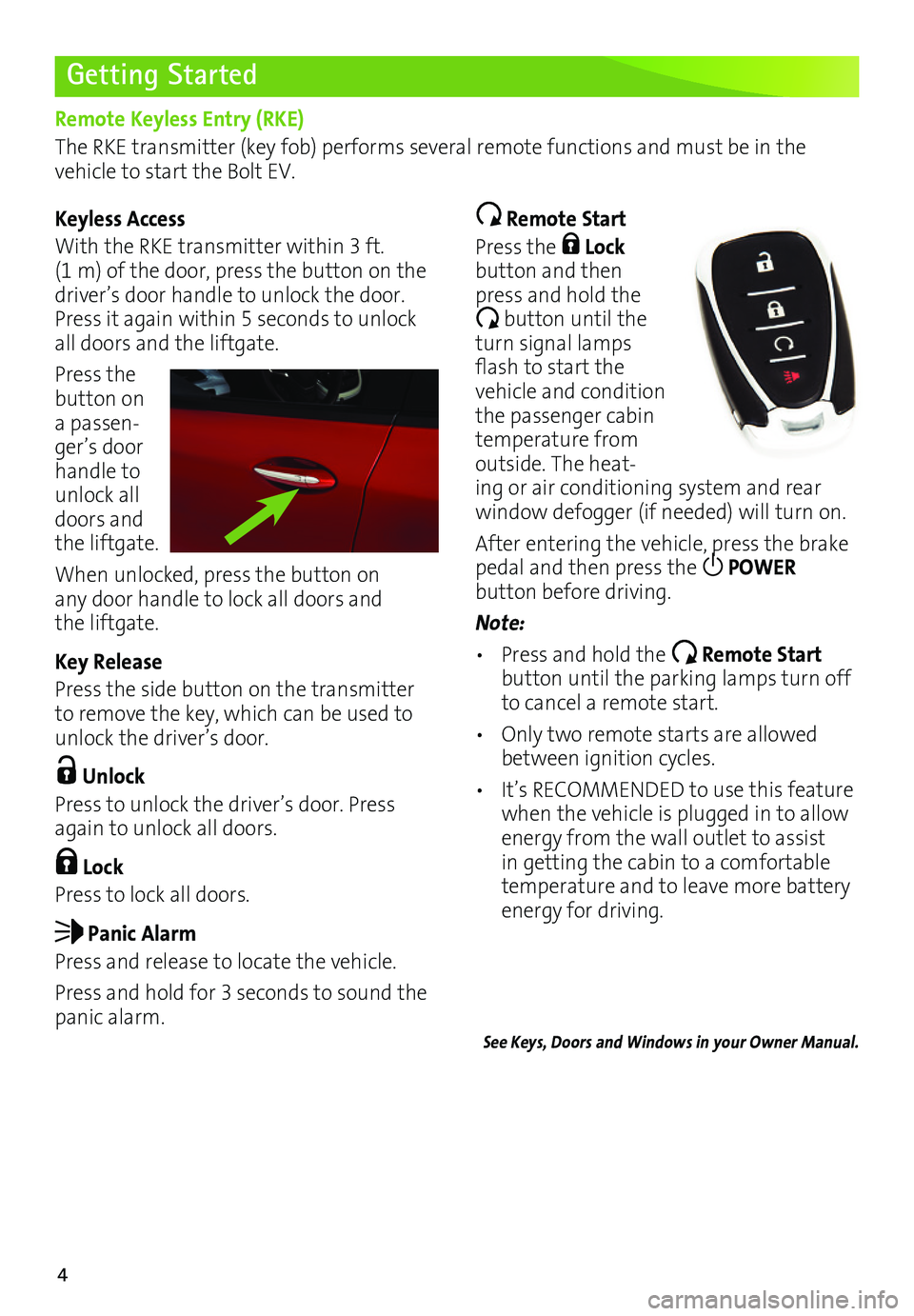
With the RKE transmitter within 3 ft. (1 m) of the door, press the button on the driver’s door handle to unlock the door. Press it again within 5 seconds to unlock all doors and the liftgate.
Press the button on a passen-ger’s door handle to unlock all doors and the liftgate.
When unlocked, press the button on any door handle to lock all doors and the liftgate.
Key Release
Press the side button on the transmitter to remove the key, which can be used to unlock the driver’s door.
Unlock
Press to unlock the driver’s door. Press again to unlock all doors.
Lock
Press to lock all doors.
Panic Alarm
Press and release to locate the vehicle.
Press and hold for 3 seconds to sound the panic alarm.
Remote Start
Press the Lock button and then press and hold the
button until the turn signal lamps flash to start the vehicle and condition the passenger cabin temperature from outside. The heat-ing or air conditioning system and rear
window defogger (if needed) will turn on.
After entering the vehicle, press the brake pedal and then press the POWER
button before driving.
Note:
• Press and hold the Remote Start button until the parking lamps turn off to cancel a remote start.
• Only two remote starts are allowed between ignition cycles.
• It’s RECOMMENDED to use this feature when the vehicle is plugged in to allow energy from the wall outlet to assist in getting the cabin to a comfortable temperature and to leave more battery energy for driving.
See Keys, Doors and Windows in your Owner Manual.
Page 5 of 16
5
Starting the Vehicle/ON
With the vehicle in Park or Neutral, press the brake pedal and then press the POWER button. A power ON audio cue will sound.
The vehicle will not shift out of Park and a Charge Cord Connected message will display if the vehicle is still plugged in.
When ON, the instrument cluster will display an active battery.
Stopping the Vehicle/OFF
Shift to Park and then press the POWER button. A power OFF audio cue will sound.
Pedestrian Safety Signal
The vehicle is equipped with an automatic sound generator. The sound is automatically generated at speeds below 14 mph to indicate the vehicle’s presence to pedestrians.
See Driving and Operating in your Owner Manual.
Getting Started
POWER Button
The Bolt EV features an electronic push-button start. The POWER button flashes when the driver’s door is opened upon entry. Once the vehicle is ON, the button illuminates.
Note: The air conditioning compressor, pumps and fan may run at any time — even when the vehicle is OFF — to cool or warm the propulsion battery.
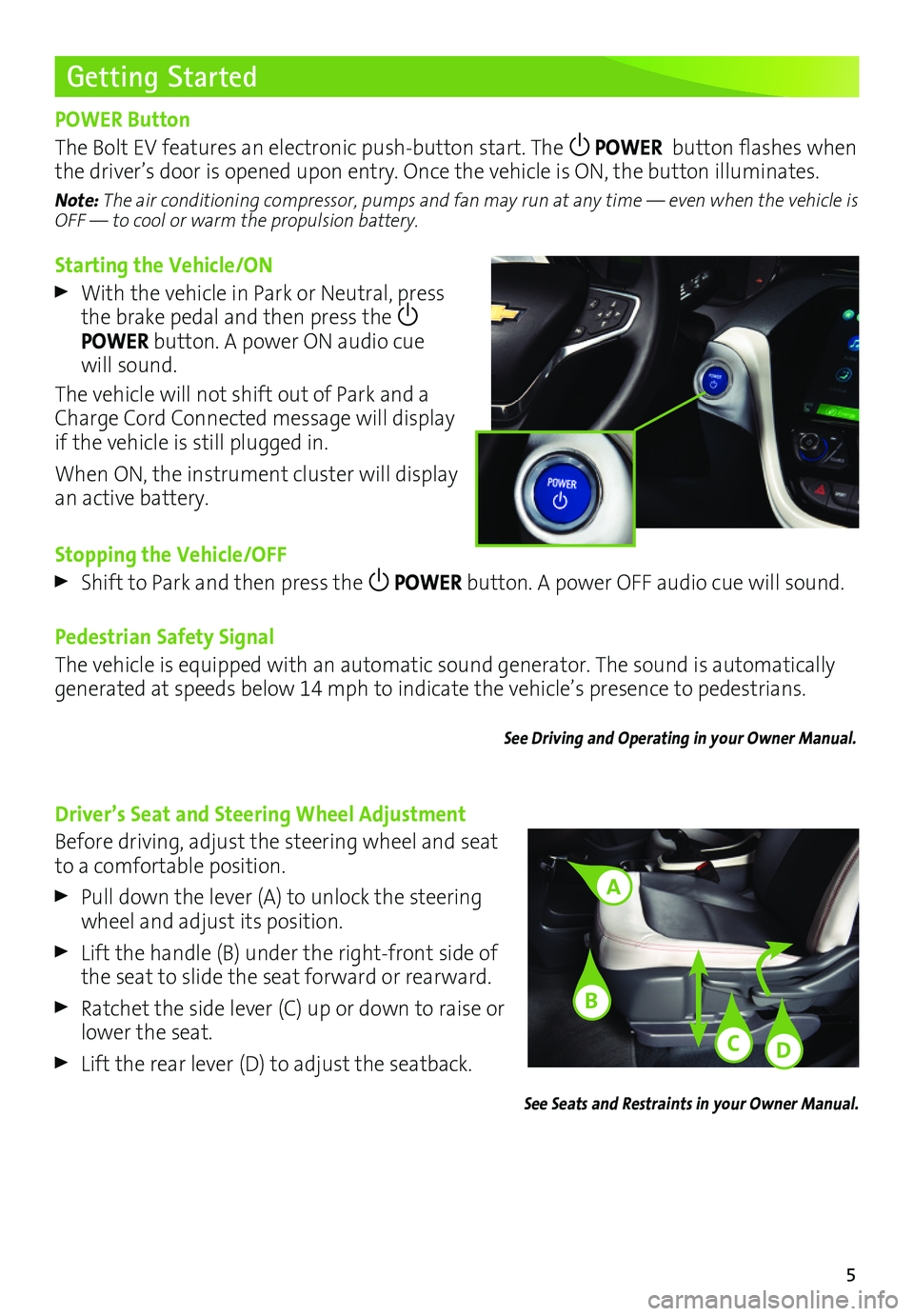
Driver’s Seat and Steering Wheel Adjustment
Before driving, adjust the steering wheel and seat to a comfortable position.
Pull down the lever (A) to unlock the steering wheel and adjust its position.
Lift the handle (B) under the right-front side of the seat to slide the seat forward or rearward.
Ratchet the side lever (C) up or down to raise or lower the seat.
Lift the rear lever (D) to adjust the seatback.
See Seats and Restraints in your Owner Manual.
A
C
B
D
Page 13 of 16
13
Charging
Start Charging
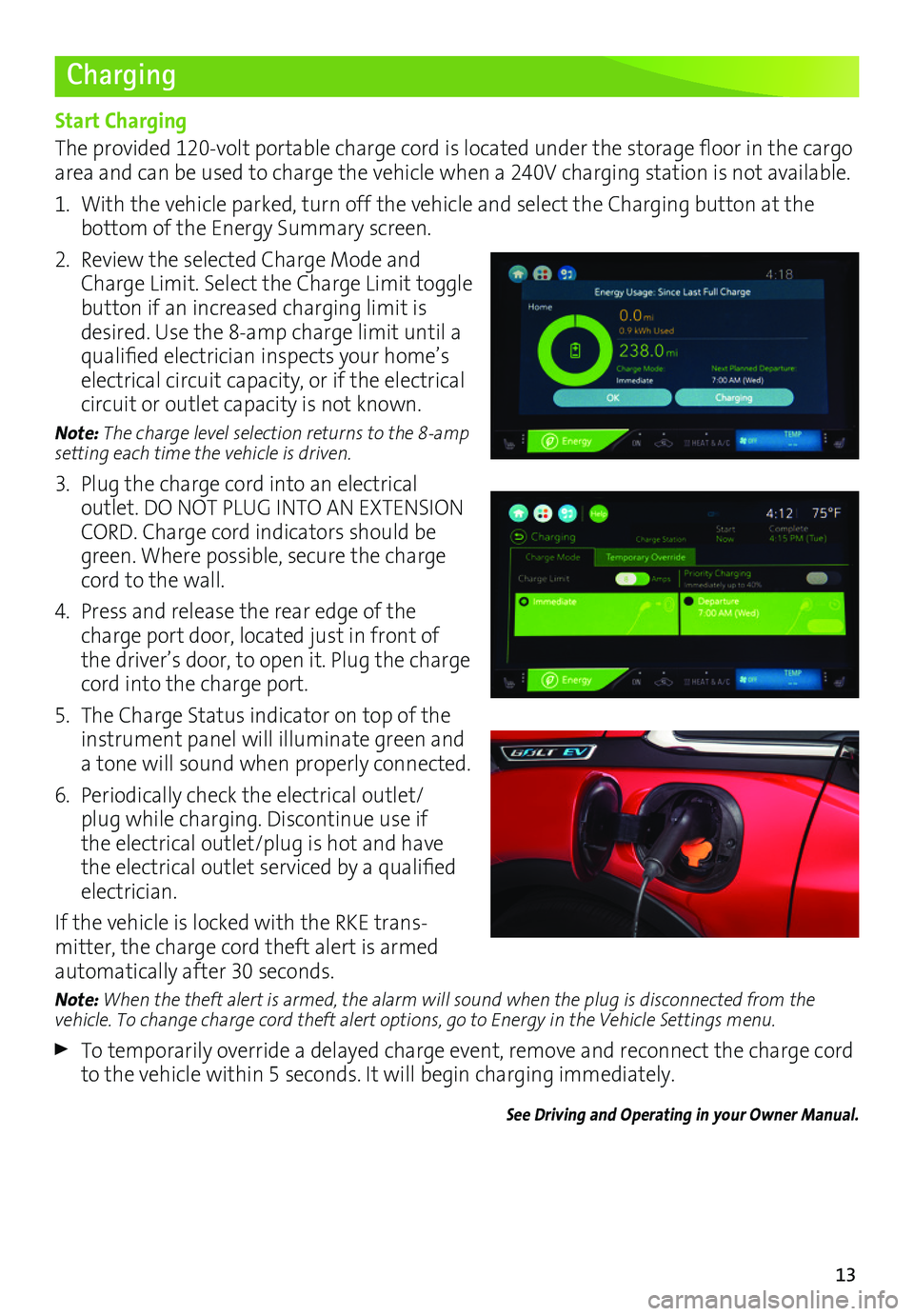
The provided 120-volt portable charge cord is located under the storage floor in the cargo area and can be used to charge the vehicle when a 240V charging station is not available.
1. With the vehicle parked, turn off the vehicle and select the Charging button at the
bottom of the Energy Summary screen.
2. Review the selected Charge Mode and Charge Limit. Select the Charge Limit toggle button if an increased charging limit is desired. Use the 8-amp charge limit until a qualified electrician inspects your home’s electrical circuit capacity, or if the electrical circuit or outlet capacity is not known.
Note: The charge level selection returns to the 8-amp setting each time the vehicle is driven.
3. Plug the charge cord into an electrical
outlet. DO NOT PLUG INTO AN EXTENSION CORD. Charge cord indicators should be green. Where possible, secure the charge cord to the wall.
4. Press and release the rear edge of the charge port door, located just in front of the driver’s door, to open it. Plug the charge cord into the charge port.
5. The Charge Status indicator on top of the instrument panel will illuminate green and a tone will sound when properly connected.
6. Periodically check the electrical outlet/plug while charging. Discontinue use if the electrical outlet/plug is hot and have the electrical outlet serviced by a qualified electrician.
If the vehicle is locked with the RKE trans-mitter, the charge cord theft alert is armed
automatically after 30 seconds.
Note: When the theft alert is armed, the alarm will sound when the plug is disconnected from the vehicle. To change charge cord theft alert options, go to Energy in the Vehicle Settings menu.
To temporarily override a delayed charge event, remove and reconnect the charge cord to the vehicle within 5 seconds. It will begin charging immediately.
See Driving and Operating in your Owner Manual.
Page 14 of 16
14
Charging
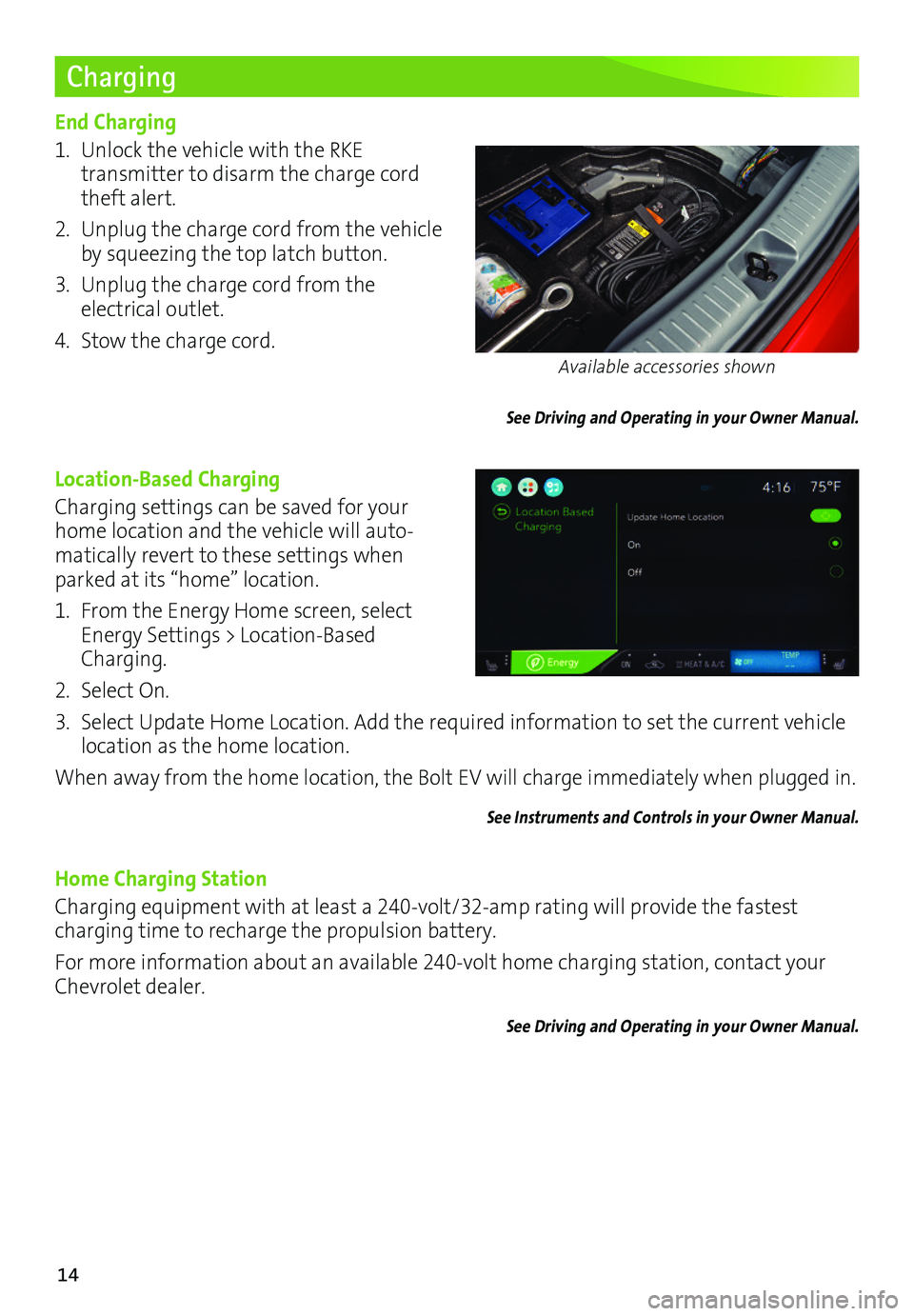
End Charging
1. Unlock the vehicle with the RKE
transmitter to disarm the charge cord theft alert.
2. Unplug the charge cord from the vehicle by squeezing the top latch button.
3. Unplug the charge cord from the electrical outlet.
4. Stow the charge cord.
See Driving and Operating in your Owner Manual.
Location-Based Charging
Charging settings can be saved for your home location and the vehicle will auto-matically revert to these settings when parked at its “home” location.
1. From the Energy Home screen, select Energy Settings > Location-Based Charging.
2. Select On.
3. Select Update Home Location. Add the required information to set the current vehicle location as the home location.
When away from the home location, the Bolt EV will charge immediately when plugged in.
See Instruments and Controls in your Owner Manual.
Home Charging Station
Charging equipment with at least a 240-volt/32-amp rating will provide the fastest charging time to recharge the propulsion battery.
For more information about an available 240-volt home charging station, contact your Chevrolet dealer.
See Driving and Operating in your Owner Manual.
Available accessories shown
Page 15 of 16
15
DC Charging (if equipped)
DC charging stations are typically found in public locations.
Charging Time
Using a DC charging station, it will take approximately 30 minutes to recharge a deplet-ed battery to 90 miles of EV range. Charge times will vary with outside temperature. Charging will continue to 100%, but at a slower rate. At 100% state of charge, the vehicle may continue to draw power to condition the battery if needed. Once battery condition-ing is complete, the vehicle will stop the charge session.
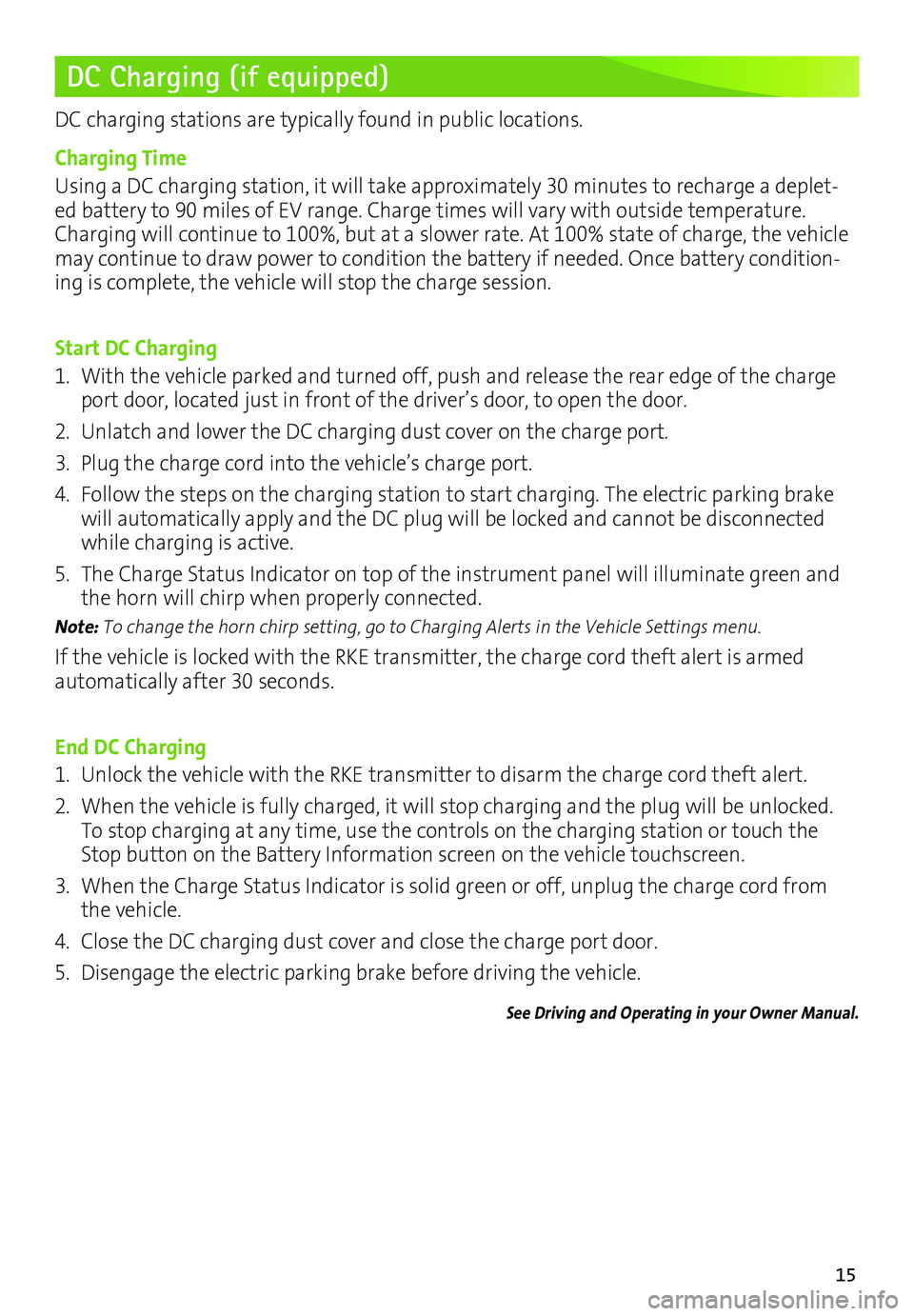
Start DC Charging
1. With the vehicle parked and turned off, push and release the rear edge of the charge port door, located just in front of the driver’s door, to open the door.
2. Unlatch and lower the DC charging dust cover on the charge port.
3. Plug the charge cord into the vehicle’s charge port.
4. Follow the steps on the charging station to start charging. The electric parking brake will automatically apply and the DC plug will be locked and cannot be disconnected while charging is active.
5. The Charge Status Indicator on top of the instrument panel will illuminate green and the horn will chirp when properly connected.
Note: To change the horn chirp setting, go to Charging Alerts in the Vehicle Settings menu.
If the vehicle is locked with the RKE transmitter, the charge cord theft alert is armed
automatically after 30 seconds.
End DC Charging
1. Unlock the vehicle with the RKE transmitter to disarm the charge cord theft alert.
2. When the vehicle is fully charged, it will stop charging and the plug will be unlocked. To stop charging at any time, use the controls on the charging station or touch the Stop button on the Battery Information screen on the vehicle touchscreen.
3. When the Charge Status Indicator is solid green or off, unplug the charge cord from the vehicle.
4. Close the DC charging dust cover and close the charge port door.
5. Disengage the electric parking brake before driving the vehicle.
See Driving and Operating in your Owner Manual.
Page 16 of 16
16
Roadside Assistance
myChevrolet Mobile App
Chevrolet Owner Center
1-888-811-1926 TTY Users: 1-888-889-2438
As the owner of a new Chevrolet, you are automatically enrolled in the Chevrolet Roadside Assistance program for 5 years/60,000 miles, whichever occurs first, at no expense to you. Chevrolet’s Roadside Assistance toll-free number is staffed by a team of trained advisors who are available 24 hours a day, 365 days a year, to contact a service provider for light
services (jump-starts, flat tire and lock-outs) or make arrangements to tow your vehicle to the nearest Bolt EV Authorized Chevrolet dealer.
Roadside Assistance and OnStar®
If you require roadside service and have a current OnStar subscription, press the OnStar
button and the vehicle will send your current GPS location to an OnStar Advisor who will speak to you, assess your problem, contact Roadside Assistance and relay your exact
location so you will get the help you need.
!84089171=A!
Certain restrictions, precautions and safety procedures apply to your ve\
hicle. Please read your Owner Manual for complete instructions. All information contained herein is based on \
the latest information available at the time of printing and is subject to change without notice. Copyright 2016 General Motors. All rights reserved.
We recommend always using ACDelco or genuine GM service parts.
The myChevrolet mobile app connects owners with a compatible mobile device to a variety of vehicle information and services, such as a searchable owner manual, OnStar Vehicle Diagnostic information and Roadside Assistance.
The myChevrolet mobile app also enables users to search for charging sta\
tions, send remote commands, check the current battery charge level and initiate charging of your Bolt EV.
Download the mobile apps from your compatible mobile device’s app store.
To learn more about OnStar services, press the blue OnStar button, visit onstar.com, call 1-888-4-ONSTAR (1-888-466-7827), or refer to your owner manual.
84089171 A
Get to know your vehicle inside and out with the Chevrolet Owner Center. Check out
personalized information, including an online owner manual and helpful how-to videos, track your service history and warranty status, review your current OnStar Vehicle Diagnostics report (active OnStar account required) and more. Create an account today at my.chevrolet.com.