seats CHEVROLET BOLT EV 2017 Owner's Manual
[x] Cancel search | Manufacturer: CHEVROLET, Model Year: 2017, Model line: BOLT EV, Model: CHEVROLET BOLT EV 2017Pages: 16, PDF Size: 2.5 MB
Page 5 of 16
5
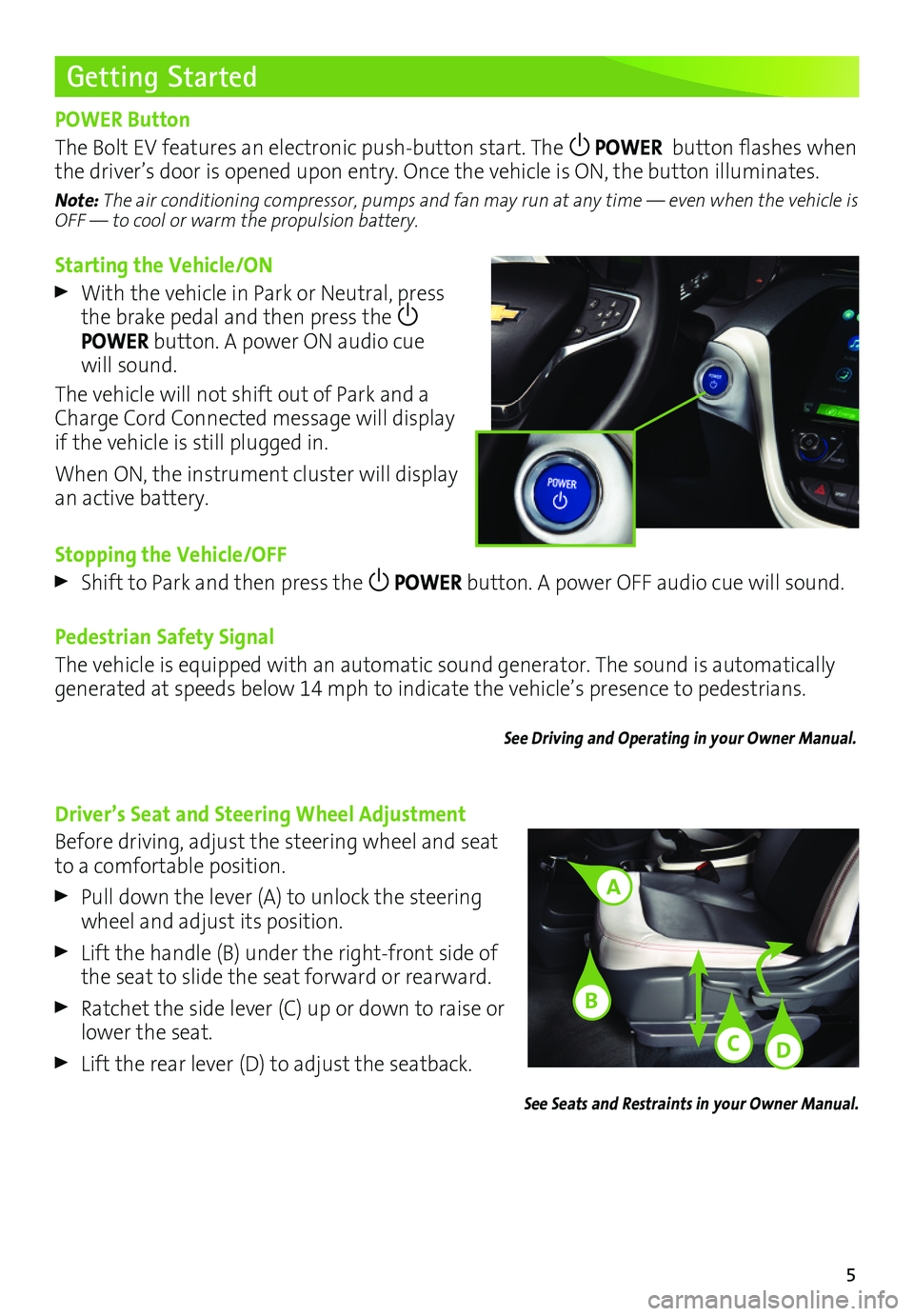
Starting the Vehicle/ON
With the vehicle in Park or Neutral, press the brake pedal and then press the POWER button. A power ON audio cue will sound.
The vehicle will not shift out of Park and a Charge Cord Connected message will display if the vehicle is still plugged in.
When ON, the instrument cluster will display an active battery.
Stopping the Vehicle/OFF
Shift to Park and then press the POWER button. A power OFF audio cue will sound.
Pedestrian Safety Signal
The vehicle is equipped with an automatic sound generator. The sound is automatically generated at speeds below 14 mph to indicate the vehicle’s presence to pedestrians.
See Driving and Operating in your Owner Manual.
Getting Started
POWER Button
The Bolt EV features an electronic push-button start. The POWER button flashes when the driver’s door is opened upon entry. Once the vehicle is ON, the button illuminates.
Note: The air conditioning compressor, pumps and fan may run at any time — even when the vehicle is OFF — to cool or warm the propulsion battery.
Driver’s Seat and Steering Wheel Adjustment
Before driving, adjust the steering wheel and seat to a comfortable position.
Pull down the lever (A) to unlock the steering wheel and adjust its position.
Lift the handle (B) under the right-front side of the seat to slide the seat forward or rearward.
Ratchet the side lever (C) up or down to raise or lower the seat.
Lift the rear lever (D) to adjust the seatback.
See Seats and Restraints in your Owner Manual.
A
C
B
D
Page 9 of 16
9
Efficiency
Climate Settings
Optimal efficiency is achieved with the climate system off (the climate ON indicator is off on the touchscreen). If using the climate system, the most efficient operation is in the following order:
Fan Only – electric cabin heating/cooling is off (Heat & A/C button indicator is off)
Heat & A/C – provides active cabin heating/cooling, but uses more energy. Touch the screen button to turn the air conditioning and heater on when the fan is on.
Use the heated seats and heated steering wheel (if equipped) to reduce the demand on the cabin heating system. Heating the seats and steering wheel uses less energy than heating the vehicle interior.
See Climate Controls in your Owner Manual.
Information Displays
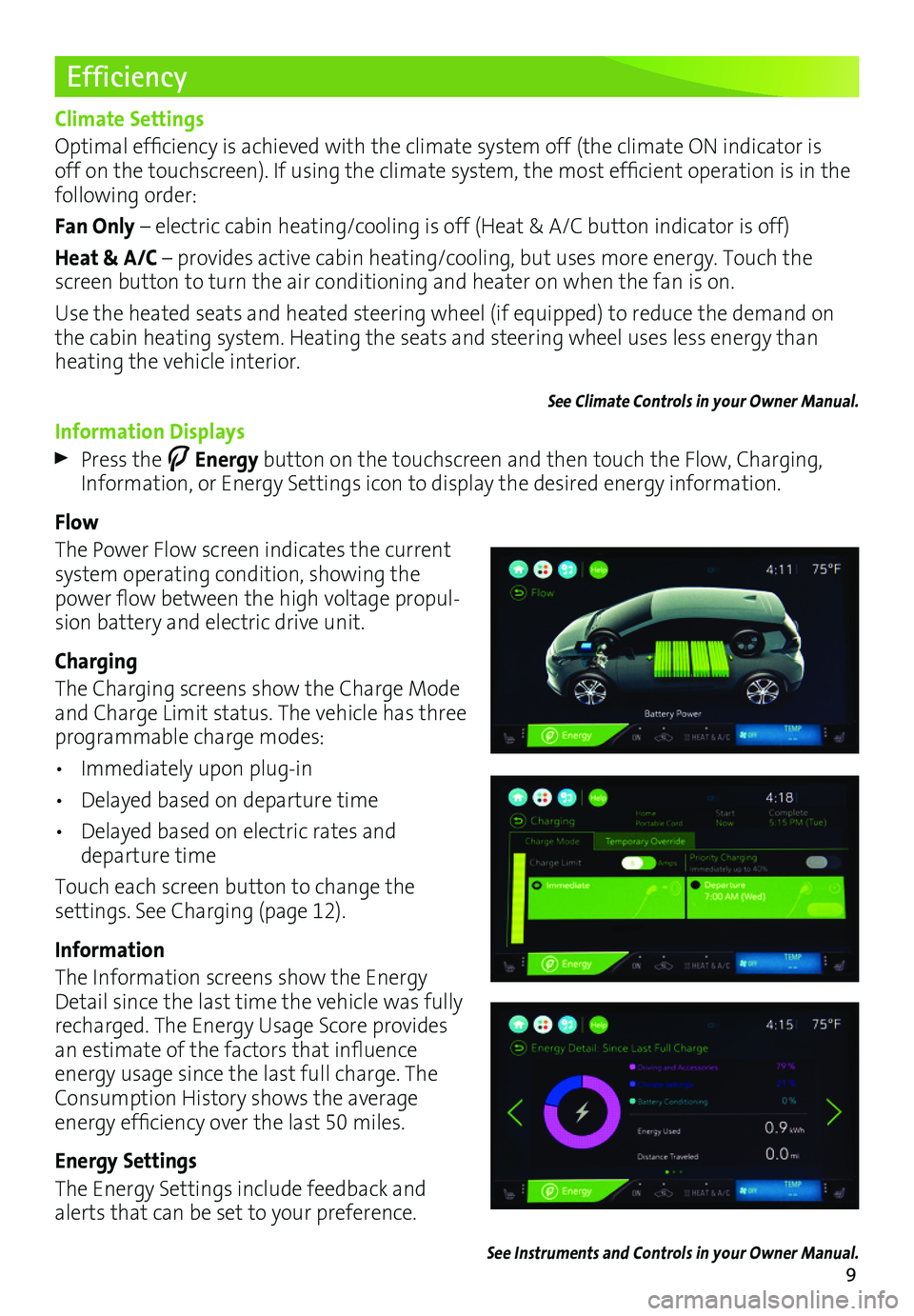
Press the Energy button on the touchscreen and then touch the Flow, Charging, Information, or Energy Settings icon to display the desired energy information.
Flow
The Power Flow screen indicates the current system operating condition, showing the power flow between the high voltage propul-sion battery and electric drive unit.
Charging
The Charging screens show the Charge Mode and Charge Limit status. The vehicle has three programmable charge modes:
• Immediately upon plug-in
• Delayed based on departure time
• Delayed based on electric rates and departure time
Touch each screen button to change the
settings. See Charging (page 12).
Information
The Information screens show the Energy Detail since the last time the vehicle was fully recharged. The Energy Usage Score provides an estimate of the factors that influence energy usage since the last full charge. The Consumption History shows the average
energy efficiency over the last 50 miles.
Energy Settings
The Energy Settings include feedback and alerts that can be set to your preference.
See Instruments and Controls in your Owner Manual.