change wheel CHEVROLET BOLT EV 2017 User Guide
[x] Cancel search | Manufacturer: CHEVROLET, Model Year: 2017, Model line: BOLT EV, Model: CHEVROLET BOLT EV 2017Pages: 361, PDF Size: 4.89 MB
Page 216 of 361
Chevrolet Bolt EV Owner Manual (GMNA-Localizing-U.S./Canada/Mexico-
10122739) - 2017 - CRC - 10/3/16
Driving and Operating 215
Caution
Do not repeatedly brake or
accelerate heavily when TCS is
off. The vehicle driveline could be
damaged.
To turn off only TCS, press and
release
g. The traction off lighti
displays in the instrument cluster,
and the appropriate message is
displayed in the DIC. See Ride
Control System Messages 0140.
To turn TCS on again, press and
release
g. The traction off lighti
displayed in the instrument cluster
will turn off.
If TCS is limiting wheel spin when
g
is pressed, the system will not turn
off until the wheels stop spinning. To turn off both TCS and StabiliTrak,
press and hold
guntil the traction
off light
iand StabiliTrak OFF
light
gcome on and stay on in the
instrument cluster. The appropriate
messages are displayed in the DIC.
See Ride Control System Messages
0 140. StabiliTrak can only be
disabled below 56 km/h (35 mph).
To turn TCS and StabiliTrak on
again, press and release
g. The
traction off light
iand StabiliTrak
OFF light
gin the instrument cluster
turn off.
Adding accessories can affect the
vehicle performance. See
Accessories and Modifications
0 250.
Cruise Control
The cruise control lets the vehicle
maintain a speed of about 40 km/h
(25 mph) or more without keeping
your foot on the accelerator. Cruise
control does not work at speeds
below 40 km/h (25 mph).
{Warning
Cruise control can be dangerous
where you cannot drive safely at
a steady speed. Do not use
cruise control on winding roads or
in heavy traffic.
Cruise control can be dangerous
on slippery roads. On such roads,
fast changes in tire traction can
cause excessive wheel slip, and
you could lose control. Do not use
cruise control on slippery roads.
Page 224 of 361
Chevrolet Bolt EV Owner Manual (GMNA-Localizing-U.S./Canada/Mexico-
10122739) - 2017 - CRC - 10/3/16
Driving and Operating 223
{Warning
FCA does not provide a warning
to help avoid a crash, unless it
detects a vehicle. FCA may not
detect a vehicle ahead if the FCA
sensor is blocked by dirt, snow,
or ice, or if the windshield is
damaged. It may also not detect a
vehicle on winding or hilly roads,
or in conditions that can limit
visibility such as fog, rain,
or snow, or if the headlamps or
windshield are not cleaned or in
proper condition. Keep the
windshield, headlamps, and FCA
sensors clean and in good repair.
Collision Alert
When your vehicle approaches
another detected vehicle too rapidly,
the red FCA display will flash on the
windshield. Also, eight rapid
high-pitched beeps will sound from
the front. When this Collision Alert
occurs, the brake system may
prepare for driver braking to occur
more rapidly which can cause a
brief, mild deceleration. Continue to
apply the brake pedal as the driving
situation dictates. Cruise control
may be disengaged when the
Collision Alert occurs.
Tailgating Alert
The vehicle ahead indicator will
display amber when you are
following a detected vehicle ahead
much too closely.
Selecting the Alert Timing
The Collision Alert control is on the
steering wheel. Press
[to set the
FCA timing to far, medium, near,
or off. The first button press shows
the current control setting on the
DIC. Additional button presses will
change this setting. The chosen
setting will remain until it is changed and will affect the timing of both the
Collision Alert and the Tailgating
Alert features. The timing of both
alerts will vary based on vehicle
speed. The faster the vehicle speed,
the farther away the alert will occur.
Consider traffic and weather
conditions when selecting the alert
timing. The range of selectable alert
timing may not be appropriate for all
drivers and driving conditions.
Following Distance Indication
The following distance to a moving
vehicle you are following is
indicated in following time in
seconds on the Driver Information
Center (DIC).
The minimum following time is
0.5 seconds away. If there is no
vehicle detected ahead, or the
vehicle ahead is out of sensor
range, dashes will be displayed.
Unnecessary Alerts
FCA may provide unnecessary
alerts to turning vehicles, vehicles in
other lanes, objects that are not
Page 231 of 361
Chevrolet Bolt EV Owner Manual (GMNA-Localizing-U.S./Canada/Mexico-
10122739) - 2017 - CRC - 10/3/16
230 Driving and Operating
Warning (Continued)
dirt, snow, or ice, if they are
not in proper condition, or if
the sun shines directly into
the camera.
. Detect road edges.
. Detect lanes on winding or
hilly roads.
If LKA only detects lane markings
on one side of the road, it will
only assist or provide an LDW
alert when approaching the lane
on the side where it has detected
a lane marking. Even with LKA
and LDW, you must steer the
vehicle. Always keep your
attention on the road and
maintain proper vehicle position
within the lane, or vehicle
damage, injury, or death could
occur. Always keep the
windshield, headlamps, and
camera sensors clean and in
good repair. Do not use LKA in
bad weather conditions.
{Warning
Using LKA on slippery roads
could cause loss of control of the
vehicle and a crash. Turn the
system off.
How the System Works
The LKA camera sensor is on the
windshield ahead of the rearview
mirror.
To turn LKA on and off, press
A
on the steering wheel.
When on,
Ais green if LKA is
available to assist and provide LDW
alerts. It may assist by gently
turning the steering wheel and
display
Aas amber if the vehicle
approaches a detected lane marking
without using a turn signal in that
direction. It may also provide an
LDW alert by flashing
Aamber
as the lane marking is crossed. Additionally, there may be three
beeps on the right or left, depending
on the lane departure direction.
The LKA system does not
continuously steer the vehicle.
If LKA does not detect active driver
steering, an alert and chime may be
provided. Move the steering wheel
to dismiss.
When the System Does Not
Seem to Work Properly
The system performance may be
affected by:
.
Close vehicles ahead.
. Sudden lighting changes, such
as when driving through tunnels.
. Banked roads.
. Roads with poor lane markings,
such as two-lane roads.
Page 257 of 361
Chevrolet Bolt EV Owner Manual (GMNA-Localizing-U.S./Canada/Mexico-
10122739) - 2017 - CRC - 10/3/16
256 Vehicle Care
Caution (Continued)
.Do not mix water with
ready-to-use washer fluid.
Water can cause the
solution to freeze and
damage the washer fluid
tank and other parts of the
washer system.
. When using concentrated
washer fluid, follow the
manufacturer instructions for
adding water.
. Fill the washer fluid tank
only three-quarters full when
it is very cold. This allows
for fluid expansion if
freezing occurs, which could
damage the tank if it is
completely full.
Brakes
Disc brake pads have built-in wear
indicators that make a high-pitched
warning sound when the brake pads
are worn and new pads are needed.
The sound can come and go or can be heard all the time when the
vehicle is moving, except when
applying the brake pedal firmly.
{Warning
The brake wear warning sound
means that soon the brakes will
not work well. That could lead to
a crash. When the brake wear
warning sound is heard, have the
vehicle serviced.
Caution
Continuing to drive with worn-out
brake pads could result in costly
brake repair.
Some driving conditions or climates
can cause a brake squeal when the
brakes are first applied or lightly
applied. This does not mean
something is wrong with the brakes.
Properly torqued wheel nuts are
necessary to help prevent brake
pulsation. When tires are rotated,
inspect brake pads for wear and evenly tighten wheel nuts in the
proper sequence to torque
specifications. See
Capacities and
Specifications 0320.
Brake pads should be replaced as
complete sets.
Brake Pedal Travel
See your dealer if the brake pedal
does not return to normal height,
or if there is a rapid increase in
pedal travel. This could be a sign
that brake service may be required.
Replacing Brake System Parts
Always replace brake system parts
with new, approved replacement
parts. If this is not done, the brakes
may not work properly. The braking
performance expected can change
in many other ways if the wrong
replacement brake parts are
installed or if parts are improperly
installed.
Page 272 of 361
Chevrolet Bolt EV Owner Manual (GMNA-Localizing-U.S./Canada/Mexico-
10122739) - 2017 - CRC - 10/3/16
Vehicle Care 271
and weather conditions. Original
equipment tires designed to GM's
specific tire performance criteria
have a TPC specification code
molded onto the sidewall. Original
equipment all-season tires can be
identified by the last two characters
of this TPC code, which will
be“MS.”
Consider installing winter tires on
the vehicle if frequent driving on
snow or ice-covered roads is
expected. All-season tires provide
adequate performance for most
winter driving conditions, but they
may not offer the same level of
traction or performance as winter
tires on snow or ice-covered roads.
See Winter Tires 0271.
Winter Tires
This vehicle was not originally
equipped with winter tires. Winter
tires are designed for increased
traction on snow and ice-covered
roads. Consider installing winter
tires on the vehicle if frequent
driving on ice or snow covered
roads is expected. See your dealer for details regarding winter tire
availability and proper tire selection.
Also, see
Buying New Tires 0283.
With winter tires, there may be
decreased dry road traction,
increased road noise, and shorter
tread life. After changing to winter
tires, be alert for changes in vehicle
handling and braking.
If using winter tires:
. Use tires of the same brand and
tread type on all four wheel
positions.
. Use only radial ply tires of the
same size, load range, and
speed rating as the original
equipment tires.
Winter tires with the same speed
rating as the original equipment tires
may not be available for H, V, W, Y,
and ZR speed rated tires. If winter
tires with a lower speed rating are
chosen, never exceed the tire's
maximum speed capability.
Self-Sealing Tires
This vehicle may have self-sealing
tires. These tires have a material
inside that can seal punctures up to
6 mm (0.25 in) in the tread area.
The tire may lose air pressure if the
sidewall is damaged or the tread
puncture is too large. If the Tire
Pressure Monitor System indicates
the tire pressure is low, inspect the
tire for damage and inflate it to the
recommended pressure. If the tire is
unable to maintain the
recommended pressure, contact the
nearest authorized GM servicing
facility immediately for inspection
and repair or replacement. To locate
the nearest GM servicing facility,
call GM Customer Assistance.
Caution
Do not drive on a deflated
self-sealing tire as this could
damage the tire. Make sure the
tire is inflated to the
recommended pressure or have it
immediately repaired or replaced.
Page 283 of 361
Chevrolet Bolt EV Owner Manual (GMNA-Localizing-U.S./Canada/Mexico-
10122739) - 2017 - CRC - 10/3/16
282 Vehicle Care
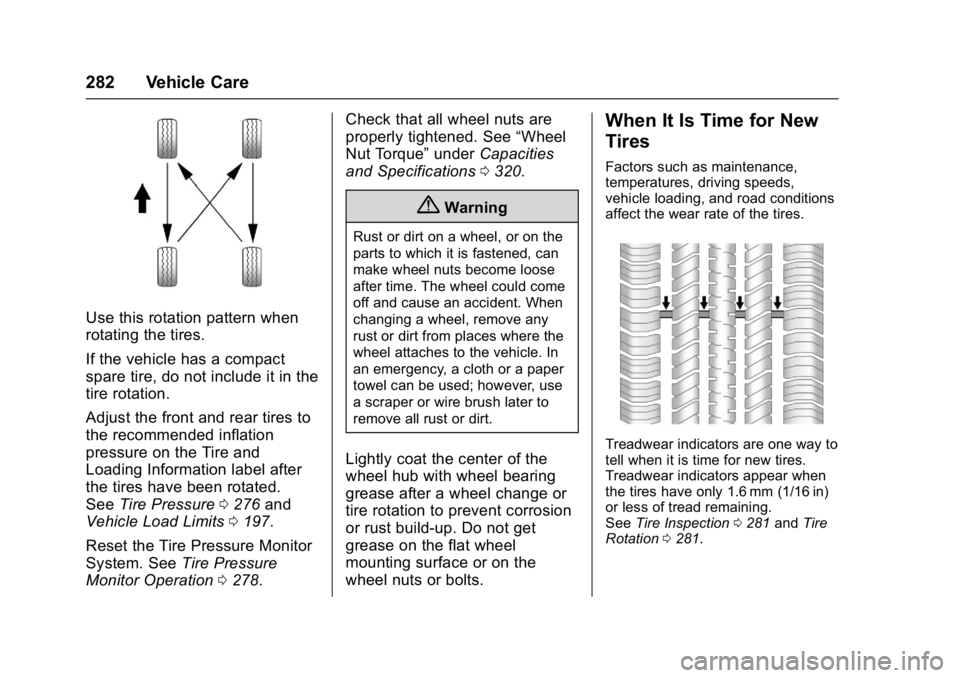
Use this rotation pattern when
rotating the tires.
If the vehicle has a compact
spare tire, do not include it in the
tire rotation.
Adjust the front and rear tires to
the recommended inflation
pressure on the Tire and
Loading Information label after
the tires have been rotated.
SeeTire Pressure 0276 and
Vehicle Load Limits 0197.
Reset the Tire Pressure Monitor
System. See Tire Pressure
Monitor Operation 0278. Check that all wheel nuts are
properly tightened. See
“Wheel
Nut Torque” underCapacities
and Specifications 0320.
{Warning
Rust or dirt on a wheel, or on the
parts to which it is fastened, can
make wheel nuts become loose
after time. The wheel could come
off and cause an accident. When
changing a wheel, remove any
rust or dirt from places where the
wheel attaches to the vehicle. In
an emergency, a cloth or a paper
towel can be used; however, use
a scraper or wire brush later to
remove all rust or dirt.
Lightly coat the center of the
wheel hub with wheel bearing
grease after a wheel change or
tire rotation to prevent corrosion
or rust build-up. Do not get
grease on the flat wheel
mounting surface or on the
wheel nuts or bolts.
When It Is Time for New
Tires
Factors such as maintenance,
temperatures, driving speeds,
vehicle loading, and road conditions
affect the wear rate of the tires.
Treadwear indicators are one way to
tell when it is time for new tires.
Treadwear indicators appear when
the tires have only 1.6 mm (1/16 in)
or less of tread remaining.
See Tire Inspection 0281 andTire
Rotation 0281.
Page 328 of 361
Chevrolet Bolt EV Owner Manual (GMNA-Localizing-U.S./Canada/Mexico-
10122739) - 2017 - CRC - 10/3/16
Customer Information 327
.Download owner manuals.
. Find the
Chevrolet-recommended
maintenance services.
GM Mobility
Reimbursement Program
This program is available to
qualified applicants for cost
reimbursement of eligible
aftermarket adaptive equipment
required for the vehicle, such as
hand controls or a wheelchair/
scooter lift for the vehicle.
For more information on the limited
offer, visit www.gmmobility.com or
call the GM Mobility Assistance
Center at 1-800-323-9935. Text
Telephone (TTY) users, call
1-800-833-9935. General Motors of Canada also has
a Mobility Program. Visit www.gm.ca
or call 1-800-GM-DRIVE (463-7483)
for details. TTY users call
1-800-263-3830.
Roadside Assistance
Program
From the U.S., call 1-888-811-1926;
Text Telephone (TTY):
1-888-889-2438.
From Canada, call 1-800-268-6800.
Service is available 24 hours a day,
365 days a year.
Calling for Assistance
When calling Roadside Assistance,
have the following information
ready:
.
Your name, home address, and
home telephone number.
. Telephone number of your
location.
. Location of the vehicle.
. Model, year, color, and license
plate number of the vehicle. .
Odometer reading, Vehicle
Identification Number (VIN), and
delivery date of the vehicle.
. Description of the problem.
Coverage
Services are provided for the
duration of the vehicle’s powertrain
warranty.
In the U.S., anyone driving the
vehicle is covered. In Canada, a
person driving the vehicle without
permission from the owner is not
covered.
Roadside Assistance is not a part of
the New Vehicle Limited Warranty.
General Motors North America and
Chevrolet reserve the right to make
any changes or discontinue the
Roadside Assistance program at
any time without notification.
General Motors North America and
Chevrolet reserve the right to limit
services or payment to an owner or
driver if they decide the claims are
made too often, or the same type of
claim is made many times.
Page 329 of 361
Chevrolet Bolt EV Owner Manual (GMNA-Localizing-U.S./Canada/Mexico-
10122739) - 2017 - CRC - 10/3/16
328 Customer Information
Services Provided
.Lock-Out Service: Service to
unlock the vehicle if you are
locked out. A remote unlock may
be available if you have OnStar.
For security reasons, the driver
must present identification
before this service is given.
. Emergency Tow from a Public
Road or Highway: Tow to the
nearest certified Bolt EV dealer
for warranty service, or if the
vehicle was in a crash and
cannot be driven. Assistance is
not given when the vehicle is
stuck in the sand, mud, or snow.
Emergency towing may be
covered during the Extended
Vehicle (EV) warranty.
. Flat Tire Change: If the tire has
been separated from the wheel,
has damaged sidewalls, or has a
large puncture, the tire is too
severely damaged for the self
sealing tire to be effective and
the vehicle will have to be
towed. It is the owner's responsibility for the repair or
replacement of the tire if it is not
covered by the warranty.
. Battery Jump Start: Service to
jump start a dead battery.
. Trip Interruption Benefits and
Assistance: If your trip is
interrupted due to a warranty
event, incidental expenses may
be reimbursed within the
Powertrain warranty period.
Items considered are reasonable
and customary hotel, meals,
rental car, or a vehicle being
delivered back to the customer,
up to 805 km (500 mi).
Services Not Included in
Roadside Assistance
. Impound towing caused by
violation of any laws.
. Legal fines.
. Mounting, dismounting,
or changing of snow tires,
chains, or other traction devices.
Service is not provided if a vehicle
is in an area that is not accessible
to the service vehicle or is not a regularly traveled or maintained
public road, which includes ice and
winter roads. Off-road use is not
covered.
Services Specific to Canadian
Vehicles
.
Lock-Out Service: Vehicle
registration is required.
. Trip Interruption Benefits and
Assistance: Must be over
150 km (93 mi) from where the
trip was started to qualify.
Pre-authorization, original
detailed receipts, and a copy of
the repair orders are required.
Once authorization has been
received, the Roadside
Assistance advisor will help to
make arrangements and explain
how to receive payment.
. Alternative Service: If
assistance cannot be provided
right away, the Roadside
Assistance advisor may give
permission to get local
emergency road service. You will
receive payment, up to $100,
after sending the original receipt
to Roadside Assistance.
Page 355 of 361

Chevrolet Bolt EV Owner Manual (GMNA-Localizing-U.S./Canada/Mexico-
10122739) - 2017 - CRC - 10/3/16
354 Index
General Information (cont'd)Vehicle Care . . . . . . . . . . . . . . . . . . 249
GM Mobility Reimbursement Program . . . . . . . . . . . . . . . . . . . . . . . 327
H
Halogen Bulbs . . . . . . . . . . . . . . . . . . 261
Hands-Free Phone . . . . . . . . . . . . . 175
Hazard Warning Flashers . . . . . . . 151
Head Restraints . . . . . . . . . . . . . . . . . 55
Headlamps
Aiming . . . . . . . . . . . . . . . . . . . . . . . . 261
Automatic . . . . . . . . . . . . . . . . . . . . . 150
Bulb Replacement . . . . . . . . . . . . 261
Daytime RunningLamps (DRL) . . . . . . . . . . . . . . . . 150
Flash-to-Pass . . . . . . . . . . . . . . . . . 150
High Intensity Discharge (HID) Lighting . . . . . . . . . . . . . . . 262
High-Beam On Light . . . . . . . . . . 123
High/Low Beam Changer . . . . . 150
Lamps On Reminder . . . . . . . . . 123
Heated Rear Seats . . . . . . . . . . . . . . . . . . . . . 62
Steering Wheel . . . . . . . . . . . . . . . 105
Heated Front Seats . . . . . . . . . . . . . . 58
Heating . . . . . . . . . . . . . . . . . . . . . . . . . 184
High Voltage Battery Gauge . . . . 115 High Voltage Devices and
Wiring . . . . . . . . . . . . . . . . . . . . . . . . . 263
High-Beam On Light . . . . . . . . . . . . 123
Hill and Mountain Roads . . . . . . . . 196
Hill Start Assist (HSA) . . . . . . . . . . 212
Hood . . . . . . . . . . . . . . . . . . . . . . . . . . . 251
Horn . . . . . . . . . . . . . . . . . . . . . . . . . . . . 105
How to Wear Safety Belts Properly . . . . . . . . . . . . . . . . . . . . . . . . 63
HVAC . . . . . . . . . . . . . . . . . . . . . . . . . . . 184
I
Immobilizer . . . . . . . . . . . . . . . . . . . . . . 47
Indicator Pedestrian Ahead . . . . . . . . . . . . 121
Vehicle Ahead . . . . . . . . . . . . . . . . 120
Infants and Young Children,
Restraints . . . . . . . . . . . . . . . . . . . . . . 82
Information Energy . . . . . . . . . . . . . . . . . . . . . . . 131
Instrument Cluster . . . . . . . . . . . . . . 111
Instrument Panel
Storage Area . . . . . . . . . . . . . . . . . 100
Interior Rearview Mirrors . . . . . . . . . 49
Introduction . . . . . . . . . . . . . . . . . . 2, 155
J
Jump Starting - North America . . . . . . . . . . . . . . . . . . . . . . . 295
K
Key and Lock Messages . . . . . . . . 137
Keyless EntryRemote (RKE) System . . . . . . . . . 33
KeyPass . . . . . . . . . . . . . . . . . . . . . . . . . 44
Keys . . . . . . . . . . . . . . . . . . . . . . . . . . . . . 32
L
Labeling, Tire Sidewall . . . . . . . . . . 272
Lamps Courtesy . . . . . . . . . . . . . . . . . . . . . . 152
Daytime Running (DRL) . . . . . . 150
Dome . . . . . . . . . . . . . . . . . . . . . . . . . 152
Exterior Controls . . . . . . . . . . . . . . 148
Exterior Lamps OffReminder . . . . . . . . . . . . . . . . . . . 150
License Plate . . . . . . . . . . . . . . . . . 262
Messages . . . . . . . . . . . . . . . . . . . . 138
On Reminder . . . . . . . . . . . . . . . . . 123
Reading . . . . . . . . . . . . . . . . . . . . . . 153
Lane Change Alert (LCA) . . . . . . . 227
Lane Departure
Warning (LDW) . . . . . . . . . . . . . . . . 229
Lane Keep Assist (LKA) . . . . . . . . 229
Lane Keep Assist Light . . . . . . . . . 120
Page 359 of 361

Chevrolet Bolt EV Owner Manual (GMNA-Localizing-U.S./Canada/Mexico-
10122739) - 2017 - CRC - 10/3/16
358 Index
SeatsAdjustment, Front . . . . . . . . . . . . . . . 56
Head Restraints . . . . . . . . . . . . . . . . 55
Heated Front . . . . . . . . . . . . . . . . . . . 58
Heated, Rear . . . . . . . . . . . . . . . . . . . 62
Rear . . . . . . . . . . . . . . . . . . . . . . . . . . . . 60
Reclining Seatbacks . . . . . . . . . . . . 57
Securing Child Restraints . . . . 95, 97
Security Light . . . . . . . . . . . . . . . . . . . . . . . . . . 122
Messages . . . . . . . . . . . . . . . . . . . . 140
OnStar
®. . . . . . . . . . . . . . . . . . . . . . 341
Vehicle . . . . . . . . . . . . . . . . . . . . . . . . . 46
Vehicle Alarm . . . . . . . . . . . . . . . . . . . 46
Self-Sealing Tires . . . . . . . . . . . . . . . 271
Service . . . . . . . . . . . . . . . . . . . . . . . . . 190 Accessories andModifications . . . . . . . . . . . . . . . . 250
Doing Your Own Work . . . . . . . . 250
Maintenance Records . . . . . . . . 318
Maintenance, General Information . . . . . . . . . . . . . . . . . . 310
Parts Identification Label . . . . . 319
Publications Ordering Information . . . . . . . . . . . . . . . . . . 335
Scheduling Appointments . . . . . 332
Vehicle Messages . . . . . . . . . . . . 140
Vehicle Soon Light . . . . . . . . . . . . .118 Service Electric Parking
Brake Light . . . . . . . . . . . . . . . . . . . . 119
Servicing the Airbag . . . . . . . . . . . . . 79
Settings . . . . . . . . . . . . . . . . . . . . . . . . 177 Energy . . . . . . . . . . . . . . . . . . . . . . . 132
Shifting Into Park . . . . . . . . . . . . . . . . . . . . . . 204
Out of Park . . . . . . . . . . . . . . . . . . . 204
Side Blind Zone Alert (SBZA) . . . 227
Signals, Turn and Lane-Change . . . . . . . . . . . . . . . . . 151
Software Updates . . . . . . . . . . . . . . 159
Specifications and Capacities . . . . . . . . . . . . . . . . . . . . . 320
Speedometer . . . . . . . . . . . . . . . . . . . 114
Sport Mode Light . . . . . . . . . . . . . . . 120
StabiliTrak OFF Light . . . . . . . . . . . . . . . . . . . . . 121
Start Remote . . . . . . . . . . . . . . . . . . . . . . . . . 39
Start Assist, Hill . . . . . . . . . . . . . . . . . 212
Starting and Stopping the
Vehicle . . . . . . . . . . . . . . . . . . . . . . . . 203
Starting the Vehicle Messages . . . . . . . . . . . . . . . . . . . . . 141
Status Screens Charging . . . . . . . . . . . . . . . . . . . . . 236
Steering . . . . . . . . . . . . . . . . . . . . . . . . 193 Steering (cont'd)
Heated Wheel . . . . . . . . . . . . . . . . 105
Wheel Adjustment . . . . . . . . . . . . 104
Wheel Controls . . . . . . . . . . . . . . . 104
Stoplamps and Back-up Lamps Bulb Replacement . . . . . . . . . . . . 262
Storage Areas Cargo Cover . . . . . . . . . . . . . . . . . . 101
Cargo ManagementSystem . . . . . . . . . . . . . . . . . . . . . . 102
Center Console . . . . . . . . . . . . . . . 101
Instrument Panel . . . . . . . . . . . . . 100
Storage Compartments . . . . . . . . . 100
Store Apps . . . . . . . . . . . . . . . . . . . . . . . . . . 181
Storing the Tire Sealant and Compressor Kit . . . . . . . . . . . . . . . 295
Stuck Vehicle . . . . . . . . . . . . . . . . . . . 197
Sun Visors . . . . . . . . . . . . . . . . . . . . . . . 53
Symbols . . . . . . . . . . . . . . . . . . . . . . . . . . 3
System
Forward CollisionAlert (FCA) . . . . . . . . . . . . . . . . . . 222
Systems Driver Assistance . . . . . . . . . . . . . 218