battery CHEVROLET BOLT EV 2018 User Guide
[x] Cancel search | Manufacturer: CHEVROLET, Model Year: 2018, Model line: BOLT EV, Model: CHEVROLET BOLT EV 2018Pages: 370, PDF Size: 5.14 MB
Page 39 of 370
Chevrolet BOLT EV Owner Manual (GMNA-Localizing-U.S./Canada/Mexico-
11434431) - 2018 - crc - 2/14/18
38 Keys, Doors, and Windows
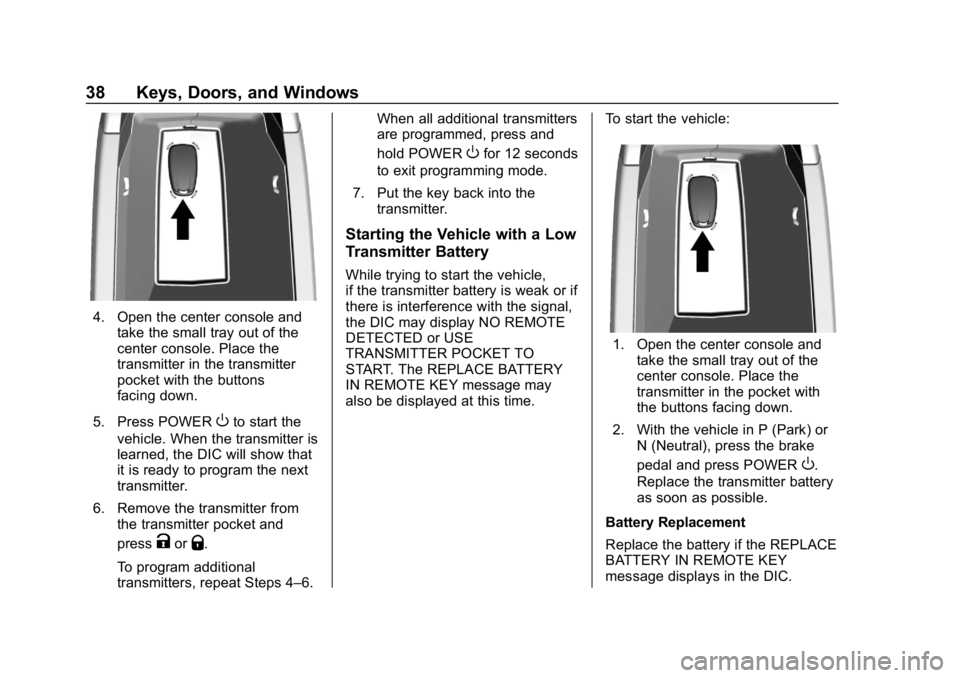
4. Open the center console andtake the small tray out of the
center console. Place the
transmitter in the transmitter
pocket with the buttons
facing down.
5. Press POWER
Oto start the
vehicle. When the transmitter is
learned, the DIC will show that
it is ready to program the next
transmitter.
6. Remove the transmitter from the transmitter pocket and
press
KorQ.
To program additional
transmitters, repeat Steps 4–6. When all additional transmitters
are programmed, press and
hold POWER
Ofor 12 seconds
to exit programming mode.
7. Put the key back into the transmitter.
Starting the Vehicle with a Low
Transmitter Battery
While trying to start the vehicle,
if the transmitter battery is weak or if
there is interference with the signal,
the DIC may display NO REMOTE
DETECTED or USE
TRANSMITTER POCKET TO
START. The REPLACE BATTERY
IN REMOTE KEY message may
also be displayed at this time. To start the vehicle:
1. Open the center console and
take the small tray out of the
center console. Place the
transmitter in the pocket with
the buttons facing down.
2. With the vehicle in P (Park) or N (Neutral), press the brake
pedal and press POWER
O.
Replace the transmitter battery
as soon as possible.
Battery Replacement
Replace the battery if the REPLACE
BATTERY IN REMOTE KEY
message displays in the DIC.
Page 40 of 370
Chevrolet BOLT EV Owner Manual (GMNA-Localizing-U.S./Canada/Mexico-
11434431) - 2018 - crc - 2/14/18
Keys, Doors, and Windows 39
Caution
When replacing the battery, do
not touch any of the circuitry on
the transmitter. Static from your
body could damage the
transmitter.
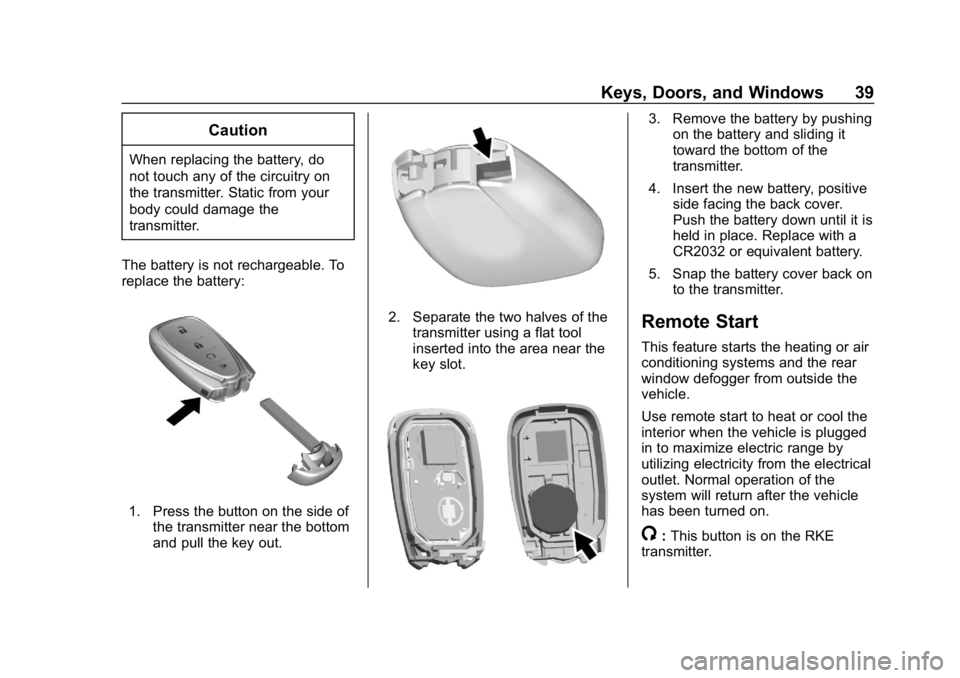
The battery is not rechargeable. To
replace the battery:
1. Press the button on the side of the transmitter near the bottom
and pull the key out.
2. Separate the two halves of thetransmitter using a flat tool
inserted into the area near the
key slot.
3. Remove the battery by pushingon the battery and sliding it
toward the bottom of the
transmitter.
4. Insert the new battery, positive side facing the back cover.
Push the battery down until it is
held in place. Replace with a
CR2032 or equivalent battery.
5. Snap the battery cover back on to the transmitter.
Remote Start
This feature starts the heating or air
conditioning systems and the rear
window defogger from outside the
vehicle.
Use remote start to heat or cool the
interior when the vehicle is plugged
in to maximize electric range by
utilizing electricity from the electrical
outlet. Normal operation of the
system will return after the vehicle
has been turned on.
/:This button is on the RKE
transmitter.
Page 42 of 370
Chevrolet BOLT EV Owner Manual (GMNA-Localizing-U.S./Canada/Mexico-
11434431) - 2018 - crc - 2/14/18
Keys, Doors, and Windows 41
Conditions in Which Remote
Start Will Not Work
The remote vehicle start feature will
not operate if:
.The RKE transmitter is in the
vehicle.
. The hood is not closed.
. The hazard warning flashers
are on.
. The service vehicle soon light
is on.
. The electric drive unit coolant
temperature is too high.
. Two remote vehicle starts, or a
single remote start with an
extension, have already
been used.
. The vehicle is not in P (Park).
Door Locks
{Warning
Unlocked doors can be
dangerous.
. Passengers, especially
children, can easily open
the doors and fall out of a
moving vehicle. The doors
can be unlocked and
opened while the vehicle is
moving. The chance of
being thrown out of the
vehicle in a crash is
increased if the doors are
not locked. So, all
passengers should wear
seat belts properly and the
doors should be locked
whenever the vehicle is
driven.
. Young children who get into
unlocked vehicles may be
unable to get out. A child
can be overcome by
extreme heat and can suffer
(Continued)
Warning (Continued)
permanent injuries or even
death from heat stroke.
Always lock the vehicle
whenever leaving it.
. Outsiders can easily enter
through an unlocked door
when you slow down or stop
the vehicle. Locking the
doors can help prevent this
from happening.
To lock or unlock the doors from
outside the vehicle:
. Use the key in the driver door to
lock and unlock the door without
the RKE (Remote Keyless Entry)
transmitter. The key cylinder is
covered with a cap. See “Driver
Door Key Lock Cylinder Access
(In Case of Dead Battery)” later
in this section.
. Press
QorKon the RKE
transmitter to lock and unlock
the doors.
Page 43 of 370
Chevrolet BOLT EV Owner Manual (GMNA-Localizing-U.S./Canada/Mexico-
11434431) - 2018 - crc - 2/14/18
42 Keys, Doors, and Windows
To lock or unlock the doors from
inside the vehicle:
.Press
QorKon the power door
lock switch.
. Pull the door handle. Pulling an
interior door handle will unlock
the door. Pulling the door handle
again unlatches it.
Keyless Access
The RKE transmitter must be within
1 m (3 ft) of the liftgate or door being
opened. Press the button on the
door handle to open. See “KeylessAccess Operation”
inRemote
Keyless Entry (RKE) System
Operation 033.
Driver Door Key Lock Cylinder
Access (In Case of Dead
Battery)
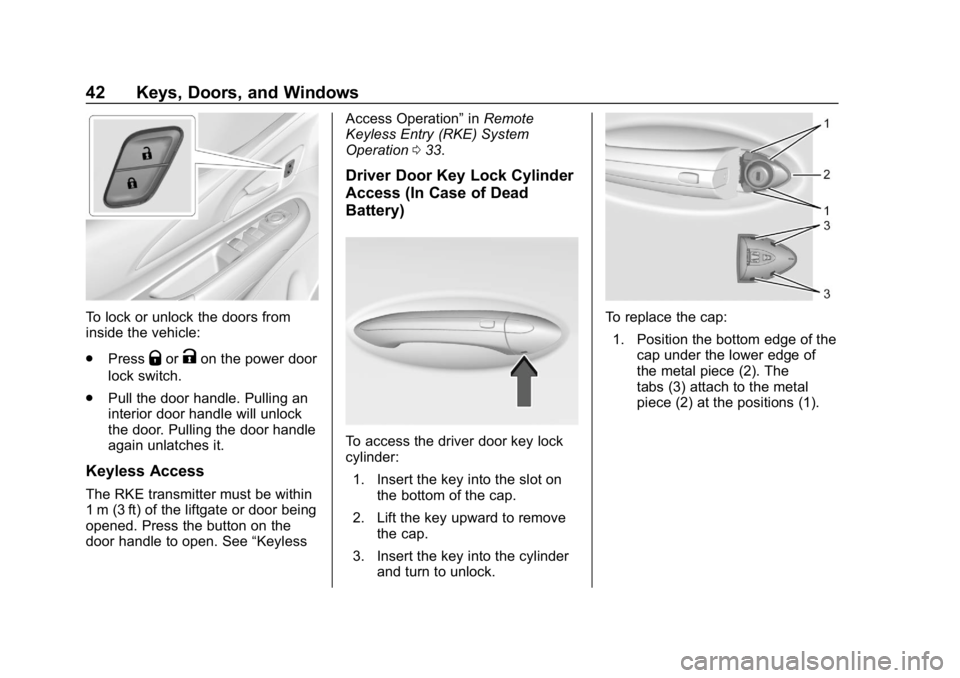
To access the driver door key lock
cylinder:
1. Insert the key into the slot on the bottom of the cap.
2. Lift the key upward to remove the cap.
3. Insert the key into the cylinder and turn to unlock.
To replace the cap:
1. Position the bottom edge of the cap under the lower edge of
the metal piece (2). The
tabs (3) attach to the metal
piece (2) at the positions (1).
Page 46 of 370
Chevrolet BOLT EV Owner Manual (GMNA-Localizing-U.S./Canada/Mexico-
11434431) - 2018 - crc - 2/14/18
Keys, Doors, and Windows 45
To open a rear door when the safety
lock is on:1. Unlock the door by using the inside handle, the power door
lock switch, or the Remote
Keyless Entry (RKE)
transmitter.
2. Open the door from the outside.
When the safety lock is enabled,
adults and older children will not be
able to open the rear door from the
inside. Cancel the safety locks to
enable the doors to open from the
inside.
To cancel the safety lock: 1. Unlock the door and open it from the outside.
2. Move the lever rearward to unlock. Do the same for the
other door.KeyPass
If equipped, this feature allows a
smartphone to be connected to the
vehicle and remote vehicle functions
to be requested. Features vary
depending on availability.
Features include:
.Remote commands –Use to
lock/unlock the vehicle, remote
start for the cabin climate,
or sound or cancel the horn and
flash the lights.
. Vehicle status –View the
vehicle’s range and battery level,
charging status, and tire
pressure.
. Welcome lighting –Request light
when approaching the vehicle.
. Location services –Save the
parked location or start
navigation at the vehicle’s GPS
coordinates.
Setup Function
. KeyPass Setup
‐Managing Priority Setting ‐
Modifying Priority Setting
. Revocation
Active Remote Function
. Door Lock/Unlock
. Remote Start/Stop
. Panic Alarm Activation/
Termination
. Remote Charge Termination
. High Voltage Charge Functions
‐Temporary Charging Override
Update
‐ Change the Charging Mode
Permanently
‐ Update Departure Time
Schedule
‐ High Voltage Priority Charging
Activate and De-activate
‐ Select Charge Level/Limit
Preference Screen
. Vehicle Locator
. Routing w/Available Mileage
Page 47 of 370
Chevrolet BOLT EV Owner Manual (GMNA-Localizing-U.S./Canada/Mexico-
11434431) - 2018 - crc - 2/14/18
46 Keys, Doors, and Windows
Passive Function
Approach Detection/Welcome
Lighting
Visual Display for Vehicle
Information
.Low Battery Indication
. Tire Pressure
. Remote Start Status
. Odometer Reading
. Rear Closure Ajar Switch Status
. Electric Parking Brake Status
. Hood Status
. High Voltage Battery State of
Charge Status
. GPS Signal for End of Trip
. Charge Mode Status
‐Available Mileage
‐ Charge Start and End Times
Status
‐ Full Week of Time Based
Delayed Charging Status
‐ Disable Rate Based and
Delayed Charging Status ‐
High Voltage Charging System
Fault (Unable to Charge)
‐ High Voltage Charger Power
Level
‐ High Voltage Battery Charge
Cord Connected Indication
‐ Charge Complete
‐ Usable State of Charge
‐ High Voltage Depletion Mode
Range
‐ High Voltage Battery State of
Charge Status
Pairing
A smartphone must be paired to the
KeyPass Module and then it must
be connected to the vehicle before it
can be used.
Setup Information
. Up to three smartphones can be
set up and connected to the
vehicle.
. Setup is disabled when the
vehicle is moving. .
Pairing only needs to be
completed once per smartphone,
unless the pairing information on
the smartphone changes or the
smartphone is deleted.
Setup Process 1. Enable the KeyPass function through vehicle
personalization. See Vehicle
Personalization 0143.
2. Download the myChevrolet app to the smartphone from the
appropriate app store.
3. The vehicle must be on and in P (Park).
4. Open the app and touch Search for New Vehicles.
5. Choose your vehicle and touch Done.
6. Aim the smartphone camera at the QR code on the
infotainment display to scan
the security key. If the camera
is not working, the QR code
can be entered manually.
Page 50 of 370
Chevrolet BOLT EV Owner Manual (GMNA-Localizing-U.S./Canada/Mexico-
11434431) - 2018 - crc - 2/14/18
Keys, Doors, and Windows 49
Immobilizer Operation
This vehicle has a passive
theft-deterrent system.
The system does not have to be
manually armed or disarmed.
The vehicle is automatically
immobilized when the transmitter
leaves the vehicle.
The immobilization system is
disarmed when POWER
Ois
pressed and a valid transmitter is
found in the vehicle.
The security light on the instrument
cluster comes on when there is a
problem with arming or disarming
the theft-deterrent system.
The system has one or more
transmitters matched to an
immobilizer control unit in the
vehicle. Only a correctly matched transmitter will start the vehicle.
If the transmitter is damaged, you
may not be able to start the vehicle.
When trying to start the vehicle, the
security light comes on briefly when
the vehicle is turned on.
If the vehicle does not start and the
security light stays on, there is a
problem with the system. Turn the
vehicle off and try again.
If the RKE transmitter appears to be
undamaged, try another transmitter,
or place the transmitter in the
transmitter pocket.
See
“Starting the Vehicle with a Low
Transmitter Battery” underRemote
Keyless Entry (RKE) System
Operation 033.
If the vehicle does not start with the
other transmitter or with the
transmitter placed in the transmitter
pocket, the vehicle needs service.
See your dealer who can service
the theft-deterrent system and have
a new transmitter programmed to
the vehicle. Do not leave the transmitter or
device that disarms or deactivates
the theft-deterrent system in the
vehicle.
Page 55 of 370
Chevrolet BOLT EV Owner Manual (GMNA-Localizing-U.S./Canada/Mexico-
11434431) - 2018 - crc - 2/14/18
54 Keys, Doors, and Windows
The power windows only operate
with the vehicle on or in Service
Mode, or when Retained Accessory
Power (RAP) is active.
Express Window Operation
The driver window has an express
feature which allows the window to
be lowered or raised without holding
the switch. To automatically raise or
lower the window, pull the driver
window switch up or press it down
all the way and release. Stop the
window by pressing or pulling the
switch in the same direction a
second time, or by briefly operating
the switch to the first position in
either direction. The front and rear
passenger windows have express
open only.
Safety Function
This is for vehicles with the
express-up feature. If any object is
in the path of the window when the
express-up feature is active, the
window will stop and auto-reverse to
a preset position. Weather
conditions may cause the window to
auto-reverse. The window switchmay be held up to the second
position to close the window. The
window will return to normal
operation once the obstruction or
condition is removed.
Safety Function Override
This is for vehicles with the
express-up feature. If the battery on
the vehicle has been recharged or
disconnected, or is not working, the
windows will need to be
reprogrammed for the express-up
feature to work. Before
reprogramming, replace or recharge
the vehicle's battery.
To program the driver window:
1. Close all doors with the vehicle on or in Service Mode.
2. Press and hold the power window switch until the window
is fully open.
3. Pull the power window switch up until the window is fully
closed. 4. Continue holding the switch up
for approximately two seconds
after the window is completely
closed.
Window Lockout
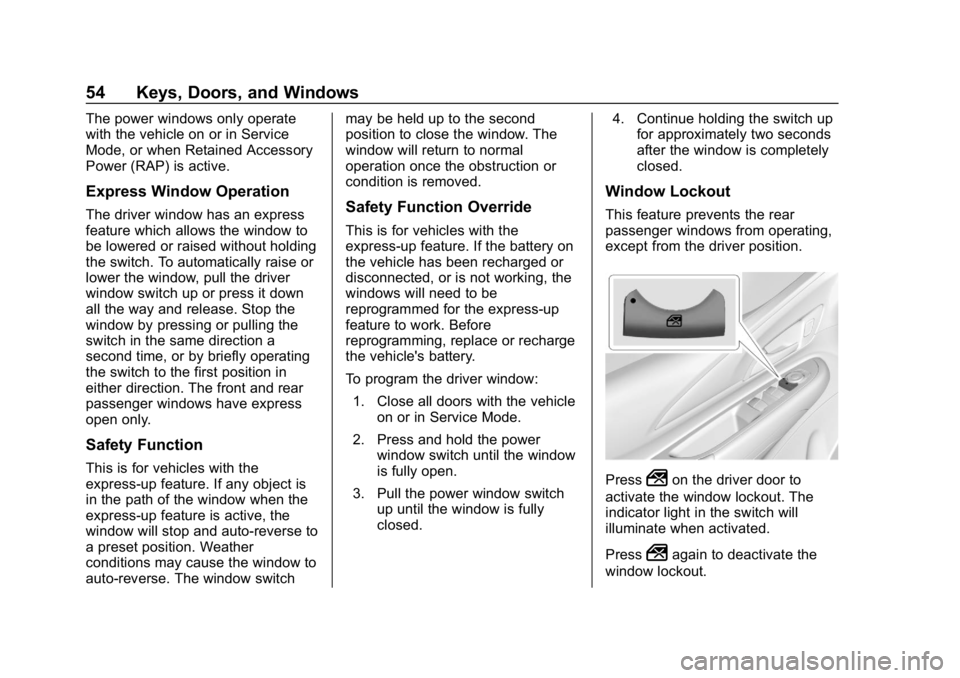
This feature prevents the rear
passenger windows from operating,
except from the driver position.
Press2on the driver door to
activate the window lockout. The
indicator light in the switch will
illuminate when activated.
Press
2again to deactivate the
window lockout.
Page 77 of 370
Chevrolet BOLT EV Owner Manual (GMNA-Localizing-U.S./Canada/Mexico-
11434431) - 2018 - crc - 2/14/18
76 Seats and Restraints
airbags. Airbag inflation does not
prevent the driver from seeing out of
the windshield or being able to steer
the vehicle, nor does it prevent
people from leaving the vehicle.
{Warning
When an airbag inflates, there
may be dust in the air. This dust
could cause breathing problems
for people with a history of
asthma or other breathing trouble.
To avoid this, everyone in the
vehicle should get out as soon as
it is safe to do so. If you have
breathing problems but cannot
get out of the vehicle after an
airbag inflates, then get fresh air
by opening a window or a door.
If you experience breathing
problems following an airbag
deployment, you should seek
medical attention.
The vehicle has a feature that may
automatically unlock the doors, turn
on the interior lamps and hazard
warning flashers after the airbags inflate. The feature may also
activate, without airbag inflation,
after an event that exceeds a
predetermined threshold. After
turning the ignition off and then on
again, the doors can be locked, the
interior lamps can be turned off, and
the hazard warning flashers can be
turned off using the controls for
those features. If any of these
systems are damaged in the crash
they may not operate as normal.
{Warning
A crash severe enough to inflate
the airbags may have also
damaged important functions in
the vehicle, such as the brake
and steering systems, etc. Even if
the vehicle appears to be drivable
after a moderate crash, there may
be concealed damage that could
make it difficult to safely operate
the vehicle.
Use caution if attempting to
restart the vehicle after a crash
has occurred.
If an airbag inflates or the vehicle
has been in a crash, the sensing
system may shut down the high
voltage system. When this occurs,
the high voltage battery is
disconnected and the vehicle will
not start. Before the vehicle can be
operated again, it must be serviced
at your dealer.
In many crashes severe enough to
inflate the airbag, windshields are
broken by vehicle deformation.
Additional windshield breakage may
also occur from the front outboard
passenger airbag.
.
Airbags are designed to inflate
only once. After an airbag
inflates, you will need some new
parts for the airbag system.
If you do not get them, the
airbag system will not be there
to help protect you in another
crash. A new system will include
airbag modules and possibly
other parts. The service manual
for the vehicle covers the need
to replace other parts.
Page 82 of 370
Chevrolet BOLT EV Owner Manual (GMNA-Localizing-U.S./Canada/Mexico-
11434431) - 2018 - crc - 2/14/18
Seats and Restraints 81
“Child Restraints”in the Index for
additional information about the
importance of proper restraint use.
A thick layer of additional material,
such as a blanket or cushion,
or aftermarket equipment such as
seat covers, seat heaters, and seat
massagers can affect how well the
passenger sensing system
operates. We recommend that you
not use seat covers or other
aftermarket equipment except when
approved by GM for your specific
vehicle. See Adding Equipment to
the Airbag-Equipped Vehicle 081
for more information about
modifications that can affect how
the system operates.
The on indicator may be lit if an
object, such as a briefcase,
handbag, grocery bag, laptop,
or other electronic device is put on
an unoccupied seat. If this is not
desired, remove the object from
the seat.{Warning
Stowing of articles under the
passenger seat or between the
passenger seat cushion and
seatback may interfere with the
proper operation of the passenger
sensing system.
Servicing the
Airbag-Equipped Vehicle
Airbags affect how the vehicle
should be serviced. There are parts
of the airbag system in several
places around the vehicle. Your
dealer and the service manual have
information about servicing the
vehicle and the airbag system. To
purchase a service manual, see
Service Publications Ordering
Information 0341.
{Warning
For up to 10 seconds after the
vehicle is turned off and the 12‐
volt battery is disconnected, an
airbag can still inflate during
improper service. You can be
injured if you are close to an
airbag when it inflates. Avoid
yellow connectors. They are
probably part of the airbag
system. Be sure to follow proper
service procedures, and make
sure the person performing work
for you is qualified to do so.
Adding Equipment to the
Airbag-Equipped Vehicle
Adding accessories that change the
vehicle's frame, bumper system,
height, front end, or side sheet
metal may keep the airbag system
from working properly. The
operation of the airbag system can
also be affected by changing any
parts of the front seats, seat belts,
airbag sensing and diagnostic