remote control CHEVROLET BOLT EV 2018 User Guide
[x] Cancel search | Manufacturer: CHEVROLET, Model Year: 2018, Model line: BOLT EV, Model: CHEVROLET BOLT EV 2018Pages: 370, PDF Size: 5.14 MB
Page 148 of 370
Chevrolet BOLT EV Owner Manual (GMNA-Localizing-U.S./Canada/Mexico-
11434431) - 2018 - crc - 2/14/18
Instruments and Controls 147
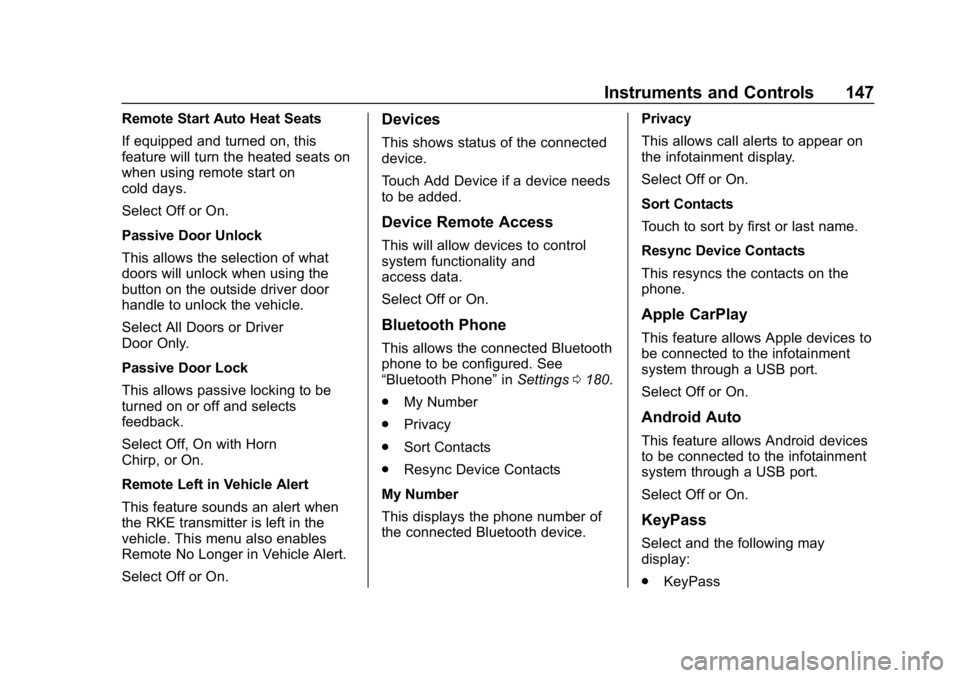
Remote Start Auto Heat Seats
If equipped and turned on, this
feature will turn the heated seats on
when using remote start on
cold days.
Select Off or On.
Passive Door Unlock
This allows the selection of what
doors will unlock when using the
button on the outside driver door
handle to unlock the vehicle.
Select All Doors or Driver
Door Only.
Passive Door Lock
This allows passive locking to be
turned on or off and selects
feedback.
Select Off, On with Horn
Chirp, or On.
Remote Left in Vehicle Alert
This feature sounds an alert when
the RKE transmitter is left in the
vehicle. This menu also enables
Remote No Longer in Vehicle Alert.
Select Off or On.Devices
This shows status of the connected
device.
Touch Add Device if a device needs
to be added.
Device Remote Access
This will allow devices to control
system functionality and
access data.
Select Off or On.
Bluetooth Phone
This allows the connected Bluetooth
phone to be configured. See
“Bluetooth Phone”inSettings 0180.
. My Number
. Privacy
. Sort Contacts
. Resync Device Contacts
My Number
This displays the phone number of
the connected Bluetooth device. Privacy
This allows call alerts to appear on
the infotainment display.
Select Off or On.
Sort Contacts
Touch to sort by first or last name.
Resync Device Contacts
This resyncs the contacts on the
phone.
Apple CarPlay
This feature allows Apple devices to
be connected to the infotainment
system through a USB port.
Select Off or On.
Android Auto
This feature allows Android devices
to be connected to the infotainment
system through a USB port.
Select Off or On.
KeyPass
Select and the following may
display:
.
KeyPass
Page 157 of 370
Chevrolet BOLT EV Owner Manual (GMNA-Localizing-U.S./Canada/Mexico-
11434431) - 2018 - crc - 2/14/18
156 Lighting
Lighting Features
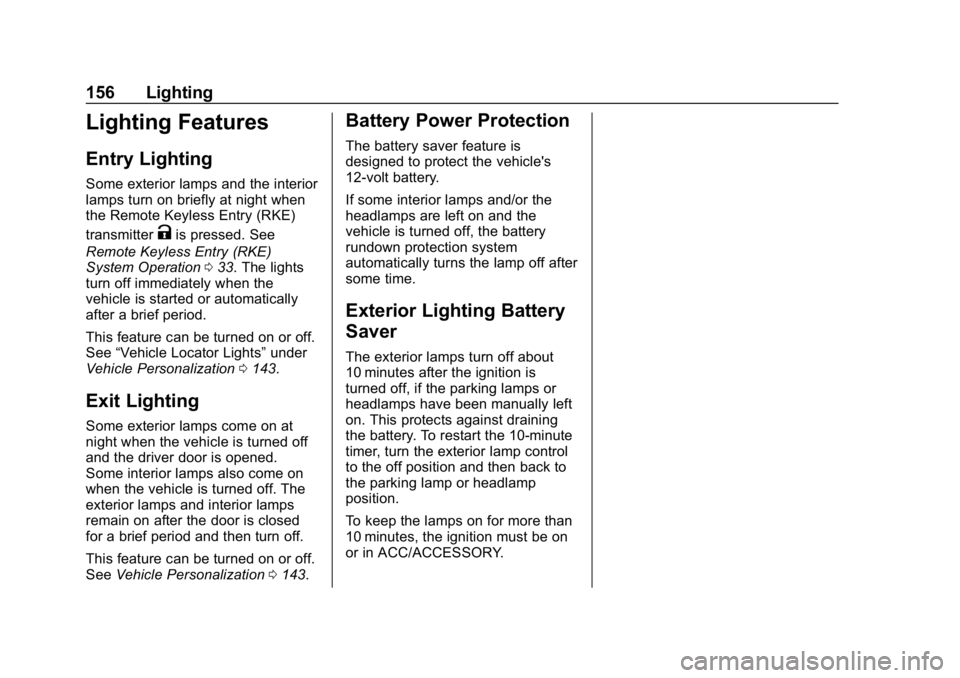
Entry Lighting
Some exterior lamps and the interior
lamps turn on briefly at night when
the Remote Keyless Entry (RKE)
transmitter
Kis pressed. See
Remote Keyless Entry (RKE)
System Operation 033. The lights
turn off immediately when the
vehicle is started or automatically
after a brief period.
This feature can be turned on or off.
See “Vehicle Locator Lights” under
Vehicle Personalization 0143.
Exit Lighting
Some exterior lamps come on at
night when the vehicle is turned off
and the driver door is opened.
Some interior lamps also come on
when the vehicle is turned off. The
exterior lamps and interior lamps
remain on after the door is closed
for a brief period and then turn off.
This feature can be turned on or off.
See Vehicle Personalization 0143.
Battery Power Protection
The battery saver feature is
designed to protect the vehicle's
12-volt battery.
If some interior lamps and/or the
headlamps are left on and the
vehicle is turned off, the battery
rundown protection system
automatically turns the lamp off after
some time.
Exterior Lighting Battery
Saver
The exterior lamps turn off about
10 minutes after the ignition is
turned off, if the parking lamps or
headlamps have been manually left
on. This protects against draining
the battery. To restart the 10-minute
timer, turn the exterior lamp control
to the off position and then back to
the parking lamp or headlamp
position.
To keep the lamps on for more than
10 minutes, the ignition must be on
or in ACC/ACCESSORY.
Page 190 of 370
Chevrolet BOLT EV Owner Manual (GMNA-Localizing-U.S./Canada/Mexico-
11434431) - 2018 - crc - 2/14/18
Climate Controls 189
Caution
Do not try to clear frost or other
material from the inside of the
front windshield and rear window
with a razor blade or anything
else that is sharp. This may
damage the rear window
defogger grid and affect the
radio's ability to pick up stations
clearly. The repairs would not be
covered by the vehicle warranty.
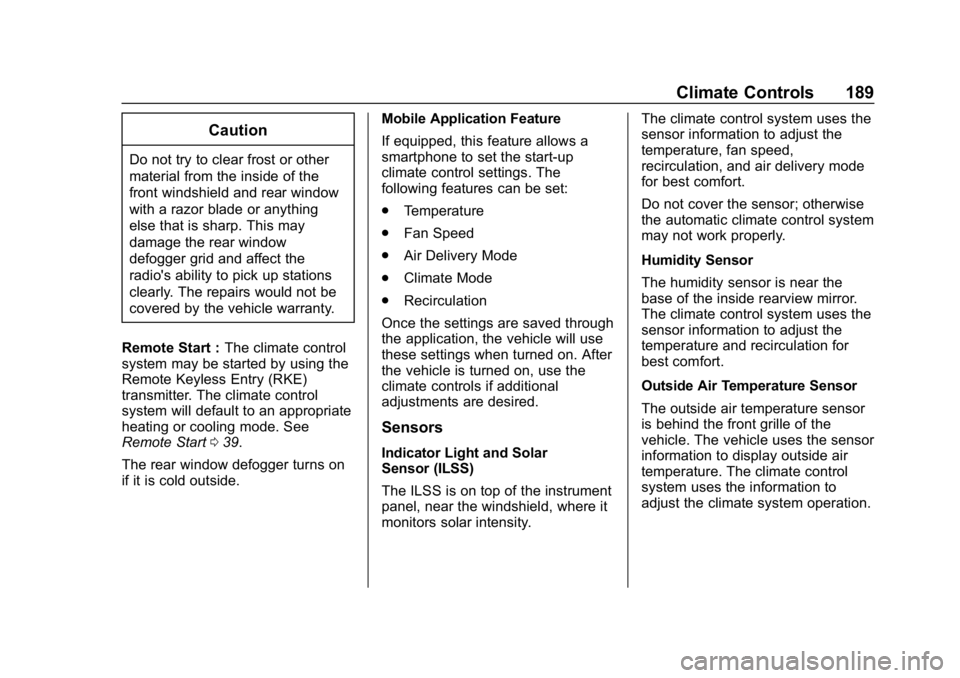
Remote Start : The climate control
system may be started by using the
Remote Keyless Entry (RKE)
transmitter. The climate control
system will default to an appropriate
heating or cooling mode. See
Remote Start 039.
The rear window defogger turns on
if it is cold outside. Mobile Application Feature
If equipped, this feature allows a
smartphone to set the start-up
climate control settings. The
following features can be set:
.
Temperature
. Fan Speed
. Air Delivery Mode
. Climate Mode
. Recirculation
Once the settings are saved through
the application, the vehicle will use
these settings when turned on. After
the vehicle is turned on, use the
climate controls if additional
adjustments are desired.
Sensors
Indicator Light and Solar
Sensor (ILSS)
The ILSS is on top of the instrument
panel, near the windshield, where it
monitors solar intensity. The climate control system uses the
sensor information to adjust the
temperature, fan speed,
recirculation, and air delivery mode
for best comfort.
Do not cover the sensor; otherwise
the automatic climate control system
may not work properly.
Humidity Sensor
The humidity sensor is near the
base of the inside rearview mirror.
The climate control system uses the
sensor information to adjust the
temperature and recirculation for
best comfort.
Outside Air Temperature Sensor
The outside air temperature sensor
is behind the front grille of the
vehicle. The vehicle uses the sensor
information to display outside air
temperature. The climate control
system uses the information to
adjust the climate system operation.
Page 257 of 370
Chevrolet BOLT EV Owner Manual (GMNA-Localizing-U.S./Canada/Mexico-
11434431) - 2018 - crc - 2/14/18
256 Vehicle Care
California Perchlorate
Materials Requirements
Certain types of automotive
applications, such as airbag
initiators, seat belt pretensioners,
and lithium batteries contained in
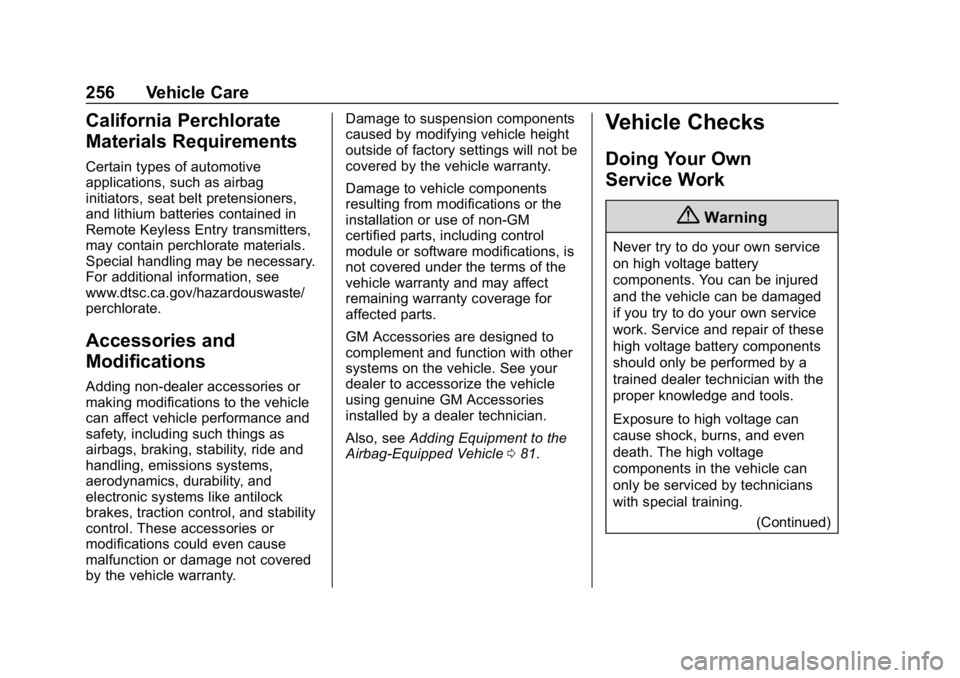
Remote Keyless Entry transmitters,
may contain perchlorate materials.
Special handling may be necessary.
For additional information, see
www.dtsc.ca.gov/hazardouswaste/
perchlorate.
Accessories and
Modifications
Adding non-dealer accessories or
making modifications to the vehicle
can affect vehicle performance and
safety, including such things as
airbags, braking, stability, ride and
handling, emissions systems,
aerodynamics, durability, and
electronic systems like antilock
brakes, traction control, and stability
control. These accessories or
modifications could even cause
malfunction or damage not covered
by the vehicle warranty.Damage to suspension components
caused by modifying vehicle height
outside of factory settings will not be
covered by the vehicle warranty.
Damage to vehicle components
resulting from modifications or the
installation or use of non-GM
certified parts, including control
module or software modifications, is
not covered under the terms of the
vehicle warranty and may affect
remaining warranty coverage for
affected parts.
GM Accessories are designed to
complement and function with other
systems on the vehicle. See your
dealer to accessorize the vehicle
using genuine GM Accessories
installed by a dealer technician.
Also, see
Adding Equipment to the
Airbag-Equipped Vehicle 081.
Vehicle Checks
Doing Your Own
Service Work
{Warning
Never try to do your own service
on high voltage battery
components. You can be injured
and the vehicle can be damaged
if you try to do your own service
work. Service and repair of these
high voltage battery components
should only be performed by a
trained dealer technician with the
proper knowledge and tools.
Exposure to high voltage can
cause shock, burns, and even
death. The high voltage
components in the vehicle can
only be serviced by technicians
with special training.
(Continued)
Page 278 of 370
Chevrolet BOLT EV Owner Manual (GMNA-Localizing-U.S./Canada/Mexico-
11434431) - 2018 - crc - 2/14/18
Vehicle Care 277
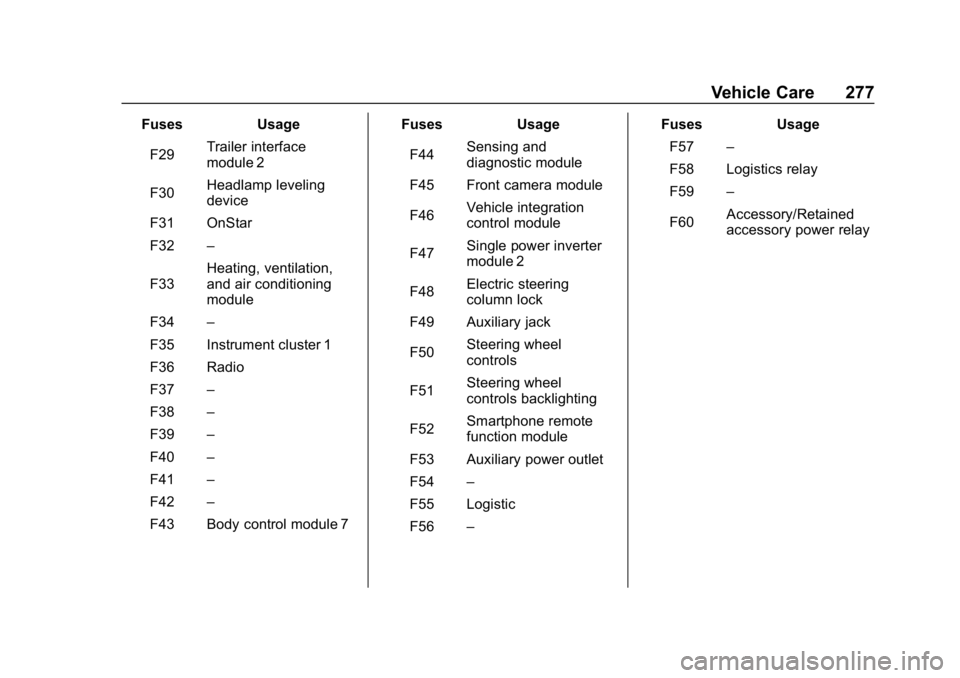
FusesUsage
F29 Trailer interface
module 2
F30 Headlamp leveling
device
F31 OnStar
F32 –
F33 Heating, ventilation,
and air conditioning
module
F34 –
F35 Instrument cluster 1
F36 Radio
F37 –
F38 –
F39 –
F40 –
F41 –
F42 –
F43 Body control module 7 Fuses
Usage
F44 Sensing and
diagnostic module
F45 Front camera module
F46 Vehicle integration
control module
F47 Single power inverter
module 2
F48 Electric steering
column lock
F49 Auxiliary jack
F50 Steering wheel
controls
F51 Steering wheel
controls backlighting
F52 Smartphone remote
function module
F53 Auxiliary power outlet
F54 –
F55 Logistic
F56 – Fuses
Usage
F57 –
F58 Logistics relay
F59 –
F60 Accessory/Retained
accessory power relay
Page 351 of 370
Chevrolet BOLT EV Owner Manual (GMNA-Localizing-U.S./Canada/Mexico-
11434431) - 2018 - crc - 2/14/18
350 OnStar
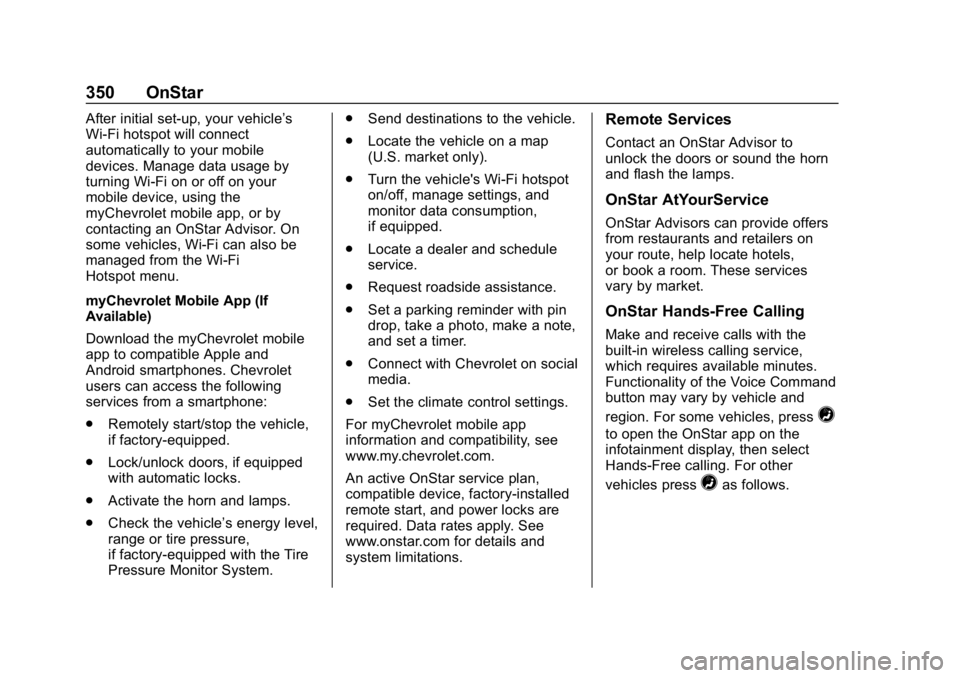
After initial set-up, your vehicle’s
Wi-Fi hotspot will connect
automatically to your mobile
devices. Manage data usage by
turning Wi-Fi on or off on your
mobile device, using the
myChevrolet mobile app, or by
contacting an OnStar Advisor. On
some vehicles, Wi-Fi can also be
managed from the Wi-Fi
Hotspot menu.
myChevrolet Mobile App (If
Available)
Download the myChevrolet mobile
app to compatible Apple and
Android smartphones. Chevrolet
users can access the following
services from a smartphone:
.Remotely start/stop the vehicle,
if factory-equipped.
. Lock/unlock doors, if equipped
with automatic locks.
. Activate the horn and lamps.
. Check the vehicle’s energy level,
range or tire pressure,
if factory-equipped with the Tire
Pressure Monitor System. .
Send destinations to the vehicle.
. Locate the vehicle on a map
(U.S. market only).
. Turn the vehicle's Wi-Fi hotspot
on/off, manage settings, and
monitor data consumption,
if equipped.
. Locate a dealer and schedule
service.
. Request roadside assistance.
. Set a parking reminder with pin
drop, take a photo, make a note,
and set a timer.
. Connect with Chevrolet on social
media.
. Set the climate control settings.
For myChevrolet mobile app
information and compatibility, see
www.my.chevrolet.com.
An active OnStar service plan,
compatible device, factory-installed
remote start, and power locks are
required. Data rates apply. See
www.onstar.com for details and
system limitations.Remote Services
Contact an OnStar Advisor to
unlock the doors or sound the horn
and flash the lamps.
OnStar AtYourService
OnStar Advisors can provide offers
from restaurants and retailers on
your route, help locate hotels,
or book a room. These services
vary by market.
OnStar Hands-Free Calling
Make and receive calls with the
built-in wireless calling service,
which requires available minutes.
Functionality of the Voice Command
button may vary by vehicle and
region. For some vehicles, press
=
to open the OnStar app on the
infotainment display, then select
Hands-Free calling. For other
vehicles press
=as follows.
Page 354 of 370
Chevrolet BOLT EV Owner Manual (GMNA-Localizing-U.S./Canada/Mexico-
11434431) - 2018 - crc - 2/14/18
OnStar 353
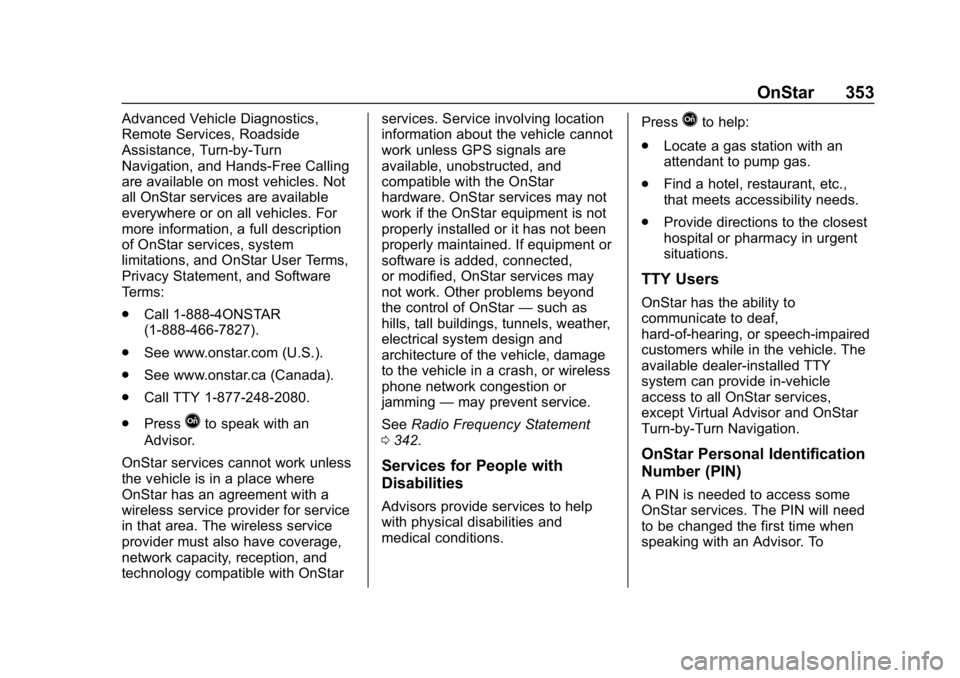
Advanced Vehicle Diagnostics,
Remote Services, Roadside
Assistance, Turn-by-Turn
Navigation, and Hands-Free Calling
are available on most vehicles. Not
all OnStar services are available
everywhere or on all vehicles. For
more information, a full description
of OnStar services, system
limitations, and OnStar User Terms,
Privacy Statement, and Software
Terms:
.Call 1-888-4ONSTAR
(1-888-466-7827).
. See www.onstar.com (U.S.).
. See www.onstar.ca (Canada).
. Call TTY 1-877-248-2080.
. Press
Qto speak with an
Advisor.
OnStar services cannot work unless
the vehicle is in a place where
OnStar has an agreement with a
wireless service provider for service
in that area. The wireless service
provider must also have coverage,
network capacity, reception, and
technology compatible with OnStar services. Service involving location
information about the vehicle cannot
work unless GPS signals are
available, unobstructed, and
compatible with the OnStar
hardware. OnStar services may not
work if the OnStar equipment is not
properly installed or it has not been
properly maintained. If equipment or
software is added, connected,
or modified, OnStar services may
not work. Other problems beyond
the control of OnStar
—such as
hills, tall buildings, tunnels, weather,
electrical system design and
architecture of the vehicle, damage
to the vehicle in a crash, or wireless
phone network congestion or
jamming —may prevent service.
See Radio Frequency Statement
0 342.
Services for People with
Disabilities
Advisors provide services to help
with physical disabilities and
medical conditions. Press
Qto help:
. Locate a gas station with an
attendant to pump gas.
. Find a hotel, restaurant, etc.,
that meets accessibility needs.
. Provide directions to the closest
hospital or pharmacy in urgent
situations.
TTY Users
OnStar has the ability to
communicate to deaf,
hard-of-hearing, or speech-impaired
customers while in the vehicle. The
available dealer-installed TTY
system can provide in-vehicle
access to all OnStar services,
except Virtual Advisor and OnStar
Turn-by-Turn Navigation.
OnStar Personal Identification
Number (PIN)
A PIN is needed to access some
OnStar services. The PIN will need
to be changed the first time when
speaking with an Advisor. To
Page 363 of 370

Chevrolet BOLT EV Owner Manual (GMNA-Localizing-U.S./Canada/Mexico-
11434431) - 2018 - crc - 2/14/18
362 Index
General InformationService and Maintenance . . . . . 321
Towing . . . . . . . . . . . . . . . . . . . . . . . . 252
Vehicle Care . . . . . . . . . . . . . . . . . . 255
GM Mobility Reimbursement Program . . . . . . . . . . . . . . . . . . . . . . . 336
H
Halogen Bulbs . . . . . . . . . . . . . . . . . . 269
Hands-Free Phone . . . . . . . . . . . . . 178
Hazard Warning Flashers . . . . . . . 153
Head Restraints . . . . . . . . . . . . . . . . . 57
HeadlampsAiming . . . . . . . . . . . . . . . . . . . . . . . . 269
Automatic . . . . . . . . . . . . . . . . . . . . . 153
Bulb Replacement . . . . . . . . . . . . 269
Daytime RunningLamps (DRL) . . . . . . . . . . . . . . . . 152
Flash-to-Pass . . . . . . . . . . . . . . . . . 152
High Intensity Discharge (HID) Lighting . . . . . . . . . . . . . . . 269
High-Beam On Light . . . . . . . . . . 130
High/Low Beam Changer . . . . . 152
Lamps On Reminder . . . . . . . . . 130
Heated Rear Seats . . . . . . . . . . . . . . . . . . . . . 64
Steering Wheel . . . . . . . . . . . . . . . .110
Heated Front Seats . . . . . . . . . . . . . . 60 Heating . . . . . . . . . . . . . . . . . . . . . . . . . 186
High Voltage Battery Gauge . . . . 122
High Voltage Devices and
Wiring . . . . . . . . . . . . . . . . . . . . . . . . . 271
High-Beam On Light . . . . . . . . . . . . 130
Hill and Mountain Roads . . . . . . . . 198
Hill Start Assist (HSA) . . . . . . . . . . 215
Hood . . . . . . . . . . . . . . . . . . . . . . . . . . . 257
Horn . . . . . . . . . . . . . . . . . . . . . . . . . . . . 110
How to Wear Seat Belts Properly . . . . . . . . . . . . . . . . . . . . . . . . 66
HVAC . . . . . . . . . . . . . . . . . . . . . . . . . . . 186
I
Immobilizer . . . . . . . . . . . . . . . . . . . . . . 48
Indicator Pedestrian Ahead . . . . . . . . . . . . 128
Vehicle Ahead . . . . . . . . . . . . . . . . 128
Infants and Young Children, Restraints . . . . . . . . . . . . . . . . . . . . . . 85
Information
Energy . . . . . . . . . . . . . . . . . . . . . . . 138
Instrument Cluster . . . . . . . . . . . . . . 118
Instrument Panel Storage Area . . . . . . . . . . . . . . . . . 105
Interior Rearview Mirrors . . . . . . . . . 51
Introduction . . . . . . . . . . . . . . . . . . 2, 157
J
Jump Starting - North
America . . . . . . . . . . . . . . . . . . . . . . . 304
K
Keyless EntryRemote (RKE) System . . . . . . . . . 33
KeyPass . . . . . . . . . . . . . . . . . . . . . . . . . 45
Keys . . . . . . . . . . . . . . . . . . . . . . . . . . . . . 32
L
Labeling, Tire Sidewall . . . . . . . . . . 280
Lamps Courtesy . . . . . . . . . . . . . . . . . . . . . . 155
Daytime Running (DRL) . . . . . . 152
Dome . . . . . . . . . . . . . . . . . . . . . . . . . 155
Exterior Controls . . . . . . . . . . . . . . 150
Exterior Lamps OffReminder . . . . . . . . . . . . . . . . . . . 152
Exterior Lighting Battery Saver . . . . . . . . . . . . . . . . . . . . . . . 156
License Plate . . . . . . . . . . . . . . . . . 270
On Reminder . . . . . . . . . . . . . . . . . 130
Reading . . . . . . . . . . . . . . . . . . . . . . 155
Lane Change Alert (LCA) . . . . . . . 231
Lane Departure
Warning (LDW) . . . . . . . . . . . . . . . . 233
Lane Keep Assist (LKA) . . . . . . . . 233
Lane Keep Assist Light . . . . . . . . . 127
Page 367 of 370

Chevrolet BOLT EV Owner Manual (GMNA-Localizing-U.S./Canada/Mexico-
11434431) - 2018 - crc - 2/14/18
366 Index
Security (cont'd)OnStar . . . . . . . . . . . . . . . . . . . . . . . 348
Vehicle . . . . . . . . . . . . . . . . . . . . . . . . . 48
Vehicle Alarm . . . . . . . . . . . . . . . . . . . 48
Self-Sealing Tires . . . . . . . . . . . . . . . 279
Service . . . . . . . . . . . . . . . . . . . . . . . . . 192 Accessories andModifications . . . . . . . . . . . . . . . . 256
Doing Your Own Work . . . . . . . . 256
Maintenance Records . . . . . . . . 329
Maintenance, General
Information . . . . . . . . . . . . . . . . . . 321
Parts Identification Label . . . . . 330
Publications Ordering Information . . . . . . . . . . . . . . . . . . 341
Scheduling Appointments . . . . . 338
Vehicle Soon Light . . . . . . . . . . . . 126
Service Electric Parking
Brake Light . . . . . . . . . . . . . . . . . . . . 127
Servicing the Airbag . . . . . . . . . . . . . 81
Settings . . . . . . . . . . . . . . . . . . . . . . . . 180 Energy . . . . . . . . . . . . . . . . . . . . . . . 140
Shifting
Into Park . . . . . . . . . . . . . . . . . . . . . . 206
Out of Park . . . . . . . . . . . . . . . . . . . 207
Side Blind Zone Alert (SBZA) . . . 231
Signals, Turn and Lane-Change . . . . . . . . . . . . . . . . . 154 Software Updates . . . . . . . . . . . . . . 161
Specifications and
Capacities . . . . . . . . . . . . . . . . . . . . . 331
Speedometer . . . . . . . . . . . . . . . . . . . 121
Sport Mode Light . . . . . . . . . . . . . . . 127
StabiliTrak OFF Light . . . . . . . . . . . . . . . . . . . . . 128
Start Remote . . . . . . . . . . . . . . . . . . . . . . . . . 39
Start Assist, Hill . . . . . . . . . . . . . . . . . 215
Starting and Stopping the Vehicle . . . . . . . . . . . . . . . . . . . . . . . . 205
Status Screens Charging . . . . . . . . . . . . . . . . . . . . . 240
Steering . . . . . . . . . . . . . . . . . . . . . . . . 195 Heated Wheel . . . . . . . . . . . . . . . . .110
Wheel Adjustment . . . . . . . . . . . . 109
Wheel Controls . . . . . . . . . . . . . . . 109
Stoplamps and Back-up Lamps Bulb Replacement . . . . . . . . . . . . 270
Storage Areas
Cargo Cover . . . . . . . . . . . . . . . . . . 106
Cargo ManagementSystem . . . . . . . . . . . . . . . . . . . . . . 107
Center Console . . . . . . . . . . . . . . . 106
Instrument Panel . . . . . . . . . . . . . 105
Storage Compartments . . . . . . . . . 105 Storing the Tire Sealant and
Compressor Kit . . . . . . . . . . . . . . . 303
Struts Gas . . . . . . . . . . . . . . . . . . . . . . . . . . . 267
Stuck Vehicle . . . . . . . . . . . . . . . . . . . 199
Sun Visors . . . . . . . . . . . . . . . . . . . . . . . 55
Symbols . . . . . . . . . . . . . . . . . . . . . . . . . . 3
System Forward CollisionAlert (FCA) . . . . . . . . . . . . . . . . . . 225
Systems
Driver Assistance . . . . . . . . . . . . . 221
T
TaillampsBulb Replacement . . . . . . . . . . . . 270
Teen Driver . . . . . . . . . . . . . . . . . . . . . 181
Text Telephone (TTY) Users . . . . 335
Theft-Deterrent Systems . . . . . . . . . 49
Immobilizer . . . . . . . . . . . . . . . . . . . . . 48
Time . . . . . . . . . . . . . . . . . . . . . . . . . . . . 114
Tires . . . . . . . . . . . . . . . . . . . . . . . . . . . . 278
All-Season . . . . . . . . . . . . . . . . . . . . 279
Buying New Tires . . . . . . . . . . . . . 291
Chains . . . . . . . . . . . . . . . . . . . . . . . . 296
Designations . . . . . . . . . . . . . . . . . 281
Different Size . . . . . . . . . . . . . . . . . 293
If a Tire Goes Flat . . . . . . . . . . . . 296