interior CHEVROLET BOLT EV 2020 User Guide
[x] Cancel search | Manufacturer: CHEVROLET, Model Year: 2020, Model line: BOLT EV, Model: CHEVROLET BOLT EV 2020Pages: 347, PDF Size: 5.7 MB
Page 135 of 347
Chevrolet BOLT EV Owner Manual (GMNA-Localizing-U.S./Canada/Mexico-
13556250) - 2020 - CRC - 2/11/20
134 Lighting
Lighting Features
Entry Lighting
Some exterior lamps and the interior
lamps turn on briefly at night when
the Remote Keyless Entry (RKE)
transmitter
Kis pressed. See
Remote Keyless Entry (RKE)
System Operation 08. The lights
turn off immediately when the
vehicle is started or automatically
after a brief period.
This feature can be turned on or off.
See “Vehicle Locator Lights” under
Vehicle Personalization 0121.
Exit Lighting
Some exterior lamps come on at
night when the vehicle is turned off
and the driver door is opened.
Some interior lamps also come on
when the vehicle is turned off. The
exterior lamps and interior lamps
remain on after the door is closed
for a brief period and then turn off.
This feature can be turned on or off.
See Vehicle Personalization 0121.
Battery Power Protection
The battery saver feature is
designed to protect the vehicle's
12-volt battery.
If some interior lamps and/or the
headlamps are left on and the
vehicle is turned off, the battery
rundown protection system
automatically turns the lamp off after
some time.
Exterior Lighting Battery
Saver
The exterior lamps turn off about
10 minutes after the ignition is
turned off, if the parking lamps or
headlamps have been manually left
on. This protects against draining
the battery. To restart the 10-minute
timer, turn the exterior lamp control
to the off position and then back to
the parking lamp or headlamp
position.
To keep the lamps on for more than
10 minutes, the ignition must be on.
Page 137 of 347
Chevrolet BOLT EV Owner Manual (GMNA-Localizing-U.S./Canada/Mexico-
13556250) - 2020 - CRC - 2/11/20
136 Infotainment System
Before driving:
.Become familiar with the
operation, center stack controls,
and infotainment display
controls.
. Set up the audio by presetting
favorite stations, setting the
tone, and adjusting the
speakers.
. Set up phone numbers in
advance so they can be called
easily by pressing a single
control or by using a single voice
command if equipped with
Bluetooth phone capability.
See Defensive Driving 0173.
To play the infotainment system with
the ignition off, see Retained
Accessory Power (RAP) 0184.
Active Noise Cancellation (ANC)
If equipped, ANC reduces engine
noise in the vehicle’s interior. ANC
requires the factory-installed audio
system, radio, speakers, amplifier (if
equipped), induction system, and
exhaust system to work properly. Deactivation is required by your
dealer if related aftermarket
equipment is installed.
Theft-Deterrent Feature
The infotainment system has an
electronic security system installed
to prevent theft.
The infotainment system only works
in the vehicle in which it was first
installed, and cannot be used in
another vehicle.
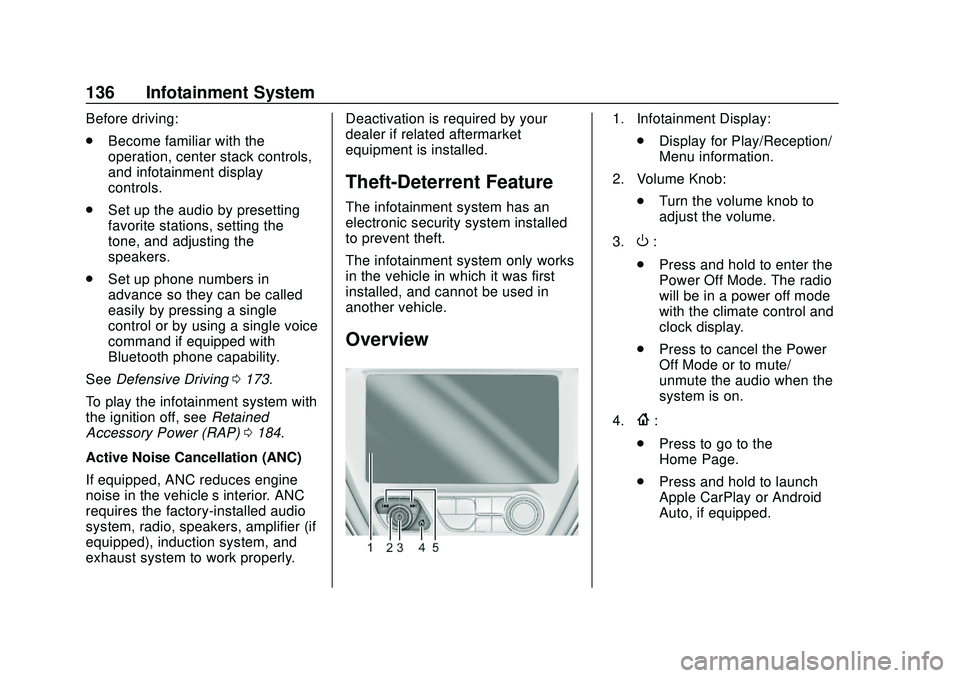
Overview
1. Infotainment Display:
.Display for Play/Reception/
Menu information.
2. Volume Knob: .Turn the volume knob to
adjust the volume.
3.
O:
. Press and hold to enter the
Power Off Mode. The radio
will be in a power off mode
with the climate control and
clock display.
. Press to cancel the Power
Off Mode or to mute/
unmute the audio when the
system is on.
4.
{:
. Press to go to the
Home Page.
. Press and hold to launch
Apple CarPlay or Android
Auto, if equipped.
Page 142 of 347
Chevrolet BOLT EV Owner Manual (GMNA-Localizing-U.S./Canada/Mexico-
13556250) - 2020 - CRC - 2/11/20
Infotainment System 141
Update AM or FM Stations1. Touch Browse Audio.
2. Touch Update AM Stations or Update FM Stations.
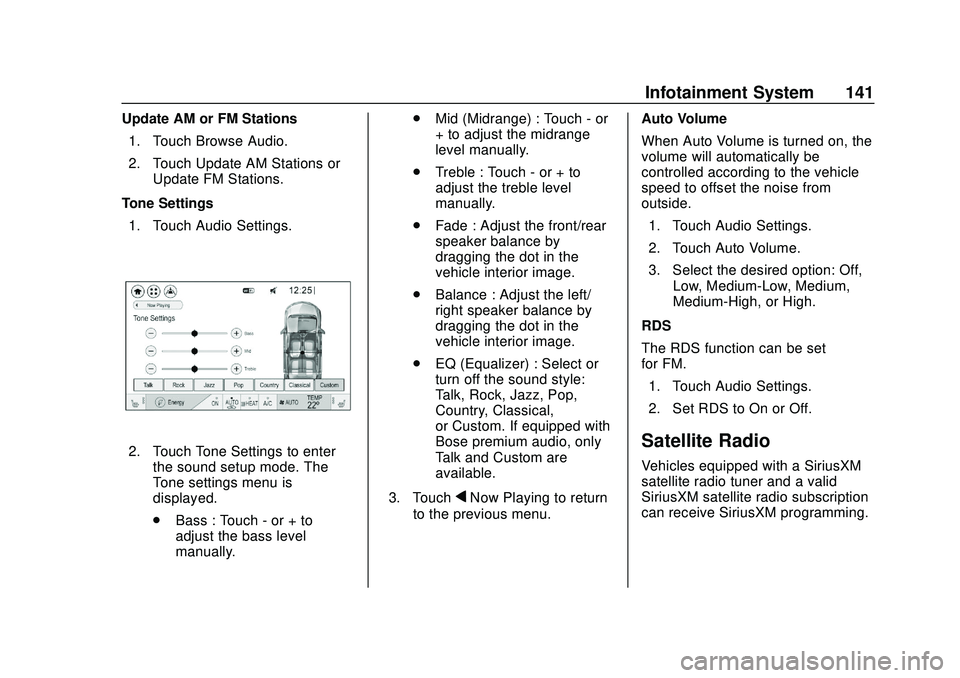
Tone Settings 1. Touch Audio Settings.
2. Touch Tone Settings to enter the sound setup mode. The
Tone settings menu is
displayed.
.Bass : Touch - or + to
adjust the bass level
manually. .
Mid (Midrange) : Touch - or
+ to adjust the midrange
level manually.
. Treble : Touch - or + to
adjust the treble level
manually.
. Fade : Adjust the front/rear
speaker balance by
dragging the dot in the
vehicle interior image.
. Balance : Adjust the left/
right speaker balance by
dragging the dot in the
vehicle interior image.
. EQ (Equalizer) : Select or
turn off the sound style:
Talk, Rock, Jazz, Pop,
Country, Classical,
or Custom. If equipped with
Bose premium audio, only
Talk and Custom are
available.
3. Touch
qNow Playing to return
to the previous menu. Auto Volume
When Auto Volume is turned on, the
volume will automatically be
controlled according to the vehicle
speed to offset the noise from
outside.
1. Touch Audio Settings.
2. Touch Auto Volume.
3. Select the desired option: Off, Low, Medium-Low, Medium,
Medium-High, or High.
RDS
The RDS function can be set
for FM. 1. Touch Audio Settings.
2. Set RDS to On or Off.
Satellite Radio
Vehicles equipped with a SiriusXM
satellite radio tuner and a valid
SiriusXM satellite radio subscription
can receive SiriusXM programming.
Page 166 of 347
Chevrolet BOLT EV Owner Manual (GMNA-Localizing-U.S./Canada/Mexico-
13556250) - 2020 - CRC - 2/11/20
Climate Controls 165
For best results, clear all snow and
ice from the windshield before
defrosting.
L:Touch to turn on
recirculation.
An indicator light comes on. Air is
recirculated to quickly cool the
inside of the vehicle or to reduce the
entry of outside air and odors. Using
the recirculation mode for extended
periods may cause the windows to
fog. If this happens, select the
defrost mode.
Using air conditioning and
recirculation together for long
periods of time may cause the air
inside the vehicle to become too
dry. To prevent this from happening,
after the air in the vehicle has
cooled, turn the recirculation
mode off.
Touching this button cancels
automatic recirculation. Press AUTO
to return to automatic operation;
recirculation runs automatically as
needed.
vHEAT : Touch to turn the heater
on when the fan is on. A/C :
Touch to turn the air
conditioning on when the fan is on.
Auto Defog : The system will
monitor high humidity inside the
vehicle. When high humidity is
detected, the climate control system
may adjust to outside air supply and
turn on the air conditioner or the
heater. The fan speed may slightly
increase to help prevent fogging.
When high humidity is no longer
detected, the system will return to
its prior operation. To turn Auto
Defog off or on, see “Climate and
Air Quality” underVehicle
Personalization 0121.
Auto Heated Seats : If equipped,
when the vehicle is on, this feature
will automatically activate the
heated seats at the level required by
the vehicle’ s interior temperature. In
auto mode, the indicators
automatically show the level setting
required.
Use the manual heated seat buttons
on the infotainment display to turn
auto heated seats off. Once this feature is turned off, the auto heated
seats will be activated the next time
the vehicle is turned on.
In manual mode, the controls can
be accessed while the vehicle is on
by touching
(orMwith three level
indicators high, medium, low or off
on the climate control display. If the
passenger seat is unoccupied, the
auto heated seats feature will not
activate that seat. See Heated Front
Seats 035 and
Vehicle Personalization 0121.
Rear Window Defogger
K:Press to turn the rear window
defogger on or off. An indicator light
on the button comes on to show that
the rear window defogger is on.
The defogger only works when the
vehicle is on. The defogger will turn
off if the vehicle is turned off.
Page 172 of 347
Chevrolet BOLT EV Owner Manual (GMNA-Localizing-U.S./Canada/Mexico-
13556250) - 2020 - CRC - 2/11/20
Driving and Operating 171
Driving Information
Driving for Better Energy
Efficiency
Use the following tips to help
maximize energy efficiency and
range.
In colder temperatures, while these
efficiency tips will help, the electric
vehicle driving range will be lower
due to higher energy usage
including energy spent heating the
cabin.
The Range Impacts screen
estimates the influence of the main
factors impacting vehicle range.
After charging is complete, this
information is reset. See“Range
Impacts” underEnergy Information
0 115.
Acceleration/Braking/Coasting
Avoid rapid accelerations and
decelerations.
Electric range is maximized at
89 km/h (55 mph) and less. Use cruise control when
appropriate.
Plan ahead for decelerations and
coast whenever possible. Do not
rush to traffic signals, and do not
shift to N (Neutral) to coast.
The vehicle recovers more energy
while coasting and braking in
L (Low) than in D (Drive) mode.
Using the steering wheel paddle
during deceleration recovers more
energy. See
Regenerative Braking
0 194.
Terrain and Vehicle Speed
Higher speeds and grade changes
use more energy and can
significantly reduce electric range.
Climate Setting
Using the heat and air conditioning
systems decreases the energy
available for electric driving.
Optimal energy efficiency is
achieved when the heat, air
conditioning, and fan are turned off. Use the heated seat feature instead
of climate control system. Heating
the seat uses less energy than
heating the vehicle interior.
Use remote start to heat or cool the
interior when the vehicle is plugged
in to maximize the electric range by
utilizing electricity from the electrical
outlet.
In hot weather, avoid parking in
direct sunlight or use sunshades
inside the vehicle.
Keep the inside of the windows
clean to reduce fogging, and turn off
the front defroster and rear defogger
when they are not needed.
Avoid driving with the windows open
at highway speeds.
Use the Enhanced Battery Gauge
on the Instrument Cluster to view
the effect of climate control settings
on your estimated range. See
Battery Gauge (High Voltage)
098.
Outside Temperature
On colder days, it is best to plug in
the vehicle overnight, and then
remote start the vehicle.
Page 173 of 347
Chevrolet BOLT EV Owner Manual (GMNA-Localizing-U.S./Canada/Mexico-
13556250) - 2020 - CRC - 2/11/20
172 Driving and Operating
Allow the vehicle to warm up for
20 minutes before driving.
If possible, use a level 2 (32 amp)
high power charge station for best
results. This allows the interior of
the vehicle and high voltage battery
to warm to optimal temperature.
Vehicle Charging/Maintenance
Charging
Keep the vehicle plugged in, even
when fully charged, to keep the
battery temperature ready for the
next drive. This is important when
outside temperatures are extremely
hot or cold.
Maintenance
Always keep the tires properly
inflated and the vehicle properly
aligned.
The weight of excess cargo in the
vehicle affects efficiency and range.
Avoid carrying more than is needed.
Avoid unnecessary use of electrical
accessories. Power used for
functions other than propelling the
vehicle will reduce EV range.Using a rooftop carrier will reduce
efficiency due to additional weight
and drag.
Distracted Driving
Distraction comes in many forms
and can take your focus from the
task of driving. Exercise good
judgment and do not let other
activities divert your attention away
from the road. Many local
governments have enacted laws
regarding driver distraction. Become
familiar with the local laws in
your area.
To avoid distracted driving, keep
your eyes on the road, keep your
hands on the steering wheel, and
focus your attention on driving.
.
Do not use a mobile phone in
demanding driving situations.
Use a hands-free method to
place or receive necessary
phone calls.
. Watch the road. Do not read,
take notes, or look up
information on mobile phones or
other electronic devices. .
Designate a front seat
passenger to handle potential
distractions.
. Become familiar with vehicle
features before driving, such as
programming favorite radio
stations and adjusting climate
control and seat settings.
Program all trip information into
any navigation device prior to
driving.
. Wait until the vehicle is parked
to retrieve items that have fallen
to the floor.
. Stop or park the vehicle to tend
to children.
. Keep pets in an appropriate
carrier or restraint.
. Avoid stressful conversations
while driving, whether with a
passenger or on a mobile
phone.
Page 234 of 347
Chevrolet BOLT EV Owner Manual (GMNA-Localizing-U.S./Canada/Mexico-
13556250) - 2020 - CRC - 2/11/20
Vehicle Care 233
Towing the Vehicle
Towing the Vehicle . . . . . . . . . . . 287
Recreational VehicleTowing . . . . . . . . . . . . . . . . . . . . . . 289
Appearance Care
Exterior Care . . . . . . . . . . . . . . . . . 291
Interior Care . . . . . . . . . . . . . . . . . . 295
Floor Mats . . . . . . . . . . . . . . . . . . . . 298
General Information
For service and parts needs, visit
your dealer. You will receive
genuine GM parts and GM-trained
and supported service people.
Genuine GM parts have one of
these marks:
California Proposition
65 Warning
{Warning
Most motor vehicles, including
this one, as well as many of its
service parts and fluids, contain
and/or emit chemicals known to
the State of California to cause
cancer and birth defects or other
reproductive harm. Engine
exhaust, many parts and
systems, many fluids, and some
component wear by-products
contain and/or emit these
chemicals. For more information
go to www.P65Warnings.ca.gov/
passenger-vehicle.
See Battery - North America 0242
and Jump Starting - North America
0 284 and the back cover.
Page 255 of 347
Chevrolet BOLT EV Owner Manual (GMNA-Localizing-U.S./Canada/Mexico-
13556250) - 2020 - CRC - 2/11/20
254 Vehicle Care
FusesUsage
45 Vehicle integration
control module
46 Integrated chassis
control module
47 Headlamp leveling
48 Integrated chassis
control module
49 Interior rearview
mirror
50 –
51 Electric brake boost
52 Rear camera
54 A/C control module
55 Rechargeable energy
storage system
coolant pump
56 –
57 Power electronics
coolant pump
58 Engine control module
59 Electric steering
column lock Fuses
Usage
60 HVAC electric heater
61 On-board charging
module
62 Transmission range
control module 1
63 Electric cooling fan
64 Engine control module
65 Auxiliary heater pump
66 Powertrain
67 Drive unit controller
70 A/C control module
71 –
72 Transmission range
control module
73 Single power inverter
module
74 – Relays
Usage
6 Pedestrian friendly
alert function
21 HID lamp
25 Powertrain
53 Run/Crank
68 Rear window
defogger
69 Second run/Crank
Page 296 of 347
Chevrolet BOLT EV Owner Manual (GMNA-Localizing-U.S./Canada/Mexico-
13556250) - 2020 - CRC - 2/11/20
Vehicle Care 295
for surface condition. Inspect drum
brake linings/shoes for wear or
cracks. Inspect all other brake parts.
Steering, Suspension, and
Chassis Components
Visually inspect steering,
suspension, and chassis
components for damaged, loose,
or missing parts or signs of wear at
least once a year.
Inspect power steering for proper
attachment, connections, binding,
leaks, cracks, chafing, etc.
Visually check constant velocity joint
boots and axle seals for leaks.
Body Component Lubrication
Lubricate all key lock cylinders,
hood hinges, liftgate hinges, steel
charge port door, and power assist
step hinges, unless the components
are plastic. Applying silicone grease
on weatherstrips with a clean cloth
will make them last longer, seal
better, and not stick or squeak.
Underbody Maintenance
At least twice a year, spring and fall,
use plain water to flush any
corrosive materials from the
underbody. Take care to thoroughly
clean any areas where mud and
other debris can collect.
Sheet Metal Damage
If the vehicle is damaged and
requires sheet metal repair or
replacement, make sure the body
repair shop applies anti-corrosion
material to parts repaired or
replaced to restore corrosion
protection.
Original manufacturer replacement
parts will provide the corrosion
protection while maintaining the
vehicle warranty.
Finish Damage
Quickly repair minor chips and
scratches with touch-up materials
available from your dealer to avoid
corrosion. Larger areas of finish
damage can be corrected in your
dealer's body and paint shop.
Chemical Paint Spotting
Airborne pollutants can fall upon
and attack painted vehicle surfaces
causing blotchy, ring-shaped
discolorations, and small, irregular
dark spots etched into the paint
surface. See“Finish Care”
previously in this section.
Interior Care
To prevent dirt particle abrasions,
regularly clean the vehicle's interior.
Immediately remove any soils.
Newspapers or dark garments can
transfer color to the vehicle’s
interior.
Use a soft bristle brush to remove
dust from knobs and crevices on the
instrument cluster. Using a mild
soap solution, immediately remove
hand lotions, sunscreen, and insect
repellent from all interior surfaces or
permanent damage may result.
Use cleaners specifically designed
for the surfaces being cleaned to
prevent permanent damage. Apply
all cleaners directly to the cleaning
Page 297 of 347
Chevrolet BOLT EV Owner Manual (GMNA-Localizing-U.S./Canada/Mexico-
13556250) - 2020 - CRC - 2/11/20
296 Vehicle Care
cloth. Do not spray cleaners on any
switches or controls. Remove
cleaners quickly.
Before using cleaners, read and
follow all safety instructions on the
label. While cleaning the interior,
open the doors and windows to get
proper ventilation.
To prevent damage, do not clean
the interior using the following
cleaners or techniques:
.Never use a razor or any other
sharp object to remove soil from
any interior surface.
. Never use a brush with stiff
bristles.
. Never rub any surface
aggressively or with too much
pressure.
. Do not use laundry detergents or
dishwashing soaps with
degreasers. For liquid cleaners,
use approximately 20 drops per
3.8 L (1 gal) of water.
A concentrated soap solution will
create streaks and attract dirt.
Do not use solutions that contain
strong or caustic soap. .
Do not heavily saturate the
upholstery when cleaning.
. Do not use solvents or cleaners
containing solvents.
Interior Glass
To clean, use a terry cloth fabric
dampened with water. Wipe droplets
left behind with a clean dry cloth.
If necessary, use a commercial
glass cleaner after cleaning with
plain water.
Caution
To prevent scratching, never use
abrasive cleaners on automotive
glass. Abrasive cleaners or
aggressive cleaning may damage
the rear window defogger.
Cleaning the windshield with water
during the first three to six months
of ownership will reduce tendency
to fog.
Speaker Covers
Vacuum around a speaker cover
gently, so that the speaker will not
be damaged. Clean spots with water
and mild soap.
Coated Moldings
Coated moldings should be cleaned.
. When lightly soiled, wipe with a
sponge or soft, lint-free cloth
dampened with water.
. When heavily soiled, use warm
soapy water.
Fabric/Carpet/Suede
Start by vacuuming the surface
using a soft brush attachment. If a
rotating vacuum brush attachment is
being used, only use it on the floor
carpet. Before cleaning, gently
remove as much of the soil as
possible:
.Gently blot liquids with a paper
towel. Continue blotting until no
more soil can be removed.
. For solid soils, remove as much
as possible prior to vacuuming.