Lug CHEVROLET BOLT EV 2020 Owner's Guide
[x] Cancel search | Manufacturer: CHEVROLET, Model Year: 2020, Model line: BOLT EV, Model: CHEVROLET BOLT EV 2020Pages: 347, PDF Size: 5.7 MB
Page 186 of 347
Chevrolet BOLT EV Owner Manual (GMNA-Localizing-U.S./Canada/Mexico-
13556250) - 2020 - CRC - 2/11/20
Driving and Operating 185
Shifting Into Park
To shift into P (Park):1. Hold the brake pedal down and set the parking brake. See
Electric Parking Brake 0192.
2. Press the button on top of the shift lever to shift into P (Park).
See Electric Drive Unit 0187.
3. The P indicator on the shift lever will turn red when the
vehicle is in P (Park).
4. Turn the vehicle off.
Leaving the Vehicle with the
Propulsion System On
{Warning
It is dangerous to get out of the
vehicle if the P (Park) button is
not pressed with the parking
brake set. The vehicle can roll.
Do not leave the vehicle when the
propulsion system is running.
If you have left the propulsion (Continued)
Warning (Continued)
system running, the vehicle can
move suddenly. You or others
could be injured. To be sure the
vehicle will not move, even when
you are on fairly level ground,
always set the parking brake and
press the P (Park) button.
If the vehicle must be left with the
propulsion system on, be sure that
the vehicle is in P (Park) with the
parking brake set, before leaving
the vehicle. After pressing the
P (Park) button, hold down the
regular brake pedal. If you cannot
see the P (Park) indicator in
instrument cluster, it means that the
vehicle has not shifted to P (Park).
Shifting out of Park
To shift out of P (Park), the vehicle
must be on, the brake pedal must
be applied, and the charge cord
must be unplugged.
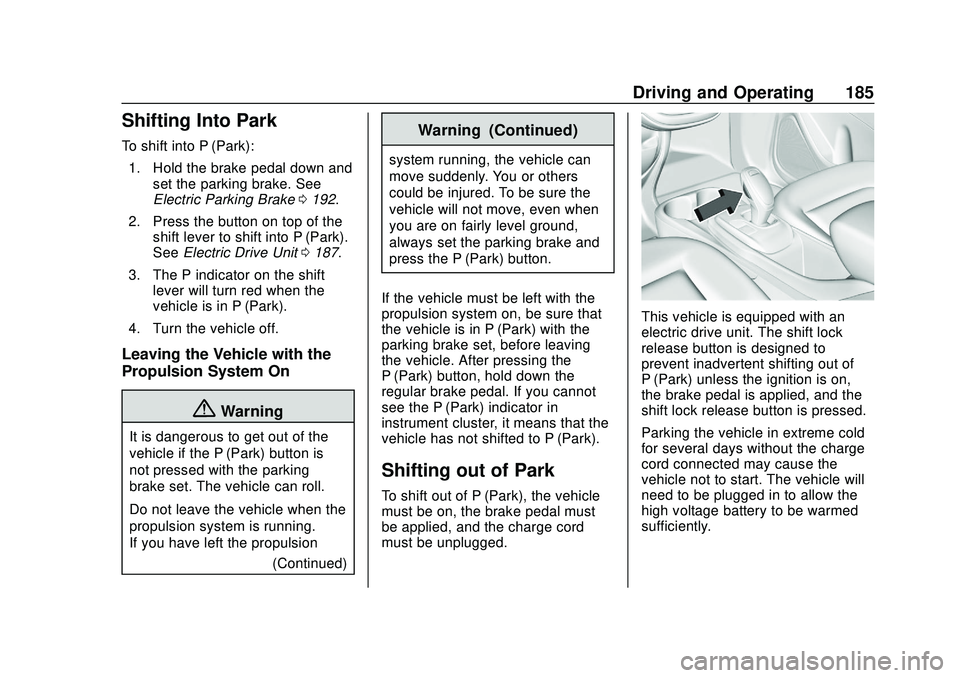
This vehicle is equipped with an
electric drive unit. The shift lock
release button is designed to
prevent inadvertent shifting out of
P (Park) unless the ignition is on,
the brake pedal is applied, and the
shift lock release button is pressed.
Parking the vehicle in extreme cold
for several days without the charge
cord connected may cause the
vehicle not to start. The vehicle will
need to be plugged in to allow the
high voltage battery to be warmed
sufficiently.
Page 187 of 347
Chevrolet BOLT EV Owner Manual (GMNA-Localizing-U.S./Canada/Mexico-
13556250) - 2020 - CRC - 2/11/20
186 Driving and Operating
The shift lock is always functional
except in the case of an uncharged
or low charged 12-volt battery (less
than 9 volts).
If the vehicle has an uncharged
12-volt battery or a 12-volt battery
with low voltage, try charging or
jump starting the 12-volt battery.
To shift out of P (Park):1. Apply the brake pedal.
2. Press POWER
Oto start the
vehicle.
3. Verify that the vehicle is unplugged and the vehicle
ready light is on.
4. Press the shift lock release button on the side of the shift
lever.
5. Move the shift lever into the desired position.
6. The P indicator will turn white and the gear indicator on the
shift lever will turn red when
the vehicle is no longer in
P (Park). 7. After releasing the shift lever, it
will return to the center
position.
Extended Parking
It is best not to park with the vehicle
running. If the vehicle is left running,
be sure it will not move and there is
adequate ventilation.
See Shifting Into Park 0185.
If the vehicle is left parked and
running with the RKE transmitter
outside the vehicle, it will continue
to run for up to an hour.
If the vehicle is left parked and
running with the RKE transmitter
inside the vehicle, it will continue to
run for up to two hour.
The timer will reset if the vehicle is
taken out of P (Park) while it is
running.
Electric Vehicle
Operating Modes
Driver Selected Operating
Modes
Sport Mode
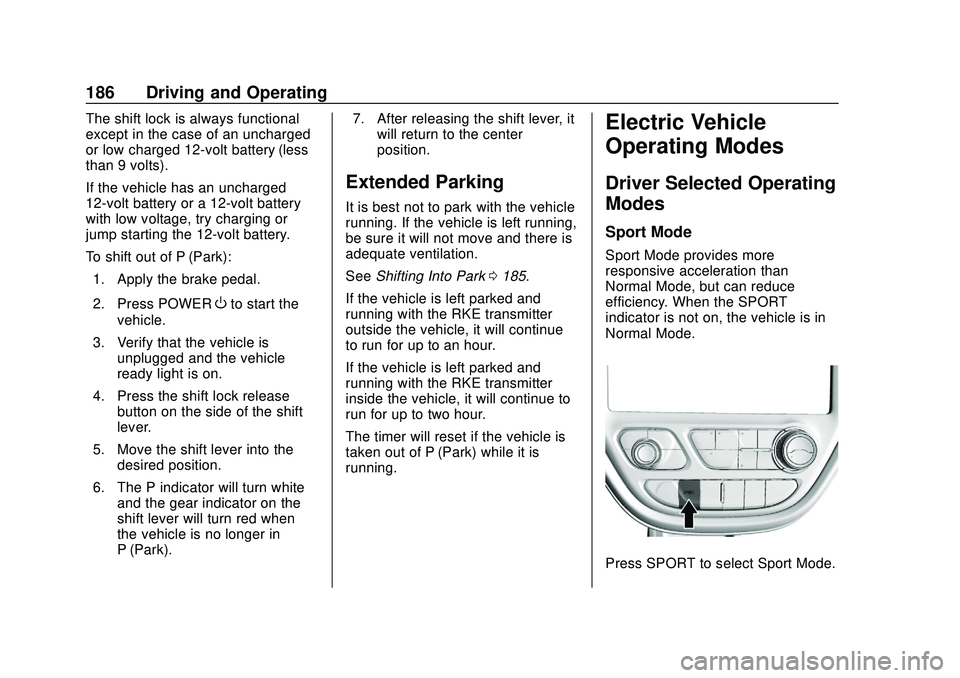
Sport Mode provides more
responsive acceleration than
Normal Mode, but can reduce
efficiency. When the SPORT
indicator is not on, the vehicle is in
Normal Mode.
Press SPORT to select Sport Mode.
Page 215 of 347
Chevrolet BOLT EV Owner Manual (GMNA-Localizing-U.S./Canada/Mexico-
13556250) - 2020 - CRC - 2/11/20
214 Driving and Operating
Plug-In Charging
This section explains the process
for charging the high voltage battery.
Do not allow the vehicle to remain in
temperature extremes for long
periods without being driven or
plugged in. It is recommended that
the vehicle be plugged in when
temperatures are below 0 °C (32 °F)
and above 32 °C (90 °F) to
maximize high voltage battery life.
When using a 120-volt AC electrical
outlet, it will take approximately
55 hours to charge the vehicle from
a fully depleted battery with the
12 amp AC current setting, allowing
approximately 6 km (4 mi) for every
hour of charging.
When using a 240-volt charging
station, it will take approximately
10 hours to charge the vehicle with
the 32 amp setting, allowing
approximately 40 km (25 mi) for
every hour of charging.Charge times will vary based on
battery condition, charge level, and
outside temperature. See
Programmable Charging
0107 for
charge mode selection.
If equipped, the vehicle can be
charged using DC charging
equipment typically found at service
stations and other public locations.
When using a DC charging station
with at least 80 kW of available
power, it will take approximately
30 minutes to recharge from a
depleted battery to an estimated
145 km (90 mi) of driving range.
This time estimate is applicable to
nominal temperature ranges. In
extreme hot or cold conditions, this
time may be lengthened. A full
charge will take additional time.
The charging system may run fans
and pumps that result in sounds
from the vehicle while it is turned
off. Additionally, clicking sounds
may be caused by the electrical
devices used while charging.
The vehicle does not require indoor
charging area ventilation before,
during, or after charging. The vehicle cannot be driven while
the charge cord is plugged into the
vehicle.
Charging Override
A CHARGING OVERRIDE/
INTERRUPTION OCCURRED
message may display to indicate
that a charging override or
interruption has occurred due to one
or more of the following events:
.
Override of the charge settings
by the owner.
. Unintended interruption of AC
power at the vehicle's
charge port.
. Interruption of charging by the
utility company.
There are several screens that will
display depending on the current
charging status. See Programmable
Charging 0107.
A loss of AC power alert may sound
for a short time if AC power is lost
for over one minute. This sound
alert can be turned off. See Vehicle
Personalization 0121.
Page 216 of 347
Chevrolet BOLT EV Owner Manual (GMNA-Localizing-U.S./Canada/Mexico-
13556250) - 2020 - CRC - 2/11/20
Driving and Operating 215
AC Charging
AC Charge Cord Vehicle Plug
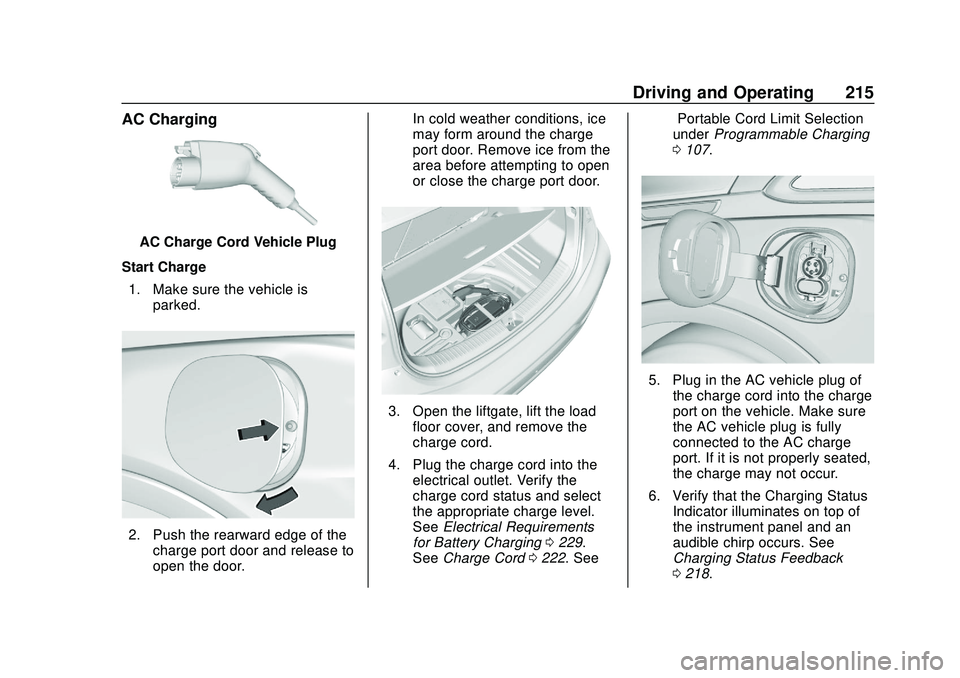
Start Charge 1. Make sure the vehicle is parked.
2. Push the rearward edge of thecharge port door and release to
open the door. In cold weather conditions, ice
may form around the charge
port door. Remove ice from the
area before attempting to open
or close the charge port door.
3. Open the liftgate, lift the load
floor cover, and remove the
charge cord.
4. Plug the charge cord into the electrical outlet. Verify the
charge cord status and select
the appropriate charge level.
See Electrical Requirements
for Battery Charging 0229.
See Charge Cord 0222. See “Portable Cord Limit Selection”
under
Programmable Charging
0 107.
5. Plug in the AC vehicle plug of
the charge cord into the charge
port on the vehicle. Make sure
the AC vehicle plug is fully
connected to the AC charge
port. If it is not properly seated,
the charge may not occur.
6. Verify that the Charging Status Indicator illuminates on top of
the instrument panel and an
audible chirp occurs. See
Charging Status Feedback
0218.
Page 217 of 347
Chevrolet BOLT EV Owner Manual (GMNA-Localizing-U.S./Canada/Mexico-
13556250) - 2020 - CRC - 2/11/20
216 Driving and Operating
7. To arm the charge cord theftalert, lock the vehicle twice with
the RKE transmitter. To disarm
this feature, see Charging
Options 0117.
End Charge 1. Unlock the vehicle with the RKE transmitter to disarm the
charge cord theft alert.
2. Unplug the vehicle plug of the charge cord from the vehicle.
Unlock the vehicle plug of the
charge cord from the vehicle by
pressing the button on the top
of the charge cord plug.
3. Close the charge port door by pressing firmly in the center
until it latches.
4. Unplug the charge cord from the electrical outlet.
5. Place the charge cord into the storage compartment.DC Charging (If Equipped)
DC Charging Station Hardware
Check the charge station DC
vehicle plug for compatibility with
the DC charge port on this vehicle.
When recharging at a DC fast
charge station, the power cable
connected to the vehicle must be
less than 10 m (33 ft) in length.
Follow the steps listed on the
charging station to perform a DC
vehicle charge.
If for any reason DC charging does
not begin or is interrupted, check
the DC charge station display for
messages. Unplug to restart the DC
charge process.
Start Charge
1. Make sure the vehicle is parked.
2. Push the rearward edge of the charge port door and release to
open the door.
In cold weather conditions, ice
may form around the charge
port door. The charge port door may not open on the first
attempt. Remove ice from the
area and repeat attempting to
open the charge port door.
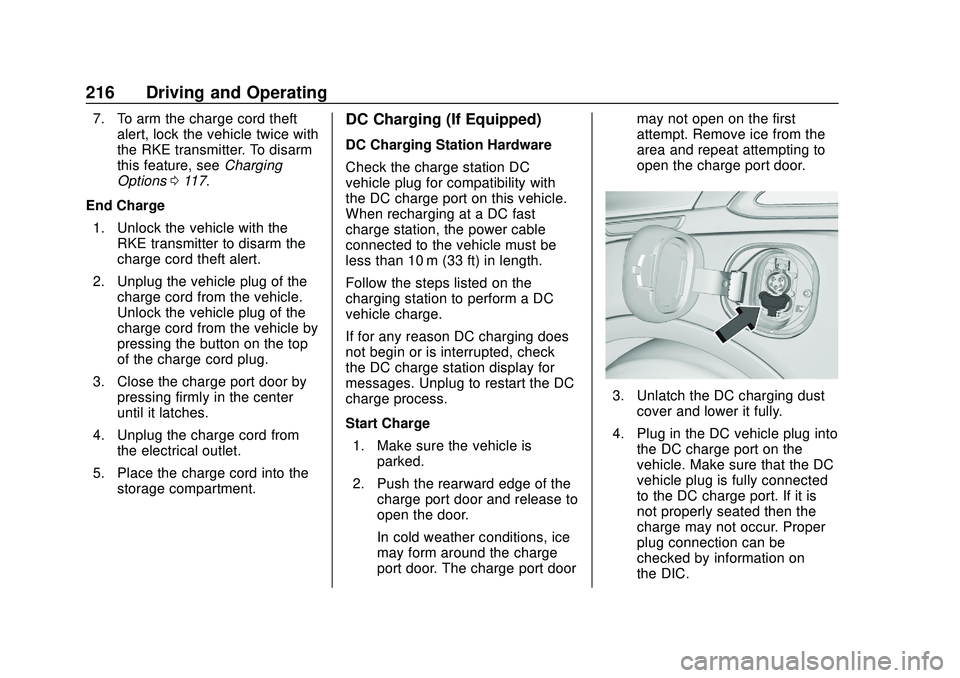
3. Unlatch the DC charging dust
cover and lower it fully.
4. Plug in the DC vehicle plug into the DC charge port on the
vehicle. Make sure that the DC
vehicle plug is fully connected
to the DC charge port. If it is
not properly seated then the
charge may not occur. Proper
plug connection can be
checked by information on
the DIC.
Page 218 of 347
Chevrolet BOLT EV Owner Manual (GMNA-Localizing-U.S./Canada/Mexico-
13556250) - 2020 - CRC - 2/11/20
Driving and Operating 217
5. Follow the steps listed on thecharging station to start
charging.
6. Once charging, the DC vehicle plug will be locked to the DC
charge port and cannot be
disconnected while charging is
active.
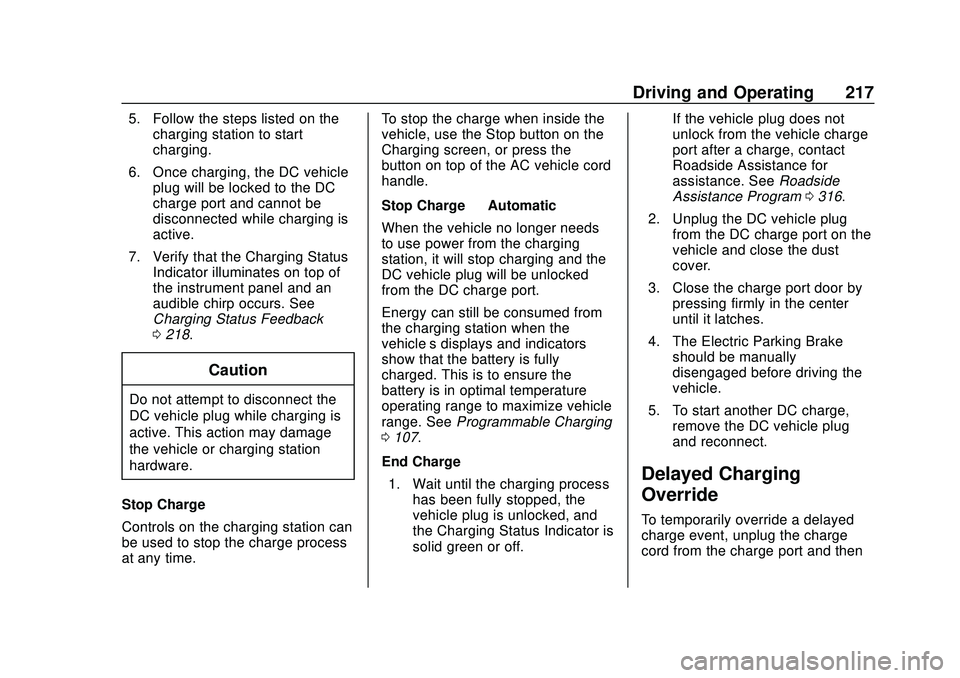
7. Verify that the Charging Status Indicator illuminates on top of
the instrument panel and an
audible chirp occurs. See
Charging Status Feedback
0218.
Caution
Do not attempt to disconnect the
DC vehicle plug while charging is
active. This action may damage
the vehicle or charging station
hardware.
Stop Charge
Controls on the charging station can
be used to stop the charge process
at any time. To stop the charge when inside the
vehicle, use the Stop button on the
Charging screen, or press the
button on top of the AC vehicle cord
handle.
Stop Charge
—Automatic
When the vehicle no longer needs
to use power from the charging
station, it will stop charging and the
DC vehicle plug will be unlocked
from the DC charge port.
Energy can still be consumed from
the charging station when the
vehicle’s displays and indicators
show that the battery is fully
charged. This is to ensure the
battery is in optimal temperature
operating range to maximize vehicle
range. See Programmable Charging
0 107.
End Charge 1. Wait until the charging process has been fully stopped, the
vehicle plug is unlocked, and
the Charging Status Indicator is
solid green or off. If the vehicle plug does not
unlock from the vehicle charge
port after a charge, contact
Roadside Assistance for
assistance. See
Roadside
Assistance Program 0316.
2. Unplug the DC vehicle plug from the DC charge port on the
vehicle and close the dust
cover.
3. Close the charge port door by pressing firmly in the center
until it latches.
4. The Electric Parking Brake should be manually
disengaged before driving the
vehicle.
5. To start another DC charge, remove the DC vehicle plug
and reconnect.
Delayed Charging
Override
To temporarily override a delayed
charge event, unplug the charge
cord from the charge port and then
Page 219 of 347
Chevrolet BOLT EV Owner Manual (GMNA-Localizing-U.S./Canada/Mexico-
13556250) - 2020 - CRC - 2/11/20
218 Driving and Operating
plug it back in within five seconds.
A single audible chirp will sound
and charging will begin immediately.
To cancel a temporary override,
unplug the charge cord, wait for
10 seconds, and then plug the
charge cord back in. A double
audible chirp will sound and
charging will be delayed.
SeeProgrammable Charging 0107
for advanced charge scheduling
options.
Charging Status
Feedback
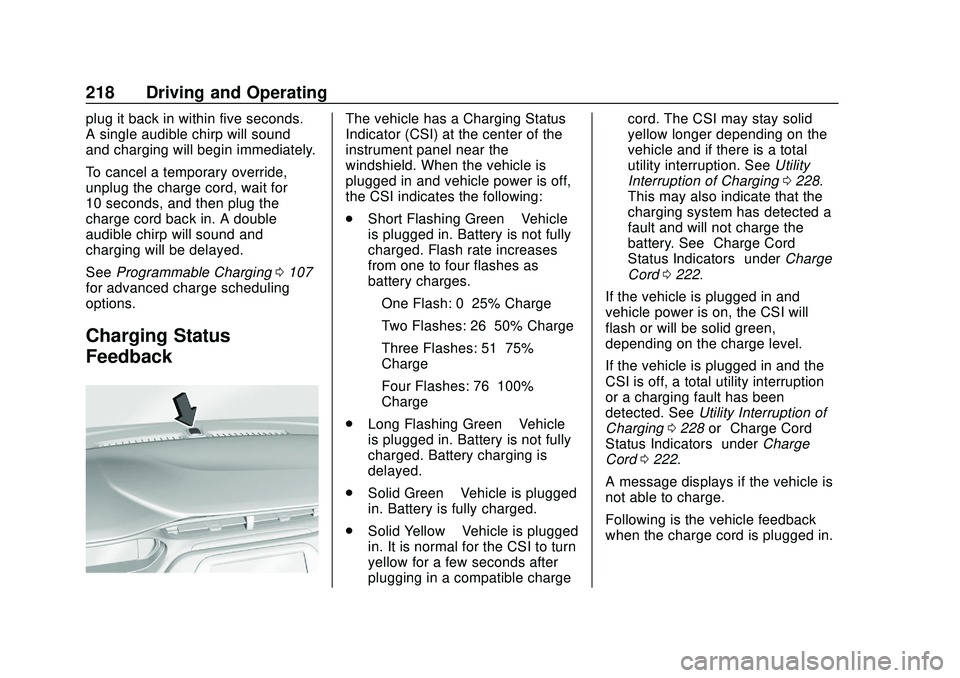
The vehicle has a Charging Status
Indicator (CSI) at the center of the
instrument panel near the
windshield. When the vehicle is
plugged in and vehicle power is off,
the CSI indicates the following:
. Short Flashing Green –Vehicle
is plugged in. Battery is not fully
charged. Flash rate increases
from one to four flashes as
battery charges.
‐ One Flash: 0–25% Charge
‐ Two Flashes: 26–50% Charge
‐ Three Flashes: 51–75%
Charge
‐ Four Flashes: 76–100%
Charge
. Long Flashing Green –Vehicle
is plugged in. Battery is not fully
charged. Battery charging is
delayed.
. Solid Green –Vehicle is plugged
in. Battery is fully charged.
. Solid Yellow –Vehicle is plugged
in. It is normal for the CSI to turn
yellow for a few seconds after
plugging in a compatible charge cord. The CSI may stay solid
yellow longer depending on the
vehicle and if there is a total
utility interruption. See
Utility
Interruption of Charging 0228.
This may also indicate that the
charging system has detected a
fault and will not charge the
battery. See “Charge Cord
Status Indicators” underCharge
Cord 0222.
If the vehicle is plugged in and
vehicle power is on, the CSI will
flash or will be solid green,
depending on the charge level.
If the vehicle is plugged in and the
CSI is off, a total utility interruption
or a charging fault has been
detected. See Utility Interruption of
Charging 0228 or“Charge Cord
Status Indicators” underCharge
Cord 0222.
A message displays if the vehicle is
not able to charge.
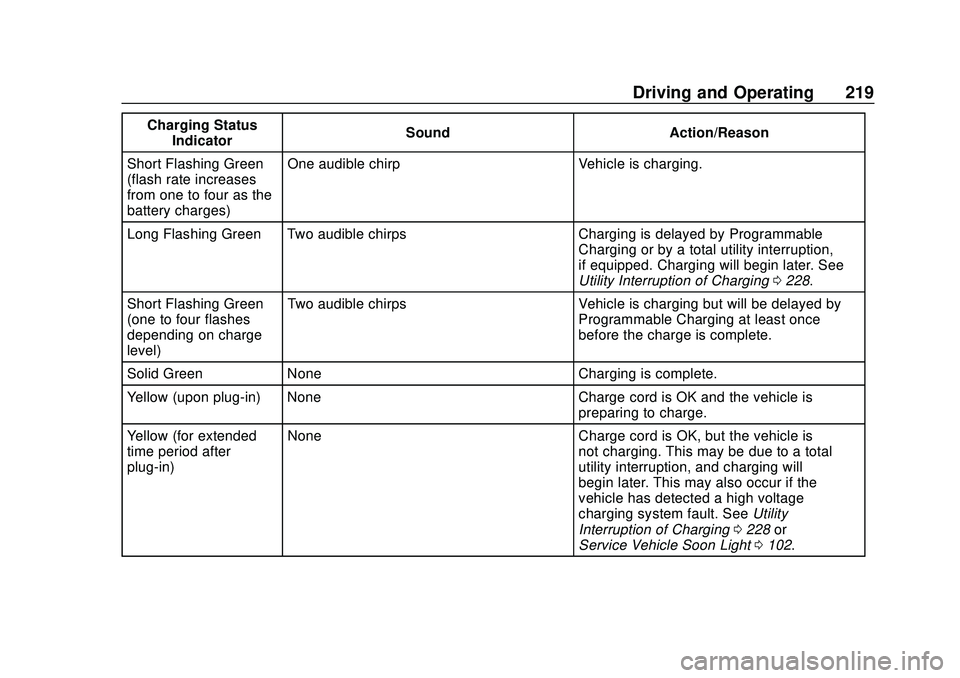
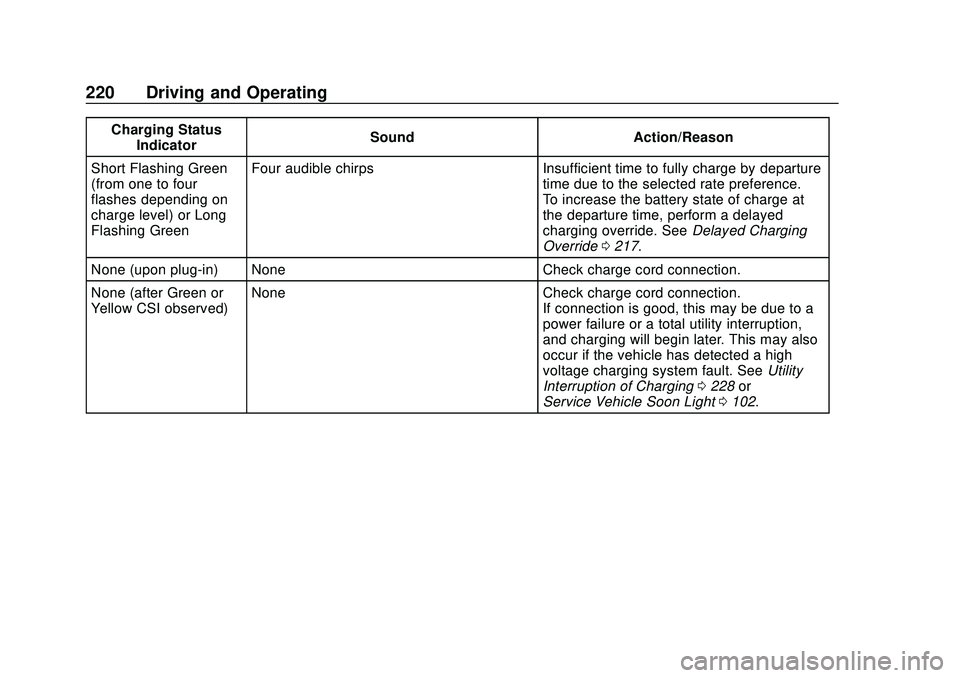
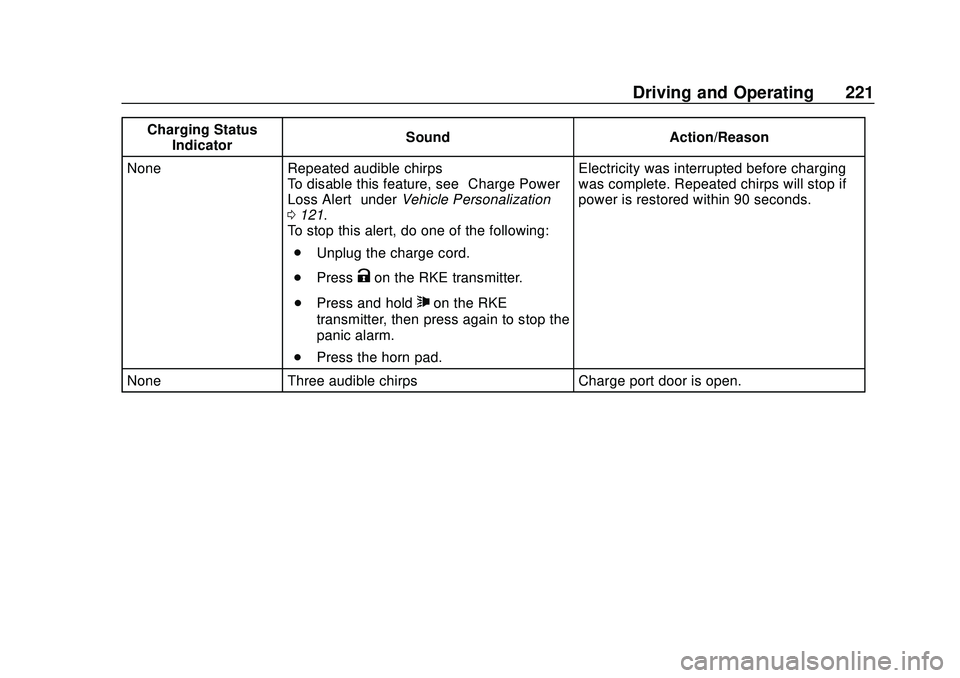
Following is the vehicle feedback
when the charge cord is plugged in.
Page 220 of 347
Chevrolet BOLT EV Owner Manual (GMNA-Localizing-U.S./Canada/Mexico-
13556250) - 2020 - CRC - 2/11/20
Driving and Operating 219
Charging StatusIndicator Sound Action/Reason
Short Flashing Green
(flash rate increases
from one to four as the
battery charges) One audible chirp Vehicle is charging.
Long Flashing Green Two audible chirps Charging is delayed by Programmable Charging or by a total utility interruption,
if equipped. Charging will begin later. See
Utility Interruption of Charging0228.
Short Flashing Green
(one to four flashes
depending on charge
level) Two audible chirps Vehicle is charging but will be delayed by
Programmable Charging at least once
before the charge is complete.
Solid Green None Charging is complete.
Yellow (upon plug-in) None Charge cord is OK and the vehicle is preparing to charge.
Yellow (for extended
time period after
plug-in) None Charge cord is OK, but the vehicle is
not charging. This may be due to a total
utility interruption, and charging will
begin later. This may also occur if the
vehicle has detected a high voltage
charging system fault. SeeUtility
Interruption of Charging 0228 or
Service Vehicle Soon Light 0102.
Page 221 of 347
Chevrolet BOLT EV Owner Manual (GMNA-Localizing-U.S./Canada/Mexico-
13556250) - 2020 - CRC - 2/11/20
220 Driving and Operating
Charging StatusIndicator Sound Action/Reason
Short Flashing Green
(from one to four
flashes depending on
charge level) or Long
Flashing Green Four audible chirps Insufficient time to fully charge by departure
time due to the selected rate preference.
To increase the battery state of charge at
the departure time, perform a delayed
charging override. SeeDelayed Charging
Override 0217.
None (upon plug-in) None Check charge cord connection.
None (after Green or
Yellow CSI observed) None Check charge cord connection.
If connection is good, this may be due to a
power failure or a total utility interruption,
and charging will begin later. This may also
occur if the vehicle has detected a high
voltage charging system fault. SeeUtility
Interruption of Charging 0228 or
Service Vehicle Soon Light 0102.
Page 222 of 347
Chevrolet BOLT EV Owner Manual (GMNA-Localizing-U.S./Canada/Mexico-
13556250) - 2020 - CRC - 2/11/20
Driving and Operating 221
Charging StatusIndicator Sound Action/Reason
None Repeated audible chirps To disable this feature, see “Charge Power
Loss Alert” underVehicle Personalization
0 121.
To stop this alert, do one of the following:
. Unplug the charge cord.
. Press
Kon the RKE transmitter.
. Press and hold
7on the RKE
transmitter, then press again to stop the
panic alarm.
. Press the horn pad. Electricity was interrupted before charging
was complete. Repeated chirps will stop if
power is restored within 90 seconds.
None Three audible chirps Charge port door is open.