radio controls CHEVROLET BOLT EV 2021 User Guide
[x] Cancel search | Manufacturer: CHEVROLET, Model Year: 2021, Model line: BOLT EV, Model: CHEVROLET BOLT EV 2021Pages: 293, PDF Size: 9.21 MB
Page 114 of 293
Chevrolet Bolt EV Owner Manual (GMNA-Localizing-U.S./Canada-
14637856) - 2021 - CRC - 10/2/20
Infotainment System 113
Infotainment System
Introduction
Introduction . . . . . . . . . . . . . . . . . . . . . . . . . . . . 113
Theft-Deterrent Feature . . . . . . . . . . . . . . . . 114
Overview . . . . . . . . . . . . . . . . . . . . . . . . . . . . . . 114
Operation . . . . . . . . . . . . . . . . . . . . . . . . . . . . . . 114
Software Updates . . . . . . . . . . . . . . . . . . . . . . 116
Radio
AM-FM Radio . . . . . . . . . . . . . . . . . . . . . . . . . . . 117
Satellite Radio . . . . . . . . . . . . . . . . . . . . . . . . . 118
Radio Reception . . . . . . . . . . . . . . . . . . . . . . . . 119
Multi-Band Antenna . . . . . . . . . . . . . . . . . . . 120
Audio Players
USB Port . . . . . . . . . . . . . . . . . . . . . . . . . . . . . . 120
Auxiliary Devices . . . . . . . . . . . . . . . . . . . . . . . 125
Bluetooth Audio . . . . . . . . . . . . . . . . . . . . . . . 125
OnStar System
OnStar System . . . . . . . . . . . . . . . . . . . . . . . . . 127
Phone
Bluetooth . . . . . . . . . . . . . . . . . . . . . . . . . . . . . . 127
Apple CarPlay and Android Auto . . . . . . . 129
Hands-Free Phone . . . . . . . . . . . . . . . . . . . . . 130
Settings
Settings . . . . . . . . . . . . . . . . . . . . . . . . . . . . . . . . 131
Teen Driver . . . . . . . . . . . . . . . . . . . . . . . . . . . . 132
Trademarks and License Agreements
Trademarks and LicenseAgreements . . . . . . . . . . . . . . . . . . . . . . . . . . 134
Introduction
Read the following pages to become familiar
with the features.
{Warning
Taking your eyes off the road for too
long or too often while using any
infotainment feature can cause a crash.
You or others could be injured or killed.
Do not give extended attention to
infotainment tasks while driving. Limit
your glances at the vehicle displays and
focus your attention on driving. Use voice
commands whenever possible.
The infotainment system has built-in
features intended to help avoid distraction
by disabling some functions when driving.
These functions may gray out when they
are unavailable. Many infotainment features
are also available through the instrument
cluster and steering wheel controls.
Before driving:
.Become familiar with the operation,
center stack controls, and infotainment
display controls.
Page 117 of 293
Chevrolet Bolt EV Owner Manual (GMNA-Localizing-U.S./Canada-
14637856) - 2021 - CRC - 10/2/20
116 Infotainment System
Gallery :Touch to view a picture. See
“Gallery” under“Selecting a Function”
following.
OnStar : Touch to use the OnStar function.
See OnStar Overview 0274.
Camera : Touch to access the camera
application. See Assistance Systems for
Parking or Backing 0171.
Low Power Mode : Touch to access the Low
Power Mode. See “Low Power Mode” under
Charging Options 098.
Selecting a Function
Audio
1. Touch
T.
2. Touch Audio, then Source.
.Touch AM to select AM radio.
.Touch FM to select FM radio.
.Touch SXM to select SiriusXM radio
(if equipped).
.Touch iPod to select iPod music.
.Touch USB1 to select USB1 music.
.Touch USB2 to select USB2 music.
.Touch Bluetooth to select Bluetooth
music.
.Touch AUX to select auxiliary sound
input. If the playback source (iPod/USB/AUX/
Bluetooth) is not connected to the
infotainment system, this function is not
available.
Audio source availability may vary
depending on the region.
The infotainment system can only support
two USB devices for the front USB ports.
Phone
To operate Bluetooth Hands-Free function,
connect the Bluetooth phone to the
infotainment system.
1. Touch
T.
2. Touch Phone, then touch
5on the
infotainment display, or press
gon the
steering wheel controls.
Settings
1. Touch
T.
2. Touch Settings, then select an item from the menu and adjust the settings by
selecting from the available options. See
Settings 0131.
Gallery
1. Touch
T. 2. Touch Gallery, then touch
'menu to
view picture files contained in the USB
storage device.
Software Updates
Over-the-Air Software Updates
If equipped, the infotainment system can
download and install select software updates
over a wireless connection. The system will
prompt for certain updates to be
downloaded and installed. There is also an
option to check for updates manually.
To manually check for updates, touch
Settings on the Home Page, followed by
Software Information, and then System
Update. Follow the on-screen prompts. Steps
for downloading and installing updates may
vary by vehicle.
Downloading Over-the-Air vehicle software
updates requires Internet connectivity, which
can be accessed through the vehicle’s
built-in OnStar 4G LTE connection,
if equipped and active. If required, data
plans are provided by a third party.
Optionally, a secure Wi-Fi hotspot such as a
compatible mobile device hotspot, home
hotspot, or public hotspot can be used.
Applicable data rates may apply.
Page 118 of 293
Chevrolet Bolt EV Owner Manual (GMNA-Localizing-U.S./Canada-
14637856) - 2021 - CRC - 10/2/20
Infotainment System 117
To connect the infotainment system to a
secured mobile device hotspot, home
hotspot, or public hotspot, touch Settings on
the Home Page, followed by Wi-Fi, and then
Manage Wi-Fi Networks. Select the
appropriate Wi-Fi network, and follow the
on-screen prompts. Download speeds
may vary.
On most compatible mobile devices,
activation of the Wi-Fi hotspot is in the
Settings menu under Mobile Network
Sharing, Personal Hotspot, Mobile Hotspot,
or similar.
Availability of Over-the-Air vehicle software
updates varies by vehicle and country. For
more information on this feature, see
www.my.chevrolet.com/learn.
Radio
AM-FM Radio
Listening to AM-FM Radio
1. TouchT.
2. Touch Audio, then Source.
3. Touch FM or AM. The most recently listened to AM or FM radio station is
displayed. RDS (Radio Data System) function is only
available in countries that support this
function.
Searching for Stations Automatically
Pressgordto automatically search for
an available station with good reception.
If RDS is supported, it will tune to the
station and may include additional
information such as time, station
identification, and program information.
Searching for Stations Directly
1. Touch Tune.
2. Using the keypad, enter the desired station number.
Touching the period between digits is not
necessary. The radio will add it
automatically at the correct location.
Favorite Preset Operation
Saving Favorites 1. Select the band.
2. Select the desired station.
3. Touch
qor touch and hold the favorite
in the Favorites list to overwrite. 4. To delete it from the Favorites list, touch
q, or swipe the station from the list on
the right.
Up to 15 radio stations can be saved in the
Favorites list.
Listening to Favorites Directly 1. Touch Favorites to see the list of favorites.
2. Touch the desired station.
The steering wheel controls can also be used
to select favorites. See Steering Wheel
Controls 072.
Using the AM or FM Radio Tab
Current Station Information
1. Touch Browse Audio.
2. Touch Current Station Information to display the station information.
AM or FM Stations 1. Touch Browse Audio.
2. Touch AM Stations or FM Stations. The AM List or FM List is displayed.
FM Categories 1. Touch Browse Audio.
2. Touch FM Categories.
Page 143 of 293
Chevrolet Bolt EV Owner Manual (GMNA-Localizing-U.S./Canada-
14637856) - 2021 - CRC - 10/2/20
142 Climate Controls
Touching this button cancels automatic
recirculation. Press AUTO to return to
automatic operation; recirculation runs
automatically as needed.
vHEAT :Touch to turn the heater on when
the fan is on.
A/C : Touch to turn the air conditioning on
when the fan is on.
Auto Defog : The system will monitor high
humidity inside the vehicle. When high
humidity is detected, the climate control
system may adjust to outside air supply and
turn on the air conditioner or the heater.
The fan speed may slightly increase to help
prevent fogging. When high humidity is no
longer detected, the system will return to
its prior operation. To turn Auto Defog off
or on, see “Climate and Air Quality” under
Vehicle Personalization 0101.
Auto Heated Seats : If equipped, when the
vehicle is on, this feature will automatically
activate the heated seats at the level
required by the vehicle’s interior
temperature. In auto mode, the indicators
automatically show the level setting
required. Use the manual heated seat buttons on the
infotainment display to turn auto heated
seats off. Once this feature is turned off, the
auto heated seats will be activated the next
time the vehicle is turned on.
In manual mode, the controls can be
accessed while the vehicle is on by touching
(orMwith three level indicators high,
medium, low or off on the climate control
display. If the passenger seat is unoccupied,
the auto heated seats feature will not
activate that seat. See Heated Front Seats
0 29 and
Vehicle Personalization 0101.
Rear Window Defogger
K:Press to turn the rear window defogger
on or off. An indicator light on the button
comes on to show that the rear window
defogger is on.
The defogger only works when the vehicle is
on. The defogger will turn off if the vehicle
is turned off.
Caution
Do not try to clear frost or other material
from the inside of the front windshield
and rear window with a razor blade or
(Continued)
Caution (Continued)
anything else that is sharp. This may
damage the rear window defogger grid
and affect the radio's ability to pick up
stations clearly. The repairs would not be
covered by the vehicle warranty.
Remote Start : The climate control system
may be started by using the Remote Keyless
Entry (RKE) transmitter. The climate control
system will default to an appropriate
heating or cooling mode. See Remote Start
0 13.
The rear window defogger turns on if it is
cold outside.
Mobile Application Feature
If equipped, this feature allows a
smartphone to set the start-up climate
control settings. The following features can
be set:
.Temperature
.Fan Speed
.Air Delivery Mode
.Climate Mode
.Recirculation
Page 216 of 293
Chevrolet Bolt EV Owner Manual (GMNA-Localizing-U.S./Canada-
14637856) - 2021 - CRC - 10/2/20
Vehicle Care 215
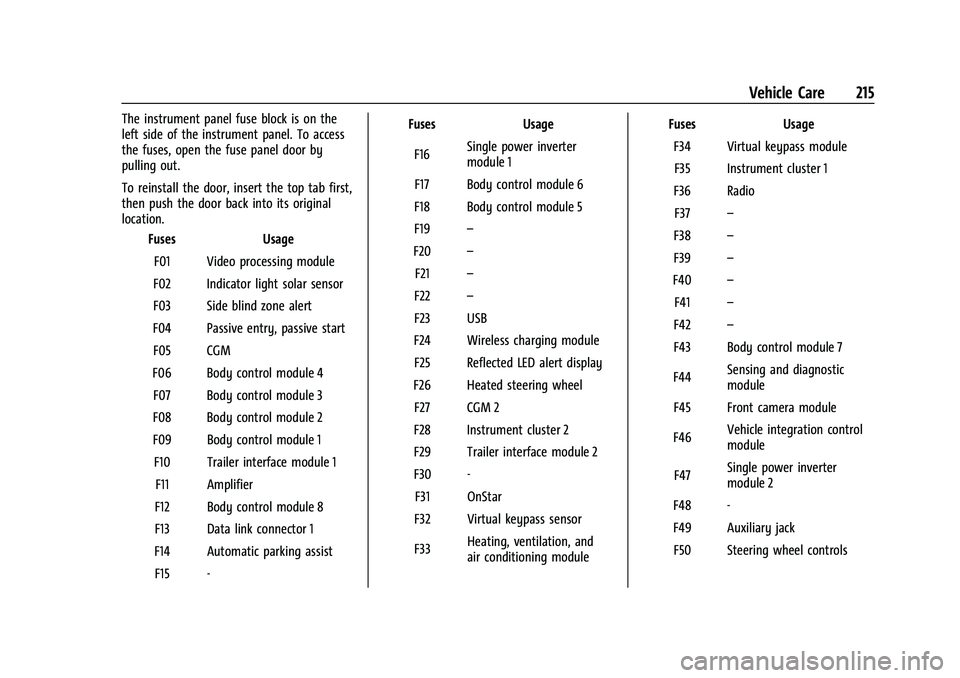
The instrument panel fuse block is on the
left side of the instrument panel. To access
the fuses, open the fuse panel door by
pulling out.
To reinstall the door, insert the top tab first,
then push the door back into its original
location.Fuses Usage
F01 Video processing module
F02 Indicator light solar sensor
F03 Side blind zone alert
F04 Passive entry, passive start F05 CGM
F06 Body control module 4 F07 Body control module 3
F08 Body control module 2
F09 Body control module 1 F10 Trailer interface module 1 F11 Amplifier
F12 Body control module 8
F13 Data link connector 1
F14 Automatic parking assist F15 - Fuses
Usage
F16 Single power inverter
module 1
F17 Body control module 6
F18 Body control module 5
F19 –
F20 –
F21 –
F22 –
F23 USB
F24 Wireless charging module F25 Reflected LED alert display
F26 Heated steering wheel F27 CGM 2
F28 Instrument cluster 2
F29 Trailer interface module 2
F30 - F31 OnStar
F32 Virtual keypass sensor
F33 Heating, ventilation, and
air conditioning module Fuses
Usage
F34 Virtual keypass module F35 Instrument cluster 1
F36 Radio F37 –
F38 –
F39 –
F40 –
F41 –
F42 –
F43 Body control module 7
F44 Sensing and diagnostic
module
F45 Front camera module
F46 Vehicle integration control
module
F47 Single power inverter
module 2
F48 -
F49 Auxiliary jack F50 Steering wheel controls
Page 273 of 293
Chevrolet Bolt EV Owner Manual (GMNA-Localizing-U.S./Canada-
14637856) - 2021 - CRC - 10/2/20
272 Customer Information
Reporting Safety Defects to
General Motors
In addition to notifying NHTSA (or Transport
Canada) in a situation like this, notify
General Motors.
In the U.S., call 1-800-222-1020, or write:
Chevrolet Motor Division
Chevrolet Customer Assistance Center
P.O. Box 33170
Detroit, MI 48232-5170
In Canada, call 1-800-263-3777 (English) or
1-800-263-7854 (French), or write:
General Motors of Canada Company
Customer Care Centre, Mail Code:
CA1-163-005
1908 Colonel Sam Drive
Oshawa, Ontario L1H 8P7
In Mexico, call 800-466-0811 or
800-508-0000.
In other Central America and Caribbean
Countries, call 52-555-901-2369.
Vehicle Data Recording and
Privacy
The vehicle has a number of computers that
record information about the vehicle’s
performance and how it is driven or used.
For example, the vehicle uses computer
modules to monitor and control electric
drive unit performance, to monitor the
conditions for airbag deployment and to
deploy them in a crash, and, if equipped, to
provide antilock braking to help the driver
control the vehicle. These modules may
store data to help the dealer technician
service the vehicle or to help GM improve
safety or features. Some modules may also
store data about how the vehicle is
operated, such as rate of energy
consumption or average speed. These
modules may retain personal preferences,
such as radio presets, seat positions, and
temperature settings.
Cybersecurity
GM collects information about the use of
your vehicle including operational and safety
related information. We collect this
information to provide, evaluate, improve,
and troubleshoot our products and servicesand to develop new products and services.
The protection of vehicle electronics systems
and customer data from unauthorized
outside electronic access or control is
important to GM. GM maintains appropriate
security standards, practices, guidelines and
controls aimed at defending the vehicle and
the vehicle service ecosystem against
unauthorized electronic access, detecting
possible malicious activity in related
networks, and responding to suspected
cybersecurity incidents in a timely,
coordinated and effective manner. Security
incidents could impact your safety or
compromise your private data. To minimize
security risks, please do not connect your
vehicle electronic systems to unauthorized
devices or connect your vehicle to any
unknown or untrusted networks (such as
Bluetooth, WIFI or similar technology). In
the event you suspect any security incident
impacting your data or the safe operation of
your vehicle, please stop operating your
vehicle and contact your dealer.Event Data Recorders
This vehicle is equipped with an event data
recorder (EDR). The main purpose of an EDR
is to record, in certain crash or near
crash-like situations, such as an air bag
Page 286 of 293
Chevrolet Bolt EV Owner Manual (GMNA-Localizing-U.S./Canada-
14637856) - 2021 - CRC - 10/2/20
Index 285
E
Electric Drive Unit . . . . . . . . . . . . . . . . . . . . . . . 160
Electric Parking Brake . . . . . . . . . . . . . . . . . . . . 164
Electric Parking Brake Light . . . . . . . . . . . . . . . 86
Electrical Equipment, Add-On . . . . . . . . . . . . 195
Electrical Requirements for BatteryCharging . . . . . . . . . . . . . . . . . . . . . . . . . . . . . . . 194
Electrical System Fuses and Circuit Breakers . . . . . . . . . . . . . . 211
Instrument Panel Fuse Block . . . . . . . . . . . 214
Overload . . . . . . . . . . . . . . . . . . . . . . . . . . . . . . . 210
Emergency OnStar . . . . . . . . . . . . . . . . . . . . . . . . . . . . . . . . . 275
Energy Efficiency
Driving . . . . . . . . . . . . . . . . . . . . . . . . . . . . . . . . 147
Energy Information . . . . . . . . . . . . . . . . . . . . . . . 97
Engine Cooling System . . . . . . . . . . . . . . . . . . . . . . . . 201
Entry Lighting . . . . . . . . . . . . . . . . . . . . . . . . . . . . 111
Event Data Recorders . . . . . . . . . . . . . . . . . . . . 272
Exit Lighting . . . . . . . . . . . . . . . . . . . . . . . . . . . . . . 112
Extended Parking . . . . . . . . . . . . . . . . . . . . . . . . 159
Extender, Seat Belt . . . . . . . . . . . . . . . . . . . . . . . .37
Exterior Lamp Controls . . . . . . . . . . . . . . . . . . . 107
Exterior Lamps Off Reminder . . . . . . . . . . . . 108
Exterior Lighting Battery Saver . . . . . . . . . . . 112
F
Flash-to-Pass . . . . . . . . . . . . . . . . . . . . . . . . . . . . . 109
Flashers, Hazard Warning . . . . . . . . . . . . . . . . .110
Flat Tire . . . . . . . . . . . . . . . . . . . . . . . . . . . . . . . . . 232
Floor Mats . . . . . . . . . . . . . . . . . . . . . . . . . . . . . . . 250
Fluid
Brakes . . . . . . . . . . . . . . . . . . . . . . . . . . . . . . . . . 203
Washer . . . . . . . . . . . . . . . . . . . . . . . . . . . . . . . . 202
Folding Mirrors . . . . . . . . . . . . . . . . . . . . . . . . . . . 20
Forward Collision Alert (FCA) System . . . . .174
Frequency Statement Radio . . . . . . . . . . . . . . . . . . . . . . . . . . . . . . . . . . . 271
Front Pedestrian Braking (FPB) System . . . . . . . . . . . . . . . . . . . . . . . . . . . . . . . . 176
Front Seats Adjustment . . . . . . . . . . . . . . . . . . . . . . . . . . . . . 28
Heated . . . . . . . . . . . . . . . . . . . . . . . . . . . . . . . . . 29
Fuses Fuses and Circuit Breakers . . . . . . . . . . . . . . 211
Instrument Panel Fuse Block . . . . . . . . . . . 214
Underhood Compartment . . . . . . . . . . . . . . . 211
G
Gas Strut(s) . . . . . . . . . . . . . . . . . . . . . . . . . . . . . . 207
Gauges
Battery . . . . . . . . . . . . . . . . . . . . . . . . . . . . . . . . . 82
Driver Efficiency . . . . . . . . . . . . . . . . . . . . . . . . 82
Odometer . . . . . . . . . . . . . . . . . . . . . . . . . . . . . . 81 Gauges (cont'd)
Power Indicator . . . . . . . . . . . . . . . . . . . . . . . . . 83
Speedometer . . . . . . . . . . . . . . . . . . . . . . . . . . . 81
Trip Odometer . . . . . . . . . . . . . . . . . . . . . . . . . . 82
Warning Lights and Indicators . . . . . . . . . . 79
General Information Service and Maintenance . . . . . . . . . . . . . . 252
Towing . . . . . . . . . . . . . . . . . . . . . . . . . . . . . . . . 194
Vehicle Care . . . . . . . . . . . . . . . . . . . . . . . . . . . 197
GM Mobility Reimbursement Program . . . . . . . . . . . . . . . . . . . . . . . . . . . . . . . 265
H
Halogen Bulbs . . . . . . . . . . . . . . . . . . . . . . . . . . . 209
Hands-Free Phone . . . . . . . . . . . . . . . . . . . . . . . . 130
Hazard Warning Flashers . . . . . . . . . . . . . . . . .110
Head Restraints . . . . . . . . . . . . . . . . . . . . . . . . . . . 26
HeadlampsAiming . . . . . . . . . . . . . . . . . . . . . . . . . . . . . . . . 208
Automatic . . . . . . . . . . . . . . . . . . . . . . . . . . . . . 109
Bulb Replacement . . . . . . . . . . . . . . . . . . . . . . 208
Daytime Running Lamps (DRL) . . . . . . . . . 109
Flash-to-Pass . . . . . . . . . . . . . . . . . . . . . . . . . . . 109
High Intensity Discharge (HID)Lighting . . . . . . . . . . . . . . . . . . . . . . . . . . . . . . 209
High-Beam On Light . . . . . . . . . . . . . . . . . . . . 89
High/Low Beam Changer . . . . . . . . . . . . . . 108
Lamps On Reminder . . . . . . . . . . . . . . . . . . . . 89
Page 290 of 293
Chevrolet Bolt EV Owner Manual (GMNA-Localizing-U.S./Canada-
14637856) - 2021 - CRC - 10/2/20
Index 289
RequirementsElectrical Battery Charging . . . . . . . . . . . . . 194
Restraints Where to Put . . . . . . . . . . . . . . . . . . . . . . . . . . . 54
Retained Accessory Power (RAP) . . . . . . . . . .158
Roads Driving, Wet . . . . . . . . . . . . . . . . . . . . . . . . . . . . 151
Roadside Assistance Program . . . . . . . . . . . . 266
Rotation, Tires . . . . . . . . . . . . . . . . . . . . . . . . . . . 226
S
Safety Defects Reporting Canadian Government . . . . . . . . . . . . . . . . . . 271
General Motors . . . . . . . . . . . . . . . . . . . . . . . . 272
U.S. Government . . . . . . . . . . . . . . . . . . . . . . . . 271
Safety Locks . . . . . . . . . . . . . . . . . . . . . . . . . . . . . . . 17
Safety Signal Pedestrian . . . . . . . . . . . . . . . . . . . . . . . . . . . . . . 73
Safety System Check . . . . . . . . . . . . . . . . . . . . . 38
Satellite Radio . . . . . . . . . . . . . . . . . . . . . . . . . . . . 118
Scheduling Appointments . . . . . . . . . . . . . . . . 267
Sealant Kit, Tire . . . . . . . . . . . . . . . . . . . . . . . . . . 232
Seat Belts . . . . . . . . . . . . . . . . . . . . . . . . . . . . . . . . . .32 Care . . . . . . . . . . . . . . . . . . . . . . . . . . . . . . . . . . . . 38
Extender . . . . . . . . . . . . . . . . . . . . . . . . . . . . . . . . 37
How to Wear Seat Belts Properly . . . . . . . 33
Lap-Shoulder Belt . . . . . . . . . . . . . . . . . . . . . . . 35
Reminders . . . . . . . . . . . . . . . . . . . . . . . . . . . . . . 83 Seat Belts (cont'd)
Replacing after a Crash . . . . . . . . . . . . . . . . . 38
Use During Pregnancy . . . . . . . . . . . . . . . . . . 37
Seats Adjustment, Front . . . . . . . . . . . . . . . . . . . . . . 28
Head Restraints . . . . . . . . . . . . . . . . . . . . . . . . . 26
Heated Front . . . . . . . . . . . . . . . . . . . . . . . . . . . 29
Heated, Rear . . . . . . . . . . . . . . . . . . . . . . . . . . . . 32
Rear . . . . . . . . . . . . . . . . . . . . . . . . . . . . . . . . . . . . . 31
Reclining Seatbacks . . . . . . . . . . . . . . . . . . . . . 29
Securing Child Restraints . . . . . . . . . . . . . . 64, 66
Security Light . . . . . . . . . . . . . . . . . . . . . . . . . . . . . . . . . . . . 89
OnStar . . . . . . . . . . . . . . . . . . . . . . . . . . . . . . . . . 275
Vehicle . . . . . . . . . . . . . . . . . . . . . . . . . . . . . . . . . 18
Vehicle Alarm . . . . . . . . . . . . . . . . . . . . . . . . . . . 18
Self-Sealing Tires . . . . . . . . . . . . . . . . . . . . . . . . . . 217
Service . . . . . . . . . . . . . . . . . . . . . . . . . . . . . . . . . . . .145 Accessories and Modifications . . . . . . . . . 197
Doing Your Own Work . . . . . . . . . . . . . . . . . 198
Maintenance Records . . . . . . . . . . . . . . . . . . 260
Maintenance, General Information . . . . . 252
Parts Identification . . . . . . . . . . . . . . . . . . . . . 261
Scheduling Appointments . . . . . . . . . . . . . . 267
Vehicle Soon Light . . . . . . . . . . . . . . . . . . . . . . 85
Service Electric Parking Brake Light . . . . . . . 86
Servicing the Airbag . . . . . . . . . . . . . . . . . . . . . . 47
Settings . . . . . . . . . . . . . . . . . . . . . . . . . . . . . . . . . . . 131 Shifting
Into Park . . . . . . . . . . . . . . . . . . . . . . . . . . . . . . 158
Out of Park . . . . . . . . . . . . . . . . . . . . . . . . . . . . 159
Side Blind Zone Alert (SBZA) . . . . . . . . . . . . . .178
Signals, Turn and Lane-Change . . . . . . . . . . . .110
Software Updates . . . . . . . . . . . . . . . . . . . . . . . . . 116
Specifications and Capacities . . . . . . . . . . . . . 262
Speedometer . . . . . . . . . . . . . . . . . . . . . . . . . . . . . .81
Sport Mode Light . . . . . . . . . . . . . . . . . . . . . . . . . 87
StabiliTrak OFF Light . . . . . . . . . . . . . . . . . . . . . . . . . . . . . . . 88
Start Remote . . . . . . . . . . . . . . . . . . . . . . . . . . . . . . . . . . 13
Start Assist, Hill . . . . . . . . . . . . . . . . . . . . . . . . . . 165
Starting and Stopping the Vehicle . . . . . . . . 157
Status Screens Charging . . . . . . . . . . . . . . . . . . . . . . . . . . . . . . . 186
Steering . . . . . . . . . . . . . . . . . . . . . . . . . . . . . . . . . 149 Heated Wheel . . . . . . . . . . . . . . . . . . . . . . . . . . 73
Wheel Adjustment . . . . . . . . . . . . . . . . . . . . . . 72
Wheel Controls . . . . . . . . . . . . . . . . . . . . . . . . . 72
Stoplamps and Back-up Lamps Bulb Replacement . . . . . . . . . . . . . . . . . . . . . . 209
Storage Areas Cargo Cover . . . . . . . . . . . . . . . . . . . . . . . . . . . . 70
Cargo Management System . . . . . . . . . . . . 70
Center Console . . . . . . . . . . . . . . . . . . . . . . . . . 70
Instrument Panel . . . . . . . . . . . . . . . . . . . . . . . 69