parking CHEVROLET BOLT EV 2023 Owners Manual
[x] Cancel search | Manufacturer: CHEVROLET, Model Year: 2023, Model line: BOLT EV, Model: CHEVROLET BOLT EV 2023Pages: 308, PDF Size: 5.18 MB
Page 6 of 308

Chevrolet BOLT EV Owner Manual (GMNA-Localizing-U.S./Canada-
16404388) - 2023 - CRC - 3/7/22
Introduction 5
1.Air Vents 0147.
2. Turn and Lane-Change Signals 0106.
IntelliBeam System Button (If Equipped).
See Exterior Lamp Controls 0103.
3. Instrument Cluster 079.
Driver Information Center (DIC) 099.
4. Windshield Wiper/Washer 074.
5. Charging Status Feedback 0201.
Automatic Headlamp System 0105.
Indicator Light and Solar Sensor (ILSS).
See “Sensors” underAutomatic Climate
Control System 0144.
6. Infotainment System. See AM-FM Radio
0 115.
7. Hazard Warning Flashers 0106
8. Automatic Climate Control System 0144.
Heated Front Seats 029 (If Equipped).
Heated Steering Wheel 073 (If
Equipped).
9. Power Outlets 076.
10. Electric Parking Brake 0168.
11. Driver Selected Operating Modes 0164.
Traction Control/Electronic Stability
Control 0171 Lane Keep Assist (LKA)
0195 (If
Equipped).
12. Shift Switches. See Electric Drive Unit
0 165.
13. Wireless Charging 076.
14. Power Button 0161.
15. Steering Wheel Controls 0111
Volume Switches. See Steering Wheel
Controls 0111 (Out of View).
16. Horn 073.
17. Steering Wheel Adjustment 073 (Out
of View).
18. Favorite Switches. See Steering Wheel
Controls 0111 (Out of View).
19. Cruise Control 0172.
Adaptive Cruise Control (Camera) 0174
(If Equipped).
20. Regen on Demand. See Regenerative
Braking 0170.
21. Instrument Panel Fuse Block 0232.
22. Data Link Connector (DLC) (Out of View). SeeService Vehicle Soon Light 085.
23. Exterior Lamp Controls 0103.
24. Instrument Panel Illumination Control
0106.
Page 15 of 308
Chevrolet BOLT EV Owner Manual (GMNA-Localizing-U.S./Canada-
16404388) - 2023 - CRC - 3/7/22
14 Keys, Doors, and Windows
7. Reinsert key into the remote key.
Remote Start
This feature starts the heating or air
conditioning systems and the rear window
defogger from outside the vehicle.
Use remote start to heat or cool the interior
when the vehicle is plugged in to maximize
electric range by utilizing electricity from
the electrical outlet. Normal operation of the
system will return after the vehicle has been
turned on.
/:This button is on the remote key.
The climate control system will use the
previous settings during a remote start. The
rear defog may come on during remote
start based on cold ambient conditions. The
rear defog indicator light does not come on
during a remote start.
Laws in some local communities may restrict
the use of remote starters. For example,
some laws require a person using remote
start to have the vehicle in view. Check local
regulations for any requirements.
If the vehicle is low on energy, do not use
the remote start feature. The vehicle may
run out of energy. The remote key range may be less while the
vehicle is running.
Other conditions can affect the performance
of the remote key. See
Remote Key07.
Remote Starting the Vehicle
To remote start the vehicle:
1. Press and release
Qon the remote key.
2. Immediately press and hold
/for at
least four seconds or until the turn
signal lamps flash.
3. After entering the vehicle during a remote start, press POWER
Owith the
brake pedal applied to start the vehicle
and operate as normal.
Remote start will automatically shut off
after 20 minutes unless a time extension
is done.
When the vehicle starts, the parking lamps
will turn on. Remote start run time can be
extended.
Extending Vehicle Run Time
The vehicle run time can also be extended
by another 20 minutes, if after 30 seconds
and during the first 20 minutes Steps 1 and
2 are repeated while the vehicle is running.
This provides a total of 40 minutes.
The remote start can only be extended once.
A maximum of two remote starts, or a
single start with an extension, are allowed
between power cycles using POWER
O.
For additional remote starts, turn the vehicle
on with the remote key in the vehicle.
Canceling Remote Start
To cancel a remote start, do any of the
following:
.Press and hold/until the parking lamps
turn off.
.Turn on the hazard warning flashers.
.Press POWEROwith the brake pedal
applied, then press POWER
Oagain to
turn the vehicle off.
Page 73 of 308
Chevrolet BOLT EV Owner Manual (GMNA-Localizing-U.S./Canada-
16404388) - 2023 - CRC - 3/7/22
72 Instruments and Controls
Instruments and Controls
Controls
Steering Wheel Adjustment . . . . . . . . . . . . . 73
Heated Steering Wheel . . . . . . . . . . . . . . . . . 73
Horn . . . . . . . . . . . . . . . . . . . . . . . . . . . . . . . . . . . . 73
Pedestrian Safety Signal . . . . . . . . . . . . . . . . 73
Windshield Wiper/Washer . . . . . . . . . . . . . . 74
Rear Window Wiper/Washer . . . . . . . . . . . 75
Compass . . . . . . . . . . . . . . . . . . . . . . . . . . . . . . . 76
Clock . . . . . . . . . . . . . . . . . . . . . . . . . . . . . . . . . . . 76
Power Outlets . . . . . . . . . . . . . . . . . . . . . . . . . . 76
Wireless Charging . . . . . . . . . . . . . . . . . . . . . . 76
Warning Lights, Gauges, and Indicators
Warning Lights, Gauges, andIndicators . . . . . . . . . . . . . . . . . . . . . . . . . . . . . 79
Instrument Cluster . . . . . . . . . . . . . . . . . . . . . 79
Speedometer . . . . . . . . . . . . . . . . . . . . . . . . . . . 81
Odometer . . . . . . . . . . . . . . . . . . . . . . . . . . . . . . 81
Trip Odometer . . . . . . . . . . . . . . . . . . . . . . . . . . 81
Battery Gauge (High Voltage) . . . . . . . . . . 81
Driver Efficiency Gauge . . . . . . . . . . . . . . . . . 82
Power Indicator Gauge . . . . . . . . . . . . . . . . . 82
Seat Belt Reminders . . . . . . . . . . . . . . . . . . . . 82
Airbag Readiness Light . . . . . . . . . . . . . . . . . 83
Passenger Airbag Status Indicator . . . . . . 84
Charging System Light (12-Volt Battery) . . . . . . . . . . . . . . . . . . . . . . . . . . . . . . 84
Service Vehicle Soon Light . . . . . . . . . . . . . . 85 Brake System Warning Light . . . . . . . . . . . 85
Electric Parking Brake Light . . . . . . . . . . . . . 85
Service Electric Parking Brake Light . . . . . 85
Antilock Brake System (ABS) Warning
Light . . . . . . . . . . . . . . . . . . . . . . . . . . . . . . . . . 86
Sport Mode Light . . . . . . . . . . . . . . . . . . . . . . 86
Lane Keep Assist (LKA) Light . . . . . . . . . . . 86
Vehicle Ahead Indicator . . . . . . . . . . . . . . . . 87
Pedestrian Ahead Indicator . . . . . . . . . . . . . 87
Traction Off Light . . . . . . . . . . . . . . . . . . . . . . . 87
StabiliTrak OFF Light . . . . . . . . . . . . . . . . . . . . 87
Traction Control System (TCS)/StabiliTrak Light . . . . . . . . . . . . . . . . . . . . . . . . . . . . . . . . . 88
Tire Pressure Light . . . . . . . . . . . . . . . . . . . . . 88
Security Light . . . . . . . . . . . . . . . . . . . . . . . . . . 88
Vehicle Ready Light . . . . . . . . . . . . . . . . . . . . 88
One-Pedal Driving Light . . . . . . . . . . . . . . . . 89
High-Beam On Light . . . . . . . . . . . . . . . . . . . . 89
Lamps On Reminder . . . . . . . . . . . . . . . . . . . . 89
Cruise Control Light . . . . . . . . . . . . . . . . . . . . 89
Door Ajar Light . . . . . . . . . . . . . . . . . . . . . . . . . 90
Information Displays
Power Flows . . . . . . . . . . . . . . . . . . . . . . . . . . . 90
Programmable Charging . . . . . . . . . . . . . . . . 90
Energy Information . . . . . . . . . . . . . . . . . . . . . 97
Charging Options . . . . . . . . . . . . . . . . . . . . . . 99
Driver Information Center (DIC) . . . . . . . . 99
Vehicle Messages
Vehicle Messages . . . . . . . . . . . . . . . . . . . . . . 101
Propulsion Power Messages . . . . . . . . . . . . 101
Vehicle Speed Messages . . . . . . . . . . . . . . . 102
Page 75 of 308
Chevrolet BOLT EV Owner Manual (GMNA-Localizing-U.S./Canada-
16404388) - 2023 - CRC - 3/7/22
74 Instruments and Controls
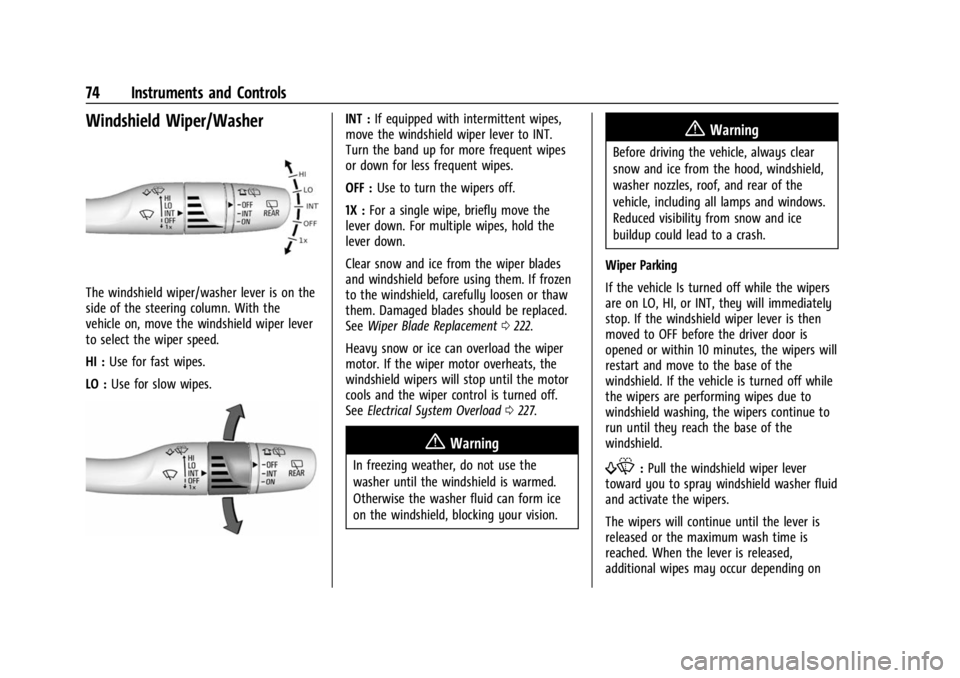
Windshield Wiper/Washer
The windshield wiper/washer lever is on the
side of the steering column. With the
vehicle on, move the windshield wiper lever
to select the wiper speed.
HI :Use for fast wipes.
LO : Use for slow wipes.
INT : If equipped with intermittent wipes,
move the windshield wiper lever to INT.
Turn the band up for more frequent wipes
or down for less frequent wipes.
OFF : Use to turn the wipers off.
1X : For a single wipe, briefly move the
lever down. For multiple wipes, hold the
lever down.
Clear snow and ice from the wiper blades
and windshield before using them. If frozen
to the windshield, carefully loosen or thaw
them. Damaged blades should be replaced.
See Wiper Blade Replacement 0222.
Heavy snow or ice can overload the wiper
motor. If the wiper motor overheats, the
windshield wipers will stop until the motor
cools and the wiper control is turned off.
See Electrical System Overload 0227.
{Warning
In freezing weather, do not use the
washer until the windshield is warmed.
Otherwise the washer fluid can form ice
on the windshield, blocking your vision.
{Warning
Before driving the vehicle, always clear
snow and ice from the hood, windshield,
washer nozzles, roof, and rear of the
vehicle, including all lamps and windows.
Reduced visibility from snow and ice
buildup could lead to a crash.
Wiper Parking
If the vehicle Is turned off while the wipers
are on LO, HI, or INT, they will immediately
stop. If the windshield wiper lever is then
moved to OFF before the driver door is
opened or within 10 minutes, the wipers will
restart and move to the base of the
windshield. If the vehicle is turned off while
the wipers are performing wipes due to
windshield washing, the wipers continue to
run until they reach the base of the
windshield.
f: Pull the windshield wiper lever
toward you to spray windshield washer fluid
and activate the wipers.
The wipers will continue until the lever is
released or the maximum wash time is
reached. When the lever is released,
additional wipes may occur depending on
Page 86 of 308
Chevrolet BOLT EV Owner Manual (GMNA-Localizing-U.S./Canada-
16404388) - 2023 - CRC - 3/7/22
Instruments and Controls 85
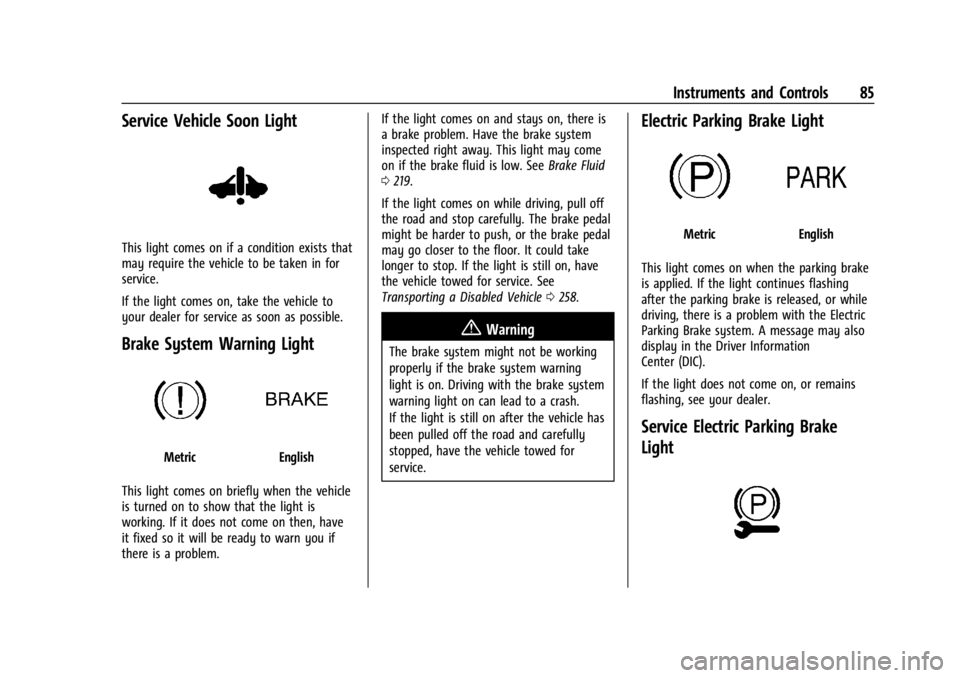
Service Vehicle Soon Light
This light comes on if a condition exists that
may require the vehicle to be taken in for
service.
If the light comes on, take the vehicle to
your dealer for service as soon as possible.
Brake System Warning Light
MetricEnglish
This light comes on briefly when the vehicle
is turned on to show that the light is
working. If it does not come on then, have
it fixed so it will be ready to warn you if
there is a problem. If the light comes on and stays on, there is
a brake problem. Have the brake system
inspected right away. This light may come
on if the brake fluid is low. See
Brake Fluid
0 219.
If the light comes on while driving, pull off
the road and stop carefully. The brake pedal
might be harder to push, or the brake pedal
may go closer to the floor. It could take
longer to stop. If the light is still on, have
the vehicle towed for service. See
Transporting a Disabled Vehicle 0258.
{Warning
The brake system might not be working
properly if the brake system warning
light is on. Driving with the brake system
warning light on can lead to a crash.
If the light is still on after the vehicle has
been pulled off the road and carefully
stopped, have the vehicle towed for
service.
Electric Parking Brake Light
MetricEnglish
This light comes on when the parking brake
is applied. If the light continues flashing
after the parking brake is released, or while
driving, there is a problem with the Electric
Parking Brake system. A message may also
display in the Driver Information
Center (DIC).
If the light does not come on, or remains
flashing, see your dealer.
Service Electric Parking Brake
Light
Page 87 of 308
Chevrolet BOLT EV Owner Manual (GMNA-Localizing-U.S./Canada-
16404388) - 2023 - CRC - 3/7/22
86 Instruments and Controls
This light should come on briefly when the
vehicle is turned on. If it does not come on,
have it fixed so it will be ready to warn if
there is a problem.
If this light stays on or comes on while
driving, there is a problem with the Electric
Parking Brake (EPB). Take the vehicle to a
dealer as soon as possible. In addition to the
parking brake, other safety functions that
utilize the EPB may also be degraded.
A message may also display in the Driver
Information Center (DIC). SeeElectric Parking
Brake 0168.
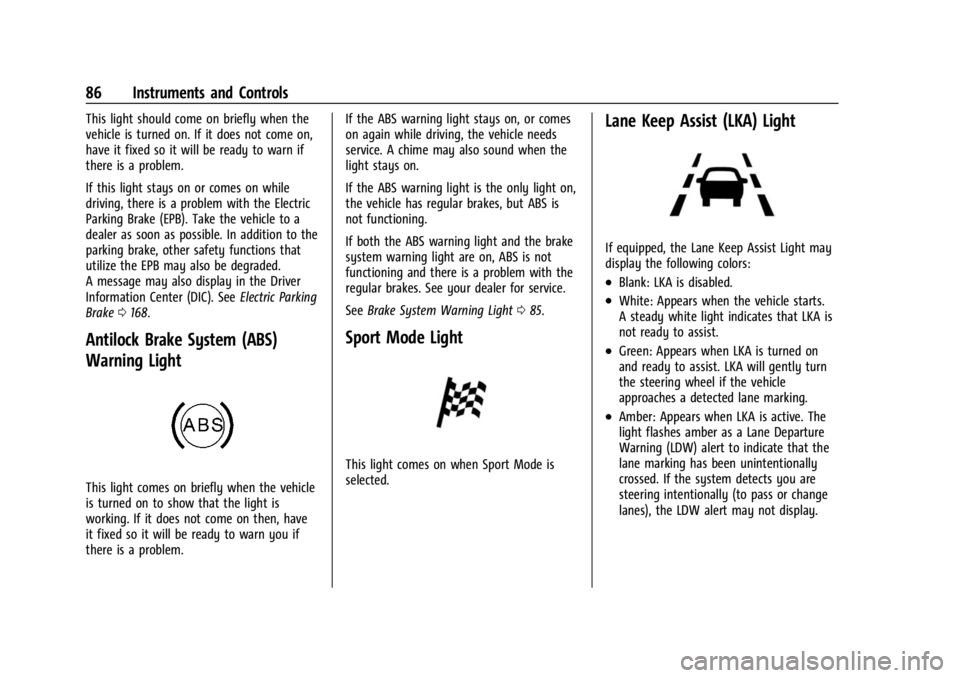
Antilock Brake System (ABS)
Warning Light
This light comes on briefly when the vehicle
is turned on to show that the light is
working. If it does not come on then, have
it fixed so it will be ready to warn you if
there is a problem. If the ABS warning light stays on, or comes
on again while driving, the vehicle needs
service. A chime may also sound when the
light stays on.
If the ABS warning light is the only light on,
the vehicle has regular brakes, but ABS is
not functioning.
If both the ABS warning light and the brake
system warning light are on, ABS is not
functioning and there is a problem with the
regular brakes. See your dealer for service.
See
Brake System Warning Light 085.
Sport Mode Light
This light comes on when Sport Mode is
selected.
Lane Keep Assist (LKA) Light
If equipped, the Lane Keep Assist Light may
display the following colors:
.Blank: LKA is disabled.
.White: Appears when the vehicle starts.
A steady white light indicates that LKA is
not ready to assist.
.Green: Appears when LKA is turned on
and ready to assist. LKA will gently turn
the steering wheel if the vehicle
approaches a detected lane marking.
.Amber: Appears when LKA is active. The
light flashes amber as a Lane Departure
Warning (LDW) alert to indicate that the
lane marking has been unintentionally
crossed. If the system detects you are
steering intentionally (to pass or change
lanes), the LDW alert may not display.
Page 104 of 308
Chevrolet BOLT EV Owner Manual (GMNA-Localizing-U.S./Canada-
16404388) - 2023 - CRC - 3/7/22
Lighting 103
Lighting
Exterior Lighting
Exterior Lamp Controls . . . . . . . . . . . . . . . . 103
Exterior Lamps Off Reminder . . . . . . . . . . 104
Headlamp High/Low-Beam Changer . . . 104
Flash-to-Pass . . . . . . . . . . . . . . . . . . . . . . . . . . . 105
Daytime Running Lamps (DRL) . . . . . . . . . 105
Automatic Headlamp System . . . . . . . . . . 105
Hazard Warning Flashers . . . . . . . . . . . . . . 106
Turn and Lane-Change Signals . . . . . . . . . 106
Interior Lighting
Instrument Panel IlluminationControl . . . . . . . . . . . . . . . . . . . . . . . . . . . . . . 106
Courtesy Lamps . . . . . . . . . . . . . . . . . . . . . . . 107
Dome Lamps . . . . . . . . . . . . . . . . . . . . . . . . . . 107
Reading Lamps . . . . . . . . . . . . . . . . . . . . . . . . 107
Lighting Features
Entry Lighting . . . . . . . . . . . . . . . . . . . . . . . . . 107
Exit Lighting . . . . . . . . . . . . . . . . . . . . . . . . . . . 108
Battery Power Protection . . . . . . . . . . . . . . 108
Exterior Lighting Battery Saver . . . . . . . . 109
Exterior Lighting
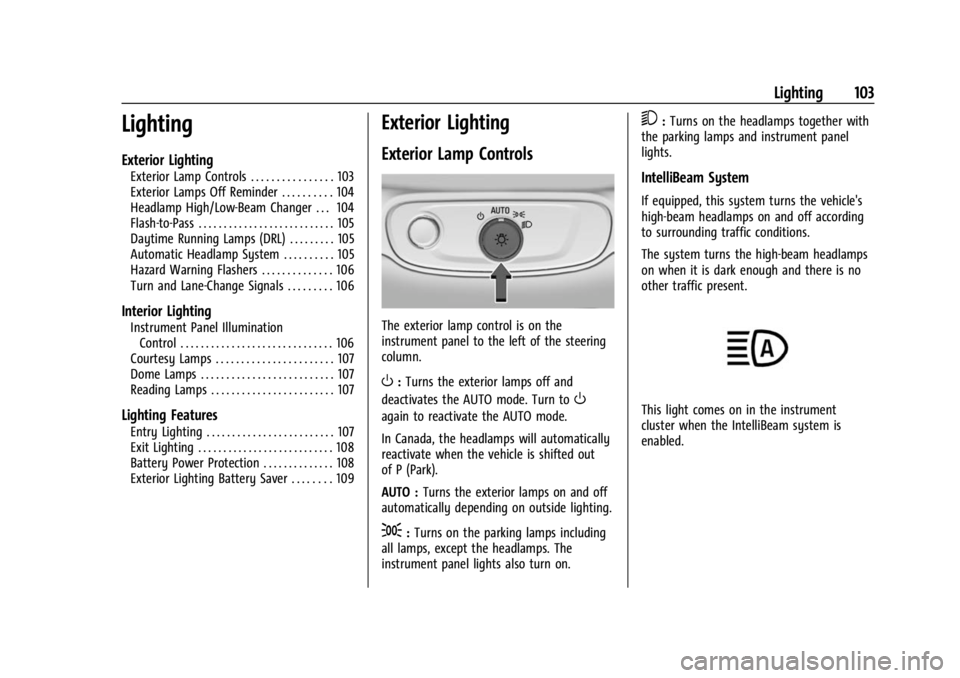
Exterior Lamp Controls
The exterior lamp control is on the
instrument panel to the left of the steering
column.
O: Turns the exterior lamps off and
deactivates the AUTO mode. Turn to
O
again to reactivate the AUTO mode.
In Canada, the headlamps will automatically
reactivate when the vehicle is shifted out
of P (Park).
AUTO : Turns the exterior lamps on and off
automatically depending on outside lighting.
;: Turns on the parking lamps including
all lamps, except the headlamps. The
instrument panel lights also turn on.
5: Turns on the headlamps together with
the parking lamps and instrument panel
lights.
IntelliBeam System
If equipped, this system turns the vehicle's
high-beam headlamps on and off according
to surrounding traffic conditions.
The system turns the high-beam headlamps
on when it is dark enough and there is no
other traffic present.
This light comes on in the instrument
cluster when the IntelliBeam system is
enabled.
Page 106 of 308
Chevrolet BOLT EV Owner Manual (GMNA-Localizing-U.S./Canada-
16404388) - 2023 - CRC - 3/7/22
Lighting 105
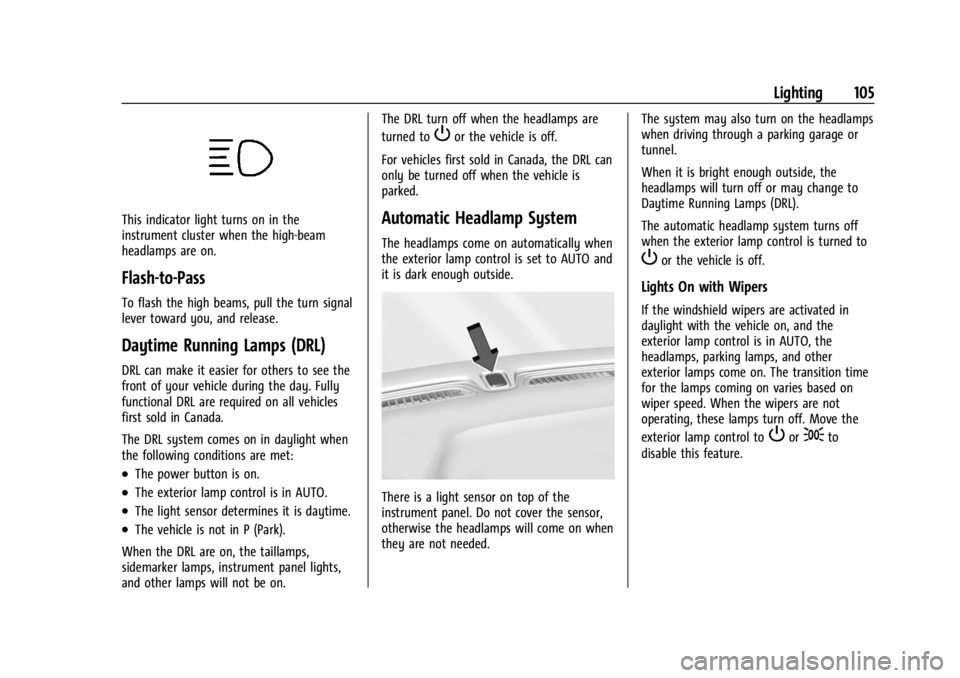
This indicator light turns on in the
instrument cluster when the high-beam
headlamps are on.
Flash-to-Pass
To flash the high beams, pull the turn signal
lever toward you, and release.
Daytime Running Lamps (DRL)
DRL can make it easier for others to see the
front of your vehicle during the day. Fully
functional DRL are required on all vehicles
first sold in Canada.
The DRL system comes on in daylight when
the following conditions are met:
.The power button is on.
.The exterior lamp control is in AUTO.
.The light sensor determines it is daytime.
.The vehicle is not in P (Park).
When the DRL are on, the taillamps,
sidemarker lamps, instrument panel lights,
and other lamps will not be on. The DRL turn off when the headlamps are
turned to
Por the vehicle is off.
For vehicles first sold in Canada, the DRL can
only be turned off when the vehicle is
parked.
Automatic Headlamp System
The headlamps come on automatically when
the exterior lamp control is set to AUTO and
it is dark enough outside.
There is a light sensor on top of the
instrument panel. Do not cover the sensor,
otherwise the headlamps will come on when
they are not needed. The system may also turn on the headlamps
when driving through a parking garage or
tunnel.
When it is bright enough outside, the
headlamps will turn off or may change to
Daytime Running Lamps (DRL).
The automatic headlamp system turns off
when the exterior lamp control is turned to
Por the vehicle is off.
Lights On with Wipers
If the windshield wipers are activated in
daylight with the vehicle on, and the
exterior lamp control is in AUTO, the
headlamps, parking lamps, and other
exterior lamps come on. The transition time
for the lamps coming on varies based on
wiper speed. When the wipers are not
operating, these lamps turn off. Move the
exterior lamp control to
Por;to
disable this feature.
Page 107 of 308
Chevrolet BOLT EV Owner Manual (GMNA-Localizing-U.S./Canada-
16404388) - 2023 - CRC - 3/7/22
106 Lighting
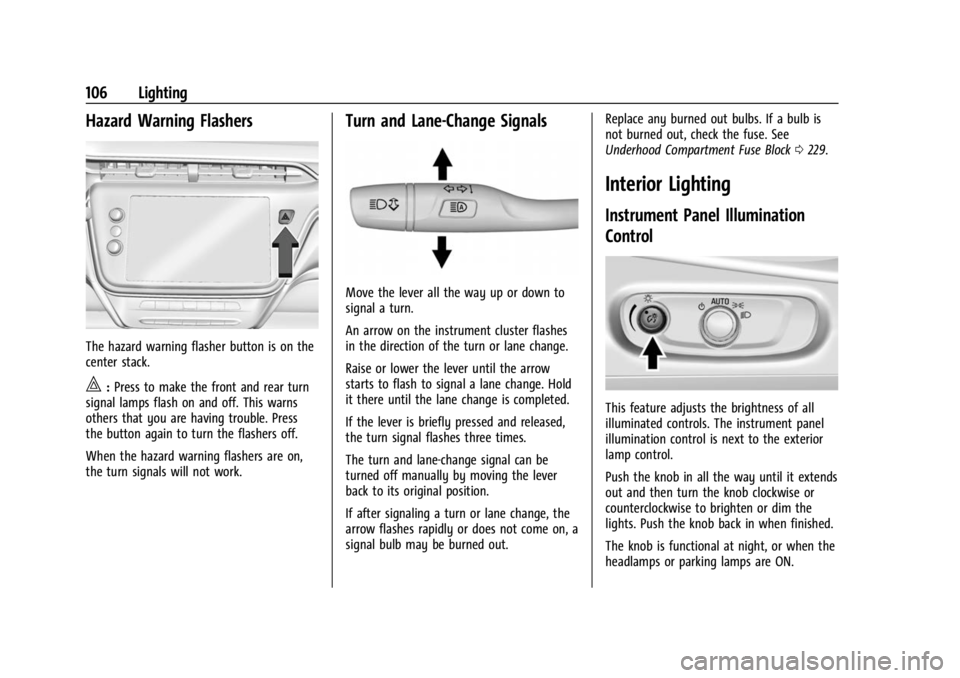
Hazard Warning Flashers
The hazard warning flasher button is on the
center stack.
|:Press to make the front and rear turn
signal lamps flash on and off. This warns
others that you are having trouble. Press
the button again to turn the flashers off.
When the hazard warning flashers are on,
the turn signals will not work.
Turn and Lane-Change Signals
Move the lever all the way up or down to
signal a turn.
An arrow on the instrument cluster flashes
in the direction of the turn or lane change.
Raise or lower the lever until the arrow
starts to flash to signal a lane change. Hold
it there until the lane change is completed.
If the lever is briefly pressed and released,
the turn signal flashes three times.
The turn and lane-change signal can be
turned off manually by moving the lever
back to its original position.
If after signaling a turn or lane change, the
arrow flashes rapidly or does not come on, a
signal bulb may be burned out. Replace any burned out bulbs. If a bulb is
not burned out, check the fuse. See
Underhood Compartment Fuse Block
0229.
Interior Lighting
Instrument Panel Illumination
Control
This feature adjusts the brightness of all
illuminated controls. The instrument panel
illumination control is next to the exterior
lamp control.
Push the knob in all the way until it extends
out and then turn the knob clockwise or
counterclockwise to brighten or dim the
lights. Push the knob back in when finished.
The knob is functional at night, or when the
headlamps or parking lamps are ON.
Page 110 of 308
Chevrolet BOLT EV Owner Manual (GMNA-Localizing-U.S./Canada-
16404388) - 2023 - CRC - 3/7/22
Lighting 109
Exterior Lighting Battery Saver
The exterior lamps turn off about 10 minutes
after the vehicle is turned off, if the parking
lamps or headlamps have been manually
left on. This protects against draining the
battery. To restart the 10-minute timer, turn
the exterior lamp control to the
Oposition
and then back to the
;or2position.
To keep the lamps on for more than
10 minutes, the vehicle must be powered on.