Wiring CHEVROLET CAMARO 1967 1.G Chassis User Guide
[x] Cancel search | Manufacturer: CHEVROLET, Model Year: 1967, Model line: CAMARO, Model: CHEVROLET CAMARO 1967 1.GPages: 659, PDF Size: 114.24 MB
Page 76 of 659
HEATER AND AIR CONDITIONING 1A-53
Fig.
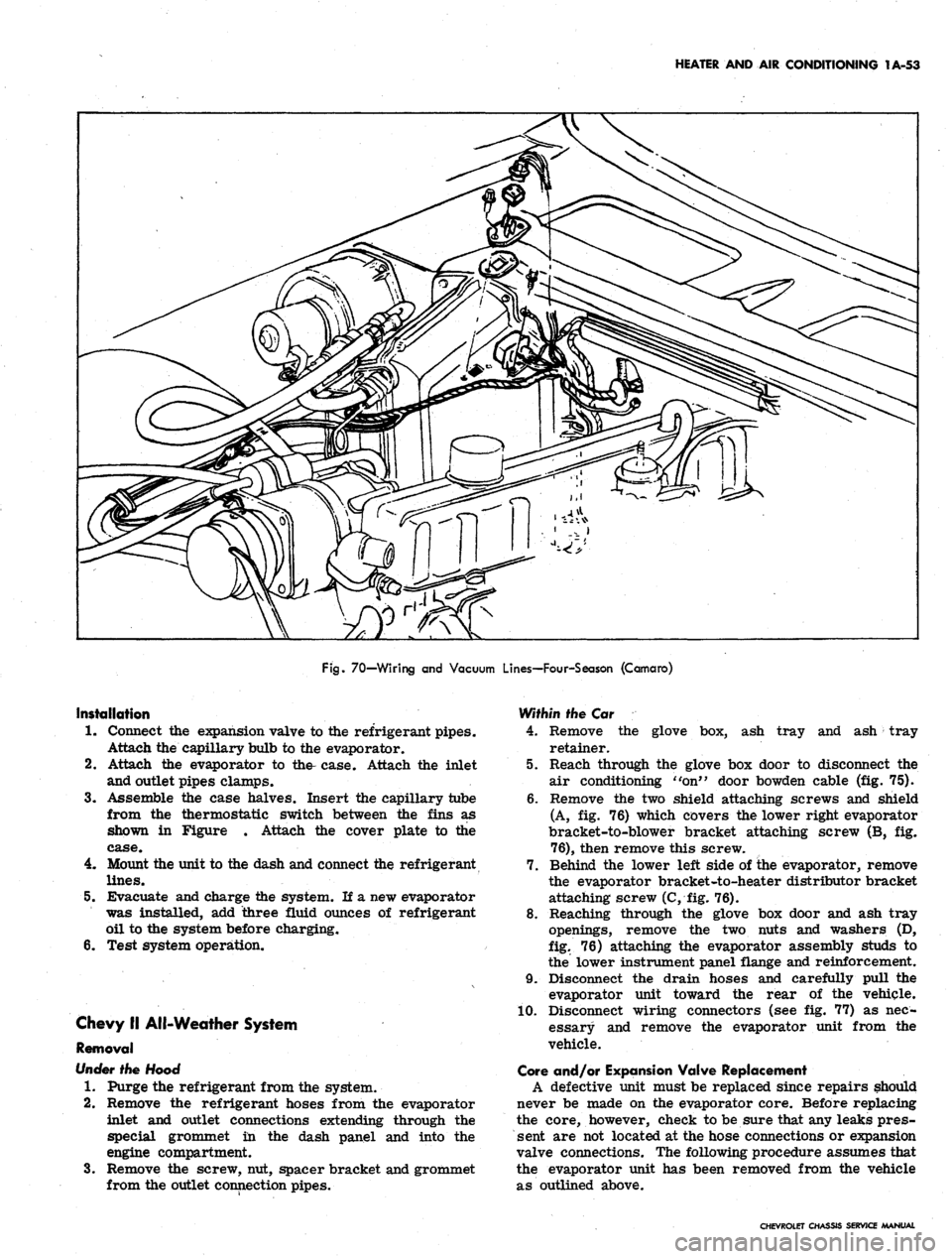
70—Wiring and Vacuum Lines—Four-Season (Camaro)
Installation
1.
Connect the expansion valve to the refrigerant pipes.
Attach the capillary bulb to the evaporator.
2.
Attach the evaporator to the- case. Attach the inlet
and outlet pipes clamps.
3.
Assemble the case halves. Insert the capillary tube
from the thermostatic switch between the fins as
shown in Figure . Attach the cover plate to the
case.
4.
Mount the unit to the dash and connect the refrigerant
lines.
5.
Evacuate and charge the system. If a new evaporator
was installed, add three fluid ounces of refrigerant
oil to the system before charging.
6. Test system operation.
Chevy II All-Weather System
Removal
Under
the Hood
1.
Purge the refrigerant from the system.
2.
Remove the refrigerant hoses from the evaporator
inlet and outlet connections extending through the
special grommet in the dash panel and into the
engine compartment.
3.
Remove the screw, nut, spacer bracket and grommet
from the outlet connection pipes.
Within the Car
4.
Remove the glove box, ash tray and ash tray
retainer.
5.
Reach through the glove box door to disconnect the
air conditioning "on" door bowden cable (fig. 75).
6. Remove the two shield attaching screws and shield
(A, fig. 76) which covers the lower right evaporator
bracket-to-blower bracket attaching screw (B, fig.
76),
then remove this screw.
7.
Behind the lower left side of ihe evaporator, remove
the evaporator bracket-to-heater distributor bracket
attaching screw (C, fig. 76).
8. Reaching through the glove box door and ash tray
openings, remove the two nuts and washers (D,
fig.
76) attaching the evaporator assembly studs to
the lower instrument panel flange and reinforcement.
9. Disconnect the drain hoses and carefully pull the
evaporator unit toward the rear of the vehicle.
10.
Disconnect wiring connectors (see fig. 77) as nec-
essary and remove the evaporator unit from the
vehicle.
Gore and/or Expansion Valve Replacement
A defective unit must be replaced since repairs should
never be made on the evaporator core. Before replacing
the core, however, check to be sure that any leaks pres-
sent are not located at the hose connections or expansion
valve connections. The following procedure assumes that
the evaporator unit has been removed from the vehicle
as outlined above.
CHEVROLET CHASSIS SERVICE MANUAL
Page 77 of 659
HEATER AND AIR CONDITIONING 1A-54
Fig.
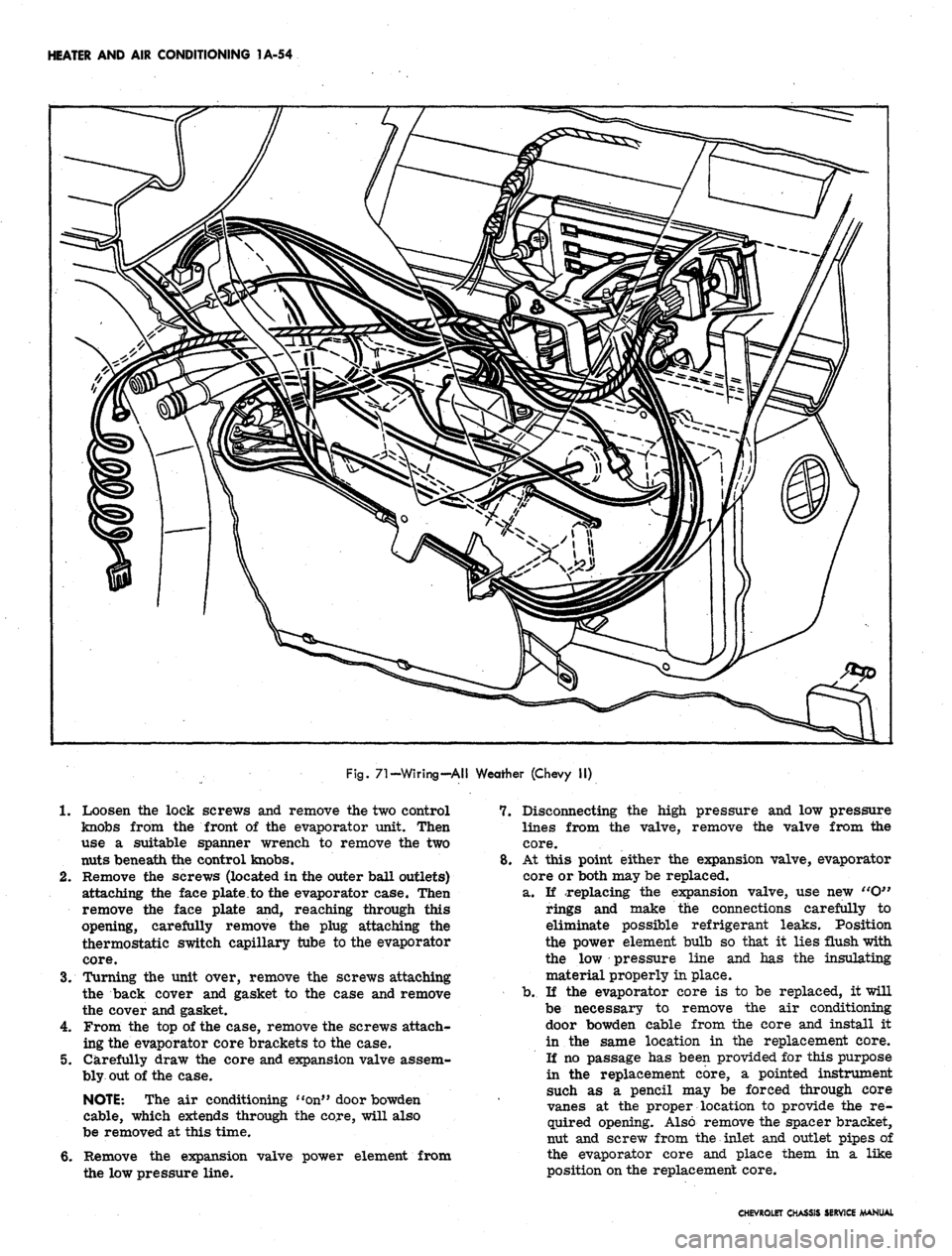
71-Wiring-AH Weather (Chevy II)
1.
Loosen the lock screws and remove the two control
knobs from the front of the evaporator unit. Then
use a suitable spanner wrench to remove the two
nuts beneath the control knobs.
2.
Remove the screws (located in the outer ball outlets)
attaching the face plate.to the evaporator case. Then
remove the face plate and, reaching through this
opening, carefully remove the plug attaching the
thermostatic switch capillary tube to the evaporator
core.
3.
Turning the unit over, remove the screws attaching
the back cover and gasket to the case and remove
the cover and gasket.
4.
From the top of the case, remove the screws attach-
ing the evaporator core brackets to the case.
5.
Carefully draw the core and expansion valve assem-
bly out of the case.
NOTE: The air conditioning "on" door bowden
cable, which extends through the core, will also
be removed at this time.
6. Remove the expansion valve power element from
the low pressure line.
7.
Disconnecting the high pressure and low pressure
lines from the valve, remove the valve from the
core.
8. At this point either the expansion valve, evaporator
core or both may be replaced.
a. If replacing the expansion valve, use new etO"
rings and make the connections carefully to
eliminate possible refrigerant leaks. Position
the power element bulb so that it lies flush with
the low pressure line and has the insulating
material properly in place.
b.
If the evaporator core is to be replaced, it will
be necessary to remove the air conditioning
door bowden cable from the core and install it
in the same location in the replacement core.
If no passage has been provided for this purpose
in the replacement core, a pointed instrument
such as a pencil may be forced through core
vanes at the proper location to provide the re-
quired opening. Also remove the spacer bracket,
nut and screw from the inlet and outlet pipes of
the evaporator core and place them in a like
position on the replacement core.
CHEVROLET CHASSIS SERVICE MANUAL
Page 78 of 659

HEATER
AND AIR
CONDITIONING
1A-55
r-TO COMPRESSOR
^GROMMET^-^^Q^S
L.H. REAR—>*<^ >
BRACKET
/>v\j^-""^
A
r—FORWARD
\ BRACKET
*-^"^
\
EVAPORATOR
BLOWER
ASM
\
-BRACE
===:
7—-INSTRUMENT PANEL
f REINFORCEMENT
/
/
f
R.H. REAR
M
BRACKET
m
K BRACKET—^
#INLET
V
M
"6"
RING
\
/
\N
1
-
DASH PANEL—v
GROMMET—^
\
OUTLET—v
A^
J/
X
\—
OUTLET
"O"
RING
A \~-EVAPORATOR
,
&
BLOWER
ASM
INLET
TUBE
Fig.
72—Evaporator Mounting—Universal Unit
9. Replace
the
core
and
valve assembly, with
the
bow-
den cable
in
place,
in the
evaporator case
and
install
the
two
case-to-door bracket attaching screws.
10.
With
the
gasket
in
place, install
the
back cover
of
the evaporator case
and its
attaching screws and
the
seal around
the
evaporator inlet
and
outlet tubes.
11.
Reach through
the
face plate opening
and,
using
the
plastic plug, attach
the
thermostatic switch capillary
tube
to the
evaporator core.
Installation
Within
the Car
1.
Attach system wiring
as
necessary
to the
evaporator
case.
2.
Carefully pass
the
evaporator inlet
and
outlet pipes
through
the
special grommet
in the
dash panel.
3.
Insert
the
evaporator studs through their drilled
holes
in
the
instrument panel flange
and
reinforce-
ment
and,
reaching through
the
glove
box
door
and
ash tray opening, install
the nut
and washer
on
each
stud.
4.
Replace
the
screws attaching
the two
evaporator
case brackets
to
the
blower bracket and distributor
bracket.
5. Replace
the
shield
and
attaching screws protecting
the lower right mounting bracket.
6. Reaching through
the
face plate opening, attach
the
evaporator bowden cable.
7. Replace
the
face plate and attaching screws, feeding
the control knob stems through
the
proper openings
in
the
face plate.
8. Replace
the
control stem bezels
and
control knobs.
9. Replace
the
drain hoses.
10.
Replace
the
glove
box
and
ash
tray.
Under
the
Hood
11.
Replace
the
spacer bracket, screw
and nut on the
CHEVROLET CHASSIS SERVICE /MANUAL
Page 79 of 659
HEATER AND AIR CONDITIONING 1A-56
BLACK & RED
IGNITION—-y^****
SWITCH -"A
/
BLOWER LEAD—^^^
RESISTOR—-" \^<
ASM.
f'
i
'fu^^^^A^^^^^r"G^OUH£>
WIRE
^^
k4
^EVAPORATOR HARNESS
' EVAPORATOR & BLOWER ASM.
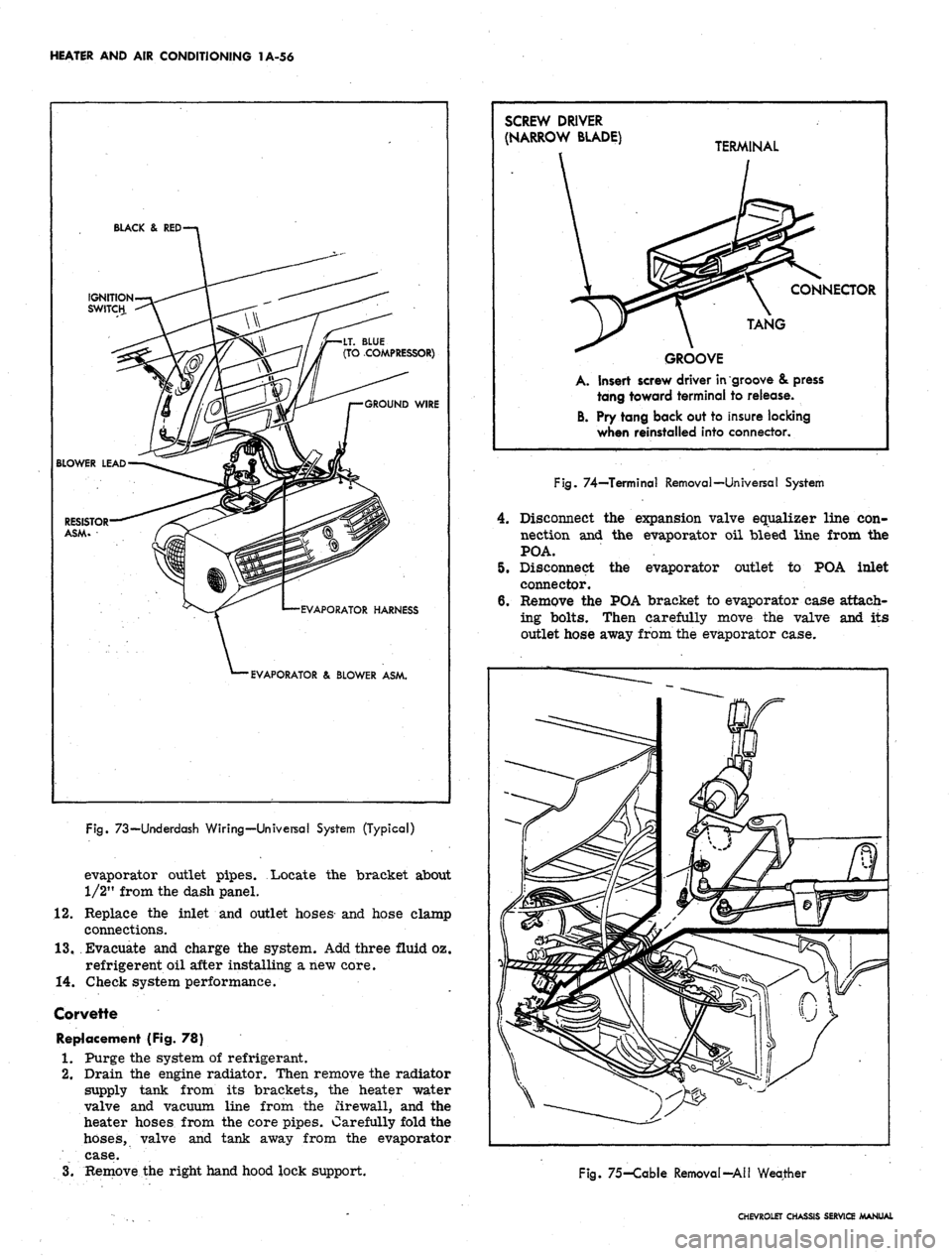
Fig.
73—Underdash Wiring—Universal System (Typical)
evaporator outlet pipes. Locate the bracket about
1/2" from the dash panel.
12.
Replace the inlet and outlet hoses and hose clamp
connections.
13.
Evacuate and charge the system. Add three fluid oz.
refrigerent oil after installing a new core.
14.
Check system performance.
Corvette
Replacement (Fig. 78)
1.
Purge the system of refrigerant.
2.
Drain the engine radiator. Then remove the radiator
supply tank from its brackets, the heater water
valve and vacuum line from the firewall, and the
heater hoses from the core pipes. Carefully fold the
hoses,
valve and tank away from the evaporator
case.
3.
Remove the right hand hood lock support.
SCREW DRIVER
(NARROW BLADE) T£
GROOVE
A. Insert screw driver in
tang toward terminal
B. Pry tang back out to
when reinstalled into
RMINAL
\ CONNECTOR
TANG
groove & press
to release.
insure locking
connector.
Fig.
74—Terminal Removal—Universal System
4.
Disconnect the expansion valve equalizer line con-
nection and the evaporator oil bleed line from the
POA.
5.
Disconnect the evaporator outlet to POA inlet
connector.
6. Remove the POA bracket to evaporator case attach-
ing bolts. Then carefully move the valve and its
outlet hose away from the evaporator case.
Fig.
75-Cable Removal-All Weather
CHEVROLET CHASSIS SERVICE MANUAL
Page 81 of 659
HEATER AND AIR CONDITIONING 1A-58
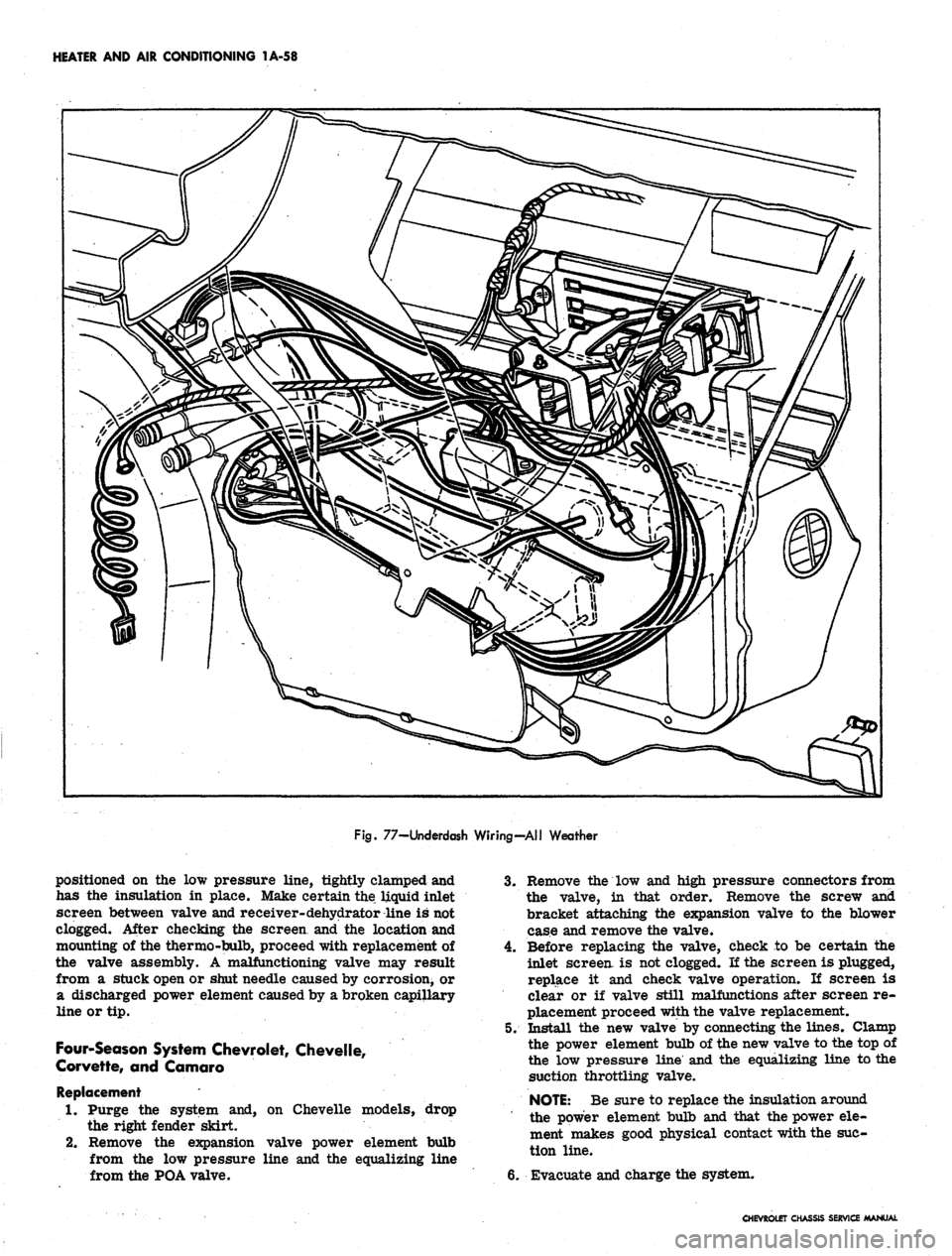
Fig.
77-Underdash Wiring-All Weather
positioned on the low pressure line, tightly clamped and
has the insulation in place. Make certain the liquid inlet
screen between valve and receiver- dehydrator line is not
clogged. After checking the screen and the location and
mounting of the thermo-bulb, proceed with replacement of
the valve assembly. A malfunctioning valve may result
from a stuck open or shut needle caused by corrosion^ or
a discharged power element caused by a broken capillary
line or tip.
Four-Season System Chevrolet, Chevelle,
Corvette, and Camaro
Replacement
1.
Purge the system and, on Chevelle models, drop
the right fender skirt.
2.
Remove the expansion valve power element bulb
from the low pressure line and the equalizing line
from the POA valve.
3.
Remove the low and high pressure connectors from
the valve, in that order. Remove the screw and
bracket attaching the expansion valve to the blower
case and remove the valve.
4.
Before replacing the valve, check to be certain the
inlet screen, is not clogged. If the screen is plugged,
replace it and check valve operation. If screen is
clear or if valve still malfunctions after screen re-
placement proceed with the valve replacement.
5. Install the new valve by connecting the lines. Clamp
the power element bulb of the new valve to the top of
the low pressure line and the equalizing line to the
suction throttling valve.
NOTE:
Be sure to replace the insulation around
the power element bulb and that the power ele-
ment makes good physical contact with the suc-
tion line.
6. Evacuate and charge the system.
CHEVROLET CHASSIS SERVICE MANUAL
Page 83 of 659
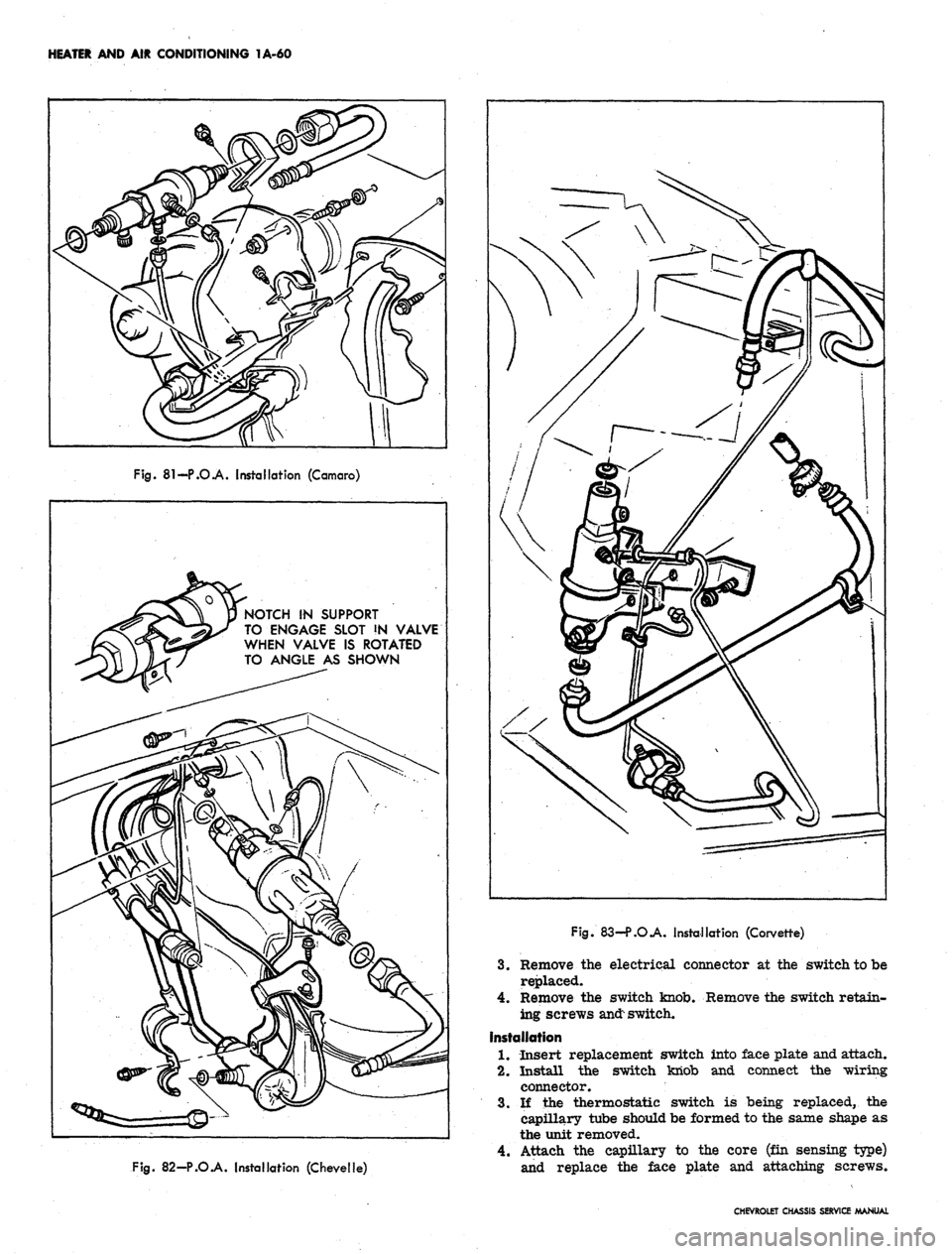
HEATER AND AIR CONDITIONING 1A-60
Fig.
81-P.O.A. Installation (Camaro)
NOTCH IN SUPPORT
TO ENGAGE SLOT !N VALVE
WHEN VALVE IS ROTATED
TO ANGLE AS SHOWN
Fig.
82-P.O.A. Installation (Chevelle)
Fig.
83—P.O.A. Installation (Corvette)
3.
Remove the electrical connector at the switch to be
replaced.
4.
Remove the switch knob. Remove the switch retain-
ing screws
and:
switch.
Installation
1.
Insert replacement switch into face plate and attach.
2.
Install the switch knob and connect the wiring
connector.
3.
If the thermostatic switch is being replaced, the
capillary tube should be formed to the same shape as
the unit removed.
4.
Attach the capillary to the core (fin sensing type)
and replace the face plate and attaching screws.
CHEVROLET CHASSIS SERVICE MANUAL
Page 87 of 659
HEATER AND AIR CONDITIONING 1A-64
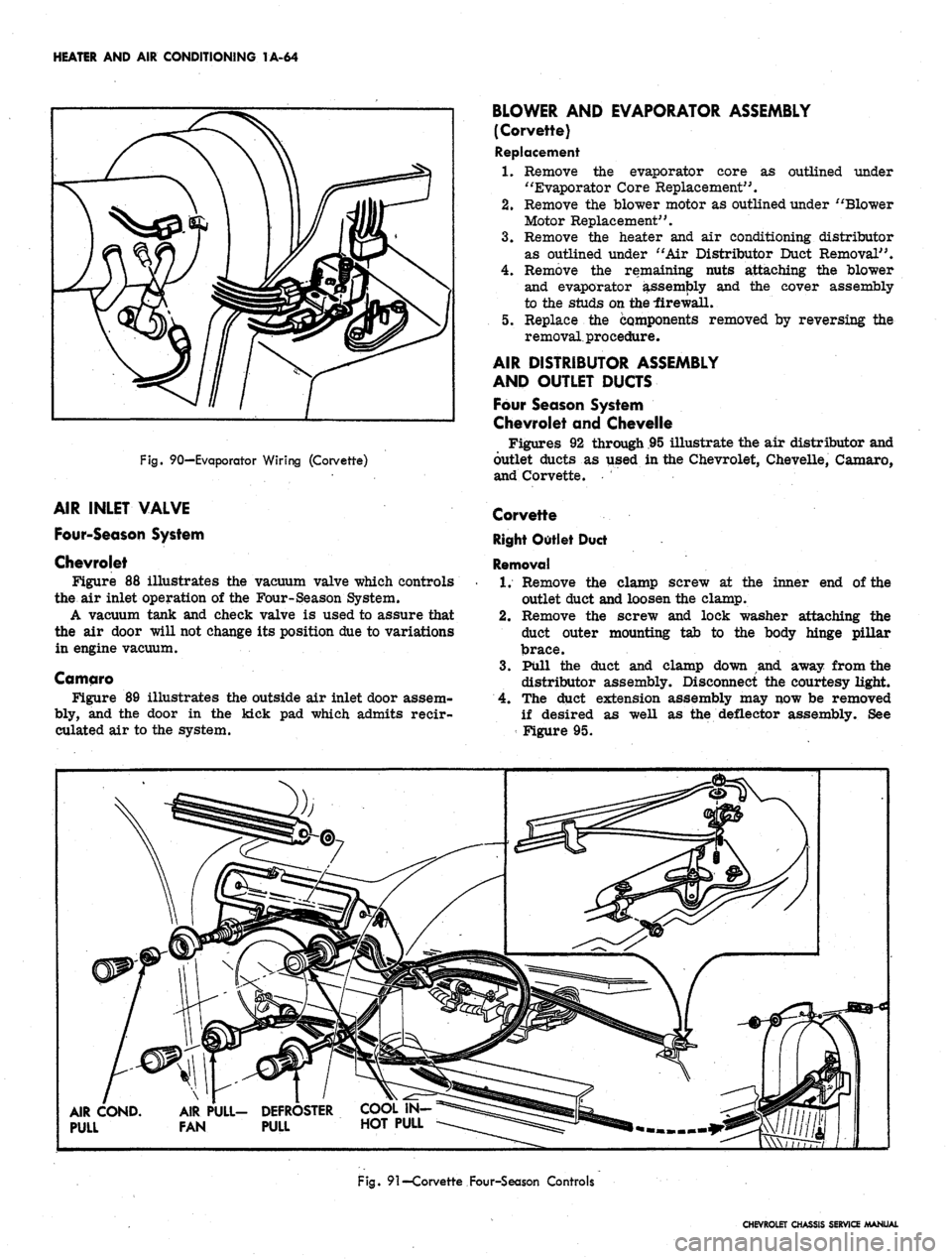
Fig.
90—Evaporator Wiring (Corvette)
AIR INLET VALVE
Four-Season System
Chevrolet
Figure 88 illustrates the vacuum valve which controls
the air inlet operation of the Four-Season System.
A vacuum tank and check valve is used to assure that
the air door will not change its position due to variations
in engine vacuum.
Camqro
Figure 89 illustrates the outside air inlet door assem-
bly, and the door in the kick pad which admits reeir-
culated air to the system.
BLOWER AND EVAPORATOR ASSEMBLY
(Corvette)
Replacement
1.
Remove the evaporator core as outlined under
"Evaporator Core Replacement".
2.
Remove the blower motor as outlined under "Blower
Motor Replacement".
3.
Remove the heater and air conditioning distributor
as outlined under "Air Distributor Duct Removal".
4.
Remove the remaining nuts attaching the blower
and evaporator assembly and the cover assembly
to the studs on the -firewall.
5. Replace the components removed by reversing the
removal, procedure.
AIR DISTRIBUTOR ASSEMBLY
AND OUTLET DUCTS
Four Season System
Chevrolet and Chevelle
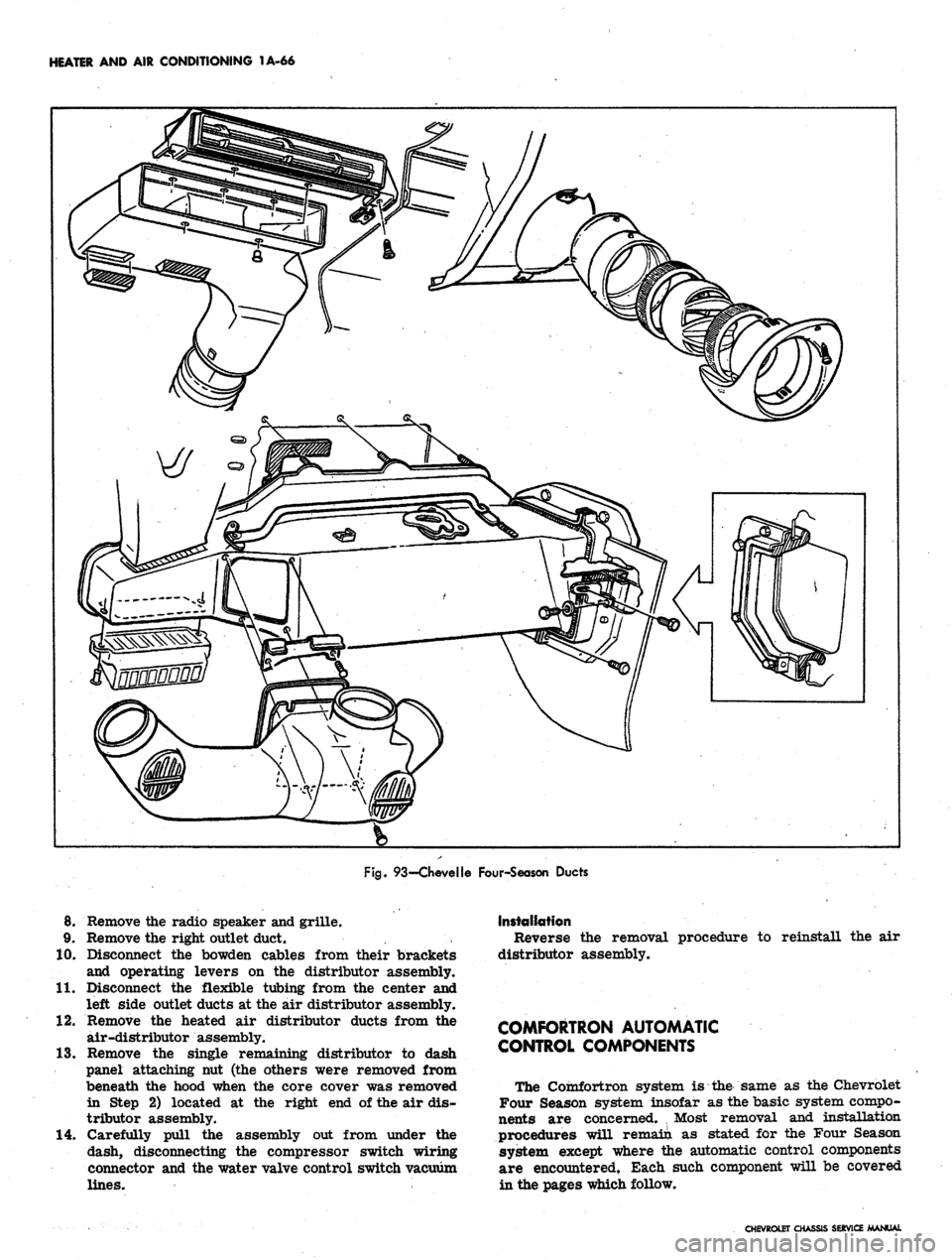
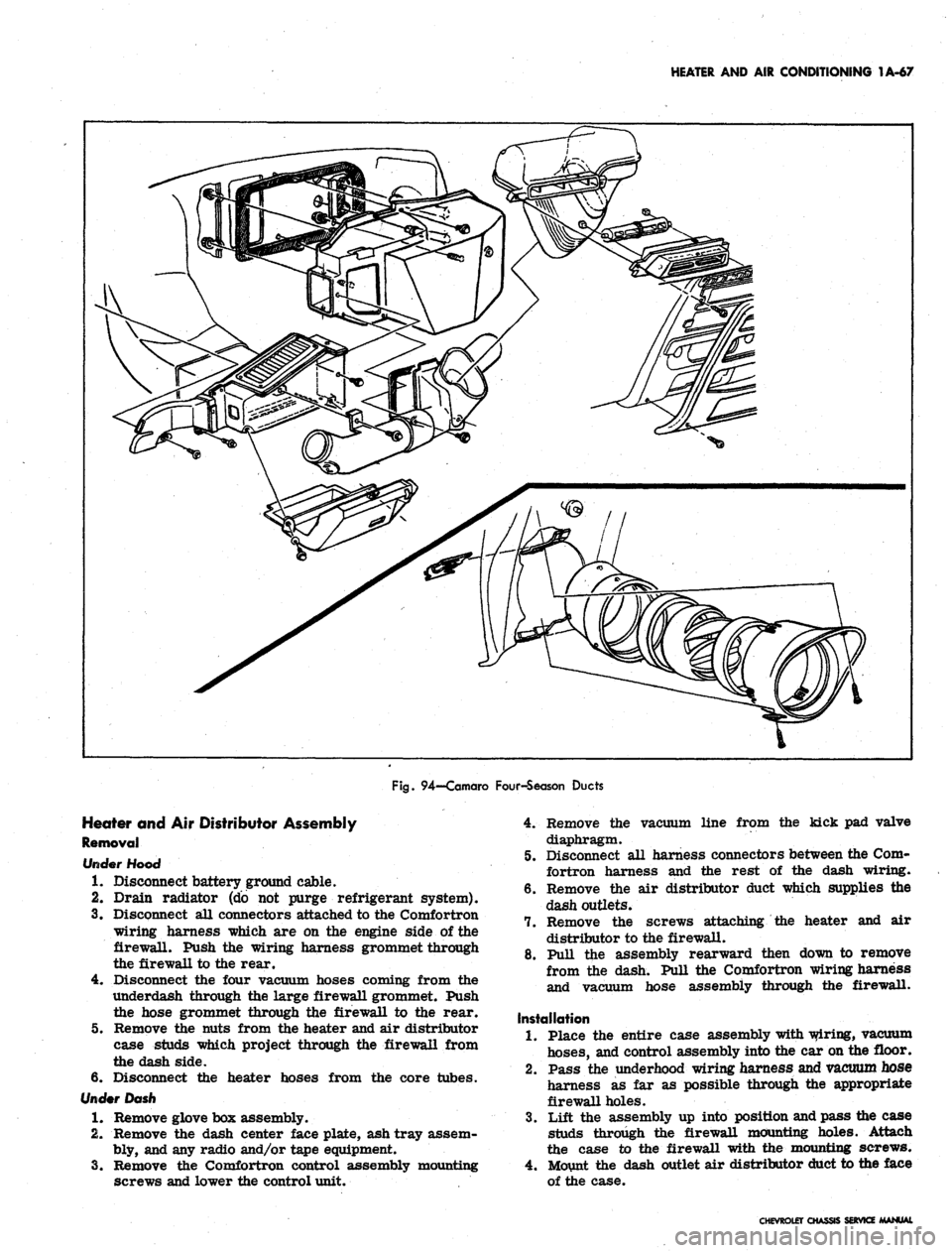
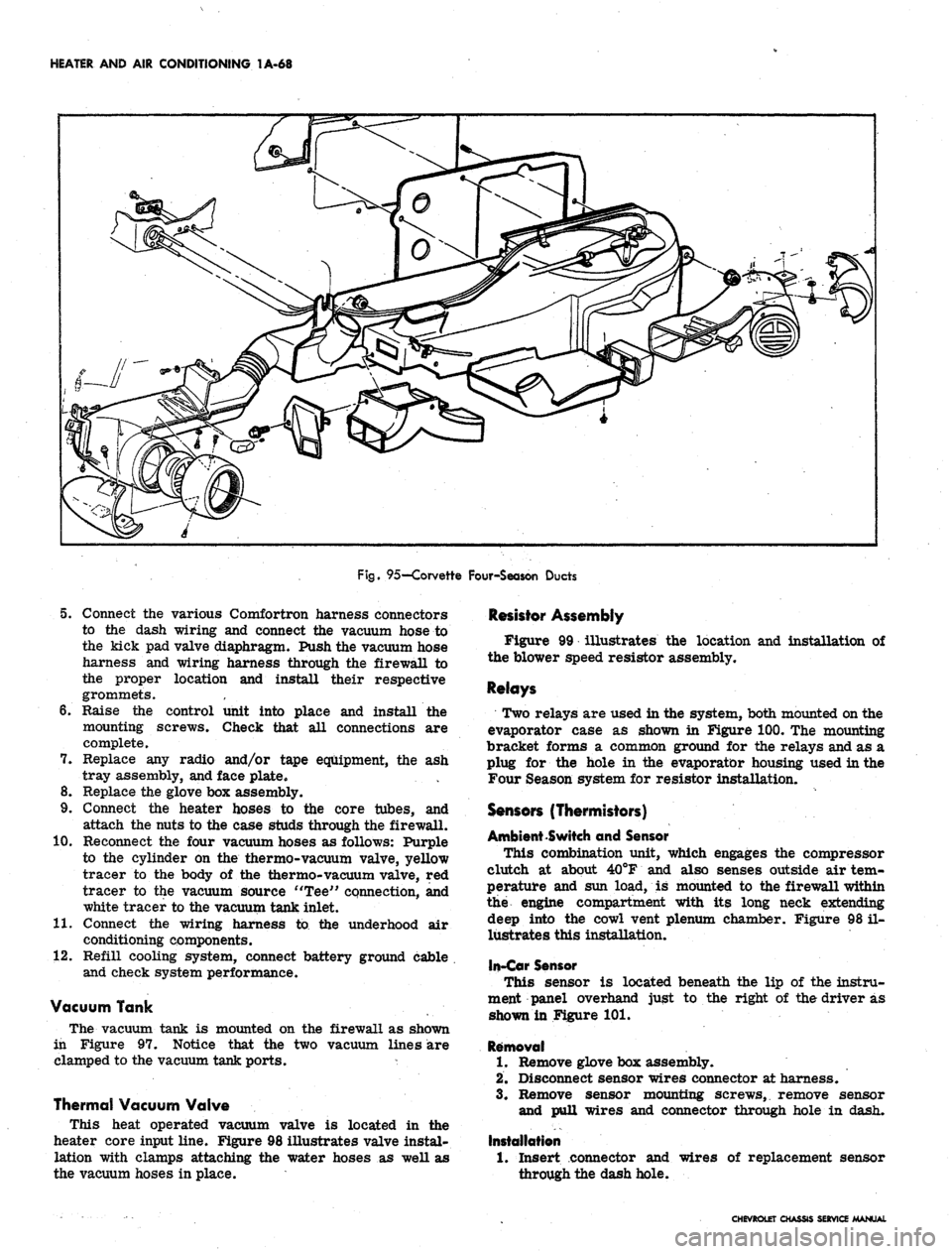
Figures 92 through .95 illustrate the air distributor and
outlet ducts as used in the Chevrolet, Chevelle, Camaro,
and Corvette.
Corvette
Right Outlet Duct
Removal
1.
Remove the clamp screw at the inner end of the
outlet duct and loosen the clamp.
2.
Remove the screw and lock washer attaching the
duct outer mounting tab to the body hinge pillar
brace.
3.
Pull the duct and clamp down and away from the
distributor assembly. Disconnect the courtesy light.
4.
The duct extension assembly may now be removed
if desired as well as the deflector assembly. See
Figure 95.
AIR COND.
PULL
AIR PULL- DEFROSTER
FAN PULL HOT PULL
Fig.
91—Corvette Four-Season Controls
CHEVROLET CHASSIS SERVICE MANUAL
Page 89 of 659
HEATER AND AIR CONDITIONING 1A-66
Fig.
93—Chevelle Four-Season Ducts
8. Remove the radio speaker and grille.
9. Remove the right outlet duct.
10.
Disconnect the bowden cables from their brackets
and operating levers on the distributor assembly.
11.
Disconnect the flexible tubing from the center and
left side outlet ducts at the air distributor assembly.
12.
Remove the heated air distributor ducts from the
air-distributor assembly.
13.
Remove the single remaining distributor to dash
panel attaching nut (the others were removed from
beneath the hood when the core cover was removed
in Step 2) located at the right end of the air dis-
tributor assembly.
14.
Carefully pull the assembly out from under the
dash, disconnecting the compressor switch wiring
connector and the water valve control switch vacuum
lines.
Installation
Reverse the removal procedure to reinstall the air
distributor assembly.
COMFORTRON AUTOMATIC
CONTROL COMPONENTS
The Comfortron system is the same as the Chevrolet
Four Season system insofar as the basic system compo-
nents are concerned. , Most removal and installation
procedures wUl remain as stated for the Four Season
system except where the automatic control components
are encountered. Each such component will be covered
in the pages which follow.
CHEVROLET CHASSIS SERVICE MANUAL
Page 90 of 659
HEATER AND AIR CONDITIONING 1A-67
Fig.
94—Camaro Four-Season Ducts
Heater and Air Distributor Assembly
Removal
rfooo
1.
Disconnect battery ground cable.
2.
Drain radiator (do not purge refrigerant system).
3.
Disconnect all connectors attached to the Comfortron
wiring harness which are on the engine side of the
firewall. Push the wiring harness grommet through
the firewall to the rear.
4.
Disconnect the four vacuum hoses coming from the
underdash through the large firewall grommet. Push
the hose grommet through the firewall to the rear.
5.
Remove the nuts from the heater and air distributor
case studs which project through the firewall from
the dash side.
6. Disconnect the heater hoses from the core tubes.
Under Dash
1.
Remove glove box assembly.
2.
Remove the dash center face plate, ash tray assem-
bly, and any radio and/or tape equipment.
3.
Remove the Comfortron control assembly mounting
screws and lower the control unit.
4.
Remove the vacuum line from the kick pad valve
diaphragm.
5.
Disconnect all harness connectors between the Com-
fortron harness and the rest of the dash wiring.
6. Remove the air distributor duct which supplies the
dash outlets.
7.
Remove the screws attaching the heater and air
distributor to the firewall.
8. Pull the assembly rearward then down to remove
from the dash. Pull the Comfortron wiring harness
and vacuum hose assembly through the firewall.
Installation
1.
Place the entire case assembly with wiring, vacuum
hoses,
and control assembly into the car on the floor.
2.
Pass the underhood wiring harness and vacuum hose
harness as far as possible through the appropriate
firewall holes.
3.
Lift the assembly up into position and pass the case
studs through the firewall mounting holes. Attach
the case to the firewall with the mounting screws.
4.
Mount the dash outlet air distributor duct to the face
of the case.
CHEVROLET CHASSIS SERVICE MANUAL
Page 91 of 659
HEATER AND AIR CONDITIONING 1A-68
Fig.
95—Corvette Four-Season Ducts
5. Connect the various Comfortron harness connectors
to the dash wiring and connect the vacuum hose to
the kick pad valve diaphragm. Push the vacuum hose
harness and wiring harness through the firewall to
the proper location and install their respective
grommets.
6. Raise the control unit into place and install the
mounting screws. Check that all connections are
complete.
7. Replace any radio and/or tape equipment, the ash
tray assembly, and face plate.
8. Replace the glove box assembly.
9. Connect the heater hoses to the core tubes, and
attach the nuts to the case studs through the firewall.
10.
Reconnect the four vacuum hoses as follows: Purple
to the cylinder on the thermo-vacuum valve, yellow
tracer to the body of the thermo-vacuum valve, red
tracer to the vacuum source "Tee" connection, and
white tracer to the vacuum tank inlet.
11.
Connect the wiring harness to the underhood air
conditioning components.
12.
Refill cooling system, connect battery ground cable
and check system performance.
Vacuum Tank
The vacuum tank is mounted on the firewall as shown
in Figure 97. Notice that the two vacuum lines are
clamped to the vacuum tank ports. *
Thermal Vacuum Valve
This heat operated vacuum valve is located in the
heater core input line. Figure 98 illustrates valve instal-
lation with clamps attaching the water hoses as well as
the vacuum hoses in place.
Resistor Assembly
Figure 99 illustrates the location and installation of
the blower speed resistor assembly.
Relays
Two relays are used in the system, both mounted on the
evaporator case as shown in Figure 100. The mounting
bracket forms a common ground for the relays and as a
plug for the hole in the evaporator housing used in the
Four Season system for resistor installation.
Sensors (Thermistors)
Ambient Switch and Sensor
This combination unit, which engages the compressor
clutch at about 40°F and also senses outside air tem-
perature and sun load, is mounted to the firewall within
the engine compartment with its long neck extending
deep into the cowl vent plenum chamber. Figure 98 il-
lustrates this installation,
In-Car Sensor
This sensor is located beneath the lip of the instru-
ment panel overhand just to the right of the driver as
shown in Figure 101.
Removal
1.
Remove glove box assembly.
2.
Disconnect sensor wires connector at harness.
3.
Remove sensor mounting screws, remove sensor
and pull wires and connector through hole in dash.
Installation
1.
Insert connector and
through the dash hole.
wires of replacement sensor
CHEVROLET CHASSIS SERVICE MANUAL