ignition CHEVROLET CAMARO 1974 2.G Owners Manual
[x] Cancel search | Manufacturer: CHEVROLET, Model Year: 1974, Model line: CAMARO, Model: CHEVROLET CAMARO 1974 2.GPages: 85, PDF Size: 32.84 MB
Page 6 of 85
Downloaded from www.Manualslib.com manuals search engine BEFORE DRIVING YOUR CAMAR 0
DRIVER CHECKLIST
Before Entering Car
1. See that windows, mirrors and
lights are clean.
2. Visually note inflation condition
of tires.
3. Check that area to rear is clear
if about to back up.
Before Driving Off
1. Lock all doors.
2. Position seat.
3 . Adjust inside and outside mirrors.
4. Fasten seat belts.
5. Check that warning bulbs light
when key
is turned to start
position.
6. Release parking brake (and see
that brake warning light turns
off) .
7. Be sure you understand your car
and how to operate it safely.
Keys
Two separate keys are provided
for your car. Each key has a differ
ent" cross section so that it can be
inserted only in certain locks.
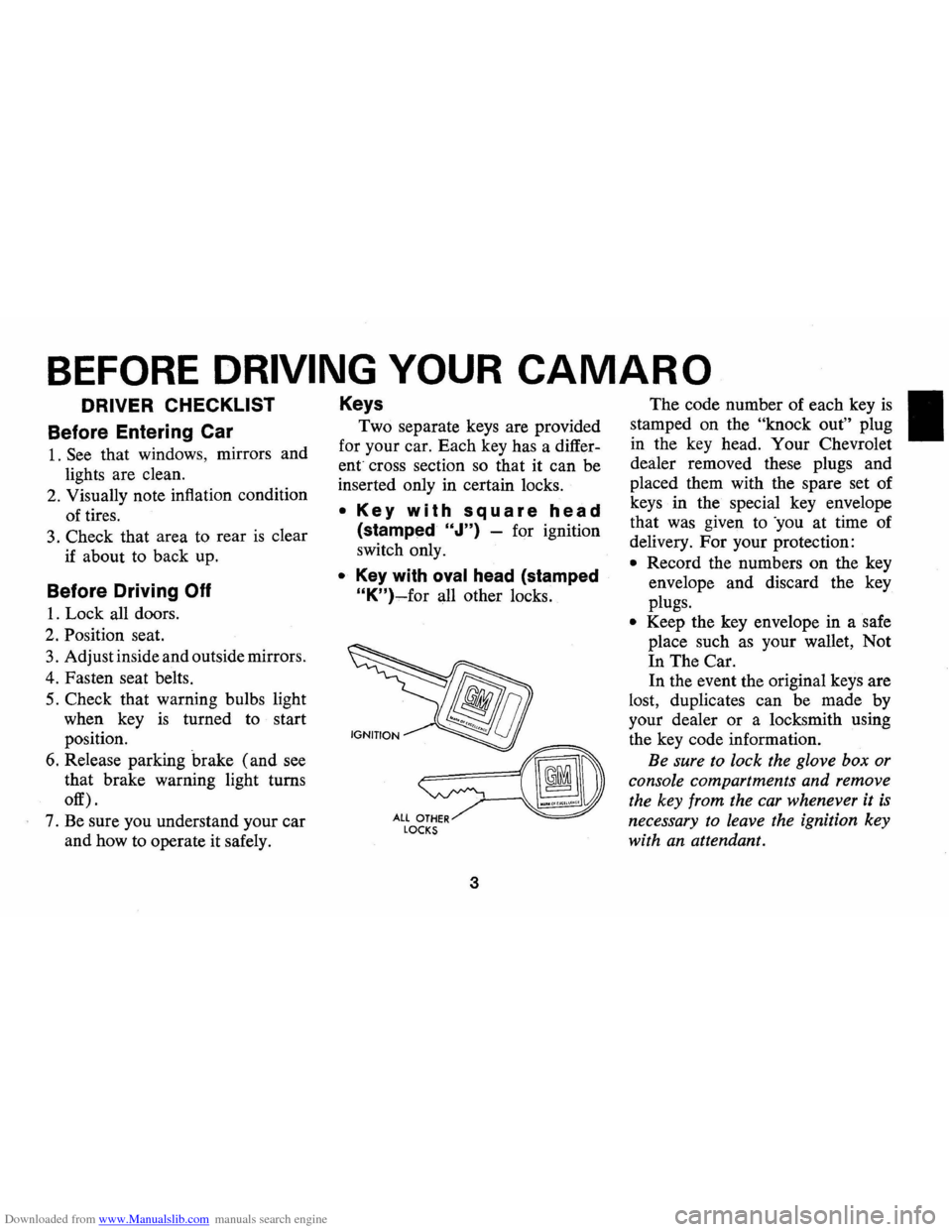
• Key with square head
(stamped "J") -for ignition
switch only.
• Key with oval head (stamped
"K")-for all other locks.
fIiJJ
~===(iD
ALlOTHER~ LOCKS
3
The code number of each key is
stamped on the "knock out" plug
in the key head. Your Chevrolet
dealer removed these plugs and
placed them with the spare set of
keys in the special key envelope
that was given to 'you at time of
delivery.
For your protection:
• Record the numbers on the key
envelope and discard the key
plugs.
• Keep the key envelope in a safe
place such
as your wallet, Not
In The Car.
In the event the original keys are
lost, duplicates can be made by
your dealer
or a locksmith using
the key code information.
Be sure to lock the glove box or
console compartments and remove
the key from the car whenever it
is
necessary to leave the ignition key
with
an attendant.
Page 9 of 85
Downloaded from www.Manualslib.com manuals search engine To Start Car:
• Seat belts must be properly
buckled around each outboard
front seat occupant , after getting
in the car, before the starter will
operate.
• The reminder buzzer and light
are designed to
go on if seat
belts are unbuckled at occupied
front seats while the vehicle
is
underway (the engine will con
tinue to
run).
• The engine may be restarted
after a stall without interlock in
terference if the driver remains
seated.
If Starter Will Not Operate:
• Remove any objects from un
occupied front seats.
• Re-buckle front seat belts.
NOTE: Front seating positions
contain a weight detector which is
, designed to activate the starter in
terlock
or the buzzer and light ni-
minder whenever a nominal weight
is placed on the seat and belts are
not buckled. The weight detector
cannot distinguish between a pas
senger and any object on the seat,
therefore, such items should be
stowed elsewhere in the vehicle.
Leaving something on the front
seat and leaving the front
seat belts
fastened while the
car is parked
creates a current drain which could
result in a discharged battery after
a period of time, which will vary
depending on battery and weather
conditions.
IfStarterSti IIWi II NotOperate:
• Set parking brake firmly, move
transmission lever to
"Park" (re
verse for manual transmission
cars) .
• TURN IGNITION KEY TO
"ON" ("RUN").
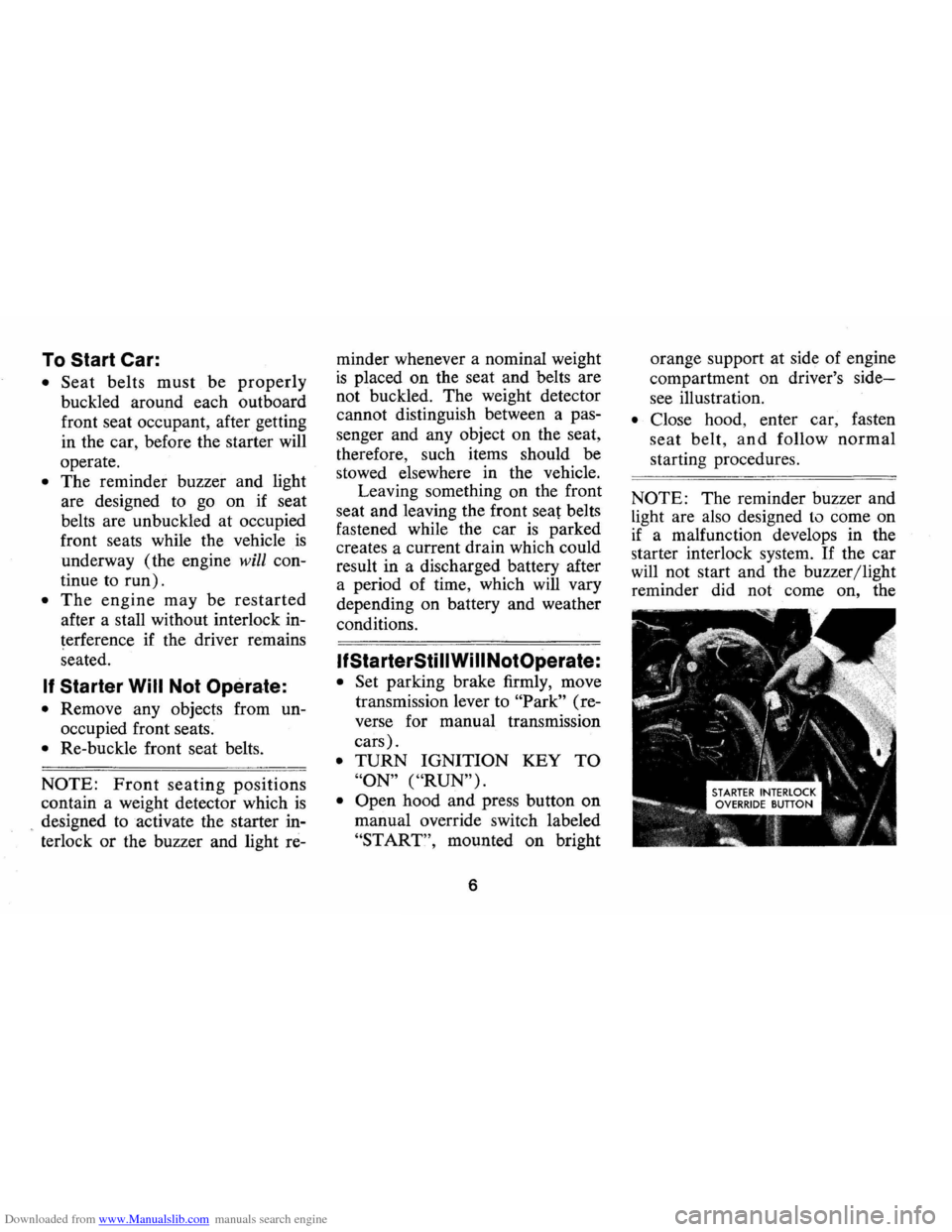
• Open hood and press button on
manual override switch labeled
"START", mounted on bright
6
orange support at side of engine
compartment
on driver's side
see illustration.
• Close hood, enter car, fasten
seat belt, and follow normal
starting procedures.
NOTE: The reminder buzzer and
Light are also designed to come on
if a malfunction develops in the
starter interlock system.
If the car
will not start and the buzzer/light
reminder did
not come on, the
Page 12 of 85
Downloaded from www.Manualslib.com manuals search engine Seat Belt Buzzer/Light
Reminder
• The front seat belts are linked to
a buzzer and light which remind
occupants to fasten their belts.
• The buzzer and light are de
signed to come on when any
outboard front seat occupant's
belt
is not fastened, while at
tempting to start the engine; or
if any front seat belt
is un
fastened while driving in any
forward gear.
• The reminders do not come on
when the engine
is running and
a front belt
is unbuckled if the
transmission
is in Park or neu
tral (automatic and column
shift transmission cars), or if the
parking brake
is engaged (floor
shift transmission cars).
If seat belt system , ignition in
terlock system, or reminder system
does not work
as described , see
your dealer for information and assistance.
Lap Belts (For
Rear Seat
Passengers)
• Seating positions next to side
windows have retractors which
are designed to automatically
take up excess webbing and
maintain tension on the lap belt.
These belts should be positioned
and secured
as described above
under
"Lap-Shoulder Belt Com
bination.
"
Seat Belt Inspection
• Periodically inspect belts,
buckles, adjustable latch plates,
retractors, interlock and re
minder systems, guide loops,
clips, and anchors for damage
that could lessen the effective
ness of the restraint system.
• Keep sharp edges and damaging
objects away from belts, and
other parts of restraint system.
• Replace belts if cut, weakened,
9
frayed, or subjected to collision
loads.
• Check that anchor mounting
bolts are tight.
• Have questionable parts re
placed.
• Keep seat belts clean and dry.
• Clean only with mild soap solu
tion and lukewarm water.
• Do not bleach or dye belts since
this may severely weaken belts.
Child Restraint
Children in automobiles should
be restrained to lessen the risk of
injury in accidents, sudden stops
or other hazardous situations. Gen
eral Motors dealers offer restraint
systems designed specifically for
use with infants and with small
children. The GM
"Infant Love
Seat" is designed for babies up to
20 pounds. The GM "Child Love
Seat" is designed for children
weighing 20 to 40 pounds, up to 3
Page 17 of 85
Downloaded from www.Manualslib.com manuals search engine STEERING COLUMN CONTROLS
Anti-Theft Steering
Column Lock
The anti-theft lock, located on the
right side of the steering column,
has
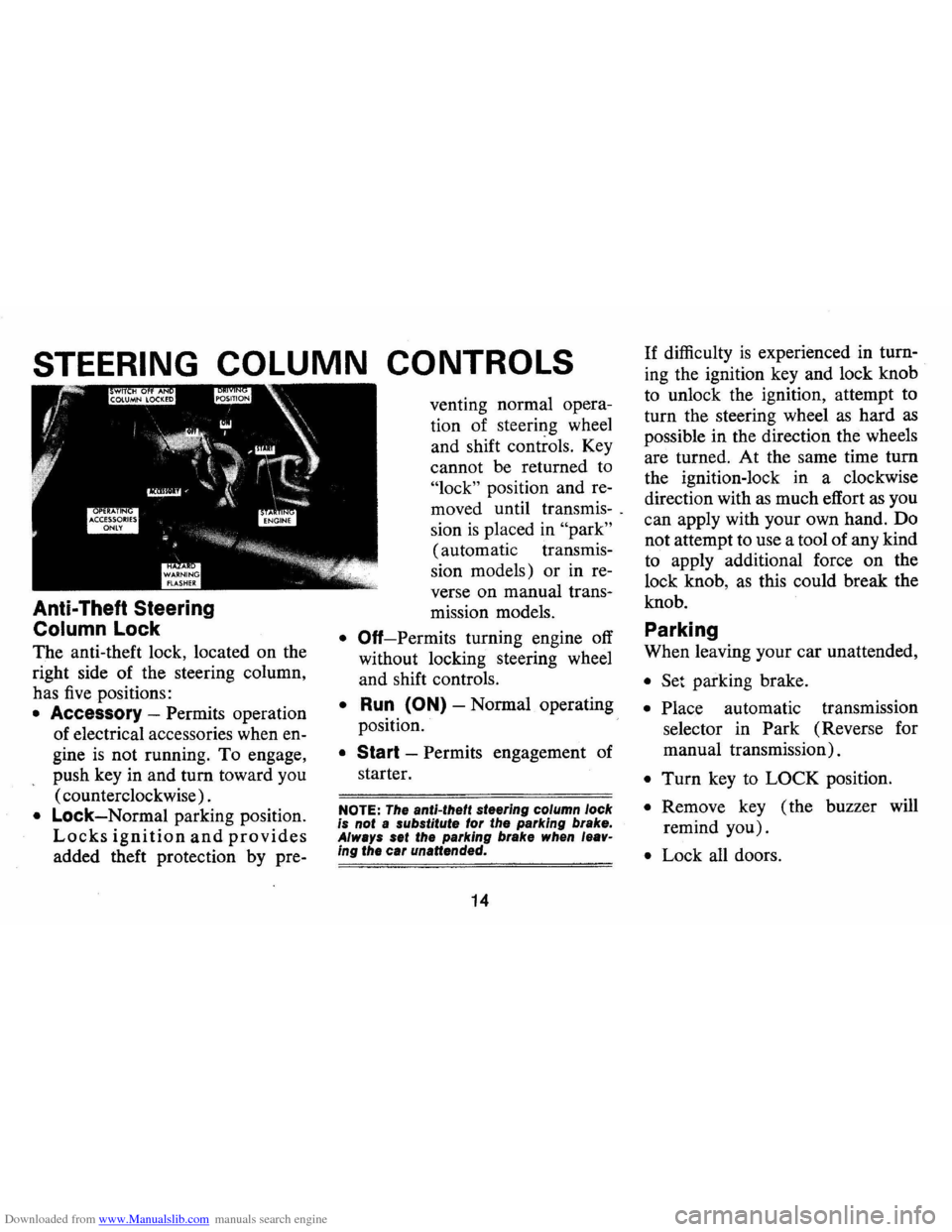
five positions:
• Accessory -Permits operation
of electrical accessories when en
gine
is not running. To engage,
push key in and turn toward you
( counterclockwise) .
• Lock-Normal parking position.
Locks ignition and provides
added theft protection by pre- venting
normal opera
tion of steering wheel
and shift controls. Key
cannot be returned to
"lock" position and re
moved until transmis-.
sion
is placed in "park"
(automatic transmis
sion models) or in re
verse on manual trans-
mission models.
• Off-Permits turning engine off
without locking steering wheel
and shift controls.
• Run (ON) -Normal operating
position.
• Start -Permits engagement of
starter.
NOTE: The anti-theft steering column lock
is not a substitute for the parking brake.
Always set the parking brake when leav
ing the car unattended.
14
If difficulty is experienced in turn
ing the ignition key and lock knob
to unlock the ignition, attempt to
turn the steering wheel
as hard as
possible in the direction the wheels
are turned. At the same time turn
the ignition-lock in a clockwise
direction with
as much effort as you
can apply with your own hand. Do
not attempt to use a tool of any kind
to apply additional force on the
lock knob,
as this could break the
knob.
Parking
When leaving your car unattended,
• Set parking brake.
• Place automatic transmission
selector in Park (Reverse for
manual transmission).
• Turn key to LOCK position.
• Remove key ( the buzzer will
remind you).
• Lock all doors.
Page 18 of 85
Downloaded from www.Manualslib.com manuals search engine Starting Engine
Automatic Transmission
Models
1. Apply the foot brake.
2. Place transmission selector
in "P" or "N" ("P" preferred).
A starter safety switch prevents
starter operation while the trans
mission selector
is in any drive
position.
(If it is necessary to
re-start the engine with the car
moving, place the selector lever
in
"N".)
IMPORTANT: Do not keep the
starter engaged for more than
15
seconds at a time. Wait 10 or 15 sec
onds before trying again.
.
3. Depress accelerator pedal and
activate starter
as outlined be
low for different conditions.
• Cold. Engine -Fully depress
accelerator pedal and slowly
release.
With foot oD the
pedal,
crank the engine by
turning the ignition key to the
Start position -release when
engine starts.
If engine starts, but fails to'
run, repeat this procedure.
When engine is running
smoothly (approximately 30
seconds), the idle speed may
be reduced by slightly depress
ing the accelerator pedal and
then slowly releasing.
• Warm Engine -Depress ac
celerator
pedal about halfway
15
and hold while cranking the
engine.
• Extremely Cold Weather
(~elow O°F.) Or After Car
Has Been Standing '
Idle
Several
Days-
Fully depress and release ac
celerator pedal two
or three
times before cranking the en
gine.
With foot oD the accel
erator pedal,
crank the engine
by turning the key to the
Start position and release
when engine starts. .
Manual Transmission Models
1. Apply parking brake and shift
transmission to neutral.
2.
Hold clutch pedal to floor
throughout the starting proce
dure. A starter interlock prevents
starter operation when clutch
is
not fully depressed. (Select the
Page 21 of 85
Downloaded from www.Manualslib.com manuals search engine Driving with Manual Transmissions
The 3-and 4-speed transmission
shift levers, extending from the
fioor, have their special shift pat
tern diagram located on the knob.
Depress the clutch pedal fully be
fore attempting to shift
toa differ
ent gear, then release the pedal to
move in that gear.
For normal
accelerations shift into second gear
at
20 mph; into third gear at 30
mph; and on 4-speed models into
fourth gear at
40 mph.
Both transmissions, being fully
synchronized, may be downshifted
into 1 st gear at any speed below
20
m. p.h. Shift into Reverse gear only
after the car has stopped. Always
depress and release the clutch pedal
fully when shifting.
Also, shift into
"Reverse" before
shutting
off engine. This will permit the
ignition key to be turned to the
"Lock" position.
Good Driving Practice: On cars
equipped with manual transmis
sions , use second gear at slow
speeds (less than
30 m.p.h.) when
driving in stop-and-go traffic; for
improved vehicle performance dur
ing acceleration; and when de
scending steep hills.
18
Turn Signals and Lane
Change Feature
The tum signal lever is located
on the left side of the steering col
umn immediately under the steer
ing wheel. The lever
is moved up
,ward to signal a right
tum and
downward to signal a left
tum.
Lamps on the front and rear of the
car transmit this signal to other
motorists and pedestrians. The
ig
nition switch must be in the "ON"
position in order for the tum sig
nals to be operational. This feature
prevents battery drain if the lever .
is left in an "ON" position when
your car
is not in use.
Page 24 of 85
Downloaded from www.Manualslib.com manuals search engine FLOOR CONTROLS
Braking System
The service brake system is de
signed for braking performance
under a wide range of driving con
ditions even when the vehicle
is
loaded to its full rated vehicle load.
Power Brakes
• On cars with power brakes if
power assist to the brakes
is in
terrupted due to a stalled engine
or some malfunction, two or
more brake applications nor
mally can be made using reserve
power.
• If the brake pedal is held down,
the system
is designed to bring
the car to a full stop on reserve
power. However, the reserve
power
is partially depleted each
time the brake pedal is applied
and released. Do not pump
brakes when brake power assist
has been interrupted.
• When reserve power is ex
hausted, the vehicle can still be
stopped by applying greater
force to the pedal.
Parking Brake
• To set parking brake, fully de
press foot pedal at far left side.
• For maximum holding power,
depress regular brake pedal with
the other foot at the same time.
• To release parking brake, pull
"BRAKE RELEASE" lever on
lower left instrument panel.
• As a reminder, the brake system
warning light
is designed to glow
whenever the parking brake con-
21
trol is not fully released, and the
ignition
is on.
• Never drive car with parking
brake set
as this may overheat or
otherwise damage rear brakes.
NOTE: "Riding the brake" by rest
ing your foot on the brake pedal
when not intending to brake can
cause abnormally high brake tem
peratures, excessive lining wear
and possible damage to the brakes.
Page 27 of 85
Downloaded from www.Manualslib.com manuals search engine Instruments
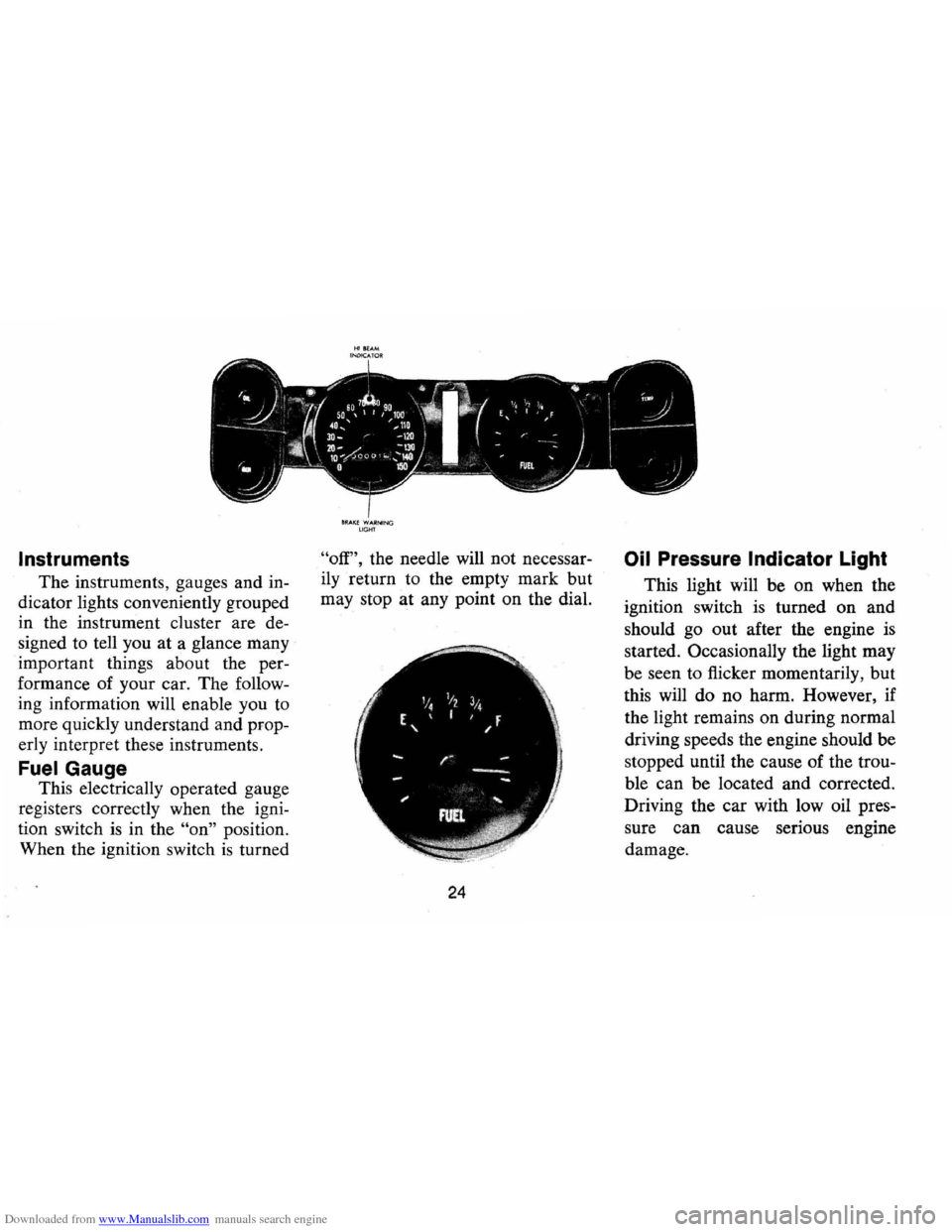
The instruments, gauges and in
dicator lights conveniently grouped
in the instrument cluster are de
signed to tell you
at a glance many
important things about the per
formance of your car. The follow
ing information will enable you to
more quickly understand and prop
erly interpret these instruments.
FuelGauge
This electrically operated gauge
registers correctly when the igni
tion switch
is in the "on" position.
When the ignition switch
is turned
8RAI(E WARNIN G LIGHT
"off", the needle will not necessar
ily return to the empty mark but
may stop at any point on the dial.
24
Oil Pressure Indicator Light
This light will be on when the
ignition switch
is turned on and
should go out after the engine
is
started. Occasionally the light may
be seen to flicker momentarily, but
this will do no harm. However , if
the light remains on during normal
driving speeds the engine should be
stopped until the cause of the trou
ble can be located and corrected .
Driving the car with low oil pres
sure can cause serious engine
damage.
Page 28 of 85
Downloaded from www.Manualslib.com manuals search engine Generator Indicator Light
The red light will go on when
the ignition key
is in the "on" posi
tion, but before the engine
is
started. After the engine starts, the
light should
go out and remain out.
If the light remains on when engine
is running, have your Authorized
Chevrolet Dealer locate and correct
the trouble
as soon as possible.
Engine Temperature
Indicator Light
This indicator light is provided
in the instrument cluster to quickly
warn of an overheated engine. With
the ignition switch in the START
position, the red
TEMP indicator
will light to let you know that it
is
operating properly.
When the engine
is started, the
red light will go out immediately.
It will light up at no other time
unless for some reason the engine
reaches a dangerously high oper
ating temperature.
If the light comes on
during extreme driving condi
tions, such as an extended idle, turn
off the air conditioner (if used) and
run the engine slightly faster than
idle speed with the transmission in
neutral gear.
If the light does not
go off within a short period of time
(1-2 minutes), then turn the engine
off until the cause of the overheat
ing
is corrected. Glance at the in
strument cluster frequently
as you
drive to see
if this light is on.
Brake System Warning
Light
The service brake system is de
signed so that half of the brake
system will provide some braking
action in the event of a hydraulic
leak in the other half of the sys
tem .
If the warning light labeled
"BRAKE, " located at lower left of
instrument cluster (speedometer
face), glows continuously when the
ignition
is on and after the brakes
have been firmly applied it may in-
25
dicate that there is a malfunction
in one half of the brake hydraulic
system .
On cars equipped with
front drum brakes, the light will
go out when foot is removed from
brake pedal.
• As a check on bulb condition
the light should glow with the
parking brake applied and the
ignition on. (Light
is also a
reminder to release parking
brake).
• The light should glow during
engine starting to verify that the
bulb
is operating properly.
• Have system repaired if light
does not come on during check.
• This warning light is not a sub
stitute for the visual check of
brake fluid level required as part
of normal maintenance.
If the light glows red:
• The parking brake control is not
fully released or,
• The service brake system is par
tially inoperative.
Page 30 of 85
Downloaded from www.Manualslib.com manuals search engine Optional Instruments and Gauges
Tachometer and Oil Pressure Indicator Light
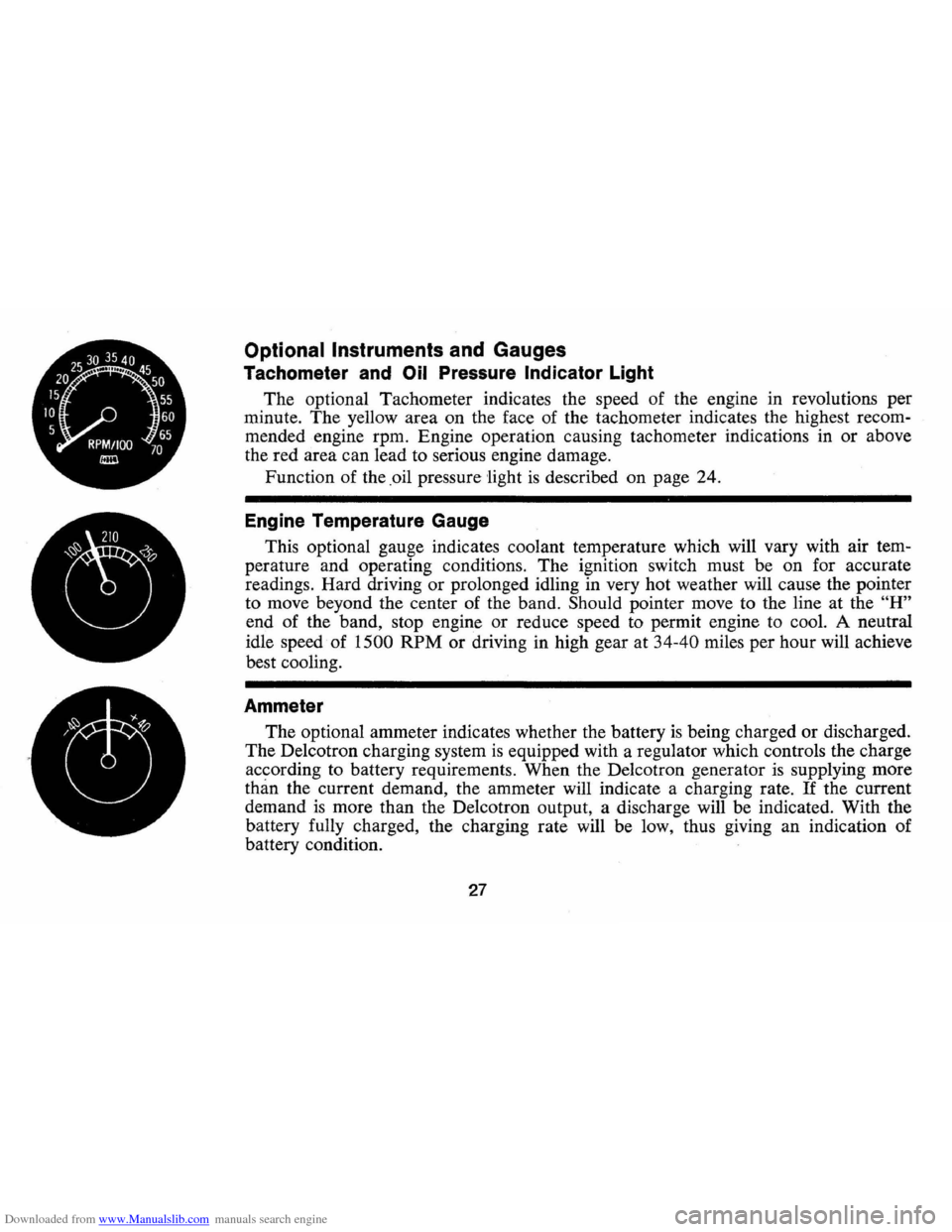
The optional Tachometer indicates the speed of the engine in revolutions per
minute. The yellow area on the face of the tachometer indicates the highest recom
mended engine rpm. Engine operation causing tachometer indications in or above
the red area can lead to serious engine damage.
Function of the .oil pressure
'light is described on page 24.
Engine Temperature Gauge
This optional gauge indicates coolant temperature which will vary with air tem
perature and operating conditions. The ignition switch must be on for accurate
readings. Hard driving
or prolonged idling in very hot weather will cause the pointer
to move beyond the center of the band.
Should pointer move to the line at the "H"
end of the band, stop engine or reduce speed to permit engine to cool. A neutral
idle speed of
1500 RPM or driving in high gear at 34-40 miles per hour will achieve
best cooling.
Ammeter
The optional ammeter indicates whether the battery is being charged or discharged.
The De1cotron charging system
is equipped with a regulator which controls the charge
according to battery requirements. When the De1cotron generator
is supplying more
than the current demand, the ammeter will indicate a charging rate. If the current
demand
is more than the De1cotron output, a discharge will be indicated. With the
battery fully charged, the charging rate will be low, thus giving an indication of
battery condition.
27