wheel bolts CHEVROLET CAMARO 1982 Repair Guide
[x] Cancel search | Manufacturer: CHEVROLET, Model Year: 1982, Model line: CAMARO, Model: CHEVROLET CAMARO 1982Pages: 875, PDF Size: 88.64 MB
Page 829 of 875
GM – CAMARO 1982-1992 – Repair Guide (Checked by WxMax) 829
12. Fully tighten the lower bolts onl
y when the front suspension is on the
ground. Torque the steering knuckle-to-strut nuts to 125 ft. lbs. (170 Nm)
followed by a 120 degree turn. Do not exceed a final torque of 148 Ft.
lbs. (200 Nm).
13. Install the brake caliper
14. Install the wheel and tire assembly.
15. Lower the front of the vehicle.
16. From inside the engine compartm ent, tighten the upper strut to upper
mount nut to 44 ft. lbs. (60 Nm).
17. Have the front end aligned.
OVERHAUL
The OEM domestic struts are serviced by replacement of the entire unit. There
is no strut cartridge to replace.
LOWER BALL JOINT
INSPECTION
Before performing this inspection, make sure the wheel bearings are adjusted
correctly and that the control arm bushings are in good condition.
1. Jack the car up under the front lower control arm at the spring seat.
2. Raise the car until t here is 1-2 in. (25-51mm) of clearance under the
wheel.
3. Insert a bar under the wheel and pr y upward. If the wheel raises more
than
1/8 in. (3mm), the ball joints are worn. Determine if the lower ball
joint is worn by visual inspec tion while prying on the wheel.
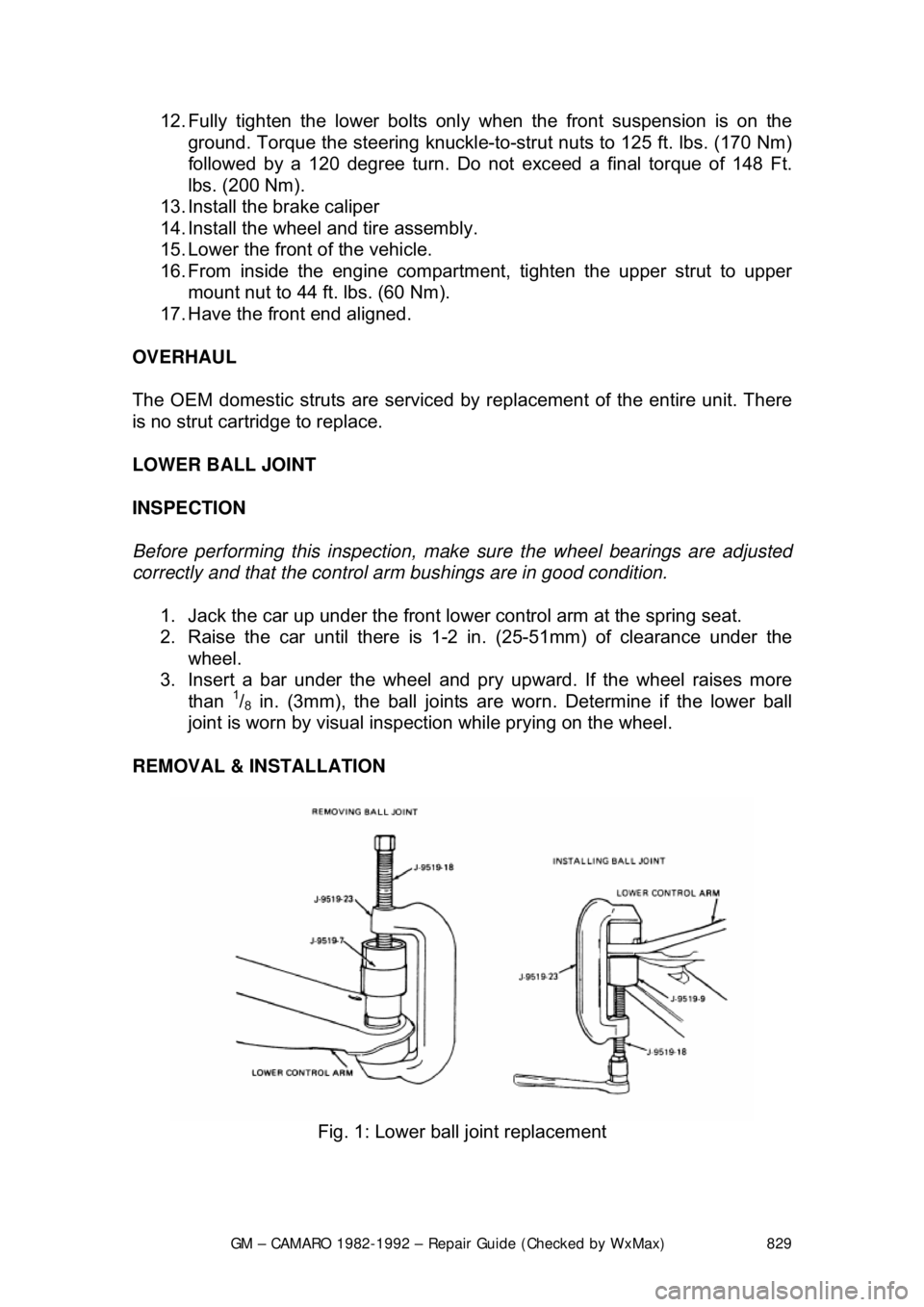
REMOVAL & INSTALLATION
Fig. 1: Lower ball joint replacement
Page 832 of 875
GM – CAMARO 1982-1992 – Repair Guide (Checked by WxMax) 832
6. Hold the stabilizer shaft approximat
ely 55mm from the bottom of the side
rail and torque the bracket bolts to 37 ft. lbs. (50 Nm).
7. Install the bolt, nut, grommets, spacer and retainers.
8. Lower the car.
LOWER CONTROL ARM
REMOVAL & INSTALLATION 1. Raise the car and safely support on jackstands.
2. Remove the wheel and tire.
3. Remove the stabilizer link and bush ings at the lower control arm.
4. Remove the pivot bolt nuts. DO NOT re move the pivot bolts at this time.
5. Install tool J-23028 or equivalent adapter to the jack and place into
position with tool J-23028 or equival ent adapter supporting bushings.
6. Install the jackstand under the outsi de frame rail on the opposite side of
the vehicle.
7. Raise tool J-23028 or equivalent adapter enough to remove both pivot
bolts.
8. Lower tool J-23028 or equivalent adapter.
9. Remove the spring and insulato r tape insulator to the spring.
10. Remove the ball joint from the knuckle.
11. To install, reverse the removal procedure.
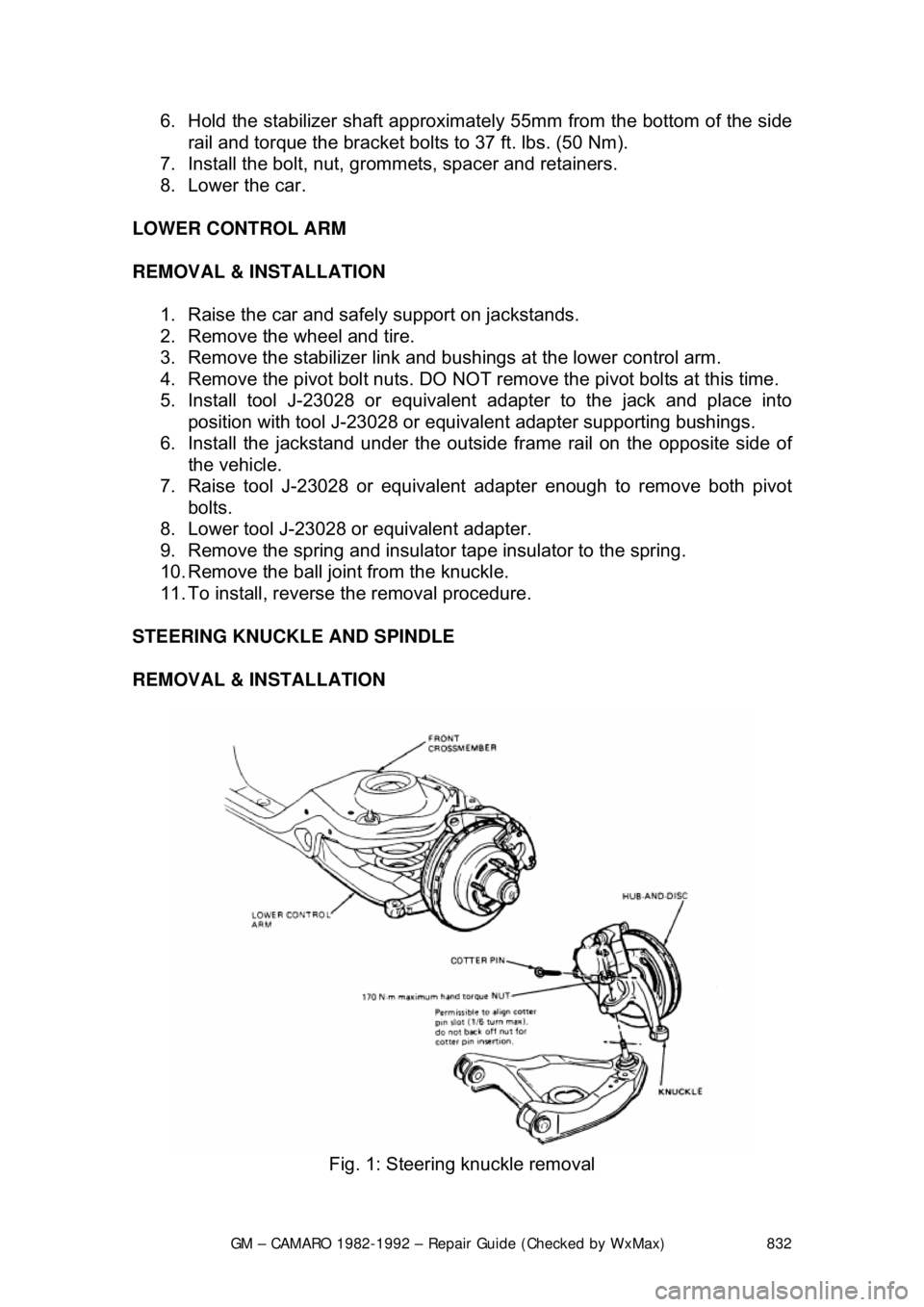
STEERING KNUCKLE AND SPINDLE
REMOVAL & INSTALLATION
Fig. 1: Steering knuckle removal
Page 833 of 875
GM – CAMARO 1982-1992 – Repair Guide (Checked by WxMax) 833
1. Siphon some brake fluid from the ma
ster cylinder. Raise and support the
vehicle.
2. Remove the wheel and tire. Remo ve the brake hose from the strut.
3. Remove the caliper and support on a wire. Refer to Brakes for
procedures, then remove the hub-and-disc.
4. Remove the splash shield. Disc onnect the tie rod from the steering
knuckle.
5. Support the lower control arm and disconnect the ball joint from the
steering knuckle using tool J-24292A.
6. Remove the 2 bolts securing the stru t to the steering knuckle and remove
the steering knuckle.
To install: 7. Place the steering knu ckle into position and install the 2 bolts securing
the strut to the st eering knuckle.
8. Support the lower control arm and c onnect the ball joint to the steering
knuckle.
9. Connect the tie rod to the steering knuckle. Install the splash shield.
10. Install the caliper.
11. Install the brake hose from the strut. Install the wheel and tire.
12. Lower the vehicle and refill the master cylinder with brake fluid.
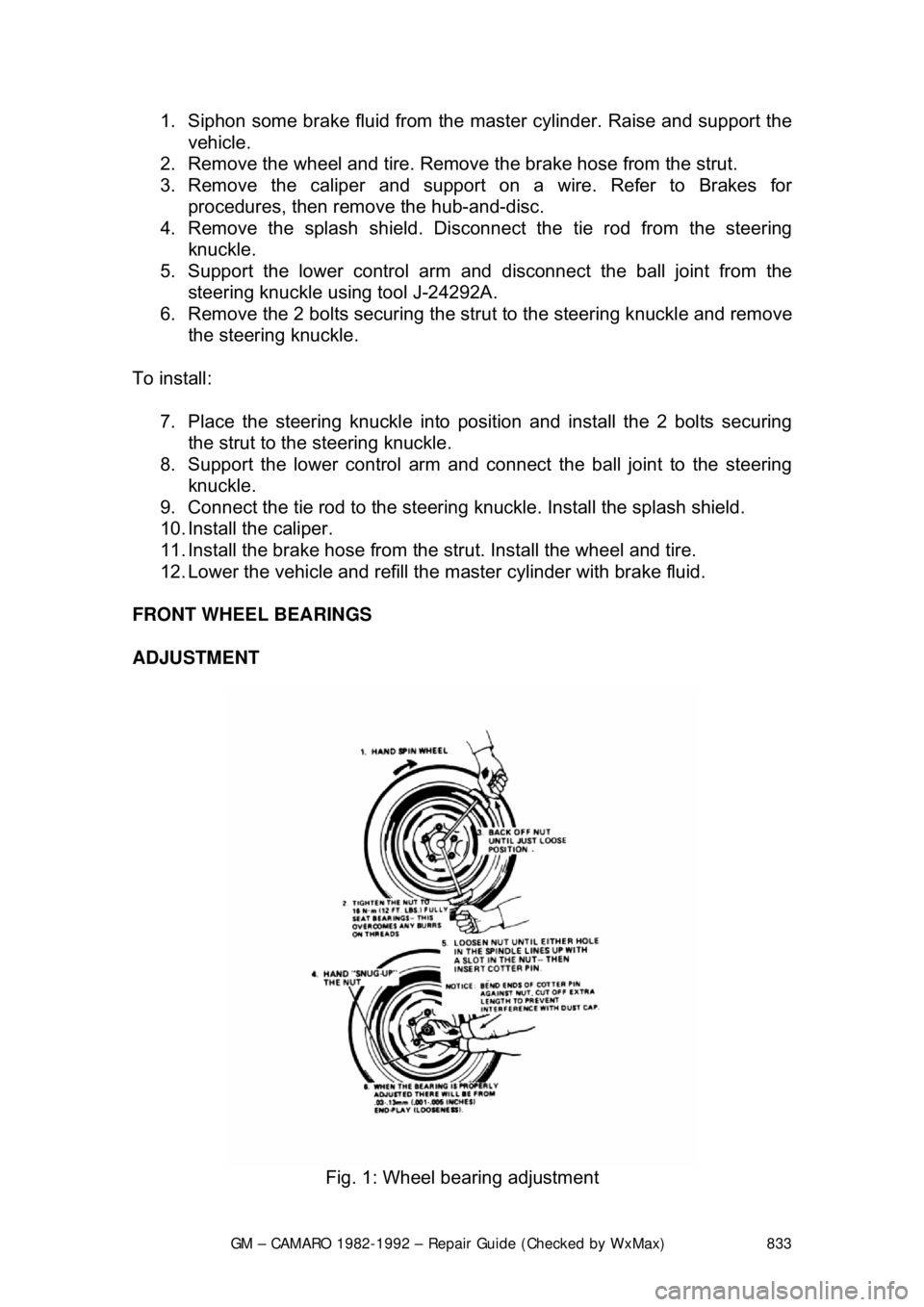
FRONT WHEEL BEARINGS
ADJUSTMENT
Fig. 1: Wheel bearing adjustment
Page 837 of 875

GM – CAMARO 1982-1992 – Repair Guide (Checked by WxMax) 837
1. Loosen the clamp bolts at each end
of the steering tie rod adjustable
sleeves.
2. With the steering wheel set strai ght ahead, turn the adjusting sleeves to
obtain the proper adjustment.
3. When the adjustment has been completed, check to see that the number
of threads showing on each end of the sleeve are equal. Also check that
tie rod end housings are at the right angles to the steering arm.
Page 845 of 875
GM – CAMARO 1982-1992 – Repair Guide (Checked by WxMax) 845
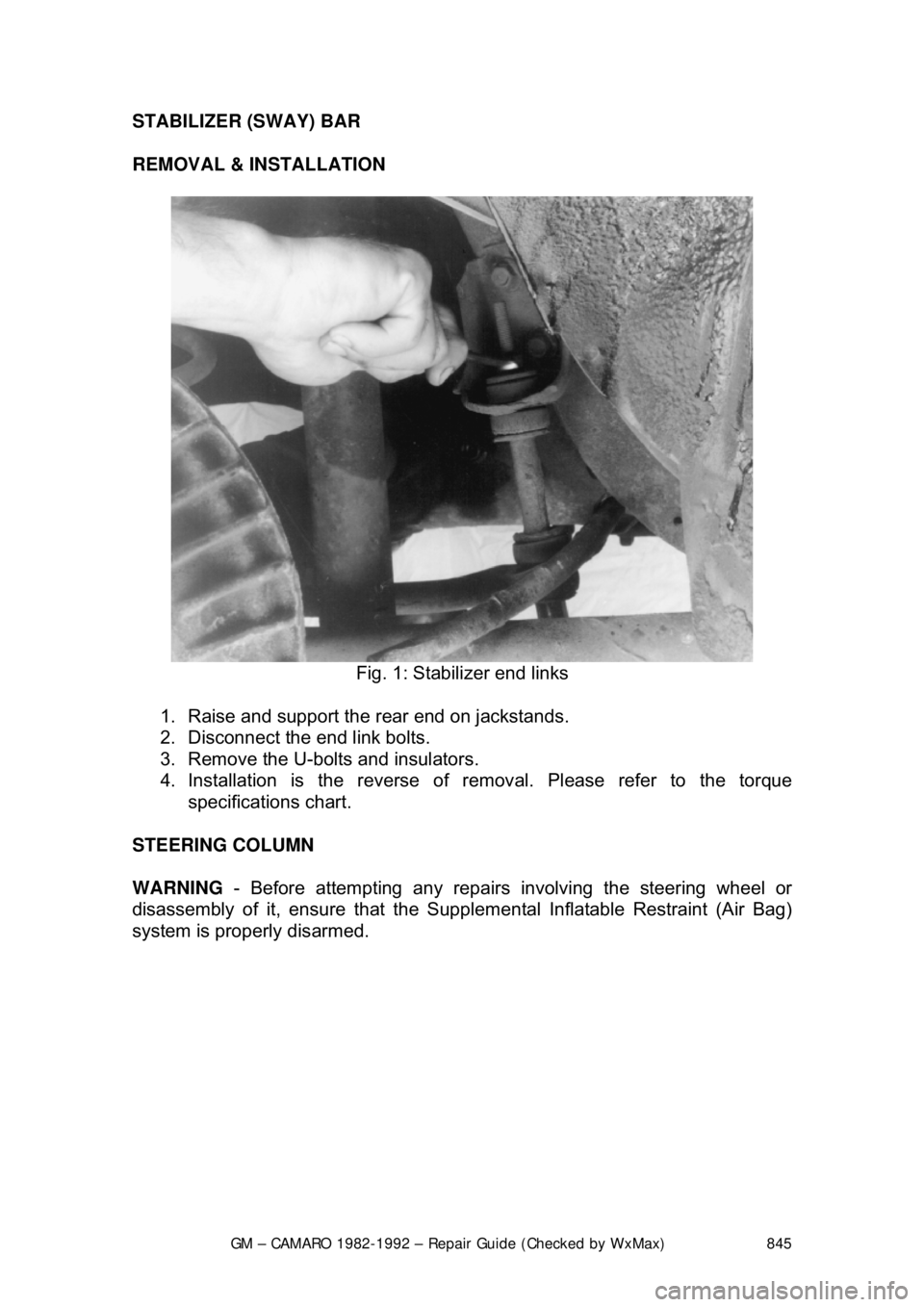
STABILIZER (SWAY) BAR
REMOVAL & INSTALLATION
Fig. 1: Stabilizer end links
1. Raise and support the rear end on jackstands.
2. Disconnect the end link bolts.
3. Remove the U-bolts and insulators.
4. Installation is the reverse of re moval. Please refer to the torque
specifications chart.
STEERING COLUMN
WARNING - Before attempting any repairs involving the steering wheel or
disassembly of it, ensure that the Supple mental Inflatable Restraint (Air Bag)
system is properly disarmed.
Page 852 of 875

GM – CAMARO 1982-1992 – Repair Guide (Checked by WxMax) 852
13. Remove the two nuts fr
om the column support bracket while holding the
column in position. Remove the br acket assembly and wire protector
from the wiring, then l oosely install the support column bracket.
14. Tape the turn signal wires at the c onnector to keep them fit and parallel.
15. Carefully remove the turn signal switch and wiring from the column.
To install: 16. Carefully install the turn signal switch and wiring into the column.
17. Remove the tape from the turn signal wires.
18. Install the wire protecto r and, while holding the colu mn in position, install
the two nuts to the colu mn support bracket.
19. Connect the clip to the link and ti ghten the screw that holds the shift
indicator needle.
20. Install the four bolts which secure the bracket assembly to the jacket.
21. Connect the turn signal connector to the wiring harness and install the
lower trim cap to the instrument panel.
22. Install the switch attaching screws.
23. Install the turn signal lever and the hazard flasher knob.
24. Install the upper bear ing preload spring.
25. Install the lockplate and the canceling cam.
26. Press down on the lockplate and inst all the snapring to the shaft using a
new snapring.
27. Install the cover to t he steering column shaft.
28. Install the steering wheel.
29. Connect the battery cable.
Page 857 of 875

GM – CAMARO 1982-1992 – Repair Guide (Checked by WxMax) 857
6. Remove the bolts attaching the toe plate to the cowl.
7. Disconnect the electrical connectors.
8. Remove the capsule nuts attachi
ng the steering column support bracket
to the instrument panel.
9. Disconnect the park lock cable from the ignition switch inhibitor, if
equipped with automatic transmission.
10. Remove the steering column from the vehicle.
To install:
If a replacement steering column is bein g installed, do not remove the anti-
rotation pin until after the steering co lumn has been connected to the steering
gear. Removing the anti-rotation pin before the steering column is connected to
the steering gear may dam age the SIR coil assembly.
11. Position the steering column in the vehicle.
12. Connect the park lock cable to the ig nition switch inhibitor on vehicles
with automatic transmission.
13. Install the capsule nuts attaching the steering column support bracket to
the instrument panel and tighten to 20 ft. lbs. (27 Nm).
14. Install the nut and bolt to the upper intermediate shaft coupling attaching
the upper intermediate shaft to the steer ing column. Tighten the nut to 44
ft. lbs. (60 Nm).
15. Install the bolts attaching the toe pl ate to the cowl and tighten to 58 inch
lbs. (6.5 Nm).
16. Connect the electrical connectors.
17. Remove the anti-rotation pin if a se rvice replacement steering column is
being installed.
18. Install the knee bolster and bracket, if equipped.
19. Install the sound insulator panel.
If SIR coil has become uncentered by turni ng of the steering wheel without the
column connected to the st eering gear, follow the proper adjustment procedure
for the SIR coil assembly before proceeding.
20. Install the steering wheel.
21. Connect the negative battery cable.
22. Enable the SIR system as follows: a. Connect the yellow 2-way SIR harness connector to the base of
the steering column and CPA clip and install the SIR fuse.
b. Install the left sound insulator.
c. Turn the ignition switch to the RUN position and verify that the
inflatable restraint indicator fl ashes 7-9 times and then turns OFF.
If the indicator does not respond as stated, a problem within the
SIR system is indicated.