audio CHEVROLET CAMARO 1994 4.G User Guide
[x] Cancel search | Manufacturer: CHEVROLET, Model Year: 1994, Model line: CAMARO, Model: CHEVROLET CAMARO 1994 4.GPages: 292, PDF Size: 15.35 MB
Page 118 of 292
Downloaded from www.Manualslib.com manuals search engine Comfort Controls and Audio Systems
[ VOLOBAL
POWER
1 TUNE 00 FADE
F
D
R
‘c AM-FM a
COMP RDM REV FWD SCAN PREV NEXT
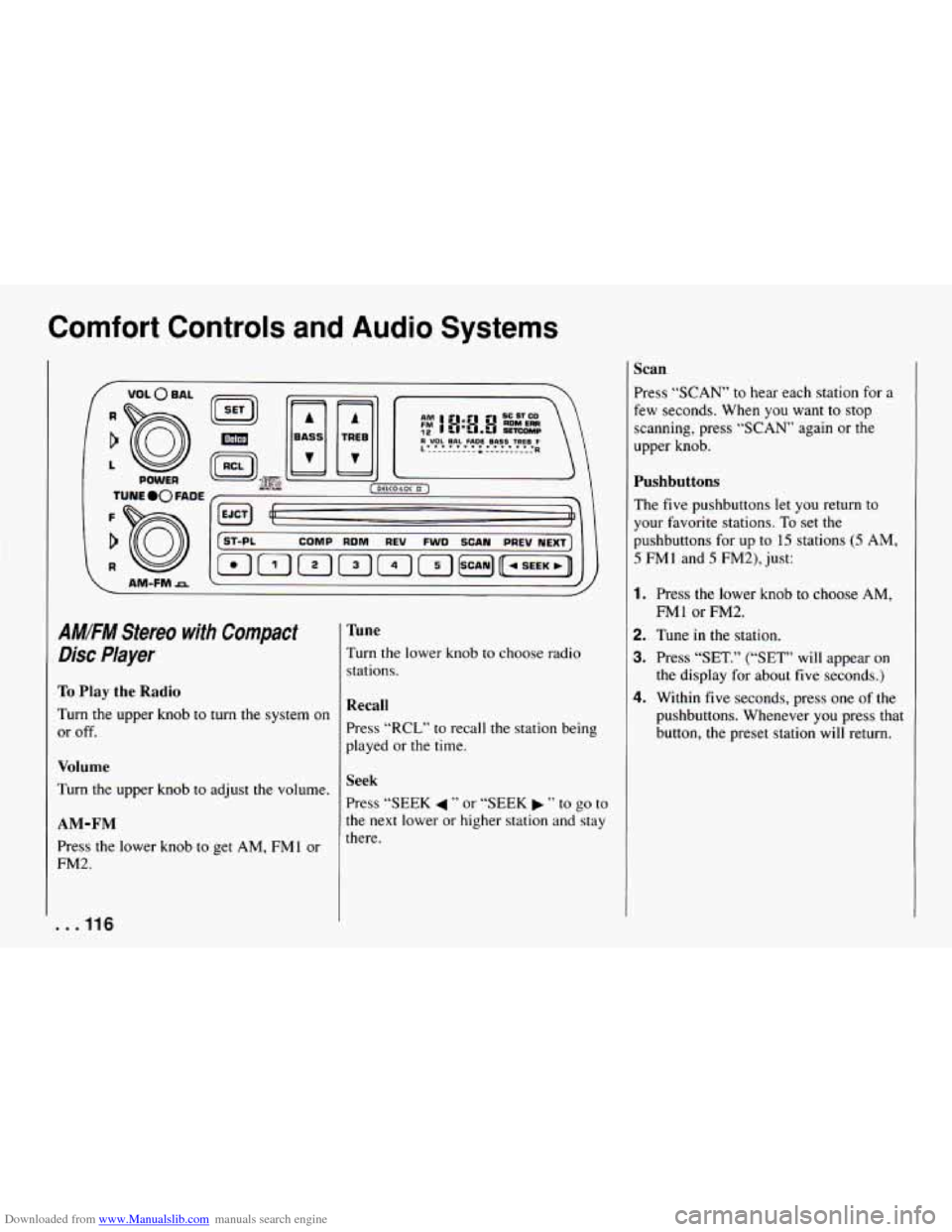
AM!FM Stereo with Compact
Disc Player
To Play the Radio
Turn the upper knob to turn the system on
or off.
Volume
Turn the upper knob to adjust the volume.
AM-FM
Press the lower knob to get AM, FMl or
FM2.
. . . 116
Tune
Turn the lower knob to choose radio
stations.
Recall
Press “RCL” to reca .I1 the station being
played or the time.
Seek
Press “SEEK 4 ” or “SEEK ” to go to
the next lower
or higher station and stay
there.
Scan
Press “SCAN’ to hear each station for a
few seconds. When you want to stop
scanning, press “SCAN’ again or the
upper knob.
Pushbuttons
The five pushbuttons let you return to
your favorite stations.
To set the
pushbuttons for up to
15 stations (5 AM,
5 FMl and 5 FM2), just:
1. Press the lower knob to choose AM,
2. Tune in the station.
3. Press “SET.” (“SET” will appear on
the display for about five seconds.)
4. Within five seconds, press one of the
pushbuttons. Whenever you press that
button, the preset station
will return.
FMl or FM2.
Page 119 of 292
Downloaded from www.Manualslib.com manuals search engine POWER
AM-FMrz
f ST-PL COMP RDM REV FWD SCAN PREV NEXT^
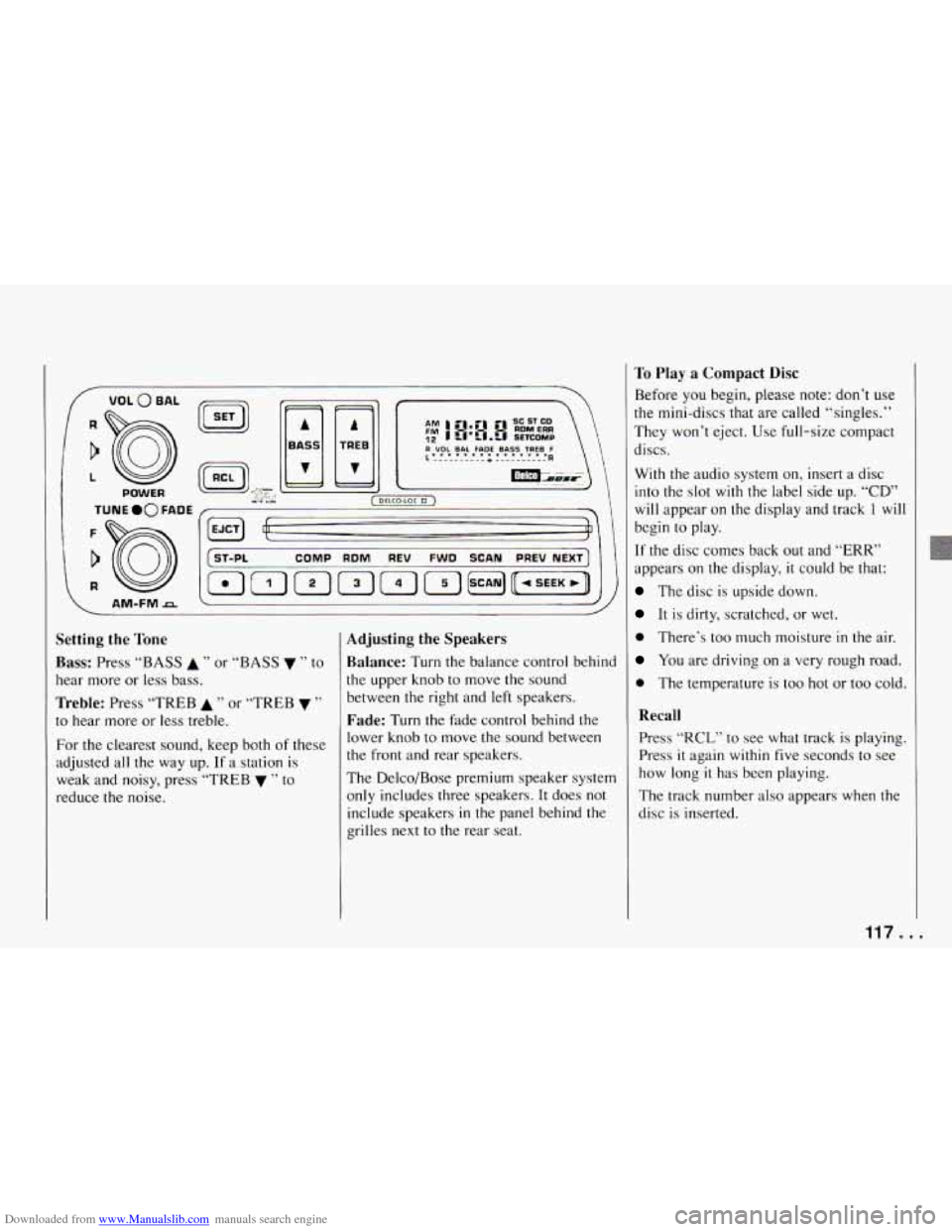
Setting the Tone
Bass: Press “BASS A ” or “BASS v ’’ to
hear more or less bass.
Treble: Press “TREB A ” or “TREB v ”
to hear more or less treble.
For the clearest sound, keep both of these
adjusted all the way up. If
a station is
weak and noisy, press “TREB
v ” to
reduce the noise.
Adjusting the Speakers
Balance:
Turn the balance control behind
the upper knob to move the sound
between the right and left speakers.
Fade: Turn the Fade control behind the
lower knob to move the sound between
the front and rear speakers.
The Delco/Bose premium speaker system
only includes three speakers. It does not
include speakers
in the panel behind the
grilles next to the rear seat.
To Play a Compact Disc
Before you begin, please note: don’t use
the mini-discs that are called “singles.”
They won’t eject.
Use full-size compact
discs.
With the audio system on, insert a disc
into the slot
with the label side up. “CD”
will appear on the display and track 1 wil
begin to play.
If the disc comes back out and “ERR”
appears on the display, it could be that:
The disc is upside down.
It is dirty, scratched, or wet.
0 There’s too much moisture in the air.
You are driving on a very rough road.
0 The temperature is too hot or too cold.
Recall
Press “RCL” to see what track is playing.
Press
it again within five seconds to see
how long
it has been playing.
The track number also appears when the
disc is inserted.
Page 120 of 292
Downloaded from www.Manualslib.com manuals search engine Comfort Controls and Audio Systems
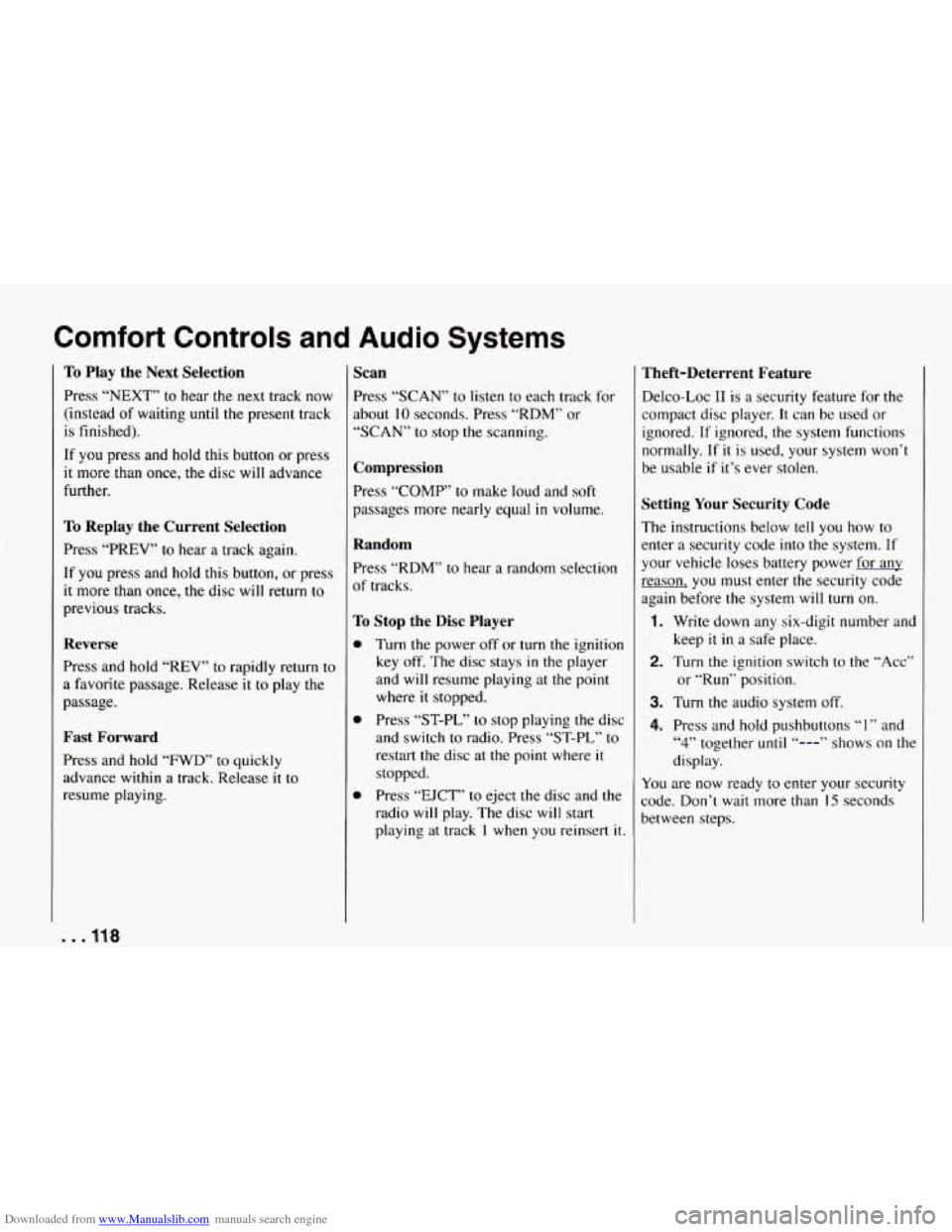
To Play the Next Selection
Press “NEXT” to hear the next track now
(instead of waiting until
the present track
is finished).
If you press and hold this button or press
it more than once, the disc will advance
further.
To Replay the Current Selection
Press “PREV” to hear a track again.
If you press and hold this button, or press
it more than once, the disc will return to
previous tracks.
Reverse
Press and hold “REV” to rapidly return to
a favorite passage. Release
it to play the
passage.
Fast Forward
Press and hold “FWD’ to quickly
advance within
a track. Release it to
resume playing.
Scan
Press “SCAN” to listen to each track for
about
10 seconds. Press “RDM” or
“SCAN” to stop the scanning.
Compression
Press “COMP’ to make loud and soft
passages more nearly equal
in volume.
Random
Press “RDM” to hear a random selection
of tracks.
To Stop the Disc Player
0
0
0
Turn the power off or turn the ignition
key off. The disc stays
in the player
and will resume playing at the point
where
it stopped.
Press “ST-PL” to stop playing the disc
and switch to radio. Press “ST-PL,” to
restart
the disc at the point where it
stopped.
Press “EJCT” to eject the disc and the
radio
will play. The disc will start
playing
at track 1 when you reinsert it.
Theft-Deterrent Feature
Delco-Loc I1 is a security feature for the
compact disc player.
It can be used or
ignored. If ignored, the system functions
normally. If
it is used, your system won’t
be usable
if it’s ever stolen.
Setting Your Security Code
The instructions below tell you how to
enter a security code into the system. If
your vehicle loses battery power for
any
reason, you must enter the security code
again before the system
will turn on.
1. Write down any six-digit number and
2. Turn the ignition switch to the “Acc”
3. Turn the audio system off.
4. Press and hold pushbuttons “1” and
keep
it in a
safe place.
or
“Run” position.
“4” together until “---” shows on the
display.
You are now ready to enter your security
code. Don’t wait more than
15 seconds
between steps.
. . .118
Page 121 of 292
Downloaded from www.Manualslib.com manuals search engine 5. Press “SET” and “000” will appear
on the display.
~ 6. Press “SEEK 4 ” or “SEEK b ” and
hold until the first digit of your code
appears. Release the button.
7. Turn the lower knob to make the
second and third digits appear.
8. Press the lower knob and “000” will
appear on the display. Now you are
ready
to enter the last three digits of
your code.
9. Press “SEEK 4 ” or “SEEK b ” and
hold until the fourth digit of your
code appears. Release the button.
10. Turn the lower knob to make the
fifth and sixth digits of your code
appear.
11. Press the lower knob. “rEP” will
appear for five seconds, and then
“000” will appear.
through
11. If “SEC” appears, your
audio system is secured.
If “---”
shows on the display, your system is
not secured.
You must restart the
entire procedure again from step
5.
12. For verification, repeat steps 6
Shutting Off the Theft-Deterrent
Feature
If your audio system is secured (“SEC”
shows on display) and you wish to disable
it, enter your security code as follows,
pausing no more than
15 seconds
between steps:
1. Turn the ignition on. Make sure the
audio system is
off. The time will
show on the display.
together
until “SEC” shows on the
display.
3. Press “SET.” “000” will appear on the
display.
4. Press “SEEK 4 ” or “SEEK b ” and
hold until the first digit of your code
appears. Release the button.
5. Turn the lower knob until the second
and third digits appear.
6. Press the lower knob. “000” will
appear on the display.
7. Press “SEEK 4 ” or “SEEK b ” and
hold until the fourth digit of your
security code appears. Release the
button.
8. Turn the lower knob until the fifth and
2. Press pushbuttons “1” and “4”
sixth digits of your code appear.
9. Press the lower knob. If “---” shows,
you have shut off the theft-deterrent
feature. If
“SEC” shows, your audio
system is still secured.
NOTE: If you lose or forget your security
code, see your dealer for assistance.
Unlocking the Audio System after a
Power Failure
If power is disrupted to the audio system
while
in the “SEC” mode, the unit will
not work and “LOC”
will show on the
display whenever the ignition is on. To
unlock the unit:
1. Turn the ignition switch to the “Acc”
or “Run” position.
2. Press “SEEK 4 ” or “SEEK b ” and
hold until the first digit of your code
appears. Release the button.
3. Turn the lower knob to make the
second and third digits appear.
4. Press the lower knob. “000” will
appear on the display.
5. Press “SEEK 4 ” or “SEEK b ” and
hold until the
fourth digit of your
security code appears. Release the
button.
119.. .
Page 122 of 292
Downloaded from www.Manualslib.com manuals search engine Comfort Controls and Audio Systems
6. Turn the lower knob until the fifth and
sixth digits
of your code appear,
7. Press the lower knob. The clock
display will appear and the unit will
work. If
“LOC” shows, the numbers
did not match and the unit is still
locked.
How to Change Your Security Code
You can change your security code by
following these steps:
1. Using your old code, follow the
directions given under “Shutting
Off
the Theft-Deterrent Feature.”
2. Repeat directions of “Setting Your
Security Code” with your new
security code.
Understanding Radio Reception
FM Stereo
FM stereo will give you the best sound.
But
FM signals will reach only about
10 to 40 miles (16 to 65 km). And, tall
buildings or hills can interfere with
FM signals, causing the sound to come
and go.
I
AM
The range for most AM stations is greater
than for
FM, especially at night. The
longer range, however, can cause stations
to interfere with each other. AM can pick
up noise from things like storms and
power lines. Try reducing the treble to
reduce this noise if you ever get it.
AM Stereo
This means the Delco@ system can
receive C-QUAM@ stereo broadcasts.
Many
AM stations around the country use
C-QUAM@ to produce stereo, though
some do not. (C-QUAM@
is a registered
trademark of Motorola, Inc.) If your
Delco@ system can get C-QUAM@, your
“STEREO” light will come on when
you’re receiving it.
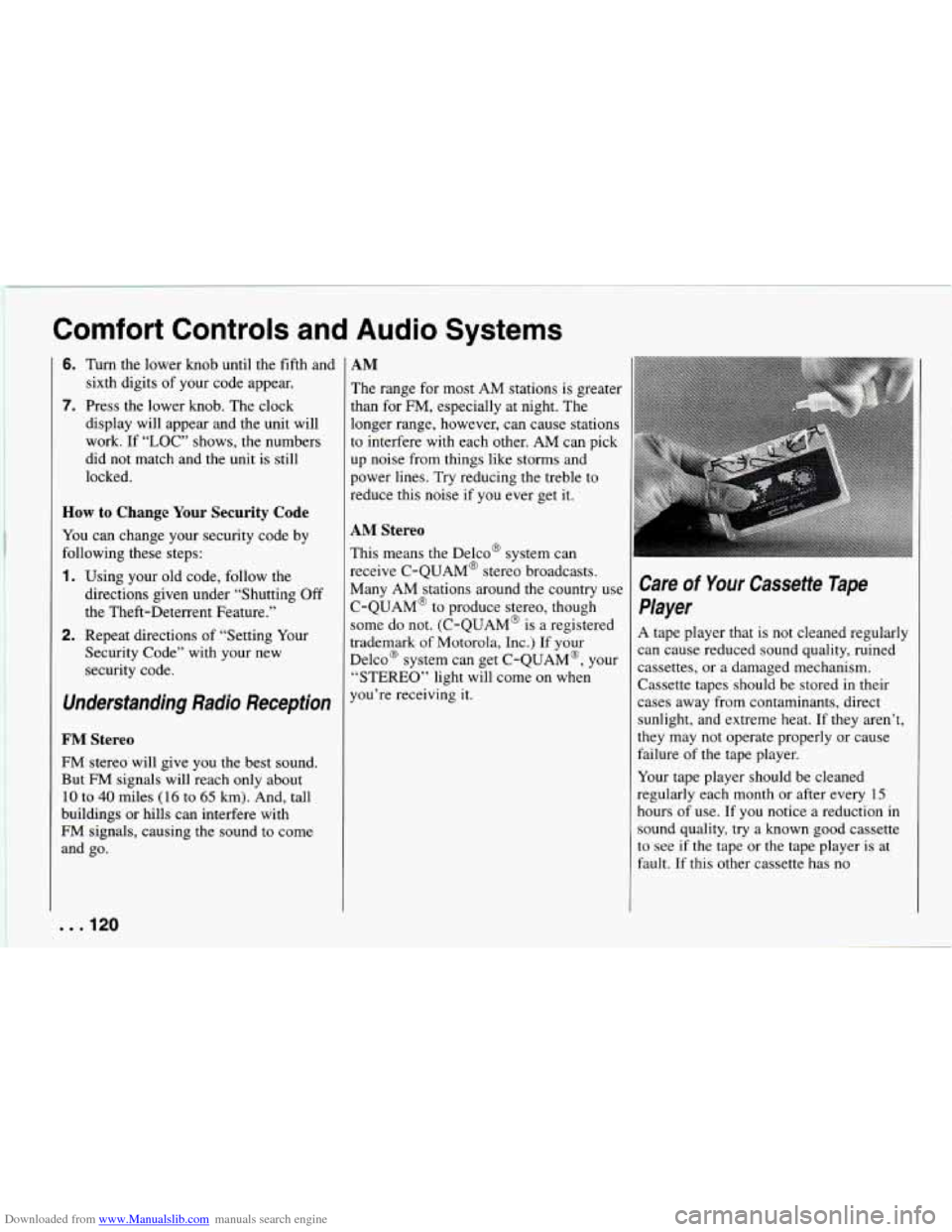
Care of Your Cassette Tape
Player
A tape player that is not cleaned regularly
can cause reduced sound quality, ruined
cassettes, or a damaged mechanism.
Cassette tapes should be stored in their
cases away from contaminants, direct
sunlight, and extreme heat. If they aren’t,
they may not operate properly or cause
failure of the tape player.
Your tape player should
be cleaned
regularly each month or after every
15
hours of use. If you notice a reduction in
sound quality, try a known good cassette
to see if the tape or the tape player
is at
fault. If this other cassette has no
. . .I20
Page 124 of 292
Downloaded from www.Manualslib.com manuals search engine Comfort Controls and Audio Systems
. . .I22
Page 231 of 292
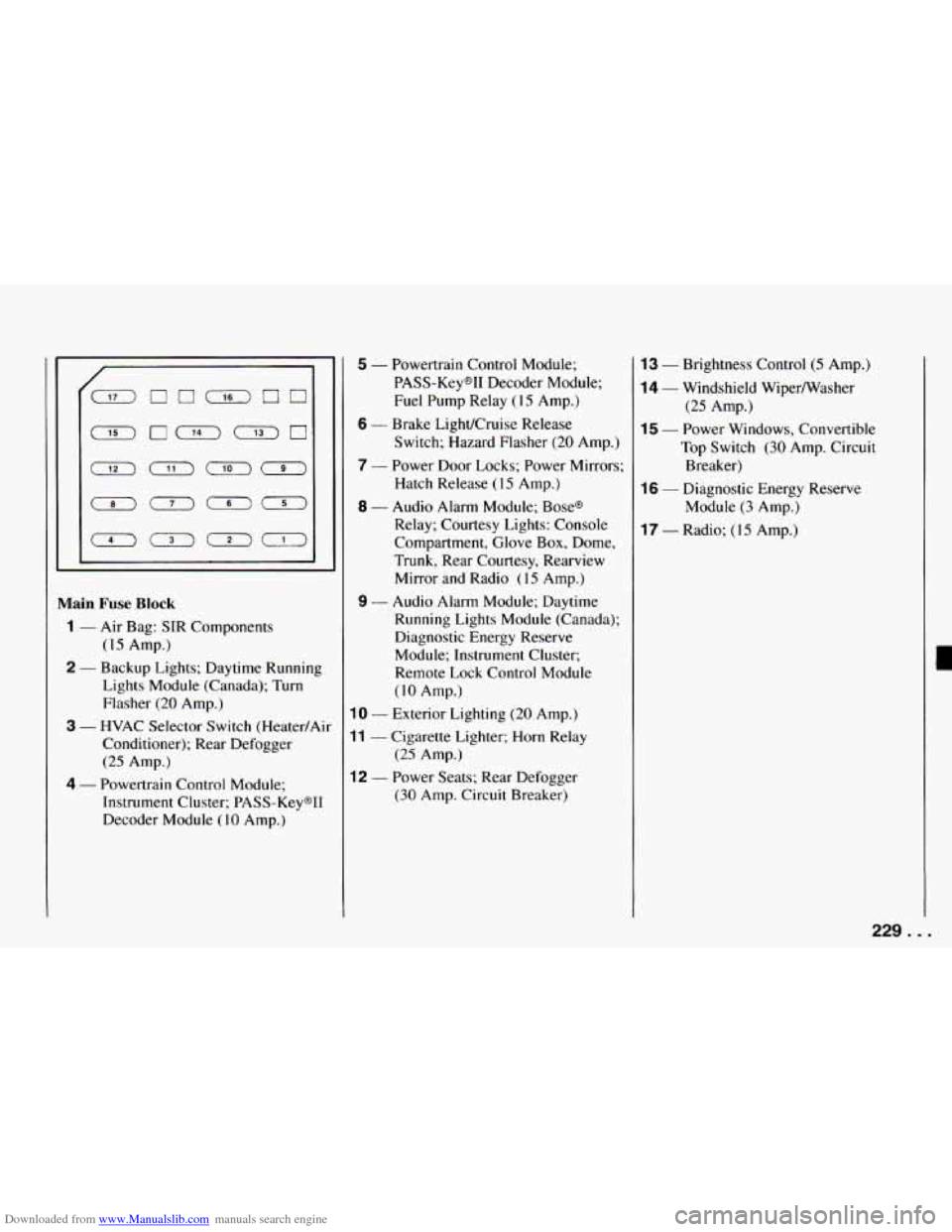
Downloaded from www.Manualslib.com manuals search engine Main Fuse Block
1 - Air Bag: SIR Components
2 - Backup Lights; Daytime Running
(15 Amp.)
Lights Module (Canada); Turn
Flasher
(20 Amp.)
3 - HVAC Selector Switch (Heater/Air
Conditioner); Rear Defogger
(25 Amp.)
4 - Powertrain Control Module;
Instrument Cluster; PASS-Keys11
Decoder Module
(10 Amp.)
5 - Powertrain Control Module;
PASS-Keys11 Decoder Module;
Fuel Pump Relay
(1 5 Amp.)
6 - Brake LighVCruise Release
Switch; Hazard Flasher
(20 Amp.)
7 - Power Door Locks; Power Mirrors;
Hatch Release
(15 Amp.)
8 - Audio Alarm Module; Bases
Relay; Courtesy Lights: Console
Compartment, Glove Box, Dome,
Trunk, Rear Courtesy, Rearview
Mirror and Radio
(1 5 Amp.)
9 - Audio Alarm Module; Daytime
Running Lights Module (Canada);
Diagnostic Energy Reserve
Module; Instrument Cluster;
Remote Lock Control Module
(IO Amp.)
10 - Exterior Lighting (20 Amp.)
11 - Cigarette Lighter; Horn Relay
12 - Power Seats: Rear Defogger
(25 Amp.)
(30 Amp. Circuit Breaker)
13 - Brightness Control (5 Amp.)
14 - Windshield Wipermasher
(25 Amp.)
15 - Power Windows, Convertible
Top Switch
(30 Amp. Circuit
Breaker)
16 - Diagnostic Energy Reserve
Module
(3 Amp.)
17 - Radio; ( 15 Amp.)
229. . .
Page 248 of 292
Downloaded from www.Manualslib.com manuals search engine Maintenance Schedule
Section B: Owner Checks and Services
Listed below are owner checks and services which should be performed at the intervals specified to help ensure the safety,
dependability and emission control performance of your vehicle. Be sure any necessary repairs are completed at once.
Whenever any fluids or lubricants are added to your vehicle, make sure they are the proper ones, as shown in Section
D.
At Each Fuel Fill (It is important for you or a service station attendant to perform these underhood checks at each fuel fill.)
CHECK
OR SERVICE WHAT TO DO
Engine
Oil Level
Check the engine coolant level and add the proper coolant mix if necessary. See “Coolant” in
Engine Coolant Level Check the engine
oil level and add the proper oil if necessary. See “Engine Oil” in the Index for
Check the windshield washer fluid level
in the windshield washer tank and add the proper fluid if
Windshield Washer
Fluid Level necessary. See “Windshield
Washer Fluid”
in the Index for further details.
further details.
the Index for further details.
At Least Once
a Month
CHECK
OR SERVICE WHAT TO DO
Tire Inflation
Check tire inflation.
Make sure they are inflated to the pressures specified on the Tire-Loading
Information label located on the rear edge of the driver’s door. See “Tires” in the Index for
further details.
Cassette Deck Clean cassette deck. Cleaning should
be done every
15 hours of tape play. See “Audio Systems”
in the Index for further details.
At Least Twice a Year
CHECK
I OR SERVICE
I
Hydraulic Clutch
System Inspection
WHAT TO DO I
Check the fluid level in the clutch reservoir. See “Hydraulic Clutch Fluid” in the Index. A fluid
loss
in this system could indicate a problem. Have the system inspected and repaired at once.
. . .246
Page 269 of 292
Downloaded from www.Manualslib.com manuals search engine ........................ 127
Acceleration Slip Regulation
System
..................... 128
System Warning Light
......... 96
Accessory Power. Retained
....... 56
Add-on Electrical Equipment
..... 227
And
Cruise Control
........... 79
Adding Coolant
................ 199
Additives. Engine Oil
............ 190
AirBags
...................... 26
How the System Works
........ 27
Servicing Your Air Bag-Equipped
Chevrolet
................. 30
Readiness Light .............. 27
Air Cleaner
.................... 19 I
Air Conditioner Controls ......... 1 10
Air Control Knob
............... 108
Air Filter Replacement ........... 192
Alignment and Tire Balance.
Wheel
...................... 219
Aluminum Wheels
.............. 224
AMFM Stereo
With Cassette Tape Player
...... I13
With Compact Disc Player ...... 116
Antenna. Fixed Mast
............ 121
Anti-Lock Brakes
.............. 127
System Warning Light
......... 95
To Use
..................... 128
Appearance Care
............... 220
Appearance Care and Materials
.... 226 Appearance Care.
Service and
..... 179
Ashtray and Lighter
............. 89
Ashtray. Front
................. 89
ASR ......................... 128
And Cruise Control
........... 79
System Warning Light ......... 96
Audio Systems ................. I 12
Audio Systems. Comfort Controls and
................. 107
Automatic
Transmission
................ 60
Transmission Fluid
............ I94
Axle. Limited-Slip Rear
.......... 66
Axle. Rear
.................... 197
Babies. Smaller Children
and (Safety Belts)
............. 34
Balance. Wheel Alignment
and Tire
.................... 219
Battery
....................... 204
Battery Replacement. Remote Lock
Control
..................... 50
BBB Auto Line - Alternative Dispute
Resolution Program. GM Participation
in ......... 259
Before Leaving
on a Long Trip .... 137
Belt Routing
................... 236
Belt. Lap-Shoulder
.............. 2 1
Bi-Level Heating ............... I09
Blizzard.
If You’re Caught in a ... 141
Box. Glove .................... 86 Brakes
Adjustment
.................. 204
Anti-Lock (ABS)
............. 127
Fluid ....................... 203
Master Cylinder
.............. 202
Parking
..................... 66
Pedal Travel
................. 204
System Parts. Replacing
........ 204
System Warning Light
......... 94
Trailer
...................... 145
Wear
...................... 203
Braking (Control of
a Vehicle) ..... 126
Braking
in Emergencies .......... 129
“Break.111.
.. New Vehicle ........ 55
Brightness Control .............. 80
Bulb Replacement
.............. 205
Center High-Mounted
Stoplight
.................. 209
Front Turn Signal
............. 210
Headlights
.................. 205
Rear Lights
.................. 205
Rear Sidemarker .............. 2 IO
Bulbs. Halogen ................. 211
Bulbs. Replacement
............. 231
Canadian Roadside Assistance
... 261
Capacities and Specifications
...... 232
Carbon Monoxide
.............. 52
Care Appearance
................. 220
Cassette Tape Player
.......... 120
Page 270 of 292
Downloaded from www.Manualslib.com manuals search engine Index
Care Compact Discs
............... 121
Safety Belts
................. 223
Cassette And Compact Disc
Storage
..................... 87
Cassette Tape Player. AMFM
Stereo
with .................. 1 13
Cassette Tape Player.
Care of Your
................. 120
Chains. Tire
................... 220
Changing a Flat Tire ............. 167
Check Gages Light
.............. 100
Checking Things under
the Hood . . 184
Checking Your Restraint Systems
. . 43
Chemical Paint Spotting
.......... 225
Chevrolet/Geo Roadside Assistance
.................. 260
Child Restraints
................ 35
Rear Seat
................... 37
Right Front Seat
.............. 39
Top Strap
................... 36
Where to Put the
.............. 35
Children (Safety Belts) ........... 34
Children. Larger (Safety Belts)
.... 42
Cigarette Lighter
................ 89
Circuit Breakers. Fuses and ....... 228
City Driving
................... 136
Cleaner. Air ................... 191
Cleaning
Aluminum Wheels
............ 224
Convertible Top
.............. 224 Cleaning
Fabric
...................... 221
Glass
....................... 223
Inside
of Your Chevrolet ....... 221
Instrument Panel. Top
of ....... 222
Leather
..................... 222
Outside of Your Chevrolet
...... 223
Problems. Special
............. 222
Tires
....................... 224
Twin Lift-off Roof Panels
...... 223
Vinyl ...................... 222
Windshield and Wiper Blades
... 223
Clock. Setting the
............... 112
Close-Out Panel
................ 88
Clutch. Hydraulic ............... 197
Comfort Controls
............... 108
Comfort Controls and Audio
Systems
.................... 107
Compact Disc. To Play a
......... 1 17
Compact
Disc Player. AMFM
Stereo
with .................. 116
Compact Disc Storage.
Cassette and
................. 87
Compact Discs. Care
of Your ...... 121
Compact Spare Tire
............. 176
Compartments. Storage and
....... 86
Console. Front
................. 87
Control of a Vehicle
............. 126
Control.
Loss of ................ 132 Controls
Air Conditioner
.............. 110
Brightness .................. 80
Comfort .................... 108
Features and
................. 45
Heater
...................... 108
Main Light
.................. 80
Remote Lock ................ 49
Seat
........................ 12
Convertible Top
................ 101
Installing the Boot Cover ....... 102
To Lower
................... 101
To Raise .................... 103
Convex Outside Mirror
.......... 82
Coolant Adding
..................... 199
Engine
..................... 198
Heater. Engine ............... 59
How to Add to the Coolant
Recovery Tank
............. 160
How to Add to the Radiator
. . 161. 163
Temperature Gage. Engine
...... 97
Cooling
....................... 110
Cooling System ................ 158
Courtesy Lights
................ 81
Courtesy Transportation .......... 261
Covered Visor Vanity Mirror
...... 89
Cruise Control
................. 76
ASR and
.................... 79
Passing Another Vehicle
While Using
............... 78
... 268