horn CHEVROLET CAMARO 1997 4.G Owners Manual
[x] Cancel search | Manufacturer: CHEVROLET, Model Year: 1997, Model line: CAMARO, Model: CHEVROLET CAMARO 1997 4.GPages: 404, PDF Size: 20.96 MB
Page 10 of 404
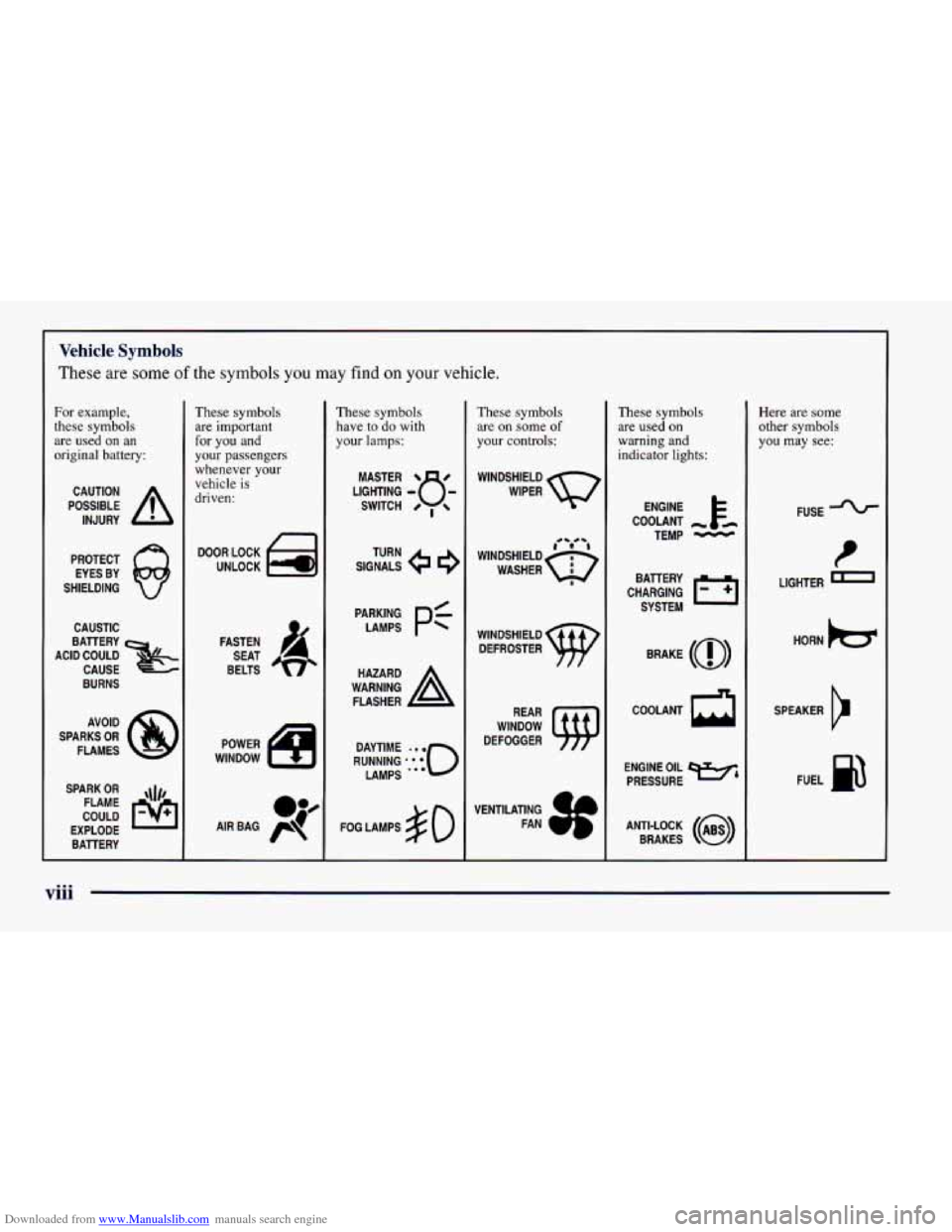
Downloaded from www.Manualslib.com manuals search engine Vehicle Symbols
These are some of the symbols you may find on your vehicle.
For example,
these symbols
are used on an
original battery:
POSSIBLE A
CAUTION
INJURY
PROTECT EYES BY
SHIELDING
CAUSTIC
BURNS AVOID
SPARKS
OR
FLAMES
SPARK
OR ,\I/,
COULD FLAME
EXPLODE BAllERY
These symbols
are important
for you and
your passengers
whenever your
vehicle
is
driven:
DOOR LOCK
UNLOCK
FASTEN SEAT
BELTS
These symbols have to
do with
your
lamps:
SIGNALS e a
TURN
FOG LAMPS
$0
These symbols
are
on some of
your controls:
WINDSHIELD
WIPER
WINDSHIELD DEFROSTER
WINDOW
DEFOGGER
These symbols
are used
on
warning and
indicator lights:
ENGINE t
COOLANT
TEMP
-
CHARGING 1-1
BAllERY
SYSTEM
BRAKE
(@)
COOLANT a
ENGINE OIL w,
PRESSURE
ANTI-LOCK
(a)
BRAKES
Here are some other symbols
you may
see:
FUSE
t
LIGHTER m
HORN k3
SPEAKER
Er
FUEL B
...
Page 58 of 404
Downloaded from www.Manualslib.com manuals search engine Operation Alarmanic Mode
The driver’s door will unlock automatically when
UNLOCK is pressed. If UNLOCK is pressed again
within five seconds, the passenger door will also unlock.
All doors will lock when LOCK is pressed.
The hatch will unlock when the button with the trunk
symbol is pressed twice within five seconds, as long as
the ignition is turned to the
OFF position. If the ignition
is on, the trunk button will only work if the transmission
is in PARK (P) for an automatic transmission, or if the
parking brake
is set on a manual transmission.
The system will turn on the interior lamps for about
40 seconds (or until the ignition switch is turned to the
RUN position), when you unlock
the doors or hatch.
The interior lamps will
go off when you lock the doors.
Operating the Remote Keyless Entry transmitter may
interact with the Vehicle and Content
Theft-DeterrenUAlarm System (if you have this option).
See “Vehicle and Content Theft-DeterrenVAlarm
System” in the Index. If
your vehicle is equipped with the Vehicle and Content
Theft-DeterrenVAlarm System, you will have a fourth
button
on your transmitter. This button is the panic
button. If you are involved in a panic situation, press
this button and your vehicle’s horn will sound and the
headlamps will flash. This will draw needed attention to
you and your vehicle. To turn this feature off, either
push the panic button again or turn the ignition
to the
RUN position. Note:
This feature will not work if your
ignition is on or if the transmitter is
30 feet (9 m) or
more away from your vehicle.
Wansmitter Range
The range of your Remote Keyless Entry system should
be about
3 feet (1 m) up to 30 feet (9 m). At times you
may notice a decrease in the range. This is normal for
the Remote Keyless Entry system. If the transmitter
does not work, or you have
to stand closer to your
vehicle for the transmitter to work:
You may have to replace the battery in your transmitter.
See the instructions for battery replacement.
0 You may be too far from your vehicle. Check your
distance. You may have
to stand closer to your
vehicle in rain or snow.
2-8
Page 59 of 404
Downloaded from www.Manualslib.com manuals search engine 0 Check the location. Other vehicles or objects may be
blocking the signal. Take a few steps to the right or left.
0 You may have to synchronize your transmitter to
the receiver in your vehicle. See the instructions
for synchronization.
You may have to match the transmitters to your
vehicle. See instructions.
If none of the above apply, see your Chevrolet dealer
or qualified technician for service.
Synchronization
Synchronization may be necessary due to the security
method used by the Remote Keyless Entry system. The
transmitter does not send the same signal twice to the
receiver. The receiver will not respond to a signal it has
been sent previously. This prevents anyone from recoding
and playing back the signal from the transmitter.
To
resynchronize the transmitter with the receiver:
0 While standing close to your vehicle, simultaneously
press and hold the LOCK and
UNLOCK buttons on
the transmitter for eight seconds. The door locks
should cycle and the parking lamps flash to confirm
synchronization. If this does not happen, you may
need to replace the battery in your transmitter
or
match the transmitter to your vehicle.
Transmitter Verification (If Equipped)
This feature provides feedback to the holder of the
Remote Keyless Entry transmitter that a command has
been received by the Remote Keyless Entry receiver.
The parking lamps will flash
on every lock and unlock
command and the horn will sound only if the
LOCK
button is pushed twice within five seconds. This allows
for silent operation of locking and unlocking, unless a
confirming horn chirp is desired. Other options may be
selected for this feature (see “Feature Customization” in
the Index).
Matching Transmitter(s) To Your Vehicle
Each remote keyless entry transmitter is coded to
prevent another transmitter from unlocking your vehicle.
If a transmitter is lost or stolen, a replacement can be
purchased through your dealer. Remember to bring any
remaining transmitters with you when you go to your
dealer. When the dealer matches the replacement
transmitter to your vehicle, any remaining transmitters
must also be matched. Once your dealer has coded the
new transmitter, the lost transmitter will not unlock your
vehicle. Each vehicle can have up to four transmitters
matched
to it.
2-9
Page 64 of 404
Downloaded from www.Manualslib.com manuals search engine Vehicle and Content
Theft-DeterrenVAlarm
Sysl
(If Equipped)
If your vehicle has this option, it has a theft-deterrent
alarm system. Once armed, the system will sound the horn
and flash the parking lamps if the vehicle is broken into.
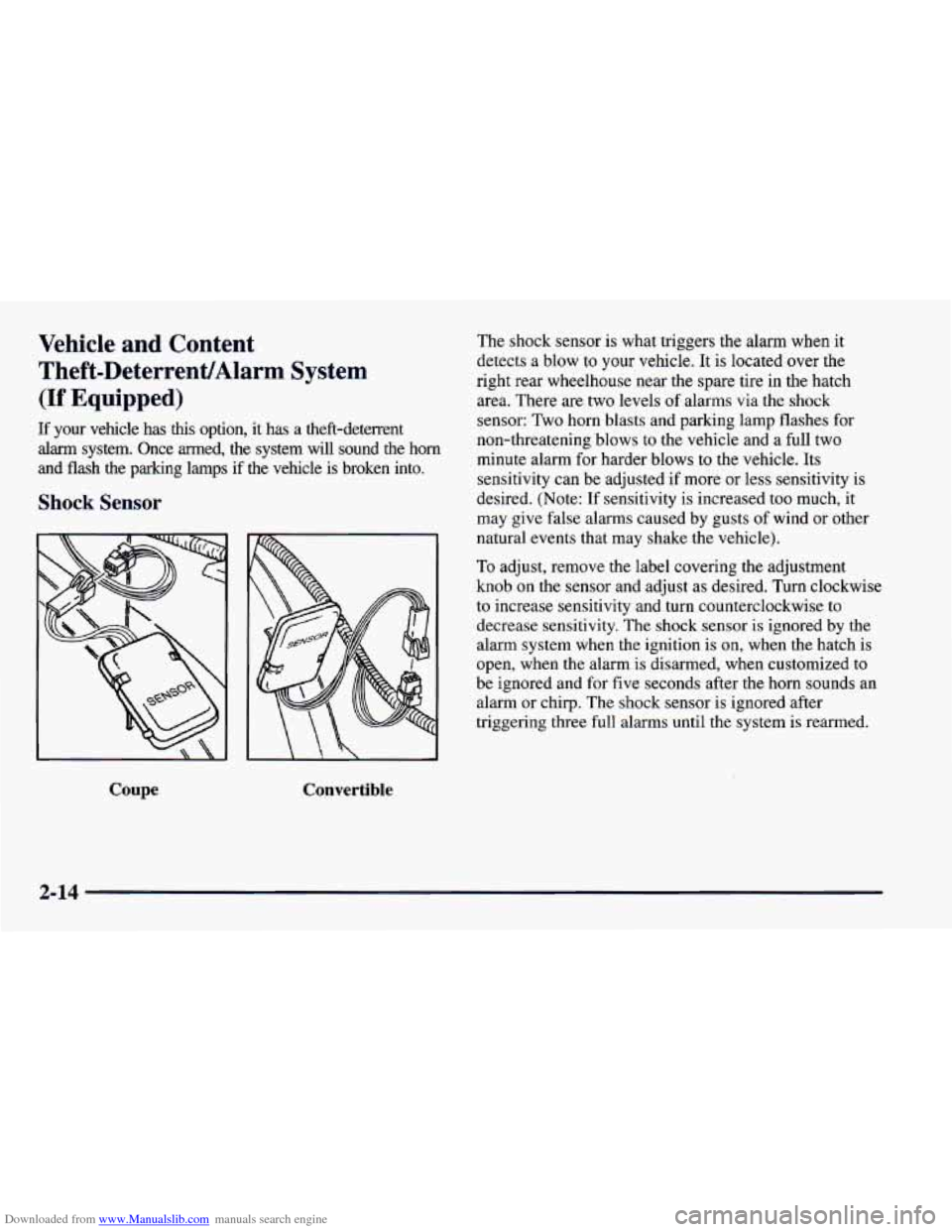
Shock Sensor
To adjust, remove the label covering the adjustment
knob on the sensor and adjust
as desired. Turn clockwise
to increase sensitivity and turn counterclockwise to
decrease sensitivity. The shock sensor is ignored
by the
alarm system when the ignition is on, when the hatch is
open, when the alarm is disarmed, when customized
to
be ignored and for five seconds after the horn sounds an
alarm or chirp. The shock sensor is ignored after
triggering three full alarms until the system is rearmed.
Coupe Convertible
The shock sensor is what triggers the alarm when it
detects
a blow to your vehicle. It is located over the
right rear wheelhouse near the spare tire in the hatch
area. There are two levels
of alarms via the shock
sensor: Two horn blasts and parking lamp flashes for
non-threatening blows to the vehicle and
a full two
minute alarm for harder blows to the vehicle. Its
sensitivity can be adjusted if more
or less sensitivity is
desired. (Note: If sensitivity is increased too much, it
may give false alarms caused by gusts
of wind or other
natural events that may shake the vehicle).
2-14
Page 65 of 404
Downloaded from www.Manualslib.com manuals search engine Arming the System Remote Keyless Entry Transmitter Locking
Passive arming is also available, if you would like the
system to arm all by itself after the doors have been
closed for a short time. When the system is armed, a red
light will flash briefly once every two seconds. (Note:
If
you return to your vehicle and the red light is flashing
two brief flashes every two seconds, the system is armed
and the shock sensor had triggered a two minute alarm.
If the red light is flashing three times every two seconds,
the system is armed and there was an intrusion that
sounded the alarm). Horn chirps and parking lamp
flashes can be set to your choice.
If all the doors are closed, locking the vehicle with
the transmitter will immediately arm the system. The
horn will chirp twice and the parking lamps will flash,
confirming that the system is armed.
If any door is open
when the transmitter
LOCK button is pressed, the
system goes into an armed wait mode, waiting for the
doors to close. Once they are closed, the system will
arm, chirp the horn twice and flash the parking lamps.
If the hatch is open or ajar at the time the system is
arming, the horn will only chirp once.
Power Door Lock Switch Locking
If any door is open when the power door lock switch
is pressed, the system goes into an armed wait mode,
waiting for the doors to close. Once they are closed, the
system will arm and flash the parking lamps.
If all of the
doors are closed when the lock switch is pressed, the
system assumes
you are inside the vehicle, so it will not
arm. Note: Locking the doors by using the manual door
locks will not arm the system.
2-15
Page 66 of 404
Downloaded from www.Manualslib.com manuals search engine Passive Arming
If the ignition was just turned off and a door was
opened, the system will arm
six seconds after all doors
are closed, whether or not you lock them. In all other
cases, the
system will wait 30 seconds after all doors are
closed before arming, allowing you time to get into the
vehicle and put the key in the ignition. The parking
lamps will flash when the system arms. Passive arming
is not enabled from the factory.
Disarming the System
There are two ways to disarm the system:
1. Press the UNLOCK button on the key chain transmitter.
If the horn chirps two or three times when you unlock the
car, the alarm sounded in your absence. Two chirps
means that the shock sensor was set
off and three chirps
means that a door
or the hatch was opened.
2. Turn the ignition to the RUN position with the
proper key.
For more information on customizing the features
mentioned here, see “Feature Customization”
in the Index.
lhrning Off the Alarm
If you started the alarm by pressing the panic button on
the key chain transmitter, you must either push that button again or
turn the ignition switch to the ON
position
to stop the alarm.
If the alarm is sounding due
to the shock sensor or a
door or hatch opening, it can be turned off by either
turning the ignition switch with a proper key inserted or
by pressing any button
on the key chain transmitter. If
you use your key chain transmitter to silence the alarm,
additional things will happen depending upon which
button
you press.
0
0
0
0
Pressing the UNLOCK button will turn the alarm
off, unlock the driver’s door and disarm the system.
Pressing the
LOCK button will turn the alarm off,
keep the doors locked and keep the system armed.
Pressing the trunk symbol button twice within five
seconds will turn the alarm off and will unlock and
disarm the hatch only.
Pressing the panic button will turn the alarm off,
keep the doors locked and keep the system armed.
If the alarm is sounding because an incorrect ignition
key was used, press any button on the key chain
transmitter
to turn the alarm off.
The alarm will stop by itself after two minutes.
2-16
Page 70 of 404
Downloaded from www.Manualslib.com manuals search engine Last Door Closed Locking and
Lockout Prevention
Your vehicle comes with this feature set in Mode 2. This
means that your power door locks will not lock when
the keys are in the ignition and a door is open. To
change the factory setting, do the following:
1. Press the LOCK switch on the door.
2. Count the number of chimes you hear. The number of
chimes tells
you which mode your vehicle is set for.
3. Press the LOCK switch on the door until you hear
the number
of chimes that correspond to the mode
selection you want.
Mode 1: Both Off (Doors will lockhnlock when you
press the power door lock switch).
Mode 2: Lockout Prevention Only (If you leave your
keys in the ignition and get out the driver’s door,
you
won’t be able to lock the doors with the power door
lock switch).
Mode 3: Last Door Closed Locking Only (If the power
door lock switch is used to lock the vehicle while any
door is open,
you will hear three chimes. The doors will
not lock until after all doors are closed).
Remote Keyless Entry Verification
Your vehicle comes with this feature set in Mode 5. This
means that when you use the key chain transmitter to
lockhnlock your vehicle, your parking lamps will flash
briefly upon the first push
on LOCK. Your horn will
sound briefly, your parking lamps will flash briefly upon
the second push
on LOCK and your parking lamps will
flash briefly upon
any push on UNLOCK. To change the
factory setting, do the following:
1. Press the UNLOCK switch on the Remote Keyless
Entry transmitter.
2. Count the number of chimes you hear. The number of
chimes tells
you which mode your vehicle is set for.
3. Press the UNLOCK switch on the Remote Keyless
Entry transmitter until
you hear the number of chimes
that correspond to the mode selection
you want.
Mode 1: All Off (The headlamps will not flash and the
horn will not sound to provide
you feedback that a
lockhnlock command has been received by the Remote
Keyless Entry transmitter).
Mode 4: Both On (This combines Mode 2 and 3).
Page 71 of 404
Downloaded from www.Manualslib.com manuals search engine Mode 2: Horn and Lamps/Lamps (Your horn will sound
briefly and your parlung lamps will flash when you
press LOCK
on the key chain transmitter. Only your
parking lamps will flash when you press UNLOCK).
Mode 3: Horn and Lamps (Your horn will sound briefly
and your parking lamps will flash every time you push
LOCK and UNLOCK).
Mode 4: Lamps (Your parking lamps will flash every
time you push LOCK and UNLOCK).
Mode 5: Lamps/Horn and LampsLamps (Your lamps
will flash upon the first push
on LOCK, your lamps
will flash and your horn will sound upon the second
push on LOCK and your lamps will flash upon any push
on UNLOCK).
Theft-Deterrent Arming Method
Your vehicle comes with this feature set in Mode 3. This
means that both your Remote Keyless Entry transmitter
and the power door lock switch will actively arm
the
system. To change the factory setting, do the following:
1. Press the UNLOCK switch on the door.
2. Count the number of chimes you hear. The number of
chimes tells
you which mode your vehicle is set for.
3. Press the UNLOCK switch on the door until you
hear the number of chimes that correspond to the
mode selection you want.
Mode 1: Alarm System Off (The system will not arm).
Mode 2: Remote Keyless Entry Transmitter Lock
(When
you lock your doors using the Key Chain
Transmitter, the system will arm itself).
Mode 3: Remote Keyless Entry Transmitter/Power
Door Lock Switch (If
you use either the Remote Keyless
Entry transmitter or the power door lock switch
to lock
the doors, the system will arm itself).
Mode 4: Passive arming and Remote Keyless Entry
Transmitter/Power Door Lock Switch Arming (The
system will arm itself after all doors are closed, plus
arming per mode
3).
2-21
Page 72 of 404
Downloaded from www.Manualslib.com manuals search engine Theft-Deterrent Arming Verification
Your vehicle comes with this feature set in Mode 3.
This means that if you arm the system using the key
chain transmitter, your parking lamps will flash and your
horn will chirp twice to verify that the system is armed.
If it only chirps once, the hatch is open or unlatched. If
you arm the system using either the power door lock
switch or by passive arming, only the parking lamps will
flash for verification. To change the factory setting, do
the following:
1. Press the LOCK switch on the Remote Keyless
Entry Transmitter.
2. Count the number of chimes you hear. The number of
chimes tells you which mode your vehicle is
set for.
3. Press the LOCK switch on the transmitter until you
hear the number of chimes that correspond to the
mode selection you want.
Mode 1: All Off (No horn chirps or parking lamp flash).
Mode 2: Horn and Lamps (Your parking lamps will
flash and your horn will chirp twice
to verify the system
is armed using any arming method).
Mode 3: Horn and LampsLamps (If you use the
transmitter to arm the system, your parking lamps will
flash and your horn will chirp twice to verify that the
system is armed. If you use either the power door lock
switch
or passive arming, only your lamps will flash
for verification).
Mode 4: Lamps (When your vehicle arms, only your
parking lamps will flash for verification).
Driver’s Door Alarm Delay and Shock
Sensor Enable
Your vehicle comes with this feature set in Mode 4. This
means that if you open the driver’s door using your key,
the alarm will not sound for eight seconds. Also the shock
sensor, able
to detect sharp blows to your vehicle is active.
To change the factory setting, do the following:
1. Turn the parking lamps on and off.
2. Count the number of chimes you hear. The number of
chimes tells you which mode your vehicle
is set for.
3. Turn the parking lamps on and off until you hear the
number of chimes that correspond to the mode
selection you want.
2-22
Page 94 of 404
Downloaded from www.Manualslib.com manuals search engine Windows
Manual Windows
Rotate the window crank handle to open and close each
door window.
Power Windows
With power windows, switches on the door control each
window when the ignition
is on or when RAP is present.
(See “Retained Accessory Power” in the Index.)
You
can open the passenger’s window any amount by
pressing the switch and releasing it when the window
has lowered to the position
you want.
The switch for the driver’s window has an express-down
feature. Quickly press and release the switch for the
driver’s window and the window will lower completely.
You can also open the driver’s window any amount by
pressing the switch again while the window is in the
express-down mode when it has lowered
to the position
you want.
Horn
To sound the horn, press either horn symbol on your
steering wheel.
If your horn sounds two or three chirps when unlocking
your vehicle with the key chain transmitter
(if you have that
option), the
alarm was triggered while you were
away. Check the vehicle before entering.
Tilt Steering Wheel
A tilt steering wheel allows you to adjust the steering
wheel before
you drive.
You can also raise it to the highest level to give your
legs more room when
you exit and enter the vehicle.
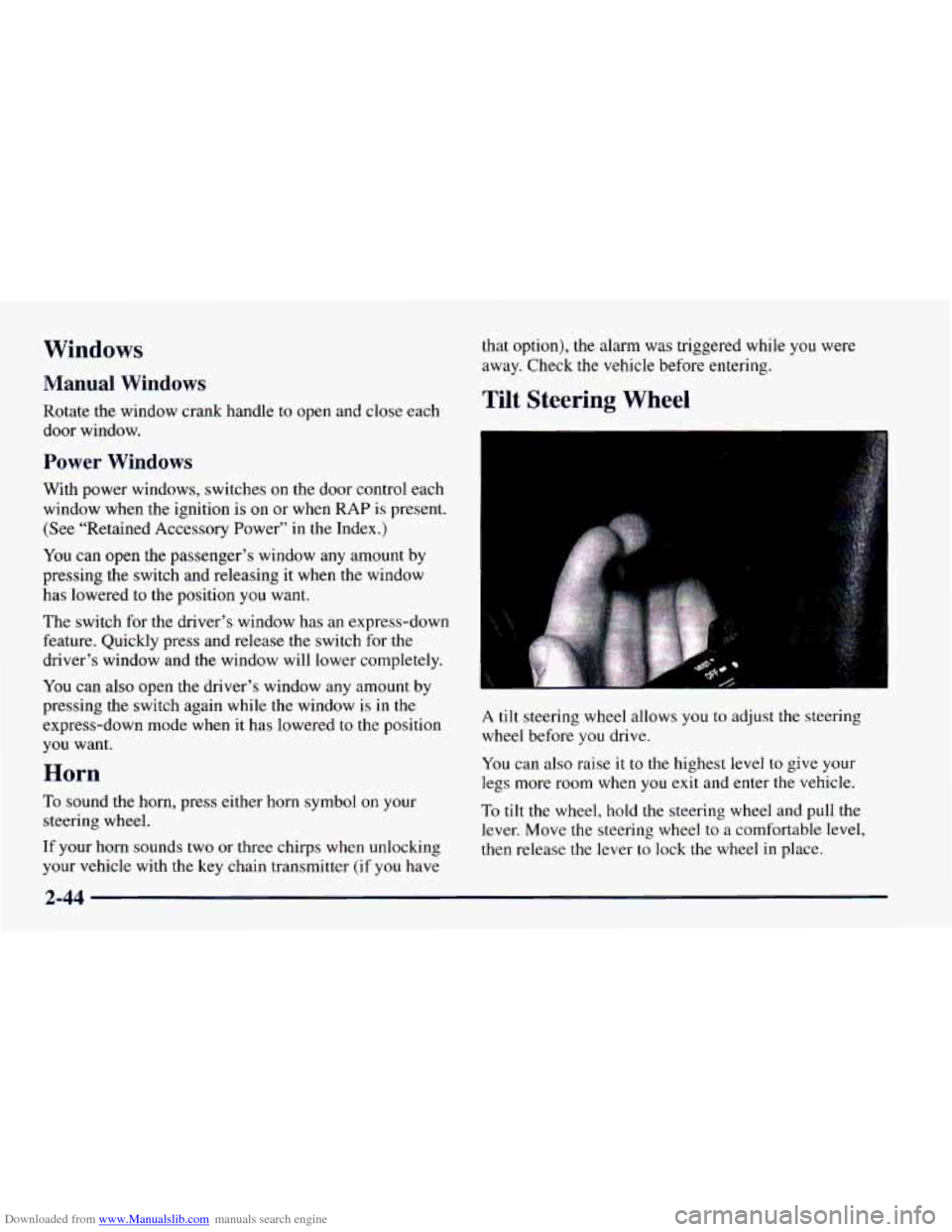
To tilt the wheel, hold the steering wheel and pull the
lever. Move the steering wheel to a comfortable level,
then release
the lever to lock the wheel in place.
2-44