traction control CHEVROLET CAMARO 2010 5.G User Guide
[x] Cancel search | Manufacturer: CHEVROLET, Model Year: 2010, Model line: CAMARO, Model: CHEVROLET CAMARO 2010 5.GPages: 378, PDF Size: 5.75 MB
Page 210 of 378
Black plate (34,1)Chevrolet Camaro Owner Manual - 2010
8-34 Driving and Operating
Ride Control Systems
Traction Control
System (TCS)
The vehicle has a Traction Control
System (TCS) that limits wheel spin.
The system utilizes engine and
braking controls to control wheel
spin during acceleration at all
driving speeds for maximum driver
control regardless of conditions.
When the system senses impending
wheel slip during acceleration, it
signals the throttle control to reduce
drive wheel torque. Under extreme
situations, such as going from
pavement to ice during acceleration,
the system will selectively apply
the brakes to maintain control.
The system may be heard or felt
while it is working, but this is
normal.The TCS/StabiliTrak warning light
flashes when the traction control
system is limiting wheel spin.
The StabiliTrak/TCS warning light
comes on solid if there is a problem
with the traction control system.
SeeTraction Control System (TCS)/
StabiliTrak
®Lighton page 4‑25for
more information. If the light stays
on, see your dealer for service.
When the TCS/StabiliTrak warning
light is on, the system will not limit
wheel spin. Adjust your driving
accordingly.
TCS automatically comes on
whenever the vehicle is started.
To limit wheel spin, especially in
slippery road conditions, the system should always be left on, but it may
be necessary to turn the system off
if the vehicle is stuck in sand, mud
or snow and rocking the vehicle is
required. Also, turn TCS off while
in deep snow or on loose gravel,
to assist vehicle motion at lower
speeds. See
If the Vehicle is Stuck
on page 8‑12for more information.
See also Winter Drivingon
page 8‑10for information on using
TCS when driving in snowy or icy
conditions.
To turn the system off, press and
release the StabiliTrak/TCS button
located on the console in front of the
shift lever.
Page 211 of 378
Black plate (35,1)Chevrolet Camaro Owner Manual - 2010
Driving and Operating 8-35
Press and release the StabiliTrak/
TCS button and the traction control
system turns off and the TCS
warning light comes on. Press and
release the button again to turn the
system back on. For information on
turning StabiliTrak off and on, see
StabiliTrak System following.
StabiliTrak System
The vehicle has an electronic
stability control system called
StabiliTrak. It is an advanced
computer controlled system that
assists with directional control of the
vehicle in difficult driving conditions.
StabiliTrak activates when the
computer senses a discrepancy
between the intended path and the
direction the vehicle is actually
traveling. StabiliTrak selectively
applies braking pressure at any
one of the vehicle's brakes to help
steer the vehicle in the direction
which you are steering.
If cruise control is being used when
StabiliTrak activates, the cruise
control will automatically disengage.
Press the cruise control button to
reengage when road conditions
allow. SeeCruise Control
on
page 8‑39for more information.
The StabiliTrak/TCS button is
located in front of the shift lever.
When the system activates, the
StabiliTrak/Traction Control System
(TCS) warning light flashes on the
instrument panel cluster. You may
also hear a noise or feel vibration
in the brake pedal. This is normal.
Continue to steer the vehicle in the
intended direction.
Page 212 of 378
Black plate (36,1)Chevrolet Camaro Owner Manual - 2010
8-36 Driving and Operating
If there is a problem detected with
StabiliTrak, a Service StabiliTrak
message displays on the DIC and
the StabiliTrak/TCS warning light on
the instrument panel cluster comes
on. When this message and warning
light displays, the system is not
operational. Driving should be
adjusted accordingly. SeeRide
Control System Messages
on
page 4‑35and Traction Control
System (TCS)/StabiliTrak®Lighton
page 4‑25for more information.
StabiliTrak comes on automatically
whenever the vehicle is started.
The system should be left on to help
assist with directional control of the
vehicle. If StabiliTrak needs to be
turned off, press and hold the
StabiliTrak/TCS button until the
Traction Control Off light and the StabiliTrak Off light come on the
instrument panel cluster. If the
system has been turned off, press
and release the StabiliTrak/TCS
button to turn the system back on.
Engine Drag Control (EDC)
EDC improves vehicle stability by
sensing if there is difference in
speed between the free rolling front
wheels and the rear drive wheels
that often occurs when the driver
takes their foot off the accelerator
pedal on slippery surfaces (snow,
ice, etc.). When this is detected,
EDC sends more torque to the rear
wheels to make sure all four wheels
are spinning at similar speeds,
making the vehicle more stable.
Page 213 of 378
Black plate (37,1)Chevrolet Camaro Owner Manual - 2010
Driving and Operating 8-37
Competitive Driving Mode
Competitive Driving Mode and
Launch Control are systems
designed to allow increased
performance while accelerating
and/or cornering. This is
accomplished by regulating and
optimizing engine and brake
performance. These modes are
for use at a closed course race
track and are not intended for
use on public roads. They will
not compensate for a driver’s
inexperience or lack of familiarity
with the race track. Drivers who
prefer to allow the system to have
more control of the engine and
brake systems are advised to turn
StabiliTrak on. See Competitive
Driving
on page 8‑7for more
information. Notice:
Do not attempt to shift
when the drive wheels are
spinning and do not have
traction. This may cause damage
to the transmission. Damage
caused by misuse of the vehicle
is not covered by the vehicle
warranty. See the warranty book
for additional information.
Competitive Driving Mode
In Competitive Driving Mode, the
StabiliTrak System helps maintain
directional control of the vehicle
by selective brake application
and controlling engine torque.
The Traction Control System (TCS)
helps control wheel spin and
Launch Control is available. Adjust
your driving style to account for the
available engine power. See Launch
Control later in this section.
This light is on when the vehicle is
in the Competitive Driving Mode.
On vehicles with a V8 engine, this
optional handling mode can be
selected by pressing the StabiliTrak/
TCS button on the console quickly
two times. “StabiliTrak Competitive
Mode” displays in the Driver
Information Center (DIC). See Ride
Control System Messages
on
page 4‑35.
When the StabiliTrak button is
pressed again, or the vehicle is
restarted, the StabiliTrak and TCS
systems are on.
Page 214 of 378
Black plate (38,1)Chevrolet Camaro Owner Manual - 2010
8-38 Driving and Operating
Launch Control (V8 with
Manual Transmission
Models Only)
A Launch Control feature is
available, within Competitive
Driving Mode on vehicles with a
manual transmission to allow the
driver to achieve high levels of
vehicle acceleration in a straight
line. Launch Control is a form of
traction control that manages tire
spin while launching the vehicle.
This feature is intended for use
during closed course race events
where consistent zero to sixty
and quarter mile times are
desirable.Launch Control is only available
when the following criteria are met:
1. Competitive Driving Mode is
selected.
2. The vehicle is not moving.
3. The steering wheel is pointing straight.
4. The clutch is pressed and the vehicle is in first gear.
5. The accelerator pedal is rapidly applied to wide open throttle.
The Launch Control feature will
initially limit engine speed as the
driver rapidly applies the accelerator
pedal to wide open throttle.
A smooth, quick release of the
clutch, while maintaining the fully
pressed accelerator pedal, will
manage wheel slip. Complete
shifts as described in Manual
Transmission on page 8‑30. After the vehicle is launched,
the system continues in
Competitive Mode.
Competitive Driving Mode and
Launch Control are systems
designed for a closed course race
track and not intended for use on
public roads. The systems are not
intended to compensate for lack of
driver experience or familiarity with
the race track.
Limited-Slip Rear Axle
Vehicles with a limited-slip rear
axle can give more traction on
snow, mud, ice, sand, or gravel.
When traction is low, this feature
allows the drive wheel with the
most traction to move the vehicle.
The limited-slip rear axle also gives
the driver enhanced control when
cornering hard or completing a
maneuver, such as a lane change.
Page 215 of 378
Black plate (39,1)Chevrolet Camaro Owner Manual - 2010
Driving and Operating 8-39
Cruise Control
With cruise control, the vehicle can
maintain a speed of about 40 km/h
(25 mph) or more without keeping
your foot on the accelerator. Cruise
control does not work at speeds
below 40 km/h (25 mph).
{WARNING
Cruise control can be dangerous
where you cannot drive safely at
a steady speed. So, do not use
the cruise control on winding
roads or in heavy traffic.
Cruise control can be dangerous
on slippery roads. On such roads,
fast changes in tire traction can
cause excessive wheel slip, and
you could lose control. Do not use
cruise control on slippery roads.Setting Cruise Control
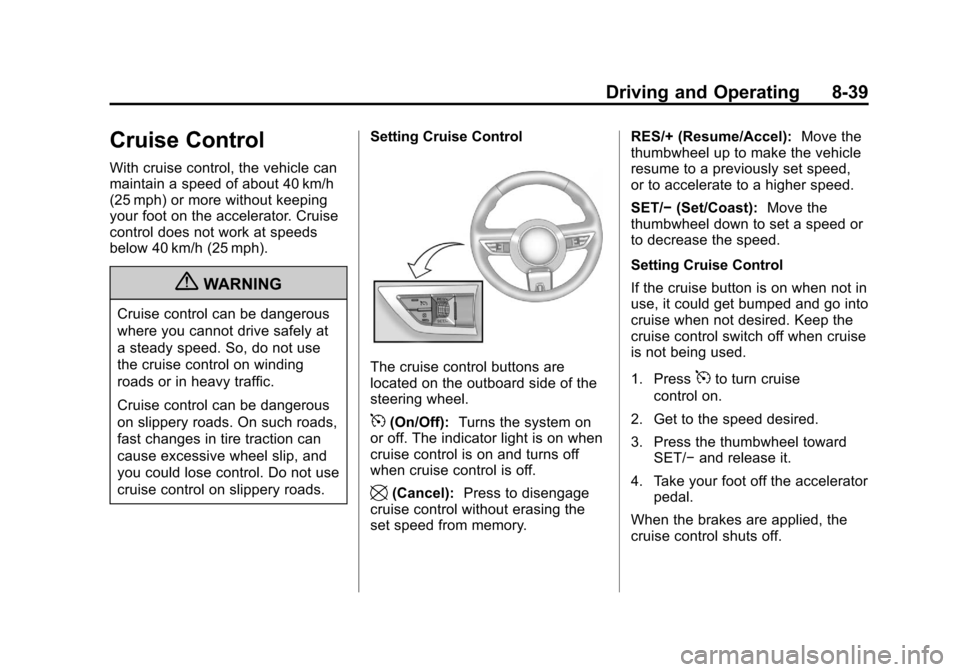
The cruise control buttons are
located on the outboard side of the
steering wheel.
5(On/Off):
Turns the system on
or off. The indicator light is on when
cruise control is on and turns off
when cruise control is off.
\(Cancel): Press to disengage
cruise control without erasing the
set speed from memory. RES/+ (Resume/Accel):
Move the
thumbwheel up to make the vehicle
resume to a previously set speed,
or to accelerate to a higher speed.
SET/− (Set/Coast): Move the
thumbwheel down to set a speed or
to decrease the speed.
Setting Cruise Control
If the cruise button is on when not in
use, it could get bumped and go into
cruise when not desired. Keep the
cruise control switch off when cruise
is not being used.
1. Press
5to turn cruise
control on.
2. Get to the speed desired.
3. Press the thumbwheel toward SET/− and release it.
4. Take your foot off the accelerator pedal.
When the brakes are applied, the
cruise control shuts off.
Page 236 of 378
Black plate (4,1)Chevrolet Camaro Owner Manual - 2010
9-4 Vehicle Care
Accessories and
Modifications
Adding non‐dealer accessories
to the vehicle can affect vehicle
performance and safety, including
such things as airbags, braking,
stability, ride and handling,
emissions systems, aerodynamics,
durability, and electronic systems
like antilock brakes, traction control,
and stability control. Some of these
accessories could even cause
malfunction or damage not covered
by the vehicle warranty.
Damage to vehicle components
resulting from the installation or use
of non‐GM certified parts, including
control module modifications, is notcovered under the terms of the
vehicle warranty and may affect
remaining warranty coverage for
affected parts.
GM Accessories are designed to
complement and function with other
systems on the vehicle. Your GM
dealer can accessorize the vehicle
using genuine GM Accessories.
When you go to your GM dealer
and ask for GM Accessories, you
will know that GM-trained and
supported service technicians will
perform the work using genuine GM
Accessories.
Also, see
Adding Equipment to the
Airbag-Equipped Vehicle
on
page 2‑34.
Vehicle Checks
Doing Your Own
Service Work
{WARNING
You can be injured and the
vehicle could be damaged if you
try to do service work on a vehicle
without knowing enough about it.
.Be sure you have sufficient
knowledge, experience,
the proper replacement
parts, and tools before
attempting any vehicle
maintenance task.
.Be sure to use the proper
nuts, bolts, and other
fasteners. English and metric
fasteners can be easily
confused. If the wrong
fasteners are used, parts
can later break or fall off.
You could be hurt.
Page 297 of 378
Black plate (65,1)Chevrolet Camaro Owner Manual - 2010
Vehicle Care 9-65
The vehicle needs new tires if any
of the following statements are true:
.You can see the indicators at
three or more places around
the tire.
.You can see cord or fabric
showing through the tire's
rubber.
.The tread or sidewall is cracked,
cut, or snagged deep enough to
show cord or fabric.
.The tire has a bump, bulge,
or split.
.The tire has a puncture, cut,
or other damage that cannot be
repaired well because of the size
or location of the damage.
The rubber in tires degrades over
time. This is also true for the spare
tire, if the vehicle has one, even
if it is not being used. Multiple
conditions affect how fast this aging
takes place, including temperatures,
loading conditions, and inflation
pressure maintenance. With proper
care and maintenance tires typically wear out before they degrade due
to age. If you are unsure about the
need to replace the tires as they get
older, consult the tire manufacturer
for more information.
Buying New Tires
GM has developed and matched
specific tires for your vehicle.
The original equipment tires
installed on your vehicle,
when it was new, were designed
to meet General Motors
Tire Performance Criteria
Specification (TPC Spec)
system rating. If you need
replacement tires, GM strongly
recommends that you get tires
with the same TPC Spec rating.
This way, your vehicle will
continue to have tires that are
designed to give the same
performance and vehicle safety,
during normal use, as the
original tires.
GM's exclusive TPC Spec
system considers over a dozen
critical specifications that
impact the overall performance
of your vehicle, including brake
system performance, ride
and handling, traction control,
and tire pressure monitoring
performance. GM's TPC Spec
number is molded onto the tire's
sidewall near the tire size. If the
tires have an all‐season tread
design, the TPC Spec number
will be followed by an MS for
mud and snow. See
Tire
Sidewall Labeling
on page 9‑50
for additional information.
GM recommends replacing tires
in sets of four. This is because
uniform tread depth on all tires
will help keep your vehicle
performing most like it did when
the tires were new. Replacing
less than a full set of tires can
affect the braking and handling
performance of your vehicle.
Page 299 of 378
Black plate (67,1)Chevrolet Camaro Owner Manual - 2010
Vehicle Care 9-67
Different Size Tires and
Wheels
If you add wheels or tires that are a
different size than your original
equipment wheels and tires, this
could affect the way your vehicle
performs, including its braking,
ride and handling characteristics,
stability, and resistance to rollover.
Additionally, if your vehicle has
electronic systems such as anti‐lock
brakes, rollover airbags, traction
control, and electronic stability
control, the performance of these
systems can be affected.
{WARNING
If you add different sized
wheels, your vehicle may not
provide an acceptable level of
performance and safety if tires not
recommended for those wheels
are selected. You may increase
the chance that you will crash and
suffer serious injury. Only use GM
specific wheel and tire systems
developed for your vehicle, and
have them properly installed by a
GM certified technician.
See Buying New Tires
on
page 9‑65and Accessories and
Modificationson page 9‑4for
additional information.
Uniform Tire Quality
Grading
Quality grades can be found
where applicable on the tire
sidewall between tread shoulder
and maximum section width.
For example:
Treadwear 200 Traction AA
Temperature A
The following information relates
to the system developed by the
United States National Highway
Traffic Safety Administration
(NHTSA), which grades tires
by treadwear, traction, and
temperature performance. This
applies only to vehicles sold in
the United States. The grades
are molded on the sidewalls
of most passenger car tires.
Page 300 of 378
Black plate (68,1)Chevrolet Camaro Owner Manual - 2010
9-68 Vehicle Care
The Uniform Tire Quality
Grading (UTQG) system
does not apply to deep
tread, winter-type snow tires,
space-saver, or temporary use
spare tires, tires with nominal
rim diameters of 10 to 12 inches
(25 to 30 cm), or to some
limited-production tires.
While the tires available on
General Motors passenger
cars and light trucks may vary
with respect to these grades,
they must also conform to
federal safety requirements and
additional General Motors Tire
Performance Criteria (TPC)
standards.
All Passenger Car Tires Must
Conform to Federal Safety
Requirements In Addition To
These Grades.Treadwear
The treadwear grade is a
comparative rating based
on the wear rate of the tire
when tested under controlled
conditions on a specified
government test course.
For example, a tire graded
150 would wear one and a
half (1½) times as well on the
government course as a tire
graded 100. The relative
performance of tires depends
upon the actual conditions of
their use, however, and may
depart significantly from the
norm due to variations in
driving habits, service practices
and differences in road
characteristics and climate.
Traction
–AA, A, B, C
The traction grades, from
highest to lowest, are AA, A, B,
and C. Those grades represent
the tire's ability to stop on wet
pavement as measured under
controlled conditions on
specified government test
surfaces of asphalt and
concrete. A tire marked C may
have poor traction performance.
Warning: The traction grade
assigned to this tire is based on
straight-ahead braking traction
tests, and does not include
acceleration, cornering,
hydroplaning, or peak
traction characteristics.