ECO mode CHEVROLET CAMARO 2011 5.G User Guide
[x] Cancel search | Manufacturer: CHEVROLET, Model Year: 2011, Model line: CAMARO, Model: CHEVROLET CAMARO 2011 5.GPages: 414, PDF Size: 6.24 MB
Page 233 of 414
Black plate (31,1)Chevrolet Camaro Owner Manual - 2011
Driving and Operating 9-31
To rock the vehicle back and forth to
get out of snow, ice, or sand without
damaging the transmission, seeIf
the Vehicle is Stuck on page 9‑12.
N (Neutral): In this position, the
engine does not connect with the
wheels. To restart the engine when
the vehicle is already moving,
use N (Neutral) only. Also, use
N (Neutral) when the vehicle is
being towed.
{WARNING
Shifting into a drive gear while the
engine is running at high speed is
dangerous. Unless your foot is
firmly on the brake pedal, the
vehicle could move very rapidly.
You could lose control and hit
people or objects. Do not shift
into a drive gear while the engine
is running at high speed. Notice:
Shifting out of P (Park)
or N (Neutral) with the engine
running at high speed may
damage the transmission.
The repairs would not be covered
by the vehicle warranty. Be sure
the engine is not running at high
speed when shifting the vehicle.
D (Drive): This position is for
normal driving. It provides the best
fuel economy. If more power is
needed for passing, and the
vehicle is:.Going less than 56 km/h
(35 mph), push the accelerator
pedal about halfway down.
.Going about 56 km/h (35 mph) or
more, push the accelerator all
the way down. Powertrain Braking
(V8 and V6 Engines)
When driving on steep descents in
D (Drive) or M (Manual Mode) where
frequent braking is required, the
transmission will shift down a gear
to help hold vehicle speed and
reduce brake wear. If the driver
continues to press the brake, the
transmission will downshift until
3 (Third) gear is reached.
If the brake is released for some
time, the transmission will upshift a
gear. If the road levels out and the
accelerator pedal is pressed, the
transmission will upshift until the
appropriate gear is reached.
Page 235 of 414
Black plate (33,1)Chevrolet Camaro Owner Manual - 2011
Driving and Operating 9-33
Tap the left control to downshift, and
the right control to upshift. A Driver
Information Center (DIC) message
indicates the gear the vehicle is in.
SeeDriver Information Center (DIC)
on page 5‑25.
When in Tap Shift mode with a
V8 model, the driver can exit
Tap Shift by holding the right
(upshift) control for two seconds.
The transmission will return to
automatic shifting.
On V8 models, the driver may
choose to briefly enter Tap Shift
mode while in D (Drive). Tapping
either the upshift or downshift
control will place the transmission
in Tap Shift mode. The driver may
then exit Tap Shift mode by holding
the upshift control for two seconds.
The system will return to automatic
shifting after 10 seconds of cruising
at a steady speed, or when the
vehicle comes to a stop. While using the Tap Shift feature,
the vehicle will have firmer, quicker
shifting for increased performance.
You can use this for sport driving
or when climbing or descending
hills, to stay in gear longer, or to
downshift for more power or engine
braking. The transmission will
only allow you to shift into gears
appropriate for the vehicle speed
and engine Revolutions Per Minute
(RPM). The transmission will not
automatically shift to the next higher
gear if the engine RPM is too high.
If shifting is prevented for any
reason, the message SHIFT
DENIED will appear in the DIC,
indicating that the transmission
has not shifted gears. While in the
Tap Shift mode, the transmission
will not automatically downshift on
hard acceleration.
When coasting to a stop, the
V6 transmission will automatically
downshift to 1 (First) gear, and the
V8 transmission will automatically
downshift to 2 (Second) gear.
A 1 (First) gear start can be selected
using the Tap Shift controls on
V8 models. When accelerating from
a stop, the transmissions will hold
these gears until the driver manually
selects higher gears using the Tap
Shift controls.
When accelerating the vehicle
from a stop in snowy and icy
conditions, you may want to shift
into 2 (Second) gear. A higher gear
ratio allows you to gain more
traction on slippery surfaces.
Page 237 of 414
Black plate (35,1)Chevrolet Camaro Owner Manual - 2011
Driving and Operating 9-35
3 (Third), 4 (Fourth), 5 (Fifth),
and 6 (Sixth):Shift into 3 (Third),
4 (Fourth), 5 (Fifth), and 6 (Sixth) the
same way you do for 2 (Second).
Slowly let up on the clutch pedal as
you press the accelerator pedal.
To stop, let up on the accelerator
pedal and press the brake pedal.
Just before the vehicle stops, press
the clutch pedal and the brake
pedal, and shift to Neutral.
Neutral: Use this position when
you start or idle the engine.
The shift lever is in Neutral when
it is centered in the shift pattern,
not in any gear.
R (Reverse): To back up, press
down the clutch pedal and shift
into R (Reverse). On V8 models,
apply pressure to get the lever
past 5 (Fifth) and 6 (Sixth) into
R (Reverse). Let up on the clutch
pedal slowly while pressing the
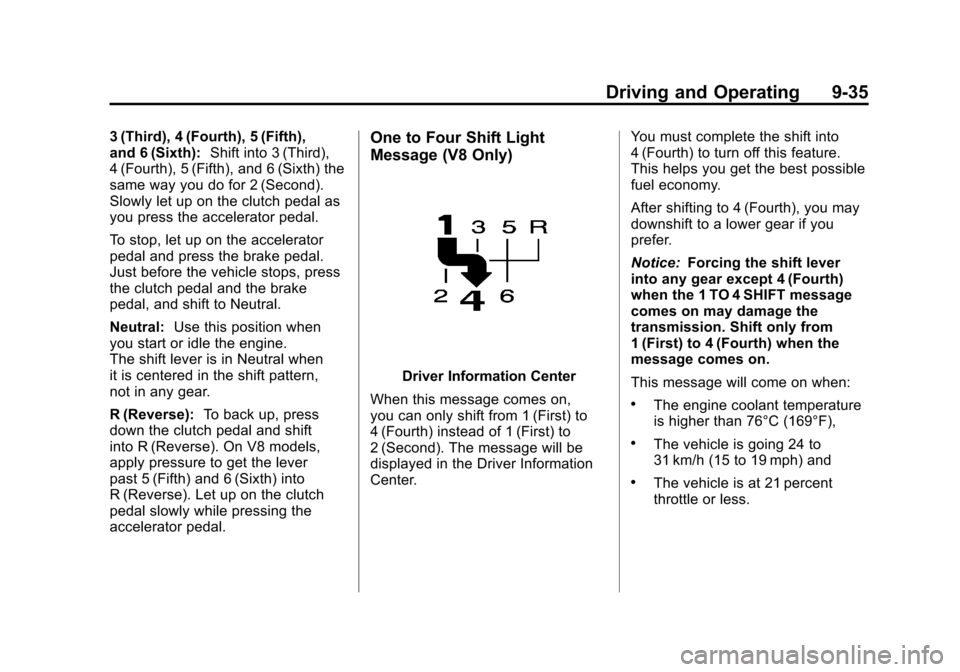
accelerator pedal.One to Four Shift Light
Message (V8 Only)
Driver Information Center
When this message comes on,
you can only shift from 1 (First) to
4 (Fourth) instead of 1 (First) to
2 (Second). The message will be
displayed in the Driver Information
Center. You must complete the shift into
4 (Fourth) to turn off this feature.
This helps you get the best possible
fuel economy.
After shifting to 4 (Fourth), you may
downshift to a lower gear if you
prefer.
Notice:
Forcing the shift lever
into any gear except 4 (Fourth)
when the 1 TO 4 SHIFT message
comes on may damage the
transmission. Shift only from
1 (First) to 4 (Fourth) when the
message comes on.
This message will come on when:
.The engine coolant temperature
is higher than 76°C (169°F),
.The vehicle is going 24 to
31 km/h (15 to 19 mph) and
.The vehicle is at 21 percent
throttle or less.
Page 257 of 414
Black plate (55,1)Chevrolet Camaro Owner Manual - 2011
Driving and Operating 9-55
.Vehicles with automatic
transmissions can tow in D
(Drive), but M (Manual Mode)
is recommended. See
“Manual Mode”inAutomatic
Transmission on page 9‑30 for
more information. Use a lower
gear if the transmission shifts
too often. For vehicles with a
manual transmission, it is better
not to use the highest gear.
.Use the cruise control when
towing.
.Obey speed limit restrictions.
Do not drive faster than the
maximum posted speed for
trailers, or no more than 90 km/h
(55 mph), to reduce wear on the
vehicle.
Driving with a Trailer
Towing a trailer requires experience.
Get familiar with handling and
braking with the added trailer
weight. The vehicle is now longer
and not as responsive as the
vehicle is by itself.
Check all trailer hitch parts
and attachments, safety chains,
electrical connectors, lamps, tires,
and mirror adjustments. If the trailer
has electric brakes, start the vehicle
and trailer moving and then apply
the trailer brake controller by hand
to be sure the brakes are working.
During the trip, check regularly to be
sure that the load is secure, and the
lamps and trailer brakes are working
properly.
Towing with a Stability Control
System
When towing, the sound of the
stability control system might be
heard. The system is reacting to the
vehicle movement caused by the
trailer, which mainly occurs during
cornering. This is normal when
towing heavier trailers.
Following Distance
Stay at least twice as far behind the
vehicle ahead as you would when
driving the vehicle without a trailer.
This can help to avoid situations
that require heavy braking and
sudden turns.
Passing
More passing distance is needed
when towing a trailer. Because the
rig is longer, it is necessary to go
much farther beyond the passed
vehicle before returning to the lane.
Page 258 of 414
Black plate (56,1)Chevrolet Camaro Owner Manual - 2011
9-56 Driving and Operating
Backing Up
Hold the bottom of the steering
wheel with one hand. Then, to
move the trailer to the left, move
that hand to the left. To move the
trailer to the right, move your hand
to the right. Always back up slowly
and, if possible, have someone
guide you.
Making Turns
Notice:Making very sharp turns
while trailering could cause the
trailer to come in contact with the
vehicle. The vehicle could be
damaged. Avoid making very
sharp turns while trailering.
When turning with a trailer,
make wider turns than normal.
Do this so the trailer won't strike
soft shoulders, curbs, road signs,
trees or other objects. Avoid jerky
or sudden maneuvers. Signal well
in advance.
Turn Signals When Towing a
Trailer
The arrows on the instrument panel
flash whenever signaling a turn or
lane change. Properly hooked up,
the trailer lamps also flash, telling
other drivers the vehicle is turning,
changing lanes, or stopping.
When towing a trailer, the arrows on
the instrument panel flash for turns
even if the bulbs on the trailer are
burned out. For this reason you
may think other drivers are seeing
the signal when they are not. It is
important to check occasionally to
be sure the trailer bulbs are still
working.
Driving On Grades
Reduce speed and shift to a
lower gear before starting down
a long or steep downgrade. If the
transmission is not shifted down,
the brakes might have to be used
so much that they would get hot and
no longer work well. Vehicles with
automatic transmissions can tow in
D (Drive), but M (Manual Mode) is
recommended. See “Manual Mode”
in Automatic Transmission on
page 9‑30 for more information.
Use a lower gear if the transmission
shifts too often. For vehicles with a
manual transmission, it is better not
to use the highest gear.
Page 302 of 414
Black plate (40,1)Chevrolet Camaro Owner Manual - 2011
10-40 Vehicle Care
5. Push the new bulb into thesocket and reinstall the socket
into the headlamp assembly by
turning it clockwise.
6. Reconnect the electrical connector.
7. Pull the duct back out of the air cleaner/filter housing until the
tabs snap the duct back into
position.
Headlamps, Front Turn
Signal and Parking
Lamps (Up-Level Vehicle)
The up‐level model vehicle has a
HID headlamp and a turn signal
lamp on the headlamp assembly.
The park lamp is also the function
of the HID headlamp. See High
Intensity Discharge (HID) Lighting
on page 10‑38 for more information. To replace the turn signal bulb:
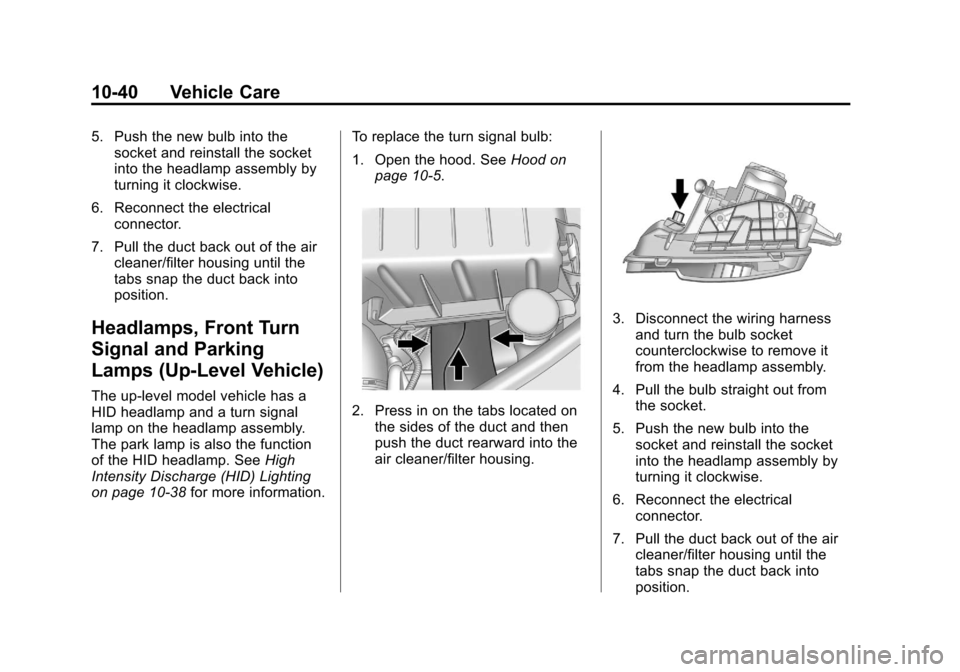
1. Open the hood. See
Hood on
page 10‑5.2. Press in on the tabs located on the sides of the duct and then
push the duct rearward into the
air cleaner/filter housing.
3. Disconnect the wiring harnessand turn the bulb socket
counterclockwise to remove it
from the headlamp assembly.
4. Pull the bulb straight out from the socket.
5. Push the new bulb into the socket and reinstall the socket
into the headlamp assembly by
turning it clockwise.
6. Reconnect the electrical connector.
7. Pull the duct back out of the air cleaner/filter housing until the
tabs snap the duct back into
position.
Page 303 of 414
Black plate (41,1)Chevrolet Camaro Owner Manual - 2011
Vehicle Care 10-41
Daytime Running
Lamps (DRL)
The up‐level model vehicle may
have daytime running lamps which
would be located on the fascia.
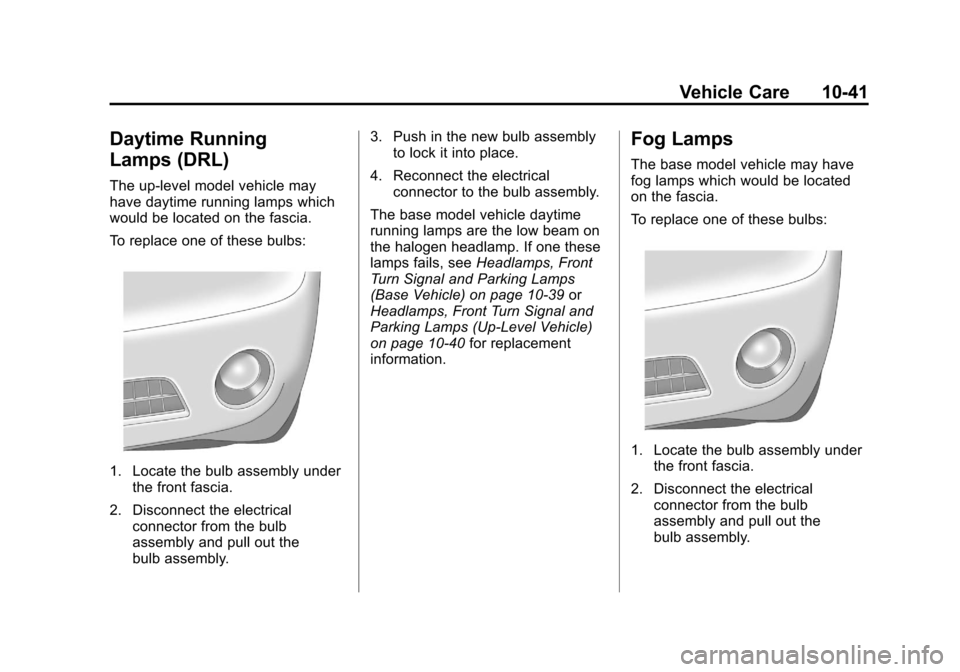
To replace one of these bulbs:
1. Locate the bulb assembly underthe front fascia.
2. Disconnect the electrical connector from the bulb
assembly and pull out the
bulb assembly. 3. Push in the new bulb assembly
to lock it into place.
4. Reconnect the electrical connector to the bulb assembly.
The base model vehicle daytime
running lamps are the low beam on
the halogen headlamp. If one these
lamps fails, see Headlamps, Front
Turn Signal and Parking Lamps
(Base Vehicle) on page 10‑39 or
Headlamps, Front Turn Signal and
Parking Lamps (Up-Level Vehicle)
on page 10‑40 for replacement
information.
Fog Lamps
The base model vehicle may have
fog lamps which would be located
on the fascia.
To replace one of these bulbs:
1. Locate the bulb assembly under the front fascia.
2. Disconnect the electrical connector from the bulb
assembly and pull out the
bulb assembly.
Page 327 of 414
Black plate (65,1)Chevrolet Camaro Owner Manual - 2011
Vehicle Care 10-65
The TPMS matching process is
outlined below:
1. Set the parking brake.
2. Turn the ignition switch toON/RUN with the engine off.
3. Go to the TPM vehicle information screen on the
DIC. See Driver Information
Center (DIC) on page 5‑25.
Press set to relearn the sensors.
The horn sounds twice to signal
the receiver is in relearn mode
and TIRE LEARNING ACTIVE
message displays on the DIC
screen.
4. Start with the driver side front tire. 5. Remove the valve cap from
the valve stem. Activate the
TPMS sensor by increasing or
decreasing the tire's air pressure
for 10 seconds, or until a horn
chirp sounds. The horn chirp,
which can take up to 30 seconds
to sound, confirms that the
TPMS sensor identification
code has been matched to
this tire position.
6. Proceed to the passenger side front tire, and repeat the
procedure in Step 5.
7. Proceed to the passenger side rear tire, and repeat the
procedure in Step 5. 8. Proceed to the driver side rear
tire, and repeat the procedure in
Step 5.
9. After hearing the confirming horn chirp for the driver side rear tire,
the horn sounds two more times
to signal the tire learning mode
is no longer active. Turn the
ignition switch to LOCK/OFF.
10. Set all four tires to the recommended air pressure
level as indicated on the Tire
and Loading Information label.
11. Put the valve caps back on the valve stems.
The tires air pressure will not
appear on the screen until you
start driving the vehicle.
Page 386 of 414
Black plate (4,1)Chevrolet Camaro Owner Manual - 2011
13-4 Customer Information
However, we recognize that
despite the good intentions of all
parties involved, sometimes a
misunderstanding may occur.
If you have a problem that has not
been satisfactorily handled through
the normal means, we suggest the
following steps:
STEP ONE
Explain your case to the dealer
service agent, service manager,
dealer sales agent, or sales
manager, depending on your case.
Make sure that they have
all necessary information.
They are interested in your
continual satisfaction.
STEP TWO
If you are not satisfied, please
contact the general manager or the
dealership owner to ask for their
help. If they are not able to resolve
your case, ask them to contact the
right people at General Motors for
support, if needed.STEP THREE
If your case is not resolved in a
reasonable amount of time by your
dealer, please call the General
Motors Customer Assistance
Center (CAC) and provide the
following information:
.Name
.Address
.Phone number
.Model year
.Brand
.Vehicle Identification
Number (VIN)
.Mileage
.Delivery date
.Description of the problem
.Dealership name
.Dealership address
See
Customer Assistance Offices
(U.S. and Canada) on page 13‑4
or Customer Assistance Offices
(Mexico) on page 13‑5 for more
information.
Customer Assistance
Offices (U.S. and Canada)
Chevrolet encourages customers
to call the toll-free number for
assistance. However, if a customer
wishes to write or e-mail Chevrolet,
the letter should be addressed to:
United States
Chevrolet Motor Division
Chevrolet Customer Assistance
Center
P.O. Box 33170
Detroit, MI 48232-5170
www.Chevrolet.com
1-800-222-1020
1-800-833-2438 (For Text
Telephone Devices (TTYs))
Roadside Assistance:
1-800-243-8872
Page 396 of 414
Black plate (14,1)Chevrolet Camaro Owner Manual - 2011
13-14 Customer Information
For emergency towing see
Roadside Assistance Program
(U.S. and Canada) on page 13‑7
orRoadside Assistance Program
(Mexico) on page 13‑10.
Gather the following information:
.Driver name, address, and
telephone number.
.Driver license number.
.Owner name, address, and
telephone number.
.Vehicle license plate number.
.Vehicle make, model, and
model year.
.Vehicle Identification
Number (VIN).
.Insurance company and policy
number.
.General description of the
damage to the other vehicle. Choose a reputable repair facility
that uses quality replacement parts.
See
“Collision Parts” earlier in this
section.
If the airbag has inflated, see What
Will You See After an Airbag
Inflates? on page 3‑29.
Managing the Vehicle Damage
Repair Process
In the event that the vehicle requires
damage repairs, GM recommends
that you take an active role in its
repair. If you have a pre-determined
repair facility of choice, take the
vehicle there, or have it towed
there. Specify to the facility that
any required replacement collision
parts be original equipment parts,
either new Genuine GM parts
or recycled original GM parts.
Remember, recycled parts will
not be covered by the GM vehicle
warranty. Insurance pays the bill for the repair,
but you must live with the repair.
Depending on your policy limits,
your insurance company may
initially value the repair using
aftermarket parts. Discuss this with
the repair professional, and insist
on Genuine GM parts. Remember,
if the vehicle is leased, you may
be obligated to have the vehicle
repaired with Genuine GM parts,
even if your insurance coverage
does not pay the full cost.
If another party's insurance
company is paying for the repairs,
you are not obligated to accept
a repair valuation based on that
insurance company's collision
policy repair limits, as you have no
contractual limits with that company.
In such cases, you can have control
of the repair and parts choices
as long as the cost stays within
reasonable limits.