remote start CHEVROLET CAMARO 2011 5.G User Guide
[x] Cancel search | Manufacturer: CHEVROLET, Model Year: 2011, Model line: CAMARO, Model: CHEVROLET CAMARO 2011 5.GPages: 414, PDF Size: 6.24 MB
Page 35 of 414
Black plate (7,1)Chevrolet Camaro Owner Manual - 2011
Keys, Doors and Windows 2-7
Conditions in Which Remote Start
Will Not Work
The remote start will not operate if:
.The key is in the ignition.
.The hood is not closed.
.The hazard warning flashers
are on.
.There is an emission control
system malfunction.
.The engine coolant temperature
is too high.
.The oil pressure is low.
.Two remote vehicle starts have
already been used.
.The vehicle is not in P (Park).
Door Locks
{WARNING
Unlocked doors can be
dangerous.
.Passengers, especially
children, can easily open the
doors and fall out of a moving
vehicle. The chance of being
thrown out of the vehicle in
a crash is increased if the
doors are not locked. So, all
passengers should wear
safety belts properly and
the doors should be locked
whenever the vehicle is
driven.(Continued)
WARNING (Continued)
.Young children who get into
unlocked vehicles may be
unable to get out. A child can
be overcome by extreme heat
and can suffer permanent
injuries or even death from
heat stroke. Always lock the
vehicle whenever leaving it.
.Outsiders can easily enter
through an unlocked door
when slowing or stopping
the vehicle. Lock the doors
to help prevent this from
happening.
Page 77 of 414
Black plate (31,1)Chevrolet Camaro Owner Manual - 2011
Seats and Restraints 3-31
In many crashes severe enough
to inflate the airbag, windshields
are broken by vehicle deformation.
Additional windshield breakage
may also occur from the right front
passenger airbag.
.Airbags are designed to inflate
only once. After an airbag
inflates, you will need some
new parts for the airbag system.
If you do not get them, the
airbag system will not be there
to help protect you in another
crash. A new system will include
airbag modules and possibly
other parts. The service manual
for your vehicle covers the need
to replace other parts.
.The vehicle has a crash sensing
and diagnostic module which
records information after a
crash. SeeVehicle Data
Recording and Privacy on
page 13‑17 andEvent Data
Recorders on page 13‑17.
.Let only qualified technicians
work on the airbag systems.
Improper service can mean that
an airbag system will not work
properly. See your dealer for
service.
Passenger Sensing
System
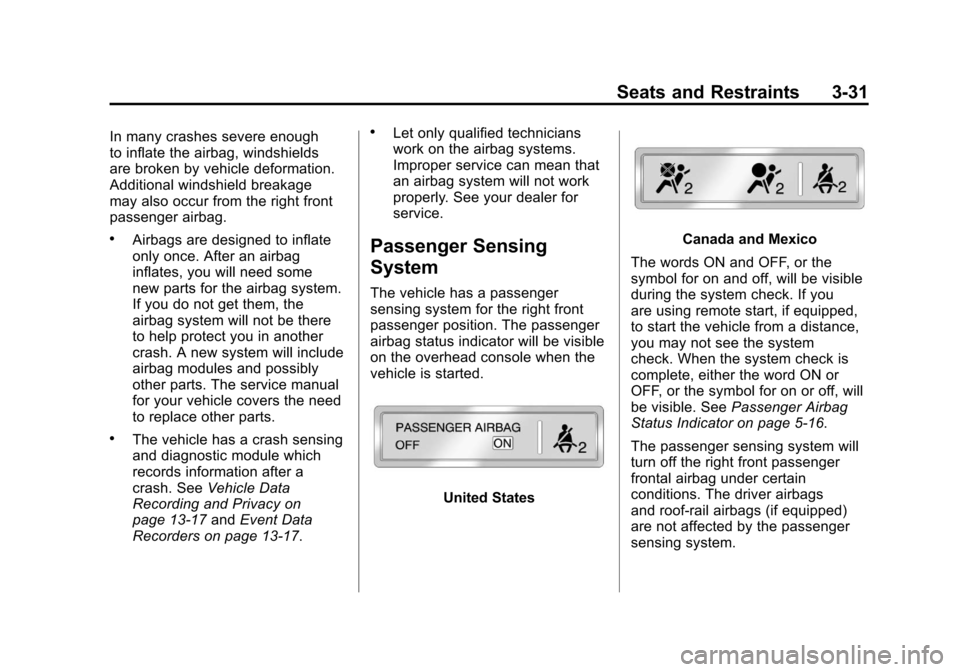
The vehicle has a passenger
sensing system for the right front
passenger position. The passenger
airbag status indicator will be visible
on the overhead console when the
vehicle is started.
United States
Canada and Mexico
The words ON and OFF, or the
symbol for on and off, will be visible
during the system check. If you
are using remote start, if equipped,
to start the vehicle from a distance,
you may not see the system
check. When the system check is
complete, either the word ON or
OFF, or the symbol for on or off, will
be visible. See Passenger Airbag
Status Indicator on page 5‑16.
The passenger sensing system will
turn off the right front passenger
frontal airbag under certain
conditions. The driver airbags
and roof‐rail airbags (if equipped)
are not affected by the passenger
sensing system.
Page 122 of 414
Black plate (16,1)Chevrolet Camaro Owner Manual - 2011
5-16 Instruments and Controls
Passenger Airbag Status
Indicator
The vehicle has a passenger
sensing system. SeePassenger
Sensing System on page 3‑31
for important safety information.
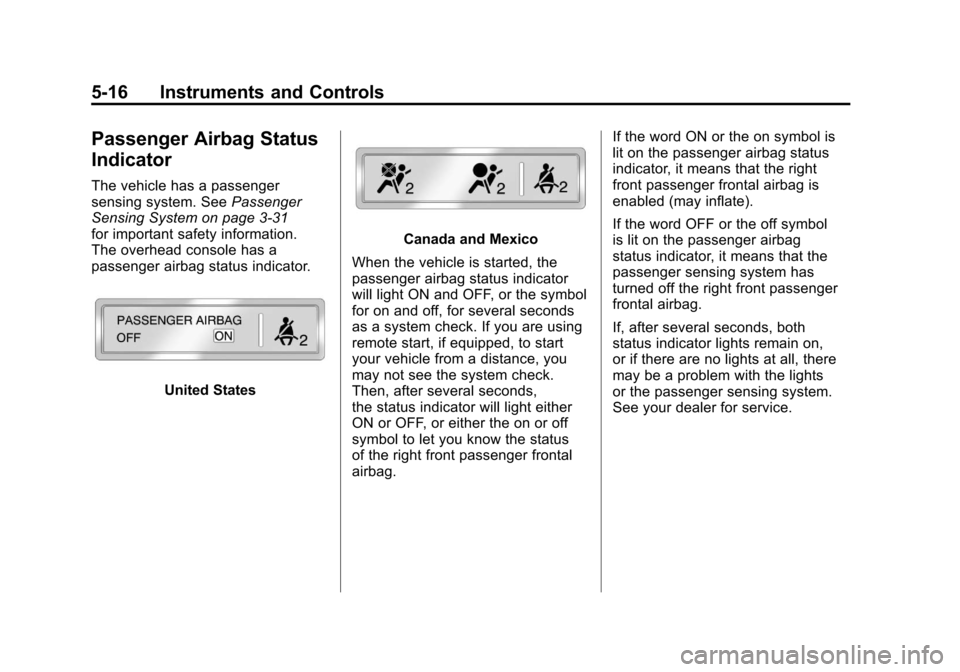
The overhead console has a
passenger airbag status indicator.
United States
Canada and Mexico
When the vehicle is started, the
passenger airbag status indicator
will light ON and OFF, or the symbol
for on and off, for several seconds
as a system check. If you are using
remote start, if equipped, to start
your vehicle from a distance, you
may not see the system check.
Then, after several seconds,
the status indicator will light either
ON or OFF, or either the on or off
symbol to let you know the status
of the right front passenger frontal
airbag. If the word ON or the on symbol is
lit on the passenger airbag status
indicator, it means that the right
front passenger frontal airbag is
enabled (may inflate).
If the word OFF or the off symbol
is lit on the passenger airbag
status indicator, it means that the
passenger sensing system has
turned off the right front passenger
frontal airbag.
If, after several seconds, both
status indicator lights remain on,
or if there are no lights at all, there
may be a problem with the lights
or the passenger sensing system.
See your dealer for service.
Page 148 of 414
Black plate (42,1)Chevrolet Camaro Owner Manual - 2011
5-42 Instruments and Controls
Vehicle
Personalization
The audio system controls are
used to access the personalization
menus for customizing vehicle
features.
CONFIG (Configuration):
Press to access the Configuration
Settings Menu.
MENU/SELECT Knob:Press
the center of this knob to enter
the menus and select menu items.
Turn the knob to scroll through the
menus.
0BACK: Press to exit or move
backwards in a menu. Entering the Personalization
Menus
1. Press the CONFIG button to
access the Configuration
Settings menu.
2. Turn the MENU/SELECT knob to highlight Vehicle Settings.
3. Press the center of the MENU/SELECT knob to select
the Vehicle Settings menu.
The following list of menu items will
be available:
.Climate and Air Quality
.Comfort and Convenience
.Collision/Detection Systems
.Language
.Lighting
.Power Door Locks
.Remote Lock/Unlock
.Return to Factory Settings Turn the MENU/SELECT knob to
highlight the menu. Press the knob
to select it. Each of the menus is
detailed in the following information.
Climate and Air Quality
Select the Climate and Air Quality
menu and the following will be
displayed:
.Remote Start Heated Seats
Remote Start Heated Seats
When on, this feature will turn the
heated seats on when using remote
start.
Press the MENU/SELECT knob
when Remote Start Heated Seats is
highlighted. Turn the knob to select
On or Off. Press the knob to confirm
and go back to the last menu.
Page 153 of 414
Black plate (47,1)Chevrolet Camaro Owner Manual - 2011
Instruments and Controls 5-47
Programming the Universal
Remote System
For questions or help programming
the Universal Remote system,
call 1‐800‐355‐3515 or go to
www.homelink.com.
Programming a garage door opener
involves time-sensitive actions, so
read the entire procedure before
starting. Otherwise, the device will
time out and the procedure will have
to be repeated.
To program up to three devices:
1. Hold the end of the hand-heldtransmitter about 3 to 8 cm
(1 to 3 in) away from the
Universal Remote system
buttons while keeping the
indicator light in view.
The hand-held transmitter
was supplied by the
manufacturer of the garage
door opener receiver
(motor-head unit). 2. At the same time, press
and hold both the hand-held
transmitter button and one of the
three Universal Remote system
buttons to be used to operate
the garage door. Do not release
the Universal Remote system
button or the hand-held
transmitter button until the
indicator light changes from
a slowly to a rapidly flashing
light. You now may release
both buttons.
Some entry gates and garage
door openers may require
substitution of Step 2 with
the procedure noted in “Gate
Operator and Canadian
Programming” later in this
section. 3. Press and hold for five seconds
the newly trained Universal
Remote system button
(the button selected in Step 2)
while observing the indicator
light and garage door activation.
.If the indicator light stays on
continuously or the garage
door starts to move when
the Universal Remote
system button is pressed
and released, then the
programming is complete.
There is no need to
continue programming
Steps 4 through 6.
Page 356 of 414
Black plate (94,1)Chevrolet Camaro Owner Manual - 2011
10-94 Vehicle Care
9. Start the engine in the vehiclewith the good battery and run
the engine at idle speed for at
least four minutes.
10. Try to start the vehicle that had the dead battery. If it will
not start after a few tries, it
probably needs service.
Notice: If the jumper cables are
connected or removed in the
wrong order, electrical shorting
may occur and damage the
vehicle. The repairs would not be
covered by the vehicle warranty.
Always connect and remove the
jumper cables in the correct
order, making sure that the
cables do not touch each other
or other metal.
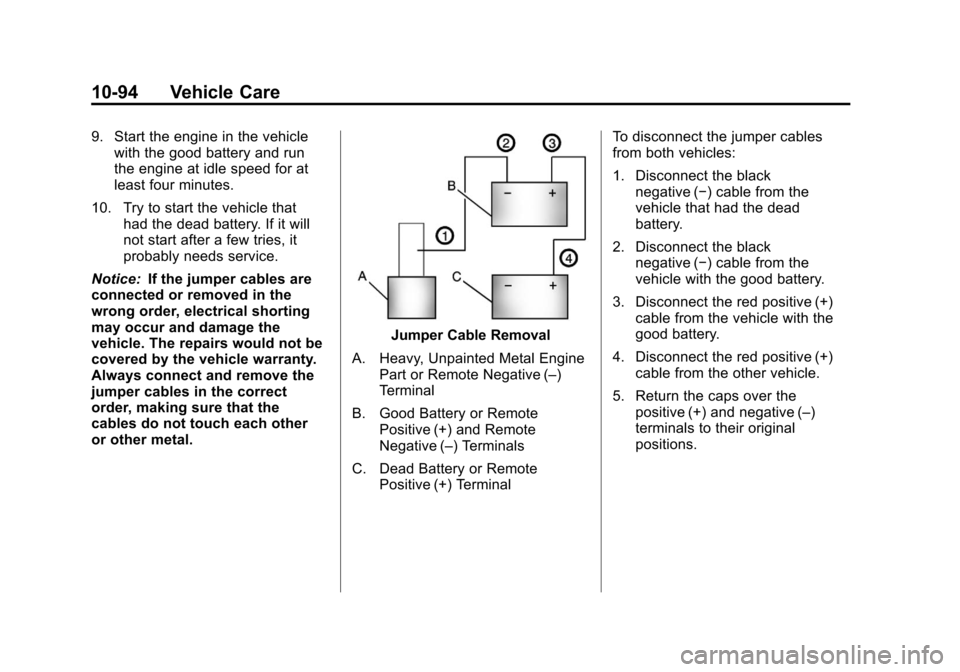
Jumper Cable Removal
A. Heavy, Unpainted Metal Engine Part or Remote Negative (–)
Terminal
B. Good Battery or Remote Positive (+) and Remote
Negative (–) Terminals
C. Dead Battery or Remote Positive (+) Terminal To disconnect the jumper cables
from both vehicles:
1. Disconnect the black
negative (−) cable from the
vehicle that had the dead
battery.
2. Disconnect the black negative (−) cable from the
vehicle with the good battery.
3. Disconnect the red positive (+) cable from the vehicle with the
good battery.
4. Disconnect the red positive (+) cable from the other vehicle.
5. Return the caps over the positive (+) and negative (–)
terminals to their original
positions.
Page 401 of 414
Black plate (19,1)Chevrolet Camaro Owner Manual - 2011
Customer Information 13-19
Radio Frequency
Identification (RFID)
RFID technology is used in some
vehicles for functions such as tire
pressure monitoring and ignition
system security, as well as in
connection with conveniences
such as key fobs for remote door
locking/unlocking and starting, and
in-vehicle transmitters for garage
door openers. RFID technology
in GM vehicles does not use or
record personal information or
link with any other GM system
containing personal information.
Radio Frequency
Statement
This vehicle has systems that
operate on a radio frequency that
comply with Part 15 of the Federal
Communications Commission (FCC)
rules and with Industry Canada
Standards RSS‐210/220/310.
Operation is subject to the following
two conditions:
1. The device may not causeinterference.
2. The device must accept any interference received, including
interference that may cause
undesired operation of the
device.
Changes or modifications to any
of these systems by other than an
authorized service facility could void
authorization to use this equipment.
Page 408 of 414

Black plate (6,1)Chevrolet Camaro Owner Manual - 2011
i-6 INDEX
Horn . . . . . . . . . . . . . . . . . . . . . . . . . . . . 5-3
How to Wear Safety BeltsProperly . . . . . . . . . . . . . . . . . . . . . . 3-11
Hydraulic Clutch . . . . . . . . . . . . . . 10-16
I
Ignition Positions . . . . . . . . . . . . . . 9-19
Ignition Transmission Lock Check . . . . . . . . . . . . . . . . . . . . . . . 10-33
Immobilizer . . . . . . . . . . . . . . . . . . . . 2-11
Immobilizer Light . . . . . . . . . . . . . . 5-24
Infants and Young Children, Restraints . . . . . . . . . . . . . . . . . . . . 3-41
Infotainment . . . . . . . . . . . . . . . . . . . . 7-1
Instrument Cluster . . . . . . . . . . . . . . 5-7
Introduction . . . . . . . . . . . . . . . . . . . . . . . iii
J
Jump Starting . . . . . . . . . . . . . . . . . 10-91
K
Key and Lock Messages . . . . . . . 5-37
Keyless Entry Remote (RKE) System . . . . . . . . 2-3
Keys . . . . . . . . . . . . . . . . . . . . . . . . . . . . 2-2
L
Labeling, Tire Sidewall . . . . . . . . 10-52
Lamp Messages . . . . . . . . . . . . . . . 5-37
Lamps DaytimeRunning (DRL) . . . . . . . . 10-41, 6-3
Dome . . . . . . . . . . . . . . . . . . . . . . . . . . 6-6
Exterior Controls . . . . . . . . . . . . . . . 6-1
Front Fog . . . . . . . . . . . . . . . . . . . . . . 6-5
Headlamps, Front Turn Signal and
Parking Lamps . . . . . 10-39, 10-40
License Plate . . . . . . . . . . . . . . . 10-42
Malfunction Indicator . . . . . . . . . 5-18
Lap-Shoulder Belt . . . . . . . . . . . . . 3-17
LATCH System Replacing Parts After aCrash . . . . . . . . . . . . . . . . . . . . . . . 3-52
Latch, Lower Anchors and Tethers for Children . . . . . . . . . . 3-47
Latches, Seatback . . . . . . . . . . . . . . 3-6
Lighting Entry . . . . . . . . . . . . . . . . . . . . . . . . . . 6-6
Illumination Control . . . . . . . . . . . . 6-6
Theater Dimming . . . . . . . . . . . . . . 6-6 Lights
Airbag Readiness . . . . . . . . . . . . . 5-15
Antilock Brake System
(ABS) Warning . . . . . . . . . . . . . . 5-21
Brake System Warning . . . . . . . 5-20
Charging System . . . . . . . . . . . . . 5-17
Cruise Control . . . . . . . . . . . . . . . . 5-25
Engine Oil Pressure . . . . . . . . . . 5-24
Flash-to-Pass . . . . . . . . . . . . . . . . . . 6-3
Front Fog Lamps . . . . . . . . . . . . . 5-25
High/Low Beam Changer . . . . . . 6-2
Immobilizer . . . . . . . . . . . . . . . . . . . 5-24
Safety Belt Reminders . . . . . . . . 5-14
Taillamp Indicator . . . . . . . . . . . . . 5-25
Tire Pressure . . . . . . . . . . . . . . . . . 5-23
Traction Control OFF/ StabiliTrak OFF . . . . . . . . . . . . . 5-23
Traction Control System (TCS)/StabiliTrak
®. . . . . . . . . . 5-22
Traction Off . . . . . . . . . . . . . . . . . . . 5-22
Page 411 of 414

Black plate (9,1)Chevrolet Camaro Owner Manual - 2011
INDEX i-9
Rearview Mirrors . . . . . . . . . . . . . . 2-14Automatic Dimming . . . . . . . . . . . 2-14
Reclining Seatbacks . . . . . . . . . . . . 3-4
Recommended Fluids and Lubricants . . . . . . . . . . . . . . . . . . . . 11-7
Recommended Fuel . . . . . . . . . . . 9-48
Records Maintenance . . . . . . . . . . . . . . . . .11-10
Recreational Vehicle Towing . . . . . . . . . . . . . . . . . . . . . . 10-95
Reimbursement Program,
GM Mobility . . . . . . . . . . . . . . . . . . 13-7
Remote Keyless Entry (RKE) System . . . . . . . . . . . . . . . . . . . . . . . . 2-3
Remote Vehicle Start . . . . . . . . . . . 2-5
Replacement Bulbs . . . . . . . . . . . 10-43
Replacement Parts Airbags . . . . . . . . . . . . . . . . . . . . . . . 3-38
Maintenance . . . . . . . . . . . . . . . . . . 11-9
Replacing Airbag System . . . . . . 3-38
Replacing LATCH System Parts After a Crash . . . . . . . . . . . 3-52
Replacing Safety Belt System Parts After a
Crash . . . . . . . . . . . . . . . . . . . . . . . . 3-22 Reporting Safety Defects
Canadian Government . . . . . . 13-16
General Motors . . . . . . . . . . . . . 13-17
U.S. Government . . . . . . . . . . . 13-16
Restraints Where to Put . . . . . . . . . . . . . . . . . 3-45
Retained Accessory
Power (RAP) . . . . . . . . . . . . . . . . . 9-24
Ride Control Systems Limited Slip Rear Axle . . . . . . . . 9-43
Messages . . . . . . . . . . . . . . . . . . . . 5-38
Roads Driving, Wet . . . . . . . . . . . . . . . . . . . 9-8
Roadside Assistance Program . . . . . . . . . . . . . . . 13-7, 13-10
Roof
Sunroof . . . . . . . . . . . . . . . . . . . . . . . 2-17
Rotation, Tires . . . . . . . . . . . . . . . . 10-66
Routing, Engine Drive Belt . . . . . 12-4
Running the Vehicle While Parked . . . . . . . . . . . . . . . . . . . . . . . 9-29S
Safety Belts . . . . . . . . . . . . . . . . . . . . 3-8
Care . . . . . . . . . . . . . . . . . . . . . . . . . . 3-22
Extender . . . . . . . . . . . . . . . . . . . . . . 3-21
How to Wear Safety BeltsProperly . . . . . . . . . . . . . . . . . . . . . 3-11
Lap-Shoulder Belt . . . . . . . . . . . . 3-17
Messages . . . . . . . . . . . . . . . . . . . . 5-39
Reminders . . . . . . . . . . . . . . . . . . . . 5-14
Replacing After a Crash . . . . . . 3-22
Use During Pregnancy . . . . . . . . 3-21
Safety Defects Reporting Canadian Government . . . . . . 13-16
General Motors . . . . . . . . . . . . . 13-17
U.S. Government . . . . . . . . . . . 13-16
Safety System Check . . . . . . . . . . 3-22
Satellite Radio . . . . . . . . . . . . . . . . . 7-10
Scheduled Maintenance . . . . . . . 11-2
Scheduling Appointments . . . . . 13-10
Sealant Kit, Tire . . . . . . . . . . . . . . 10-78
Seatback Latches . . . . . . . . . . . . . . 3-6
Page 412 of 414

Black plate (10,1)Chevrolet Camaro Owner Manual - 2011
i-10 INDEX
SeatsAdjustment, Front . . . . . . . . . . . . . . 3-3
Head Restraints . . . . . . . . . . . . . . . 3-2
Heated Front . . . . . . . . . . . . . . . . . . 3-6
Power Adjustment, Front . . . . . . 3-4
Rear . . . . . . . . . . . . . . . . . . . . . . . . . . . 3-7
Reclining Seatbacks . . . . . . . . . . . 3-4
Securing Child Restraints . . . . . . . . . . . . . . 3-52, 3-54
Security Vehicle . . . . . . . . . . . . . . . . . . . . . . . 2-10
Service Accessories andModifications . . . . . . . . . . . . . . . . 10-3
Doing Your Own Work . . . . . . . . 10-4
Engine Soon Light . . . . . . . . . . . . 5-18
Maintenance Records . . . . . . .11-10
Maintenance, General Information . . . . . . . . . . . . . . . . . . 11-1
Parts Identification Label . . . . . 12-1
Publications Ordering Information . . . . . . . . . . . . . . . . 13-15
Scheduling Appointments . . . 13-10
Vehicle Messages . . . . . . . . . . . . 5-39 Servicing the Airbag . . . . . . . . . . . 3-36
Shift Lock Control Function
Check, Automatic
Transmission . . . . . . . . . . . . . . . . 10-33
Shifting Into Park . . . . . . . . . . . . . . . . . . . . . . 9-24
Out of Park . . . . . . . . . . . . . . . . . . . 9-25
Signals, Turn and Lane-Change . . . . . . . . . . . . . . . . . 6-5
Spare Tire Compact . . . . . . . . . . . . . . . . . . . . 10-90
Specifications and Capacities . . . . . . . . . . . . . . . . . . . . 12-2
Speedometer . . . . . . . . . . . . . . . . . . . 5-8
StabiliTrak OFF Light . . . . . . . . . . . . . . . . . . . . . 5-23
StabiliTrak
®System . . . . . . . . . . . 9-39
Start Vehicle, Remote . . . . . . . . . . 2-5
Starter Switch Check . . . . . . . . . 10-32
Starting the Engine . . . . . . . . . . . . 9-21
Steering . . . . . . . . . . . . . . . . . . . . . . . . 9-5 Fluid, Power . . . . . . . . . . . . . . . . 10-27
Wheel Adjustment . . . . . . . . . . . . . 5-2
Wheel Controls . . . . . . . . . . . . . . . . 5-2 Storage Areas
Center Console . . . . . . . . . . . . . . . . 4-1
Convenience Net . . . . . . . . . . . . . . 4-1
Glove Box . . . . . . . . . . . . . . . . . . . . . 4-1
Storing the Tire Sealant and Compressor Kit . . . . . . . . . 10-84
Stuck Vehicle . . . . . . . . . . . . . . . . . . 9-12
Sun Visors . . . . . . . . . . . . . . . . . . . . . 2-17
Sunroof . . . . . . . . . . . . . . . . . . . . . . . . 2-17
Symbols . . . . . . . . . . . . . . . . . . . . . . . . . . iv
System
Infotainment . . . . . . . . . . . . . . . . . . . 7-1
T
Tachometer . . . . . . . . . . . . . . . . . . . . . 5-8
Taillamp Indicator Light . . . . . . . . 5-25
TaillampsTurn Signal, and
Stoplamps . . . . . . . . . . . . . . . . 10-42
Text Telephone (TTY) Users . . . 13-6
Theater Dimming . . . . . . . . . . . . . . . 6-6
Theft-Deterrent Systems . . . . . . . 2-12 Immobilizer . . . . . . . . . . . . . . . . . . . 2-11
Time . . . . . . . . . . . . . . . . . . . . . . . . . . . . 5-4