Key release CHEVROLET CAMARO 2011 5.G Owners Manual
[x] Cancel search | Manufacturer: CHEVROLET, Model Year: 2011, Model line: CAMARO, Model: CHEVROLET CAMARO 2011 5.GPages: 414, PDF Size: 6.24 MB
Page 7 of 414
Black plate (1,1)Chevrolet Camaro Owner Manual - 2011
In Brief 1-1
In Brief
Instrument Panel
Instrument Panel . . . . . . . . . . . . . . 1-2
Initial Drive Information
Initial Drive Information . . . . . . . . 1-4
Remote Keyless Entry (RKE)System . . . . . . . . . . . . . . . . . . . . . . 1-4
Remote Vehicle Start . . . . . . . . . 1-5
Door Locks . . . . . . . . . . . . . . . . . . . 1-5
Trunk Release . . . . . . . . . . . . . . . . 1-6
Seat Adjustment . . . . . . . . . . . . . . 1-6
Heated Seats . . . . . . . . . . . . . . . . . 1-7
Head Restraint Adjustment . . . . 1-7
Safety Belts . . . . . . . . . . . . . . . . . . . 1-7
Sensing System for Passenger Airbag . . . . . . . . . . . . . . . . . . . . . . . 1-8
Mirror Adjustment . . . . . . . . . . . . . 1-8 Steering Wheel Adjustment . . . 1-9
Interior Lighting . . . . . . . . . . . . . . . 1-9
Exterior Lighting . . . . . . . . . . . . . . 1-9
Windshield Wiper/Washer . . . . 1-10
Climate Controls . . . . . . . . . . . . . 1-11
Transmission . . . . . . . . . . . . . . . . 1-11Vehicle Features
Radio(s) . . . . . . . . . . . . . . . . . . . . . 1-12
Satellite Radio . . . . . . . . . . . . . . . 1-13
Portable Audio Devices . . . . . . 1-14
Bluetooth
®. . . . . . . . . . . . . . . . . . . 1-14
Steering Wheel Controls . . . . . 1-14
Cruise Control . . . . . . . . . . . . . . . 1-15
Driver Information Center (DIC) . . . . . . . . . . . . . . . 1-15
Vehicle Personalization . . . . . . 1-16
Ultrasonic Parking Assist . . . . 1-16
Power Outlets . . . . . . . . . . . . . . . 1-16
Universal Remote System . . . 1-17
Sunroof . . . . . . . . . . . . . . . . . . . . . . 1-17
Performance and Maintenance
Traction Control
System (TCS) . . . . . . . . . . . . . . 1-18
StabiliTrak
®System . . . . . . . . . 1-18
Towing . . . . . . . . . . . . . . . . . . . . . . . 1-18
Tire Pressure Monitor . . . . . . . . 1-18
Tire Sealant and Compressor Kit . . . . . . . . . . . . . 1-19
Engine Oil Life System . . . . . . 1-19
Driving for Better Fuel Economy . . . . . . . . . . . . . . . . . . . 1-19
Roadside Assistance Program . . . . . . . . . . . . . . . . . . . . 1-20
OnStar
®. . . . . . . . . . . . . . . . . . . . . 1-20
Page 10 of 414
Black plate (4,1)Chevrolet Camaro Owner Manual - 2011
1-4 In Brief
Initial Drive
Information
This section provides a brief
overview about some of the
important features that may or may
not be on your specific vehicle.
For more detailed information, refer
to each of the features which can be
found later in this owner manual.
Remote Keyless
Entry (RKE) System
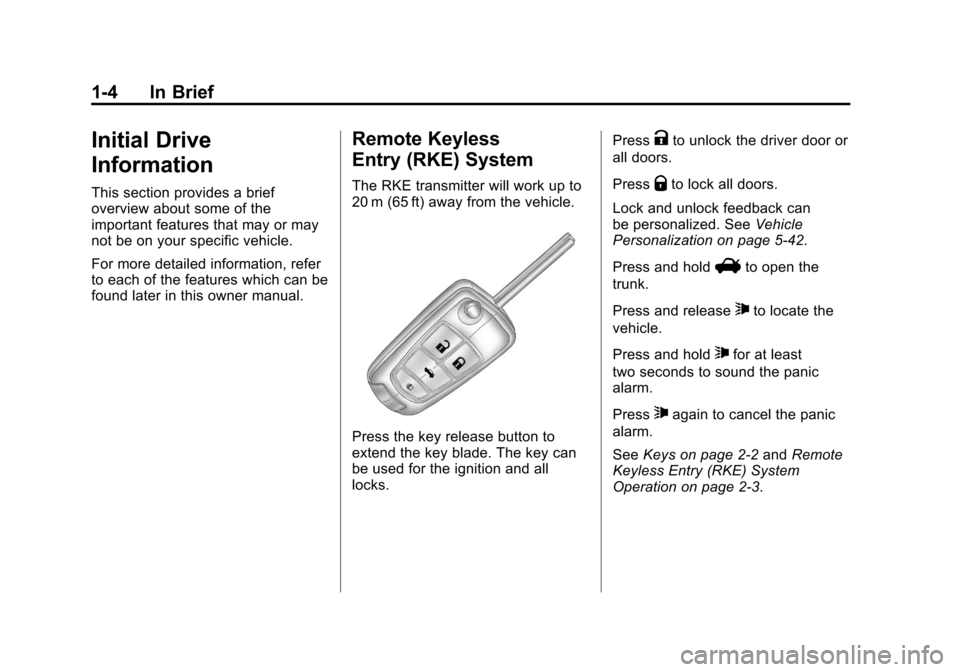
The RKE transmitter will work up to
20 m (65 ft) away from the vehicle.
Press the key release button to
extend the key blade. The key can
be used for the ignition and all
locks.Press
Kto unlock the driver door or
all doors.
Press
Qto lock all doors.
Lock and unlock feedback can
be personalized. See Vehicle
Personalization on page 5‑42.
Press and hold
Vto open the
trunk.
Press and release
7to locate the
vehicle.
Press and hold
7for at least
two seconds to sound the panic
alarm.
Press
7again to cancel the panic
alarm.
See Keys on page 2‑2 andRemote
Keyless Entry (RKE) System
Operation on page 2‑3.
Page 12 of 414
Black plate (6,1)Chevrolet Camaro Owner Manual - 2011
1-6 In Brief
Trunk Release
The trunk may be opened by
pressing the remote trunk release
button located on the lower portion
of the driver door or
Von the
Remote Keyless Entry (RKE)
transmitter. See Trunk on page 2‑9
for more information.
Seat Adjustment
Manual Seats
To adjust the seat:
1. Pull the handle under the seat to unlock it.
2. Slide the seat and release the handle.
3. Try to move the seat back and forth to be sure it is locked in
place.
See Seat Adjustment on page 3‑3
for more information.
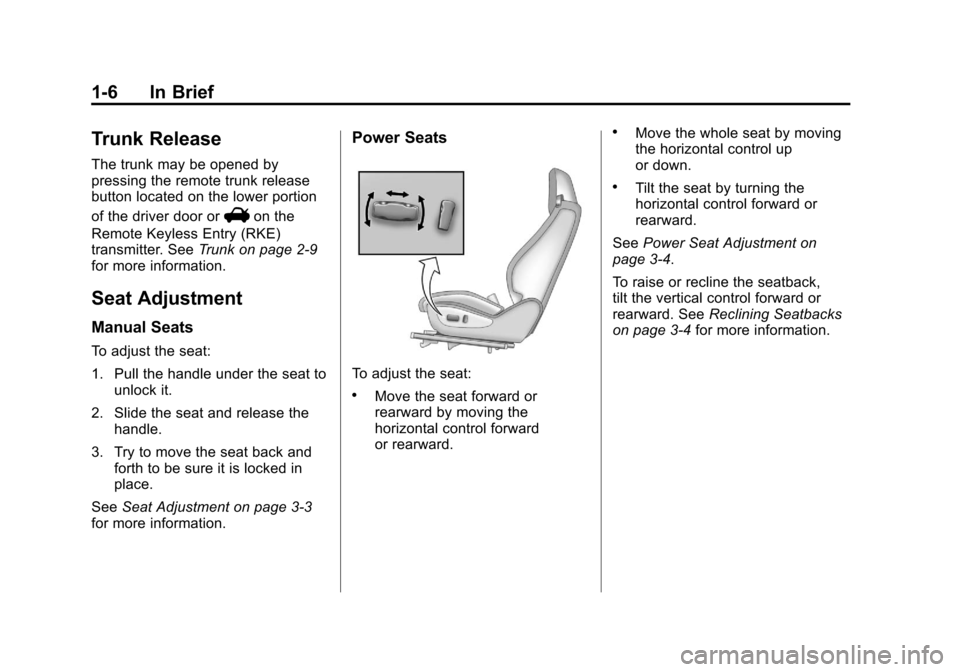
Power Seats
To adjust the seat:
.Move the seat forward or
rearward by moving the
horizontal control forward
or rearward.
.Move the whole seat by moving
the horizontal control up
or down.
.Tilt the seat by turning the
horizontal control forward or
rearward.
See Power Seat Adjustment on
page 3‑4.
To raise or recline the seatback,
tilt the vertical control forward or
rearward. See Reclining Seatbacks
on page 3‑4 for more information.
Page 30 of 414
Black plate (2,1)Chevrolet Camaro Owner Manual - 2011
2-2 Keys, Doors and Windows
Keys and Locks
Keys
{WARNING
Leaving children in a vehicle with
the ignition key is dangerous for
many reasons. Children or others
could be badly injured or even
killed. They could operate the
power windows or other controls
or even make the vehicle move.
The windows will function with the
keys in the ignition and children
could be seriously injured or killed
if caught in the path of a closing
window. Do not leave the keys in
a vehicle with children.
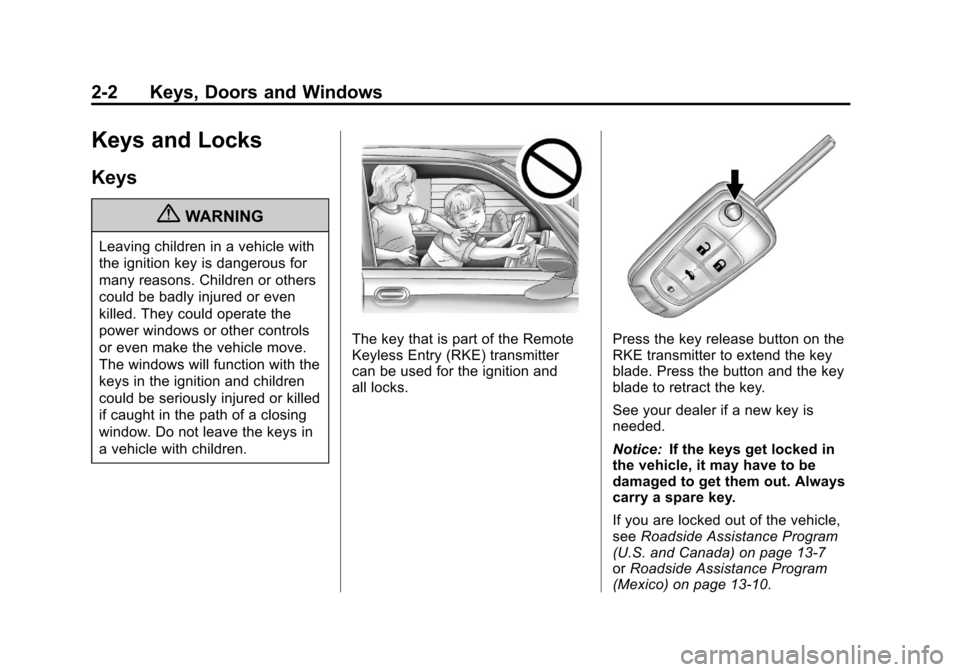
The key that is part of the Remote
Keyless Entry (RKE) transmitter
can be used for the ignition and
all locks.Press the key release button on the
RKE transmitter to extend the key
blade. Press the button and the key
blade to retract the key.
See your dealer if a new key is
needed.
Notice:If the keys get locked in
the vehicle, it may have to be
damaged to get them out. Always
carry a spare key.
If you are locked out of the vehicle,
see Roadside Assistance Program
(U.S. and Canada) on page 13‑7
or Roadside Assistance Program
(Mexico) on page 13‑10.
Page 32 of 414
Black plate (4,1)Chevrolet Camaro Owner Manual - 2011
2-4 Keys, Doors and Windows
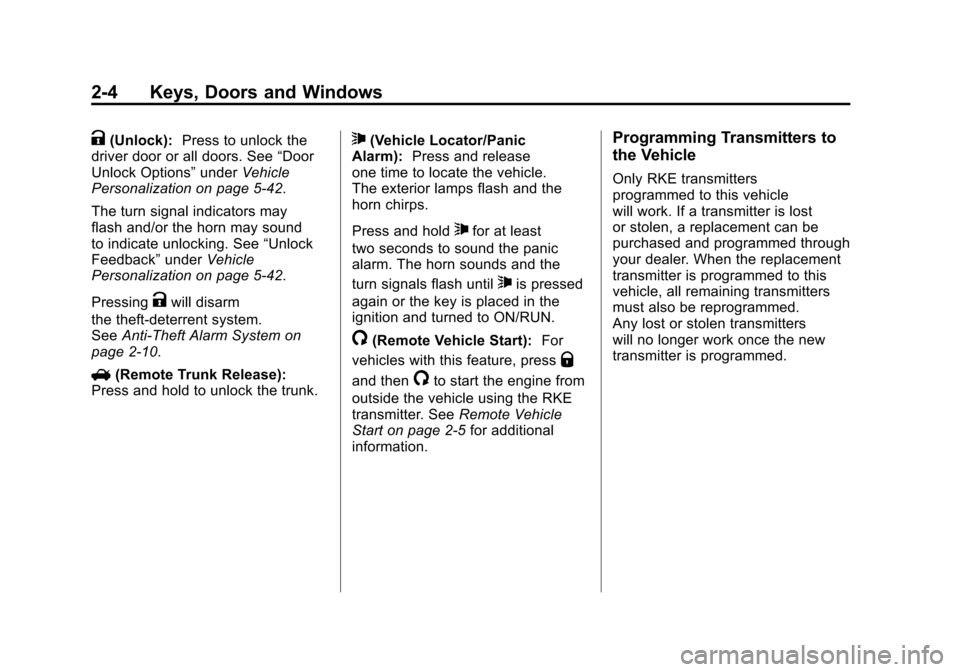
K(Unlock):Press to unlock the
driver door or all doors. See “Door
Unlock Options” underVehicle
Personalization on page 5‑42.
The turn signal indicators may
flash and/or the horn may sound
to indicate unlocking. See “Unlock
Feedback” underVehicle
Personalization on page 5‑42.
Pressing
Kwill disarm
the theft-deterrent system.
See Anti-Theft Alarm System on
page 2‑10.
V (Remote Trunk Release):
Press and hold to unlock the trunk.
7(Vehicle Locator/Panic
Alarm): Press and release
one time to locate the vehicle.
The exterior lamps flash and the
horn chirps.
Press and hold
7for at least
two seconds to sound the panic
alarm. The horn sounds and the
turn signals flash until
7is pressed
again or the key is placed in the
ignition and turned to ON/RUN.
/(Remote Vehicle Start): For
vehicles with this feature, press
Q
and then/to start the engine from
outside the vehicle using the RKE
transmitter. See Remote Vehicle
Start on page 2‑5 for additional
information.
Programming Transmitters to
the Vehicle
Only RKE transmitters
programmed to this vehicle
will work. If a transmitter is lost
or stolen, a replacement can be
purchased and programmed through
your dealer. When the replacement
transmitter is programmed to this
vehicle, all remaining transmitters
must also be reprogrammed.
Any lost or stolen transmitters
will no longer work once the new
transmitter is programmed.
Page 37 of 414
Black plate (9,1)Chevrolet Camaro Owner Manual - 2011
Keys, Doors and Windows 2-9
Doors
Trunk
{WARNING
Exhaust gases can enter the
vehicle if it is driven with the
liftgate, trunk/hatch open, or
with any objects that pass
through the seal between the
body and the trunk/hatch or
liftgate. Engine exhaust contains
Carbon Monoxide (CO) which
cannot be seen or smelled.
It can cause unconsciousness
and even death.(Continued)
WARNING (Continued)
If the vehicle must be driven with
the liftgate, or trunk/hatch open:
.Close all of the windows.
.Fully open the air outlets on
or under the instrument
panel.
.Adjust the Climate Control
system to a setting that
brings in only outside air
and set the fan speed to the
highest setting. See Climate
Control System in the Index.
.If the vehicle has a power
liftgate, disable the power
liftgate function.
For more information about
carbon monoxide, see Engine
Exhaust on page 9‑28.
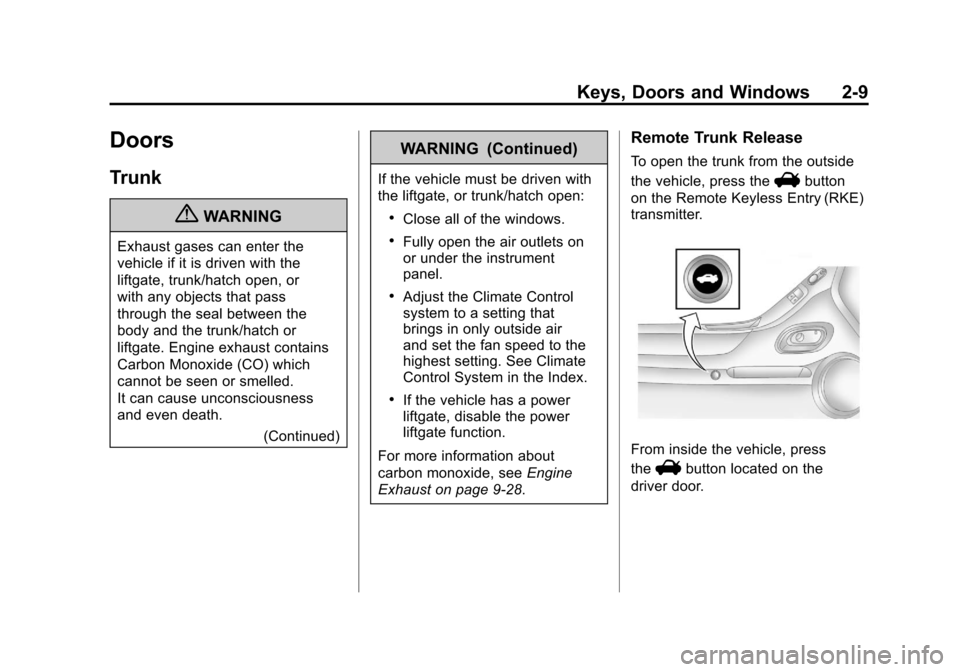
Remote Trunk Release
To open the trunk from the outside
the vehicle, press the
Vbutton
on the Remote Keyless Entry (RKE)
transmitter.
From inside the vehicle, press
the
Vbutton located on the
driver door.
Page 38 of 414
Black plate (10,1)Chevrolet Camaro Owner Manual - 2011
2-10 Keys, Doors and Windows
Emergency Trunk Release
Handle
Notice:Do not use the
emergency trunk release handle
as a tie-down or anchor point
when securing items in the trunk
as it could damage the handle.
The emergency trunk release
handle is only intended to aid a
person trapped in a latched trunk,
enabling them to open the trunk
from the inside.
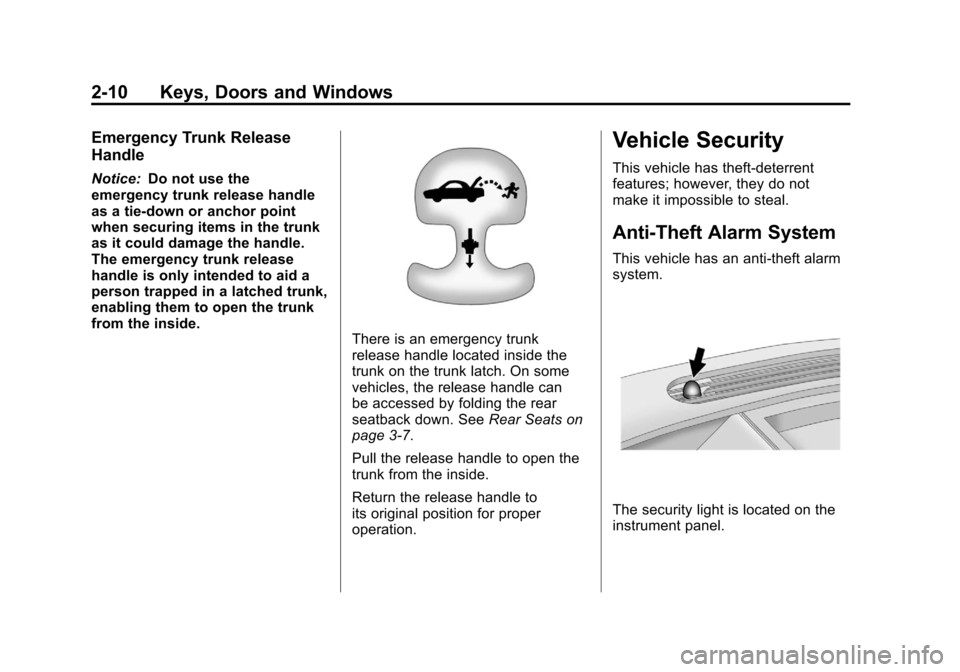
There is an emergency trunk
release handle located inside the
trunk on the trunk latch. On some
vehicles, the release handle can
be accessed by folding the rear
seatback down. See Rear Seats on
page 3‑7.
Pull the release handle to open the
trunk from the inside.
Return the release handle to
its original position for proper
operation.
Vehicle Security
This vehicle has theft-deterrent
features; however, they do not
make it impossible to steal.
Anti-Theft Alarm System
This vehicle has an anti-theft alarm
system.
The security light is located on the
instrument panel.
Page 44 of 414
Black plate (16,1)Chevrolet Camaro Owner Manual - 2011
2-16 Keys, Doors and Windows
The switches work when
the ignition is in ON/RUN
or ACC/ACCESSORY, or in
Retained Accessory Power (RAP).
SeeRetained Accessory Power
(RAP) on page 9‑24.
Window Indexing
This automatically lowers the
window a small amount when the
door is opened. When the door is
closed, the window will raise fully.
If the vehicle loses power or the
window freezes, this feature may
not work. From outside the vehicle,
close the door and push the window
inward so that the glass goes under
the molding. If the OPEN, THEN CLOSE
DRIVER WINDOW or OPEN,
THEN CLOSE PASSENGER
WINDOW messages are
displayed on the Driver Information
Center (DIC), follow the procedure
for Programming the Power
Windows later in this section.
See also
Driver Information
Center (DIC) on page 5‑25.
Express Window Operation
The front window switches have
an express-up or down feature that
lowers or raises the window without
holding the switch. Pull the switch
up or press it down all the way and
release it. Stop the window by
pressing or pulling the switch.
Express Window Anti-Pinch
Feature
When express-up is active, the
window will auto-reverse if there
is an obstruction or severe icing.
The window returns to normal
operation after the obstruction
or condition is removed.
{WARNING
If express override is activated,
the window will not reverse
automatically. You or others could
be injured and the window could
be damaged. Before you use
express override, make sure that
all people and obstructions are
clear of the window path.
Page 45 of 414
Black plate (17,1)Chevrolet Camaro Owner Manual - 2011
Keys, Doors and Windows 2-17
Express Window Anti-Pinch
Override
The anti-pinch feature can
be overridden by holding the
window switch all the way down.
The window will lower for as long
as the switch is held. Once the
switch is released, the express
mode is re-activated. In this mode,
the window can still close on an
object in its path. Use care when
using the override mode.
Programming the Power
Windows
If the battery on the vehicle has
been recharged, disconnected,
or is not working, you will need to
reprogram each front power window
for the express-up feature to work.
Before reprogramming, replace or
recharge the vehicle's battery.To program each front window,
follow these steps:
1. With the ignition in ON/RUN or
ACC/ACCESSORY, or when
Retained Accessory Power
(RAP) is active, close all doors.
2. Press and hold the power window switch until the window
is fully open.
3. Pull the power window switch up until the window is fully closed.
4. Continue holding the switch up for approximately two seconds
after the window is completely
closed.
The window is now reprogrammed.
Repeat the process for the other
window.
Sun Visors
Pull the sun visor toward you or
move it to the side to reduce glare.
Roof
Sunroof
On vehicles with a sunroof, the
switch is located on the overhead
console.
The sunroof only operates
when the ignition is in ON/RUN or
ACC/ACCESSORY, or if Retained
Accessory Power (RAP) is active.
See Retained Accessory Power
(RAP) on page 9‑24.
Page 46 of 414
Black plate (18,1)Chevrolet Camaro Owner Manual - 2011
2-18 Keys, Doors and Windows
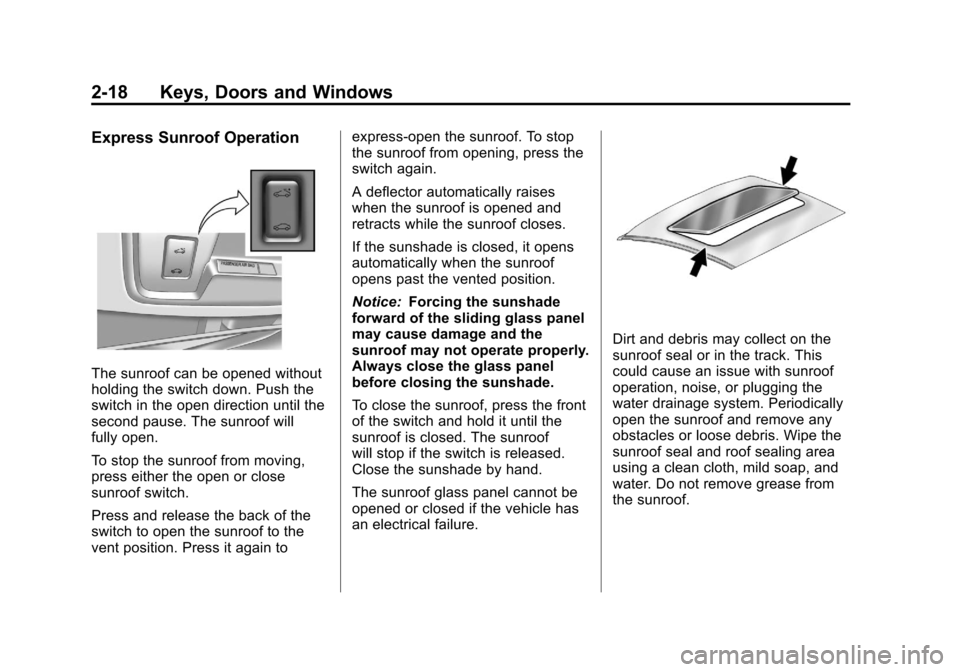
Express Sunroof Operation
The sunroof can be opened without
holding the switch down. Push the
switch in the open direction until the
second pause. The sunroof will
fully open.
To stop the sunroof from moving,
press either the open or close
sunroof switch.
Press and release the back of the
switch to open the sunroof to the
vent position. Press it again toexpress-open the sunroof. To stop
the sunroof from opening, press the
switch again.
A deflector automatically raises
when the sunroof is opened and
retracts while the sunroof closes.
If the sunshade is closed, it opens
automatically when the sunroof
opens past the vented position.
Notice:
Forcing the sunshade
forward of the sliding glass panel
may cause damage and the
sunroof may not operate properly.
Always close the glass panel
before closing the sunshade.
To close the sunroof, press the front
of the switch and hold it until the
sunroof is closed. The sunroof
will stop if the switch is released.
Close the sunshade by hand.
The sunroof glass panel cannot be
opened or closed if the vehicle has
an electrical failure.
Dirt and debris may collect on the
sunroof seal or in the track. This
could cause an issue with sunroof
operation, noise, or plugging the
water drainage system. Periodically
open the sunroof and remove any
obstacles or loose debris. Wipe the
sunroof seal and roof sealing area
using a clean cloth, mild soap, and
water. Do not remove grease from
the sunroof.