horn CHEVROLET CAMARO 2011 5.G Owners Manual
[x] Cancel search | Manufacturer: CHEVROLET, Model Year: 2011, Model line: CAMARO, Model: CHEVROLET CAMARO 2011 5.GPages: 414, PDF Size: 6.24 MB
Page 9 of 414

Black plate (3,1)Chevrolet Camaro Owner Manual - 2011
In Brief 1-3
A.Air Vents on page 8‑4.
B. Driver Shift Controls (If Equipped). See Automatic
Transmission on page 9‑30.
C. Instrument Cluster on page 5‑7.
D. Windshield Wiper/Washer on
page 5‑3.
E. Infotainment on page 7‑1.
F. Turn and Lane‐Change Lever. See Turn and Lane-Change
Signals on page 6‑5.
Headlamp High/Low-Beam
Changer on page 6‑2.
Flash-to-Pass on page 6‑3.
Driver Information Center
(DIC) Buttons (If Equipped).
See Driver Information Center
(DIC) on page 5‑25. G. Data Link Connector (DLC)
(Out of View). See Malfunction
Indicator Lamp on page 5‑18.
H. Cruise Control on page 9‑43.
I. Exterior Lamp Controls on
page 6‑1.
Front Fog Lamps on page 6‑5
(If Equipped).
Instrument Panel Illumination
Control on page 6‑6.
J. Steering Wheel Adjustment on
page 5‑2.
K. Horn on page 5‑3.
L. Steering Wheel Controls on
page 5‑2.
M. Head-Up Display (HUD) on
page 5‑29 (If Equipped). N.
Climate Control Systems on
page 8‑1.
O. Transmission Temperature
Gauge on page 5‑12.
Voltmeter Gauge on page 5‑13.
Engine Oil Temperature Gauge
on page 5‑11.
Engine Oil Pressure Gauge on
page 5‑9.
P. Shift Lever. See Shifting Into
Park (Automatic Transmission)
on page 9‑24.
Q. Power Outlets on page 5‑5.
R. Hazard Warning Flashers on
page 6‑5.
Power Door Locks on page 2‑8.
S. Glove Box on page 4‑1.
Page 31 of 414
Black plate (3,1)Chevrolet Camaro Owner Manual - 2011
Keys, Doors and Windows 2-3
Remote Keyless Entry
(RKE) System
SeeRadio Frequency Statement on
page 13‑19 for information
regarding Part 15 of the Federal
Communications Commission
(FCC) rules and Industry Canada
Standards RSS-210/220/310.
If there is a decrease in the RKE
operating range:
.Check the distance.
The transmitter may be
too far from the vehicle.
.Check the location. Other
vehicles or objects may be
blocking the signal.
.Check the transmitter's battery.
See “Battery Replacement” later
in this section.
.If the transmitter is still not
working correctly, see your
dealer or a qualified technician
for service.
Remote Keyless Entry
(RKE) System Operation
The Remote Keyless Entry (RKE)
transmitter will work up to 20 m
(65 ft) away from the vehicle.
Other conditions can affect the
performance of the transmitter.
See Remote Keyless Entry (RKE)
System on page 2‑3.
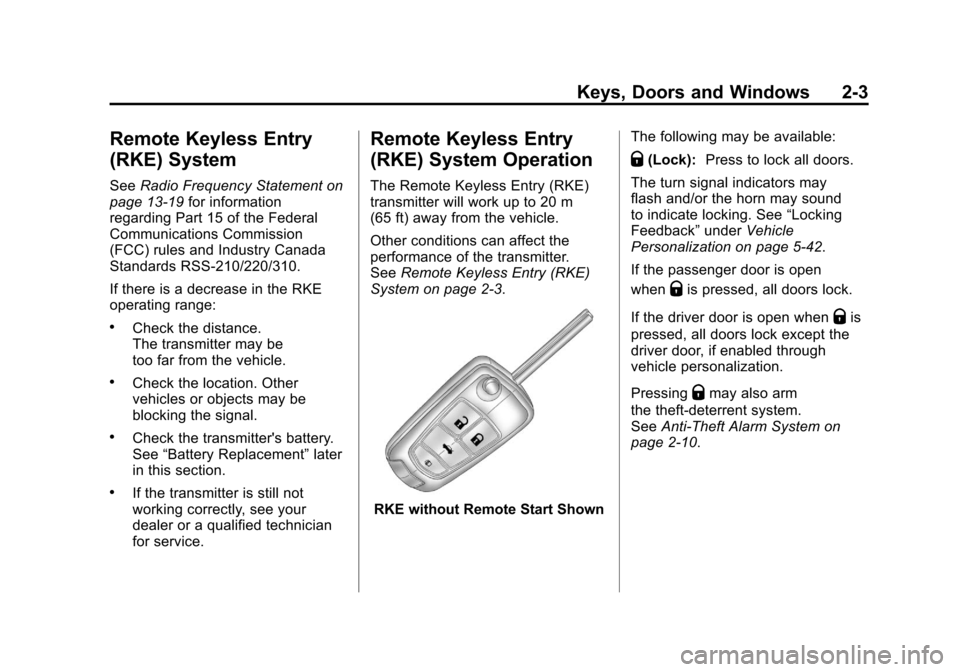
RKE without Remote Start Shown The following may be available:
Q(Lock):
Press to lock all doors.
The turn signal indicators may
flash and/or the horn may sound
to indicate locking. See “Locking
Feedback” underVehicle
Personalization on page 5‑42.
If the passenger door is open
when
Qis pressed, all doors lock.
If the driver door is open when
Qis
pressed, all doors lock except the
driver door, if enabled through
vehicle personalization.
Pressing
Qmay also arm
the theft-deterrent system.
See Anti-Theft Alarm System on
page 2‑10.
Page 32 of 414
Black plate (4,1)Chevrolet Camaro Owner Manual - 2011
2-4 Keys, Doors and Windows
K(Unlock):Press to unlock the
driver door or all doors. See “Door
Unlock Options” underVehicle
Personalization on page 5‑42.
The turn signal indicators may
flash and/or the horn may sound
to indicate unlocking. See “Unlock
Feedback” underVehicle
Personalization on page 5‑42.
Pressing
Kwill disarm
the theft-deterrent system.
See Anti-Theft Alarm System on
page 2‑10.
V (Remote Trunk Release):
Press and hold to unlock the trunk.
7(Vehicle Locator/Panic
Alarm): Press and release
one time to locate the vehicle.
The exterior lamps flash and the
horn chirps.
Press and hold
7for at least
two seconds to sound the panic
alarm. The horn sounds and the
turn signals flash until
7is pressed
again or the key is placed in the
ignition and turned to ON/RUN.
/(Remote Vehicle Start): For
vehicles with this feature, press
Q
and then/to start the engine from
outside the vehicle using the RKE
transmitter. See Remote Vehicle
Start on page 2‑5 for additional
information.
Programming Transmitters to
the Vehicle
Only RKE transmitters
programmed to this vehicle
will work. If a transmitter is lost
or stolen, a replacement can be
purchased and programmed through
your dealer. When the replacement
transmitter is programmed to this
vehicle, all remaining transmitters
must also be reprogrammed.
Any lost or stolen transmitters
will no longer work once the new
transmitter is programmed.
Page 39 of 414
Black plate (11,1)Chevrolet Camaro Owner Manual - 2011
Keys, Doors and Windows 2-11
Arming the System
To arm the system, pressQon the
RKE transmitter.
The alarm automatically arms after
about 30 seconds. The security
light, located on the instrument
panel, flashes.
Disarming the System
To disarm the system, do one of the
following:
.PressKon the RKE transmitter.
.Turn the ignition to ON/RUN.
The security light stays on for
approximately one second when
the vehicle is disarming.
If the system is armed when there
are people inside of the vehicle,
pulling the door handle from the
inside one time will unlock the door.
Pulling the handle a second time
will unlatch the door.
How the System Alarm is
Activated
To activate the system if it is armed,
open any door, the trunk, or hood.
The horn will sound and the hazard
warning flashers will flash.
How to Turn Off the System
Alarm
To turn off the system alarm, do one
of the following:
.PressKon the RKE transmitter.
.Turn the ignition to ON/RUN.
The theft-deterrent system is
disarmed when the alarm is
turned off.
How to Detect a Tamper
Condition
If the horn sounds and the turn
signal lamps flash three times
when
Kis pressed, an attempted
break-in has occurred while the
system was armed. The vehicle
may also display a message on the
DIC. See Anti-Theft Alarm System
Messages on page 5‑39 for more
information.
Immobilizer
See Radio Frequency Statement on
page 13‑19 for information
regarding Part 15 of the Federal
Communications Commission
(FCC) rules and Industry Canada
Standards RSS-210/220/310.
Page 107 of 414
Black plate (1,1)Chevrolet Camaro Owner Manual - 2011
Instruments and Controls 5-1
Instruments and
Controls
Controls
Steering Wheel Adjustment . . . 5-2
Steering Wheel Controls . . . . . . 5-2
Horn . . . . . . . . . . . . . . . . . . . . . . . . . . 5-3
Windshield Wiper/Washer . . . . . 5-3
Compass . . . . . . . . . . . . . . . . . . . . . 5-4
Clock . . . . . . . . . . . . . . . . . . . . . . . . . 5-4
Power Outlets . . . . . . . . . . . . . . . . . 5-5
Warning Lights, Gauges, and
Indicators
Warning Lights, Gauges, andIndicators . . . . . . . . . . . . . . . . . . . . 5-6
Instrument Cluster . . . . . . . . . . . . 5-7
Speedometer . . . . . . . . . . . . . . . . . 5-8
Odometer . . . . . . . . . . . . . . . . . . . . . 5-8
Trip Odometer . . . . . . . . . . . . . . . . . 5-8
Tachometer . . . . . . . . . . . . . . . . . . . 5-8
Fuel Gauge . . . . . . . . . . . . . . . . . . . 5-8
Engine Oil Pressure Gauge . . . 5-9
Engine Oil Temperature Gauge . . . . . . . . . . . . . . . . . . . . . . 5-11 Engine Coolant Temperature
Gauge . . . . . . . . . . . . . . . . . . . . . . 5-11
Transmission Temperature Gauge . . . . . . . . . . . . . . . . . . . . . . 5-12
Voltmeter Gauge . . . . . . . . . . . . . 5-13
Safety Belt Reminders . . . . . . . 5-14
Airbag Readiness Light . . . . . . 5-15
Passenger Airbag Status
Indicator . . . . . . . . . . . . . . . . . . . . 5-16
Charging System Light . . . . . . 5-17
Malfunction Indicator Lamp . . . . . . . . . . . . . 5-18
Brake System Warning Light . . . . . . . . . . . . . . . . . . . . . . . 5-20
Antilock Brake System (ABS) Warning Light . . . . . . . . . . . . . . 5-21
Traction Off Light . . . . . . . . . . . . 5-22
Traction Control System (TCS)/StabiliTrak
®Light . . . . 5-22
Traction Control System (TCS) OFF/StabiliTrak
®OFF
Light . . . . . . . . . . . . . . . . . . . . . . . 5-23
Tire Pressure Light . . . . . . . . . . 5-23
Engine Oil Pressure Light . . . . 5-24
Immobilizer Light . . . . . . . . . . . . 5-24
Front Fog Lamp Light . . . . . . . . 5-25
Taillamp Indicator Light . . . . . . 5-25
Cruise Control Light . . . . . . . . . 5-25
Information Displays
Driver Information Center (DIC) . . . . . . . . . . . . . . . 5-25
Head-Up Display (HUD) . . . . . 5-29
Vehicle Messages
Vehicle Messages . . . . . . . . . . . 5-34
Battery Voltage and Charging Messages . . . . . . . . . . . . . . . . . . 5-34
Brake System Messages . . . . 5-34
Compass Messages . . . . . . . . . 5-35
Cruise Control Messages . . . . 5-35
Door Ajar Messages . . . . . . . . . 5-35
Engine Cooling System Messages . . . . . . . . . . . . . . . . . . 5-35
Engine Oil Messages . . . . . . . . 5-36
Engine Power Messages . . . . 5-37
Fuel System Messages . . . . . . 5-37
Key and Lock Messages . . . . . 5-37
Lamp Messages . . . . . . . . . . . . . 5-37
Object Detection System Messages . . . . . . . . . . . . . . . . . . 5-38
Ride Control System Messages . . . . . . . . . . . . . . . . . . 5-38
Airbag System Messages . . . . 5-39
Safety Belt Messages . . . . . . . 5-39
Anti-Theft Alarm System Messages . . . . . . . . . . . . . . . . . . 5-39
Service Vehicle Messages . . . 5-39
Page 109 of 414
Black plate (3,1)Chevrolet Camaro Owner Manual - 2011
Instruments and Controls 5-3
bg(Push to Talk): For vehicles
with a Bluetooth®or OnStar®, press
to interact with those systems. See
Bluetooth (Overview) on page 7‑23
or Bluetooth (Infotainment Controls)
on page 7‑24 orBluetooth (Voice
Recognition) on page 7‑28 or the
OnStar Owner's Guide for more
information.
$ c(Mute/End Call): Press to
reject an incoming call, or end a
current call. Press to silence the
vehicle speakers while using the
infotainment system. Press again
to turn the sound on.
_SRC^(Toggle Switch): Press to
select an audio source.
Toggle up or down to select the next
or previous favorite radio station or
CD/MP3 track.
+
x− (Volume): Press + or−to
increase or decrease the volume.
Horn
Press near the horn symbols or
press on the steering wheel pad to
sound the horn.
Windshield Wiper/Washer
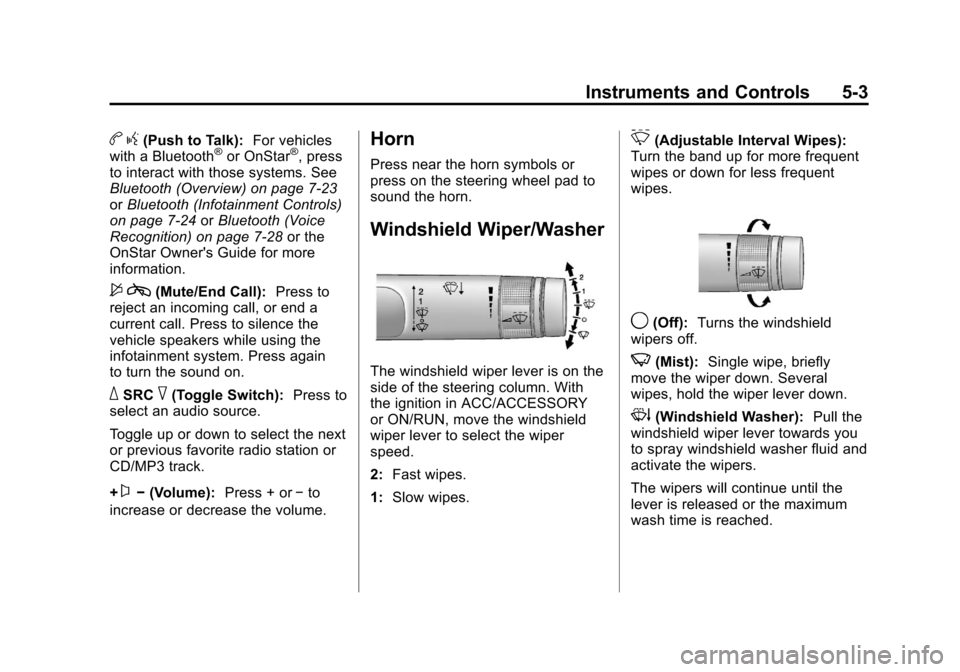
The windshield wiper lever is on the
side of the steering column. With
the ignition in ACC/ACCESSORY
or ON/RUN, move the windshield
wiper lever to select the wiper
speed.
2: Fast wipes.
1: Slow wipes.
&(Adjustable Interval Wipes):
Turn the band up for more frequent
wipes or down for less frequent
wipes.
9(Off): Turns the windshield
wipers off.
3(Mist): Single wipe, briefly
move the wiper down. Several
wipes, hold the wiper lever down.
3(Windshield Washer): Pull the
windshield wiper lever towards you
to spray windshield washer fluid and
activate the wipers.
The wipers will continue until the
lever is released or the maximum
wash time is reached.
Page 151 of 414
Black plate (45,1)Chevrolet Camaro Owner Manual - 2011
Instruments and Controls 5-45
Remote Lock/Unlock
Select Remote Lock/Unlock and the
following will be displayed:
.Unlock Feedback (Lights)
.Locking Feedback
.Door Unlock Options
Unlock Feedback (Lights)
When on, the exterior lamps will
flash when unlocking the vehicle
with the RKE transmitter.
Press the MENU/SELECT knob
when Unlock Feedback (Lights) is
highlighted. Turn the knob to select
Flash Lights or Off. Press the knob
to confirm and go back to the
last menu. Locking Feedback
This allows selection of what type of
feedback is given when unlocking
the vehicle with the RKE transmitter.
Press the MENU/SELECT
knob when Locking Feedback
is highlighted. Turn the knob to
select Lights and Horn, Lights Only,
Horn Only, or Off. Press the knob
to confirm and go back to the
last menu.
Door Unlock Options
This allows selection of which doors
will unlock when pressing the unlock
button on the RKE transmitter.
Press the MENU/SELECT knob
when Door Unlock Options is
highlighted. Turn the knob to select
All Doors or Driver Door Only. Press
the knob to confirm and go back to
the last menu.
Return to Factory Settings
Select Return to Factory
Settings to return all of the vehicle
personalization to the default
settings. Turn the knob to select Yes
or No. Press the knob to confirm
and go back to the last menu.
Page 308 of 414
Black plate (46,1)Chevrolet Camaro Owner Manual - 2011
10-46 Vehicle Care
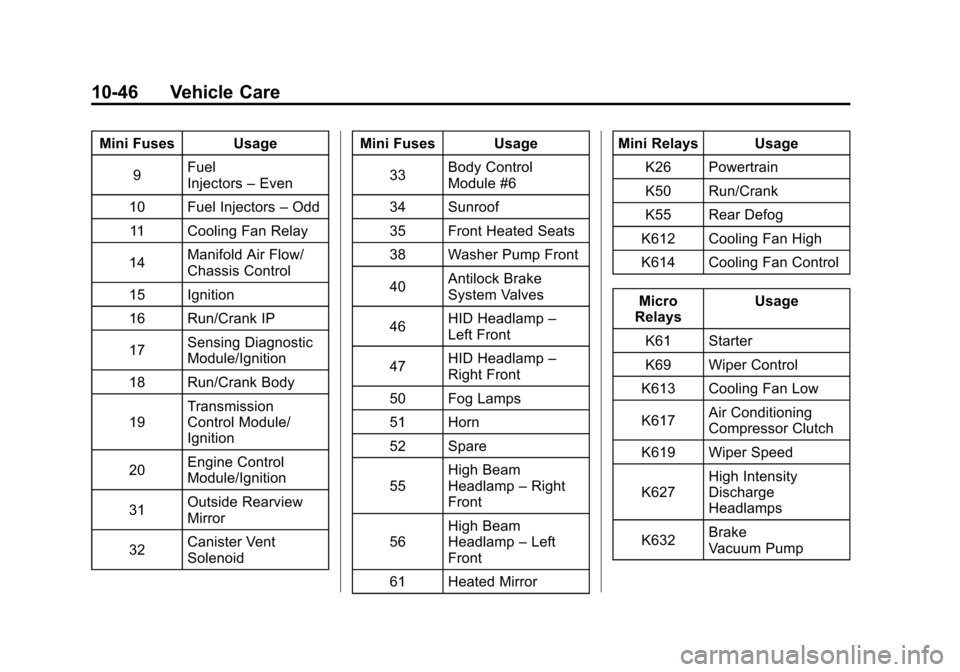
Mini Fuses Usage9 Fuel
Injectors
–Even
10 Fuel Injectors –Odd
11 Cooling Fan Relay
14 Manifold Air Flow/
Chassis Control
15 Ignition
16 Run/Crank IP
17 Sensing Diagnostic
Module/Ignition
18 Run/Crank Body
19 Transmission
Control Module/
Ignition
20 Engine Control
Module/Ignition
31 Outside Rearview
Mirror
32 Canister Vent
Solenoid Mini Fuses Usage
33 Body Control
Module #6
34 Sunroof
35 Front Heated Seats
38 Washer Pump Front
40 Antilock Brake
System Valves
46 HID Headlamp
–
Left Front
47 HID Headlamp
–
Right Front
50 Fog Lamps
51 Horn
52 Spare
55 High Beam
Headlamp
–Right
Front
56 High Beam
Headlamp
–Left
Front
61 Heated Mirror Mini Relays Usage
K26 Powertrain
K50 Run/Crank
K55 Rear Defog
K612 Cooling Fan High
K614 Cooling Fan Control
Micro
Relays Usage
K61 Starter
K69 Wiper Control
K613 Cooling Fan Low
K617 Air Conditioning
Compressor Clutch
K619 Wiper Speed
K627 High Intensity
Discharge
Headlamps
K632 Brake
Vacuum Pump
Page 327 of 414
Black plate (65,1)Chevrolet Camaro Owner Manual - 2011
Vehicle Care 10-65
The TPMS matching process is
outlined below:
1. Set the parking brake.
2. Turn the ignition switch toON/RUN with the engine off.
3. Go to the TPM vehicle information screen on the
DIC. See Driver Information
Center (DIC) on page 5‑25.
Press set to relearn the sensors.
The horn sounds twice to signal
the receiver is in relearn mode
and TIRE LEARNING ACTIVE
message displays on the DIC
screen.
4. Start with the driver side front tire. 5. Remove the valve cap from
the valve stem. Activate the
TPMS sensor by increasing or
decreasing the tire's air pressure
for 10 seconds, or until a horn
chirp sounds. The horn chirp,
which can take up to 30 seconds
to sound, confirms that the
TPMS sensor identification
code has been matched to
this tire position.
6. Proceed to the passenger side front tire, and repeat the
procedure in Step 5.
7. Proceed to the passenger side rear tire, and repeat the
procedure in Step 5. 8. Proceed to the driver side rear
tire, and repeat the procedure in
Step 5.
9. After hearing the confirming horn chirp for the driver side rear tire,
the horn sounds two more times
to signal the tire learning mode
is no longer active. Turn the
ignition switch to LOCK/OFF.
10. Set all four tires to the recommended air pressure
level as indicated on the Tire
and Loading Information label.
11. Put the valve caps back on the valve stems.
The tires air pressure will not
appear on the screen until you
start driving the vehicle.
Page 408 of 414

Black plate (6,1)Chevrolet Camaro Owner Manual - 2011
i-6 INDEX
Horn . . . . . . . . . . . . . . . . . . . . . . . . . . . . 5-3
How to Wear Safety BeltsProperly . . . . . . . . . . . . . . . . . . . . . . 3-11
Hydraulic Clutch . . . . . . . . . . . . . . 10-16
I
Ignition Positions . . . . . . . . . . . . . . 9-19
Ignition Transmission Lock Check . . . . . . . . . . . . . . . . . . . . . . . 10-33
Immobilizer . . . . . . . . . . . . . . . . . . . . 2-11
Immobilizer Light . . . . . . . . . . . . . . 5-24
Infants and Young Children, Restraints . . . . . . . . . . . . . . . . . . . . 3-41
Infotainment . . . . . . . . . . . . . . . . . . . . 7-1
Instrument Cluster . . . . . . . . . . . . . . 5-7
Introduction . . . . . . . . . . . . . . . . . . . . . . . iii
J
Jump Starting . . . . . . . . . . . . . . . . . 10-91
K
Key and Lock Messages . . . . . . . 5-37
Keyless Entry Remote (RKE) System . . . . . . . . 2-3
Keys . . . . . . . . . . . . . . . . . . . . . . . . . . . . 2-2
L
Labeling, Tire Sidewall . . . . . . . . 10-52
Lamp Messages . . . . . . . . . . . . . . . 5-37
Lamps DaytimeRunning (DRL) . . . . . . . . 10-41, 6-3
Dome . . . . . . . . . . . . . . . . . . . . . . . . . . 6-6
Exterior Controls . . . . . . . . . . . . . . . 6-1
Front Fog . . . . . . . . . . . . . . . . . . . . . . 6-5
Headlamps, Front Turn Signal and
Parking Lamps . . . . . 10-39, 10-40
License Plate . . . . . . . . . . . . . . . 10-42
Malfunction Indicator . . . . . . . . . 5-18
Lap-Shoulder Belt . . . . . . . . . . . . . 3-17
LATCH System Replacing Parts After aCrash . . . . . . . . . . . . . . . . . . . . . . . 3-52
Latch, Lower Anchors and Tethers for Children . . . . . . . . . . 3-47
Latches, Seatback . . . . . . . . . . . . . . 3-6
Lighting Entry . . . . . . . . . . . . . . . . . . . . . . . . . . 6-6
Illumination Control . . . . . . . . . . . . 6-6
Theater Dimming . . . . . . . . . . . . . . 6-6 Lights
Airbag Readiness . . . . . . . . . . . . . 5-15
Antilock Brake System
(ABS) Warning . . . . . . . . . . . . . . 5-21
Brake System Warning . . . . . . . 5-20
Charging System . . . . . . . . . . . . . 5-17
Cruise Control . . . . . . . . . . . . . . . . 5-25
Engine Oil Pressure . . . . . . . . . . 5-24
Flash-to-Pass . . . . . . . . . . . . . . . . . . 6-3
Front Fog Lamps . . . . . . . . . . . . . 5-25
High/Low Beam Changer . . . . . . 6-2
Immobilizer . . . . . . . . . . . . . . . . . . . 5-24
Safety Belt Reminders . . . . . . . . 5-14
Taillamp Indicator . . . . . . . . . . . . . 5-25
Tire Pressure . . . . . . . . . . . . . . . . . 5-23
Traction Control OFF/ StabiliTrak OFF . . . . . . . . . . . . . 5-23
Traction Control System (TCS)/StabiliTrak
®. . . . . . . . . . 5-22
Traction Off . . . . . . . . . . . . . . . . . . . 5-22