steering CHEVROLET CAMARO 2011 5.G Owners Manual
[x] Cancel search | Manufacturer: CHEVROLET, Model Year: 2011, Model line: CAMARO, Model: CHEVROLET CAMARO 2011 5.GPages: 414, PDF Size: 6.24 MB
Page 5 of 414

Black plate (5,1)Chevrolet Camaro Owner Manual - 2011
Introduction v
Vehicle Symbol Chart
Here are some additional symbols
that may be found on the vehicle
and what they mean. For more
information on the symbol, refer
to the Index.
9:Airbag Readiness Light
#:Air Conditioning
!:Antilock Brake System (ABS)
g:Audio Steering Wheel Controls
or OnStar®
$: Brake System Warning Light
":Charging System
I:Cruise Control
B: Engine Coolant Temperature
O:Exterior Lamps
#:Fog Lamps
.: Fuel Gauge
+:Fuses
3: Headlamp High/Low-Beam
Changer
j: LATCH System Child
Restraints
*: Malfunction Indicator Lamp
::Oil Pressure
}:Power
/:Remote Vehicle Start
>:Safety Belt Reminders
7:Tire Pressure Monitor
d:Traction Control
M:Windshield Washer Fluid
Page 7 of 414
Black plate (1,1)Chevrolet Camaro Owner Manual - 2011
In Brief 1-1
In Brief
Instrument Panel
Instrument Panel . . . . . . . . . . . . . . 1-2
Initial Drive Information
Initial Drive Information . . . . . . . . 1-4
Remote Keyless Entry (RKE)System . . . . . . . . . . . . . . . . . . . . . . 1-4
Remote Vehicle Start . . . . . . . . . 1-5
Door Locks . . . . . . . . . . . . . . . . . . . 1-5
Trunk Release . . . . . . . . . . . . . . . . 1-6
Seat Adjustment . . . . . . . . . . . . . . 1-6
Heated Seats . . . . . . . . . . . . . . . . . 1-7
Head Restraint Adjustment . . . . 1-7
Safety Belts . . . . . . . . . . . . . . . . . . . 1-7
Sensing System for Passenger Airbag . . . . . . . . . . . . . . . . . . . . . . . 1-8
Mirror Adjustment . . . . . . . . . . . . . 1-8 Steering Wheel Adjustment . . . 1-9
Interior Lighting . . . . . . . . . . . . . . . 1-9
Exterior Lighting . . . . . . . . . . . . . . 1-9
Windshield Wiper/Washer . . . . 1-10
Climate Controls . . . . . . . . . . . . . 1-11
Transmission . . . . . . . . . . . . . . . . 1-11Vehicle Features
Radio(s) . . . . . . . . . . . . . . . . . . . . . 1-12
Satellite Radio . . . . . . . . . . . . . . . 1-13
Portable Audio Devices . . . . . . 1-14
Bluetooth
®. . . . . . . . . . . . . . . . . . . 1-14
Steering Wheel Controls . . . . . 1-14
Cruise Control . . . . . . . . . . . . . . . 1-15
Driver Information Center (DIC) . . . . . . . . . . . . . . . 1-15
Vehicle Personalization . . . . . . 1-16
Ultrasonic Parking Assist . . . . 1-16
Power Outlets . . . . . . . . . . . . . . . 1-16
Universal Remote System . . . 1-17
Sunroof . . . . . . . . . . . . . . . . . . . . . . 1-17
Performance and Maintenance
Traction Control
System (TCS) . . . . . . . . . . . . . . 1-18
StabiliTrak
®System . . . . . . . . . 1-18
Towing . . . . . . . . . . . . . . . . . . . . . . . 1-18
Tire Pressure Monitor . . . . . . . . 1-18
Tire Sealant and Compressor Kit . . . . . . . . . . . . . 1-19
Engine Oil Life System . . . . . . 1-19
Driving for Better Fuel Economy . . . . . . . . . . . . . . . . . . . 1-19
Roadside Assistance Program . . . . . . . . . . . . . . . . . . . . 1-20
OnStar
®. . . . . . . . . . . . . . . . . . . . . 1-20
Page 9 of 414

Black plate (3,1)Chevrolet Camaro Owner Manual - 2011
In Brief 1-3
A.Air Vents on page 8‑4.
B. Driver Shift Controls (If Equipped). See Automatic
Transmission on page 9‑30.
C. Instrument Cluster on page 5‑7.
D. Windshield Wiper/Washer on
page 5‑3.
E. Infotainment on page 7‑1.
F. Turn and Lane‐Change Lever. See Turn and Lane-Change
Signals on page 6‑5.
Headlamp High/Low-Beam
Changer on page 6‑2.
Flash-to-Pass on page 6‑3.
Driver Information Center
(DIC) Buttons (If Equipped).
See Driver Information Center
(DIC) on page 5‑25. G. Data Link Connector (DLC)
(Out of View). See Malfunction
Indicator Lamp on page 5‑18.
H. Cruise Control on page 9‑43.
I. Exterior Lamp Controls on
page 6‑1.
Front Fog Lamps on page 6‑5
(If Equipped).
Instrument Panel Illumination
Control on page 6‑6.
J. Steering Wheel Adjustment on
page 5‑2.
K. Horn on page 5‑3.
L. Steering Wheel Controls on
page 5‑2.
M. Head-Up Display (HUD) on
page 5‑29 (If Equipped). N.
Climate Control Systems on
page 8‑1.
O. Transmission Temperature
Gauge on page 5‑12.
Voltmeter Gauge on page 5‑13.
Engine Oil Temperature Gauge
on page 5‑11.
Engine Oil Pressure Gauge on
page 5‑9.
P. Shift Lever. See Shifting Into
Park (Automatic Transmission)
on page 9‑24.
Q. Power Outlets on page 5‑5.
R. Hazard Warning Flashers on
page 6‑5.
Power Door Locks on page 2‑8.
S. Glove Box on page 4‑1.
Page 15 of 414
Black plate (9,1)Chevrolet Camaro Owner Manual - 2011
In Brief 1-9
Steering Wheel
Adjustment
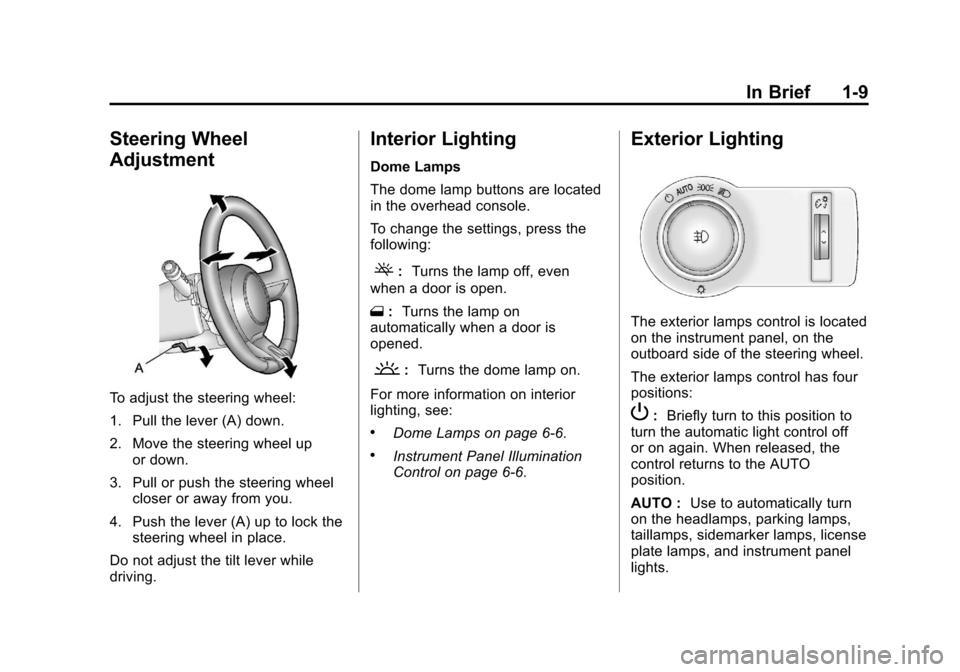
To adjust the steering wheel:
1. Pull the lever (A) down.
2. Move the steering wheel upor down.
3. Pull or push the steering wheel closer or away from you.
4. Push the lever (A) up to lock the steering wheel in place.
Do not adjust the tilt lever while
driving.
Interior Lighting
Dome Lamps
The dome lamp buttons are located
in the overhead console.
To change the settings, press the
following:
(: Turns the lamp off, even
when a door is open.
1 :Turns the lamp on
automatically when a door is
opened.
': Turns the dome lamp on.
For more information on interior
lighting, see:
.Dome Lamps on page 6‑6.
.Instrument Panel Illumination
Control on page 6‑6.
Exterior Lighting
The exterior lamps control is located
on the instrument panel, on the
outboard side of the steering wheel.
The exterior lamps control has four
positions:
P: Briefly turn to this position to
turn the automatic light control off
or on again. When released, the
control returns to the AUTO
position.
AUTO : Use to automatically turn
on the headlamps, parking lamps,
taillamps, sidemarker lamps, license
plate lamps, and instrument panel
lights.
Page 16 of 414
Black plate (10,1)Chevrolet Camaro Owner Manual - 2011
1-10 In Brief
;:Use to turn on the parking
lamps together with the taillamps,
sidemarker lamps, license plate
lamps and instrument panel lights.
5: Use turn on the headlamps
together with the parking lamps,
taillamps, sidemarker lamps, license
plate lamps, and instrument panel
lights.
#: Use to turn the fog lamps on
or off.
For more information, see:
.Exterior Lamp Controls on
page 6‑1.
.Daytime Running Lamps (DRL)
on page 6‑3.
.Front Fog Lamps on page 6‑5.
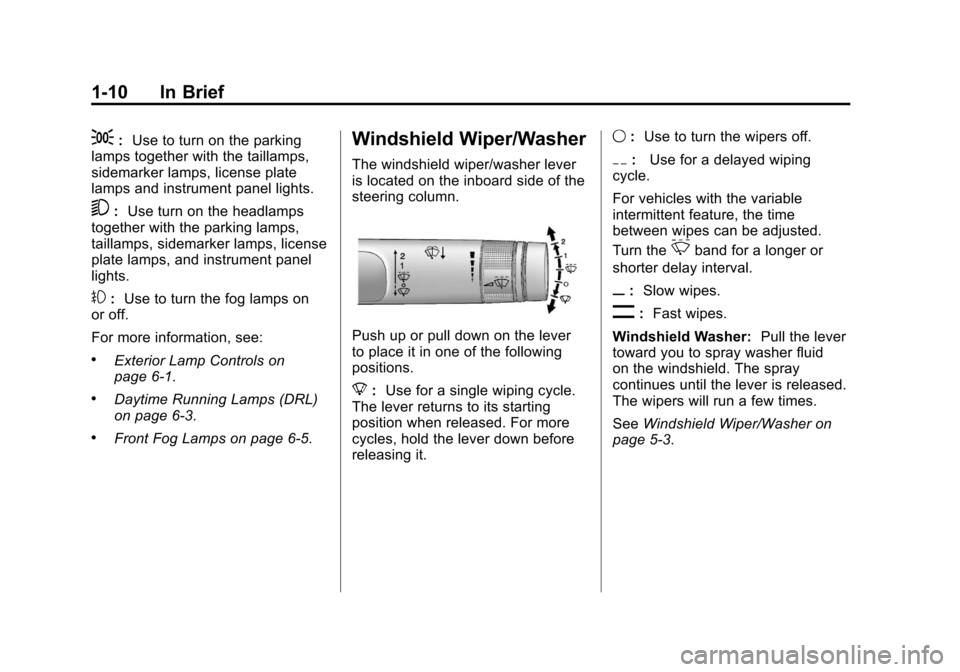
Windshield Wiper/Washer
The windshield wiper/washer lever
is located on the inboard side of the
steering column.
Push up or pull down on the lever
to place it in one of the following
positions.
8 :Use for a single wiping cycle.
The lever returns to its starting
position when released. For more
cycles, hold the lever down before
releasing it. 9
:Use to turn the wipers off.
6: Use for a delayed wiping
cycle.
For vehicles with the variable
intermittent feature, the time
between wipes can be adjusted.
Turn the
&band for a longer or
shorter delay interval.
x: Slow wipes.
[:Fast wipes.
Windshield Washer: Pull the lever
toward you to spray washer fluid
on the windshield. The spray
continues until the lever is released.
The wipers will run a few times.
See Windshield Wiper/Washer on
page 5‑3.
Page 17 of 414
Black plate (11,1)Chevrolet Camaro Owner Manual - 2011
In Brief 1-11
Climate Controls
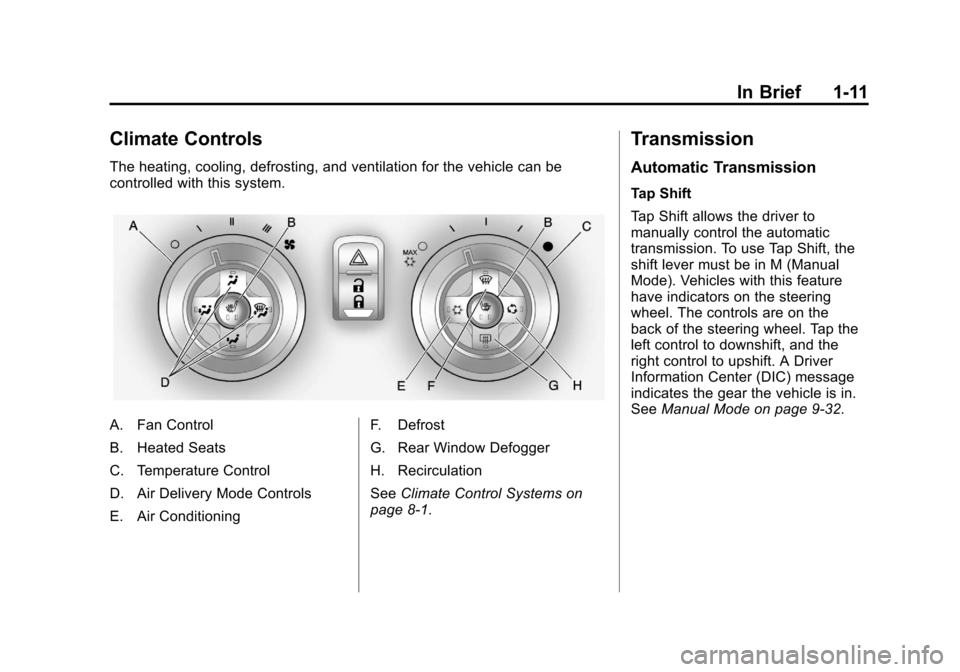
The heating, cooling, defrosting, and ventilation for the vehicle can be
controlled with this system.
A. Fan Control
B. Heated Seats
C. Temperature Control
D. Air Delivery Mode Controls
E. Air ConditioningF. Defrost
G. Rear Window Defogger
H. Recirculation
See
Climate Control Systems on
page 8‑1.
Transmission
Automatic Transmission
Tap Shift
Tap Shift allows the driver to
manually control the automatic
transmission. To use Tap Shift, the
shift lever must be in M (Manual
Mode). Vehicles with this feature
have indicators on the steering
wheel. The controls are on the
back of the steering wheel. Tap the
left control to downshift, and the
right control to upshift. A Driver
Information Center (DIC) message
indicates the gear the vehicle is in.
See Manual Mode on page 9‑32.
Page 20 of 414
Black plate (14,1)Chevrolet Camaro Owner Manual - 2011
1-14 In Brief
Portable Audio Devices
This vehicle may have a 3.5 mm
(1/8 in) auxiliary input and a USB
port located in the center console.
External devices such as iPods
®,
laptop computers, MP3 players, CD
changers, and USB storage devices
may be connected, depending on
the audio system.
For more information, see Auxiliary
Devices on page 7‑17.
Bluetooth®
The Bluetooth®system allows users
with a Bluetooth-enabled cell phone
to make and receive hands-free
calls using the vehicle audio
system, microphone, and controls.
The Bluetooth-enabled cell phone
must be paired with the in-vehicle
Bluetooth system before it can be
used in the vehicle. Not all phones
will support all functions. See
Bluetooth (Overview) on
page 7‑23 orBluetooth
(Infotainment Controls) on
page 7‑24 orBluetooth (Voice
Recognition) on page 7‑28.
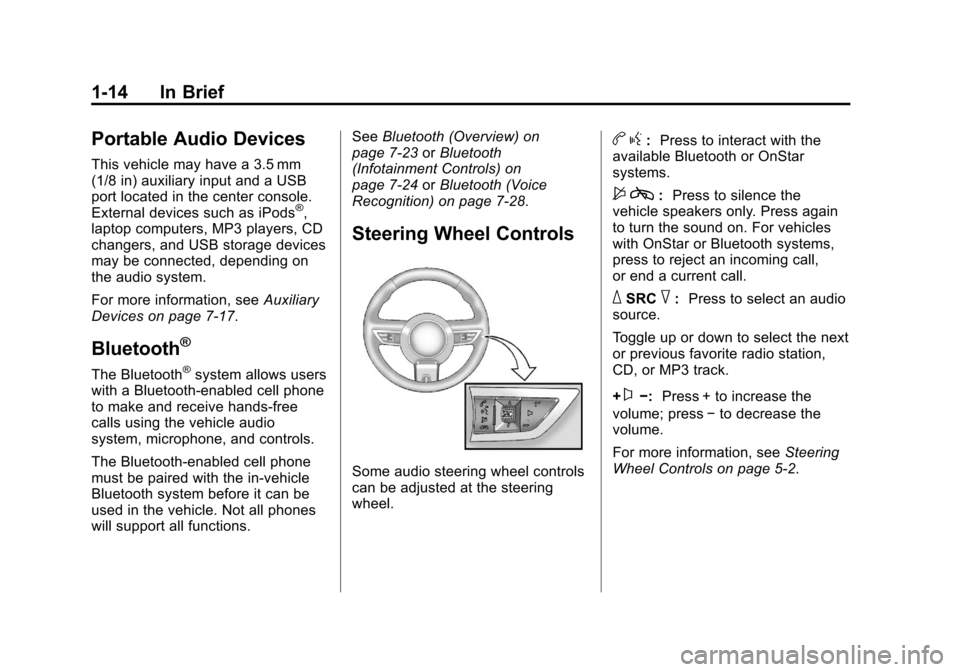
Steering Wheel Controls
Some audio steering wheel controls
can be adjusted at the steering
wheel.
b g: Press to interact with the
available Bluetooth or OnStar
systems.
$ c: Press to silence the
vehicle speakers only. Press again
to turn the sound on. For vehicles
with OnStar or Bluetooth systems,
press to reject an incoming call,
or end a current call.
_SRC^: Press to select an audio
source.
Toggle up or down to select the next
or previous favorite radio station,
CD, or MP3 track.
+
x−: Press + to increase the
volume; press −to decrease the
volume.
For more information, see Steering
Wheel Controls on page 5‑2.
Page 21 of 414
Black plate (15,1)Chevrolet Camaro Owner Manual - 2011
In Brief 1-15
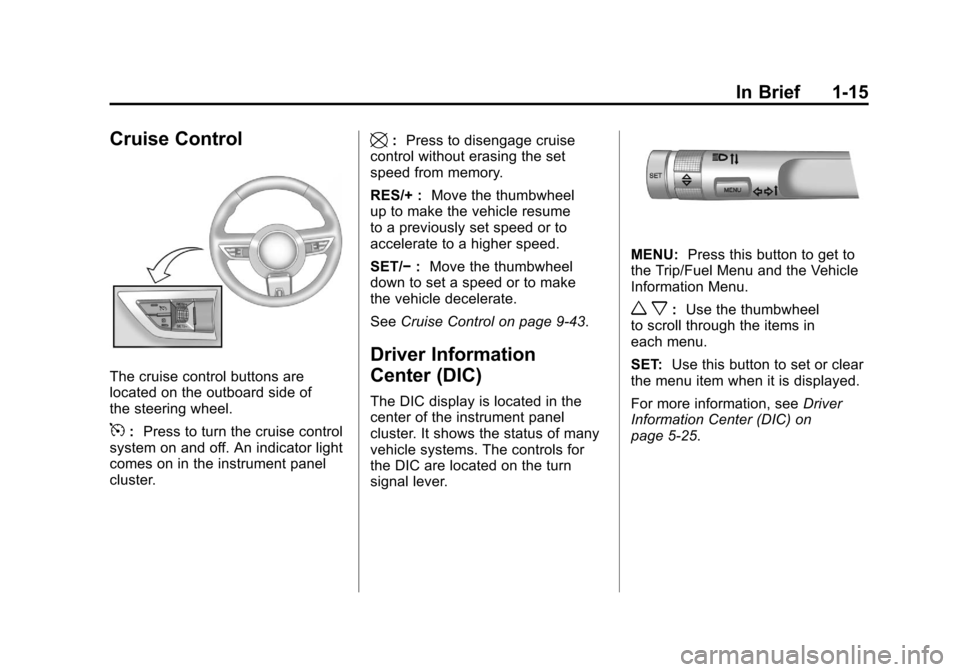
Cruise Control
The cruise control buttons are
located on the outboard side of
the steering wheel.
5:Press to turn the cruise control
system on and off. An indicator light
comes on in the instrument panel
cluster.
\: Press to disengage cruise
control without erasing the set
speed from memory.
RES/+ : Move the thumbwheel
up to make the vehicle resume
to a previously set speed or to
accelerate to a higher speed.
SET/− :Move the thumbwheel
down to set a speed or to make
the vehicle decelerate.
See Cruise Control on page 9‑43.
Driver Information
Center (DIC)
The DIC display is located in the
center of the instrument panel
cluster. It shows the status of many
vehicle systems. The controls for
the DIC are located on the turn
signal lever.
MENU: Press this button to get to
the Trip/Fuel Menu and the Vehicle
Information Menu.
w x: Use the thumbwheel
to scroll through the items in
each menu.
SET: Use this button to set or clear
the menu item when it is displayed.
For more information, see Driver
Information Center (DIC) on
page 5‑25.
Page 28 of 414
Black plate (22,1)Chevrolet Camaro Owner Manual - 2011
1-22 In Brief
If you try to add, connect, or modify
any equipment or software in the
vehicle, OnStar service may not
work. Other problems OnStar can’t
control may prevent service to you,
such as hills, tall buildings, tunnels,
weather, electrical system design
and architecture of the vehicle,
damage to important parts of the
vehicle in a crash, or wireless phone
network congestion or jamming.
SeeRadio Frequency Statement on
page 13‑19 for information
regarding Part 15 of the Federal
Communications Commission
(FCC) rules and Industry Canada
Standards RSS-210/220/310.OnStar Steering Wheel
Controls
This vehicle may have
a
b g/$ iTalk/Mute button
that can be used to interact
with OnStar Hands-Free calling.
See Steering Wheel Controls on
page 5‑2 for more information.
On some vehicles, the
$ ibutton
can be used to dial numbers into
voice mail systems, or to dial phone
extensions. See the OnStar Owner's
Guide for more information.
Your Responsibility
Increase the volume of the radio
if the OnStar Advisor cannot be
heard.
If the light next to the OnStar
buttons is red, the system may
not be functioning properly. Push
the
Qbutton and request a vehicle
diagnostic check. If the light
appears clear (no light appears),
your OnStar subscription has
expired and all services have been
deactivated. Push the
Qbutton to
confirm that the OnStar equipment
is active.
Page 69 of 414
Black plate (23,1)Chevrolet Camaro Owner Manual - 2011
Seats and Restraints 3-23
After a minor crash, replacement of
safety belts may not be necessary.
But the safety belt assemblies that
were used during any crash may
have been stressed or damaged.
See your dealer to have the safety
belt assemblies inspected or
replaced.
New parts and repairs may be
necessary even if the safety belt
system was not being used at the
time of the crash.
Have the safety belt pretensioners
checked if the vehicle has been in a
crash, or if the airbag readiness light
stays on after you start the vehicle
or while you are driving. SeeAirbag
Readiness Light on page 5‑15.Airbag System
The vehicle has the following
airbags:
.A frontal airbag for the driver.
.A frontal airbag for the right front
passenger.
.A seat-mounted side impact
airbag for the driver.
.A seat-mounted side impact
airbag for the right front
passenger.
The vehicle may also have the
following airbags:
.A roof-rail airbag for the driver
and the passenger seated
directly behind the driver.
.A roof-rail airbag for the right
front passenger and the
passenger seated directly
behind the right front passenger. All of the airbags in your vehicle will
have the word AIRBAG embossed
in the trim or on an attached label
near the deployment opening.
For frontal airbags, the word
AIRBAG will appear on the middle
part of the steering wheel for the
driver and on the instrument panel
for the right front passenger.
With seat-mounted side impact
airbags, the word AIRBAG will
appear on the side of the seatback
closest to the door.
With roof-rail airbags, the word
AIRBAG will appear along the
headliner or trim.
Airbags are designed to supplement
the protection provided by safety
belts. Even though today's airbags
are also designed to help reduce
the risk of injury from the force of an
inflating bag, all airbags must inflate
very quickly to do their job.