remote start CHEVROLET CAMARO 2013 5.G User Guide
[x] Cancel search | Manufacturer: CHEVROLET, Model Year: 2013, Model line: CAMARO, Model: CHEVROLET CAMARO 2013 5.GPages: 404, PDF Size: 5.45 MB
Page 72 of 404

Black plate (24,1)Chevrolet Camaro Owner Manual (Include Mex) - 2012
3-24 Seats and Restraints
Canada and Mexico
The words ON and OFF, or the
symbol for on and off, will be visible
during the system check. If you are
using remote start, if equipped, to
start the vehicle from a distance,
you may not see the system check.
When the system check is
complete, either the word ON or
OFF, or the symbol for on or off, will
be visible. See Passenger Airbag
Status Indicator on page 5‑15.
The passenger sensing system will
turn off the right front passenger
frontal airbag under certain
conditions. The driver airbags and
roof‐rail airbags (if equipped) are not
affected by the passenger sensing
system. The passenger sensing system
works with sensors that are part of
the right front passenger seat. The
sensors are designed to detect the
presence of a properly seated
occupant and determine if the right
front passenger frontal airbag
should be enabled (may inflate)
or not.
According to accident statistics,
children are safer when properly
secured in a rear seat in the correct
child restraint for their weight
and size.
We recommend that children be
secured in a rear seat, including: an
infant or a child riding in a
rear-facing child restraint; a child
riding in a forward-facing child seat;
an older child riding in a booster
seat; and children, who are large
enough, using safety belts.
A label on the sun visor says,
“Never put a rear-facing child seat in
the front.”
This is because the risk to
the rear-facing child is so great if the
airbag deploys.{WARNING
A child in a rear-facing child
restraint can be seriously injured
or killed if the right front
passenger airbag inflates. This is
because the back of the
rear-facing child restraint would
be very close to the inflating
airbag. A child in a forward-facing
child restraint can be seriously
injured or killed if the right front
passenger airbag inflates and the
passenger seat is in a forward
position.
Even if the passenger sensing
system has turned off the right
front passenger frontal airbag, no
system is fail-safe. No one can
guarantee that an airbag will not
(Continued)
Page 119 of 404
Black plate (15,1)Chevrolet Camaro Owner Manual (Include Mex) - 2012
Instruments and Controls 5-15
Passenger Airbag Status
Indicator
The vehicle has a passenger
sensing system. SeePassenger
Sensing System on page 3‑23 for
important safety information. The
overhead console has a passenger
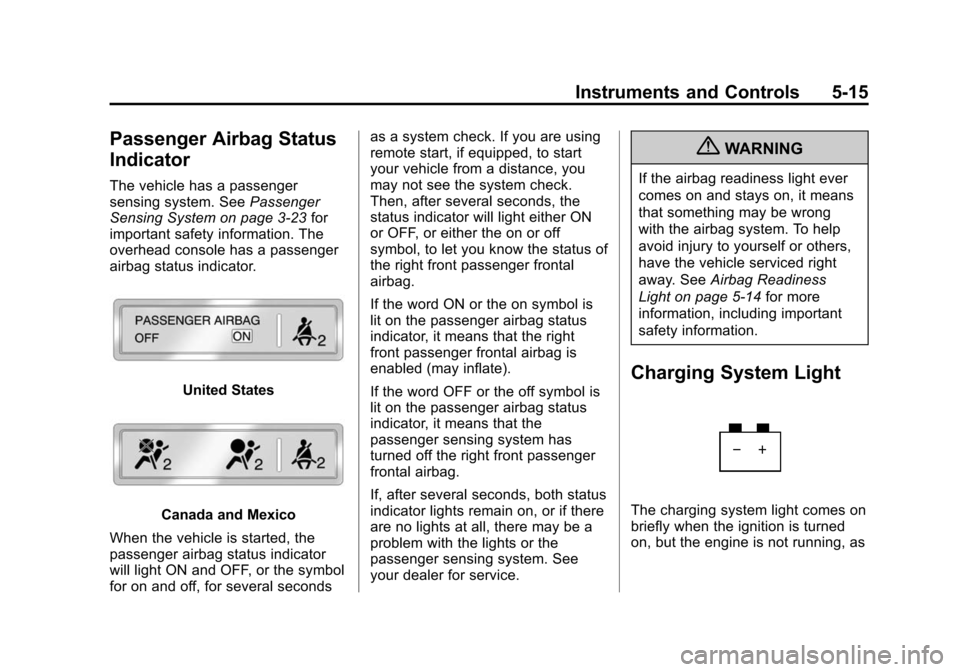
airbag status indicator.
United States
Canada and Mexico
When the vehicle is started, the
passenger airbag status indicator
will light ON and OFF, or the symbol
for on and off, for several seconds as a system check. If you are using
remote start, if equipped, to start
your vehicle from a distance, you
may not see the system check.
Then, after several seconds, the
status indicator will light either ON
or OFF, or either the on or off
symbol, to let you know the status of
the right front passenger frontal
airbag.
If the word ON or the on symbol is
lit on the passenger airbag status
indicator, it means that the right
front passenger frontal airbag is
enabled (may inflate).
If the word OFF or the off symbol is
lit on the passenger airbag status
indicator, it means that the
passenger sensing system has
turned off the right front passenger
frontal airbag.
If, after several seconds, both status
indicator lights remain on, or if there
are no lights at all, there may be a
problem with the lights or the
passenger sensing system. See
your dealer for service.
{WARNING
If the airbag readiness light ever
comes on and stays on, it means
that something may be wrong
with the airbag system. To help
avoid injury to yourself or others,
have the vehicle serviced right
away. See
Airbag Readiness
Light on page 5‑14 for more
information, including important
safety information.
Charging System Light
The charging system light comes on
briefly when the ignition is turned
on, but the engine is not running, as
Page 144 of 404
Black plate (40,1)Chevrolet Camaro Owner Manual (Include Mex) - 2012
5-40 Instruments and Controls
Climate and Air Quality
Select the Climate and Air Quality
menu and the following will be
displayed:
.Remote Start Heated Seats
Remote Start Heated Seats
When on, this feature will turn the
heated seats on when using remote
start on cold days.
Press the MENU/SELECT knob
when Remote Start Heated Seats is
highlighted. Turn the knob to select
On or Off. Press the knob to confirm
and go back to the last menu.
Comfort and Convenience
Select the Comfort and
Convenience menu and the
following will be displayed:
.Chime Volume Chime Volume
This allows the selection of the
chime volume level.
Press the MENU/SELECT knob
when Chime Volume is highlighted.
Turn the knob to select Normal or
High. Press the knob to confirm and
go back to the last menu.
Collision/Detection Systems
Select the Collision/Detection
Systems menu and the following
will be displayed:
.Park Assist
Park Assist
This allows the Ultrasonic Parking
Assist feature to be turned on or off.
Press the MENU/SELECT knob
when Park Assist is highlighted.
Turn the knob to select On or Off.
Press the knob to confirm and go
back to the last menu.
Language
Select the Language menu and the
following will be displayed:
.English
.French
.Spanish
Turn the MENU/SELECT knob to
select the language. Press the knob
to confirm and go back to the
last menu.
Lighting
Select the Lighting menu and the
following will be displayed:
.Exit Lighting
.Vehicle Locator Lights
Page 147 of 404
Black plate (43,1)Chevrolet Camaro Owner Manual (Include Mex) - 2012
Instruments and Controls 5-43
Universal Remote
System
SeeRadio Frequency Statement on
page 13‑20 for information
regarding Part 15 of the Federal
Communications Commission (FCC)
rules and Industry Canada
Standards RSS-GEN/210/220/310.
Universal Remote System
Programming
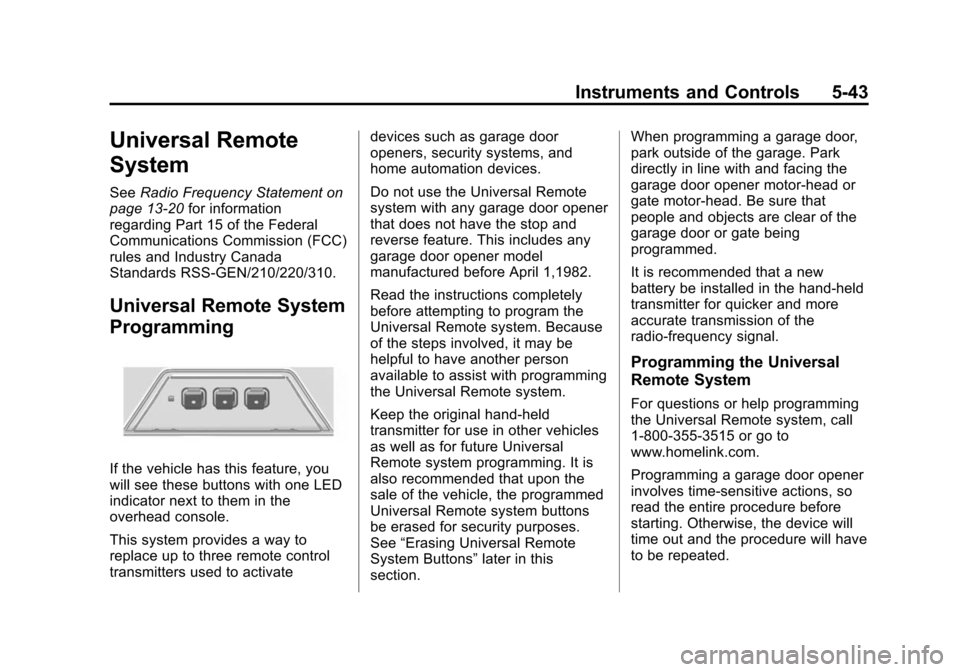
If the vehicle has this feature, you
will see these buttons with one LED
indicator next to them in the
overhead console.
This system provides a way to
replace up to three remote control
transmitters used to activate devices such as garage door
openers, security systems, and
home automation devices.
Do not use the Universal Remote
system with any garage door opener
that does not have the stop and
reverse feature. This includes any
garage door opener model
manufactured before April 1,1982.
Read the instructions completely
before attempting to program the
Universal Remote system. Because
of the steps involved, it may be
helpful to have another person
available to assist with programming
the Universal Remote system.
Keep the original hand-held
transmitter for use in other vehicles
as well as for future Universal
Remote system programming. It is
also recommended that upon the
sale of the vehicle, the programmed
Universal Remote system buttons
be erased for security purposes.
See
“Erasing Universal Remote
System Buttons” later in this
section. When programming a garage door,
park outside of the garage. Park
directly in line with and facing the
garage door opener motor-head or
gate motor-head. Be sure that
people and objects are clear of the
garage door or gate being
programmed.
It is recommended that a new
battery be installed in the hand-held
transmitter for quicker and more
accurate transmission of the
radio-frequency signal.
Programming the Universal
Remote System
For questions or help programming
the Universal Remote system, call
1‐800‐355‐3515 or go to
www.homelink.com.
Programming a garage door opener
involves time-sensitive actions, so
read the entire procedure before
starting. Otherwise, the device will
time out and the procedure will have
to be repeated.
Page 148 of 404
Black plate (44,1)Chevrolet Camaro Owner Manual (Include Mex) - 2012
5-44 Instruments and Controls
To program up to three devices:
1. Hold the end of the hand-heldtransmitter about 3 to 8 cm
(1 to 3 in) away from the
Universal Remote system
buttons while keeping the
indicator light in view. The
hand-held transmitter was
supplied by the manufacturer of
the garage door opener receiver
(motor-head unit).
2. At the same time, press and hold both the hand-held
transmitter button and one of the
three Universal Remote system
buttons to be used to operate
the garage door. Do not release
the Universal Remote system
button or the hand-held
transmitter button until the
indicator light changes from a
slowly to a rapidly flashing light.
You now may release both
buttons.
Some entry gates and garage
door openers may require
substitution of Step 2 with the procedure noted in
“Gate
Operator and Canadian
Programming” later in this
section.
3. Press and hold for five seconds the newly trained Universal
Remote system button (the
button selected in Step 2) while
observing the indicator light and
garage door activation.
.If the indicator light stays on
continuously or the garage
door starts to move when
the Universal Remote
system button is pressed
and released, then the
programming is complete.
There is no need to
continue programming
Steps 4 through 6.
.If the Universal Remote
system indicator light blinks
rapidly for two seconds,
then turns to a constant
light and the garage door does not move, continue
with programming Steps 4
through 6.
It may be helpful to have
another person assist with
the remaining Steps 4
through 6.
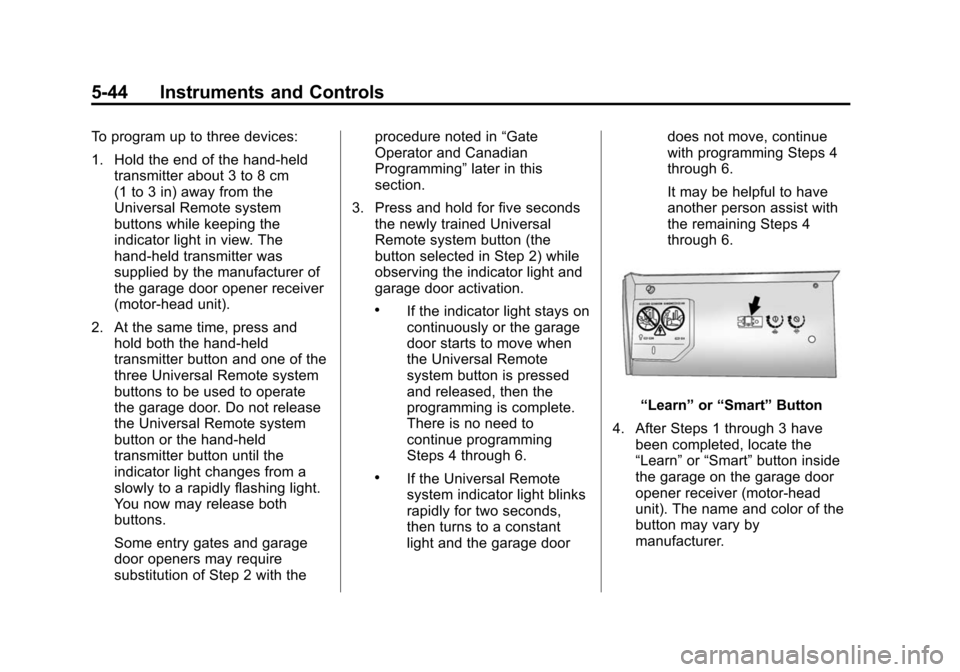
“Learn”
or“Smart” Button
4. After Steps 1 through 3 have been completed, locate the
“Learn” or“Smart” button inside
the garage on the garage door
opener receiver (motor-head
unit). The name and color of the
button may vary by
manufacturer.
Page 241 of 404
Black plate (47,1)Chevrolet Camaro Owner Manual (Include Mex) - 2012
Driving and Operating 9-47
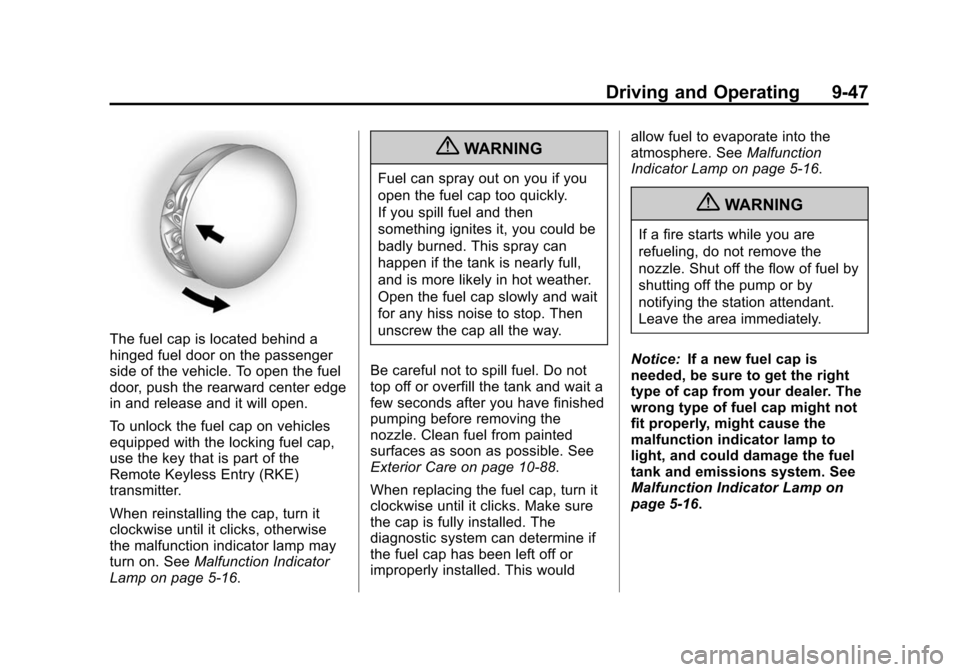
The fuel cap is located behind a
hinged fuel door on the passenger
side of the vehicle. To open the fuel
door, push the rearward center edge
in and release and it will open.
To unlock the fuel cap on vehicles
equipped with the locking fuel cap,
use the key that is part of the
Remote Keyless Entry (RKE)
transmitter.
When reinstalling the cap, turn it
clockwise until it clicks, otherwise
the malfunction indicator lamp may
turn on. SeeMalfunction Indicator
Lamp on page 5‑16.
{WARNING
Fuel can spray out on you if you
open the fuel cap too quickly.
If you spill fuel and then
something ignites it, you could be
badly burned. This spray can
happen if the tank is nearly full,
and is more likely in hot weather.
Open the fuel cap slowly and wait
for any hiss noise to stop. Then
unscrew the cap all the way.
Be careful not to spill fuel. Do not
top off or overfill the tank and wait a
few seconds after you have finished
pumping before removing the
nozzle. Clean fuel from painted
surfaces as soon as possible. See
Exterior Care on page 10‑88.
When replacing the fuel cap, turn it
clockwise until it clicks. Make sure
the cap is fully installed. The
diagnostic system can determine if
the fuel cap has been left off or
improperly installed. This would allow fuel to evaporate into the
atmosphere. See
Malfunction
Indicator Lamp on page 5‑16.
{WARNING
If a fire starts while you are
refueling, do not remove the
nozzle. Shut off the flow of fuel by
shutting off the pump or by
notifying the station attendant.
Leave the area immediately.
Notice: If a new fuel cap is
needed, be sure to get the right
type of cap from your dealer. The
wrong type of fuel cap might not
fit properly, might cause the
malfunction indicator lamp to
light, and could damage the fuel
tank and emissions system. See
Malfunction Indicator Lamp on
page 5‑16.
Page 334 of 404
Black plate (86,1)Chevrolet Camaro Owner Manual (Include Mex) - 2012
10-86 Vehicle Care
7. Connect one end of the blacknegative (–) cable to the
negative (–) terminal of the good
battery (C).
8. Connect the other end of the black negative (–) cable to the
negative (–) post (D).
9. Start the engine in the vehicle with the good battery and run
the engine at idle speed for at
least four minutes.
10. Try to start the vehicle that had the dead battery. If it will not
start after a few tries, it
probably needs service. Notice:
If the jumper cables are
connected or removed in the
wrong order, electrical shorting
may occur and damage the
vehicle. The repairs would not be
covered by the vehicle warranty.
Always connect and remove the
jumper cables in the correct
order, making sure that the
cables do not touch each other or
other metal.
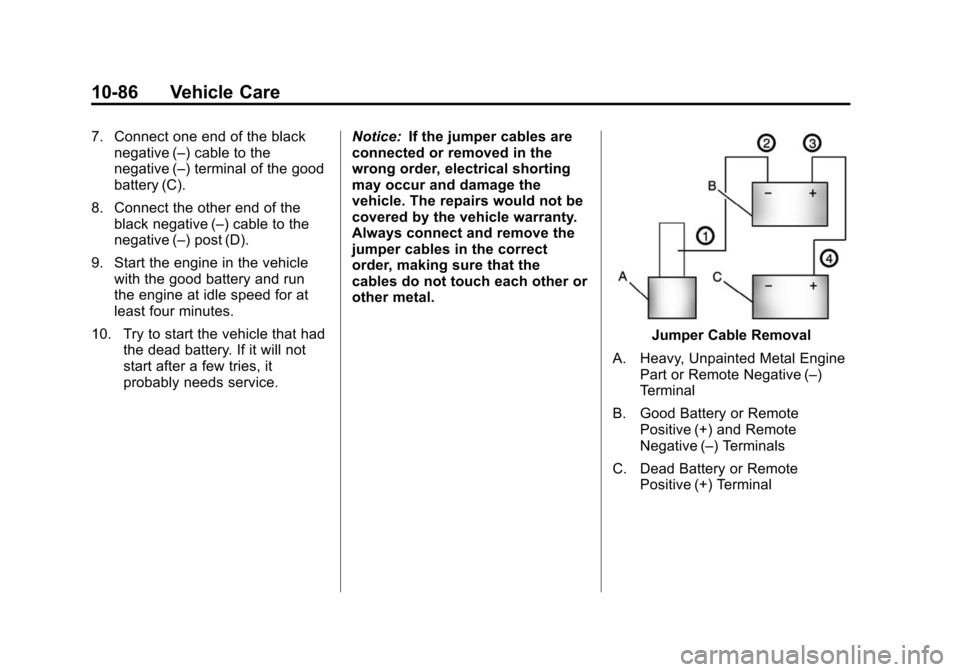
Jumper Cable Removal
A. Heavy, Unpainted Metal Engine Part or Remote Negative (–)
Terminal
B. Good Battery or Remote Positive (+) and Remote
Negative (–) Terminals
C. Dead Battery or Remote Positive (+) Terminal
Page 372 of 404
Black plate (8,1)Chevrolet Camaro Owner Manual (Include Mex) - 2012
13-8 Customer Information
Chevrolet and General Motors of
Canada Limited reserve the right to
limit services or payment to an
owner or driver if they decide the
claims are made too often, or the
same type of claim is made many
times.
Services Provided
.Emergency Fuel Delivery:
Delivery of enough fuel for the
vehicle to get to the nearest
service station.
.Lock‐Out Service:Service to
unlock the vehicle if you are
locked out. A remote unlock may
be available if you have OnStar.
For security reasons, the driver
must present identification
before this service is given.
.Emergency Tow From a Public
Road or Highway: Tow to the
nearest Chevrolet dealer for
warranty service, or if the vehicle
was in a crash and cannot be
driven. Assistance is also given
when the vehicle is stuck in the
sand, mud, or snow.
.Flat Tire Change: Service to
change a flat tire with the spare
tire. The spare tire, if equipped,
must be in good condition and
properly inflated. It is the owner's
responsibility for the repair or
replacement of the tire if it is not
covered by the warranty.
.Battery Jump Start: Service to
jump start a dead battery.
Services Not Included in
Roadside Assistance
.Impound towing caused by
violation of any laws.
.Legal fines.
.Mounting, dismounting,
or changing of snow tires,
chains, or other traction devices.
.Towing or services for vehicles
driven on a non-public road or
highway.
Services Specific to Canadian
Purchased Vehicles
.Fuel Delivery: Reimbursement
is approximately $5 Canadian.
Diesel fuel delivery may be
restricted. Propane and other
fuels are not provided through
this service.
.Lock-Out Service: Vehicle
registration is required.
.Trip Routing Service: Detailed
maps of North America are
provided when requested either
with the most direct route or the
most scenic route. There is a
limit of six requests per year.
Additional travel information is
also available. Allow three
weeks for delivery.
.Trip Interruption Benefits and
Assistance: Must be over
250 kilometers from where your
trip was started to qualify.
General Motors of Canada
Limited requires
pre-authorization, original
detailed receipts, and a copy of
Page 384 of 404
Black plate (20,1)Chevrolet Camaro Owner Manual (Include Mex) - 2012
13-20 Customer Information
OnStar®
If the vehicle is equipped with an
active OnStar system, that system
may also record data in crash or
near crash‐like situations. The
OnStar Terms and Conditions
provides information on data
collection and use and is available
at www.onstar.com (U.S.) or
www.onstar.ca (Canada), or by
pressing the
Qbutton and
speaking to an advisor. See OnStar
Overview on page 14‑1 for more
information.
Radio Frequency
Identification (RFID)
RFID technology is used in some
vehicles for functions such as tire
pressure monitoring and ignition
system security, as well as in
connection with conveniences such
as key fobs for remote door locking/
unlocking and starting, and
in-vehicle transmitters for garage
door openers. RFID technology in
GM vehicles does not use or record
personal information or link with any
other GM system containing
personal information.
Radio Frequency
Statement
This vehicle has systems that
operate on a radio frequency that
comply with Part 15 of the Federal
Communications Commission (FCC)
rules and with Industry Canada
Standards RSS‐GEN/210/220/310.
Operation is subject to the following
two conditions:
1. The device may not cause harmful interference.
2. The device must accept any interference received, including
interference that may cause
undesired operation of the
device.
Changes or modifications to any of
these systems by other than an
authorized service facility could void
authorization to use this equipment.
Page 388 of 404
Black plate (4,1)Chevrolet Camaro Owner Manual (Include Mex) - 2012
14-4 OnStar
Connections
OnStar Hands-Free Calling allows
calls to be made and received from
the vehicle. The vehicle can also be
controlled from a cell phone through
the OnStar mobile app. See
www.onstar.com for coverage maps.
Hands-Free Calling
1. PushX. System responds:
“OnStar ready.”
2. Say “Dial.”System responds:
“Please say the name or number
to call.”
3. Say the entire number without pausing, including a “1”and the
area code. System responds:
“OK calling.”
Retrieve My Number
1. PushX. System responds:
“OnStar ready.”
2. Say “My Number.” System
responds: “Your OnStar
Hands-Free Calling number is.”
End a Call
PushX. System responds: “Call
ended.”
Store a Name Tag for Speed
Dialing
1. PushX. System responds:
“OnStar ready.”
2. Say “Store.” System responds:
“Please say the number you
would like to store.”
3. Say the entire number without pausing. System responds:
“Please say the name tag.”
4. Pick a name tag. “System
responds: ”About to store
5. Say “Yes”or“No” to try again.
System responds: “OK, storing
Place a Call Using a Stored
Number
1. PushX. System responds:
“OnStar ready.”
2. Say “Call
responds: “OK, calling
Verify Minutes and Expiration
PushXand say “minutes” then
“verify” to check how many minutes
remain and their expiration date.
OnStar Mobile App
With an iPhone®or
Android™-based mobile device, an
OnStar mobile app can be
downloaded. The vehicle can be
remote started, if equipped, or the
doors can be unlocked from
anywhere there is cell phone
service. It can also check the fuel
level, tire pressure, and oil life.
It can connect to an OnStar Advisor
anytime. For OnStar mobile app
compatibility or further information,
see www.onstar.com.