automatic transmission CHEVROLET CAMARO 2013 5.G Owners Manual
[x] Cancel search | Manufacturer: CHEVROLET, Model Year: 2013, Model line: CAMARO, Model: CHEVROLET CAMARO 2013 5.GPages: 404, PDF Size: 5.45 MB
Page 1 of 404

Black plate (1,1)Chevrolet Camaro Owner Manual (Include Mex) - 2012
2012 Chevrolet Camaro Owner ManualM
In Brief. . . . . . . . . . . . . . . . . . . . . . . . 1-1
Instrument Panel . . . . . . . . . . . . . . 1-2
Initial Drive Information . . . . . . . . 1-4
Vehicle Features . . . . . . . . . . . . . 1-12
Performance and Maintenance . . . . . . . . . . . . . . . . 1-17
Keys, Doors, and Windows . . . . . . . . . . . . . . . . . . . . 2-1
Keys and Locks . . . . . . . . . . . . . . . 2-2
Doors . . . . . . . . . . . . . . . . . . . . . . . . . . 2-8
Vehicle Security . . . . . . . . . . . . . . 2-10
Exterior Mirrors . . . . . . . . . . . . . . . 2-12
Interior Mirrors . . . . . . . . . . . . . . . . 2-13
Windows . . . . . . . . . . . . . . . . . . . . . 2-14
Roof . . . . . . . . . . . . . . . . . . . . . . . . . . 2-16
Seats and Restraints . . . . . . . . . 3-1
Head Restraints . . . . . . . . . . . . . . . 3-2
Front Seats . . . . . . . . . . . . . . . . . . . . 3-3
Rear Seats . . . . . . . . . . . . . . . . . . . . 3-7
Safety Belts . . . . . . . . . . . . . . . . . . . . 3-8
Airbag System . . . . . . . . . . . . . . . . 3-16
Child Restraints . . . . . . . . . . . . . . 3-31 Storage
. . . . . . . . . . . . . . . . . . . . . . . 4-1
Storage Compartments . . . . . . . . 4-1
Additional Storage Features . . . 4-3
Instruments and Controls . . . . 5-1
Controls . . . . . . . . . . . . . . . . . . . . . . . 5-2
Warning Lights, Gauges, and
Indicators . . . . . . . . . . . . . . . . . . . . 5-6
Information Displays . . . . . . . . . . 5-24
Vehicle Messages . . . . . . . . . . . . 5-31
Vehicle Personalization . . . . . . . 5-39
Universal Remote System . . . . 5-43
Lighting . . . . . . . . . . . . . . . . . . . . . . . 6-1
Exterior Lighting . . . . . . . . . . . . . . . 6-1
Interior Lighting . . . . . . . . . . . . . . . . 6-5
Lighting Features . . . . . . . . . . . . . . 6-6
Infotainment System . . . . . . . . . 7-1
Introduction . . . . . . . . . . . . . . . . . . . . 7-1
Radio . . . . . . . . . . . . . . . . . . . . . . . . . . 7-8
Audio Players . . . . . . . . . . . . . . . . 7-14
Phone . . . . . . . . . . . . . . . . . . . . . . . . 7-21
Climate Controls . . . . . . . . . . . . . 8-1
Climate Control Systems . . . . . . 8-1
Air Vents . . . . . . . . . . . . . . . . . . . . . . . 8-3 Driving and Operating
. . . . . . . . 9-1
Driving Information . . . . . . . . . . . . . 9-2
Starting and Operating . . . . . . . 9-16
Engine Exhaust . . . . . . . . . . . . . . 9-25
Automatic Transmission . . . . . . 9-26
Manual Transmission . . . . . . . . . 9-30
Brakes . . . . . . . . . . . . . . . . . . . . . . . 9-32
Ride Control Systems . . . . . . . . 9-34
Cruise Control . . . . . . . . . . . . . . . . 9-38
Object Detection Systems . . . . 9-40
Fuel . . . . . . . . . . . . . . . . . . . . . . . . . . 9-44
Towing . . . . . . . . . . . . . . . . . . . . . . . 9-48
Conversions and Add-Ons . . . 9-54
Vehicle Care . . . . . . . . . . . . . . . . . 10-1
General Information . . . . . . . . . . 10-2
Vehicle Checks . . . . . . . . . . . . . . . 10-4
Headlamp Aiming . . . . . . . . . . . 10-34
Bulb Replacement . . . . . . . . . . 10-34
Electrical System . . . . . . . . . . . . 10-39
Wheels and Tires . . . . . . . . . . . 10-47
Jump Starting . . . . . . . . . . . . . . . 10-83
Towing . . . . . . . . . . . . . . . . . . . . . . 10-87
Appearance Care . . . . . . . . . . . 10-88
Page 9 of 404

Black plate (3,1)Chevrolet Camaro Owner Manual (Include Mex) - 2012
In Brief 1-3
A.Air Vents on page 8‑3.
B. Turn and Lane‐Change Lever. See Turn and Lane-Change
Signals on page 6‑4.
Headlamp High/Low-Beam
Changer on page 6‑2.
Flash-to-Pass on page 6‑2.
Driver Information Center (DIC)
Buttons (If Equipped). See
Driver Information Center (DIC)
on page 5‑24.
C. Driver Shift Controls (If Equipped). See Automatic
Transmission on page 9‑26.
D. Instrument Cluster on page 5‑7.
E. Windshield Wiper/Washer on
page 5‑3.
F. Light Sensor. See Automatic
Headlamp System on page 6‑3. G.
Infotainment on page 7‑1.
H. Hood Release (Out of View). See Hood on page 10‑5.
I. Data Link Connector (DLC) (Out of View). See Malfunction
Indicator Lamp on page 5‑16.
J. Exterior Lamp Controls on
page 6‑1.
Front Fog Lamps on page 6‑5
(If Equipped).
Instrument Panel Illumination
Control on page 6‑5.
K. Cruise Control on page 9‑38.
L. Steering Wheel Adjustment on
page 5‑2.
M. Horn on page 5‑3.
N. Steering Wheel Controls on
page 5‑2.
O. Head-Up Display (HUD) on
page 5‑27 (If Equipped). P.
Climate Control Systems on
page 8‑1.
Q. Transmission Temperature
Gauge on page 5‑12.
Voltmeter Gauge on page 5‑13.
Engine Oil Temperature Gauge
on page 5‑10.
Engine Oil Pressure Gauge on
page 5‑9.
R. Traction Control System (TCS)
on page 9‑34.
S. Shift Lever. See Automatic
Transmission on page 9‑26 or
Manual Transmission on
page 9‑30.
T. Power Outlets on page 5‑5.
U. Hazard Warning Flashers on
page 6‑4.
Page 17 of 404
Black plate (11,1)Chevrolet Camaro Owner Manual (Include Mex) - 2012
In Brief 1-11
Climate Controls
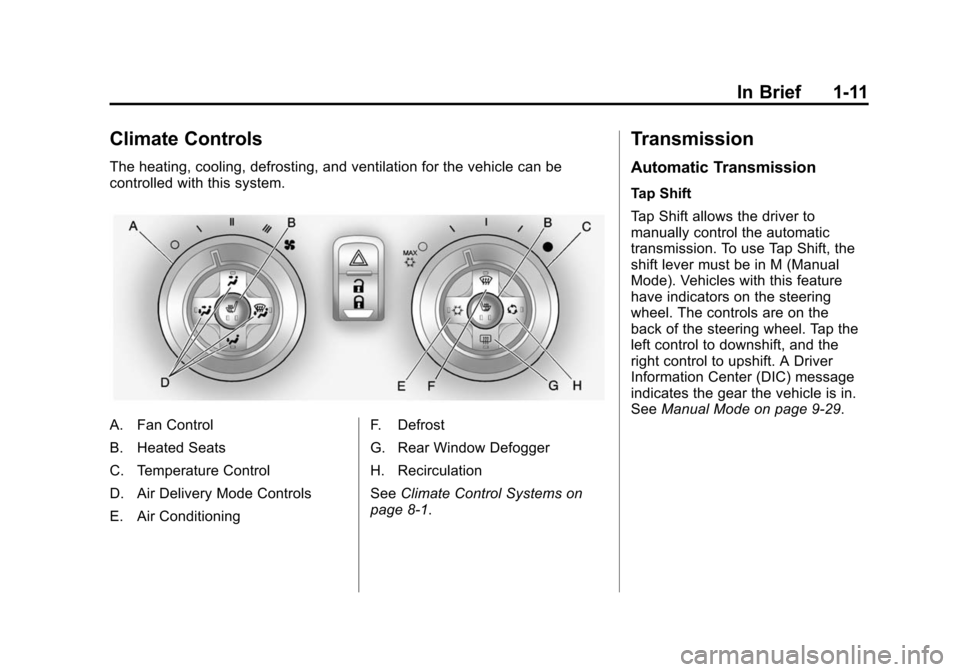
The heating, cooling, defrosting, and ventilation for the vehicle can be
controlled with this system.
A. Fan Control
B. Heated Seats
C. Temperature Control
D. Air Delivery Mode Controls
E. Air ConditioningF. Defrost
G. Rear Window Defogger
H. Recirculation
See
Climate Control Systems on
page 8‑1.
Transmission
Automatic Transmission
Tap Shift
Tap Shift allows the driver to
manually control the automatic
transmission. To use Tap Shift, the
shift lever must be in M (Manual
Mode). Vehicles with this feature
have indicators on the steering
wheel. The controls are on the
back of the steering wheel. Tap the
left control to downshift, and the
right control to upshift. A Driver
Information Center (DIC) message
indicates the gear the vehicle is in.
See Manual Mode on page 9‑29.
Page 44 of 404
Black plate (18,1)Chevrolet Camaro Owner Manual (Include Mex) - 2012
2-18 Keys, Doors, and Windows
Convertible Top
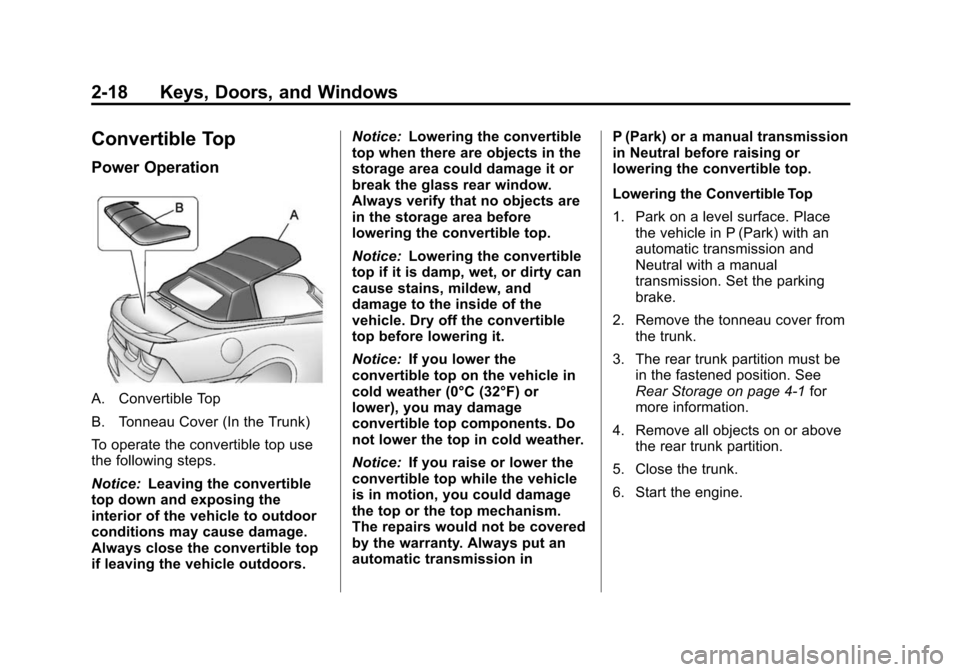
Power Operation
A. Convertible Top
B. Tonneau Cover (In the Trunk)
To operate the convertible top use
the following steps.
Notice:Leaving the convertible
top down and exposing the
interior of the vehicle to outdoor
conditions may cause damage.
Always close the convertible top
if leaving the vehicle outdoors. Notice:
Lowering the convertible
top when there are objects in the
storage area could damage it or
break the glass rear window.
Always verify that no objects are
in the storage area before
lowering the convertible top.
Notice: Lowering the convertible
top if it is damp, wet, or dirty can
cause stains, mildew, and
damage to the inside of the
vehicle. Dry off the convertible
top before lowering it.
Notice: If you lower the
convertible top on the vehicle in
cold weather (0°C (32°F) or
lower), you may damage
convertible top components. Do
not lower the top in cold weather.
Notice: If you raise or lower the
convertible top while the vehicle
is in motion, you could damage
the top or the top mechanism.
The repairs would not be covered
by the warranty. Always put an
automatic transmission in P (Park) or a manual transmission
in Neutral before raising or
lowering the convertible top.
Lowering the Convertible Top
1. Park on a level surface. Place
the vehicle in P (Park) with an
automatic transmission and
Neutral with a manual
transmission. Set the parking
brake.
2. Remove the tonneau cover from the trunk.
3. The rear trunk partition must be in the fastened position. See
Rear Storage on page 4‑1 for
more information.
4. Remove all objects on or above the rear trunk partition.
5. Close the trunk.
6. Start the engine.
Page 45 of 404
Black plate (19,1)Chevrolet Camaro Owner Manual (Include Mex) - 2012
Keys, Doors, and Windows 2-19
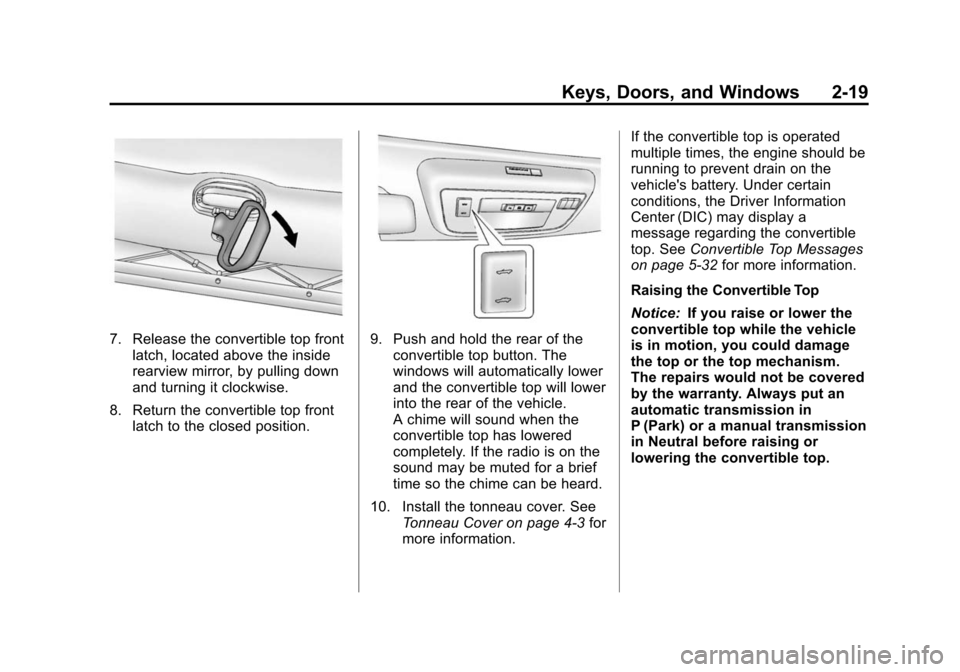
7. Release the convertible top frontlatch, located above the inside
rearview mirror, by pulling down
and turning it clockwise.
8. Return the convertible top front latch to the closed position.9. Push and hold the rear of the
convertible top button. The
windows will automatically lower
and the convertible top will lower
into the rear of the vehicle.
A chime will sound when the
convertible top has lowered
completely. If the radio is on the
sound may be muted for a brief
time so the chime can be heard.
10. Install the tonneau cover. See Tonneau Cover on page 4‑3 for
more information. If the convertible top is operated
multiple times, the engine should be
running to prevent drain on the
vehicle's battery. Under certain
conditions, the Driver Information
Center (DIC) may display a
message regarding the convertible
top. See
Convertible Top Messages
on page 5‑32 for more information.
Raising the Convertible Top
Notice: If you raise or lower the
convertible top while the vehicle
is in motion, you could damage
the top or the top mechanism.
The repairs would not be covered
by the warranty. Always put an
automatic transmission in
P (Park) or a manual transmission
in Neutral before raising or
lowering the convertible top.
Page 46 of 404
Black plate (20,1)Chevrolet Camaro Owner Manual (Include Mex) - 2012
2-20 Keys, Doors, and Windows
Notice:If you raise the top
without removing the tonneau
cover you may damage the top
components and the tonneau
cover. Remove the tonneau cover
before operating the
convertible top.
1. Park on a level surface. Place the vehicle in P (Park) with an
automatic transmission and
Neutral with a manual
transmission. Set the parking
brake.
2. Remove the tonneau cover if installed. See Tonneau Cover on
page 4‑3 for more information.
3. Move any objects that have fallen against the convertible top
inside the trunk.
4. Close the trunk.
5. Start the engine.
{WARNING
Placing hands on the top of the
windshield frame when closing
the convertible soft top could
cause fingers to be pinched and
may cause injury. Keep hands
below the windshield frame when
closing the convertible top.
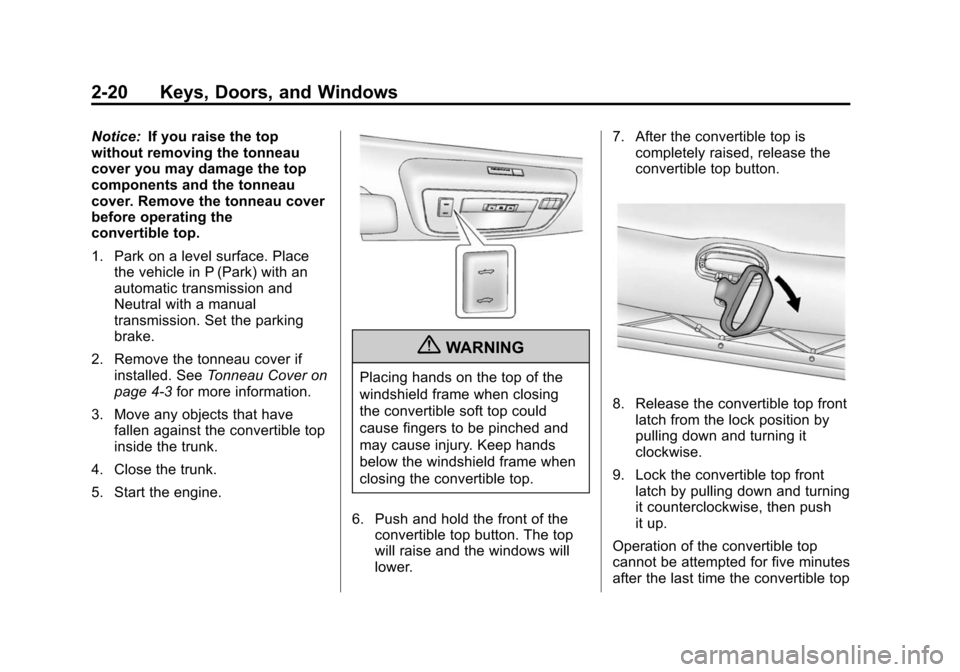
6. Push and hold the front of the convertible top button. The top
will raise and the windows will
lower. 7. After the convertible top is
completely raised, release the
convertible top button.
8. Release the convertible top front
latch from the lock position by
pulling down and turning it
clockwise.
9. Lock the convertible top front latch by pulling down and turning
it counterclockwise, then push
it up.
Operation of the convertible top
cannot be attempted for five minutes
after the last time the convertible top
Page 47 of 404
Black plate (21,1)Chevrolet Camaro Owner Manual (Include Mex) - 2012
Keys, Doors, and Windows 2-21
switch was pressed if the
convertible top was opened
repeatedly within a short time and
the top has stopped functioning.
If the vehicle has lost power, the
convertible top can still be raised by
releasing pressure on the
hydraulic pump.
Never attempt to open or close the
convertible top manually without first
releasing pressure.
Raising the Convertible Top
Manually
Notice:If you raise the top
without removing the tonneau
cover you may damage the top
components and the tonneau
cover. Remove the tonneau cover
before operating the
convertible top.
1. Park on a level surface. Place the vehicle in P (Park) with an
automatic transmission and
Neutral with a manual
transmission. Set the parking
brake. 2. Remove the tonneau cover if
installed. See Tonneau Cover on
page 4‑3 for more information.
3. Move any objects that have fallen against the convertible top
inside the trunk.
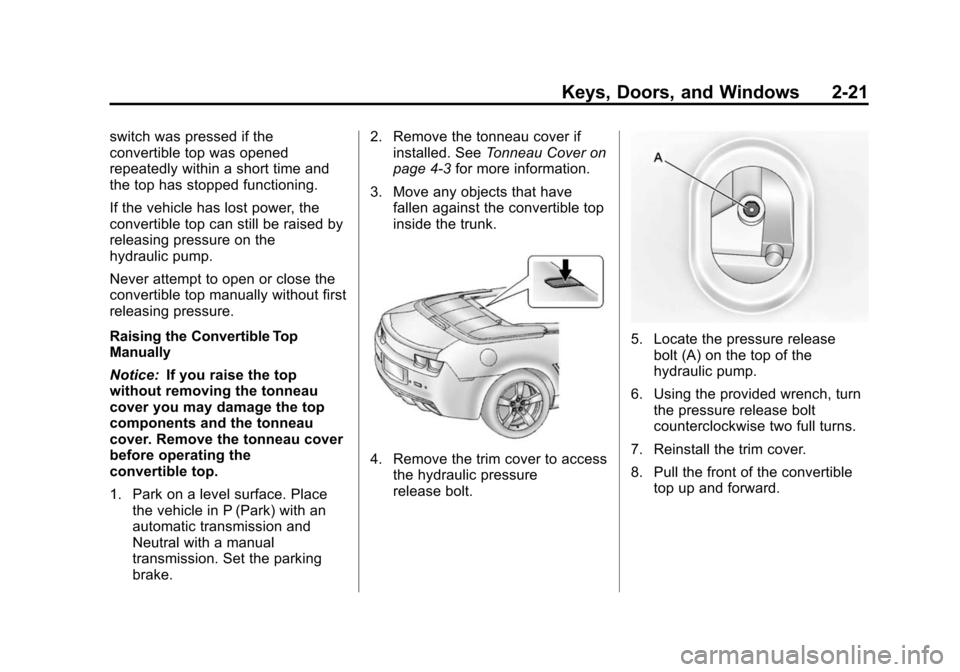
4. Remove the trim cover to accessthe hydraulic pressure
release bolt.
5. Locate the pressure release
bolt (A) on the top of the
hydraulic pump.
6. Using the provided wrench, turn the pressure release bolt
counterclockwise two full turns.
7. Reinstall the trim cover.
8. Pull the front of the convertible top up and forward.
Page 128 of 404
Black plate (24,1)Chevrolet Camaro Owner Manual (Include Mex) - 2012
5-24 Instruments and Controls
Cruise Control Light
This light is white when the cruise
control is set and green when the
system is active.
The light goes out when the cruise
control is turned off. SeeCruise
Control on page 9‑38 for more
information.
Information Displays
Driver Information
Center (DIC)
The vehicle may have a Driver
Information Center (DIC). The DIC
displays information about your
vehicle. It also displays warning
messages if a system problem is
detected. See Vehicle Messages on
page 5‑31 for more information. All
messages appear in the DIC display
located in the center of the
instrument panel cluster.
The vehicle may also have features
that can be customized through the
controls on the radio. See Vehicle
Personalization on page 5‑39 for
more information.
DIC Operation and Displays
The DIC has different displays
which can be accessed by using the
DIC buttons on the turn signal lever
located on the left side of the
steering wheel. The DIC displays trip, fuel, vehicle system information,
and warning messages if a system
problem is detected.
The bottom of the DIC display
shows what position the shift lever
is in (Automatic Transmission Only),
the odometer, and the direction the
vehicle is driving.
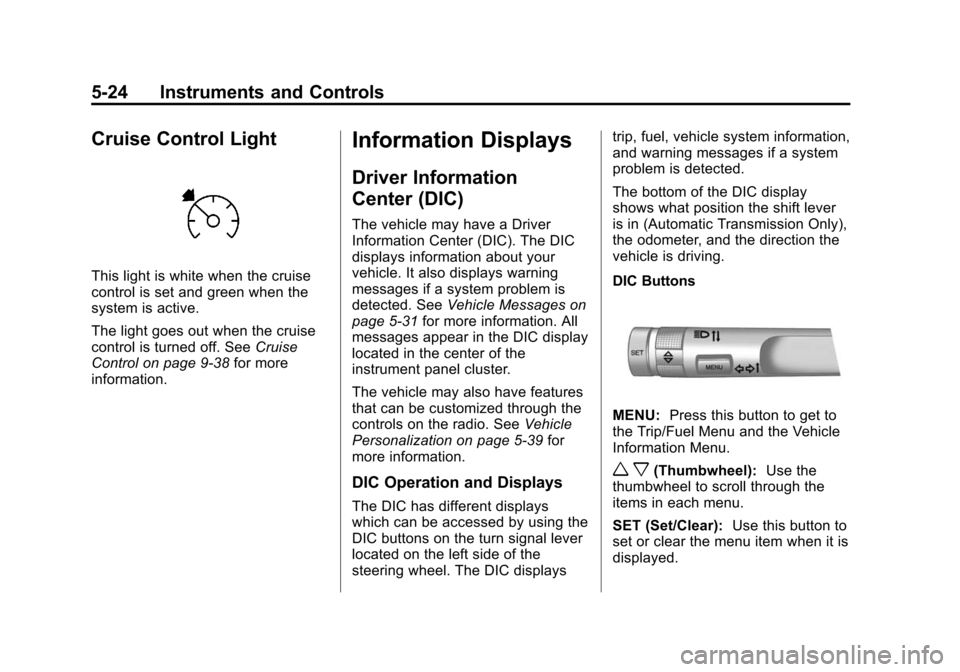
DIC Buttons
MENU:
Press this button to get to
the Trip/Fuel Menu and the Vehicle
Information Menu.
w x(Thumbwheel): Use the
thumbwheel to scroll through the
items in each menu.
SET (Set/Clear): Use this button to
set or clear the menu item when it is
displayed.
Page 142 of 404
Black plate (38,1)Chevrolet Camaro Owner Manual (Include Mex) - 2012
5-38 Instruments and Controls
Transmission Messages
1–4 SHIFT
This message displays when you
can only shift from 1 (First) to
4 (Fourth) instead of 1 (First) to
2 (Second). See Manual
Transmission on page 9‑30 for more
information.
PRESS CLUTCH TO START
This message displays when
attempting to start a vehicle with a
manual transmission without
pressing on the clutch pedal.
SERVICE TRANSMISSION
This message displays if there is a
problem with the transmission. See
your dealer.
SHIFT DENIED
This message displays when
attempting to use the automatic
transmission manual mode to shift
to too low of a gear. See Manual
Mode on page 9‑29 for more
information.
SHIFT TO PARK
This message displays when the
transmission needs to be shifted to
park. This may appear when
attempting to remove the key from
the ignition if the vehicle is not in
P (Park).
TRANSMISSION HOT –IDLE
ENGINE
This message displays and a chime
sounds if the transmission fluid in
the vehicle gets hot. Driving with the
transmission fluid temperature high
can cause damage to the vehicle.
Stop the vehicle and let it idle to
allow the transmission to cool. This
message clears when the fluid
temperature reaches a safe level.
Vehicle Reminder
Messages
ICE POSSIBLE DRIVE
WITH CARE
This message is displayed when ice
conditions are possible.
TURN WIPER CONTROL TO
INTERMITTENT FIRST
This message is displayed when
attempting to adjust the intermittent
wiper speed without intermittent
selected on the wiper control. See
Windshield Wiper/Washer on
page 5‑3.
Vehicle Speed Messages
DRIVER SELECTED SPEED
LIMIT EXCEEDED
This message is displayed when the
vehicle speed is greater than the set
speed. See “Speed Warning” under
Driver Information Center (DIC) on
page 5‑24.
Page 145 of 404
Black plate (41,1)Chevrolet Camaro Owner Manual (Include Mex) - 2012
Instruments and Controls 5-41
Exit Lighting
This allows the selection of how
long the exterior lamps stay on
when leaving the vehicle when it is
dark outside.
Press the MENU/SELECT knob
when Exit Lighting is highlighted.
Turn the knob to select Off,
30 Seconds, 1 Minute, or 2 Minutes.
Press the knob to confirm and go
back to the last menu.
Vehicle Locator Lights
This allows the vehicle locator lights
to be turned on or off.
Press the MENU/SELECT knob
when Vehicle Locator Lights is
highlighted. Turn the knob to select
On or Off. Press the knob to confirm
and go back to the last menu.Power Door Locks
Select Power Door Locks and the
following will be displayed:
.Unlocked Door Anti Lock Out
.Auto Door Unlock
.Delayed Door Lock
Unlocked Door Anti Lock Out
When on, this feature will keep the
driver door from locking when the
door is open. If off is selected, the
Delayed Door Lock menu will be
available.
Press the MENU/SELECT knob
when Auto Door Unlock is
highlighted. Turn the knob to select
On or Off. Press the knob to confirm
and go back to the last menu. Auto Door Unlock
This allows selection of which of the
doors will automatically unlock when
the vehicle is shifted into P (Park)
(automatic transmission) or when
the key is removed from the ignition
(manual transmission).
Press the MENU/SELECT knob
when Auto Door Unlock is
highlighted. Turn the knob to select
All Doors, Driver Door, or Off. Press
the knob to confirm and go back to
the last menu.
Delayed Door Lock
When on, this feature will delay the
locking of the doors. To override the
delay, press the power door lock on
the center console.
Press the MENU/SELECT knob
when Delayed Door Lock is
highlighted. Turn the knob to select
On or Off. Press the knob to confirm
and go back to the last menu.