mirror CHEVROLET CAMARO 2013 5.G Owners Manual
[x] Cancel search | Manufacturer: CHEVROLET, Model Year: 2013, Model line: CAMARO, Model: CHEVROLET CAMARO 2013 5.GPages: 404, PDF Size: 5.45 MB
Page 1 of 404

Black plate (1,1)Chevrolet Camaro Owner Manual (Include Mex) - 2012
2012 Chevrolet Camaro Owner ManualM
In Brief. . . . . . . . . . . . . . . . . . . . . . . . 1-1
Instrument Panel . . . . . . . . . . . . . . 1-2
Initial Drive Information . . . . . . . . 1-4
Vehicle Features . . . . . . . . . . . . . 1-12
Performance and Maintenance . . . . . . . . . . . . . . . . 1-17
Keys, Doors, and Windows . . . . . . . . . . . . . . . . . . . . 2-1
Keys and Locks . . . . . . . . . . . . . . . 2-2
Doors . . . . . . . . . . . . . . . . . . . . . . . . . . 2-8
Vehicle Security . . . . . . . . . . . . . . 2-10
Exterior Mirrors . . . . . . . . . . . . . . . 2-12
Interior Mirrors . . . . . . . . . . . . . . . . 2-13
Windows . . . . . . . . . . . . . . . . . . . . . 2-14
Roof . . . . . . . . . . . . . . . . . . . . . . . . . . 2-16
Seats and Restraints . . . . . . . . . 3-1
Head Restraints . . . . . . . . . . . . . . . 3-2
Front Seats . . . . . . . . . . . . . . . . . . . . 3-3
Rear Seats . . . . . . . . . . . . . . . . . . . . 3-7
Safety Belts . . . . . . . . . . . . . . . . . . . . 3-8
Airbag System . . . . . . . . . . . . . . . . 3-16
Child Restraints . . . . . . . . . . . . . . 3-31 Storage
. . . . . . . . . . . . . . . . . . . . . . . 4-1
Storage Compartments . . . . . . . . 4-1
Additional Storage Features . . . 4-3
Instruments and Controls . . . . 5-1
Controls . . . . . . . . . . . . . . . . . . . . . . . 5-2
Warning Lights, Gauges, and
Indicators . . . . . . . . . . . . . . . . . . . . 5-6
Information Displays . . . . . . . . . . 5-24
Vehicle Messages . . . . . . . . . . . . 5-31
Vehicle Personalization . . . . . . . 5-39
Universal Remote System . . . . 5-43
Lighting . . . . . . . . . . . . . . . . . . . . . . . 6-1
Exterior Lighting . . . . . . . . . . . . . . . 6-1
Interior Lighting . . . . . . . . . . . . . . . . 6-5
Lighting Features . . . . . . . . . . . . . . 6-6
Infotainment System . . . . . . . . . 7-1
Introduction . . . . . . . . . . . . . . . . . . . . 7-1
Radio . . . . . . . . . . . . . . . . . . . . . . . . . . 7-8
Audio Players . . . . . . . . . . . . . . . . 7-14
Phone . . . . . . . . . . . . . . . . . . . . . . . . 7-21
Climate Controls . . . . . . . . . . . . . 8-1
Climate Control Systems . . . . . . 8-1
Air Vents . . . . . . . . . . . . . . . . . . . . . . . 8-3 Driving and Operating
. . . . . . . . 9-1
Driving Information . . . . . . . . . . . . . 9-2
Starting and Operating . . . . . . . 9-16
Engine Exhaust . . . . . . . . . . . . . . 9-25
Automatic Transmission . . . . . . 9-26
Manual Transmission . . . . . . . . . 9-30
Brakes . . . . . . . . . . . . . . . . . . . . . . . 9-32
Ride Control Systems . . . . . . . . 9-34
Cruise Control . . . . . . . . . . . . . . . . 9-38
Object Detection Systems . . . . 9-40
Fuel . . . . . . . . . . . . . . . . . . . . . . . . . . 9-44
Towing . . . . . . . . . . . . . . . . . . . . . . . 9-48
Conversions and Add-Ons . . . 9-54
Vehicle Care . . . . . . . . . . . . . . . . . 10-1
General Information . . . . . . . . . . 10-2
Vehicle Checks . . . . . . . . . . . . . . . 10-4
Headlamp Aiming . . . . . . . . . . . 10-34
Bulb Replacement . . . . . . . . . . 10-34
Electrical System . . . . . . . . . . . . 10-39
Wheels and Tires . . . . . . . . . . . 10-47
Jump Starting . . . . . . . . . . . . . . . 10-83
Towing . . . . . . . . . . . . . . . . . . . . . . 10-87
Appearance Care . . . . . . . . . . . 10-88
Page 7 of 404
Black plate (1,1)Chevrolet Camaro Owner Manual (Include Mex) - 2012
In Brief 1-1
In Brief
Instrument Panel
Instrument Panel . . . . . . . . . . . . . . 1-2
Initial Drive Information
Initial Drive Information . . . . . . . . 1-4
Remote Keyless Entry (RKE)System . . . . . . . . . . . . . . . . . . . . . . 1-4
Remote Vehicle Start . . . . . . . . . 1-4
Door Locks . . . . . . . . . . . . . . . . . . . 1-5
Trunk Release . . . . . . . . . . . . . . . . 1-5
Seat Adjustment . . . . . . . . . . . . . . 1-5
Heated Seats . . . . . . . . . . . . . . . . . 1-6
Head Restraint Adjustment . . . . 1-6
Safety Belts . . . . . . . . . . . . . . . . . . . 1-7
Passenger Sensing System . . . 1-7
Mirror Adjustment . . . . . . . . . . . . . 1-8 Steering Wheel Adjustment . . . 1-8
Interior Lighting . . . . . . . . . . . . . . . 1-9
Exterior Lighting . . . . . . . . . . . . . . 1-9
Windshield Wiper/Washer . . . . 1-10
Climate Controls . . . . . . . . . . . . . 1-11
Transmission . . . . . . . . . . . . . . . . 1-11Vehicle Features
Radio(s) . . . . . . . . . . . . . . . . . . . . . 1-12
Satellite Radio . . . . . . . . . . . . . . . 1-13
Portable Audio Devices . . . . . . 1-13
Bluetooth
®. . . . . . . . . . . . . . . . . . . 1-13
Steering Wheel Controls . . . . . 1-14
Cruise Control . . . . . . . . . . . . . . . 1-14
Driver Information Center (DIC) . . . . . . . . . . . . . . . 1-15
Ultrasonic Parking Assist . . . . 1-15
Power Outlets . . . . . . . . . . . . . . . 1-15
Universal Remote System . . . 1-16
Sunroof . . . . . . . . . . . . . . . . . . . . . . 1-16
Convertible . . . . . . . . . . . . . . . . . . 1-16
Performance and Maintenance
Traction Control
System (TCS) . . . . . . . . . . . . . . 1-17
StabiliTrak
®System . . . . . . . . . 1-17
Tire Pressure Monitor . . . . . . . . 1-17
Tire Sealant and Compressor Kit . . . . . . . . . . . . . 1-18
Engine Oil Life System . . . . . . 1-18
Driving for Better Fuel Economy . . . . . . . . . . . . . . . . . . . 1-18
Roadside Assistance Program . . . . . . . . . . . . . . . . . . . . 1-19
OnStar
®. . . . . . . . . . . . . . . . . . . . . 1-19
Page 14 of 404
Black plate (8,1)Chevrolet Camaro Owner Manual (Include Mex) - 2012
1-8 In Brief
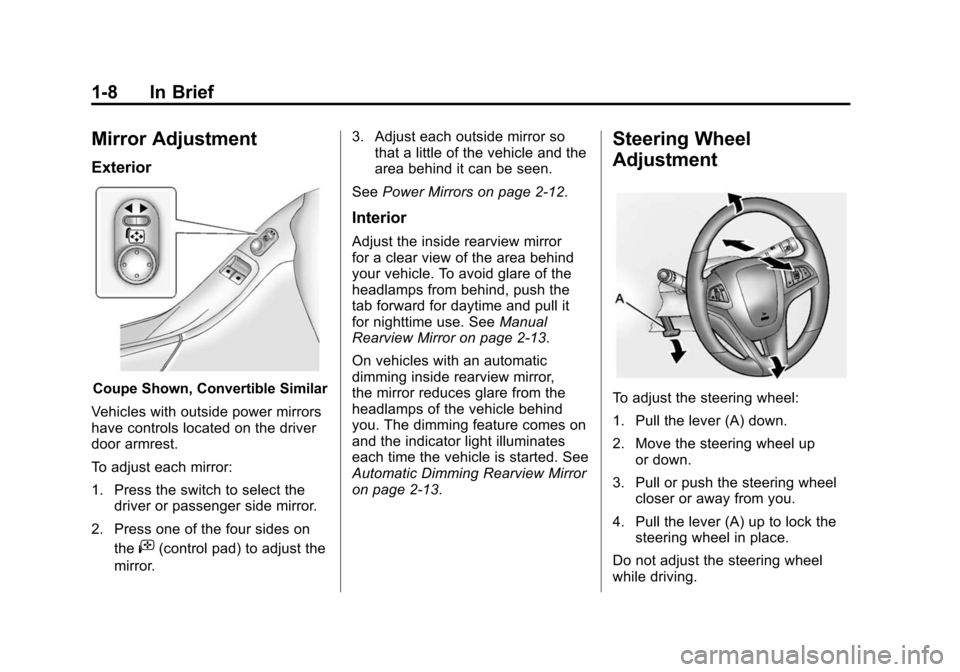
Mirror Adjustment
Exterior
Coupe Shown, Convertible Similar
Vehicles with outside power mirrors
have controls located on the driver
door armrest.
To adjust each mirror:
1. Press the switch to select the driver or passenger side mirror.
2. Press one of the four sides on the
i(control pad) to adjust the
mirror. 3. Adjust each outside mirror so
that a little of the vehicle and the
area behind it can be seen.
See Power Mirrors on page 2‑12.
Interior
Adjust the inside rearview mirror
for a clear view of the area behind
your vehicle. To avoid glare of the
headlamps from behind, push the
tab forward for daytime and pull it
for nighttime use. See Manual
Rearview Mirror on page 2‑13.
On vehicles with an automatic
dimming inside rearview mirror,
the mirror reduces glare from the
headlamps of the vehicle behind
you. The dimming feature comes on
and the indicator light illuminates
each time the vehicle is started. See
Automatic Dimming Rearview Mirror
on page 2‑13.
Steering Wheel
Adjustment
To adjust the steering wheel:
1. Pull the lever (A) down.
2. Move the steering wheel up or down.
3. Pull or push the steering wheel closer or away from you.
4. Pull the lever (A) up to lock the steering wheel in place.
Do not adjust the steering wheel
while driving.
Page 15 of 404
Black plate (9,1)Chevrolet Camaro Owner Manual (Include Mex) - 2012
In Brief 1-9
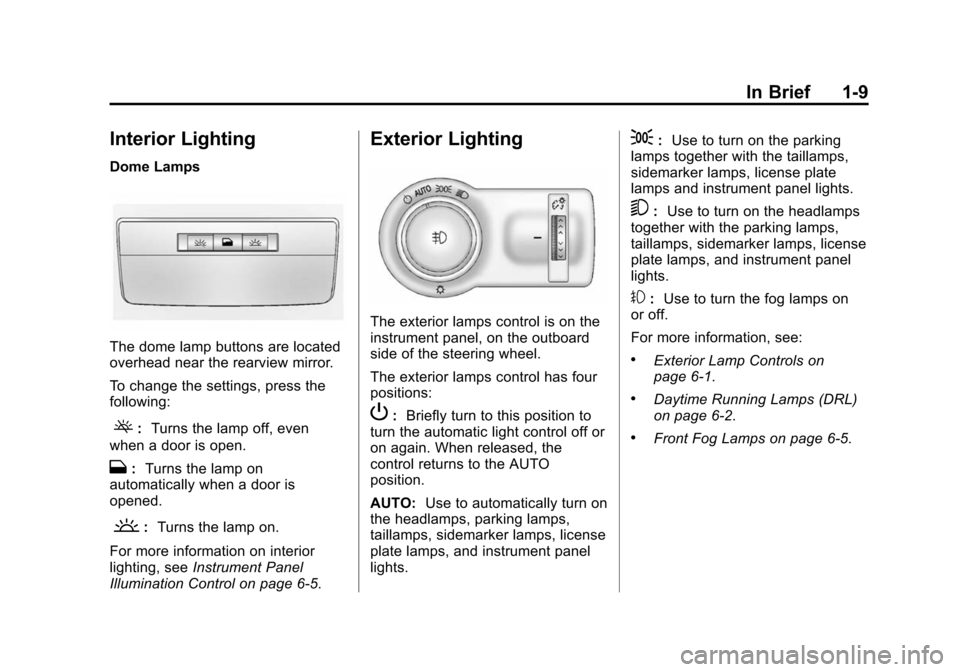
Interior Lighting
Dome Lamps
The dome lamp buttons are located
overhead near the rearview mirror.
To change the settings, press the
following:
(:Turns the lamp off, even
when a door is open.
H: Turns the lamp on
automatically when a door is
opened.
': Turns the lamp on.
For more information on interior
lighting, see Instrument Panel
Illumination Control on page 6‑5.
Exterior Lighting
The exterior lamps control is on the
instrument panel, on the outboard
side of the steering wheel.
The exterior lamps control has four
positions:
P: Briefly turn to this position to
turn the automatic light control off or
on again. When released, the
control returns to the AUTO
position.
AUTO: Use to automatically turn on
the headlamps, parking lamps,
taillamps, sidemarker lamps, license
plate lamps, and instrument panel
lights.
;: Use to turn on the parking
lamps together with the taillamps,
sidemarker lamps, license plate
lamps and instrument panel lights.
5: Use to turn on the headlamps
together with the parking lamps,
taillamps, sidemarker lamps, license
plate lamps, and instrument panel
lights.
#: Use to turn the fog lamps on
or off.
For more information, see:
.Exterior Lamp Controls on
page 6‑1.
.Daytime Running Lamps (DRL)
on page 6‑2.
.Front Fog Lamps on page 6‑5.
Page 27 of 404
Black plate (1,1)Chevrolet Camaro Owner Manual (Include Mex) - 2012
Keys, Doors, and Windows 2-1
Keys, Doors, and
Windows
Keys and Locks
Keys . . . . . . . . . . . . . . . . . . . . . . . . . . 2-2
Remote Keyless Entry (RKE)System . . . . . . . . . . . . . . . . . . . . . . 2-3
Remote Keyless Entry (RKE) System Operation . . . . . . . . . . . 2-3
Remote Vehicle Start . . . . . . . . . 2-5
Door Locks . . . . . . . . . . . . . . . . . . . 2-6
Power Door Locks . . . . . . . . . . . . 2-7
Lockout Protection . . . . . . . . . . . . 2-8
Doors
Trunk . . . . . . . . . . . . . . . . . . . . . . . . . 2-8
Vehicle Security
Vehicle Security . . . . . . . . . . . . . . 2-10
Anti-theft Alarm System . . . . . . 2-10
Immobilizer . . . . . . . . . . . . . . . . . . 2-11
Immobilizer Operation . . . . . . . . 2-11
Exterior Mirrors
Convex Mirrors . . . . . . . . . . . . . . 2-12
Power Mirrors . . . . . . . . . . . . . . . . 2-12
Heated Mirrors . . . . . . . . . . . . . . . 2-13
Automatic Dimming Mirror . . . 2-13
Interior Mirrors
Manual Rearview Mirror . . . . . . 2-13
Automatic Dimming Rearview Mirror . . . . . . . . . . . . . . . . . . . . . . . 2-13
Windows
Windows . . . . . . . . . . . . . . . . . . . . . 2-14
Power Windows . . . . . . . . . . . . . 2-14
Sun Visors . . . . . . . . . . . . . . . . . . . 2-16
Roof
Sunroof . . . . . . . . . . . . . . . . . . . . . . 2-16
Convertible Top . . . . . . . . . . . . . . 2-18
Page 38 of 404
Black plate (12,1)Chevrolet Camaro Owner Manual (Include Mex) - 2012
2-12 Keys, Doors, and Windows
If the engine still does not start and
the light continues to stay on, try
another key.
If the engine still does not start with
the other key, the vehicle needs
service. If the vehicle does start, the
first key may be damaged. See your
dealer who can service the
theft-deterrent system and have a
new key made.
Do not leave the key or device that
disarms or deactivates the
theft-deterrent system in the vehicle.Exterior Mirrors
Convex Mirrors
{WARNING
A convex mirror can make things,
like other vehicles, look farther
away than they really are. If you
cut too sharply into the right lane,
you could hit a vehicle on the
right. Check the inside mirror or
glance over your shoulder before
changing lanes.
The passenger side mirror is convex
shaped. A convex mirror's surface is
curved so more can be seen from
the driver seat.
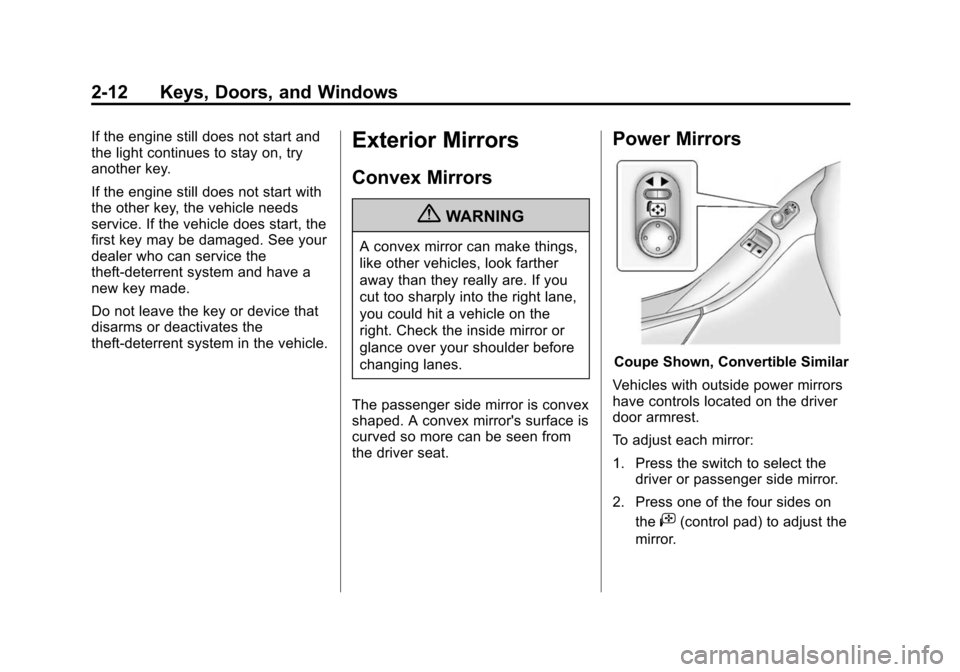
Power Mirrors
Coupe Shown, Convertible Similar
Vehicles with outside power mirrors
have controls located on the driver
door armrest.
To adjust each mirror:
1. Press the switch to select the driver or passenger side mirror.
2. Press one of the four sides on the
i(control pad) to adjust the
mirror.
Page 39 of 404
Black plate (13,1)Chevrolet Camaro Owner Manual (Include Mex) - 2012
Keys, Doors, and Windows 2-13
3. Adjust each outside mirror sothat a little of the vehicle and the
area behind it can be seen.
Turn Signal Indicator
If the vehicle has a turn signal
indicator on the mirror, an arrow on
the mirror flashes in the direction of
the turn or lane change.
Heated Mirrors
For vehicles with heated mirrors:
1(Rear Window Defogger):
Press to heat the mirrors.
See “Rear Window Defogger” under
Climate Control Systems on
page 8‑1 for more information.
Automatic Dimming
Mirror
If the vehicle is equipped with an
automatic dimming outside mirror on
the driver side, the mirror will adjust
for the glare of headlamps
behind you.
Interior Mirrors
Manual Rearview Mirror
Adjust the inside rearview mirror for
a clear view of the area behind your
vehicle. To avoid glare of the
headlamps from behind, push the
tab forward for daytime and pull it
for nighttime use.
Vehicles with OnStar
®have three
control buttons at the bottom of the
mirror. See your dealer for more
information about OnStar and how
to subscribe to it. See OnStar
Overview on page 14‑1.
Automatic Dimming
Rearview Mirror
The vehicle may have an automatic
dimming inside rearview mirror.
Automatic dimming reduces the
glare from the headlamps of the
vehicle behind you. The dimming
feature and the indicator light come
on each time the vehicle is started.
Vehicles with OnStar have three
control buttons located at the
bottom of the mirror. See your
dealer for more information about
OnStar and how to subscribe to it.
See OnStar Overview on page 14‑1.
Cleaning the Mirror
Do not spray glass cleaner directly
on the mirror. Use a soft towel
dampened with water.
Page 45 of 404
Black plate (19,1)Chevrolet Camaro Owner Manual (Include Mex) - 2012
Keys, Doors, and Windows 2-19
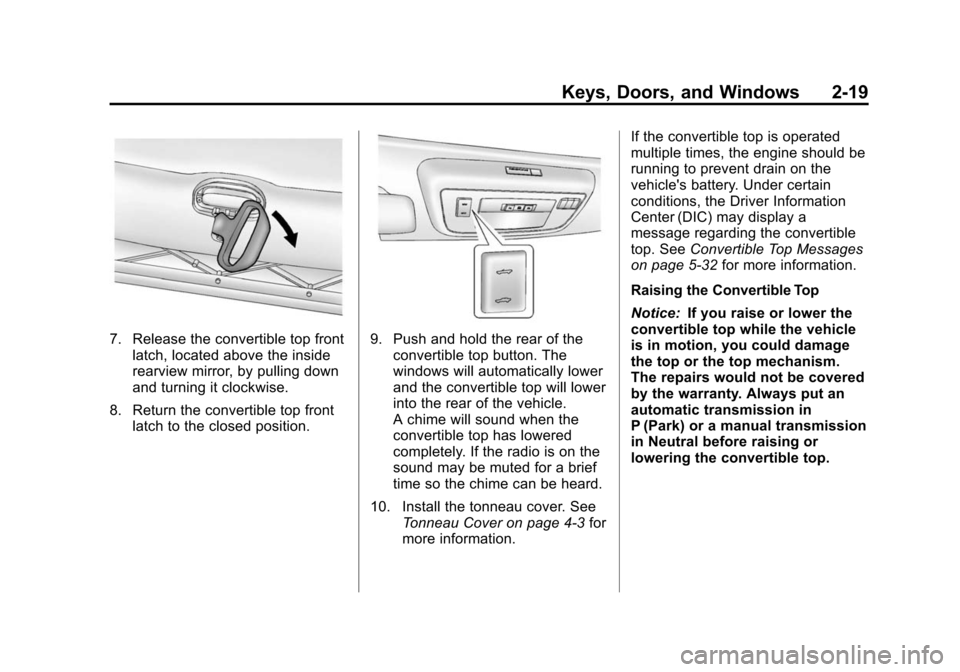
7. Release the convertible top frontlatch, located above the inside
rearview mirror, by pulling down
and turning it clockwise.
8. Return the convertible top front latch to the closed position.9. Push and hold the rear of the
convertible top button. The
windows will automatically lower
and the convertible top will lower
into the rear of the vehicle.
A chime will sound when the
convertible top has lowered
completely. If the radio is on the
sound may be muted for a brief
time so the chime can be heard.
10. Install the tonneau cover. See Tonneau Cover on page 4‑3 for
more information. If the convertible top is operated
multiple times, the engine should be
running to prevent drain on the
vehicle's battery. Under certain
conditions, the Driver Information
Center (DIC) may display a
message regarding the convertible
top. See
Convertible Top Messages
on page 5‑32 for more information.
Raising the Convertible Top
Notice: If you raise or lower the
convertible top while the vehicle
is in motion, you could damage
the top or the top mechanism.
The repairs would not be covered
by the warranty. Always put an
automatic transmission in
P (Park) or a manual transmission
in Neutral before raising or
lowering the convertible top.
Page 156 of 404
Black plate (6,1)Chevrolet Camaro Owner Manual (Include Mex) - 2012
6-6 Lighting
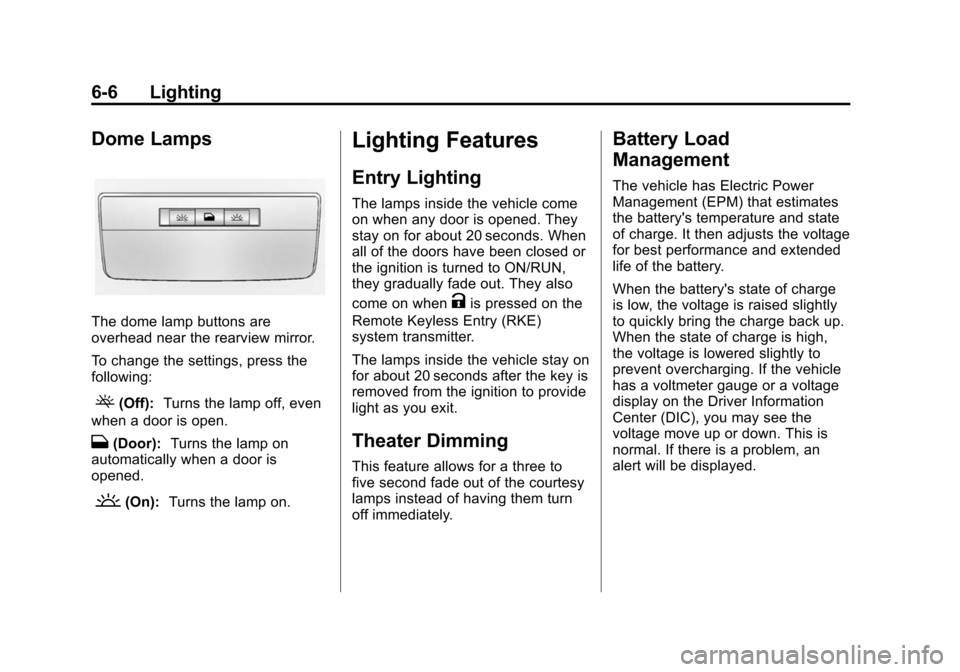
Dome Lamps
The dome lamp buttons are
overhead near the rearview mirror.
To change the settings, press the
following:
((Off):Turns the lamp off, even
when a door is open.
H(Door): Turns the lamp on
automatically when a door is
opened.
'(On): Turns the lamp on.
Lighting Features
Entry Lighting
The lamps inside the vehicle come
on when any door is opened. They
stay on for about 20 seconds. When
all of the doors have been closed or
the ignition is turned to ON/RUN,
they gradually fade out. They also
come on when
Kis pressed on the
Remote Keyless Entry (RKE)
system transmitter.
The lamps inside the vehicle stay on
for about 20 seconds after the key is
removed from the ignition to provide
light as you exit.
Theater Dimming
This feature allows for a three to
five second fade out of the courtesy
lamps instead of having them turn
off immediately.
Battery Load
Management
The vehicle has Electric Power
Management (EPM) that estimates
the battery's temperature and state
of charge. It then adjusts the voltage
for best performance and extended
life of the battery.
When the battery's state of charge
is low, the voltage is raised slightly
to quickly bring the charge back up.
When the state of charge is high,
the voltage is lowered slightly to
prevent overcharging. If the vehicle
has a voltmeter gauge or a voltage
display on the Driver Information
Center (DIC), you may see the
voltage move up or down. This is
normal. If there is a problem, an
alert will be displayed.
Page 200 of 404
Black plate (6,1)Chevrolet Camaro Owner Manual (Include Mex) - 2012
9-6 Driving and Operating
If the vehicle starts to slide, follow
these suggestions:
.Ease your foot off the
accelerator pedal and quickly
steer the way you want the
vehicle to go. The vehicle may
straighten out. Be ready for a
second skid if it occurs.
.Slow down and adjust your
driving according to weather
conditions. Stopping distance
can be longer and vehicle
control can be affected when
traction is reduced by water,
snow, ice, gravel, or other
material on the road. Learn to
recognize warning clues—such
as enough water, ice, or packed
snow on the road to make a
mirrored surface —and slow
down when you have any doubt.
.Try to avoid sudden steering,
acceleration, or braking,
including reducing vehicle speed
by shifting to a lower gear. Any
sudden changes could cause
the tires to slide.
Remember: Antilock brakes help
avoid only the braking skid.
Competitive Driving
Competitive driving may affect the
vehicle warranty. See the warranty
book before using the vehicle for
racing or other competitive driving.
The new vehicle break‐in must be
performed before the vehicle is
used for competitive driving. See
New Vehicle Break-In on page 9‑16. Notice:
If you use your vehicle
for competitive driving, the
engine may use more oil than it
would with normal use. Low oil
levels can damage the engine. Be
sure to check the oil level often
during competitive driving and
keep the level at or near the
upper mark that shows the proper
operating range on the engine oil
dipstick. For information on how
to add oil, see Engine Oil on
page 10‑10.
For competitive driving, it is
recommended that the brake fluid
be replaced with a high performance
brake fluid that has a dry boiling
point greater than 279°C (534°F).
After conversion to the high
performance brake fluid, follow
the brake fluid service
recommendations outlined by the
fluid manufacturer. Do not use
silicone or DOT‐5 brake fluids.