parking brake CHEVROLET CAMARO 2014 5.G User Guide
[x] Cancel search | Manufacturer: CHEVROLET, Model Year: 2014, Model line: CAMARO, Model: CHEVROLET CAMARO 2014 5.GPages: 432, PDF Size: 6.2 MB
Page 223 of 432
Black plate (25,1)Chevrolet Camaro Owner Manual (GMNA-Localizing-U.S./Canada/Mexico-
6042601) - 2014 - CRC - 1/21/14
Driving and Operating 9-25
Release the button and check that
the shift lever cannot be moved out
of P (Park).
Torque Lock
Torque lock is when the weight of
the vehicle puts too much force on
the parking pawl in the
transmission. This happens when
parking on a hill and shifting the
transmission into P (Park) is not
done properly and then it is difficult
to shift out of P (Park). To prevent
torque lock, set the parking brake
and then shift into P (Park). To find
out how, see“Shifting Into Park”
listed previously.
If torque lock does occur, the
vehicle may need to be pushed
uphill by another vehicle to relieve
the parking pawl pressure, so you
can shift out of P (Park).
Shifting out of Park
This vehicle is equipped with an
electronic shift lock control system.
The shift lock release is
designed to:
.Prevent ignition key removal
unless the shift lever is in
P (Park) with the shift lever
button fully released.
.Prevent movement of the shift
lever out of P (Park), unless the
ignition is in ON/RUN and the
brake pedal is applied.
The shift lock release is always
functional except in the case of an
uncharged or low voltage (less than
9-volt) battery.
If the vehicle has an uncharged
battery or a battery with low voltage,
try charging or jump starting the
battery. See Jump Starting on
page 10-97. To shift out of P (Park):
1. Apply the brake pedal.
2. Turn the key to the ON/RUN
position.
3. Release the parking brake. See Parking Brake on page 9-37.
4. Press the shift lever button.
5. Move the shift lever to the desired position.
If still unable to shift out of P (Park):
1. Fully release the shift lever button.
2. Hold the brake pedal down and press the shift lever button
again.
3. Move the shift lever to the desired position.
If the shift lever still cannot be
moved from P (Park), see “Shift
Lock Manual Release” following.
Page 224 of 432
Black plate (26,1)Chevrolet Camaro Owner Manual (GMNA-Localizing-U.S./Canada/Mexico-
6042601) - 2014 - CRC - 1/21/14
9-26 Driving and Operating
Shift Lock Manual Release
The transmission has an electric
park lock called a shift lock manual
release. The key must be in the ON/
RUN position, and the brake pedal
pressed so the shift lever can be
moved from the P (Park) position.
If the battery has lost power, the
shift lever cannot be moved from
P (Park) unless the shift lock manual
release is disengaged manually.
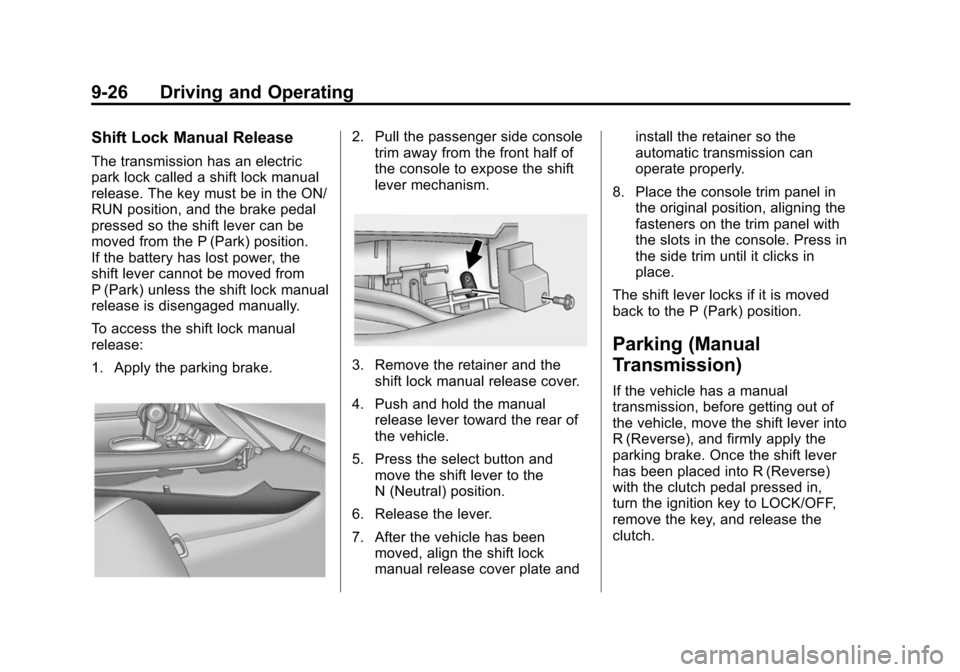
To access the shift lock manual
release:
1. Apply the parking brake.
2. Pull the passenger side consoletrim away from the front half of
the console to expose the shift
lever mechanism.
3. Remove the retainer and the
shift lock manual release cover.
4. Push and hold the manual release lever toward the rear of
the vehicle.
5. Press the select button and move the shift lever to the
N (Neutral) position.
6. Release the lever.
7. After the vehicle has been moved, align the shift lock
manual release cover plate and install the retainer so the
automatic transmission can
operate properly.
8. Place the console trim panel in the original position, aligning the
fasteners on the trim panel with
the slots in the console. Press in
the side trim until it clicks in
place.
The shift lever locks if it is moved
back to the P (Park) position.
Parking (Manual
Transmission)
If the vehicle has a manual
transmission, before getting out of
the vehicle, move the shift lever into
R (Reverse), and firmly apply the
parking brake. Once the shift lever
has been placed into R (Reverse)
with the clutch pedal pressed in,
turn the ignition key to LOCK/OFF,
remove the key, and release the
clutch.
Page 227 of 432
Black plate (29,1)Chevrolet Camaro Owner Manual (GMNA-Localizing-U.S./Canada/Mexico-
6042601) - 2014 - CRC - 1/21/14
Driving and Operating 9-29
P (Park):This position locks the
rear wheels. It is the best position to
use when starting the engine
because the vehicle cannot move
easily.
{Warning
It is dangerous to get out of the
vehicle if the shift lever is not fully
in P (Park) with the parking brake
firmly set. The vehicle can roll.
Do not leave the vehicle when the
engine is running. If you have left
the engine running, the vehicle
can move suddenly. You or others
could be injured. To be sure the
vehicle will not move, even when
you are on fairly level ground,
always set the parking brake and
move the shift lever to P (Park).
See Shifting Into Park on
page 9-24 andDriving
Characteristics and Towing Tips
on page 9-57. Make sure the shift lever is fully in
P (Park) before starting the engine.
The vehicle has an automatic
transmission shift lock control
system. The regular brake must be
fully applied first and then the shift
lever button pressed before shifting
from P (Park) when the ignition key
is in ON/RUN. If you cannot shift out
of P (Park), ease pressure on the
shift lever, then push the shift lever
all the way into P (Park) as you
maintain brake application. Then
press the shift lever button and
move the shift lever into another
gear. See
Shifting out of Park on
page 9-25.
R (Reverse): Use this gear to
back up.
{Caution
Shifting to R (Reverse) while the
vehicle is moving forward could
damage the transmission. The
repairs would not be covered by
the vehicle warranty. Shift to
R (Reverse) only after the vehicle
is stopped.
To rock the vehicle back and forth to
get out of snow, ice, or sand without
damaging the transmission, see If
the Vehicle Is Stuck on page 9-14.
N (Neutral): In this position, the
engine does not connect with the
wheels. To restart the engine when
the vehicle is already moving, use
N (Neutral) only. Also, use
N (Neutral) when the vehicle is
being towed.
Page 235 of 432
Black plate (37,1)Chevrolet Camaro Owner Manual (GMNA-Localizing-U.S./Canada/Mexico-
6042601) - 2014 - CRC - 1/21/14
Driving and Operating 9-37
If driving safely on a wet road and it
becomes necessary to slam on the
brakes and continue braking to
avoid a sudden obstacle, a
computer senses the wheels are
slowing down. If one of the wheels
is about to stop rolling, the computer
will separately work the brakes at
each wheel.
ABS can change the brake pressure
to each wheel, as required, faster
than any driver could. This can help
you steer around the obstacle while
braking hard.
As the brakes are applied, the
computer keeps receiving updates
on wheel speed and controls
braking pressure accordingly.
Remember: ABS does not change
the time needed to get a foot up to
the brake pedal or always decrease
stopping distance. If you get too
close to the vehicle in front of you,
there will not be enough time to
apply the brakes if that vehiclesuddenly slows or stops. Always
leave enough room up ahead to
stop, even with ABS.
Using ABS
Do not pump the brakes. Just hold
the brake pedal down firmly and let
ABS work. You may hear the ABS
pump or motor operating and feel
the brake pedal pulsate. This is
normal.
Braking in Emergencies
ABS allows you to steer and brake
at the same time. In many
emergencies, steering can help
more than even the very best
braking.
Parking Brake
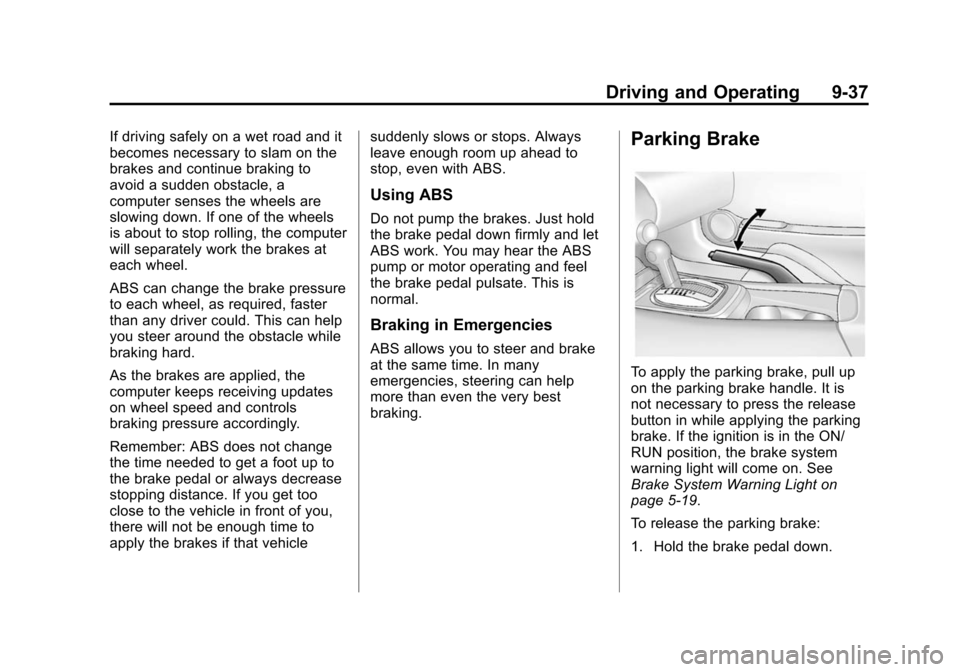
To apply the parking brake, pull up
on the parking brake handle. It is
not necessary to press the release
button in while applying the parking
brake. If the ignition is in the ON/
RUN position, the brake system
warning light will come on. See
Brake System Warning Light on
page 5-19.
To release the parking brake:
1. Hold the brake pedal down.
Page 236 of 432
Black plate (38,1)Chevrolet Camaro Owner Manual (GMNA-Localizing-U.S./Canada/Mexico-
6042601) - 2014 - CRC - 1/21/14
9-38 Driving and Operating
2. Pull the parking brake handle upuntil you can press the release
button.
3. Hold the release button in as you move the brake handle all
the way down.
{Caution
Driving with the parking brake on
can overheat the brake system
and cause premature wear or
damage to brake system parts.
Make sure that the parking brake
is fully released and the brake
warning light is off before driving.
Driving with the parking brake
applied will cause a warning chime
to sound and the RELEASE
PARKING BRAKE message to
appear in the DIC. The message will
remain on until:
.The parking brake is released.
.The vehicle comes to a stop. If you are towing a trailer and
parking on a hill, see
Driving
Characteristics and Towing Tips on
page 9-57.
Brake Assist
This vehicle has a brake assist
feature designed to assist the driver
in stopping or decreasing vehicle
speed in emergency driving
conditions. This feature uses the
stability system hydraulic brake
control module to supplement the
power brake system under
conditions where the driver has
quickly and forcefully applied the
brake pedal in an attempt to quickly
stop or slow down the vehicle. The
stability system hydraulic brake
control module increases brake
pressure at each corner of the
vehicle until the ABS activates.
Minor brake pedal pulsation or
pedal movement during this time is
normal and the driver should
continue to apply the brake pedal
as the driving situation dictates. The brake assist feature will
automatically disengage when the
brake pedal is released or brake
pedal pressure is quickly
decreased.Hill Start Assist (HSA)
If equipped, HSA may automatically
activate when the vehicle is stopped
on a grade. This feature is designed
to prevent the vehicle from rolling,
either forward or rearward, during
vehicle drive off. During the
transition from releasing the brake
pedal to accelerating to drive off on
a grade, HSA holds the braking
pressure to prevent rolling. HSA will
not activate if the vehicle is in a
drive gear and facing downhill or if
the vehicle is facing uphill and in
R (Reverse).
Page 246 of 432
Black plate (48,1)Chevrolet Camaro Owner Manual (GMNA-Localizing-U.S./Canada/Mexico-
6042601) - 2014 - CRC - 1/21/14
9-48 Driving and Operating
Passing Another Vehicle While
Using Cruise Control
Use the accelerator pedal to
increase the vehicle speed. When
you take your foot off the pedal, the
vehicle slows down to the previously
set cruise control speed. While
pressing the accelerator pedal or
shortly following the release to
override cruise control, briefly
moving the thumbwheel toward
SET/–will result in cruise control set
to the current vehicle speed.
Using Cruise Control on Hills
How well the cruise control works
on hills depends upon the vehicle's
speed, load, and the steepness of
the hills. When going up steep hills,
you might have to step on the
accelerator pedal to maintain the
vehicle speed. When going
downhill, you might have to brake or
shift to a lower gear to maintain the
vehicle speed. When the brakes are
applied the cruise control is
disengaged. Ending Cruise Control
There are three ways to end the
cruise control:
.To disengage cruise control,
step lightly on the brake pedal or
clutch. The indicator light on the
instrument cluster goes out.
.Press*on the steering wheel.
.To turn off cruise control, press1on the steering wheel.
Erasing Speed Memory
The cruise control set speed is
erased from memory if
1is pressed
or if the vehicle is turned off.
Driver Assistance
Systems
Ultrasonic Parking Assist
If equipped, the Ultrasonic Rear
Parking Assist (URPA) system
assists the driver with parking and
avoiding objects while in
R (Reverse). URPA operates at
speeds less than 8 km/h (5 mph).
The sensors on the rear bumper
detect objects up to 2.5 m (8 ft)
behind the vehicle, and at least
20 cm (8 in) off the ground. The
distance objects can be detected
may be less during warmer or humid
weather.
{Warning
The parking assist system does
not detect children, pedestrians,
bicyclists, animals, or objects
below the bumper or that are too
close or too far from the vehicle.
(Continued)
Page 248 of 432
Black plate (50,1)Chevrolet Camaro Owner Manual (GMNA-Localizing-U.S./Canada/Mexico-
6042601) - 2014 - CRC - 1/21/14
9-50 Driving and Operating
.An object was hanging out of the
trunk during the last drive cycle.
Once the object is removed,
URPA will return to normal
operation.
.The bumper is damaged. Take
the vehicle to your dealer to
repair the system.
.Other conditions, such as
vibrations from a jackhammer or
the compression of air brakes on
a very large truck, are affecting
system performance.
Rear Vision
Camera (RVC)
{Warning
The RVC system does not display
children, pedestrians, bicyclists,
animals, or any other object
located outside the camera's field
of view, below the bumper,
or under the vehicle. Perceived(Continued)
Warning (Continued)
distances may be different from
actual distances. Do not back the
vehicle using only the RVC
screen, during longer, higher
speed backing maneuvers,
or where there could be cross
traffic. Failure to use proper care
before backing may result in
injury, death, or vehicle damage.
Always check behind and around
the vehicle before backing.
If equipped, the RVC system is
designed to help the driver when
backing up by displaying a view of
the area behind the vehicle. When
the key is in ON/RUN and the driver
shifts the vehicle into R (Reverse),
the video image automatically
appears on the infotainment screen.
The infotainment screen goes to the
previous screen after approximately
four seconds once the vehicle is
shifted out of R (Reverse). To see the previous screen sooner,
do one of the following:.Press a hard key on the
infotainment system.
.Shift into P (Park).
.Reach a vehicle speed of
8 km/h (5 mph).
Symbols and Guidelines
The RVC system may have a
feature that lets the driver view
symbols on the infotainment screen
while using the RVC. The Ultrasonic
Rear Park Assist (URPA) system
must not be disabled to use the
caution symbols. The error message
Rear Parking Assist Symbols
Unavailable may display if URPA
has been disabled and the symbols
have been turned on. See
Ultrasonic Parking Assist on
page 9-48.
The symbols appear and may cover
an object when viewing the
infotainment screen when an object
is detected by the URPA system.
Page 257 of 432
Black plate (59,1)Chevrolet Camaro Owner Manual (GMNA-Localizing-U.S./Canada/Mexico-
6042601) - 2014 - CRC - 1/21/14
Driving and Operating 9-59
lamps also flash, telling other
drivers the vehicle is turning,
changing lanes or stopping.
When towing a trailer, the arrows on
the instrument cluster flash for turns
even if the bulbs on the trailer are
burned out. Check occasionally to
be sure the trailer bulbs are still
working.
Driving on Grades
Reduce speed and shift to a lower
gear before starting down a long or
steep downgrade. If the
transmission is not shifted down, the
brakes might have to be used so
much that they would get hot and no
longer work well.
The vehicle can tow in D (Drive).
Use a lower gear if the transmission
shifts too often.
When towing at high altitude on
steep uphill grades, engine coolant
boils at a lower temperature than at
normal altitudes. If the engine is
turned off immediately after towing
at high altitude on steep uphillgrades, the vehicle could show
signs similar to engine overheating.
To avoid this, let the engine run
while parked, preferably on level
ground, with the transmission in
P (Park) for a few minutes before
turning the engine off. If the
overheat warning comes on, see
Engine Overheating on page 10-35.
Parking on Hills
{Warning
Parking the vehicle on a hill with
the trailer attached can be
dangerous. If something goes
wrong, the rig could start to move.
People can be injured, and both
the vehicle and the trailer can be
damaged. When possible, always
park the rig on a flat surface.
If parking the rig on a hill:
1. Press the brake pedal, but do
not shift into P (Park) yet. Turn
the wheels into the curb if facing
downhill or into traffic if facing
uphill.
2. Have someone place chocks under the trailer wheels.
3. When the wheel chocks are in place, release the brake pedal
until the chocks absorb the load.
4. Reapply the brake pedal. Then apply the parking brake and shift
into P (Park) for vehicles with an
automatic transmission or into
gear for vehicles with a manual
transmission.
5. Release the brake pedal.
Leaving After Parking on a Hill
1. Apply and hold the brake pedal while you:
.Start the engine.
.Shift into a gear.
.Release the parking brake.
Page 261 of 432
Black plate (1,1)Chevrolet Camaro Owner Manual (GMNA-Localizing-U.S./Canada/Mexico-
6042601) - 2014 - CRC - 1/21/14
Vehicle Care 10-1
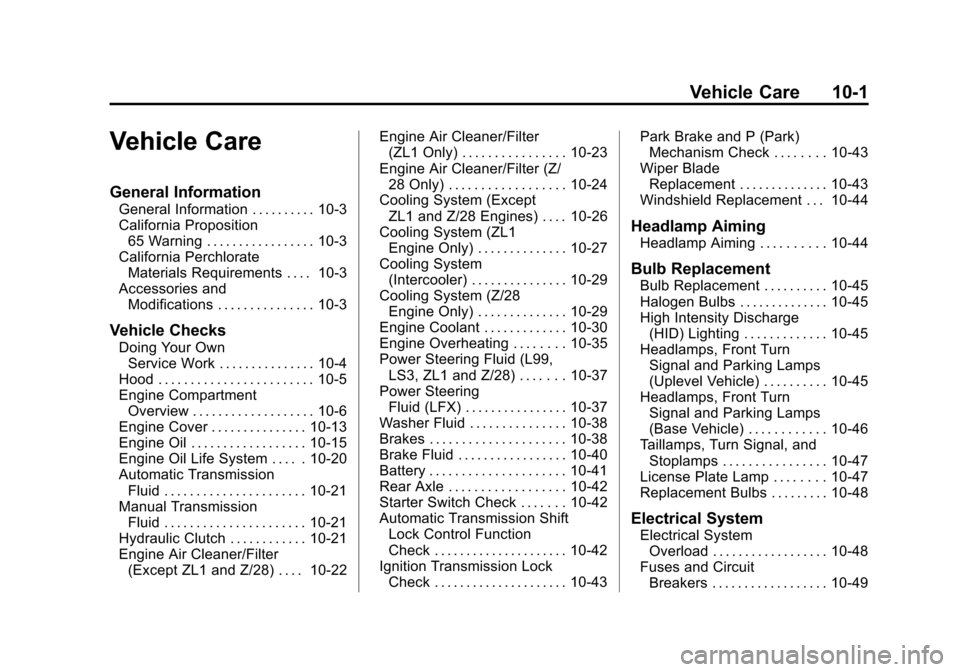
Vehicle Care
General Information
General Information . . . . . . . . . . 10-3
California Proposition65 Warning . . . . . . . . . . . . . . . . . 10-3
California Perchlorate Materials Requirements . . . . 10-3
Accessories and Modifications . . . . . . . . . . . . . . . 10-3
Vehicle Checks
Doing Your OwnService Work . . . . . . . . . . . . . . . 10-4
Hood . . . . . . . . . . . . . . . . . . . . . . . . 10-5
Engine Compartment Overview . . . . . . . . . . . . . . . . . . . 10-6
Engine Cover . . . . . . . . . . . . . . . 10-13
Engine Oil . . . . . . . . . . . . . . . . . . 10-15
Engine Oil Life System . . . . . 10-20
Automatic Transmission Fluid . . . . . . . . . . . . . . . . . . . . . . 10-21
Manual Transmission Fluid . . . . . . . . . . . . . . . . . . . . . . 10-21
Hydraulic Clutch . . . . . . . . . . . . 10-21
Engine Air Cleaner/Filter (Except ZL1 and Z/28) . . . . 10-22 Engine Air Cleaner/Filter
(ZL1 Only) . . . . . . . . . . . . . . . . 10-23
Engine Air Cleaner/Filter (Z/ 28 Only) . . . . . . . . . . . . . . . . . . 10-24
Cooling System (Except
ZL1 and Z/28 Engines) . . . . 10-26
Cooling System (ZL1 Engine Only) . . . . . . . . . . . . . . 10-27
Cooling System (Intercooler) . . . . . . . . . . . . . . . 10-29
Cooling System (Z/28 Engine Only) . . . . . . . . . . . . . . 10-29
Engine Coolant . . . . . . . . . . . . . 10-30
Engine Overheating . . . . . . . . 10-35
Power Steering Fluid (L99, LS3, ZL1 and Z/28) . . . . . . . 10-37
Power Steering Fluid (LFX) . . . . . . . . . . . . . . . . 10-37
Washer Fluid . . . . . . . . . . . . . . . 10-38
Brakes . . . . . . . . . . . . . . . . . . . . . 10-38
Brake Fluid . . . . . . . . . . . . . . . . . 10-40
Battery . . . . . . . . . . . . . . . . . . . . . 10-41
Rear Axle . . . . . . . . . . . . . . . . . . 10-42
Starter Switch Check . . . . . . . 10-42
Automatic Transmission Shift Lock Control Function
Check . . . . . . . . . . . . . . . . . . . . . 10-42
Ignition Transmission Lock Check . . . . . . . . . . . . . . . . . . . . . 10-43 Park Brake and P (Park)
Mechanism Check . . . . . . . . 10-43
Wiper Blade Replacement . . . . . . . . . . . . . . 10-43
Windshield Replacement . . . 10-44
Headlamp Aiming
Headlamp Aiming . . . . . . . . . . 10-44
Bulb Replacement
Bulb Replacement . . . . . . . . . . 10-45
Halogen Bulbs . . . . . . . . . . . . . . 10-45
High Intensity Discharge
(HID) Lighting . . . . . . . . . . . . . 10-45
Headlamps, Front Turn Signal and Parking Lamps
(Uplevel Vehicle) . . . . . . . . . . 10-45
Headlamps, Front Turn Signal and Parking Lamps
(Base Vehicle) . . . . . . . . . . . . 10-46
Taillamps, Turn Signal, and Stoplamps . . . . . . . . . . . . . . . . 10-47
License Plate Lamp . . . . . . . . 10-47
Replacement Bulbs . . . . . . . . . 10-48
Electrical System
Electrical System Overload . . . . . . . . . . . . . . . . . . 10-48
Fuses and Circuit Breakers . . . . . . . . . . . . . . . . . . 10-49
Page 302 of 432
Black plate (42,1)Chevrolet Camaro Owner Manual (GMNA-Localizing-U.S./Canada/Mexico-
6042601) - 2014 - CRC - 1/21/14
10-42 Vehicle Care
Rear Axle
When to Check Lubricant
It is not necessary to regularly
check the rear axle fluid, unless a
leak is suspected or an unusual
noise is heard. A fluid loss could
indicate a problem. Have it
inspected and repaired by your
dealer.
Starter Switch Check
{Warning
When you are doing this
inspection, the vehicle could
move suddenly. If the vehicle
moves, you or others could be
injured.
1. Before starting this check, be sure there is enough room
around the vehicle. 2. Apply both the parking brake
and the regular brake.
Do not use the accelerator
pedal, and be ready to turn off
the engine immediately if it
starts.
3. For automatic transmission vehicles, try to start the engine
in each gear. The vehicle should
start only in P (Park) or
N (Neutral). If the vehicle starts
in any other position, contact
your dealer for service.
For manual transmission
vehicles, put the shift lever in
Neutral, push the clutch pedal
down halfway, and try to start
the engine. The vehicle should
start only when the clutch pedal
is pushed down all the way to
the floor. If the vehicle starts
when the clutch pedal is not
pushed all the way down,
contact your dealer for service.
Automatic Transmission
Shift Lock Control
Function Check
{Warning
When you are doing this
inspection, the vehicle could
move suddenly. If the vehicle
moves, you or others could be
injured.
1. Before starting this check, be sure there is enough room
around the vehicle. It should be
parked on a level surface.
2. Apply the parking brake. Be ready to apply the regular brake
immediately if the vehicle begins
to move.