automatic transmission CHEVROLET CAMARO 2014 5.G Owners Manual
[x] Cancel search | Manufacturer: CHEVROLET, Model Year: 2014, Model line: CAMARO, Model: CHEVROLET CAMARO 2014 5.GPages: 432, PDF Size: 6.2 MB
Page 1 of 432

Black plate (1,1)Chevrolet Camaro Owner Manual (GMNA-Localizing-U.S./Canada/Mexico-
6042601) - 2014 - CRC - 1/21/14
2014 Chevrolet Camaro Owner ManualM
In Brief. . . . . . . . . . . . . . . . . . . . . . . . 1-1
Instrument Panel . . . . . . . . . . . . . . 1-2
Initial Drive Information . . . . . . . . 1-4
Vehicle Features . . . . . . . . . . . . . 1-13
Performance and Maintenance . . . . . . . . . . . . . . . . 1-18
Keys, Doors, and Windows . . . . . . . . . . . . . . . . . . . . 2-1
Keys and Locks . . . . . . . . . . . . . . . 2-1
Doors . . . . . . . . . . . . . . . . . . . . . . . . . . 2-9
Vehicle Security . . . . . . . . . . . . . . 2-11
Exterior Mirrors . . . . . . . . . . . . . . . 2-14
Interior Mirrors . . . . . . . . . . . . . . . . 2-15
Windows . . . . . . . . . . . . . . . . . . . . . 2-15
Roof . . . . . . . . . . . . . . . . . . . . . . . . . . 2-18
Seats and Restraints . . . . . . . . . 3-1
Head Restraints . . . . . . . . . . . . . . . 3-2
Front Seats . . . . . . . . . . . . . . . . . . . . 3-3
Rear Seats . . . . . . . . . . . . . . . . . . . . 3-7
Safety Belts . . . . . . . . . . . . . . . . . . . . 3-8
Airbag System . . . . . . . . . . . . . . . . 3-15
Child Restraints . . . . . . . . . . . . . . 3-28 Storage
. . . . . . . . . . . . . . . . . . . . . . . 4-1
Storage Compartments . . . . . . . . 4-1
Additional Storage Features . . . 4-3
Instruments and Controls . . . . 5-1
Controls . . . . . . . . . . . . . . . . . . . . . . . 5-2
Warning Lights, Gauges, and
Indicators . . . . . . . . . . . . . . . . . . . . 5-6
Information Displays . . . . . . . . . . 5-24
Vehicle Messages . . . . . . . . . . . . 5-32
Vehicle Personalization . . . . . . . 5-43
Universal Remote System . . . . 5-46
Lighting . . . . . . . . . . . . . . . . . . . . . . . 6-1
Exterior Lighting . . . . . . . . . . . . . . . 6-1
Interior Lighting . . . . . . . . . . . . . . . . 6-5
Lighting Features . . . . . . . . . . . . . . 6-6
Infotainment System . . . . . . . . . 7-1
Introduction . . . . . . . . . . . . . . . . . . . . 7-1
Radio . . . . . . . . . . . . . . . . . . . . . . . . . . 7-7
Audio Players . . . . . . . . . . . . . . . . 7-12
Phone . . . . . . . . . . . . . . . . . . . . . . . . 7-20 Climate Controls
. . . . . . . . . . . . . 8-1
Climate Control Systems . . . . . . 8-1
Air Vents . . . . . . . . . . . . . . . . . . . . . . . 8-3
Maintenance . . . . . . . . . . . . . . . . . . . 8-4
Driving and Operating . . . . . . . . 9-1
Driving Information . . . . . . . . . . . . . 9-2
Starting and Operating . . . . . . . 9-19
Engine Exhaust . . . . . . . . . . . . . . 9-27
Automatic Transmission . . . . . . 9-28
Manual Transmission . . . . . . . . . 9-34
Brakes . . . . . . . . . . . . . . . . . . . . . . . 9-36
Ride Control Systems . . . . . . . . 9-39
Cruise Control . . . . . . . . . . . . . . . . 9-46
Driver Assistance Systems . . . 9-48
Fuel . . . . . . . . . . . . . . . . . . . . . . . . . . 9-52
Trailer Towing . . . . . . . . . . . . . . . . 9-57
Conversions and Add-Ons . . . 9-62
Vehicle Care . . . . . . . . . . . . . . . . . 10-1
General Information . . . . . . . . . . 10-3
Vehicle Checks . . . . . . . . . . . . . . . 10-4
Headlamp Aiming . . . . . . . . . . . 10-44
Bulb Replacement . . . . . . . . . . 10-45
Electrical System . . . . . . . . . . . . 10-48
Wheels and Tires . . . . . . . . . . . 10-56
Page 9 of 432

Black plate (3,1)Chevrolet Camaro Owner Manual (GMNA-Localizing-U.S./Canada/Mexico-
6042601) - 2014 - CRC - 1/21/14
In Brief 1-3
1.Air Vents on page 8-3.
2. Turn Signal Lever. See Turn and
Lane-Change Signals on
page 6-4.
Headlamp High/Low-Beam
Changer on page 6-2.
Flash-to-Pass on page 6-2.
Driver Information Center (DIC)
Buttons (If Equipped). See
Driver Information Center (DIC)
on page 5-24.
3. Tap Shift (If Equipped). See Manual Mode on page 9-32.
4. Instrument Cluster on page 5-7.
5. Windshield Wiper/Washer on
page 5-3.
6. Light Sensor. See Automatic
Headlamp System on page 6-2.
7. Infotainment on page 7-1.
8. Hood Release (Out of View). See Hood on page 10-5.
9. Data Link Connector (DLC) (Out of View). See Malfunction
Indicator Lamp on page 5-16. 10.
Exterior Lamp Controls on
page 6-1.
Front Fog Lamps on page 6-4
(If Equipped).
Instrument Panel Illumination
Control on page 6-5.
11. Cruise Control on page 9-46.
12. Steering Wheel Adjustment on
page 5-2.
13. Horn on page 5-3.
14. Steering Wheel Controls on
page 5-2.
15. Head-Up Display (HUD) on
page 5-28 (If Equipped).
16. Climate Control Systems on
page 8-1.
17. Transmission Temperature
Gauge (Except ZL1) on
page 5-12.
Voltmeter Gauge on page 5-13.
Engine Oil Temperature Gauge
on page 5-11. Engine Oil Pressure Gauge on
page 5-10.
18. Traction Control/Electronic
Stability Control on page 9-39.
Performance Traction
Management (PTM). See
Competitive Driving Mode on
page 9-41 (ZL1 or Z/28
Models Only).
19. Shift Lever. See Automatic
Transmission on page 9-28 or
Manual Transmission on
page 9-34.
20. Power Outlets on page 5-5.
21. Hazard Warning Flashers on
page 6-4.
Page 18 of 432
Black plate (12,1)Chevrolet Camaro Owner Manual (GMNA-Localizing-U.S./Canada/Mexico-
6042601) - 2014 - CRC - 1/21/14
1-12 In Brief
Transmission
Automatic Transmission
Tap Shift
Tap Shift allows the driver to
manually control the automatic
transmission. To use Tap Shift, the
shift lever must be in M (Manual
Mode) or D (Drive). Vehicles with
this feature have indicators on the
steering wheel. The controls are on
the back of the steering wheel. Tap
the left control to downshift, and the
right control to upshift. A Driver
Information Center (DIC) message
indicates the gear the vehicle is in.
Electronic Range Select
(ERS) Mode
Vehicles with axle code GW8 have
an ERS mode. ERS mode allows
you to choose the top-gear limit of
the transmission with fully automatic
gear selection. This can help controlthe vehicle's speed while driving
downhill or towing a trailer. The
vehicle has an electronic shift
position indicator within the
instrument cluster. When using the
ERS mode a number will display
next to the M, indicating the current
maximum gear allowed.
To use this feature:
1. Move the shift lever to
M (Manual Mode).
2. Press the plus/minus buttons on the back of the steering wheel,
to increase or decrease the gear
range available.
See Manual Mode on page 9-32.
Manual Transmission
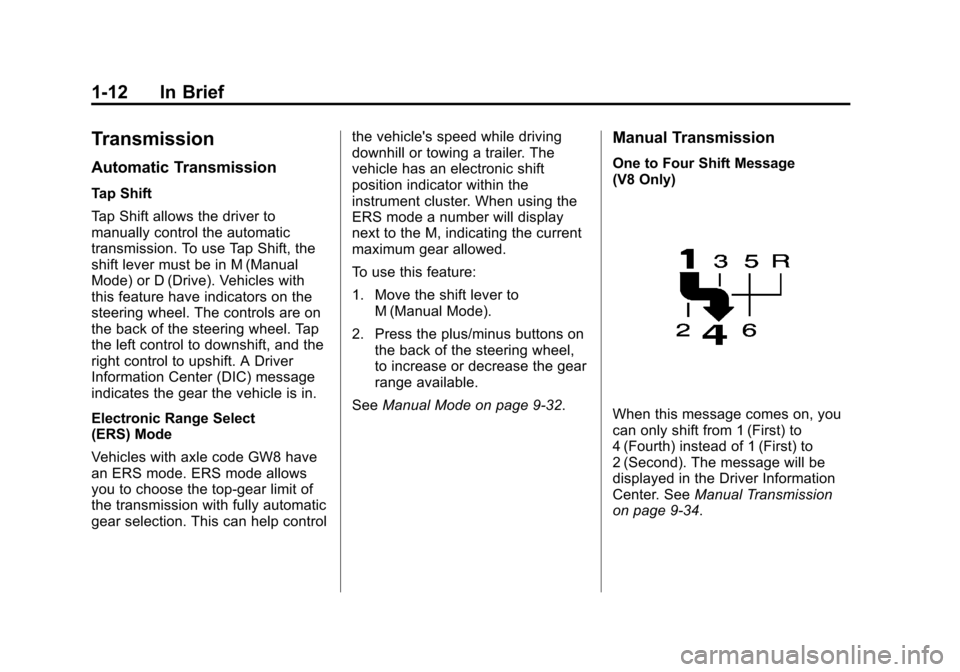
One to Four Shift Message
(V8 Only)
When this message comes on, you
can only shift from 1 (First) to
4 (Fourth) instead of 1 (First) to
2 (Second). The message will be
displayed in the Driver Information
Center. See Manual Transmission
on page 9-34.
Page 35 of 432
Black plate (9,1)Chevrolet Camaro Owner Manual (GMNA-Localizing-U.S./Canada/Mexico-
6042601) - 2014 - CRC - 1/21/14
Keys, Doors, and Windows 2-9
Automatic Door Locks
When the doors are closed, the
ignition is on, and the shift lever is
moved out of P (Park) for automatic
transmissions, or the vehicle speed
is above 13 km/h (8 mph) for
manual transmissions, the doors
will lock.
To unlock the doors:
.PressKon a power door lock
switch.
.If equipped with an automatic
transmission, shift the
transmission into P (Park).
.If equipped with a manual
transmission, remove the key
from the ignition when parked.
Automatic door unlocking can be
programmed through the Driver
Information Center (DIC). See
Vehicle Personalization on
page 5-43.
Lockout Protection
When locking is requested with the
driver door open and the key in the
ignition, all the doors will lock and
then the driver door will unlock. This
can be manually overridden by
pressing and holding
Qon the
power door lock switch.
If Unlocked Door Anti-Lockout is
turned on, the vehicle is off with the
driver door open, and door locking
is requested, all the doors will lock
and only the driver door will unlock.
The Unlocked Door Anti-Lockout
feature can be turned on or off using
the vehicle personalization menus.
See Vehicle Personalization on
page 5-43.
Doors
Trunk
{Warning
Exhaust gases can enter the
vehicle if it is driven with the
liftgate, trunk/hatch open, or with
any objects that pass through the
seal between the body and the
trunk/hatch or liftgate. Engine
exhaust contains carbon
monoxide (CO) which cannot be
seen or smelled. It can cause
unconsciousness and even death.
If the vehicle must be driven with
the liftgate, or trunk/hatch open:
.Close all of the windows.
.Fully open the air outlets on
or under the instrument
panel.
(Continued)
Page 36 of 432
Black plate (10,1)Chevrolet Camaro Owner Manual (GMNA-Localizing-U.S./Canada/Mexico-
6042601) - 2014 - CRC - 1/21/14
2-10 Keys, Doors, and Windows
Warning (Continued)
.Adjust the climate control
system to a setting that
brings in only outside air and
set the fan speed to the
highest setting. See“Climate
Control Systems” in the
Index.
.If the vehicle has a power
liftgate, disable the power
liftgate function.
For more information about
carbon monoxide, see Engine
Exhaust on page 9-27.
Trunk Release
To open the trunk from outside of
the vehicle, press
VorYon the
Remote Keyless Entry (RKE)
transmitter. For automatic transmissions, the
vehicle must be in P (Park). For
manual transmissions, the vehicle
must be off, or stationary with the
parking brake set.
From inside the vehicle, pressV
on the lower portion of the
driver door.
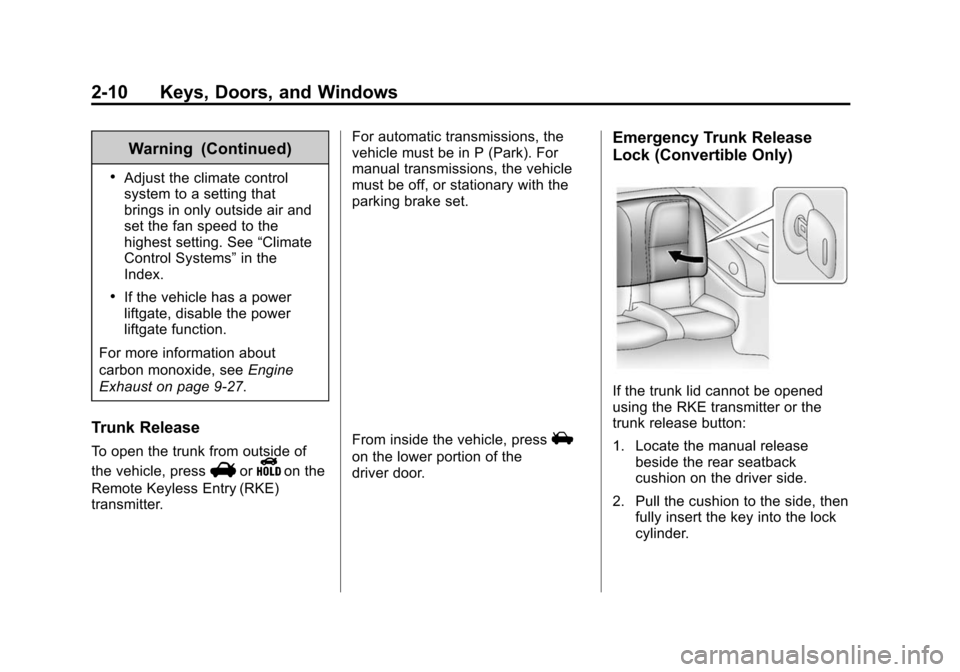
Emergency Trunk Release
Lock (Convertible Only)
If the trunk lid cannot be opened
using the RKE transmitter or the
trunk release button:
1. Locate the manual release
beside the rear seatback
cushion on the driver side.
2. Pull the cushion to the side, then fully insert the key into the lock
cylinder.
Page 46 of 432
Black plate (20,1)Chevrolet Camaro Owner Manual (GMNA-Localizing-U.S./Canada/Mexico-
6042601) - 2014 - CRC - 1/21/14
2-20 Keys, Doors, and Windows
{Caution
If you raise or lower the
convertible top while the vehicle
is in motion, you could damage
the top or the top mechanism.
The repairs would not be covered
by the warranty. Always put an
automatic transmission in P (Park)
or a manual transmission in
Neutral before raising or lowering
the convertible top.
Lowering the Convertible Top
1. Park on a level surface. Place the vehicle in P (Park) with an
automatic transmission and
Neutral with a manual
transmission. Set the parking
brake.
2. Remove the tonneau cover from the trunk.
3. The rear trunk partition must be in the fastened position. See
Rear Storage on page 4-1. 4. Remove all objects on or above
the rear trunk partition.
5. Close the trunk.
6. Start the engine.
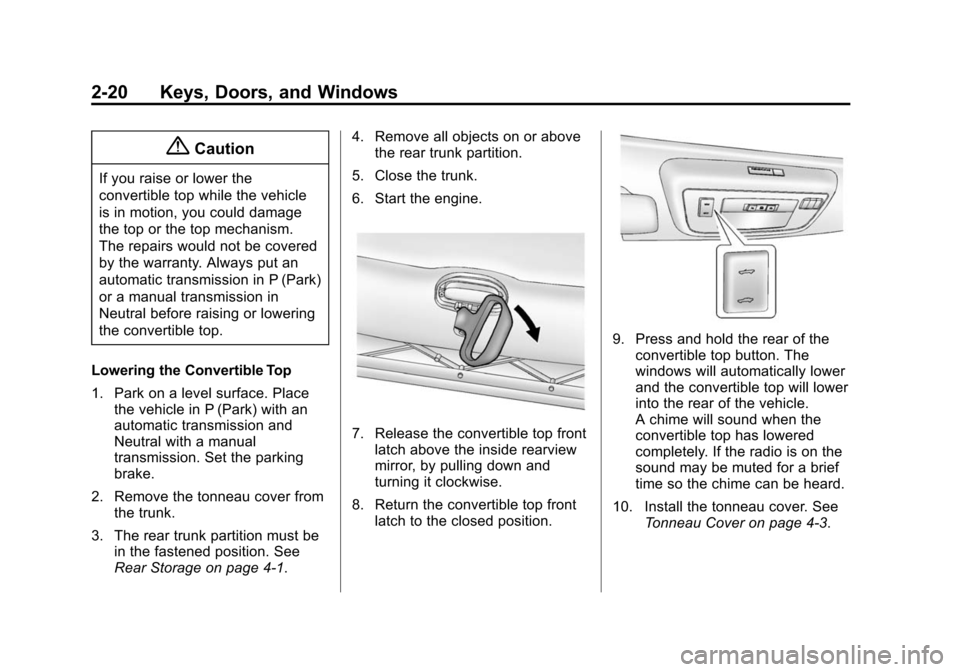
7. Release the convertible top front latch above the inside rearview
mirror, by pulling down and
turning it clockwise.
8. Return the convertible top front latch to the closed position.
9. Press and hold the rear of theconvertible top button. The
windows will automatically lower
and the convertible top will lower
into the rear of the vehicle.
A chime will sound when the
convertible top has lowered
completely. If the radio is on the
sound may be muted for a brief
time so the chime can be heard.
10. Install the tonneau cover. See Tonneau Cover on page 4-3.
Page 47 of 432
Black plate (21,1)Chevrolet Camaro Owner Manual (GMNA-Localizing-U.S./Canada/Mexico-
6042601) - 2014 - CRC - 1/21/14
Keys, Doors, and Windows 2-21
If the convertible top is operated
multiple times, the engine should be
running to prevent drain on the
vehicle's battery. Under certain
conditions, the Driver Information
Center (DIC) may display a
message regarding the convertible
top. SeeConvertible Top Messages
on page 5-33.
{Caution
Raising the top without removing
the tonneau cover may damage
the top components and the
tonneau cover. Remove the
tonneau cover before operating
the convertible top.
Raising the Convertible Top
1. Park on a level surface. Place the vehicle in P (Park) with an
automatic transmission and
Neutral with a manual
transmission. Set the parking
brake. 2. Remove the tonneau cover if
installed. See Tonneau Cover on
page 4-3.
3. Move any objects that have fallen against the convertible top
inside the trunk.
4. Close the trunk.
5. Start the engine.
{Warning
Placing hands on the top of the
windshield frame when closing
the convertible soft top could
cause fingers to be pinched and
may cause injury. Keep hands
below the windshield frame when
closing the convertible top.
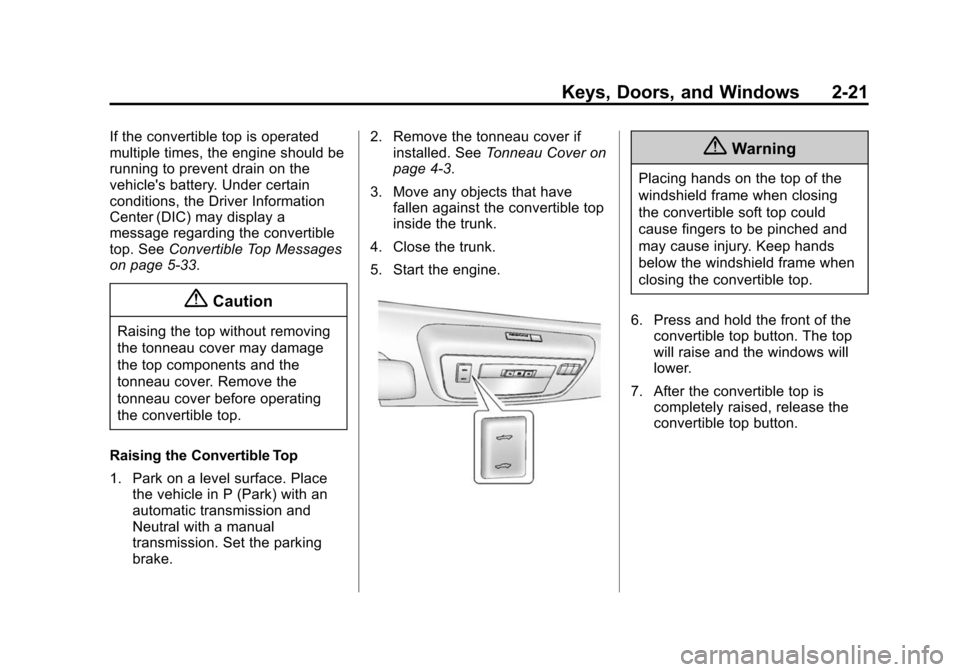
6. Press and hold the front of the convertible top button. The top
will raise and the windows will
lower.
7. After the convertible top is completely raised, release the
convertible top button.
Page 48 of 432
Black plate (22,1)Chevrolet Camaro Owner Manual (GMNA-Localizing-U.S./Canada/Mexico-
6042601) - 2014 - CRC - 1/21/14
2-22 Keys, Doors, and Windows
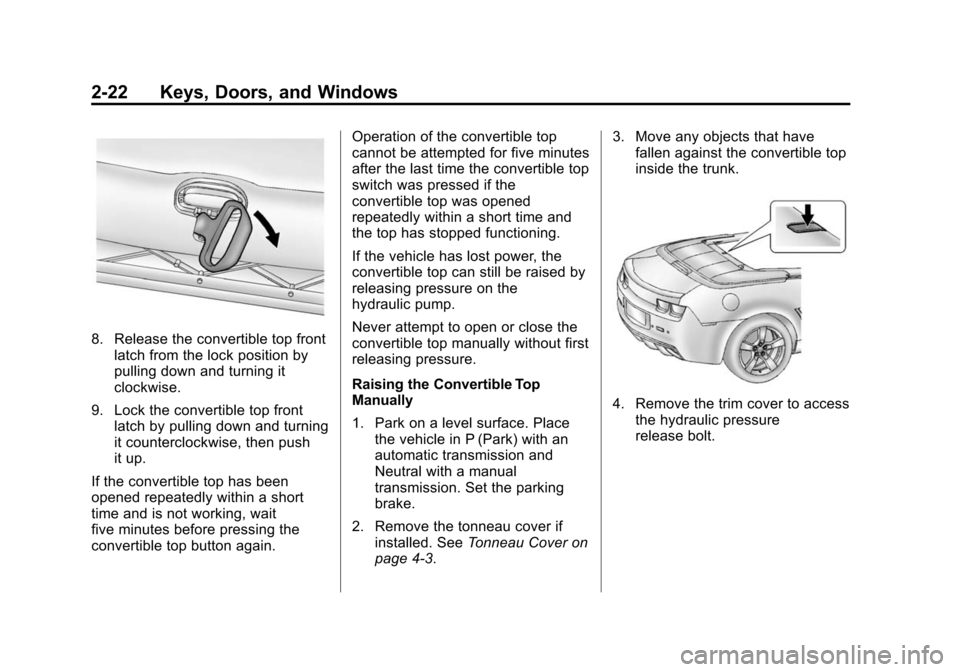
8. Release the convertible top frontlatch from the lock position by
pulling down and turning it
clockwise.
9. Lock the convertible top front latch by pulling down and turning
it counterclockwise, then push
it up.
If the convertible top has been
opened repeatedly within a short
time and is not working, wait
five minutes before pressing the
convertible top button again. Operation of the convertible top
cannot be attempted for five minutes
after the last time the convertible top
switch was pressed if the
convertible top was opened
repeatedly within a short time and
the top has stopped functioning.
If the vehicle has lost power, the
convertible top can still be raised by
releasing pressure on the
hydraulic pump.
Never attempt to open or close the
convertible top manually without first
releasing pressure.
Raising the Convertible Top
Manually
1. Park on a level surface. Place
the vehicle in P (Park) with an
automatic transmission and
Neutral with a manual
transmission. Set the parking
brake.
2. Remove the tonneau cover if installed. See Tonneau Cover on
page 4-3. 3. Move any objects that have
fallen against the convertible top
inside the trunk.
4. Remove the trim cover to access
the hydraulic pressure
release bolt.
Page 128 of 432
Black plate (24,1)Chevrolet Camaro Owner Manual (GMNA-Localizing-U.S./Canada/Mexico-
6042601) - 2014 - CRC - 1/21/14
5-24 Instruments and Controls
Information Displays
Driver Information
Center (DIC)
The DIC displays information about
your vehicle. It also displays
warning messages if a system
problem is detected. SeeVehicle
Messages on page 5-32. All
messages appear in the DIC display
in the center of the instrument
cluster.
The vehicle may also have features
that can be customized through the
controls on the radio. See Vehicle
Personalization on page 5-43.
DIC Operation and Displays
The DIC has different displays
which can be accessed by using the
DIC buttons on the turn signal lever
on the left side of the steering
wheel. The DIC displays trip, fuel,
vehicle system information, and
warning messages if a system
problem is detected. The bottom of the DIC display
shows what position the shift lever
is in (automatic transmission only),
the odometer, and the direction the
vehicle is driving.
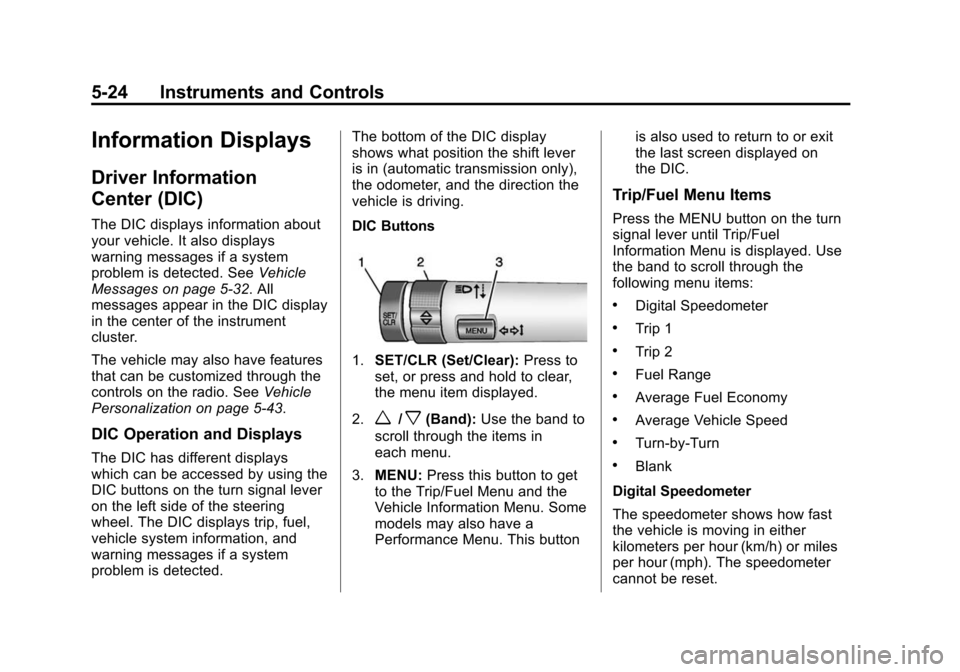
DIC Buttons
1.
SET/CLR (Set/Clear): Press to
set, or press and hold to clear,
the menu item displayed.
2.
w/x(Band): Use the band to
scroll through the items in
each menu.
3. MENU: Press this button to get
to the Trip/Fuel Menu and the
Vehicle Information Menu. Some
models may also have a
Performance Menu. This button is also used to return to or exit
the last screen displayed on
the DIC.
Trip/Fuel Menu Items
Press the MENU button on the turn
signal lever until Trip/Fuel
Information Menu is displayed. Use
the band to scroll through the
following menu items:
.Digital Speedometer
.Trip 1
.Trip 2
.Fuel Range
.Average Fuel Economy
.Average Vehicle Speed
.Turn-by-Turn
.Blank
Digital Speedometer
The speedometer shows how fast
the vehicle is moving in either
kilometers per hour (km/h) or miles
per hour (mph). The speedometer
cannot be reset.
Page 134 of 432
Black plate (30,1)Chevrolet Camaro Owner Manual (GMNA-Localizing-U.S./Canada/Mexico-
6042601) - 2014 - CRC - 1/21/14
5-30 Instruments and Controls
Use the following settings to adjust
the HUD.
OFF:Turn the HUD dimming knob
fully counterclockwise until the HUD
display turns off.
Brightness: Turn the dimming knob
clockwise or counterclockwise to
brighten or dim the display. The
HUD image will automatically dim
and brighten to compensate for
outside lighting. The HUD
brightness control can also be
adjusted as needed. The HUD
image can temporarily light up
depending on the angle and position
of the sunlight on the HUD display.
This is normal. Polarized
sunglasses could make the HUD
image harder to see.
«(Up): orª(Down): Press the
up or down arrows to center the
HUD image in your view. The HUD
image can only be adjusted up and
down, not side to side.
PAGE: Press to select the display
formats. Release the PAGE button
when the format number with the desired display is shown on the
HUD. If vehicle messages are
displayed, pressing PAGE may clear
the message.
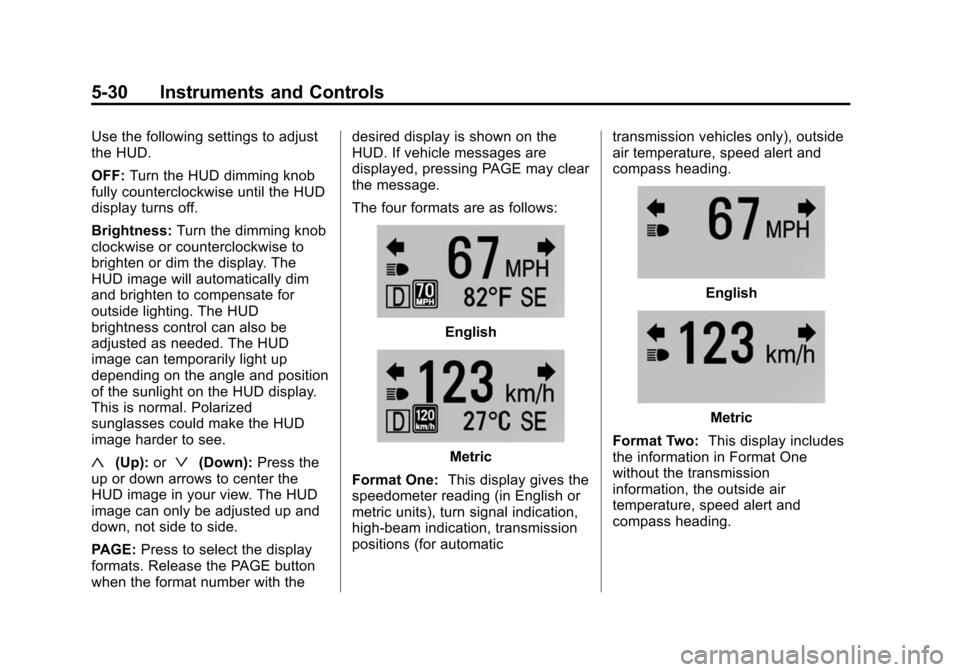
The four formats are as follows:
English
Metric
Format One: This display gives the
speedometer reading (in English or
metric units), turn signal indication,
high-beam indication, transmission
positions (for automatic transmission vehicles only), outside
air temperature, speed alert and
compass heading.
English
Metric
Format Two: This display includes
the information in Format One
without the transmission
information, the outside air
temperature, speed alert and
compass heading.