instrument panel CHEVROLET CAMARO 2014 5.G Owners Manual
[x] Cancel search | Manufacturer: CHEVROLET, Model Year: 2014, Model line: CAMARO, Model: CHEVROLET CAMARO 2014 5.GPages: 432, PDF Size: 6.2 MB
Page 1 of 432

Black plate (1,1)Chevrolet Camaro Owner Manual (GMNA-Localizing-U.S./Canada/Mexico-
6042601) - 2014 - CRC - 1/21/14
2014 Chevrolet Camaro Owner ManualM
In Brief. . . . . . . . . . . . . . . . . . . . . . . . 1-1
Instrument Panel . . . . . . . . . . . . . . 1-2
Initial Drive Information . . . . . . . . 1-4
Vehicle Features . . . . . . . . . . . . . 1-13
Performance and Maintenance . . . . . . . . . . . . . . . . 1-18
Keys, Doors, and Windows . . . . . . . . . . . . . . . . . . . . 2-1
Keys and Locks . . . . . . . . . . . . . . . 2-1
Doors . . . . . . . . . . . . . . . . . . . . . . . . . . 2-9
Vehicle Security . . . . . . . . . . . . . . 2-11
Exterior Mirrors . . . . . . . . . . . . . . . 2-14
Interior Mirrors . . . . . . . . . . . . . . . . 2-15
Windows . . . . . . . . . . . . . . . . . . . . . 2-15
Roof . . . . . . . . . . . . . . . . . . . . . . . . . . 2-18
Seats and Restraints . . . . . . . . . 3-1
Head Restraints . . . . . . . . . . . . . . . 3-2
Front Seats . . . . . . . . . . . . . . . . . . . . 3-3
Rear Seats . . . . . . . . . . . . . . . . . . . . 3-7
Safety Belts . . . . . . . . . . . . . . . . . . . . 3-8
Airbag System . . . . . . . . . . . . . . . . 3-15
Child Restraints . . . . . . . . . . . . . . 3-28 Storage
. . . . . . . . . . . . . . . . . . . . . . . 4-1
Storage Compartments . . . . . . . . 4-1
Additional Storage Features . . . 4-3
Instruments and Controls . . . . 5-1
Controls . . . . . . . . . . . . . . . . . . . . . . . 5-2
Warning Lights, Gauges, and
Indicators . . . . . . . . . . . . . . . . . . . . 5-6
Information Displays . . . . . . . . . . 5-24
Vehicle Messages . . . . . . . . . . . . 5-32
Vehicle Personalization . . . . . . . 5-43
Universal Remote System . . . . 5-46
Lighting . . . . . . . . . . . . . . . . . . . . . . . 6-1
Exterior Lighting . . . . . . . . . . . . . . . 6-1
Interior Lighting . . . . . . . . . . . . . . . . 6-5
Lighting Features . . . . . . . . . . . . . . 6-6
Infotainment System . . . . . . . . . 7-1
Introduction . . . . . . . . . . . . . . . . . . . . 7-1
Radio . . . . . . . . . . . . . . . . . . . . . . . . . . 7-7
Audio Players . . . . . . . . . . . . . . . . 7-12
Phone . . . . . . . . . . . . . . . . . . . . . . . . 7-20 Climate Controls
. . . . . . . . . . . . . 8-1
Climate Control Systems . . . . . . 8-1
Air Vents . . . . . . . . . . . . . . . . . . . . . . . 8-3
Maintenance . . . . . . . . . . . . . . . . . . . 8-4
Driving and Operating . . . . . . . . 9-1
Driving Information . . . . . . . . . . . . . 9-2
Starting and Operating . . . . . . . 9-19
Engine Exhaust . . . . . . . . . . . . . . 9-27
Automatic Transmission . . . . . . 9-28
Manual Transmission . . . . . . . . . 9-34
Brakes . . . . . . . . . . . . . . . . . . . . . . . 9-36
Ride Control Systems . . . . . . . . 9-39
Cruise Control . . . . . . . . . . . . . . . . 9-46
Driver Assistance Systems . . . 9-48
Fuel . . . . . . . . . . . . . . . . . . . . . . . . . . 9-52
Trailer Towing . . . . . . . . . . . . . . . . 9-57
Conversions and Add-Ons . . . 9-62
Vehicle Care . . . . . . . . . . . . . . . . . 10-1
General Information . . . . . . . . . . 10-3
Vehicle Checks . . . . . . . . . . . . . . . 10-4
Headlamp Aiming . . . . . . . . . . . 10-44
Bulb Replacement . . . . . . . . . . 10-45
Electrical System . . . . . . . . . . . . 10-48
Wheels and Tires . . . . . . . . . . . 10-56
Page 7 of 432
Black plate (1,1)Chevrolet Camaro Owner Manual (GMNA-Localizing-U.S./Canada/Mexico-
6042601) - 2014 - CRC - 1/21/14
In Brief 1-1
In Brief
Instrument Panel
Instrument Panel . . . . . . . . . . . . . . 1-2
Initial Drive Information
Initial Drive Information . . . . . . . . 1-4
Remote Keyless Entry (RKE)System . . . . . . . . . . . . . . . . . . . . . . 1-4
Remote Vehicle Start . . . . . . . . . 1-5
Door Locks . . . . . . . . . . . . . . . . . . . 1-5
Trunk Release . . . . . . . . . . . . . . . . 1-6
Windows . . . . . . . . . . . . . . . . . . . . . . 1-6
Seat Adjustment . . . . . . . . . . . . . . 1-6
Heated Seats . . . . . . . . . . . . . . . . . 1-7
Head Restraint Adjustment . . . . 1-7
Safety Belts . . . . . . . . . . . . . . . . . . . 1-8
Passenger Sensing System . . . 1-8
Mirror Adjustment . . . . . . . . . . . . . 1-8
Steering Wheel Adjustment . . . 1-9
Interior Lighting . . . . . . . . . . . . . . . 1-9
Exterior Lighting . . . . . . . . . . . . . 1-10
Windshield Wiper/Washer . . . . 1-10
Climate Controls . . . . . . . . . . . . . 1-11
Transmission . . . . . . . . . . . . . . . . 1-12
Vehicle Features
Radio(s) . . . . . . . . . . . . . . . . . . . . . 1-13
Satellite Radio . . . . . . . . . . . . . . . 1-13
Portable Audio Devices . . . . . . 1-14
Bluetooth
®. . . . . . . . . . . . . . . . . . . 1-14
Steering Wheel Controls . . . . . 1-14
Cruise Control . . . . . . . . . . . . . . . 1-15
Infotainment System . . . . . . . . . 1-15
Driver Information
Center (DIC) . . . . . . . . . . . . . . . 1-16
Rear Vision Camera (RVC) . . . . . . . . . . . . . 1-16
Ultrasonic Parking Assist . . . . 1-16
Power Outlets . . . . . . . . . . . . . . . 1-16
Universal Remote System . . . 1-16
Sunroof . . . . . . . . . . . . . . . . . . . . . . 1-17
Convertible . . . . . . . . . . . . . . . . . . 1-17
Performance and Maintenance
Traction Control/Electronic Stability Control . . . . . . . . . . . . 1-18
Tire Pressure Monitor . . . . . . . . 1-18
Engine Oil Life System . . . . . . 1-19
Car Wash Guidelines . . . . . . . . 1-19
Driving for Better Fuel Economy . . . . . . . . . . . . . . . . . . . 1-19
Roadside Assistance Program . . . . . . . . . . . . . . . . . . . . 1-20
OnStar
®. . . . . . . . . . . . . . . . . . . . . 1-20
Page 8 of 432
Black plate (2,1)Chevrolet Camaro Owner Manual (GMNA-Localizing-U.S./Canada/Mexico-
6042601) - 2014 - CRC - 1/21/14
1-2 In Brief
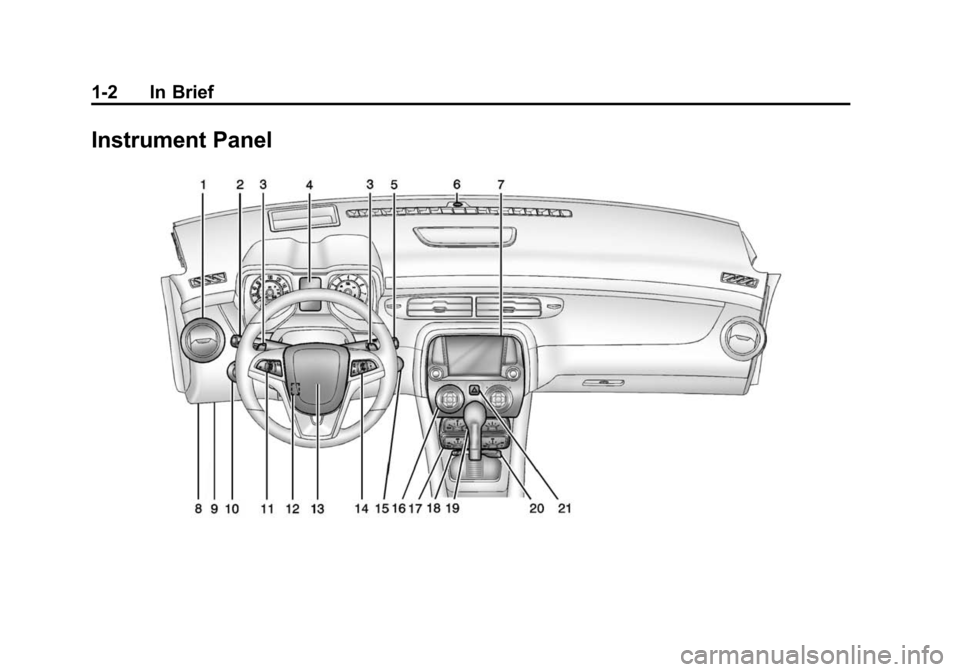
Instrument Panel
Page 9 of 432

Black plate (3,1)Chevrolet Camaro Owner Manual (GMNA-Localizing-U.S./Canada/Mexico-
6042601) - 2014 - CRC - 1/21/14
In Brief 1-3
1.Air Vents on page 8-3.
2. Turn Signal Lever. See Turn and
Lane-Change Signals on
page 6-4.
Headlamp High/Low-Beam
Changer on page 6-2.
Flash-to-Pass on page 6-2.
Driver Information Center (DIC)
Buttons (If Equipped). See
Driver Information Center (DIC)
on page 5-24.
3. Tap Shift (If Equipped). See Manual Mode on page 9-32.
4. Instrument Cluster on page 5-7.
5. Windshield Wiper/Washer on
page 5-3.
6. Light Sensor. See Automatic
Headlamp System on page 6-2.
7. Infotainment on page 7-1.
8. Hood Release (Out of View). See Hood on page 10-5.
9. Data Link Connector (DLC) (Out of View). See Malfunction
Indicator Lamp on page 5-16. 10.
Exterior Lamp Controls on
page 6-1.
Front Fog Lamps on page 6-4
(If Equipped).
Instrument Panel Illumination
Control on page 6-5.
11. Cruise Control on page 9-46.
12. Steering Wheel Adjustment on
page 5-2.
13. Horn on page 5-3.
14. Steering Wheel Controls on
page 5-2.
15. Head-Up Display (HUD) on
page 5-28 (If Equipped).
16. Climate Control Systems on
page 8-1.
17. Transmission Temperature
Gauge (Except ZL1) on
page 5-12.
Voltmeter Gauge on page 5-13.
Engine Oil Temperature Gauge
on page 5-11. Engine Oil Pressure Gauge on
page 5-10.
18. Traction Control/Electronic
Stability Control on page 9-39.
Performance Traction
Management (PTM). See
Competitive Driving Mode on
page 9-41 (ZL1 or Z/28
Models Only).
19. Shift Lever. See Automatic
Transmission on page 9-28 or
Manual Transmission on
page 9-34.
20. Power Outlets on page 5-5.
21. Hazard Warning Flashers on
page 6-4.
Page 11 of 432
Black plate (5,1)Chevrolet Camaro Owner Manual (GMNA-Localizing-U.S./Canada/Mexico-
6042601) - 2014 - CRC - 1/21/14
In Brief 1-5
Press and release7to initiate
vehicle locator.
Press and hold
7for at least
three seconds to sound the panic
alarm.
Press
7again to cancel the panic
alarm.
See Keys on page 2-1 andRemote
Keyless Entry (RKE) System
Operation on page 2-3.
Remote Vehicle Start
If equipped, this feature allows the
engine to be started from outside
the vehicle.
Starting the Vehicle
1. Aim the RKE transmitter at the vehicle.
2. Press and release
Q.
3. Immediately after completing Step 2, press and hold
/for at
least four seconds or until the
turn signal lamps flash. When the engine starts, the parking
lamps will turn on and remain on as
long as the engine is running. The
doors will be locked and the climate
control system may come on.
The engine will continue to run for
10 minutes. Repeat the steps for a
10-minute time extension. Remote
start can be extended only once.
Canceling a Remote Start
To cancel a remote start, do one of
the following:
.Aim the RKE transmitter at the
vehicle and press and hold
/
until the parking lamps turn off.
.Turn on the hazard warning
flashers.
.Turn the vehicle on and then off.
See Remote Vehicle Start on
page 2-5.
Door Locks
To lock or unlock a door:
.To lock the door from the inside,
use the door lock knob on the
top of the door.
.To unlock the door from inside,
pull the handle once. Pulling the
handle again unlatches the door.
.From the outside turn the key
clockwise or counterclockwise,
or press
QorKon the Remote
Keyless Entry (RKE) transmitter.
See Door Locks on page 2-7 or
Remote Keyless Entry (RKE)
System Operation on page 2-3.
Power Door Locks
If equipped, there is a power door
lock switch on the instrument panel
and on the front door panels.
Q: Press to lock the doors.
K: Press to unlock the doors.
See Power Door Locks on page 2-8.
Page 15 of 432
Black plate (9,1)Chevrolet Camaro Owner Manual (GMNA-Localizing-U.S./Canada/Mexico-
6042601) - 2014 - CRC - 1/21/14
In Brief 1-9
2. Press one of the four sides onthe
h(control pad) to adjust the
mirror.
3. Adjust each outside mirror so that a little of the vehicle and the
area behind it can be seen.
See Power Mirrors on page 2-14.
Interior
Adjust the inside rearview mirror for
a clear view of the area behind your
vehicle.
If equipped, push the tab forward for
daytime use and pull it for nighttime
use to avoid glare from the
headlamps from behind.
If equipped, automatic dimming
reduces the glare of the headlamps
from behind. The dimming feature
comes on when the vehicle is
started.
Cleaning the Mirror
Do not spray glass cleaner directly
on the mirror. Use a soft towel
dampened with water.
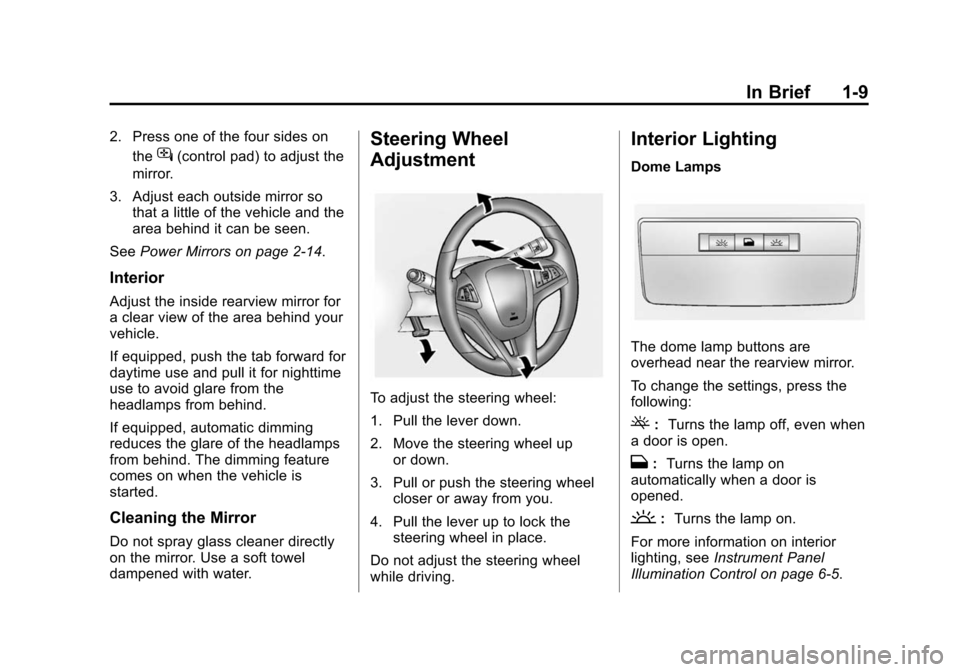
Steering Wheel
Adjustment
To adjust the steering wheel:
1. Pull the lever down.
2. Move the steering wheel up
or down.
3. Pull or push the steering wheel closer or away from you.
4. Pull the lever up to lock the steering wheel in place.
Do not adjust the steering wheel
while driving.
Interior Lighting
Dome Lamps
The dome lamp buttons are
overhead near the rearview mirror.
To change the settings, press the
following:
(: Turns the lamp off, even when
a door is open.
H: Turns the lamp on
automatically when a door is
opened.
': Turns the lamp on.
For more information on interior
lighting, see Instrument Panel
Illumination Control on page 6-5.
Page 16 of 432
Black plate (10,1)Chevrolet Camaro Owner Manual (GMNA-Localizing-U.S./Canada/Mexico-
6042601) - 2014 - CRC - 1/21/14
1-10 In Brief
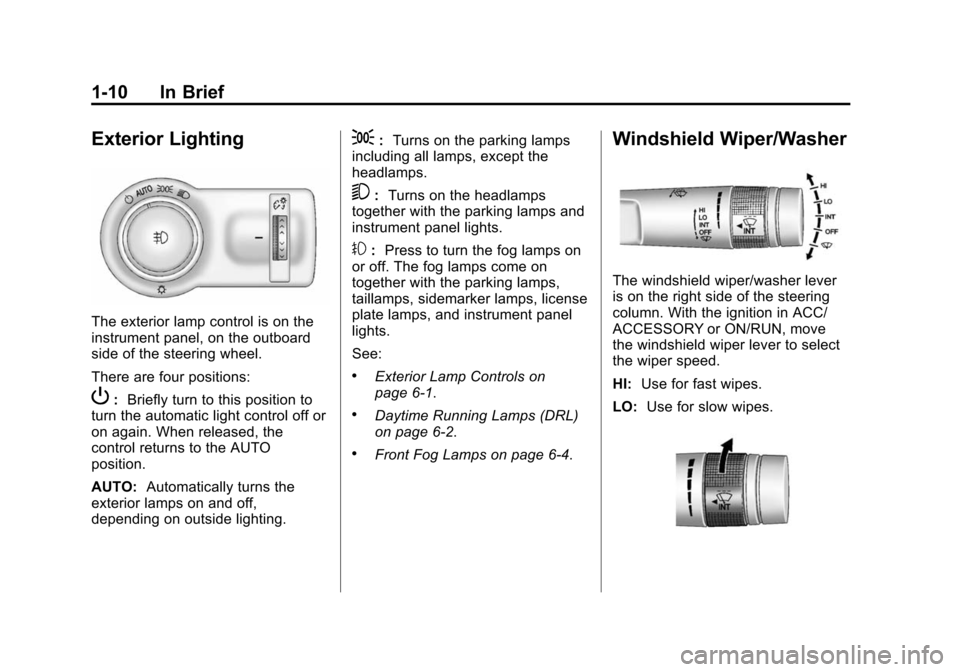
Exterior Lighting
The exterior lamp control is on the
instrument panel, on the outboard
side of the steering wheel.
There are four positions:
P:Briefly turn to this position to
turn the automatic light control off or
on again. When released, the
control returns to the AUTO
position.
AUTO: Automatically turns the
exterior lamps on and off,
depending on outside lighting.
;: Turns on the parking lamps
including all lamps, except the
headlamps.
5: Turns on the headlamps
together with the parking lamps and
instrument panel lights.
#: Press to turn the fog lamps on
or off. The fog lamps come on
together with the parking lamps,
taillamps, sidemarker lamps, license
plate lamps, and instrument panel
lights.
See:
.Exterior Lamp Controls on
page 6-1.
.Daytime Running Lamps (DRL)
on page 6-2.
.Front Fog Lamps on page 6-4.
Windshield Wiper/Washer
The windshield wiper/washer lever
is on the right side of the steering
column. With the ignition in ACC/
ACCESSORY or ON/RUN, move
the windshield wiper lever to select
the wiper speed.
HI: Use for fast wipes.
LO: Use for slow wipes.
Page 34 of 432
Black plate (8,1)Chevrolet Camaro Owner Manual (GMNA-Localizing-U.S./Canada/Mexico-
6042601) - 2014 - CRC - 1/21/14
2-8 Keys, Doors, and Windows
Power Door Locks
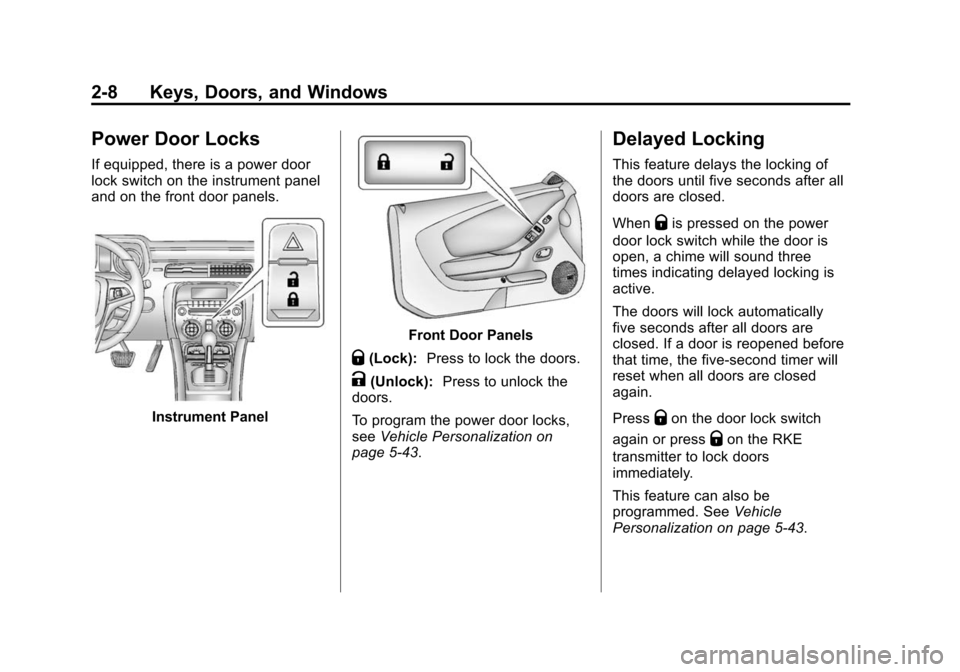
If equipped, there is a power door
lock switch on the instrument panel
and on the front door panels.
Instrument Panel
Front Door Panels
Q(Lock):Press to lock the doors.
K(Unlock): Press to unlock the
doors.
To program the power door locks,
see Vehicle Personalization on
page 5-43.
Delayed Locking
This feature delays the locking of
the doors until five seconds after all
doors are closed.
When
Qis pressed on the power
door lock switch while the door is
open, a chime will sound three
times indicating delayed locking is
active.
The doors will lock automatically
five seconds after all doors are
closed. If a door is reopened before
that time, the five-second timer will
reset when all doors are closed
again.
Press
Qon the door lock switch
again or press
Qon the RKE
transmitter to lock doors
immediately.
This feature can also be
programmed. See Vehicle
Personalization on page 5-43.
Page 35 of 432
Black plate (9,1)Chevrolet Camaro Owner Manual (GMNA-Localizing-U.S./Canada/Mexico-
6042601) - 2014 - CRC - 1/21/14
Keys, Doors, and Windows 2-9
Automatic Door Locks
When the doors are closed, the
ignition is on, and the shift lever is
moved out of P (Park) for automatic
transmissions, or the vehicle speed
is above 13 km/h (8 mph) for
manual transmissions, the doors
will lock.
To unlock the doors:
.PressKon a power door lock
switch.
.If equipped with an automatic
transmission, shift the
transmission into P (Park).
.If equipped with a manual
transmission, remove the key
from the ignition when parked.
Automatic door unlocking can be
programmed through the Driver
Information Center (DIC). See
Vehicle Personalization on
page 5-43.
Lockout Protection
When locking is requested with the
driver door open and the key in the
ignition, all the doors will lock and
then the driver door will unlock. This
can be manually overridden by
pressing and holding
Qon the
power door lock switch.
If Unlocked Door Anti-Lockout is
turned on, the vehicle is off with the
driver door open, and door locking
is requested, all the doors will lock
and only the driver door will unlock.
The Unlocked Door Anti-Lockout
feature can be turned on or off using
the vehicle personalization menus.
See Vehicle Personalization on
page 5-43.
Doors
Trunk
{Warning
Exhaust gases can enter the
vehicle if it is driven with the
liftgate, trunk/hatch open, or with
any objects that pass through the
seal between the body and the
trunk/hatch or liftgate. Engine
exhaust contains carbon
monoxide (CO) which cannot be
seen or smelled. It can cause
unconsciousness and even death.
If the vehicle must be driven with
the liftgate, or trunk/hatch open:
.Close all of the windows.
.Fully open the air outlets on
or under the instrument
panel.
(Continued)
Page 37 of 432
Black plate (11,1)Chevrolet Camaro Owner Manual (GMNA-Localizing-U.S./Canada/Mexico-
6042601) - 2014 - CRC - 1/21/14
Keys, Doors, and Windows 2-11
3. Firmly turn the key clockwise tounlatch the trunk lid.
4. Remove the key.
Emergency Trunk Release
Handle
{Caution
Do not use the emergency trunk
release handle as a tie-down or
anchor point when securing items
in the trunk as it could damage
the handle.
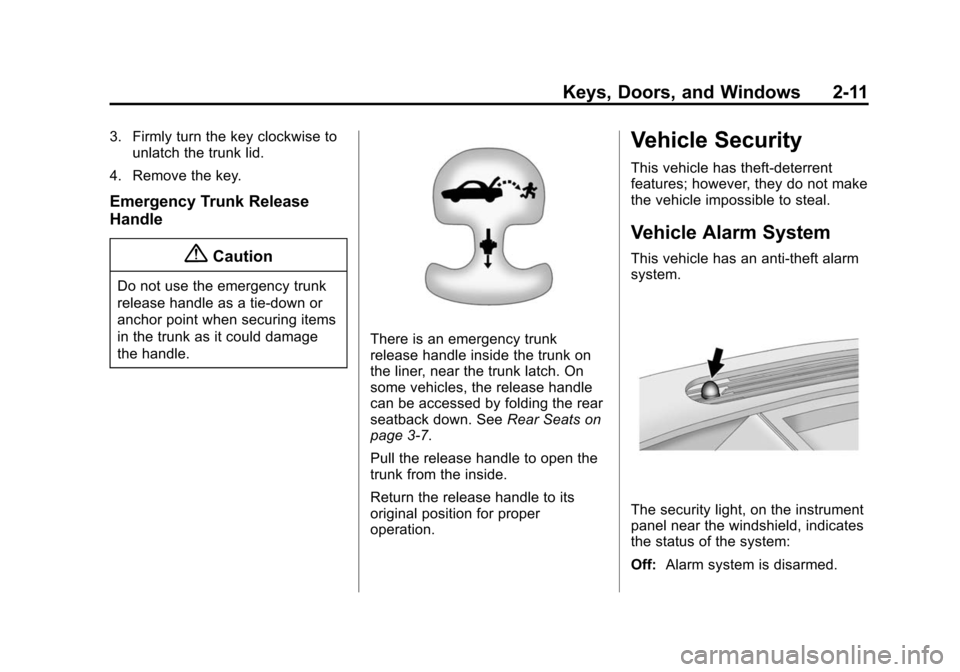
There is an emergency trunk
release handle inside the trunk on
the liner, near the trunk latch. On
some vehicles, the release handle
can be accessed by folding the rear
seatback down. See Rear Seats on
page 3-7.
Pull the release handle to open the
trunk from the inside.
Return the release handle to its
original position for proper
operation.
Vehicle Security
This vehicle has theft-deterrent
features; however, they do not make
the vehicle impossible to steal.
Vehicle Alarm System
This vehicle has an anti-theft alarm
system.
The security light, on the instrument
panel near the windshield, indicates
the status of the system:
Off: Alarm system is disarmed.