mirror CHEVROLET CAMARO 2015 5.G User Guide
[x] Cancel search | Manufacturer: CHEVROLET, Model Year: 2015, Model line: CAMARO, Model: CHEVROLET CAMARO 2015 5.GPages: 435, PDF Size: 6.28 MB
Page 249 of 435
Black plate (48,1)Chevrolet Camaro Owner Manual (GMNA-Localizing-U.S./Canada/Mexico-
7695163) - 2015 - crc - 9/4/14
9-48 Driving and Operating
Ending Cruise Control
There are four ways to end cruise
control:
.To disengage cruise control,
step lightly on the brake pedal or
clutch. The indicator light on the
instrument cluster goes out.
.Press*.
.Shift the transmission to
N (Neutral).
.To turn off cruise control,
press
1.
Erasing Speed Memory
The cruise control set speed is
erased from memory if
1is pressed
or if the vehicle is turned off.
Driver Assistance
Systems
Parking Assist
If equipped, the Rear Parking Assist
(RPA) system assists the driver with
parking and avoiding objects while
in R (Reverse). RPA operates at
speeds less than 8 km/h (5 mph).
The sensors on the rear bumper
detect objects up to 2.5 m (8 ft)
behind the vehicle, and at least
20 cm (8 in) off the ground. The
distance objects can be detected
may be less during warmer or humid
weather.
{Warning
The parking assist system does
not detect children, pedestrians,
bicyclists, animals, or objects
below the bumper or that are too
close or too far from the vehicle.
It is not available at speeds
(Continued)
Warning (Continued)
greater than 8 km/h (5 mph). To
prevent injury, death, or vehicle
damage, even with parking assist,
always check the area around the
vehicle and check all mirrors
before backing.
How the System Works
RPA comes on automatically when
the shift lever is moved into
R (Reverse). A single beep sounds
to indicate the system is working.
An obstacle detection is indicated
by beeps. The time between the
beeps becomes shorter as the
vehicle gets closer to the obstacle.
When the distance is less than
30 cm (12 in), the beeping is a
continuous beep for five seconds.
Page 258 of 435
Black plate (57,1)Chevrolet Camaro Owner Manual (GMNA-Localizing-U.S./Canada/Mexico-
7695163) - 2015 - crc - 9/4/14
Driving and Operating 9-57
Towing a trailer requires a certain
amount of experience. The
combination you are driving is
longer and not as responsive as the
vehicle itself. Get acquainted with
the handling and braking of the rig
before setting out for the open road.
Before starting, check all trailer hitch
parts and attachments, safety
chains, electrical connectors, lamps,
tires and mirrors. If the trailer has
electric brakes, start the
combination moving and then apply
the trailer brake controller by hand
to be sure the brakes work.
During the trip, check occasionally
to be sure that the load is secure
and the lamps and any trailer
brakes still work.
Towing with a Stability Control
System
When towing, the sound of the
stability control system might be
heard. The system is reacting to the
vehicle movement caused by thetrailer, which mainly occurs during
cornering. This is normal when
towing heavier trailers.
Following Distance
Stay at least twice as far behind the
vehicle ahead as you would when
driving the vehicle without a trailer.
This can help to avoid situations
that require heavy braking and
sudden turns.
Passing
More passing distance is needed
when towing a trailer. Because the
rig is longer, it is necessary to go
farther beyond the passed vehicle
before returning to the lane.
Backing Up
Hold the bottom of the steering
wheel with one hand. To move the
trailer to the left, move your hand to
the left. To move the trailer to the
right, move your hand to the right.
Always back up slowly and,
if possible, have someone
guide you.
Making Turns
{Caution
Making very sharp turns while
trailering could cause the trailer to
come in contact with the vehicle.
The vehicle could be damaged.
Avoid making very sharp turns
while trailering.
When turning with a trailer, make
wider turns than normal so the
trailer will not strike soft shoulders,
curbs, road signs, trees or other
objects. Use the turn signal well in
advance and avoid jerky or sudden
maneuvers.
Turn Signals When Towing a
Trailer
The turn signal indicators on the
instrument cluster flash whenever
signaling a turn or lane change.
Properly hooked up, the trailer
Page 313 of 435
Black plate (50,1)Chevrolet Camaro Owner Manual (GMNA-Localizing-U.S./Canada/Mexico-
7695163) - 2015 - crc - 9/4/14
10-50 Vehicle Care
J-CaseFuses Usage
6 Wiper
12 Starter
22 Brake Vacuum Pump
25 Power Windows Rear
26 Power Windows Front
27 Rear Defog
41 Cooling Fan High
43 Antilock Brake System Pump
44 Cooling Fan Low
Mini Fuses Usage 1 Air Conditioning Compressor Clutch
2 Transmission Control Module
3 Intercooler Pump Mini Fuses Usage
5 Engine Control Module Main
7 Pre-Catalytic Converter Oxygen
Sensor
8 Post-Catalytic Converter Oxygen
Sensor
9 Fuel Injectors –Even
10 Fuel Injectors –Odd
11 Cooling Fan Relay
14 Manifold Air Flow/ Chassis Control
15 Ignition
16 Run/Crank IP
17 Sensing Diagnostic Module/Ignition
18 Run/Crank Body Mini Fuses Usage
19 Transmission Control Module/
Ignition
20 Engine Control Module/Ignition
31 Outside Rearview Mirror
32 Canister Vent Solenoid
33 Body Control Module 6
34 Sunroof
35 Front Heated Seats
38 Washer Pump Front
40 Antilock Brake System Valves
46 HID Headlamp –
Left Front
47 HID Headlamp –
Right Front
50 Fog Lamps
Page 314 of 435
Black plate (51,1)Chevrolet Camaro Owner Manual (GMNA-Localizing-U.S./Canada/Mexico-
7695163) - 2015 - crc - 9/4/14
Vehicle Care 10-51
Mini Fuses Usage51 Horn
52 Spare
55 High-Beam Headlamp –Right
Front
56 High-Beam Headlamp –Left
Front
61 Heated Mirror
Mini Relays Usage K26 Powertrain
K50 Run/Crank
K55 Rear Defog
K612 Cooling Fan High
K614 Cooling Fan Control
Micro
Relays Usage
K61 Starter Micro
Relays Usage
K69 Wiper Control
K613 Cooling Fan Low
K617 Air Conditioning Compressor Clutch
K619 Wiper Speed
K627 High Intensity Discharge
Headlamps
K632 Brake Vacuum Pump
K641 Intercooler PumpInstrument Panel Fuse
Block
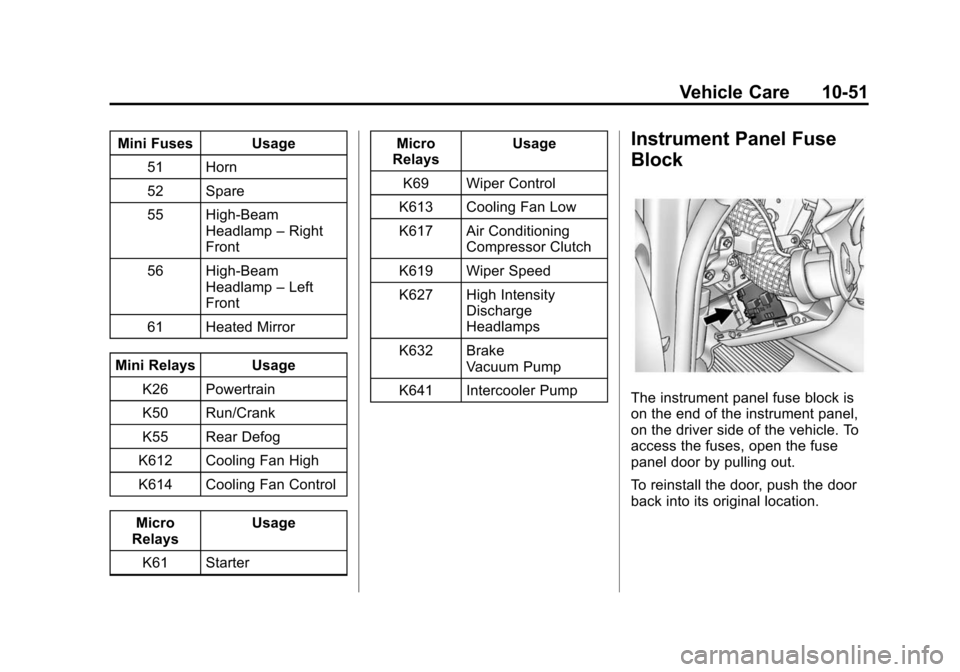
The instrument panel fuse block is
on the end of the instrument panel,
on the driver side of the vehicle. To
access the fuses, open the fuse
panel door by pulling out.
To reinstall the door, push the door
back into its original location.
Page 317 of 435
Black plate (54,1)Chevrolet Camaro Owner Manual (GMNA-Localizing-U.S./Canada/Mexico-
7695163) - 2015 - crc - 9/4/14
10-54 Vehicle Care
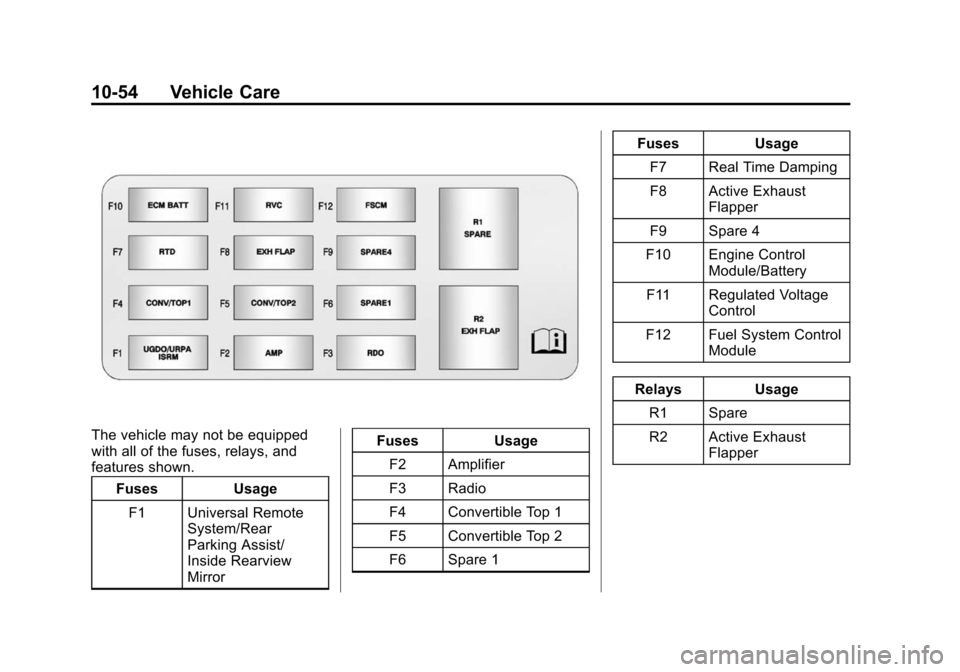
The vehicle may not be equipped
with all of the fuses, relays, and
features shown.Fuses Usage
F1 Universal Remote System/Rear
Parking Assist/
Inside Rearview
Mirror Fuses
Usage
F2 Amplifier
F3 Radio
F4 Convertible Top 1
F5 Convertible Top 2
F6 Spare 1 Fuses
Usage
F7 Real Time Damping
F8 Active Exhaust Flapper
F9 Spare 4
F10 Engine Control Module/Battery
F11 Regulated Voltage Control
F12 Fuel System Control Module
Relays Usage
R1 Spare
R2 Active Exhaust Flapper
Page 410 of 435
Black plate (1,1)Chevrolet Camaro Owner Manual (GMNA-Localizing-U.S./Canada/Mexico-
7695163) - 2015 - crc - 9/4/14
OnStar 14-1
OnStar
OnStar Overview
OnStar Overview . . . . . . . . . . . . 14-1
OnStar Services
Emergency . . . . . . . . . . . . . . . . . . 14-3
Security . . . . . . . . . . . . . . . . . . . . . . 14-3
Navigation . . . . . . . . . . . . . . . . . . . 14-3
Connections . . . . . . . . . . . . . . . . . 14-4
Vehicle Diagnostics . . . . . . . . . . 14-6
OnStar Additional Information
OnStar AdditionalInformation . . . . . . . . . . . . . . . . . 14-6
OnStar Overview
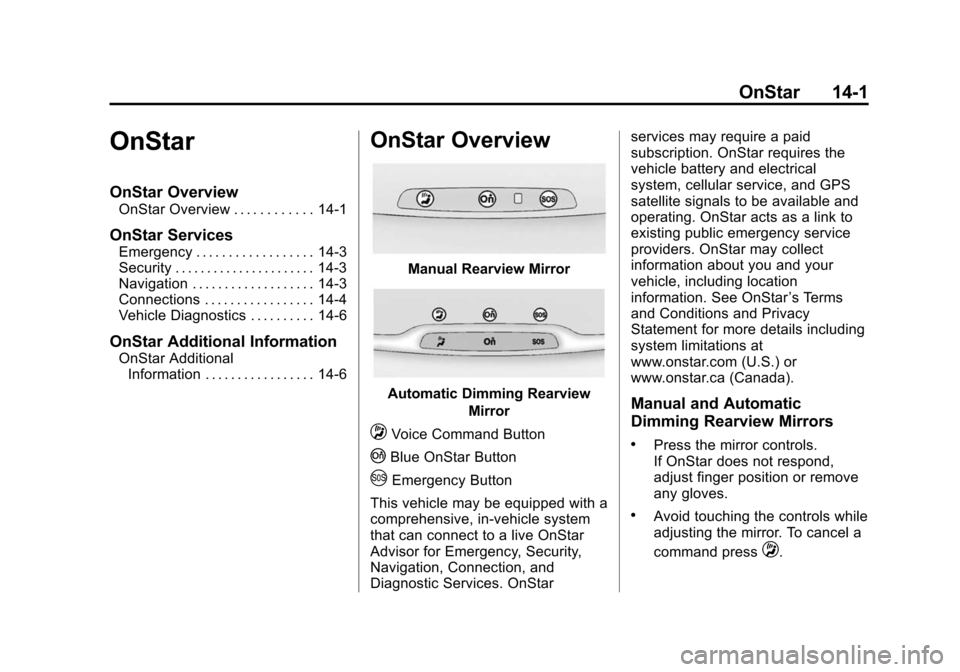
Manual Rearview Mirror
Automatic Dimming Rearview
Mirror
QVoice Command Button
|Blue OnStar Button
UEmergency Button
This vehicle may be equipped with a
comprehensive, in-vehicle system
that can connect to a live OnStar
Advisor for Emergency, Security,
Navigation, Connection, and
Diagnostic Services. OnStar services may require a paid
subscription. OnStar requires the
vehicle battery and electrical
system, cellular service, and GPS
satellite signals to be available and
operating. OnStar acts as a link to
existing public emergency service
providers. OnStar may collect
information about you and your
vehicle, including location
information. See OnStar
’s Terms
and Conditions and Privacy
Statement for more details including
system limitations at
www.onstar.com (U.S.) or
www.onstar.ca (Canada).
Manual and Automatic
Dimming Rearview Mirrors
.Press the mirror controls.
If OnStar does not respond,
adjust finger position or remove
any gloves.
.Avoid touching the controls while
adjusting the mirror. To cancel a
command press
Q.
Page 411 of 435
Black plate (2,1)Chevrolet Camaro Owner Manual (GMNA-Localizing-U.S./Canada/Mexico-
7695163) - 2015 - crc - 9/4/14
14-2 OnStar
.Clean the mirror while the
vehicle is off to avoid making
calls.
Status Indicator
The OnStar system status light is
next to the OnStar controls on the
manual rearview mirror.
If the status light is:
.Solid Green: System is on.
.Flashing Green: On a call.
.Red: Indicates a problem.
.Off: System is off. Press the blue
OnStar button twice to speak
with an OnStar Advisor.
For the automatic dimming rearview
mirror, the status is provided
through the Display on Demand
Icons.
.Three Color Icons: The system
is enabled and active.
.No Icons: The vehicle is in
motion or the OnStar
subscription is inactive
.Blinking: Button has been
pressed.
.Solid: On a call.
.~(Fault Icon On): Indicates a
problem.
OnStar Commands
Press
|or call 1-888-4-ONSTAR
(1-888-466-7827) to speak to an
Advisor.
Press
Qto:
.Make a call, end a call,
or answer an incoming call.
.Give OnStar Hands-Free Calling
voice commands.
.Give OnStar Turn-by-Turn
Navigation voice commands.
Requires a specific OnStar
subscription plan.
.Obtain the WiFi network name,
or Service Set Identifier or SSID,
and passphrase (if equipped). Press
|to connect to a live
Advisor to:
.Verify account information or
update contact information.
.Get driving directions. Requires
the available Requires a specific
OnStar subscription plan.
.Receive On-Demand
Diagnostics for a check of the
vehicle’s key operating systems.
.Receive Roadside Assistance.
.Manage WiFi Settings (if
equipped).
Press the OnStar Emergency
button
Uto get a priority
connection to an Emergency
Advisor available 24/7 to:
.Get help for an emergency.
.Be a Good Samaritan or
respond to an AMBER Alert.
.Get assistance in severe
weather or other crisis and get
evacuation routes.
Page 422 of 435

Black plate (1,1)Chevrolet Camaro Owner Manual (GMNA-Localizing-U.S./Canada/Mexico-
7695163) - 2015 - crc - 9/4/14
INDEX i-1
A
Accessories andModifications . . . . . . . . . . . . . . . . . 10-3
Accessory Power . . . . . . . . . . . . . . 9-23
Active Fuel Management
®. . . . . 9-26
Add-On Electrical Equipment . . . . . . . . . . . . . . . . . . . 9-61
Additional Information OnStar
®. . . . . . . . . . . . . . . . . . . . . . 14-6
Additional Maintenance and Care . . . . . . . . . . . . . . . . . . . . . 11-9
Air Cleaner/Filter, Engine . . . . . . . . . . . 10-21, 10-23, 10-24
Air Filter, Passenger
Compartment . . . . . . . . . . . . . . . . . 8-4
Air Vents . . . . . . . . . . . . . . . . . . . . . . . 8-3
Airbag System Check . . . . . . . . . . . . . . . . . . . . . . . . 3-28
How Does an AirbagRestrain? . . . . . . . . . . . . . . . . . . . 3-20
Passenger Sensing
System . . . . . . . . . . . . . . . . . . . . . . 3-22
What Makes an Airbag Inflate? . . . . . . . . . . . . . . . . . . . . . . 3-20 Airbag System (cont'd)
What Will You See after an
Airbag Inflates? . . . . . . . . . . . . . 3-21
When Should an Airbag
Inflate? . . . . . . . . . . . . . . . . . . . . . . 3-19
Where Are the Airbags? . . . . . . 3-17
Airbags Adding Equipment to theVehicle . . . . . . . . . . . . . . . . . . . . . . 3-27
Passenger Status Indicator . . . 5-15
Readiness Light . . . . . . . . . . . . . . 5-15
Servicing Airbag-Equipped Vehicles . . . . . . . . . . . . . . . . . . . . . 3-27
System Check . . . . . . . . . . . . . . . . 3-16
Alarm Vehicle Security . . . . . . . . . . . . . . 2-12
All-Season Tires . . . . . . . . . . . . . . 10-56
AM-FM Radio . . . . . . . . . . . . . . . . . . . 7-7
Antenna Multi-band . . . . . . . . . . . . . . . . . . . . 7-12
Antilock Brake System (ABS) . . . . . . . . . . . . . . . . 9-36
Warning Light . . . . . . . . . . . . . . . . . 5-20
Appearance Care Exterior . . . . . . . . . . . . . . . . . . . . . 10-98
Interior . . . . . . . . . . . . . . . . . . . . . 10-104 Assistance Program,
Roadside . . . . . . . . . . . . . . . . . . . . . 13-5
Audio Players . . . . . . . . . . . . . . . . . 7-12 CD . . . . . . . . . . . . . . . . . . . . . . . . . . . 7-12
Audio System Backglass Antenna . . . . . . . . . . . 7-11
Diversity Antenna System . . . . 7-12
Radio Reception . . . . . . . . . . . . . . 7-10
Theft-Deterrent Feature . . . . . . . . 7-2
Automatic Dimming Mirrors . . . . . . . . . . . . . . 2-15
Door Locks . . . . . . . . . . . . . . . . . . . . 2-9
Headlamp System . . . . . . . . . . . . . 6-3
Transmission . . . . . . . . . . . . . . . . . 9-28
Transmission Fluid . . . . . . . . . 10-20
Automatic Transmission
Manual Mode . . . . . . . . . . . . . . . . . 9-31
Shift Lock ControlFunction Check . . . . . . . . . . . 10-42
Auxiliary Devices . . . . . . . . . . . . . . . . . . . . . . . 7-14
Axle, Rear . . . . . . . . . . . . . . . . . . . . 10-41
Page 424 of 435

Black plate (3,1)Chevrolet Camaro Owner Manual (GMNA-Localizing-U.S./Canada/Mexico-
7695163) - 2015 - crc - 9/4/14
INDEX i-3
Climate Control Systems . . . . . . . 8-1Air Conditioning . . . . . . . . . . . . . . . 8-1
Heating . . . . . . . . . . . . . . . . . . . . . . . . 8-1
Clock . . . . . . . . . . . . . . . . . . . . . . . . . . . 5-4
Cluster, Instrument . . . . . . . . . . . . . 5-7
Clutch, Hydraulic . . . . . . . . . . . . . 10-21
Collision Damage Repair . . . . . . 13-8
Compact Spare Tire . . . . . . . . . . 10-94
Compartments Storage . . . . . . . . . . . . . . . . . . . . . . . . 4-1
Compass . . . . . . . . . . . . . . . . . . . . . . . 5-4
Messages . . . . . . . . . . . . . . . . . . . . 5-33
Competition Oriented Tires . . . 10-57
Competitive Driving Mode . . . . . 9-40
Compressor Kit, Tire Sealant . . . . . . . . . . . . . . . . . . . . . . 10-80
Connections OnStar
®. . . . . . . . . . . . . . . . . . . . . . 14-4
Control Traction and ElectronicStability . . . . . . . . . . . . . . . . . . . . . 9-38
Control of a Vehicle . . . . . . . . . . . . . 9-3
Convenience Net . . . . . . . . . . . . . . . 4-5
Convertible Top . . . . . . . . . . . . . . . . 2-19 Messages . . . . . . . . . . . . . . . . . . . . 5-33
Convex Mirrors . . . . . . . . . . . . . . . . 2-14 Coolant
Engine . . . . . . . . . . . . . . . . . . . . . . 10-30
Engine Temperature
Gauge . . . . . . . . . . . . . . . . . . . . . . 5-12
Cooling System . . . . 10-25, 10-27–10-29
Engine Messages . . . . . . . . . . . . 5-35
Courtesy Transportation Program . . . . . . . . . . . . . . . . . . . . . . 13-7
Cover Engine . . . . . . . . . . . . . . . . . . . . . . 10-13
Tonneau . . . . . . . . . . . . . . . . . . . . . . . 4-3
Cruise Control . . . . . . . . . . . . . . . . . 9-45
Light . . . . . . . . . . . . . . . . . . . . . . . . . . 5-23
Messages . . . . . . . . . . . . . . . . . . . . 5-34
Customer Assistance . . . . . . . . . . 13-4 Offices . . . . . . . . . . . . . . . . . . . . . . . . 13-3
Text Telephone (TTY)Users . . . . . . . . . . . . . . . . . . . . . . . 13-4
Customer Information Service PublicationsOrdering Information . . . . . . .13-11
Customer Satisfaction
Procedure . . . . . . . . . . . . . . . . . . . . 13-1
D
Damage Repair, Collision . . . . . . 13-8
Danger, Warnings, andCautions . . . . . . . . . . . . . . . . . . . . . . . . iv
Data Recorders, Event . . . . . . . 13-14
Daytime Running Lamps (DRL) . . . . . . . . . . . . . . . . . . 6-2
Defensive Driving . . . . . . . . . . . . . . . 9-3
Delayed Locking . . . . . . . . . . . . . . . . 2-9
Devices Auxiliary . . . . . . . . . . . . . . . . . . . . . . 7-14
Distracted Driving . . . . . . . . . . . . . . . 9-2
Dome Lamps . . . . . . . . . . . . . . . . . . . 6-6
Door Ajar Messages . . . . . . . . . . . . . . . 5-34
Delayed Locking . . . . . . . . . . . . . . . 2-9
Locks . . . . . . . . . . . . . . . . . . . . . . . . . . 2-7
Power Locks . . . . . . . . . . . . . . . . . . . 2-8
Drive Belt Routing, Engine . . . . . 12-5
Driver Information Center (DIC) . . . . . . . . . . . . . . . . . 5-24
Driving Characteristics andTowing Tips . . . . . . . . . . . . . . . . . 9-56
Defensive . . . . . . . . . . . . . . . . . . . . . . 9-3
Drunk . . . . . . . . . . . . . . . . . . . . . . . . . . 9-3
Page 427 of 435

Black plate (6,1)Chevrolet Camaro Owner Manual (GMNA-Localizing-U.S./Canada/Mexico-
7695163) - 2015 - crc - 9/4/14
i-6 INDEX
H
Halogen Bulbs . . . . . . . . . . . . . . . . 10-44
Hazard Warning Flashers . . . . . . . 6-4
Head Restraints . . . . . . . . . . . . . . . . 3-2
Head-up Display . . . . . . . . . . . . . . . 5-28
HeadlampsAiming . . . . . . . . . . . . . . . . . . . . . . 10-44
Automatic . . . . . . . . . . . . . . . . . . . . . . 6-3
Bulb Replacement . . . . . . . . . . 10-44
Daytime RunningLamps (DRL) . . . . . . . . . . . . . . . . . 6-2
Flash-to-Pass . . . . . . . . . . . . . . . . . . 6-2
High Intensity Discharge (HID) Lighting . . . . . . . . . . . . . 10-44
High-Beam On Light . . . . . . . . . . 5-23
High/Low Beam Changer . . . . . . 6-2
Heated Front Seats . . . . . . . . . . . . . 3-6
Heated Mirrors . . . . . . . . . . . . . . . . . 2-15
Heater Engine . . . . . . . . . . . . . . . . . . . . . . . . 9-22
Heating and Air Conditioning . . . 8-1
High-Beam On Light . . . . . . . . . . . 5-23
High-Speed Operation . . . . . . . . 10-65
Hill and Mountain Roads . . . . . . . 9-11
Hill Start Assist (HSA) . . . . . . . . . 9-38 Hood . . . . . . . . . . . . . . . . . . . . . . . . . . 10-5
Horn . . . . . . . . . . . . . . . . . . . . . . . . . . . . 5-3
How to Wear Safety Belts
Properly . . . . . . . . . . . . . . . . . . . . . . . 3-9
Hydraulic Clutch . . . . . . . . . . . . . . 10-21
I
Ignition Positions . . . . . . . . . . . . . . 9-19
Ignition Transmission Lock Check . . . . . . . . . . . . . . . . . . . . . . . 10-42
Immobilizer . . . . . . . . . . . . . . . . . . . . 2-13 Light . . . . . . . . . . . . . . . . . . . . . . . . . . 5-22
Infants and Young Children,
Restraints . . . . . . . . . . . . . . . . . . . . 3-31
Infotainment . . . . . . . . . . . . . . . . . . . . 7-1
Infotainment System . . . . . . . . . . 13-15
Instrument Cluster . . . . . . . . . . . . . . 5-7
Interior Rearview Mirrors . . . . . . . 2-15
Introduction . . . . . . . . . . . . . . . . . . . . . . . iii
J
Jump Starting . . . . . . . . . . . . . . . . . 10-95
K
Key and Lock Messages . . . . . . . 5-36
Keyless Entry Remote (RKE) System . . . . . . . . 2-3
Keys . . . . . . . . . . . . . . . . . . . . . . . . . . . . 2-1
L
Labeling, Tire Sidewall . . . . . . . . 10-58
Lamps Daytime Running (DRL) . . . . . . . 6-2
Dome . . . . . . . . . . . . . . . . . . . . . . . . . . 6-6
Exterior Controls . . . . . . . . . . . . . . . 6-1
Exterior Lighting BatterySaver . . . . . . . . . . . . . . . . . . . . . . . . 6-7
Front Fog . . . . . . . . . . . . . . . . . . . . . . 6-5
Headlamps, Front Turn Signal, and
Parking Lamps . . . . . 10-44, 10-45
License Plate . . . . . . . . . . . . . . . 10-47
Malfunction Indicator . . . . . . . . . 5-16
Messages . . . . . . . . . . . . . . . . . . . . 5-36
Lap-Shoulder Belt . . . . . . . . . . . . . 3-10
LATCH System Replacing Parts after aCrash . . . . . . . . . . . . . . . . . . . . . . . 3-42