remote start CHEVROLET CAMARO 2015 5.G User Guide
[x] Cancel search | Manufacturer: CHEVROLET, Model Year: 2015, Model line: CAMARO, Model: CHEVROLET CAMARO 2015 5.GPages: 435, PDF Size: 6.28 MB
Page 34 of 435
Black plate (7,1)Chevrolet Camaro Owner Manual (GMNA-Localizing-U.S./Canada/Mexico-
7695163) - 2015 - crc - 9/4/14
Keys, Doors, and Windows 2-7
Canceling a Remote Start
To cancel a remote start, do one of
the following:
.Aim the RKE transmitter at the
vehicle and press and hold
/
until the parking lamps turn off.
.Turn on the hazard warning
flashers.
.Turn the vehicle on and then off.
Conditions in Which Remote Start
Will Not Work
The remote start will not operate if:
.The key is in the ignition.
.The hood is not closed.
.The hazard warning flashers
are on.
.There is an emission control
system malfunction.
.The engine coolant temperature
is too high.
.The oil pressure is low.
.Two remote vehicle starts, or a
single remote start with an
extension, have already
been used.
.The vehicle is not in P (Park).
Door Locks
{Warning
Unlocked doors can be
dangerous.
.Passengers, especially
children, can easily open the
doors and fall out of a moving
vehicle. The chance of being
thrown out of the vehicle in a
crash is increased if the
doors are not locked. So, all
passengers should wear
safety belts properly and the
doors should be locked
whenever the vehicle is
driven. (Continued)
Warning (Continued)
.Young children who get into
unlocked vehicles may be
unable to get out. A child can
be overcome by extreme heat
and can suffer permanent
injuries or even death from
heat stroke. Always lock the
vehicle whenever leaving it.
.Outsiders can easily enter
through an unlocked door
when slowing or stopping the
vehicle. Lock the doors to
help prevent this from
happening.
Manual Door Locks
Lock the doors from inside the
vehicle by pressing down on the
door lock knob on the top of
the door.
The doors can also be unlocked
from the inside by pulling the door
handle. Pulling the door handle
again unlatches the door.
Page 57 of 435
Black plate (6,1)Chevrolet Camaro Owner Manual (GMNA-Localizing-U.S./Canada/Mexico-
7695163) - 2015 - crc - 9/4/14
3-6 Seats and Restraints
Heated Front Seats
{Warning
If you cannot feel temperature
change or pain to the skin, the
seat heater may cause burns. To
reduce the risk of burns, people
with such a condition should use
care when using the seat heater,
especially for long periods of
time. Do not place anything on
the seat that insulates against
heat, such as a blanket, cushion,
cover, or similar item. This may
cause the seat heater to
overheat. An overheated seat
heater may cause a burn or may
damage the seat.
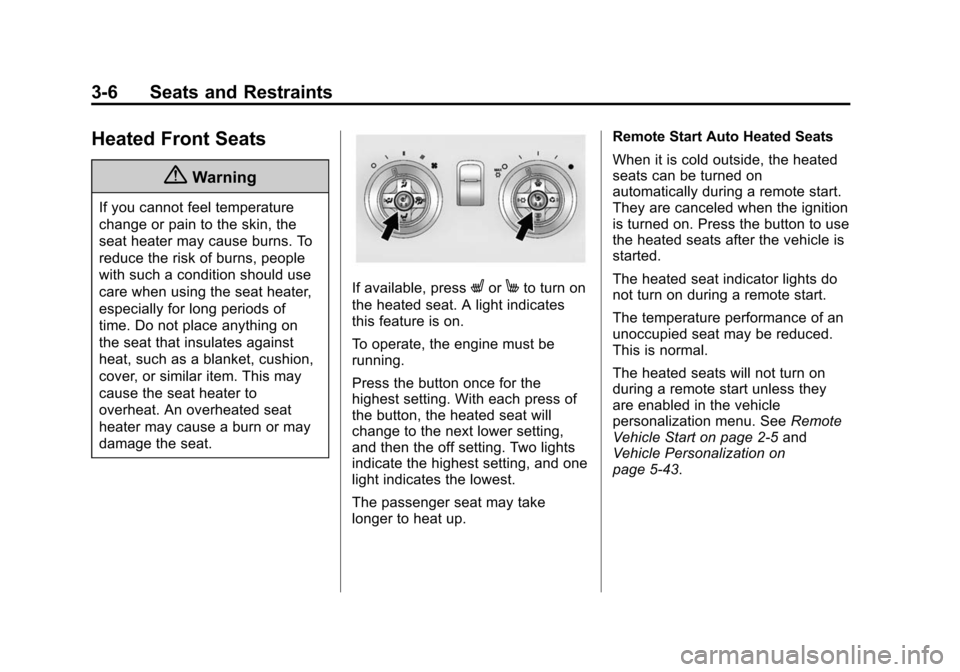
If available, pressLorMto turn on
the heated seat. A light indicates
this feature is on.
To operate, the engine must be
running.
Press the button once for the
highest setting. With each press of
the button, the heated seat will
change to the next lower setting,
and then the off setting. Two lights
indicate the highest setting, and one
light indicates the lowest.
The passenger seat may take
longer to heat up. Remote Start Auto Heated Seats
When it is cold outside, the heated
seats can be turned on
automatically during a remote start.
They are canceled when the ignition
is turned on. Press the button to use
the heated seats after the vehicle is
started.
The heated seat indicator lights do
not turn on during a remote start.
The temperature performance of an
unoccupied seat may be reduced.
This is normal.
The heated seats will not turn on
during a remote start unless they
are enabled in the vehicle
personalization menu. See
Remote
Vehicle Start on page 2-5 and
Vehicle Personalization on
page 5-43.
Page 151 of 435
Black plate (46,1)Chevrolet Camaro Owner Manual (GMNA-Localizing-U.S./Canada/Mexico-
7695163) - 2015 - crc - 9/4/14
5-46 Instruments and Controls
Select and follow the screen
prompts.
Restore Home Page Defaults
This feature will restore the Home
Page to the factory settings.
Select and follow the screen
prompts.
Rear Camera Options
For more information on Rear
Camera Options, seeRear Vision
Camera (RVC) on page 9-49.
Display Off
Press to turn the display off. The
display will return when any radio
buttons are pressed or the screen is
touched (if equipped).
Map Settings
See “Map Settings” in“Configure
Menu” in the infotainment manual.
Vehicle Settings
Select and the following may
display:
.Climate and Air Quality
.Comfort and Convenience
.Collision Detection Systems
.Lighting
.Power Door Locks
.Remote Lock/Unlock/Start
.Return to Factory Settings?
Climate and Air Quality
Select and the following may
display:
.Remote Start Auto Heated Seats
Remote Start Auto Heated Seats
When on, this feature will turn the
heated seats on when using remote
start.
Select enable or disable.
Comfort and Convenience
Select and the following may
display:
.Chime Volume
.Button Chime Chime Volume
This allows the selection of the
chime volume level to be changed.
Select Normal or High.
Button Chime
This allows this feature to be turned
on and off.
Select or deselect.
Collision Detection Systems
Select the following may display:
.Park Assist
Park Assist
This allows the Parking Assist
feature to be turned on or off.
Select On or Off.
Lighting
Select and the following may
display:
.Vehicle Locator Lights
.Exit Lighting
Page 152 of 435
Black plate (47,1)Chevrolet Camaro Owner Manual (GMNA-Localizing-U.S./Canada/Mexico-
7695163) - 2015 - crc - 9/4/14
Instruments and Controls 5-47
Vehicle Locator Lights
This allows the feature to be turned
on or off. When on, the headlamps,
parking lamps, taillamps, license
plate lamps, and back-up lamps will
illuminate at night when
Kis
pressed on the RKE transmitter.
Select to enable or disable.
Exit Lighting
This allows the selection of how
long the exterior lamps stay on
when leaving the vehicle and it is
dark outside.
Select OFF, 30 seconds, 1 minute,
or 2 minutes.
Power Door Locks
Select and depending on the radio
the following may display:
.Open Door Anti Lock Out
.Unlocked Door Anti Lock Out
.Auto Door Unlock
.Delayed Door Lock Open Door Anti Lock Out or
Unlocked Door Anti Lock Out
When on, this feature will keep the
driver door from locking until the
door is closed. If this feature is
turned on, the Delayed Door Lock
menu will not be available.
Select to enable or disable.
Auto Door Unlock
This allows selection of which doors
will automatically unlock when the
vehicle is shifted into P (Park).
Select All Doors, Driver Door,
or OFF.
Delayed Door Lock
When on, this feature will delay the
locking of the doors. See
Delayed
Locking on page 2-9.
Select to enable or disable.
Remote Lock/Unlock/Start
Select and depending on the radio
the following may display:
.Remote Unlock Feedback
.Remote Unlock Light Feedback
.Remote Lock Feedback
.Remote Door Unlock
Remote Unlock Feedback or
Remote Unlock Light Feedback
When on, the exterior lamps will
flash when unlocking the vehicle
with the RKE transmitter.
Depending on the radio select Flash
Lights or OFF, or select to enable or
disable.
Remote Lock Feedback
This allows selection of what
feedback is provided when
unlocking the vehicle with the RKE
transmitter.
Select Lights and Horn, Lights Only,
Horn Only, or OFF.
Remote Door Unlock
This allows selection of which doors
will unlock on the first press of
Kon
the RKE transmitter.
Select Driver Door or All Doors.
Page 358 of 435
Black plate (95,1)Chevrolet Camaro Owner Manual (GMNA-Localizing-U.S./Canada/Mexico-
7695163) - 2015 - crc - 9/4/14
Vehicle Care 10-95
Jump Starting
For more information about the
vehicle battery, seeBattery on
page 10-40.
If the battery has run down, try to
use another vehicle and some
jumper cables to start your vehicle.
Be sure to use the following steps to
do it safely.
{Warning
Batteries can hurt you. They can
be dangerous because:
.They contain acid that can
burn you.
.They contain gas that can
explode or ignite.
.They contain enough
electricity to burn you.
If you do not follow these steps
exactly, some or all of these
things can hurt you.
{Caution
Ignoring these steps could result
in costly damage to the vehicle
that would not be covered by the
vehicle warranty. Trying to start
the vehicle by pushing or pulling it
will not work, and it could damage
the vehicle.
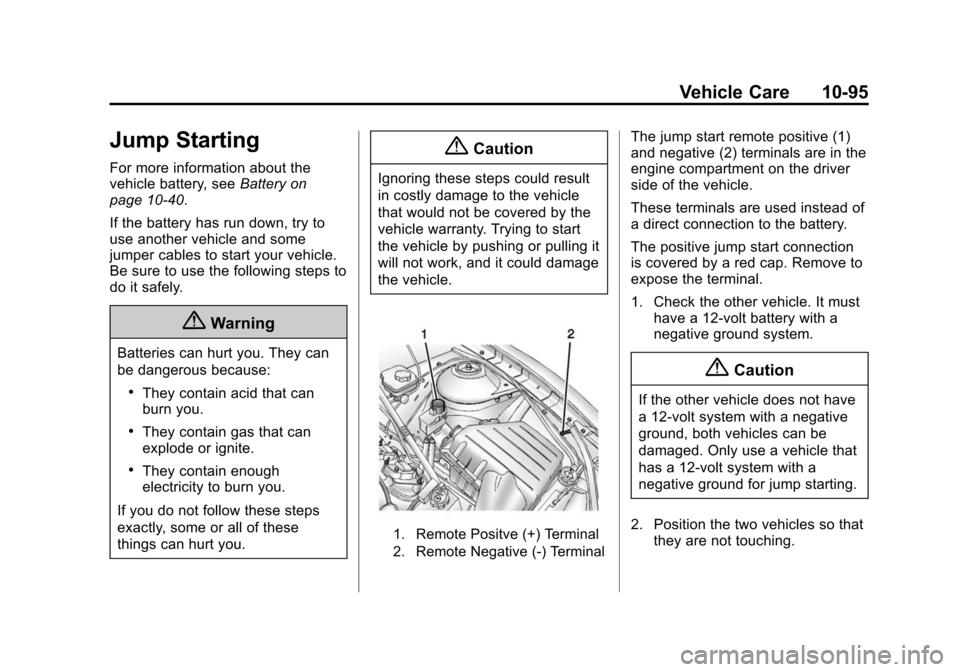
1. Remote Positve (+) Terminal
2. Remote Negative (-) Terminal
The jump start remote positive (1)
and negative (2) terminals are in the
engine compartment on the driver
side of the vehicle.
These terminals are used instead of
a direct connection to the battery.
The positive jump start connection
is covered by a red cap. Remove to
expose the terminal.
1. Check the other vehicle. It must have a 12-volt battery with a
negative ground system.
{Caution
If the other vehicle does not have
a 12-volt system with a negative
ground, both vehicles can be
damaged. Only use a vehicle that
has a 12-volt system with a
negative ground for jump starting.
2. Position the two vehicles so that they are not touching.
Page 399 of 435
Black plate (6,1)Chevrolet Camaro Owner Manual (GMNA-Localizing-U.S./Canada/Mexico-
7695163) - 2015 - crc - 9/4/14
13-6 Customer Information
.Model, year, color, and license
plate number of the vehicle.
.Odometer reading, Vehicle
Identification Number (VIN), and
delivery date of the vehicle.
.Description of the problem.
Coverage
Services are provided up to 5 years/
160 000 km (100,000 mi), whichever
comes first.
In the U.S., anyone driving the
vehicle is covered. In Canada, a
person driving the vehicle without
permission from the owner is not
covered.
Roadside Assistance is not a part of
the New Vehicle Limited Warranty.
General Motors North America and
Chevrolet reserve the right to make
any changes or discontinue the
Roadside Assistance program at
any time without notification.
General Motors North America and
Chevrolet reserve the right to limit
services or payment to an owner ordriver if they decide the claims are
made too often, or the same type of
claim is made many times.
Services Provided
.Emergency Fuel Delivery:
Delivery of enough fuel for the
vehicle to get to the nearest
service station.
.Lock-Out Service:
Service to
unlock the vehicle if you are
locked out. A remote unlock may
be available if you have OnStar.
For security reasons, the driver
must present identification
before this service is given.
.Emergency Tow from a Public
Road or Highway: Tow to the
nearest Chevrolet dealer for
warranty service, or if the vehicle
was in a crash and cannot be
driven. Assistance is not given
when the vehicle is stuck in the
sand, mud, or snow.
.Flat Tire Change: Service to
change a flat tire with the spare
tire. The spare tire, if equipped, must be in good condition and
properly inflated. It is the owner's
responsibility for the repair or
replacement of the tire if it is not
covered by the warranty.
.Battery Jump Start:
Service to
jump start a dead battery.
Services Not Included in
Roadside Assistance
.Impound towing caused by
violation of any laws.
.Legal fines.
.Mounting, dismounting,
or changing of snow tires,
chains, or other traction devices.
Service is not provided if a vehicle
is in an area that is not accessible
to the service vehicle or is not a
regularly traveled or maintained
public road, which includes ice and
winter roads. Off-road use is not
covered.
Page 405 of 435
Black plate (12,1)Chevrolet Camaro Owner Manual (GMNA-Localizing-U.S./Canada/Mexico-
7695163) - 2015 - crc - 9/4/14
13-12 Customer Information
Radio Frequency
Identification (RFID)
RFID technology is used in some
vehicles for functions such as tire
pressure monitoring and ignition
system security, as well as in
connection with conveniences such
as Remote Keyless Entry (RKE)
transmitters for remote door locking/
unlocking and starting, and
in-vehicle transmitters for garage
door openers. RFID technology in
GM vehicles does not use or record
personal information or link with any
other GM system containing
personal information.
Radio Frequency
Statement
This vehicle has systems that
operate on a radio frequency that
complies with Part 15/Part 18 of the
Federal Communications
Commission (FCC) rules and with
Industry Canada Standards
RSS-GEN/210/220/310, ICES‐001.
Operation is subject to the following
two conditions:
1. The device may not causeharmful interference.
2. The device must accept any interference received, including
interference that may cause
undesired operation of the
device.
Changes or modifications to any of
these systems by other than an
authorized service facility could void
authorization to use this equipment.
Reporting Safety
Defects
Reporting Safety Defects
to the United States
Government
If you believe that your vehicle
has a defect which could cause
a crash or could cause injury or
death, you should immediately
inform the National Highway
Traffic Safety Administration
(NHTSA) in addition to notifying
General Motors.
If NHTSA receives similar
complaints, it may open an
investigation, and if it finds that
a safety defect exists in a group
of vehicles, it may order a recall
and remedy campaign.
However, NHTSA cannot
become involved in individual
problems between you, your
dealer, or General Motors.
Page 414 of 435
Black plate (5,1)Chevrolet Camaro Owner Manual (GMNA-Localizing-U.S./Canada/Mexico-
7695163) - 2015 - crc - 9/4/14
OnStar 14-5
pressure (if the vehicle is equipped
with the tire pressure monitoring
system); or activate remote horn
and lights. Also remote start the
vehicle (if factory equipped) or
unlock the doors from anywhere
with a wireless connection (if
equipped with automatic locks).
With the required specific OnStar
service plan, a destination can be
sent to the vehicle. For OnStar
RemoteLink information and
compatibility, see www.onstar.com
(U.S.) or www.onstar.ca (Canada).
OnStar RemoteLink
®Key Fob
Services
This feature is included for five
years and allows for remote door
lock/unlock (if equipped with
automatic locks), remote start (if
factory equipped), or activation of
horn and lights from anywhere with
a wireless signal. Download the app
and start using it any time during the
trial period to get started.
OnStar Hands-Free Calling
This service allows calls to be made
and received from the vehicle.
To Make a Call
1. Press
Q. System responds:
“OnStar ready.”
2. Say “Call.”System responds:
“Call. Please say the name or
number to call.”
3. Say the entire number without pausing, including a “1”and the
area code. System responds:
“OK calling.”
Calling 911 Emergency
1. PressQ. System responds:
“OnStar Ready,” followed by
a tone.
2. Say “Call.”System responds:
“Call. Please say the name or
number to call.”
3. Say “911”without pausing.
System responds: “911.”4. Say
“Call.”System responds:
“OK, dialing 911.”
Retrieve My Number
1. PressQ. System responds:
“OnStar ready.”
2. Say “My number.” System
responds: “Your OnStar
Hands-Free Calling number is,”
then says the number.
End a Call
PressQ. System responds: “Call
ended.”
Store a Name Tag for Speed
Dialing
1. PressQ. System responds:
“OnStar ready.”
2. Say “Store.” System responds:
“Please say the number you
would like to store.”
3. Say the entire number without pausing. System responds:
“Please say the name tag.”
Page 427 of 435

Black plate (6,1)Chevrolet Camaro Owner Manual (GMNA-Localizing-U.S./Canada/Mexico-
7695163) - 2015 - crc - 9/4/14
i-6 INDEX
H
Halogen Bulbs . . . . . . . . . . . . . . . . 10-44
Hazard Warning Flashers . . . . . . . 6-4
Head Restraints . . . . . . . . . . . . . . . . 3-2
Head-up Display . . . . . . . . . . . . . . . 5-28
HeadlampsAiming . . . . . . . . . . . . . . . . . . . . . . 10-44
Automatic . . . . . . . . . . . . . . . . . . . . . . 6-3
Bulb Replacement . . . . . . . . . . 10-44
Daytime RunningLamps (DRL) . . . . . . . . . . . . . . . . . 6-2
Flash-to-Pass . . . . . . . . . . . . . . . . . . 6-2
High Intensity Discharge (HID) Lighting . . . . . . . . . . . . . 10-44
High-Beam On Light . . . . . . . . . . 5-23
High/Low Beam Changer . . . . . . 6-2
Heated Front Seats . . . . . . . . . . . . . 3-6
Heated Mirrors . . . . . . . . . . . . . . . . . 2-15
Heater Engine . . . . . . . . . . . . . . . . . . . . . . . . 9-22
Heating and Air Conditioning . . . 8-1
High-Beam On Light . . . . . . . . . . . 5-23
High-Speed Operation . . . . . . . . 10-65
Hill and Mountain Roads . . . . . . . 9-11
Hill Start Assist (HSA) . . . . . . . . . 9-38 Hood . . . . . . . . . . . . . . . . . . . . . . . . . . 10-5
Horn . . . . . . . . . . . . . . . . . . . . . . . . . . . . 5-3
How to Wear Safety Belts
Properly . . . . . . . . . . . . . . . . . . . . . . . 3-9
Hydraulic Clutch . . . . . . . . . . . . . . 10-21
I
Ignition Positions . . . . . . . . . . . . . . 9-19
Ignition Transmission Lock Check . . . . . . . . . . . . . . . . . . . . . . . 10-42
Immobilizer . . . . . . . . . . . . . . . . . . . . 2-13 Light . . . . . . . . . . . . . . . . . . . . . . . . . . 5-22
Infants and Young Children,
Restraints . . . . . . . . . . . . . . . . . . . . 3-31
Infotainment . . . . . . . . . . . . . . . . . . . . 7-1
Infotainment System . . . . . . . . . . 13-15
Instrument Cluster . . . . . . . . . . . . . . 5-7
Interior Rearview Mirrors . . . . . . . 2-15
Introduction . . . . . . . . . . . . . . . . . . . . . . . iii
J
Jump Starting . . . . . . . . . . . . . . . . . 10-95
K
Key and Lock Messages . . . . . . . 5-36
Keyless Entry Remote (RKE) System . . . . . . . . 2-3
Keys . . . . . . . . . . . . . . . . . . . . . . . . . . . . 2-1
L
Labeling, Tire Sidewall . . . . . . . . 10-58
Lamps Daytime Running (DRL) . . . . . . . 6-2
Dome . . . . . . . . . . . . . . . . . . . . . . . . . . 6-6
Exterior Controls . . . . . . . . . . . . . . . 6-1
Exterior Lighting BatterySaver . . . . . . . . . . . . . . . . . . . . . . . . 6-7
Front Fog . . . . . . . . . . . . . . . . . . . . . . 6-5
Headlamps, Front Turn Signal, and
Parking Lamps . . . . . 10-44, 10-45
License Plate . . . . . . . . . . . . . . . 10-47
Malfunction Indicator . . . . . . . . . 5-16
Messages . . . . . . . . . . . . . . . . . . . . 5-36
Lap-Shoulder Belt . . . . . . . . . . . . . 3-10
LATCH System Replacing Parts after aCrash . . . . . . . . . . . . . . . . . . . . . . . 3-42
Page 430 of 435

Black plate (9,1)Chevrolet Camaro Owner Manual (GMNA-Localizing-U.S./Canada/Mexico-
7695163) - 2015 - crc - 9/4/14
INDEX i-9
Passenger Sensing System . . . 3-22
Perchlorate MaterialsRequirements, California . . . . . 10-3
Personalization Vehicle . . . . . . . . . . . . . . . . . . . . . . . 5-43
Phone Bluetooth . . . . . . . . . 7-20, 7-21, 7-25
Power Door Locks . . . . . . . . . . . . . . . . . . . . 2-8
Mirrors . . . . . . . . . . . . . . . . . . . . . . . . 2-14
Outlets . . . . . . . . . . . . . . . . . . . . . . . . 5-5
Protection, Battery . . . . . . . . . . . . . 6-7
Retained Accessory (RAP) . . . 9-23
Seat Adjustment . . . . . . . . . . . . . . . 3-4
Steering Fluid . . . . . . . . . . . . . . . 10-36
Windows . . . . . . . . . . . . . . . . . . . . . 2-16
Pregnancy, Using Safety Belts . . . . . . . . . . . . . . . . . . . . . . . . . 3-14
Privacy Vehicle Data Recording . . . . . 13-14
Program
Courtesy Transportation . . . . . . 13-7
Proposition 65 Warning, California . . . . . . . . . . . . . . . . . . . . . 10-3R
Radio FrequencyIdentification (RFID) . . . . . . . . . 13-12
Radio Frequency Statement . . . . . . . . . . . . . . . . . . . 13-12
Radios AM-FM Radio . . . . . . . . . . . . . . . . . . 7-7
Reception . . . . . . . . . . . . . . . . . . . . 7-10
Satellite . . . . . . . . . . . . . . . . . . . . . . . . 7-9
Rear Axle . . . . . . . . . . . . . . . . . . . . . 10-41 Limited-Slip . . . . . . . . . . . . . . . . . . . 9-44
Rear Seats . . . . . . . . . . . . . . . . . . . . . 3-7
Rear Storage . . . . . . . . . . . . . . . . . . . 4-1
Rear Vision Camera (RVC) . . . . 9-49
Rearview Mirrors . . . . . . . . . . . . . . 2-15 Automatic Dimming . . . . . . . . . . . 2-15
Reclining Seatbacks . . . . . . . . . . . . 3-4
Recommended Fluids and Lubricants . . . . . . . . . . . . . . . . . . . 11-12
Records
Maintenance . . . . . . . . . . . . . . . . .11-16
Recreational Vehicle Towing . . . . . . . . . . . . . . . . . . . . . . 10-98
Reimbursement Program, GM Mobility . . . . . . . . . . . . . . . . . . 13-5 Remote Keyless Entry (RKE)
System . . . . . . . . . . . . . . . . . . . . . . . . 2-3
Remote Vehicle Start . . . . . . . . . . . 2-5
Replacement Bulbs . . . . . . . . . . . 10-47
Replacement Parts Airbags . . . . . . . . . . . . . . . . . . . . . . . 3-28
Maintenance . . . . . . . . . . . . . . . . .11-14
Replacing Airbag System . . . . . . 3-28
Replacing LATCH System Parts after a Crash . . . . . . . . . . . 3-42
Replacing Safety Belt
System Parts after a Crash . . . 3-15
Reporting Safety Defects Canadian Government . . . . . . 13-13
General Motors . . . . . . . . . . . . . 13-13
U.S. Government . . . . . . . . . . . 13-12
Restraints Where to Put . . . . . . . . . . . . . . . . . 3-35
Retained Accessory Power (RAP) . . . . . . . . . . . . . . . . . 9-23
Ride Control Systems
Limited Slip Rear Axle . . . . . . . . 9-44
Messages . . . . . . . . . . . . . . . . . . . . 5-38
Selective . . . . . . . . . . . . . . . . . . . . . 9-44
Roads
Driving, Wet . . . . . . . . . . . . . . . . . . 9-10