trunk CHEVROLET CAMARO 2015 5.G User Guide
[x] Cancel search | Manufacturer: CHEVROLET, Model Year: 2015, Model line: CAMARO, Model: CHEVROLET CAMARO 2015 5.GPages: 435, PDF Size: 6.28 MB
Page 48 of 435
Black plate (21,1)Chevrolet Camaro Owner Manual (GMNA-Localizing-U.S./Canada/Mexico-
7695163) - 2015 - crc - 9/4/14
Keys, Doors, and Windows 2-21
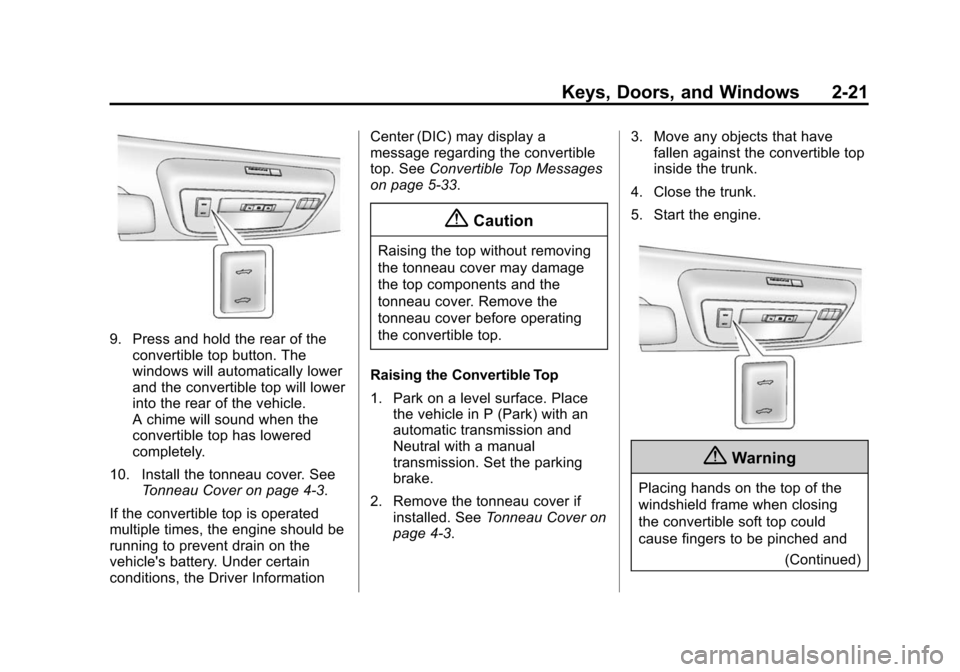
9. Press and hold the rear of theconvertible top button. The
windows will automatically lower
and the convertible top will lower
into the rear of the vehicle.
A chime will sound when the
convertible top has lowered
completely.
10. Install the tonneau cover. See Tonneau Cover on page 4-3.
If the convertible top is operated
multiple times, the engine should be
running to prevent drain on the
vehicle's battery. Under certain
conditions, the Driver Information Center (DIC) may display a
message regarding the convertible
top. See
Convertible Top Messages
on page 5-33.
{Caution
Raising the top without removing
the tonneau cover may damage
the top components and the
tonneau cover. Remove the
tonneau cover before operating
the convertible top.
Raising the Convertible Top
1. Park on a level surface. Place the vehicle in P (Park) with an
automatic transmission and
Neutral with a manual
transmission. Set the parking
brake.
2. Remove the tonneau cover if installed. See Tonneau Cover on
page 4-3. 3. Move any objects that have
fallen against the convertible top
inside the trunk.
4. Close the trunk.
5. Start the engine.
{Warning
Placing hands on the top of the
windshield frame when closing
the convertible soft top could
cause fingers to be pinched and (Continued)
Page 49 of 435
Black plate (22,1)Chevrolet Camaro Owner Manual (GMNA-Localizing-U.S./Canada/Mexico-
7695163) - 2015 - crc - 9/4/14
2-22 Keys, Doors, and Windows
Warning (Continued)
may cause injury. Keep hands
below the windshield frame when
closing the convertible top.
6. Press and hold the front of the convertible top button. The top
will raise and the windows will
lower.
7. After the convertible top is completely raised, release the
convertible top button.
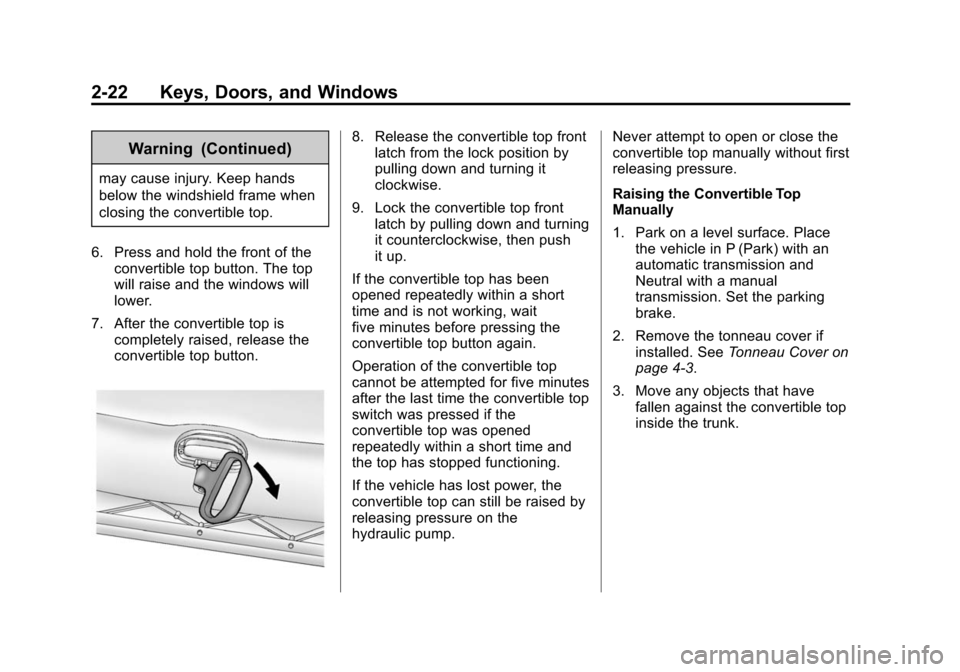
8. Release the convertible top frontlatch from the lock position by
pulling down and turning it
clockwise.
9. Lock the convertible top front latch by pulling down and turning
it counterclockwise, then push
it up.
If the convertible top has been
opened repeatedly within a short
time and is not working, wait
five minutes before pressing the
convertible top button again.
Operation of the convertible top
cannot be attempted for five minutes
after the last time the convertible top
switch was pressed if the
convertible top was opened
repeatedly within a short time and
the top has stopped functioning.
If the vehicle has lost power, the
convertible top can still be raised by
releasing pressure on the
hydraulic pump. Never attempt to open or close the
convertible top manually without first
releasing pressure.
Raising the Convertible Top
Manually
1. Park on a level surface. Place
the vehicle in P (Park) with an
automatic transmission and
Neutral with a manual
transmission. Set the parking
brake.
2. Remove the tonneau cover if installed. See Tonneau Cover on
page 4-3.
3. Move any objects that have fallen against the convertible top
inside the trunk.
Page 100 of 435
Black plate (1,1)Chevrolet Camaro Owner Manual (GMNA-Localizing-U.S./Canada/Mexico-
7695163) - 2015 - crc - 9/4/14
Storage 4-1
Storage
Storage Compartments
Storage Compartments . . . . . . . 4-1
Glove Box . . . . . . . . . . . . . . . . . . . . 4-1
Rear Storage . . . . . . . . . . . . . . . . . 4-1
Center Console Storage . . . . . . 4-2
Additional Storage Features
Tonneau Cover . . . . . . . . . . . . . . . . 4-3
Convenience Net . . . . . . . . . . . . . 4-5
Storage
Compartments
{Warning
Do not store heavy or sharp
objects in storage compartments.
In a crash, these objects may
cause the cover to open and
could result in injury.
Glove Box
Open the glove box by lifting up on
the lever. Use the key to lock and
unlock the glove box.
Rear Storage
Rear Trunk Partition
The trunk partition keeps cargo
away from the convertible top.The trunk partition attaches to the
sides of the trunk to protect the
convertible top or can be rolled up
and stored when the convertible top
is up.
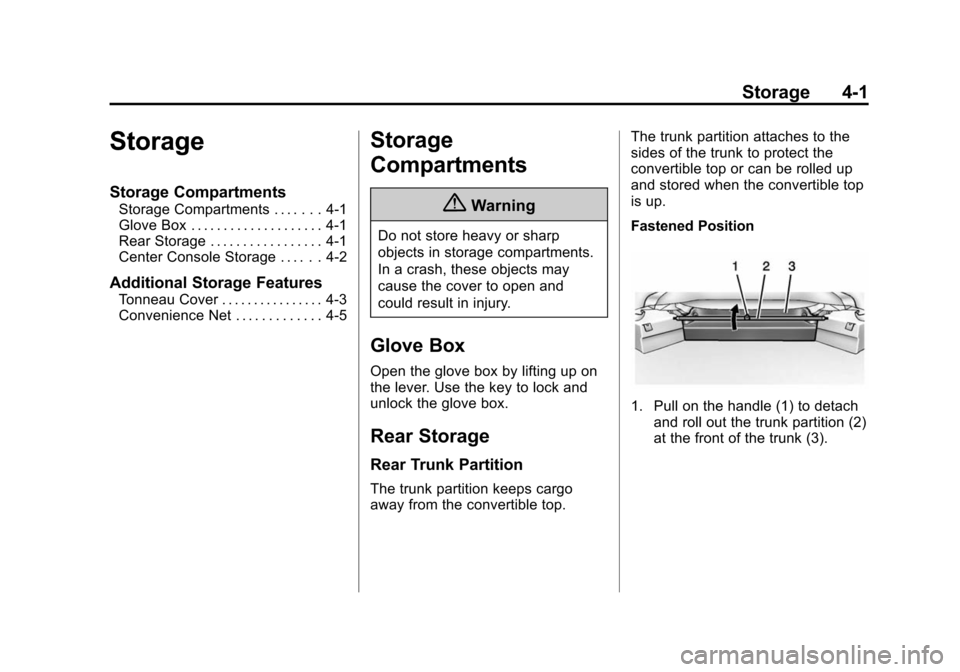
Fastened Position
1. Pull on the handle (1) to detach
and roll out the trunk partition (2)
at the front of the trunk (3).
Page 101 of 435
Black plate (2,1)Chevrolet Camaro Owner Manual (GMNA-Localizing-U.S./Canada/Mexico-
7695163) - 2015 - crc - 9/4/14
4-2 Storage
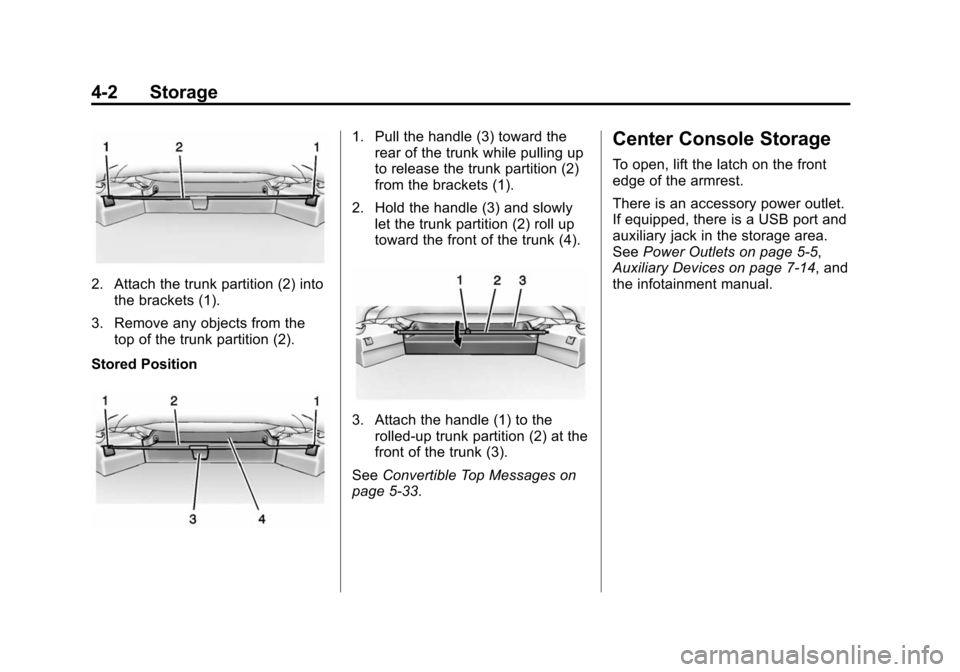
2. Attach the trunk partition (2) intothe brackets (1).
3. Remove any objects from the top of the trunk partition (2).
Stored Position
1. Pull the handle (3) toward the rear of the trunk while pulling up
to release the trunk partition (2)
from the brackets (1).
2. Hold the handle (3) and slowly let the trunk partition (2) roll up
toward the front of the trunk (4).
3. Attach the handle (1) to the
rolled-up trunk partition (2) at the
front of the trunk (3).
See Convertible Top Messages on
page 5-33.
Center Console Storage
To open, lift the latch on the front
edge of the armrest.
There is an accessory power outlet.
If equipped, there is a USB port and
auxiliary jack in the storage area.
See Power Outlets on page 5-5,
Auxiliary Devices on page 7-14, and
the infotainment manual.
Page 102 of 435
Black plate (3,1)Chevrolet Camaro Owner Manual (GMNA-Localizing-U.S./Canada/Mexico-
7695163) - 2015 - crc - 9/4/14
Storage 4-3
Additional Storage
Features
Tonneau Cover
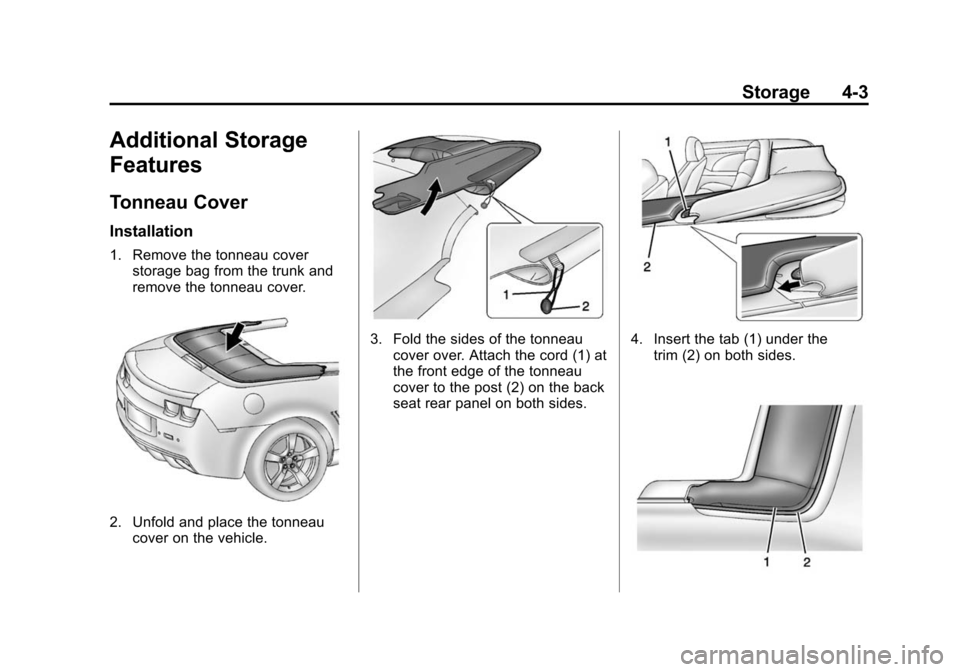
Installation
1. Remove the tonneau coverstorage bag from the trunk and
remove the tonneau cover.
2. Unfold and place the tonneaucover on the vehicle.
3. Fold the sides of the tonneaucover over. Attach the cord (1) at
the front edge of the tonneau
cover to the post (2) on the back
seat rear panel on both sides.4. Insert the tab (1) under thetrim (2) on both sides.
Page 103 of 435
Black plate (4,1)Chevrolet Camaro Owner Manual (GMNA-Localizing-U.S./Canada/Mexico-
7695163) - 2015 - crc - 9/4/14
4-4 Storage
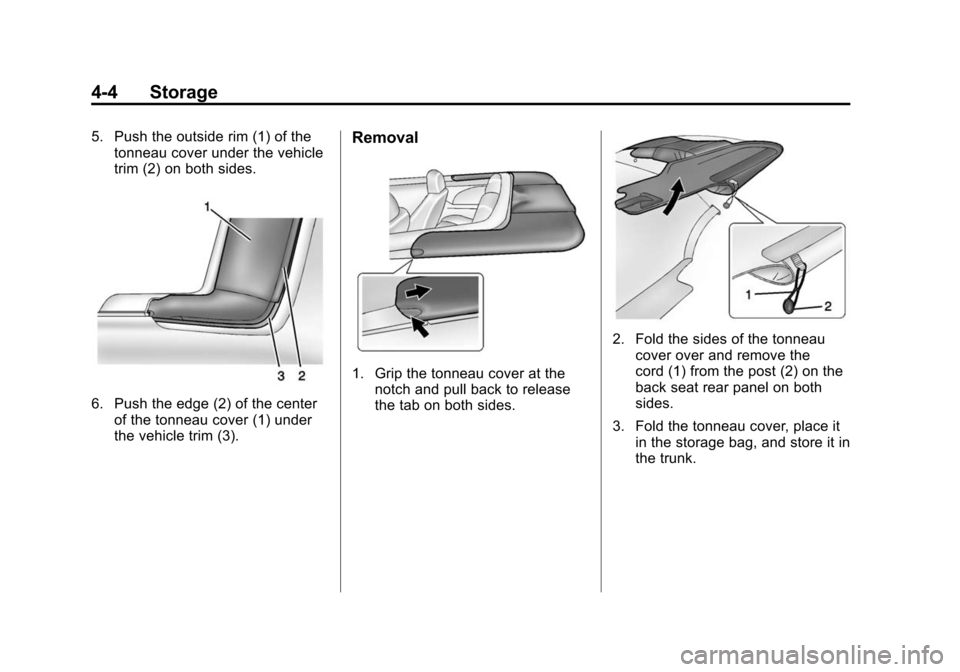
5. Push the outside rim (1) of thetonneau cover under the vehicle
trim (2) on both sides.
6. Push the edge (2) of the center
of the tonneau cover (1) under
the vehicle trim (3).
Removal
1. Grip the tonneau cover at thenotch and pull back to release
the tab on both sides.
2. Fold the sides of the tonneau
cover over and remove the
cord (1) from the post (2) on the
back seat rear panel on both
sides.
3. Fold the tonneau cover, place it in the storage bag, and store it in
the trunk.
Page 104 of 435
Black plate (5,1)Chevrolet Camaro Owner Manual (GMNA-Localizing-U.S./Canada/Mexico-
7695163) - 2015 - crc - 9/4/14
Storage 4-5
Convenience Net
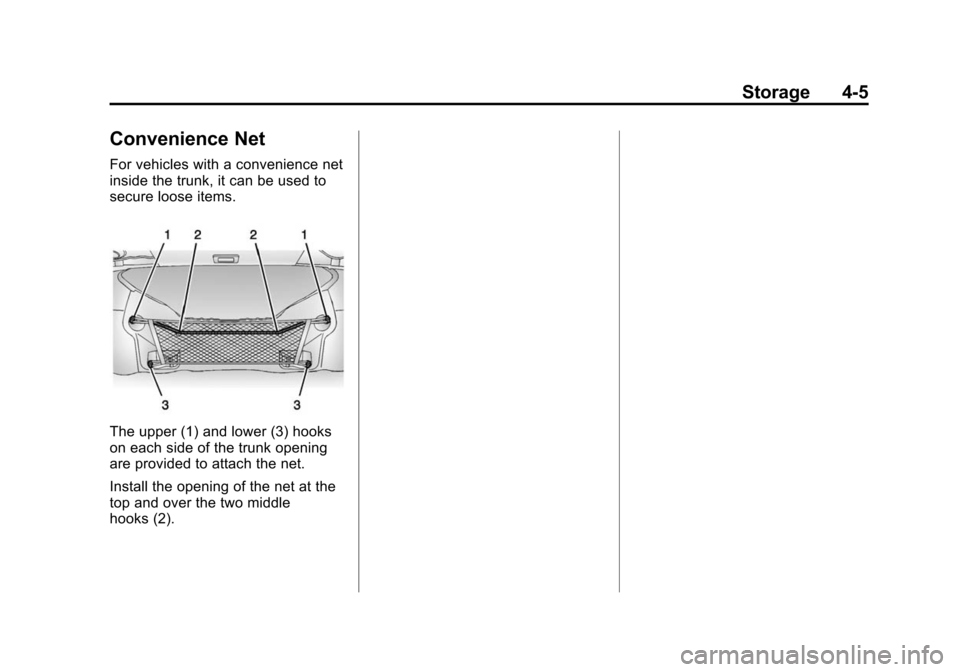
For vehicles with a convenience net
inside the trunk, it can be used to
secure loose items.
The upper (1) and lower (3) hooks
on each side of the trunk opening
are provided to attach the net.
Install the opening of the net at the
top and over the two middle
hooks (2).
Page 138 of 435
Black plate (33,1)Chevrolet Camaro Owner Manual (GMNA-Localizing-U.S./Canada/Mexico-
7695163) - 2015 - crc - 9/4/14
Instruments and Controls 5-33
Battery Voltage and
Charging Messages
BATTERY SAVER ACTIVE
This message displays when the
vehicle has detected that the battery
voltage is dropping beyond a
reasonable point. The battery saver
system starts reducing features of
the vehicle that may be noticed. At
the point that features are disabled,
this message displays. Turn off
unnecessary accessories to allow
the battery to recharge.
LOW BATTERY
This message is displayed when the
battery voltage is low. SeeBattery
on page 10-40.
SERVICE BATTERY
CHARGING SYSTEM
This message is displayed when
there is a fault in the battery
charging system. Take the vehicle to
your dealer for service.
Brake System Messages
BRAKE FLUID LOW
This message is displayed when the
brake fluid level is low; see Brake
Fluid on page 10-39.
CHANGE BRAKE PADS (Z/
28 Only)
This message is displayed when the
brake pads are worn.
HILL START ASSIST ACTIVE
This message is displayed when Hill
Start Assist (HSA) is preventing the
vehicle from rolling while driving off
on a grade. See Hill Start Assist
(HSA) on page 9-38.
RELEASE PARKING BRAKE
This message is displayed as a
reminder that the parking brake is
on. Release it before you attempt to
drive.
Compass Messages
CAL
This message is displayed when the
compass needs to be calibrated.
See Compass on page 5-4.
– –
Dashes will be displayed if the
compass needs service. See your
dealer for service.
Convertible Top
Messages
BATTERY VOLTAGE TOO LOW
–TOP DISABLED
This message displays when the
battery voltage is too low to operate
the convertible top.
EXTEND CARGO SHADE TO
OPERATE
This message displays if the rear
trunk partition is not extended and
engaged.
Page 139 of 435
Black plate (34,1)Chevrolet Camaro Owner Manual (GMNA-Localizing-U.S./Canada/Mexico-
7695163) - 2015 - crc - 9/4/14
5-34 Instruments and Controls
CLOSE TRUNK TO
OPERATE TOP
This message displays if the trunk is
open while you are trying to operate
the convertible top. Make sure the
trunk is closed before operating the
convertible top. SeeConvertible Top
on page 2-19.
COMPLETE TOP MOTION TO
OPEN TRUNK
This message displays if attempting
to open the trunk before the top has
been fully opened or closed.
REDUCE VEHICLE SPEED TO
OPERATE TOP
This message is displayed when the
vehicle is moving too fast to safely
operate the convertible top. Reduce
the vehicle speed.
TEMPERATURE TOO LOW –
TOP DISABLED
This message displays and a sound
will be heard when the power
convertible top button is pressed and the power convertible top pump
motor temperature is below 0°C (32°
F). Wait for the power convertible
top pump motor to warm up before
using the power convertible top.
TOP NOT SECURE
This message displays when the
power convertible top is closed
without the convertible top front
latch engaged or when the folding
top is not fully stowed. Press and
hold the convertible top button in the
open direction until a beep is heard
or close the top and engage the
latch.
TOP SYSTEM OVERHEATED,
PLEASE WAIT
This message displays and a sound
will be heard when the power
convertible top button is pressed
and the power convertible top pump
motor is overheated. Wait for the
power convertible top pump motor
to cool down before using the power
convertible top.
UNLATCH TOP
This message displays and a sound
will be heard if you try to lower the
convertible top without first
releasing the front latch. See
Convertible Top on page 2-19.
Cruise Control Messages
CRUISE SET TO XXX
This message displays when the
cruise control is set and shows the
speed it was set to. See
Cruise
Control on page 9-45.
Door Ajar Messages
DRIVER DOOR OPEN
This message will display when the
driver door is open. Close the door
completely.
HOOD OPEN
This message will display when the
hood is open. Close the hood
completely.
Page 140 of 435
Black plate (35,1)Chevrolet Camaro Owner Manual (GMNA-Localizing-U.S./Canada/Mexico-
7695163) - 2015 - crc - 9/4/14
Instruments and Controls 5-35
PASSENGER DOOR OPEN
This message will display when the
passenger door is open. Close the
door completely.
TRUNK OPEN
This message will display when the
trunk is open. Close the trunk
completely.
Engine Cooling System
Messages
A/C OFF DUE TO HIGH
ENGINE TEMP
This message displays when the
engine coolant becomes hotter than
the normal operating temperature.
To avoid added strain on a hot
engine, the air conditioning
compressor automatically turns off.
When the coolant temperature
returns to normal, the air
conditioning compressor turns back
on. You can continue to drive the
vehicle.If this message continues to appear,
have the system repaired by your
dealer as soon as possible to avoid
damage to the engine.
COOLANT LEVEL LOW ADD
COOLANT
This message will display if the
coolant is low. See
Engine Coolant
on page 10-30.
ENGINE OVERHEATED —
IDLE ENGINE
This message displays when the
engine coolant temperature is too
hot. Stop and allow the vehicle to
idle until it cools down.
ENGINE OVERHEATED —
STOP ENGINE
This message displays and a
continuous chime sounds if the
engine cooling system reaches
unsafe temperatures for operation.
Stop and turn off the vehicle as
soon as it is safe to do so to avoid severe damage. This message
clears when the engine has cooled
to a safe operating temperature.
Engine Oil Messages
CHANGE ENGINE OIL SOON
This message displays when the
engine oil needs to be changed.
When you change the engine oil, be
sure to reset the oil life system. See
Engine Oil Life System on
page 10-19,
Driver Information
Center (DIC) on page 5-24, Engine
Oil on page 10-15, and Maintenance
Schedule on page 11-2.
ENGINE OIL HOT, IDLE
ENGINE
This message displays when the
engine oil temperature is too hot.
Stop and allow the vehicle to idle
until it cools down.
ENGINE OIL LOW —ADD OIL
On some vehicles, this message
displays when the engine oil level
may be too low. Check the oil level