ECO mode CHEVROLET CAMARO 2016 6.G Owner's Manual
[x] Cancel search | Manufacturer: CHEVROLET, Model Year: 2016, Model line: CAMARO, Model: CHEVROLET CAMARO 2016 6.GPages: 383, PDF Size: 6.46 MB
Page 212 of 383
Chevrolet Camaro Owner Manual-Convertible (GMNA-Localizing-U.S./Cana-
da/Mexico-9702260) - 2016 - CRC - 10/28/15
Driving and Operating 211
press the clutch pedal first,
then press ENGINE
START/STOP.
If there is no RKE transmitter in
the vehicle or if there is
something causing interference
with it, the DIC will display a
message. SeeKey and Lock
Messages 0135.
2. When the engine begins cranking, let go of the button
and the engine cranks
automatically until it starts.
If the battery in the RKE
transmitter is weak, the DIC will
display a message. The vehicle
can still be driven.
See “Starting the Vehicle with a
Low Transmitter Battery” under
Remote Keyless Entry (RKE)
System Operation 027. If the
RKE transmitter battery is
dead, insert it into the rear
cupholder to enable engine
starting. See “NO REMOTE
KEY WAS DETECTED PLACE
KEY IN TRANSMITTER POCKET THEN START YOUR
VEHICLE”
underKey and Lock
Messages 0135.
3. Do not race the engine immediately after starting it.
Operate the engine and
transmission gently until the oil
warms up and lubricates all
moving parts.
4. If the engine does not start and no DIC message is displayed,
wait 15 seconds before trying
again to let the cranking motor
cool down.
If the engine does not start
after five to 10 seconds,
especially in very cold weather
(below −18 °C or 0 °F), it could
be flooded with too much
gasoline. Try pushing the
accelerator pedal all the way to
the floor while cranking for up
to 15 seconds maximum. Wait
at least 15 seconds between
each try, to allow the cranking
motor to cool down. When the
engine starts, let go of the
accelerator. If the vehicle starts
briefly but then stops again, repeat these steps. This clears
the extra gasoline from the
engine.
Caution
Cranking the engine for long
periods of time, by returning the
ignition to the START position
immediately after cranking has
ended, can overheat and damage
the cranking motor, and drain the
battery. Wait at least 15 seconds
between each try, to let the
cranking motor cool down.
Stopping the Engine
If the vehicle has an automatic
transmission, move the shift lever to
P (Park) and press and hold
ENGINE START/STOP on the
instrument panel, until the engine
shuts off. If the shift lever is not in
P (Park), the engine shuts off and
the vehicle goes into the accessory
mode. The DIC displays SHIFT TO
PARK. Once the shift lever is moved
to P (Park), the vehicle turns off.
Page 213 of 383
Chevrolet Camaro Owner Manual-Convertible (GMNA-Localizing-U.S./Cana-
da/Mexico-9702260) - 2016 - CRC - 10/28/15
212 Driving and Operating
If the vehicle has a manual
transmission, move the shift lever to
R (Reverse) and set the parking
brake after turning off the engine by
pressing and holding ENGINE
START/STOP.
If the RKE transmitter is not
detected inside the vehicle when it
is turned to OFF, the DIC displays a
message. SeeKey and Lock
Messages 0135.
Engine Heater
The engine coolant heater,
if equipped, can help in cold
weather conditions at or
below −18 °C (0 °F) for easier
starting and better fuel economy
during engine warm-up. Plug in the
coolant heater at least four hours
before starting the vehicle. An
internal thermostat in the plug end
of the cord will prevent engine
coolant heater operation at
temperatures above −18 °C (0 °F).
Using the Engine Coolant
Heater
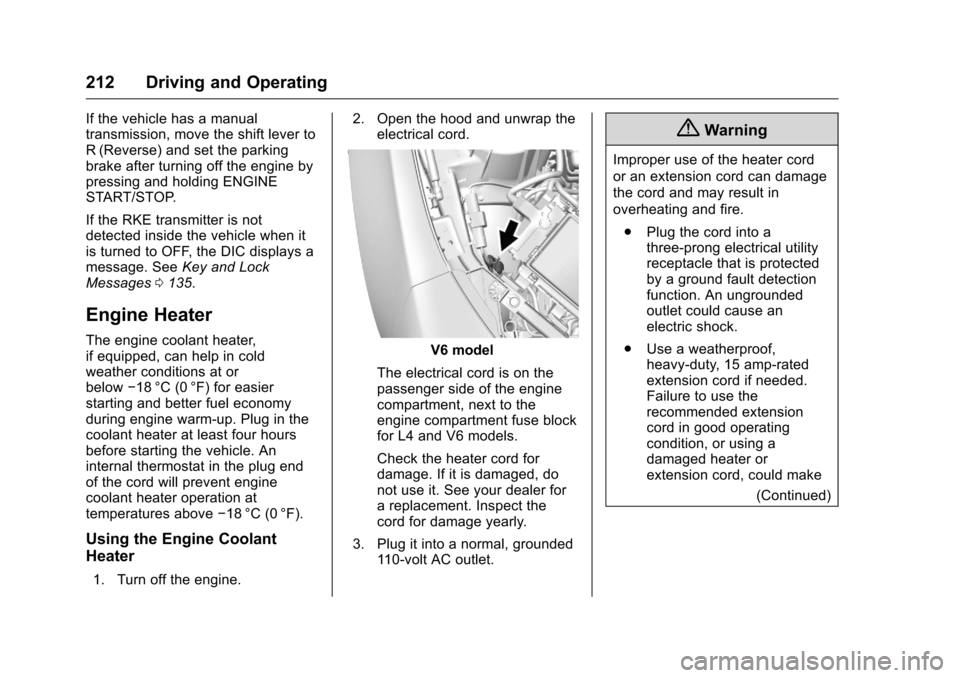
1. Turn off the engine. 2. Open the hood and unwrap the
electrical cord.
V6 model
The electrical cord is on the
passenger side of the engine
compartment, next to the
engine compartment fuse block
for L4 and V6 models.
Check the heater cord for
damage. If it is damaged, do
not use it. See your dealer for
a replacement. Inspect the
cord for damage yearly.
3. Plug it into a normal, grounded 110-volt AC outlet.
{Warning
Improper use of the heater cord
or an extension cord can damage
the cord and may result in
overheating and fire.
. Plug the cord into a
three-prong electrical utility
receptacle that is protected
by a ground fault detection
function. An ungrounded
outlet could cause an
electric shock.
. Use a weatherproof,
heavy-duty, 15 amp-rated
extension cord if needed.
Failure to use the
recommended extension
cord in good operating
condition, or using a
damaged heater or
extension cord, could make
(Continued)
Page 216 of 383
Chevrolet Camaro Owner Manual-Convertible (GMNA-Localizing-U.S./Cana-
da/Mexico-9702260) - 2016 - CRC - 10/28/15
Driving and Operating 215
Parking
If the vehicle has a manual
transmission, before getting out of
the vehicle, move the shift lever into
R (Reverse), and firmly apply the
parking brake. Once the shift lever
has been placed into R (Reverse)
with the clutch pedal pressed in,
turn the ignition to OFF, and release
the clutch.
Parking over Things
That Burn
{Warning
Things that can burn could touch
hot exhaust parts under the
vehicle and ignite. Do not park
over papers, leaves, dry grass,
or other things that can burn.
Active Fuel Management®
Vehicles with V6 and V8 engines
and an automatic transmission have
Active Fuel Management. This
system allows the engine to operate
on either all or four of its cylinders,
depending on the driving conditions.
When less power is required, such
as cruising at a constant vehicle
speed, the system will operate in
four cylinder mode, allowing the
vehicle to achieve better fuel
economy. When greater power
demands are required, such as
accelerating from a stop, passing,
or merging onto a freeway, the
system will maintain full-cylinder
operation.
Engine Exhaust
{Warning
Engine exhaust contains carbon
monoxide (CO), which cannot be
seen or smelled. Exposure to CO
can cause unconsciousness and
even death.
Exhaust may enter the vehicle if:. The vehicle idles in areas
with poor ventilation
(parking garages, tunnels,
deep snow that may block
underbody airflow or tail
pipes).
. The exhaust smells or
sounds strange or different.
. The exhaust system leaks
due to corrosion or damage.
. The vehicle exhaust system
has been modified,
damaged, or improperly
repaired.
(Continued)
Page 220 of 383
Chevrolet Camaro Owner Manual-Convertible (GMNA-Localizing-U.S./Cana-
da/Mexico-9702260) - 2016 - CRC - 10/28/15
Driving and Operating 219
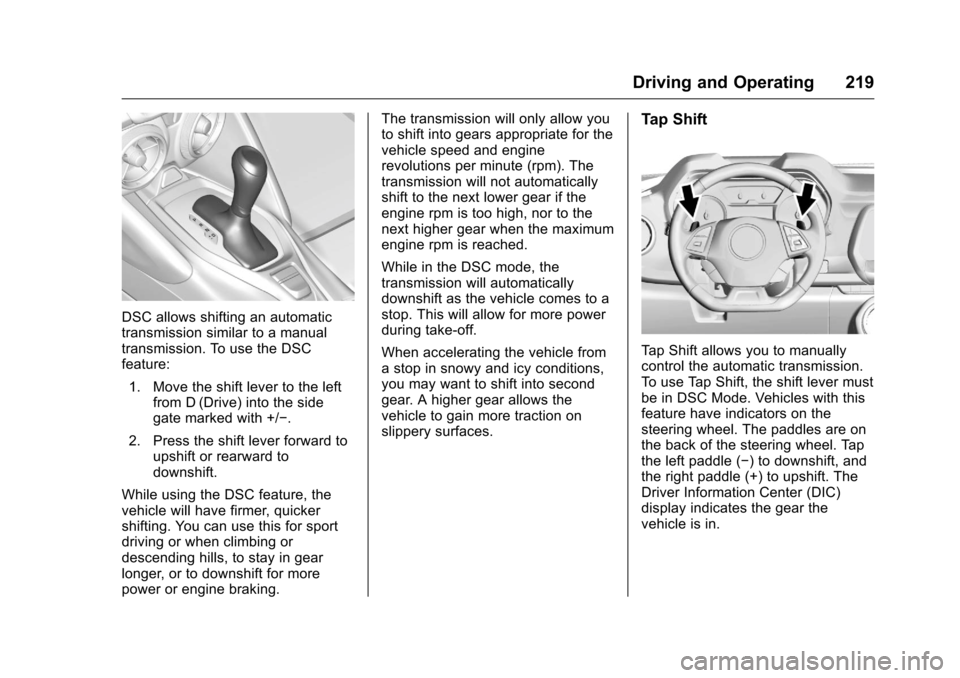
DSC allows shifting an automatic
transmission similar to a manual
transmission. To use the DSC
feature:1. Move the shift lever to the left from D (Drive) into the side
gate marked with +/−.
2. Press the shift lever forward to upshift or rearward to
downshift.
While using the DSC feature, the
vehicle will have firmer, quicker
shifting. You can use this for sport
driving or when climbing or
descending hills, to stay in gear
longer, or to downshift for more
power or engine braking. The transmission will only allow you
to shift into gears appropriate for the
vehicle speed and engine
revolutions per minute (rpm). The
transmission will not automatically
shift to the next lower gear if the
engine rpm is too high, nor to the
next higher gear when the maximum
engine rpm is reached.
While in the DSC mode, the
transmission will automatically
downshift as the vehicle comes to a
stop. This will allow for more power
during take-off.
When accelerating the vehicle from
a stop in snowy and icy conditions,
you may want to shift into second
gear. A higher gear allows the
vehicle to gain more traction on
slippery surfaces.
Tap Shift
Tap Shift allows you to manually
control the automatic transmission.
To use Tap Shift, the shift lever must
be in DSC Mode. Vehicles with this
feature have indicators on the
steering wheel. The paddles are on
the back of the steering wheel. Tap
the left paddle (−) to downshift, and
the right paddle (+) to upshift. The
Driver Information Center (DIC)
display indicates the gear the
vehicle is in.
Page 221 of 383
Chevrolet Camaro Owner Manual-Convertible (GMNA-Localizing-U.S./Cana-
da/Mexico-9702260) - 2016 - CRC - 10/28/15
220 Driving and Operating
Holding the left paddle for an
extended time will downshift the
transmission to the lowest
available gear.
While in M (Manual Mode), the
transmission will prevent shifting to
a lower gear if the engine speed is
too high. If the tap down−(Minus)
paddle is held while the vehicle
slows down, the M in the DIC will
flash, and the downshift will be
allowed when vehicle speed is low
enough. Continuing to hold the tap
down −(Minus) paddle will not
cause the transmission to continue
downshifting. Each downshift must
be requested separately by
releasing and reapplying the tap
down −(Minus) paddle.
Vehicles equipped with a Head-Up
Display (HUD) may also have shift
timing lights across the top of the
display. The rows of lights get closer
together as the shift point gets
closer. Shift the transmission before
the lights come together in the
display. Shift immediately if the
lights are flashing.
See
Head-Up Display (HUD) 0127.
Temporary Tap Shift Mode allows
brief entry into Tap Shift Mode while
in D (Drive). Tapping either the
upshift or downshift control will
place the transmission in Tap Shift
Mode. Exit Tap Shift Mode by
holding the upshift control for
two seconds. The system will return
to automatic shifting after
seven seconds of driving at a
steady speed, or when the vehicle
comes to a stop.
This may be used for sport driving
or when climbing or descending
hills, to stay in gear longer, or to
downshift for more power or engine
braking. The transmission will only
allow you to shift into gears
appropriate for the vehicle speed
and engine revolutions per minute
(rpm). The transmission will not
automatically shift to the next higher gear if the engine rpm is too high.
If shifting is prevented for any
reason, the message SHIFT
DENIED will appear in the DIC,
indicating that the transmission has
not shifted gears. While in the Tap
Shift Mode, the transmission will not
automatically downshift on hard
acceleration.
When accelerating the vehicle from
a stop in snowy and icy conditions,
you may want to shift into
2 (Second) gear. A higher gear ratio
allows you to gain more traction on
slippery surfaces.
Page 222 of 383
Chevrolet Camaro Owner Manual-Convertible (GMNA-Localizing-U.S./Cana-
da/Mexico-9702260) - 2016 - CRC - 10/28/15
Driving and Operating 221
Manual Transmission
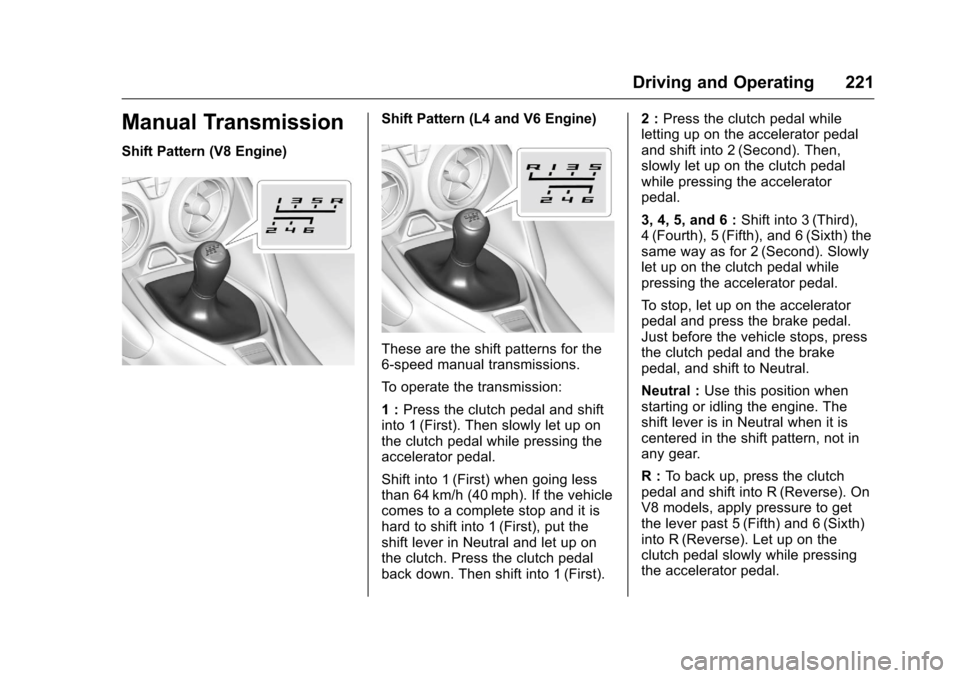
Shift Pattern (V8 Engine)
Shift Pattern (L4 and V6 Engine)
These are the shift patterns for the
6-speed manual transmissions.
To operate the transmission:
1 :Press the clutch pedal and shift
into 1 (First). Then slowly let up on
the clutch pedal while pressing the
accelerator pedal.
Shift into 1 (First) when going less
than 64 km/h (40 mph). If the vehicle
comes to a complete stop and it is
hard to shift into 1 (First), put the
shift lever in Neutral and let up on
the clutch. Press the clutch pedal
back down. Then shift into 1 (First). 2 :
Press the clutch pedal while
letting up on the accelerator pedal
and shift into 2 (Second). Then,
slowly let up on the clutch pedal
while pressing the accelerator
pedal.
3, 4, 5, and 6 : Shift into 3 (Third),
4 (Fourth), 5 (Fifth), and 6 (Sixth) the
same way as for 2 (Second). Slowly
let up on the clutch pedal while
pressing the accelerator pedal.
To stop, let up on the accelerator
pedal and press the brake pedal.
Just before the vehicle stops, press
the clutch pedal and the brake
pedal, and shift to Neutral.
Neutral : Use this position when
starting or idling the engine. The
shift lever is in Neutral when it is
centered in the shift pattern, not in
any gear.
R : To back up, press the clutch
pedal and shift into R (Reverse). On
V8 models, apply pressure to get
the lever past 5 (Fifth) and 6 (Sixth)
into R (Reverse). Let up on the
clutch pedal slowly while pressing
the accelerator pedal.
Page 231 of 383
Chevrolet Camaro Owner Manual-Convertible (GMNA-Localizing-U.S./Cana-
da/Mexico-9702260) - 2016 - CRC - 10/28/15
230 Driving and Operating
Competitive Driving Mode can be
accessed through this mode by
pressing the button with this
gicon
twice.
Snow/Ice Mode
Use when more traction is needed
during slippery conditions. The
vehicle will upshift normally when
the vehicle is moving. The
acceleration will adjust to help
provide a smoother launch. The
transmission will also shift differently
to assist in maintaining traction.
When selected, the Snow/Ice Mode
indicator will display in the DIC.
This feature is not intended for use
when the vehicle is stuck in sand,
mud, ice, snow, or gravel. If the
vehicle becomes stuck, see If the
Vehicle Is Stuck 0204.
Track Mode (V8 Only)
Use when maximum vehicle
handling is desired.
When selected, the Track Mode
indicator will display in the DIC.
When in Track Mode, the automatic
transmission and steering will
function similar to Sport Mode. The
accelerator pedal is adjusted to give
maximum control during the highest
level of spirited driving. The
Magnetic Ride Control will be set to
the optimum level for vehicle
responsiveness. If the vehicle is
equipped with Active Exhaust, the
exhaust valves will open.
Competitive Driving Mode can be
accessed through this mode by
pressing the button with this
gicon
twice.
Page 298 of 383
Chevrolet Camaro Owner Manual-Convertible (GMNA-Localizing-U.S./Cana-
da/Mexico-9702260) - 2016 - CRC - 10/28/15
Vehicle Care 297
.One or more TPMS sensors are
missing or damaged. The
malfunction light and the DIC
message should go off when the
TPMS sensors are installed and
the sensor matching process is
performed successfully. See
your dealer for service.
. Replacement tires or wheels do
not match the original equipment
tires or wheels. Tires and wheels
other than those recommended
could prevent the TPMS from
functioning properly. See Buying
New Tires 0300.
. Operating electronic devices or
being near facilities using radio
wave frequencies similar to the
TPMS could cause the TPMS
sensors to malfunction.
If the TPMS is not functioning
properly it cannot detect or signal a
low tire condition. See your dealer
for service if the TPMS malfunction
light and DIC message comes on
and stays on.TPMS Sensor Matching
Process
Each TPMS sensor has a unique
identification code. The identification
code needs to be matched to a new
tire/wheel position after rotating the
vehicle’s tires or replacing one or
more of the TPMS sensors. The
TPMS sensor matching process
should also be performed after
replacing a spare tire with a road
tire containing the TPMS sensor.
The malfunction light and the DIC
message should go off at the next
ignition cycle. The sensors are
matched to the tire/wheel positions,
using a TPMS relearn tool, in the
following order: driver side front tire,
passenger side front tire, passenger
side rear tire, and driver side rear.
See your dealer for service or to
purchase a relearn tool. A TPMS
relearn tool can also be purchased.
See Tire Pressure Monitor
Sensor Activation Tool at
www.gmtoolsandequipment.com or
call 1-800-GM TOOLS
(1-800-468-6657). There are two minutes to match the
first tire/wheel position, and
five minutes overall to match all four
tire/wheel positions. If it takes
longer, the matching process stops
and must be restarted.
The TPMS sensor matching
process is:
1. Set the parking brake.
2. Place the vehicle power mode in ON/RUN/START. See
Ignition Positions 0208.
3. Make sure the Tire Pressure info display option is turned on.
The info displays on the DIC
can be turned on and off
through the Settings menu.
See Driver Information Center
(DIC) 0124.
4. Use the five-way DIC control on the right side of the steering
wheel to scroll to the Tire
Pressure screen under the DIC
info page. See Driver
Information Center (DIC) 0124.
5. Press and hold SEL in the center of the five-way DIC
control.
Page 299 of 383
Chevrolet Camaro Owner Manual-Convertible (GMNA-Localizing-U.S./Cana-
da/Mexico-9702260) - 2016 - CRC - 10/28/15
298 Vehicle Care
The horn sounds twice to
signal the receiver is in relearn
mode and the TIRE
LEARNING ACTIVE message
displays on the DIC screen.
6. Start with the driver side front tire.
7. Place the relearn tool against the tire sidewall, near the valve
stem. Then press the button to
activate the TPMS sensor.
A horn chirp confirms that the
sensor identification code has
been matched to this tire and
wheel position.
8. Proceed to the passenger side front tire, and repeat Step 7.
9. Proceed to the passenger side rear tire, and repeat Step 7.
10. Proceed to the driver side rear tire, and repeat Step 7. The
horn sounds two times to
indicate the sensor
identification code has been
matched to the driver side rear
tire, and the TPMS sensor
matching process is no longer active. The TIRE LEARNING
ACTIVE message on the DIC
display screen goes off.
11. Shut the ignition off.
12. Set all four tires to the recommended air pressure
level as indicated on the Tire
and Loading Information label.
Tire Inspection
We recommend that the tires,
including the spare tire, if the
vehicle has one, be inspected
for signs of wear or damage at
least once a month.
Replace the tire if:
.The indicators at three or
more places around the tire
can be seen.
.There is cord or fabric
showing through the tire's
rubber.
.The tread or sidewall is
cracked, cut, or snagged
deep enough to show cord
or fabric.
.The tire has a bump, bulge,
or split.
.The tire has a puncture, cut,
or other damage that cannot
be repaired well because of
the size or location of the
damage.
Tire Rotation
If the vehicle has non-directional
tires, they should be rotated
every 12 000 km/7,500 mi. See
Maintenance Schedule 0329.
Tires are rotated to achieve a
uniform wear for all tires. The
first rotation is the most
important.
Anytime unusual wear is
noticed, rotate the tires as soon
as possible, check for proper tire
inflation pressure, and check for
damaged tires or wheels. If the
unusual wear continues after the
rotation, check the wheel
Page 318 of 383
Chevrolet Camaro Owner Manual-Convertible (GMNA-Localizing-U.S./Cana-
da/Mexico-9702260) - 2016 - CRC - 10/28/15
Vehicle Care 317
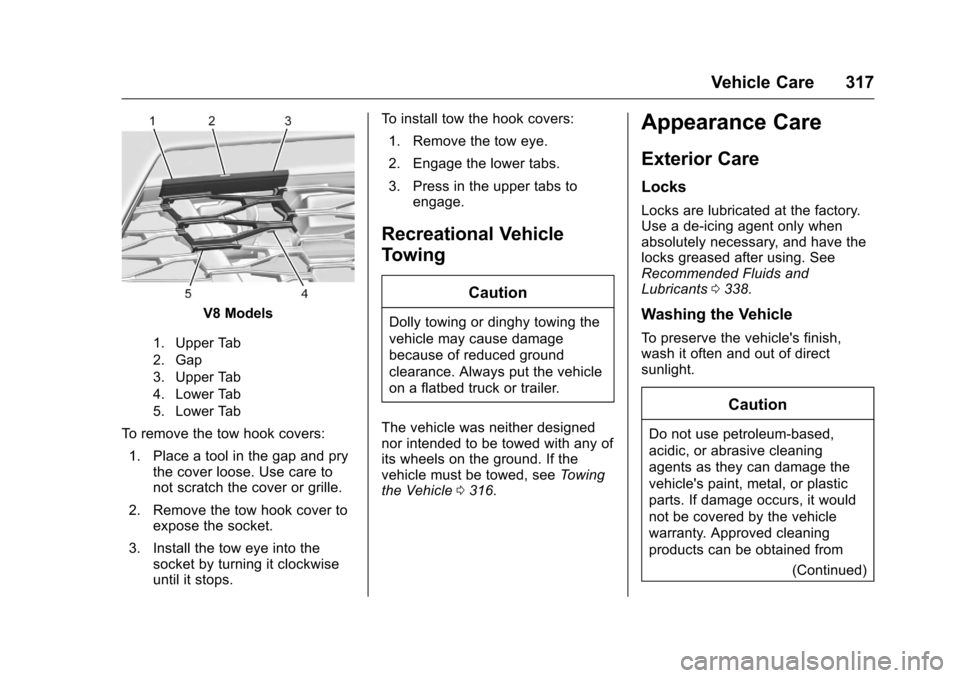
V8 Models
1. Upper Tab
2. Gap
3. Upper Tab
4. Lower Tab
5. Lower Tab
To remove the tow hook covers:1. Place a tool in the gap and pry the cover loose. Use care to
not scratch the cover or grille.
2. Remove the tow hook cover to expose the socket.
3. Install the tow eye into the socket by turning it clockwise
until it stops. To install tow the hook covers:
1. Remove the tow eye.
2. Engage the lower tabs.
3. Press in the upper tabs to engage.
Recreational Vehicle
Towing
Caution
Dolly towing or dinghy towing the
vehicle may cause damage
because of reduced ground
clearance. Always put the vehicle
on a flatbed truck or trailer.
The vehicle was neither designed
nor intended to be towed with any of
its wheels on the ground. If the
vehicle must be towed, see Towing
the Vehicle 0316.
Appearance Care
Exterior Care
Locks
Locks are lubricated at the factory.
Use a de-icing agent only when
absolutely necessary, and have the
locks greased after using. See
Recommended Fluids and
Lubricants 0338.
Washing the Vehicle
To preserve the vehicle's finish,
wash it often and out of direct
sunlight.
Caution
Do not use petroleum-based,
acidic, or abrasive cleaning
agents as they can damage the
vehicle's paint, metal, or plastic
parts. If damage occurs, it would
not be covered by the vehicle
warranty. Approved cleaning
products can be obtained from
(Continued)