remote control CHEVROLET CAMARO 2016 6.G Owner's Manual
[x] Cancel search | Manufacturer: CHEVROLET, Model Year: 2016, Model line: CAMARO, Model: CHEVROLET CAMARO 2016 6.GPages: 383, PDF Size: 6.46 MB
Page 153 of 383
Chevrolet Camaro Owner Manual-Convertible (GMNA-Localizing-U.S./Cana-
da/Mexico-9702260) - 2016 - CRC - 10/28/15
152 Instruments and Controls
enough for the Universal Remote
system to pick up the signal during
programming.
If the programming did not work,
replace Step 2 under“Programming
the Universal Remote System” with
the following:
Press and hold the Universal
Remote system button while
pressing and releasing the
hand-held transmitter button every
two seconds until the signal has
been successfully accepted by the
Universal Remote system. The
Universal Remote system indicator
light will flash slowly at first and then
rapidly. Proceed with Step 3 under
“Programming the Universal Remote
System” to complete.Universal Remote System
Operation
Using the Universal Remote
System
Press and hold the appropriate
Universal Remote system button for
at least one-half second. The
indicator light will come on while the
signal is being transmitted.
Erasing Universal Remote
System Buttons
Erase all programmed buttons when
vehicle ownership is terminated.
To erase:
1. Press and hold the two outside buttons until the indicator light
begins to flash. This should
take about 10 seconds.
2. Release both buttons.
Reprogramming a Single
Universal Remote System
Button
To reprogram any of the system
buttons: 1. Press and hold any one of the buttons. Do not release the
button.
2. The indicator light will begin to flash after 20 seconds. Without
releasing the button, proceed
with Step 1 under
“Programming the Universal
Remote System.”
Page 158 of 383
Chevrolet Camaro Owner Manual-Convertible (GMNA-Localizing-U.S./Cana-
da/Mexico-9702260) - 2016 - CRC - 10/28/15
Lighting 157
Reading Lamps
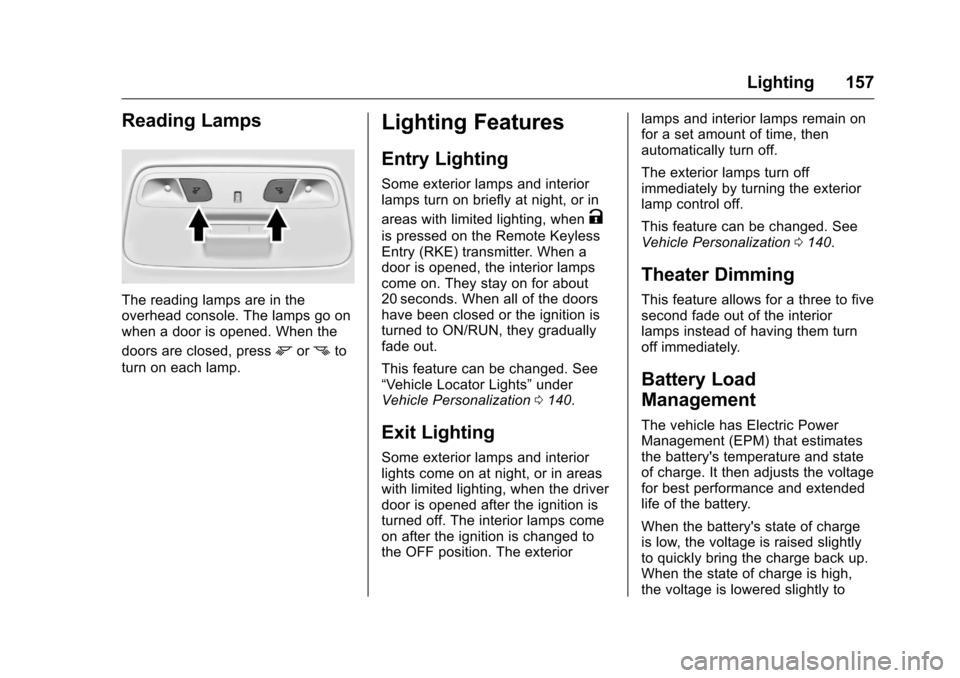
The reading lamps are in the
overhead console. The lamps go on
when a door is opened. When the
doors are closed, press
mornto
turn on each lamp.
Lighting Features
Entry Lighting
Some exterior lamps and interior
lamps turn on briefly at night, or in
areas with limited lighting, when
K
is pressed on the Remote Keyless
Entry (RKE) transmitter. When a
door is opened, the interior lamps
come on. They stay on for about
20 seconds. When all of the doors
have been closed or the ignition is
turned to ON/RUN, they gradually
fade out.
This feature can be changed. See
“Vehicle Locator Lights” under
Vehicle Personalization 0140.
Exit Lighting
Some exterior lamps and interior
lights come on at night, or in areas
with limited lighting, when the driver
door is opened after the ignition is
turned off. The interior lamps come
on after the ignition is changed to
the OFF position. The exterior lamps and interior lamps remain on
for a set amount of time, then
automatically turn off.
The exterior lamps turn off
immediately by turning the exterior
lamp control off.
This feature can be changed. See
Vehicle Personalization
0140.
Theater Dimming
This feature allows for a three to five
second fade out of the interior
lamps instead of having them turn
off immediately.
Battery Load
Management
The vehicle has Electric Power
Management (EPM) that estimates
the battery's temperature and state
of charge. It then adjusts the voltage
for best performance and extended
life of the battery.
When the battery's state of charge
is low, the voltage is raised slightly
to quickly bring the charge back up.
When the state of charge is high,
the voltage is lowered slightly to
Page 189 of 383
Chevrolet Camaro Owner Manual-Convertible (GMNA-Localizing-U.S./Cana-
da/Mexico-9702260) - 2016 - CRC - 10/28/15
188 Climate Controls
Recirculation is not available in the
defrost or defog modes.
To improve fuel efficiency and to
cool the vehicle faster, recirculation
may be automatically selected in
warm weather. The recirculation
light will not come on. Press
@to
select recirculation; press it again to
select outside air.
Rear Window Defogger
1: Press to turn the rear window
defogger on or off. An indicator light
on the button comes on to show that
the rear window defogger is on. The
defogger turns off if the ignition is
turned to ACC/ACCESSORY
or OFF. Do not drive the vehicle until all
windows are clear.
Caution
Do not use a razor blade or sharp
object to clear the inside rear
window. Do not adhere anything
to the defogger grid lines in the
rear glass. These actions may
damage the rear defogger.
Repairs would not be covered by
the vehicle warranty.
Remote Start Climate Control
Operation, If Equipped :
The
climate control system may run
when the vehicle is started remotely.
See Remote Vehicle Start 033. The
system uses the driver ’s previous
settings to heat or cool the inside of
the vehicle. The rear defog may
come on during remote start based
on cold ambient conditions. The
rear defog indicator light does not
come on during a remote start.
When enabled, the front heated
seats, if equipped, will turn on
automatically if it is cold outside.
See Vehicle Personalization 0140.
The heated seat indicator lights do
not come on during a remote start.
Page 192 of 383
Chevrolet Camaro Owner Manual-Convertible (GMNA-Localizing-U.S./Cana-
da/Mexico-9702260) - 2016 - CRC - 10/28/15
Climate Controls 191
Do not drive the vehicle until all
windows are clear.
Caution
Do not use a razor blade or sharp
object to clear the inside rear
window. Do not adhere anything
to the defogger grid lines in the
rear glass. These actions may
damage the rear defogger.
Repairs would not be covered by
the vehicle warranty.
LorM(If Equipped) :PressLorMto heat the driver or
passenger seat.
Press
{orC, if equipped, to
ventilate the driver or passenger
seat. See Heated and Ventilated
Front Seats 057. Remote Start Climate Control
Operation, If Equipped :
The
climate control system may run
when the vehicle is started remotely.
See Remote Vehicle Start 033. The
system uses the driver ’s previous
settings to heat or cool the inside of
the vehicle. The rear defog may
come on during remote start based
on cold ambient conditions. The
rear defog indicator light does not
come on during a remote start.
When enabled, the front heated
seats, if equipped, will turn on
automatically if it is cold outside.
See Vehicle Personalization 0140.
The heated seat indicator lights do
not come on during a remote start.
Air Vents
Use the air outlets in the center and
on the side of the instrument panel
to direct the airflow.
Operation Tips
. In defog or defrost mode, warm
air flows from side air outlets. To
improve side window defogging
or defrosting, direct side air
outlets toward the side windows.
. Clear away any ice, snow,
or leaves from air inlets at the
base of the windshield that could
block the flow of air into the
vehicle.
. Keep the path under the front
seats clear of objects to help
circulate the air inside of the
vehicle more effectively.
. Use of non-GM approved hood
deflectors can adversely affect
the performance of the system.
Check with your dealer before
adding equipment to the outside
of the vehicle.
Page 285 of 383
Chevrolet Camaro Owner Manual-Convertible (GMNA-Localizing-U.S./Cana-
da/Mexico-9702260) - 2016 - CRC - 10/28/15
284 Vehicle Care
FusesUsage
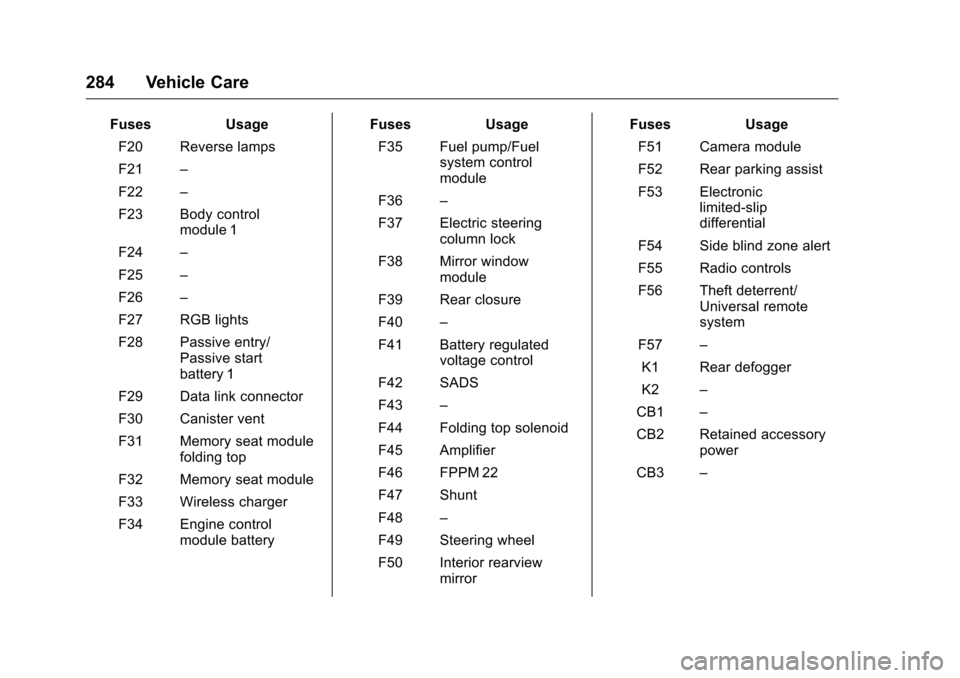
F20 Reverse lamps
F21 –
F22 –
F23 Body control module 1
F24 –
F25 –
F26 –
F27 RGB lights
F28 Passive entry/ Passive start
battery 1
F29 Data link connector
F30 Canister vent
F31 Memory seat module folding top
F32 Memory seat module
F33 Wireless charger
F34 Engine control module battery Fuses
Usage
F35 Fuel pump/Fuel system control
module
F36 –
F37 Electric steering column lock
F38 Mirror window module
F39 Rear closure
F40 –
F41 Battery regulated voltage control
F42 SADS
F43 –
F44 Folding top solenoid
F45 Amplifier
F46 FPPM 22
F47 Shunt
F48 –
F49 Steering wheel
F50 Interior rearview mirror Fuses
Usage
F51 Camera module
F52 Rear parking assist
F53 Electronic limited-slip
differential
F54 Side blind zone alert
F55 Radio controls
F56 Theft deterrent/ Universal remote
system
F57 –
K1 Rear defogger
K2 –
CB1 –
CB2 Retained accessory power
CB3 –
Page 352 of 383
Chevrolet Camaro Owner Manual-Convertible (GMNA-Localizing-U.S./Cana-
da/Mexico-9702260) - 2016 - CRC - 10/28/15
Customer Information 351
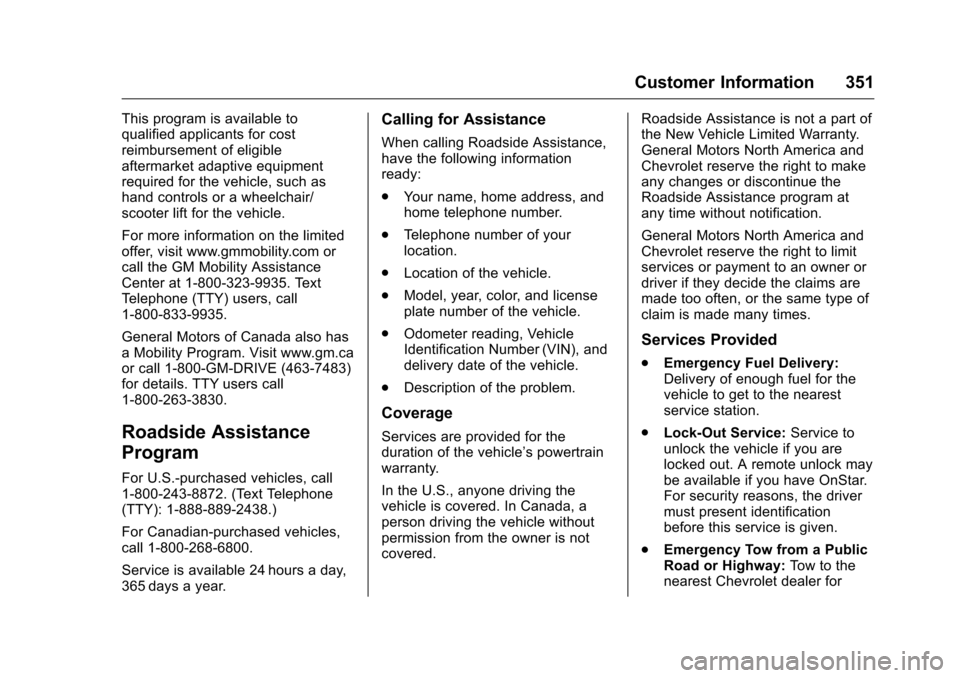
This program is available to
qualified applicants for cost
reimbursement of eligible
aftermarket adaptive equipment
required for the vehicle, such as
hand controls or a wheelchair/
scooter lift for the vehicle.
For more information on the limited
offer, visit www.gmmobility.com or
call the GM Mobility Assistance
Center at 1-800-323-9935. Text
Telephone (TTY) users, call
1-800-833-9935.
General Motors of Canada also has
a Mobility Program. Visit www.gm.ca
or call 1-800-GM-DRIVE (463-7483)
for details. TTY users call
1-800-263-3830.
Roadside Assistance
Program
For U.S.-purchased vehicles, call
1-800-243-8872. (Text Telephone
(TTY): 1-888-889-2438.)
For Canadian-purchased vehicles,
call 1-800-268-6800.
Service is available 24 hours a day,
365 days a year.
Calling for Assistance
When calling Roadside Assistance,
have the following information
ready:
.Your name, home address, and
home telephone number.
. Telephone number of your
location.
. Location of the vehicle.
. Model, year, color, and license
plate number of the vehicle.
. Odometer reading, Vehicle
Identification Number (VIN), and
delivery date of the vehicle.
. Description of the problem.
Coverage
Services are provided for the
duration of the vehicle’s powertrain
warranty.
In the U.S., anyone driving the
vehicle is covered. In Canada, a
person driving the vehicle without
permission from the owner is not
covered. Roadside Assistance is not a part of
the New Vehicle Limited Warranty.
General Motors North America and
Chevrolet reserve the right to make
any changes or discontinue the
Roadside Assistance program at
any time without notification.
General Motors North America and
Chevrolet reserve the right to limit
services or payment to an owner or
driver if they decide the claims are
made too often, or the same type of
claim is made many times.
Services Provided
.
Emergency Fuel Delivery:
Delivery of enough fuel for the
vehicle to get to the nearest
service station.
. Lock-Out Service: Service to
unlock the vehicle if you are
locked out. A remote unlock may
be available if you have OnStar.
For security reasons, the driver
must present identification
before this service is given.
. Emergency Tow from a Public
Road or Highway: Tow to the
nearest Chevrolet dealer for
Page 365 of 383
Chevrolet Camaro Owner Manual-Convertible (GMNA-Localizing-U.S./Cana-
da/Mexico-9702260) - 2016 - CRC - 10/28/15
364 OnStar
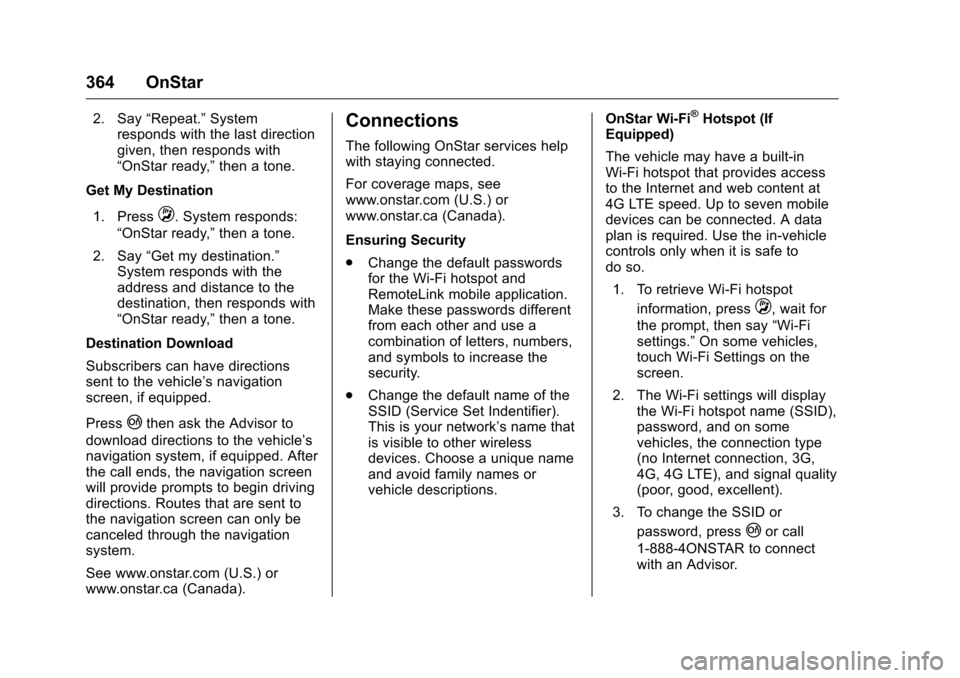
2. Say“Repeat.” System
responds with the last direction
given, then responds with
“OnStar ready,” then a tone.
Get My Destination
1. Press
Q. System responds:
“OnStar ready,” then a tone.
2. Say “Get my destination.”
System responds with the
address and distance to the
destination, then responds with
“OnStar ready,” then a tone.
Destination Download
Subscribers can have directions
sent to the vehicle’ s navigation
screen, if equipped.
Press
|then ask the Advisor to
download directions to the vehicle’s
navigation system, if equipped. After
the call ends, the navigation screen
will provide prompts to begin driving
directions. Routes that are sent to
the navigation screen can only be
canceled through the navigation
system.
See www.onstar.com (U.S.) or
www.onstar.ca (Canada).
Connections
The following OnStar services help
with staying connected.
For coverage maps, see
www.onstar.com (U.S.) or
www.onstar.ca (Canada).
Ensuring Security
. Change the default passwords
for the Wi-Fi hotspot and
RemoteLink mobile application.
Make these passwords different
from each other and use a
combination of letters, numbers,
and symbols to increase the
security.
. Change the default name of the
SSID (Service Set Indentifier).
This is your network’s name that
is visible to other wireless
devices. Choose a unique name
and avoid family names or
vehicle descriptions. OnStar Wi-Fi
®Hotspot (If
Equipped)
The vehicle may have a built-in
Wi-Fi hotspot that provides access
to the Internet and web content at
4G LTE speed. Up to seven mobile
devices can be connected. A data
plan is required. Use the in-vehicle
controls only when it is safe to
do so.
1. To retrieve Wi-Fi hotspot information, press
Q, wait for
the prompt, then say “Wi-Fi
settings.” On some vehicles,
touch Wi-Fi Settings on the
screen.
2. The Wi-Fi settings will display the Wi-Fi hotspot name (SSID),
password, and on some
vehicles, the connection type
(no Internet connection, 3G,
4G, 4G LTE), and signal quality
(poor, good, excellent).
3. To change the SSID or password, press
|or call
1-888-4ONSTAR to connect
with an Advisor.
Page 378 of 383
Chevrolet Camaro Owner Manual-Convertible (GMNA-Localizing-U.S./Cana-
da/Mexico-9702260) - 2016 - CRC - 10/28/15
Index 377
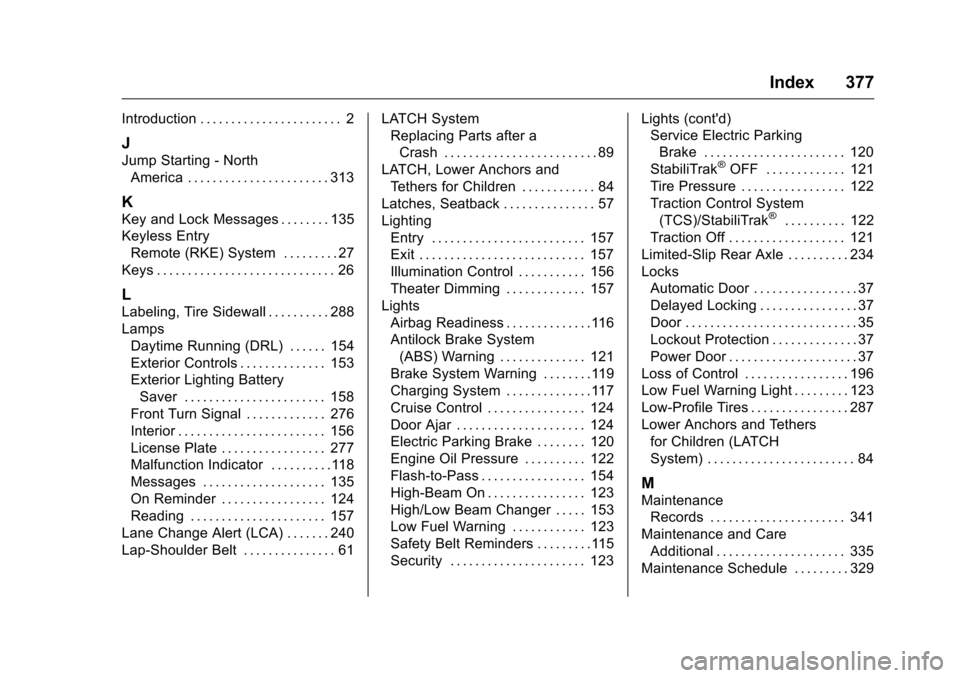
Introduction . . . . . . . . . . . . . . . . . . . . . . . 2
J
Jump Starting - NorthAmerica . . . . . . . . . . . . . . . . . . . . . . . 313
K
Key and Lock Messages . . . . . . . . 135
Keyless EntryRemote (RKE) System . . . . . . . . . 27
Keys . . . . . . . . . . . . . . . . . . . . . . . . . . . . . 26
L
Labeling, Tire Sidewall . . . . . . . . . . 288
Lamps Daytime Running (DRL) . . . . . . 154
Exterior Controls . . . . . . . . . . . . . . 153
Exterior Lighting BatterySaver . . . . . . . . . . . . . . . . . . . . . . . 158
Front Turn Signal . . . . . . . . . . . . . 276
Interior . . . . . . . . . . . . . . . . . . . . . . . . 156
License Plate . . . . . . . . . . . . . . . . . 277
Malfunction Indicator . . . . . . . . . .118
Messages . . . . . . . . . . . . . . . . . . . . 135
On Reminder . . . . . . . . . . . . . . . . . 124
Reading . . . . . . . . . . . . . . . . . . . . . . 157
Lane Change Alert (LCA) . . . . . . . 240
Lap-Shoulder Belt . . . . . . . . . . . . . . . 61 LATCH System
Replacing Parts after a
Crash . . . . . . . . . . . . . . . . . . . . . . . . . 89
LATCH, Lower Anchors and Tethers for Children . . . . . . . . . . . . 84
Latches, Seatback . . . . . . . . . . . . . . . 57
Lighting Entry . . . . . . . . . . . . . . . . . . . . . . . . . 157
Exit . . . . . . . . . . . . . . . . . . . . . . . . . . . 157
Illumination Control . . . . . . . . . . . 156
Theater Dimming . . . . . . . . . . . . . 157
Lights Airbag Readiness . . . . . . . . . . . . . .116
Antilock Brake System(ABS) Warning . . . . . . . . . . . . . . 121
Brake System Warning . . . . . . . .119
Charging System . . . . . . . . . . . . . .117
Cruise Control . . . . . . . . . . . . . . . . 124
Door Ajar . . . . . . . . . . . . . . . . . . . . . 124
Electric Parking Brake . . . . . . . . 120
Engine Oil Pressure . . . . . . . . . . 122
Flash-to-Pass . . . . . . . . . . . . . . . . . 154
High-Beam On . . . . . . . . . . . . . . . . 123
High/Low Beam Changer . . . . . 153
Low Fuel Warning . . . . . . . . . . . . 123
Safety Belt Reminders . . . . . . . . .115
Security . . . . . . . . . . . . . . . . . . . . . . 123 Lights (cont'd)
Service Electric Parking
Brake . . . . . . . . . . . . . . . . . . . . . . . 120
StabiliTrak
®OFF . . . . . . . . . . . . . 121
Tire Pressure . . . . . . . . . . . . . . . . . 122
Traction Control System (TCS)/StabiliTrak
®. . . . . . . . . . 122
Traction Off . . . . . . . . . . . . . . . . . . . 121
Limited-Slip Rear Axle . . . . . . . . . . 234
Locks
Automatic Door . . . . . . . . . . . . . . . . . 37
Delayed Locking . . . . . . . . . . . . . . . . 37
Door . . . . . . . . . . . . . . . . . . . . . . . . . . . . 35
Lockout Protection . . . . . . . . . . . . . . 37
Power Door . . . . . . . . . . . . . . . . . . . . . 37
Loss of Control . . . . . . . . . . . . . . . . . 196
Low Fuel Warning Light . . . . . . . . . 123
Low-Profile Tires . . . . . . . . . . . . . . . . 287
Lower Anchors and Tethers for Children (LATCH
System) . . . . . . . . . . . . . . . . . . . . . . . . 84
M
MaintenanceRecords . . . . . . . . . . . . . . . . . . . . . . 341
Maintenance and Care Additional . . . . . . . . . . . . . . . . . . . . . 335
Maintenance Schedule . . . . . . . . . 329
Page 382 of 383
Chevrolet Camaro Owner Manual-Convertible (GMNA-Localizing-U.S./Cana-
da/Mexico-9702260) - 2016 - CRC - 10/28/15
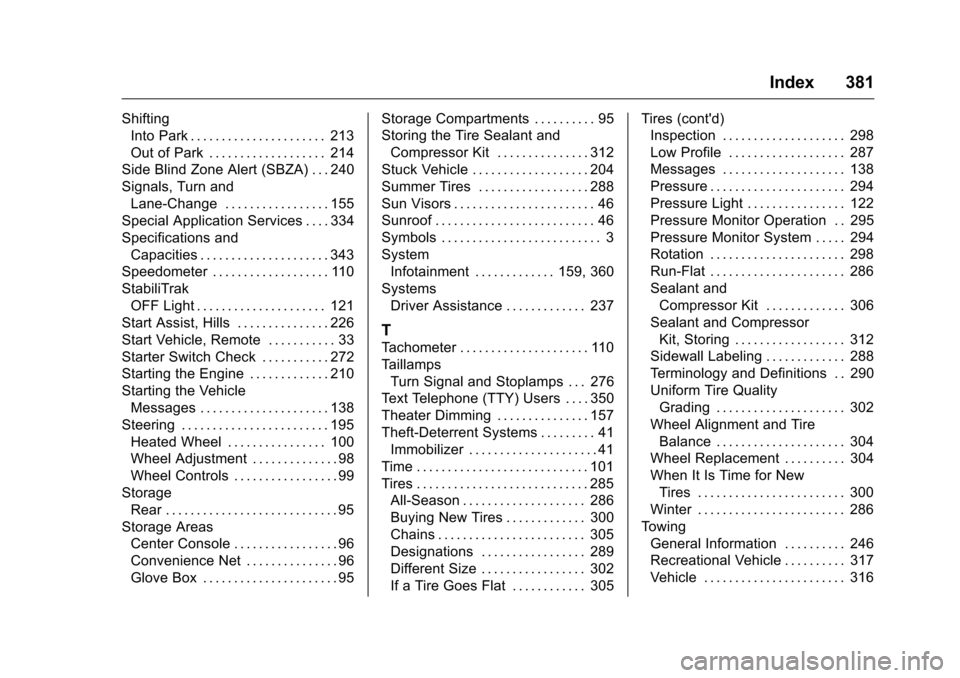
Index 381
ShiftingInto Park . . . . . . . . . . . . . . . . . . . . . . 213
Out of Park . . . . . . . . . . . . . . . . . . . 214
Side Blind Zone Alert (SBZA) . . . 240
Signals, Turn and Lane-Change . . . . . . . . . . . . . . . . . 155
Special Application Services . . . . 334
Specifications and
Capacities . . . . . . . . . . . . . . . . . . . . . 343
Speedometer . . . . . . . . . . . . . . . . . . . 110
StabiliTrak OFF Light . . . . . . . . . . . . . . . . . . . . . 121
Start Assist, Hills . . . . . . . . . . . . . . . 226
Start Vehicle, Remote . . . . . . . . . . . 33
Starter Switch Check . . . . . . . . . . . 272
Starting the Engine . . . . . . . . . . . . . 210
Starting the Vehicle Messages . . . . . . . . . . . . . . . . . . . . . 138
Steering . . . . . . . . . . . . . . . . . . . . . . . . 195 Heated Wheel . . . . . . . . . . . . . . . . 100
Wheel Adjustment . . . . . . . . . . . . . . 98
Wheel Controls . . . . . . . . . . . . . . . . . 99
Storage Rear . . . . . . . . . . . . . . . . . . . . . . . . . . . . 95
Storage Areas
Center Console . . . . . . . . . . . . . . . . . 96
Convenience Net . . . . . . . . . . . . . . . 96
Glove Box . . . . . . . . . . . . . . . . . . . . . . 95 Storage Compartments . . . . . . . . . . 95
Storing the Tire Sealant and
Compressor Kit . . . . . . . . . . . . . . . 312
Stuck Vehicle . . . . . . . . . . . . . . . . . . . 204
Summer Tires . . . . . . . . . . . . . . . . . . 288
Sun Visors . . . . . . . . . . . . . . . . . . . . . . . 46
Sunroof . . . . . . . . . . . . . . . . . . . . . . . . . . 46
Symbols . . . . . . . . . . . . . . . . . . . . . . . . . . 3
System Infotainment . . . . . . . . . . . . . 159, 360
Systems
Driver Assistance . . . . . . . . . . . . . 237
T
Tachometer . . . . . . . . . . . . . . . . . . . . . 110
TaillampsTurn Signal and Stoplamps . . . 276
Text Telephone (TTY) Users . . . . 350
Theater Dimming . . . . . . . . . . . . . . . 157
Theft-Deterrent Systems . . . . . . . . . 41 Immobilizer . . . . . . . . . . . . . . . . . . . . . 41
Time . . . . . . . . . . . . . . . . . . . . . . . . . . . . 101
Tires . . . . . . . . . . . . . . . . . . . . . . . . . . . . 285 All-Season . . . . . . . . . . . . . . . . . . . . 286
Buying New Tires . . . . . . . . . . . . . 300
Chains . . . . . . . . . . . . . . . . . . . . . . . . 305
Designations . . . . . . . . . . . . . . . . . 289
Different Size . . . . . . . . . . . . . . . . . 302
If a Tire Goes Flat . . . . . . . . . . . . 305 Tires (cont'd)
Inspection . . . . . . . . . . . . . . . . . . . . 298
Low Profile . . . . . . . . . . . . . . . . . . . 287
Messages . . . . . . . . . . . . . . . . . . . . 138
Pressure . . . . . . . . . . . . . . . . . . . . . . 294
Pressure Light . . . . . . . . . . . . . . . . 122
Pressure Monitor Operation . . 295
Pressure Monitor System . . . . . 294
Rotation . . . . . . . . . . . . . . . . . . . . . . 298
Run-Flat . . . . . . . . . . . . . . . . . . . . . . 286
Sealant and
Compressor Kit . . . . . . . . . . . . . 306
Sealant and Compressor Kit, Storing . . . . . . . . . . . . . . . . . . 312
Sidewall Labeling . . . . . . . . . . . . . 288
Terminology and Definitions . . 290
Uniform Tire Quality Grading . . . . . . . . . . . . . . . . . . . . . 302
Wheel Alignment and Tire Balance . . . . . . . . . . . . . . . . . . . . . 304
Wheel Replacement . . . . . . . . . . 304
When It Is Time for New Tires . . . . . . . . . . . . . . . . . . . . . . . . 300
Winter . . . . . . . . . . . . . . . . . . . . . . . . 286
Towing General Information . . . . . . . . . . 246
Recreational Vehicle . . . . . . . . . . 317
Vehicle . . . . . . . . . . . . . . . . . . . . . . . 316
Page 383 of 383
Chevrolet Camaro Owner Manual-Convertible (GMNA-Localizing-U.S./Cana-
da/Mexico-9702260) - 2016 - CRC - 10/28/15
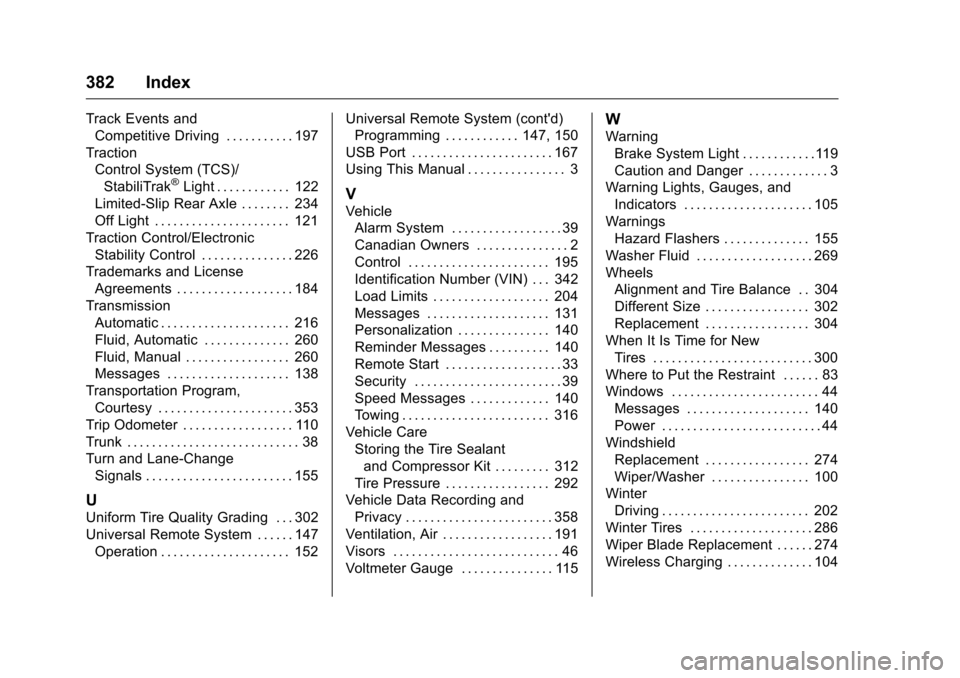
382 Index
Track Events andCompetitive Driving . . . . . . . . . . . 197
Traction Control System (TCS)/StabiliTrak
®Light . . . . . . . . . . . . 122
Limited-Slip Rear Axle . . . . . . . . 234
Off Light . . . . . . . . . . . . . . . . . . . . . . 121
Traction Control/Electronic Stability Control . . . . . . . . . . . . . . . 226
Trademarks and License Agreements . . . . . . . . . . . . . . . . . . . 184
Transmission Automatic . . . . . . . . . . . . . . . . . . . . . 216
Fluid, Automatic . . . . . . . . . . . . . . 260
Fluid, Manual . . . . . . . . . . . . . . . . . 260
Messages . . . . . . . . . . . . . . . . . . . . 138
Transportation Program, Courtesy . . . . . . . . . . . . . . . . . . . . . . 353
Trip Odometer . . . . . . . . . . . . . . . . . . 110
Trunk . . . . . . . . . . . . . . . . . . . . . . . . . . . . 38
Turn and Lane-Change Signals . . . . . . . . . . . . . . . . . . . . . . . . 155
U
Uniform Tire Quality Grading . . . 302
Universal Remote System . . . . . . 147Operation . . . . . . . . . . . . . . . . . . . . . 152 Universal Remote System (cont'd)
Programming . . . . . . . . . . . . 147, 150
USB Port . . . . . . . . . . . . . . . . . . . . . . . 167
Using This Manual . . . . . . . . . . . . . . . . 3
V
Vehicle Alarm System . . . . . . . . . . . . . . . . . . 39
Canadian Owners . . . . . . . . . . . . . . . 2
Control . . . . . . . . . . . . . . . . . . . . . . . 195
Identification Number (VIN) . . . 342
Load Limits . . . . . . . . . . . . . . . . . . . 204
Messages . . . . . . . . . . . . . . . . . . . . 131
Personalization . . . . . . . . . . . . . . . 140
Reminder Messages . . . . . . . . . . 140
Remote Start . . . . . . . . . . . . . . . . . . . 33
Security . . . . . . . . . . . . . . . . . . . . . . . . 39
Speed Messages . . . . . . . . . . . . . 140
Towing . . . . . . . . . . . . . . . . . . . . . . . . 316
Vehicle Care Storing the Tire Sealantand Compressor Kit . . . . . . . . . 312
Tire Pressure . . . . . . . . . . . . . . . . . 292
Vehicle Data Recording and
Privacy . . . . . . . . . . . . . . . . . . . . . . . . 358
Ventilation, Air . . . . . . . . . . . . . . . . . . 191
Visors . . . . . . . . . . . . . . . . . . . . . . . . . . . 46
Voltmeter Gauge . . . . . . . . . . . . . . . 115
W
Warning Brake System Light . . . . . . . . . . . .119
Caution and Danger . . . . . . . . . . . . . 3
Warning Lights, Gauges, and
Indicators . . . . . . . . . . . . . . . . . . . . . 105
Warnings Hazard Flashers . . . . . . . . . . . . . . 155
Washer Fluid . . . . . . . . . . . . . . . . . . . 269
Wheels Alignment and Tire Balance . . 304
Different Size . . . . . . . . . . . . . . . . . 302
Replacement . . . . . . . . . . . . . . . . . 304
When It Is Time for New
Tires . . . . . . . . . . . . . . . . . . . . . . . . . . 300
Where to Put the Restraint . . . . . . 83
Windows . . . . . . . . . . . . . . . . . . . . . . . . 44 Messages . . . . . . . . . . . . . . . . . . . . 140
Power . . . . . . . . . . . . . . . . . . . . . . . . . . 44
Windshield Replacement . . . . . . . . . . . . . . . . . 274
Wiper/Washer . . . . . . . . . . . . . . . . 100
Winter Driving . . . . . . . . . . . . . . . . . . . . . . . . 202
Winter Tires . . . . . . . . . . . . . . . . . . . . 286
Wiper Blade Replacement . . . . . . 274
Wireless Charging . . . . . . . . . . . . . . 104