remote start CHEVROLET CAMARO 2016 6.G Owner's Manual
[x] Cancel search | Manufacturer: CHEVROLET, Model Year: 2016, Model line: CAMARO, Model: CHEVROLET CAMARO 2016 6.GPages: 383, PDF Size: 6.46 MB
Page 209 of 383
Chevrolet Camaro Owner Manual-Convertible (GMNA-Localizing-U.S./Cana-
da/Mexico-9702260) - 2016 - CRC - 10/28/15
208 Driving and Operating
Caution (Continued)
.Do not let the engine labor.
Never lug the engine in high
gear at low speeds. With a
manual transmission, shift
to the next lower gear. This
rule applies at all times, not
just during the break-in
period.
. Do not participate in racing
events, sport driving
schools, or similar activities
during this break-in period.
. Check engine oil with every
refueling and add if
necessary. Oil and fuel
consumption may be higher
than normal during the first
2 414 km (1,500 mi).
. To break in new tires, drive
at moderate speeds and
avoid hard cornering for the
first 322 km (200 mi). New
tires do not have maximum
traction and may tend
to slip.
(Continued)
Caution (Continued)
.New brake linings also need
a break-in period. Avoid
making hard stops during
the first 322 km (200 mi).
This is recommended every
time brake linings are
replaced.
. Should the vehicle be used
for racing or competitive
driving (after break-in), the
rear axle lubricant must be
replaced before hand.
See Track Events and Competitive
Driving 0197.
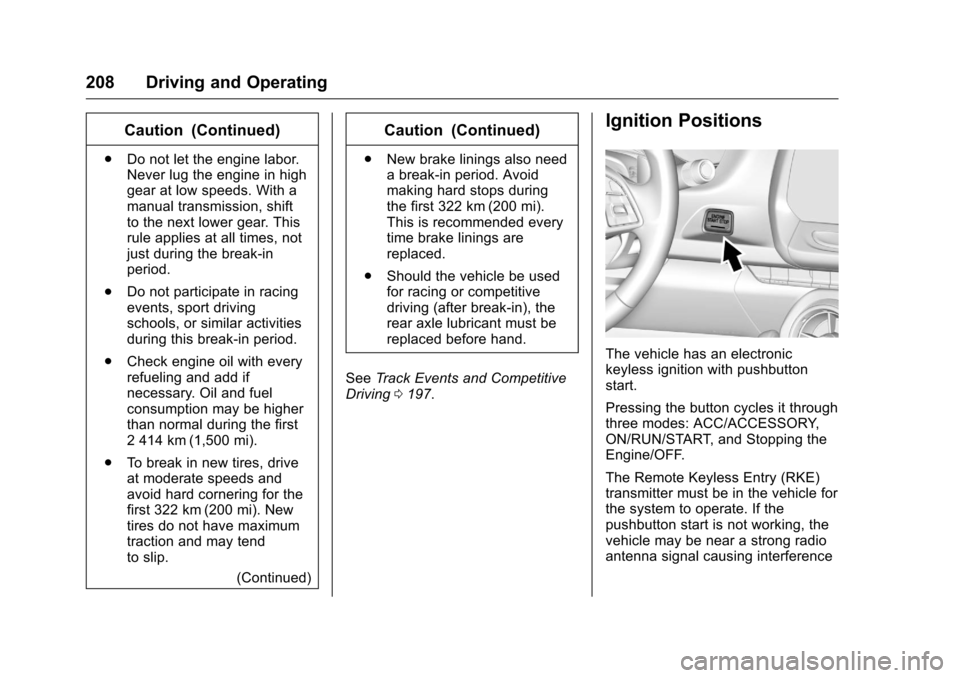
Ignition Positions
The vehicle has an electronic
keyless ignition with pushbutton
start.
Pressing the button cycles it through
three modes: ACC/ACCESSORY,
ON/RUN/START, and Stopping the
Engine/OFF.
The Remote Keyless Entry (RKE)
transmitter must be in the vehicle for
the system to operate. If the
pushbutton start is not working, the
vehicle may be near a strong radio
antenna signal causing interference
Page 210 of 383
Chevrolet Camaro Owner Manual-Convertible (GMNA-Localizing-U.S./Cana-
da/Mexico-9702260) - 2016 - CRC - 10/28/15
Driving and Operating 209
to the Keyless Access system.
SeeRemote Keyless Entry (RKE)
System Operation 027.
To shift out of P (Park), the vehicle
must be in ON/RUN and the brake
pedal must be applied.
Stopping the Engine/OFF (No
Indicator Lights) : When the
vehicle is stopped, press ENGINE
START/STOP once to turn the
engine off.
If the vehicle is in P (Park), the
ignition will turn off, and Retained
Accessory Power (RAP) will remain
active. See Retained Accessory
Power (RAP) 0213.
Automatic Transmission
If the vehicle is not in P (Park), the
ignition will return to ACC/
ACCESSORY and display a
message in the Driver Information
Center (DIC). See Transmission
Messages 0138. When the vehicle
is shifted into P (Park), the ignition
system will switch to OFF. Manual Transmission
If the vehicle is stationary, the
ignition will turn off, and Retained
Accessory Power (RAP) will remain
active. See
Retained Accessory
Power (RAP) 0213.
Do not turn the engine off when the
vehicle is moving. This will cause a
loss of power assist in the brake
and steering systems and disable
the airbags.
If the vehicle must be shut off in an
emergency: 1. Brake using a firm and steady pressure. Do not pump the
brakes repeatedly. This may
deplete power assist, requiring
increased brake pedal force.
2. Shift the vehicle to N (Neutral). This can be done while the
vehicle is moving. After shifting
to N (Neutral), firmly apply the
brakes and steer the vehicle to
a safe location. 3. Come to a complete stop. Shift
to P (Park) with an automatic
transmission, or N (Neutral)
with a manual transmission.
Turn the ignition to OFF.
4. Set the parking brake. See Electric Parking Brake 0224.
{Warning
Turning off the vehicle while
moving may cause loss of power
assist in the brake and steering
systems and disable the airbags.
While driving, only shut the
vehicle off in an emergency.
If the vehicle cannot be pulled over,
and must be shut off while driving,
press and hold ENGINE START/
STOP for longer than two seconds,
or press twice within five seconds.
ACC/ACCESSORY (Amber
Indicator Light) : This mode allows
the use of some electrical
accessories when the engine is off.
Page 212 of 383
Chevrolet Camaro Owner Manual-Convertible (GMNA-Localizing-U.S./Cana-
da/Mexico-9702260) - 2016 - CRC - 10/28/15
Driving and Operating 211
press the clutch pedal first,
then press ENGINE
START/STOP.
If there is no RKE transmitter in
the vehicle or if there is
something causing interference
with it, the DIC will display a
message. SeeKey and Lock
Messages 0135.
2. When the engine begins cranking, let go of the button
and the engine cranks
automatically until it starts.
If the battery in the RKE
transmitter is weak, the DIC will
display a message. The vehicle
can still be driven.
See “Starting the Vehicle with a
Low Transmitter Battery” under
Remote Keyless Entry (RKE)
System Operation 027. If the
RKE transmitter battery is
dead, insert it into the rear
cupholder to enable engine
starting. See “NO REMOTE
KEY WAS DETECTED PLACE
KEY IN TRANSMITTER POCKET THEN START YOUR
VEHICLE”
underKey and Lock
Messages 0135.
3. Do not race the engine immediately after starting it.
Operate the engine and
transmission gently until the oil
warms up and lubricates all
moving parts.
4. If the engine does not start and no DIC message is displayed,
wait 15 seconds before trying
again to let the cranking motor
cool down.
If the engine does not start
after five to 10 seconds,
especially in very cold weather
(below −18 °C or 0 °F), it could
be flooded with too much
gasoline. Try pushing the
accelerator pedal all the way to
the floor while cranking for up
to 15 seconds maximum. Wait
at least 15 seconds between
each try, to allow the cranking
motor to cool down. When the
engine starts, let go of the
accelerator. If the vehicle starts
briefly but then stops again, repeat these steps. This clears
the extra gasoline from the
engine.
Caution
Cranking the engine for long
periods of time, by returning the
ignition to the START position
immediately after cranking has
ended, can overheat and damage
the cranking motor, and drain the
battery. Wait at least 15 seconds
between each try, to let the
cranking motor cool down.
Stopping the Engine
If the vehicle has an automatic
transmission, move the shift lever to
P (Park) and press and hold
ENGINE START/STOP on the
instrument panel, until the engine
shuts off. If the shift lever is not in
P (Park), the engine shuts off and
the vehicle goes into the accessory
mode. The DIC displays SHIFT TO
PARK. Once the shift lever is moved
to P (Park), the vehicle turns off.
Page 250 of 383
Chevrolet Camaro Owner Manual-Convertible (GMNA-Localizing-U.S./Cana-
da/Mexico-9702260) - 2016 - CRC - 10/28/15
Vehicle Care 249
Wheel Alignment and TireBalance . . . . . . . . . . . . . . . . . . . . . 304
Wheel Replacement . . . . . . . . . . 304
Tire Chains . . . . . . . . . . . . . . . . . . . 305
If a Tire Goes Flat . . . . . . . . . . . . 305
Tire Sealant and Compressor Kit . . . . . . . . . . . . . 306
Storing the Tire Sealant and Compressor Kit . . . . . . . . . . . . . 312
Jump Starting
Jump Starting - NorthAmerica . . . . . . . . . . . . . . . . . . . . . 313
Towing the Vehicle
Towing the Vehicle . . . . . . . . . . . 316
Recreational VehicleTowing . . . . . . . . . . . . . . . . . . . . . . 317
Appearance Care
Exterior Care . . . . . . . . . . . . . . . . . 317
Interior Care . . . . . . . . . . . . . . . . . . 322
Floor Mats . . . . . . . . . . . . . . . . . . . . 326
General Information
For service and parts needs, visit
your dealer. You will receive
genuine GM parts and GM-trained
and supported service people.
Genuine GM parts have one of
these marks:
California Proposition
65 Warning
WARNING: Most motor vehicles,
including this one, contain and/or
emit chemicals known to the State
of California to cause cancer and
birth defects or other reproductive harm. Engine exhaust, many parts
and systems, many fluids, and
some component wear by-products
contain and/or emit these
chemicals.
See
Battery - North America 0271
and Jump Starting - North
America 0313.
California Perchlorate
Materials Requirements
Certain types of automotive
applications, such as airbag
initiators, safety belt pretensioners,
and lithium batteries contained in
Remote Keyless Entry transmitters,
may contain perchlorate materials.
Special handling may be necessary.
For additional information, see
www.dtsc.ca.gov/hazardouswaste/
perchlorate.
Page 285 of 383
Chevrolet Camaro Owner Manual-Convertible (GMNA-Localizing-U.S./Cana-
da/Mexico-9702260) - 2016 - CRC - 10/28/15
284 Vehicle Care
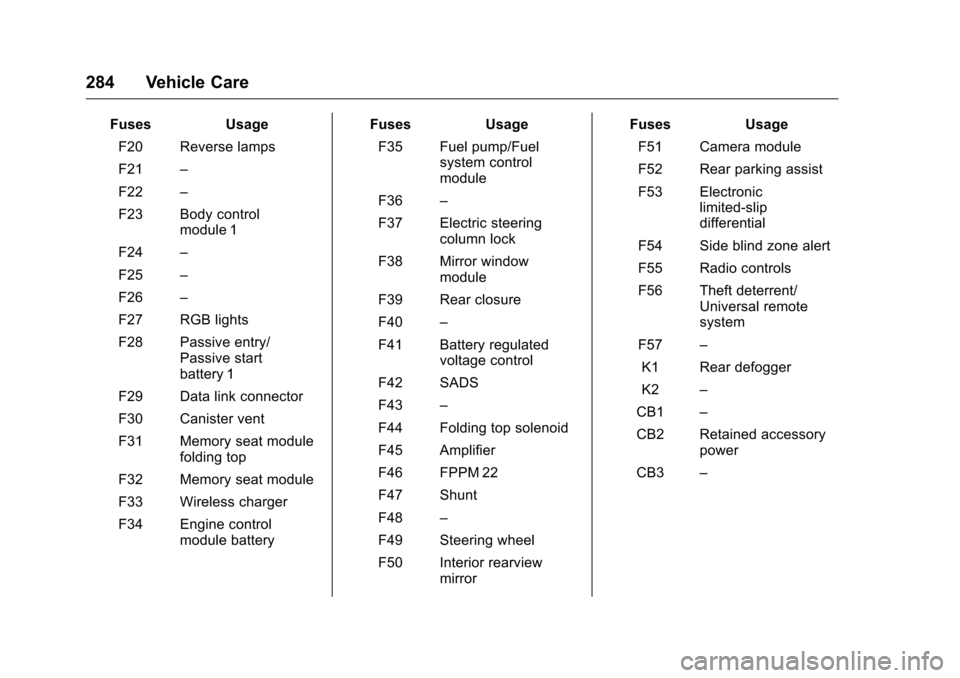
FusesUsage
F20 Reverse lamps
F21 –
F22 –
F23 Body control module 1
F24 –
F25 –
F26 –
F27 RGB lights
F28 Passive entry/ Passive start
battery 1
F29 Data link connector
F30 Canister vent
F31 Memory seat module folding top
F32 Memory seat module
F33 Wireless charger
F34 Engine control module battery Fuses
Usage
F35 Fuel pump/Fuel system control
module
F36 –
F37 Electric steering column lock
F38 Mirror window module
F39 Rear closure
F40 –
F41 Battery regulated voltage control
F42 SADS
F43 –
F44 Folding top solenoid
F45 Amplifier
F46 FPPM 22
F47 Shunt
F48 –
F49 Steering wheel
F50 Interior rearview mirror Fuses
Usage
F51 Camera module
F52 Rear parking assist
F53 Electronic limited-slip
differential
F54 Side blind zone alert
F55 Radio controls
F56 Theft deterrent/ Universal remote
system
F57 –
K1 Rear defogger
K2 –
CB1 –
CB2 Retained accessory power
CB3 –
Page 364 of 383
Chevrolet Camaro Owner Manual-Convertible (GMNA-Localizing-U.S./Cana-
da/Mexico-9702260) - 2016 - CRC - 10/28/15
OnStar 363
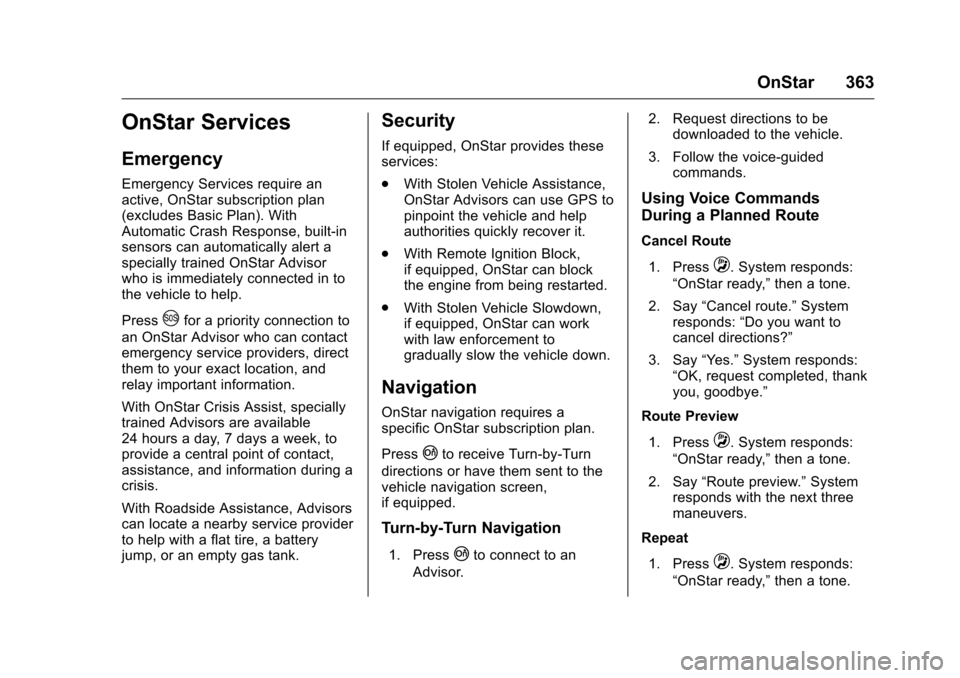
OnStar Services
Emergency
Emergency Services require an
active, OnStar subscription plan
(excludes Basic Plan). With
Automatic Crash Response, built-in
sensors can automatically alert a
specially trained OnStar Advisor
who is immediately connected in to
the vehicle to help.
Press
Ufor a priority connection to
an OnStar Advisor who can contact
emergency service providers, direct
them to your exact location, and
relay important information.
With OnStar Crisis Assist, specially
trained Advisors are available
24 hours a day, 7 days a week, to
provide a central point of contact,
assistance, and information during a
crisis.
With Roadside Assistance, Advisors
can locate a nearby service provider
to help with a flat tire, a battery
jump, or an empty gas tank.
Security
If equipped, OnStar provides these
services:
. With Stolen Vehicle Assistance,
OnStar Advisors can use GPS to
pinpoint the vehicle and help
authorities quickly recover it.
. With Remote Ignition Block,
if equipped, OnStar can block
the engine from being restarted.
. With Stolen Vehicle Slowdown,
if equipped, OnStar can work
with law enforcement to
gradually slow the vehicle down.
Navigation
OnStar navigation requires a
specific OnStar subscription plan.
Press
|to receive Turn-by-Turn
directions or have them sent to the
vehicle navigation screen,
if equipped.
Turn-by-Turn Navigation
1. Press|to connect to an
Advisor. 2. Request directions to be
downloaded to the vehicle.
3. Follow the voice-guided commands.
Using Voice Commands
During a Planned Route
Cancel Route
1. Press
Q. System responds:
“OnStar ready,” then a tone.
2. Say “Cancel route.” System
responds: “Do you want to
cancel directions?”
3. Say “Yes.”System responds:
“OK, request completed, thank
you, goodbye.”
Route Preview
1. Press
Q. System responds:
“OnStar ready,” then a tone.
2. Say “Route preview.” System
responds with the next three
maneuvers.
Repeat
1. Press
Q. System responds:
“OnStar ready,” then a tone.
Page 366 of 383
Chevrolet Camaro Owner Manual-Convertible (GMNA-Localizing-U.S./Cana-
da/Mexico-9702260) - 2016 - CRC - 10/28/15
OnStar 365
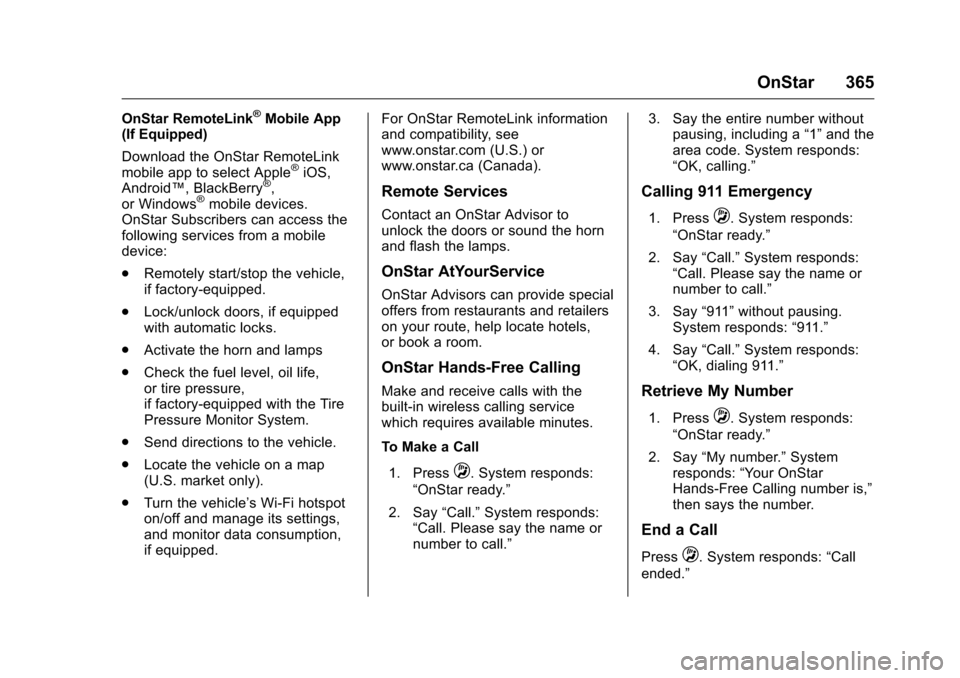
OnStar RemoteLink®Mobile App
(If Equipped)
Download the OnStar RemoteLink
mobile app to select Apple
®iOS,
Android™, BlackBerry®,
or Windows®mobile devices.
OnStar Subscribers can access the
following services from a mobile
device:
. Remotely start/stop the vehicle,
if factory-equipped.
. Lock/unlock doors, if equipped
with automatic locks.
. Activate the horn and lamps
. Check the fuel level, oil life,
or tire pressure,
if factory-equipped with the Tire
Pressure Monitor System.
. Send directions to the vehicle.
. Locate the vehicle on a map
(U.S. market only).
. Turn the vehicle’ s Wi-Fi hotspot
on/off and manage its settings,
and monitor data consumption,
if equipped. For OnStar RemoteLink information
and compatibility, see
www.onstar.com (U.S.) or
www.onstar.ca (Canada).Remote Services
Contact an OnStar Advisor to
unlock the doors or sound the horn
and flash the lamps.
OnStar AtYourService
OnStar Advisors can provide special
offers from restaurants and retailers
on your route, help locate hotels,
or book a room.
OnStar Hands-Free Calling
Make and receive calls with the
built-in wireless calling service
which requires available minutes.
To Make a Call
1. Press
Q. System responds:
“OnStar ready.”
2. Say “Call.”System responds:
“Call. Please say the name or
number to call.” 3. Say the entire number without
pausing, including a “1”and the
area code. System responds:
“OK, calling.”
Calling 911 Emergency
1. PressQ. System responds:
“OnStar ready.”
2. Say “Call.”System responds:
“Call. Please say the name or
number to call.”
3. Say “911”without pausing.
System responds: “911.”
4. Say “Call.”System responds:
“OK, dialing 911.”
Retrieve My Number
1. PressQ. System responds:
“OnStar ready.”
2. Say “My number.” System
responds: “Your OnStar
Hands-Free Calling number is,”
then says the number.
End a Call
PressQ. System responds: “Call
ended.”
Page 369 of 383
Chevrolet Camaro Owner Manual-Convertible (GMNA-Localizing-U.S./Cana-
da/Mexico-9702260) - 2016 - CRC - 10/28/15
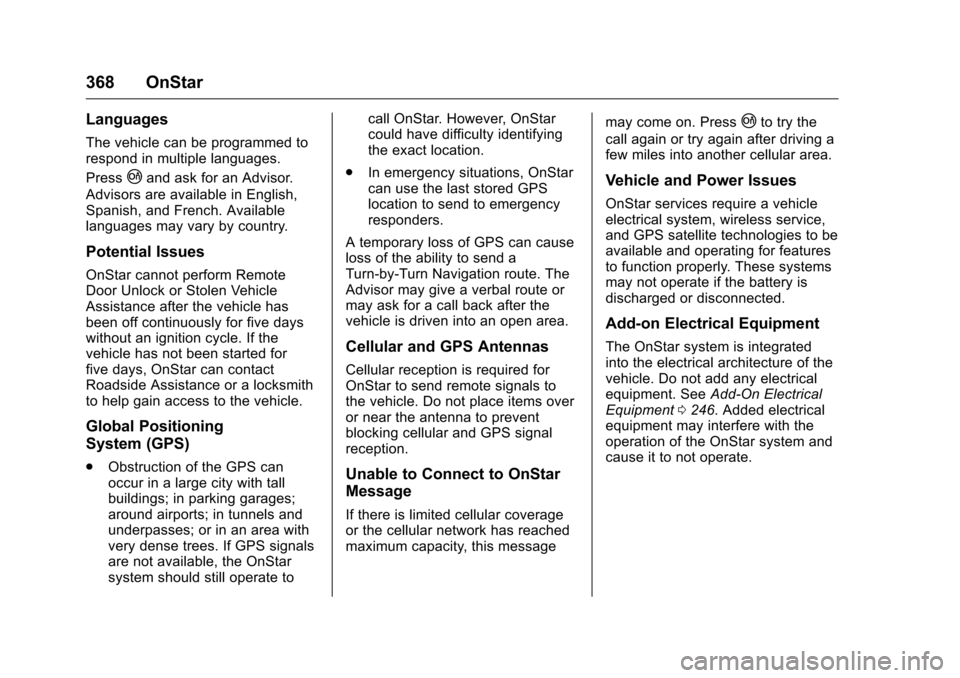
368 OnStar
Languages
The vehicle can be programmed to
respond in multiple languages.
Press
|and ask for an Advisor.
Advisors are available in English,
Spanish, and French. Available
languages may vary by country.
Potential Issues
OnStar cannot perform Remote
Door Unlock or Stolen Vehicle
Assistance after the vehicle has
been off continuously for five days
without an ignition cycle. If the
vehicle has not been started for
five days, OnStar can contact
Roadside Assistance or a locksmith
to help gain access to the vehicle.
Global Positioning
System (GPS)
. Obstruction of the GPS can
occur in a large city with tall
buildings; in parking garages;
around airports; in tunnels and
underpasses; or in an area with
very dense trees. If GPS signals
are not available, the OnStar
system should still operate to call OnStar. However, OnStar
could have difficulty identifying
the exact location.
. In emergency situations, OnStar
can use the last stored GPS
location to send to emergency
responders.
A temporary loss of GPS can cause
loss of the ability to send a
Turn-by-Turn Navigation route. The
Advisor may give a verbal route or
may ask for a call back after the
vehicle is driven into an open area.
Cellular and GPS Antennas
Cellular reception is required for
OnStar to send remote signals to
the vehicle. Do not place items over
or near the antenna to prevent
blocking cellular and GPS signal
reception.
Unable to Connect to OnStar
Message
If there is limited cellular coverage
or the cellular network has reached
maximum capacity, this message may come on. Press
|to try the
call again or try again after driving a
few miles into another cellular area.
Vehicle and Power Issues
OnStar services require a vehicle
electrical system, wireless service,
and GPS satellite technologies to be
available and operating for features
to function properly. These systems
may not operate if the battery is
discharged or disconnected.
Add-on Electrical Equipment
The OnStar system is integrated
into the electrical architecture of the
vehicle. Do not add any electrical
equipment. See Add-On Electrical
Equipment 0246. Added electrical
equipment may interfere with the
operation of the OnStar system and
cause it to not operate.
Page 378 of 383
Chevrolet Camaro Owner Manual-Convertible (GMNA-Localizing-U.S./Cana-
da/Mexico-9702260) - 2016 - CRC - 10/28/15
Index 377
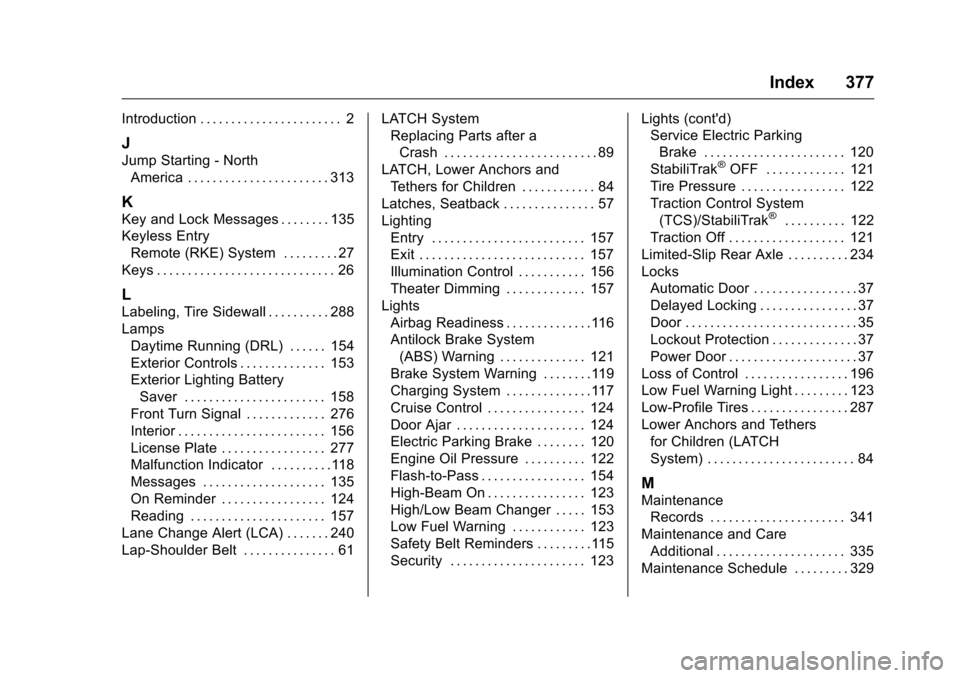
Introduction . . . . . . . . . . . . . . . . . . . . . . . 2
J
Jump Starting - NorthAmerica . . . . . . . . . . . . . . . . . . . . . . . 313
K
Key and Lock Messages . . . . . . . . 135
Keyless EntryRemote (RKE) System . . . . . . . . . 27
Keys . . . . . . . . . . . . . . . . . . . . . . . . . . . . . 26
L
Labeling, Tire Sidewall . . . . . . . . . . 288
Lamps Daytime Running (DRL) . . . . . . 154
Exterior Controls . . . . . . . . . . . . . . 153
Exterior Lighting BatterySaver . . . . . . . . . . . . . . . . . . . . . . . 158
Front Turn Signal . . . . . . . . . . . . . 276
Interior . . . . . . . . . . . . . . . . . . . . . . . . 156
License Plate . . . . . . . . . . . . . . . . . 277
Malfunction Indicator . . . . . . . . . .118
Messages . . . . . . . . . . . . . . . . . . . . 135
On Reminder . . . . . . . . . . . . . . . . . 124
Reading . . . . . . . . . . . . . . . . . . . . . . 157
Lane Change Alert (LCA) . . . . . . . 240
Lap-Shoulder Belt . . . . . . . . . . . . . . . 61 LATCH System
Replacing Parts after a
Crash . . . . . . . . . . . . . . . . . . . . . . . . . 89
LATCH, Lower Anchors and Tethers for Children . . . . . . . . . . . . 84
Latches, Seatback . . . . . . . . . . . . . . . 57
Lighting Entry . . . . . . . . . . . . . . . . . . . . . . . . . 157
Exit . . . . . . . . . . . . . . . . . . . . . . . . . . . 157
Illumination Control . . . . . . . . . . . 156
Theater Dimming . . . . . . . . . . . . . 157
Lights Airbag Readiness . . . . . . . . . . . . . .116
Antilock Brake System(ABS) Warning . . . . . . . . . . . . . . 121
Brake System Warning . . . . . . . .119
Charging System . . . . . . . . . . . . . .117
Cruise Control . . . . . . . . . . . . . . . . 124
Door Ajar . . . . . . . . . . . . . . . . . . . . . 124
Electric Parking Brake . . . . . . . . 120
Engine Oil Pressure . . . . . . . . . . 122
Flash-to-Pass . . . . . . . . . . . . . . . . . 154
High-Beam On . . . . . . . . . . . . . . . . 123
High/Low Beam Changer . . . . . 153
Low Fuel Warning . . . . . . . . . . . . 123
Safety Belt Reminders . . . . . . . . .115
Security . . . . . . . . . . . . . . . . . . . . . . 123 Lights (cont'd)
Service Electric Parking
Brake . . . . . . . . . . . . . . . . . . . . . . . 120
StabiliTrak
®OFF . . . . . . . . . . . . . 121
Tire Pressure . . . . . . . . . . . . . . . . . 122
Traction Control System (TCS)/StabiliTrak
®. . . . . . . . . . 122
Traction Off . . . . . . . . . . . . . . . . . . . 121
Limited-Slip Rear Axle . . . . . . . . . . 234
Locks
Automatic Door . . . . . . . . . . . . . . . . . 37
Delayed Locking . . . . . . . . . . . . . . . . 37
Door . . . . . . . . . . . . . . . . . . . . . . . . . . . . 35
Lockout Protection . . . . . . . . . . . . . . 37
Power Door . . . . . . . . . . . . . . . . . . . . . 37
Loss of Control . . . . . . . . . . . . . . . . . 196
Low Fuel Warning Light . . . . . . . . . 123
Low-Profile Tires . . . . . . . . . . . . . . . . 287
Lower Anchors and Tethers for Children (LATCH
System) . . . . . . . . . . . . . . . . . . . . . . . . 84
M
MaintenanceRecords . . . . . . . . . . . . . . . . . . . . . . 341
Maintenance and Care Additional . . . . . . . . . . . . . . . . . . . . . 335
Maintenance Schedule . . . . . . . . . 329
Page 380 of 383
Chevrolet Camaro Owner Manual-Convertible (GMNA-Localizing-U.S./Cana-
da/Mexico-9702260) - 2016 - CRC - 10/28/15
Index 379
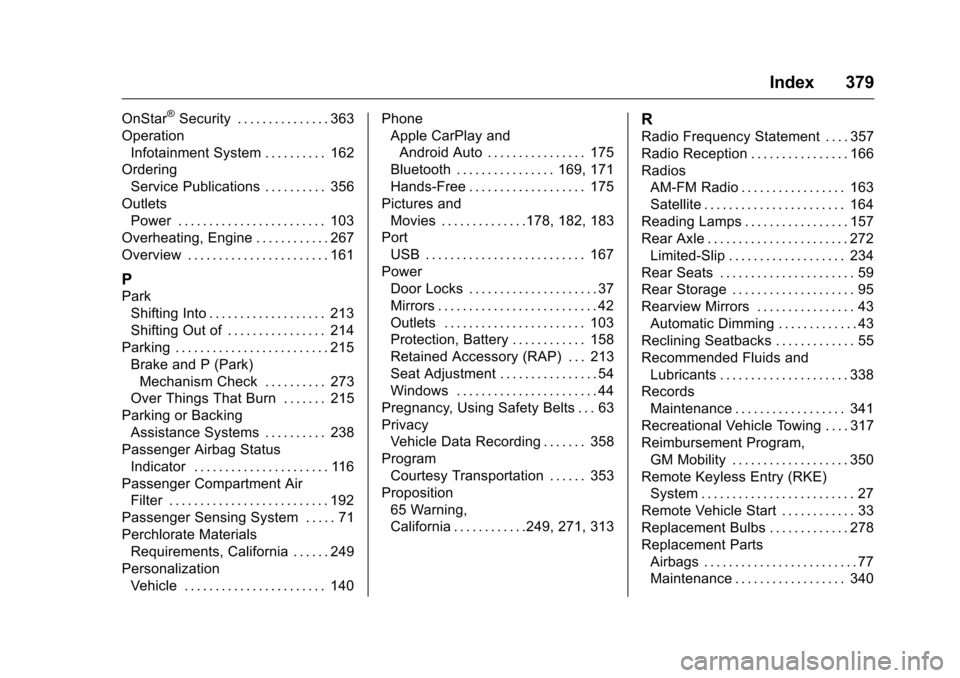
OnStar®Security . . . . . . . . . . . . . . . 363
Operation
Infotainment System . . . . . . . . . . 162
Ordering Service Publications . . . . . . . . . . 356
Outlets Power . . . . . . . . . . . . . . . . . . . . . . . . 103
Overheating, Engine . . . . . . . . . . . . 267
Overview . . . . . . . . . . . . . . . . . . . . . . . 161
P
Park Shifting Into . . . . . . . . . . . . . . . . . . . 213
Shifting Out of . . . . . . . . . . . . . . . . 214
Parking . . . . . . . . . . . . . . . . . . . . . . . . . 215 Brake and P (Park)Mechanism Check . . . . . . . . . . 273
Over Things That Burn . . . . . . . 215
Parking or Backing Assistance Systems . . . . . . . . . . 238
Passenger Airbag Status
Indicator . . . . . . . . . . . . . . . . . . . . . . 116
Passenger Compartment Air Filter . . . . . . . . . . . . . . . . . . . . . . . . . . 192
Passenger Sensing System . . . . . 71
Perchlorate Materials Requirements, California . . . . . . 249
Personalization Vehicle . . . . . . . . . . . . . . . . . . . . . . . 140 Phone
Apple CarPlay and
Android Auto . . . . . . . . . . . . . . . . 175
Bluetooth . . . . . . . . . . . . . . . . 169, 171
Hands-Free . . . . . . . . . . . . . . . . . . . 175
Pictures and Movies . . . . . . . . . . . . . .178, 182, 183
Port USB . . . . . . . . . . . . . . . . . . . . . . . . . . 167
Power Door Locks . . . . . . . . . . . . . . . . . . . . . 37
Mirrors . . . . . . . . . . . . . . . . . . . . . . . . . . 42
Outlets . . . . . . . . . . . . . . . . . . . . . . . 103
Protection, Battery . . . . . . . . . . . . 158
Retained Accessory (RAP) . . . 213
Seat Adjustment . . . . . . . . . . . . . . . . 54
Windows . . . . . . . . . . . . . . . . . . . . . . . 44
Pregnancy, Using Safety Belts . . . 63
Privacy Vehicle Data Recording . . . . . . . 358
Program
Courtesy Transportation . . . . . . 353
Proposition 65 Warning,
California . . . . . . . . . . . .249, 271, 313
R
Radio Frequency Statement . . . . 357
Radio Reception . . . . . . . . . . . . . . . . 166
RadiosAM-FM Radio . . . . . . . . . . . . . . . . . 163
Satellite . . . . . . . . . . . . . . . . . . . . . . . 164
Reading Lamps . . . . . . . . . . . . . . . . . 157
Rear Axle . . . . . . . . . . . . . . . . . . . . . . . 272 Limited-Slip . . . . . . . . . . . . . . . . . . . 234
Rear Seats . . . . . . . . . . . . . . . . . . . . . . 59
Rear Storage . . . . . . . . . . . . . . . . . . . . 95
Rearview Mirrors . . . . . . . . . . . . . . . . 43
Automatic Dimming . . . . . . . . . . . . . 43
Reclining Seatbacks . . . . . . . . . . . . . 55
Recommended Fluids and
Lubricants . . . . . . . . . . . . . . . . . . . . . 338
Records Maintenance . . . . . . . . . . . . . . . . . . 341
Recreational Vehicle Towing . . . . 317
Reimbursement Program,
GM Mobility . . . . . . . . . . . . . . . . . . . 350
Remote Keyless Entry (RKE) System . . . . . . . . . . . . . . . . . . . . . . . . . 27
Remote Vehicle Start . . . . . . . . . . . . 33
Replacement Bulbs . . . . . . . . . . . . . 278
Replacement Parts
Airbags . . . . . . . . . . . . . . . . . . . . . . . . . 77
Maintenance . . . . . . . . . . . . . . . . . . 340