automatic transmission CHEVROLET CAMARO 2016 6.G Owners Manual
[x] Cancel search | Manufacturer: CHEVROLET, Model Year: 2016, Model line: CAMARO, Model: CHEVROLET CAMARO 2016 6.GPages: 383, PDF Size: 6.46 MB
Page 8 of 383
Chevrolet Camaro Owner Manual-Convertible (GMNA-Localizing-U.S./Cana-
da/Mexico-9702260) - 2016 - CRC - 10/28/15
In Brief 7
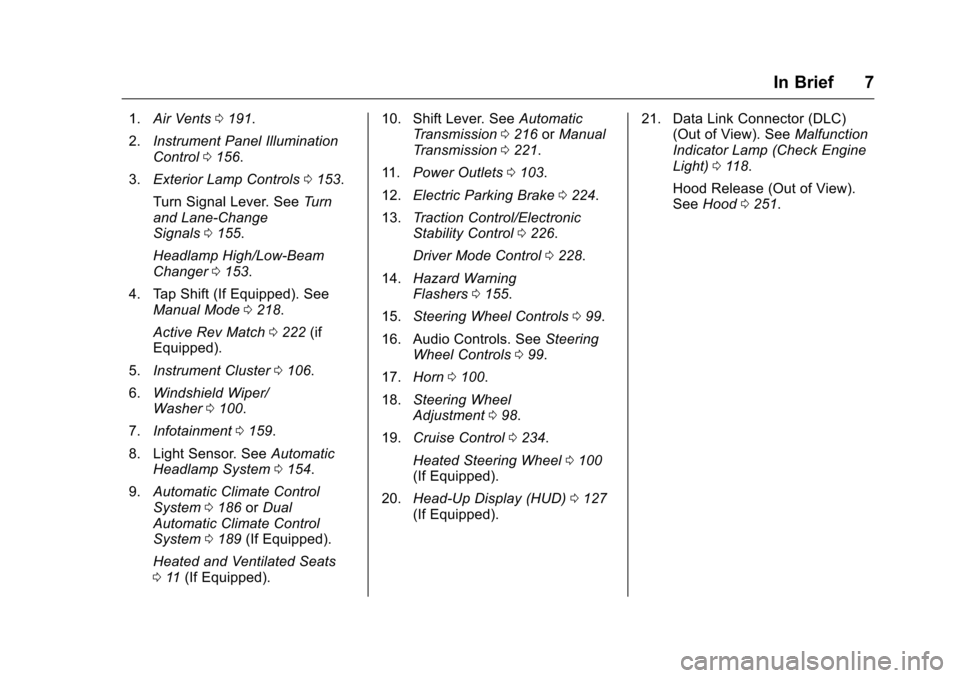
1.Air Vents 0191.
2. Instrument Panel Illumination
Control 0156.
3. Exterior Lamp Controls 0153.
Turn Signal Lever. See Turn
and Lane-Change
Signals 0155.
Headlamp High/Low-Beam
Changer 0153.
4. Tap Shift (If Equipped). See Manual Mode 0218.
Active Rev Match 0222 (if
Equipped).
5. Instrument Cluster 0106.
6. Windshield Wiper/
Washer 0100.
7. Infotainment 0159.
8. Light Sensor. See Automatic
Headlamp System 0154.
9. Automatic Climate Control
System 0186 orDual
Automatic Climate Control
System 0189 (If Equipped).
Heated and Ventilated Seats
0 11 (If Equipped). 10. Shift Lever. See
Automatic
Transmission 0216 orManual
Transmission 0221.
11. Power Outlets 0103.
12. Electric Parking Brake 0224.
13. Traction Control/Electronic
Stability Control 0226.
Driver Mode Control 0228.
14. Hazard Warning
Flashers 0155.
15. Steering Wheel Controls 099.
16. Audio Controls. See Steering
Wheel Controls 099.
17. Horn 0100.
18. Steering Wheel
Adjustment 098.
19. Cruise Control 0234.
Heated Steering Wheel 0100
(If Equipped).
20. Head-Up Display (HUD) 0127
(If Equipped). 21. Data Link Connector (DLC)
(Out of View). See Malfunction
Indicator Lamp (Check Engine
Light) 0118.
Hood Release (Out of View).
See Hood 0251.
Page 17 of 383
Chevrolet Camaro Owner Manual-Convertible (GMNA-Localizing-U.S./Cana-
da/Mexico-9702260) - 2016 - CRC - 10/28/15
16 In Brief
Dual Automatic Climate Control System
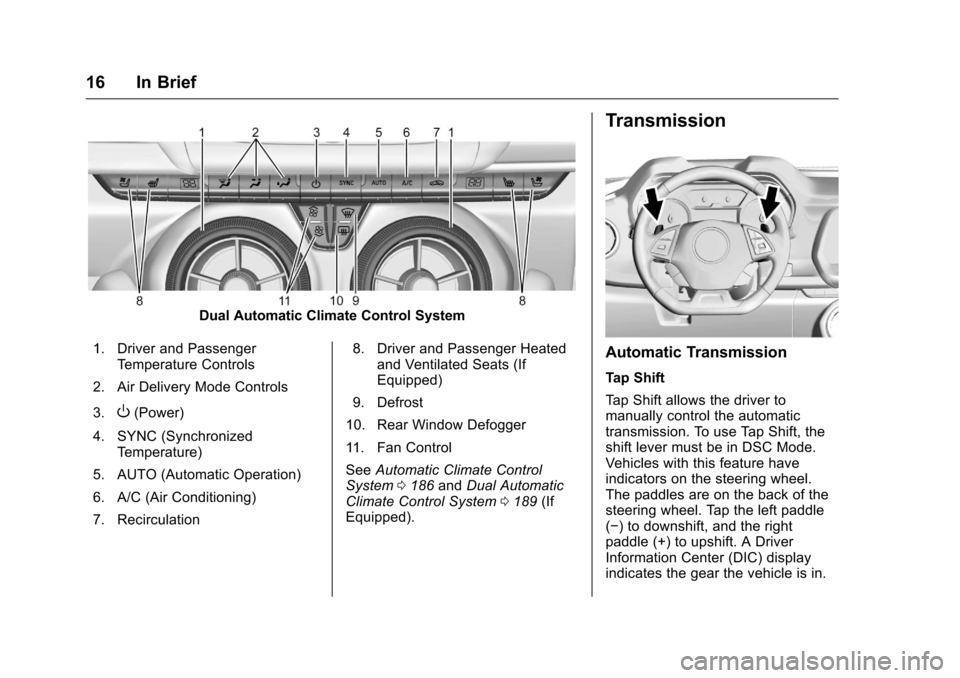
1. Driver and Passenger Temperature Controls
2. Air Delivery Mode Controls
3.
O(Power)
4. SYNC (Synchronized Temperature)
5. AUTO (Automatic Operation)
6. A/C (Air Conditioning)
7. Recirculation 8. Driver and Passenger Heated
and Ventilated Seats (If
Equipped)
9. Defrost
10. Rear Window Defogger
11. Fan Control
See Automatic Climate Control
System 0186 andDual Automatic
Climate Control System 0189 (If
Equipped).
Transmission
Automatic Transmission
Tap Shift
Tap Shift allows the driver to
manually control the automatic
transmission. To use Tap Shift, the
shift lever must be in DSC Mode.
Vehicles with this feature have
indicators on the steering wheel.
The paddles are on the back of the
steering wheel. Tap the left paddle
(−) to downshift, and the right
paddle (+) to upshift. A Driver
Information Center (DIC) display
indicates the gear the vehicle is in.
Page 38 of 383
Chevrolet Camaro Owner Manual-Convertible (GMNA-Localizing-U.S./Cana-
da/Mexico-9702260) - 2016 - CRC - 10/28/15
Keys, Doors, and Windows 37
Power Door Locks
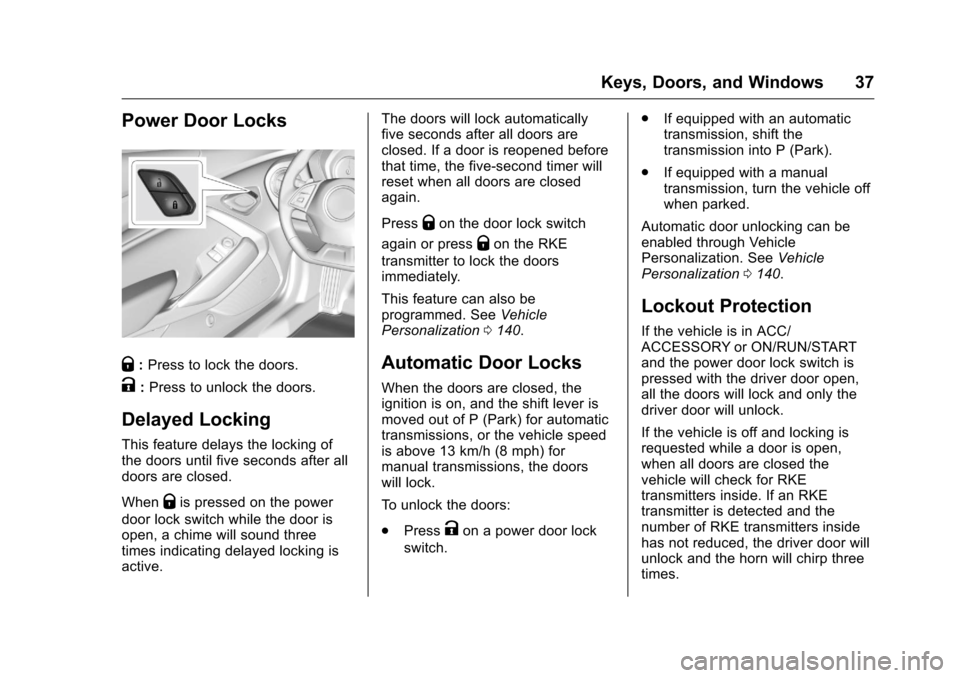
Q:Press to lock the doors.
K:Press to unlock the doors.
Delayed Locking
This feature delays the locking of
the doors until five seconds after all
doors are closed.
When
Qis pressed on the power
door lock switch while the door is
open, a chime will sound three
times indicating delayed locking is
active. The doors will lock automatically
five seconds after all doors are
closed. If a door is reopened before
that time, the five-second timer will
reset when all doors are closed
again.
Press
Qon the door lock switch
again or press
Qon the RKE
transmitter to lock the doors
immediately.
This feature can also be
programmed. See Vehicle
Personalization 0140.
Automatic Door Locks
When the doors are closed, the
ignition is on, and the shift lever is
moved out of P (Park) for automatic
transmissions, or the vehicle speed
is above 13 km/h (8 mph) for
manual transmissions, the doors
will lock.
To unlock the doors:
.
Press
Kon a power door lock
switch. .
If equipped with an automatic
transmission, shift the
transmission into P (Park).
. If equipped with a manual
transmission, turn the vehicle off
when parked.
Automatic door unlocking can be
enabled through Vehicle
Personalization. See Vehicle
Personalization 0140.
Lockout Protection
If the vehicle is in ACC/
ACCESSORY or ON/RUN/START
and the power door lock switch is
pressed with the driver door open,
all the doors will lock and only the
driver door will unlock.
If the vehicle is off and locking is
requested while a door is open,
when all doors are closed the
vehicle will check for RKE
transmitters inside. If an RKE
transmitter is detected and the
number of RKE transmitters inside
has not reduced, the driver door will
unlock and the horn will chirp three
times.
Page 39 of 383
Chevrolet Camaro Owner Manual-Convertible (GMNA-Localizing-U.S./Cana-
da/Mexico-9702260) - 2016 - CRC - 10/28/15
38 Keys, Doors, and Windows
Lockout Protection can be manually
overridden with the driver door open
by pressing and holding
Qon the
power door lock switch.
Unlocked Door Anti-Lockout
If Unlocked Door Anti-Lockout is
turned on and the vehicle is off, the
driver door is open, and locking is
requested, all the doors will lock and
only the driver door will unlock. The
Unlocked Door Anti-Lockout feature
can be turned on or off using the
vehicle personalization menus. See
Vehicle Personalization 0140.
Doors
Trunk
{Warning
Exhaust gases can enter the
vehicle if it is driven with the
liftgate, trunk/hatch open, or with
any objects that pass through the
seal between the body and the
trunk/hatch or liftgate. Engine
exhaust contains carbon
monoxide (CO) which cannot be
seen or smelled. It can cause
unconsciousness and even death.
If the vehicle must be driven with
the liftgate, or trunk/hatch open:
. Close all of the windows.
. Fully open the air outlets on
or under the instrument
panel.
. Adjust the climate control
system to a setting that
brings in only outside air
and set the fan speed to the
(Continued)
Warning (Continued)
highest setting. See
“Climate Control Systems”
in the Index.
. If the vehicle has a power
liftgate, disable the power
liftgate function.
For more information about
carbon monoxide, see Engine
Exhaust 0215.
Trunk Release
To open the trunk from outside of
the vehicle, press
Xtwice quickly
on the Remote Keyless Entry (RKE)
transmitter or press the touch pad in
the area above the license plate
after unlocking all doors.
For automatic transmissions, the
vehicle must be in P (Park). For
manual transmissions, the vehicle
must be off, or stationary with the
parking brake set.
For Keyless Access, the RKE
transmitter must be within 1 m (3 ft)
of the trunk.
Page 129 of 383
Chevrolet Camaro Owner Manual-Convertible (GMNA-Localizing-U.S./Cana-
da/Mexico-9702260) - 2016 - CRC - 10/28/15
128 Instruments and Controls
The language selection is changed
through the radio and the units of
measurement is changed through
the instrument cluster. SeeVehicle
Personalization 0140 and“Options”
under Instrument Cluster 0106.
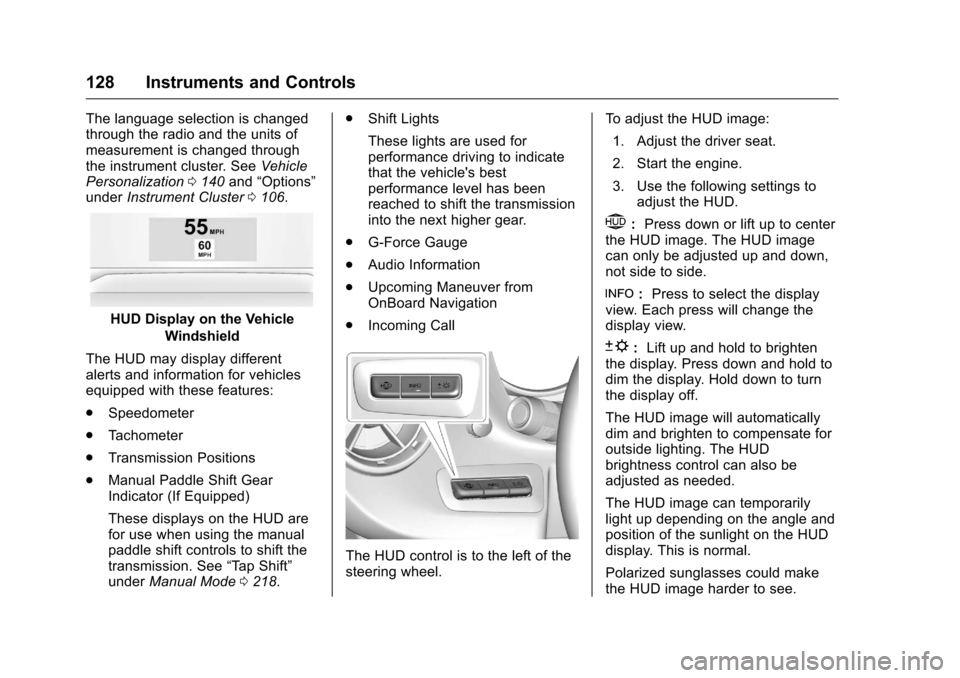
HUD Display on the Vehicle
Windshield
The HUD may display different
alerts and information for vehicles
equipped with these features:
. Speedometer
. Tachometer
. Transmission Positions
. Manual Paddle Shift Gear
Indicator (If Equipped)
These displays on the HUD are
for use when using the manual
paddle shift controls to shift the
transmission. See “Tap Shift”
under Manual Mode 0218. .
Shift Lights
These lights are used for
performance driving to indicate
that the vehicle's best
performance level has been
reached to shift the transmission
into the next higher gear.
. G-Force Gauge
. Audio Information
. Upcoming Maneuver from
OnBoard Navigation
. Incoming Call
The HUD control is to the left of the
steering wheel. To adjust the HUD image:
1. Adjust the driver seat.
2. Start the engine.
3. Use the following settings to adjust the HUD.
$:Press down or lift up to center
the HUD image. The HUD image
can only be adjusted up and down,
not side to side.
!: Press to select the display
view. Each press will change the
display view.
D: Lift up and hold to brighten
the display. Press down and hold to
dim the display. Hold down to turn
the display off.
The HUD image will automatically
dim and brighten to compensate for
outside lighting. The HUD
brightness control can also be
adjusted as needed.
The HUD image can temporarily
light up depending on the angle and
position of the sunlight on the HUD
display. This is normal.
Polarized sunglasses could make
the HUD image harder to see.
Page 130 of 383
Chevrolet Camaro Owner Manual-Convertible (GMNA-Localizing-U.S./Cana-
da/Mexico-9702260) - 2016 - CRC - 10/28/15
Instruments and Controls 129
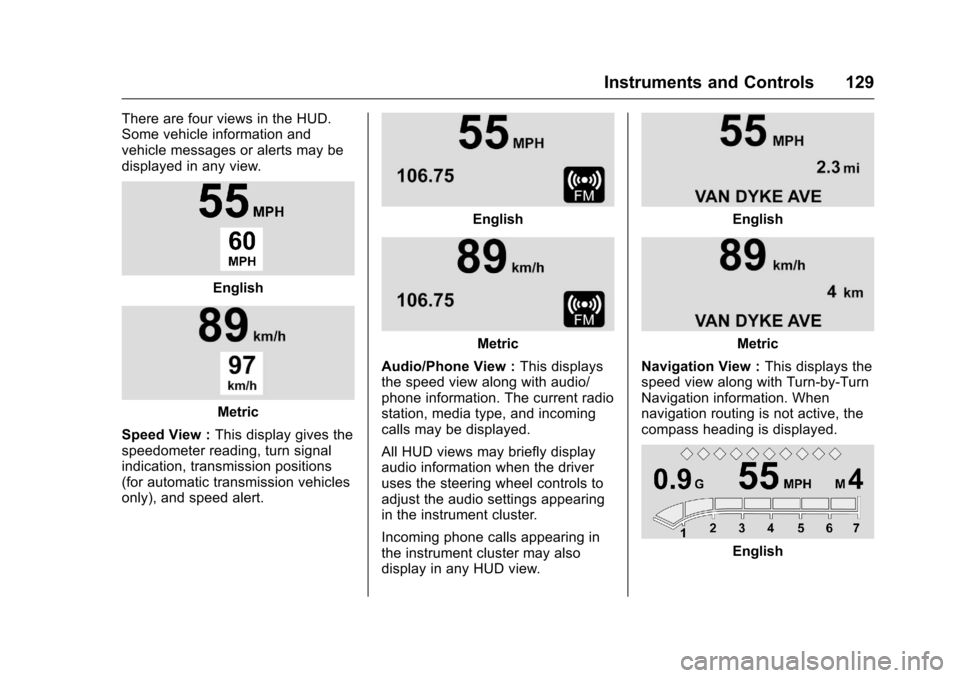
There are four views in the HUD.
Some vehicle information and
vehicle messages or alerts may be
displayed in any view.
English
Metric
Speed View : This display gives the
speedometer reading, turn signal
indication, transmission positions
(for automatic transmission vehicles
only), and speed alert.
English
Metric
Audio/Phone View : This displays
the speed view along with audio/
phone information. The current radio
station, media type, and incoming
calls may be displayed.
All HUD views may briefly display
audio information when the driver
uses the steering wheel controls to
adjust the audio settings appearing
in the instrument cluster.
Incoming phone calls appearing in
the instrument cluster may also
display in any HUD view.
English
Metric
Navigation View : This displays the
speed view along with Turn-by-Turn
Navigation information. When
navigation routing is not active, the
compass heading is displayed.
English
Page 131 of 383
Chevrolet Camaro Owner Manual-Convertible (GMNA-Localizing-U.S./Cana-
da/Mexico-9702260) - 2016 - CRC - 10/28/15
130 Instruments and Controls
Metric
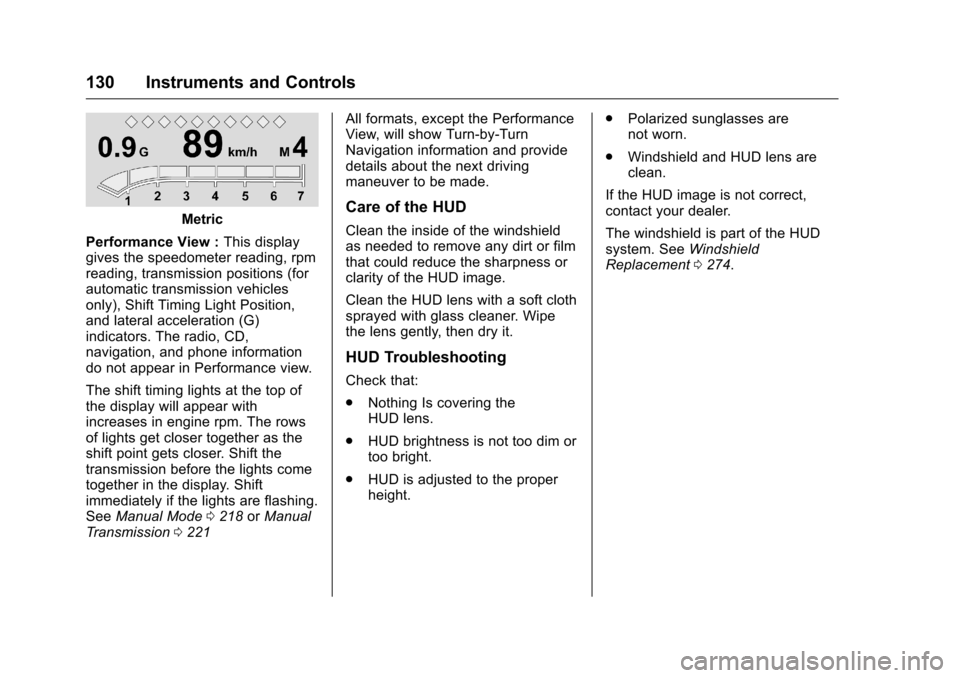
Performance View : This display
gives the speedometer reading, rpm
reading, transmission positions (for
automatic transmission vehicles
only), Shift Timing Light Position,
and lateral acceleration (G)
indicators. The radio, CD,
navigation, and phone information
do not appear in Performance view.
The shift timing lights at the top of
the display will appear with
increases in engine rpm. The rows
of lights get closer together as the
shift point gets closer. Shift the
transmission before the lights come
together in the display. Shift
immediately if the lights are flashing.
See Manual Mode 0218 orManual
Transmission 0221 All formats, except the Performance
View, will show Turn-by-Turn
Navigation information and provide
details about the next driving
maneuver to be made.Care of the HUD
Clean the inside of the windshield
as needed to remove any dirt or film
that could reduce the sharpness or
clarity of the HUD image.
Clean the HUD lens with a soft cloth
sprayed with glass cleaner. Wipe
the lens gently, then dry it.
HUD Troubleshooting
Check that:
.
Nothing Is covering the
HUD lens.
. HUD brightness is not too dim or
too bright.
. HUD is adjusted to the proper
height. .
Polarized sunglasses are
not worn.
. Windshield and HUD lens are
clean.
If the HUD image is not correct,
contact your dealer.
The windshield is part of the HUD
system. See Windshield
Replacement 0274.
Page 135 of 383
Chevrolet Camaro Owner Manual-Convertible (GMNA-Localizing-U.S./Cana-
da/Mexico-9702260) - 2016 - CRC - 10/28/15
134 Instruments and Controls
Engine Cooling System
Messages
A/C OFF DUE TO HIGH
ENGINE TEMP
This message displays when the
engine coolant becomes hotter than
the normal operating temperature.
To avoid added strain on a hot
engine, the air conditioning
compressor automatically turns off.
When the coolant temperature
returns to normal, the air
conditioning compressor turns back
on. The vehicle can continue to be
driven.
If this message continues to appear,
have the system repaired by your
dealer as soon as possible to avoid
damage to the engine.
ENGINE OVERHEATING—
IDLE ENGINE
This message displays when the
engine coolant temperature is too
hot. Stop and allow the vehicle to
idle until it cools down.
Engine Oil Messages
CHANGE ENGINE OIL SOON
This message displays when the
engine oil needs to be changed.
When you change the engine oil, be
sure to reset the Oil Life System.
See Engine Oil Life System 0259,
Driver Information Center (DIC)
0 124, Engine Oil 0257, and
Maintenance Schedule 0329.
ENGINE OIL HOT, IDLE
ENGINE
This message displays when the
engine oil temperature is too hot.
Stop and allow the vehicle to idle
until it cools down.
ENGINE OIL LOW —ADD OIL
On some vehicles, this message
displays when the engine oil level
may be too low. Check the oil level
before filling to the recommended
level. If the oil is not low and this
message remains on, take the
vehicle to your dealer for service.
See Engine Oil 0257.
OIL PRESSURE LOW —STOP
ENGINE
This message displays if low oil
pressure levels occur. Stop the
vehicle as soon as safely possible,
turn off the engine, and do not
operate it until the cause of the low
oil pressure has been corrected.
Check the oil as soon as possible
and have the vehicle serviced by
your dealer.
UPSHIFT NOW, ENGINE
PROTECTION ACTIVE
This message indicates the engine
controls have taken action to
prevent an oil starvation condition.
This may reduce the available
engine power, or on automatic
transmission equipped vehicles
force an upshift to a higher gear.
Engine Power Messages
ENGINE POWER IS REDUCED
This message displays when the
vehicle's engine power is reduced.
Reduced engine power can affect
the vehicle's ability to accelerate.
Page 139 of 383
Chevrolet Camaro Owner Manual-Convertible (GMNA-Localizing-U.S./Cana-
da/Mexico-9702260) - 2016 - CRC - 10/28/15
138 Instruments and Controls
system. If this message displays
and a reduction in steering
performance or loss of power
steering assistance is noticed, see
your dealer.
SERVICE VEHICLE SOON
This message is displayed if there is
a problem with the vehicle. Take the
vehicle to your dealer for service.
Starting the Vehicle
Messages
PRESS BRAKE TO START
This message is displayed when
attempting to start an automatic
transmission equipped vehicle
without first pressing the brake
pedal.
PRESS CLUTCH TO START
This message is displayed when
attempting to start a manual
transmission equipped vehicle
without first pressing the clutch
pedal.
SERVICE KEYLESS START
SYSTEM
This message is displayed if there is
a problem with the pushbutton start
system. Take the vehicle to your
dealer for service.
Tire Messages
SERVICE TIRE MONITOR
SYSTEM
This message displays if there is a
problem with the Tire Pressure
Monitor System (TPMS). SeeTire
Pressure Monitor Operation 0295.
TIRE LEARNING ACTIVE
This message displays when the
system is learning new tires. See
Tire Pressure Monitor
Operation 0295.
TIRE PRESSURE LOW ADD
AIR TO TIRE
This message displays when the
pressure in one or more of the tires
is low. This message also displays LEFT
FRONT, RIGHT FRONT, LEFT
REAR, or RIGHT REAR to indicate
the location of the low tire.
The low tire pressure warning light
will also come on. See
Tire
Pressure Light 0122.
If a tire pressure message appears
on the DIC, stop as soon as
possible. Inflate the tires by adding
air until the tire pressure is equal to
the values shown on the Tire and
Loading Information label. See Tires
0 285, Vehicle Load Limits 0204,
and Tire Pressure 0292.
More than one tire pressure
message can appear at a time. The
DIC also shows the tire pressure
values. See Driver Information
Center (DIC) 0124.
Transmission Messages
1-4 SHIFT
This message displays on a manual
transmission vehicle when you can
only shift from 1 (First) to 4 (Fourth)
instead of 1 (First) to 2 (Second).
Page 140 of 383
Chevrolet Camaro Owner Manual-Convertible (GMNA-Localizing-U.S./Cana-
da/Mexico-9702260) - 2016 - CRC - 10/28/15
Instruments and Controls 139
MANUAL TRANSMISSION—
RELEASE CLUTCH PEDAL
This message displays and a chime
sounds if the manual transmission
clutch pedal is partially applied for
an extended period of time while the
vehicle is being driven. Driving with
the clutch pedal applied can reduce
the life of the clutch. Fully release
the clutch pedal after each gear
change.
AUTOMATIC TRANSMISSION
PERFORMANCE SHIFT
ACTIVE
This message may display when the
vehicle is in Sport or Track Mode.
REDUCED PERFORMANCE —
REDUCE CLUTCH USE
This message displays and engine
torque is momentarily limited if
excessive manual transmission
clutch slip is detected while the
clutch pedal is fully released.
Reduce clutch slip during
acceleration from a stop and during
gear changes to allow the clutch to
cool. This should prevent further slips with the clutch pedal fully
released. If this message displays
repeatedly, see your dealer.
SERVICE TRANSMISSION
This message displays if there is a
problem with the transmission. See
your dealer.
SHIFT DENIED
This message displays when
attempting to shift to a gear not
appropriate for the vehicle speed
and engine revolutions per
minute (rpm).
SHIFT TO PARK
This message displays when the
transmission needs to be shifted to
P (Park). This may appear when
attempting to remove the key from
the vehicle if the vehicle is not in
P (Park).
TRANSMISSION HOT
—IDLE
ENGINE
This message displays and a chime
sounds if the transmission fluid in
the vehicle gets hot. Driving with the
automatic transmission fluid temperature high can cause
damage to the vehicle. Stop the
vehicle and let it idle to allow the
transmission to cool. This message
clears when the fluid temperature
reaches a safe level.
If this message is displayed during
normal vehicle operation on flat
roads, the vehicle may need
service. See your dealer for an
inspection.
TRANSMISSION HOT
—
SLOW DOWN
This message displays and a chime
sounds if the manual transmission
fluid is hot and if the vehicle speed
is high. Driving with the manual
transmission fluid temperature high
can cause damage to the vehicle.
Drive at a slower speed to cool the
manual transmission fluid. This
message clears when the vehicle
has slowed sufficiently or if the
manual transmission fluid has
cooled sufficiently.