fuse CHEVROLET CAMARO 2016 6.G Owners Manual
[x] Cancel search | Manufacturer: CHEVROLET, Model Year: 2016, Model line: CAMARO, Model: CHEVROLET CAMARO 2016 6.GPages: 383, PDF Size: 6.46 MB
Page 5 of 383
Chevrolet Camaro Owner Manual-Convertible (GMNA-Localizing-U.S./Cana-
da/Mexico-9702260) - 2016 - CRC - 10/28/15
4 Introduction
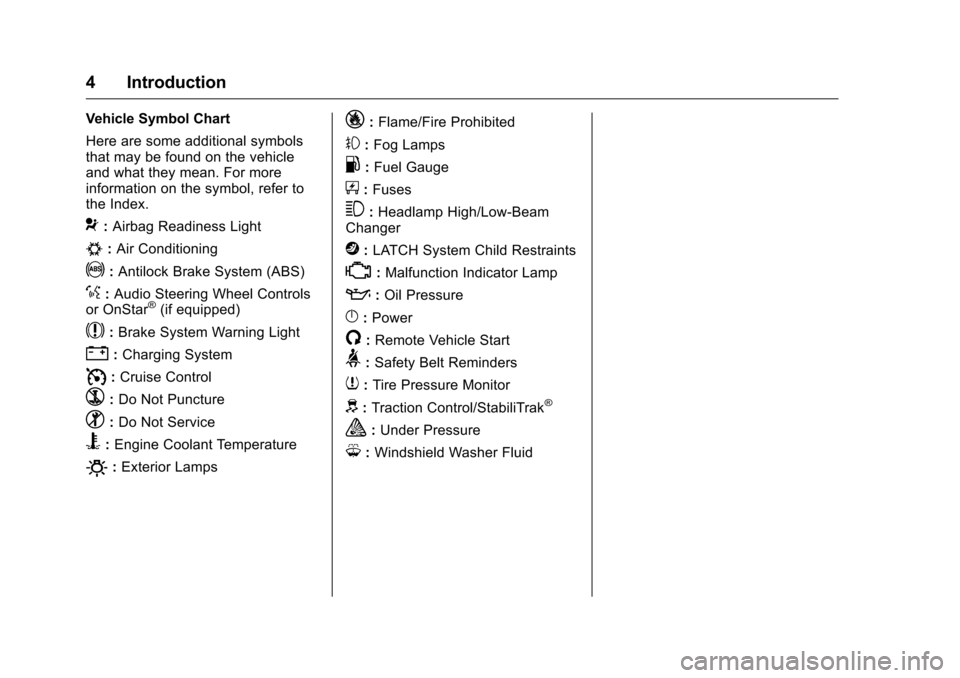
Vehicle Symbol Chart
Here are some additional symbols
that may be found on the vehicle
and what they mean. For more
information on the symbol, refer to
the Index.
9:Airbag Readiness Light
#:Air Conditioning
!:Antilock Brake System (ABS)
%:Audio Steering Wheel Controls
or OnStar®(if equipped)
$: Brake System Warning Light
":Charging System
I: Cruise Control
`:Do Not Puncture
^:Do Not Service
B:Engine Coolant Temperature
O:Exterior Lamps
_: Flame/Fire Prohibited
#:Fog Lamps
.:Fuel Gauge
+: Fuses
3:Headlamp High/Low-Beam
Changer
j: LATCH System Child Restraints
*:Malfunction Indicator Lamp
::Oil Pressure
}:Power
/:Remote Vehicle Start
>: Safety Belt Reminders
7:Tire Pressure Monitor
d:Traction Control/StabiliTrak®
a:Under Pressure
M: Windshield Washer Fluid
Page 51 of 383
Chevrolet Camaro Owner Manual-Convertible (GMNA-Localizing-U.S./Cana-
da/Mexico-9702260) - 2016 - CRC - 10/28/15
50 Keys, Doors, and Windows
Complete the power window
indexing procedure. SeePower
Windows 044.
See Convertible Top
Messages 0132.
Other features may be affected
while operating the convertible top:
. The trunk can only be opened
with the key until the convertible
top is completely opened or
closed.
. The windows cannot close while
the top is moving.
. When driving with the top not
fully secured, chimes can be
heard above 80 km/h (50 mph).
If the vehicle battery has been
disconnected and reconnected, the
fuses were pulled or replaced, or a
jump start was performed, the TOP
NOT SECURE message may
display. Press and hold
Mto
open/close the top until this
message is cleared.
See Convertible Top
Messages 0132. Partial Top Cycling
If the convertible top operation is
stopped before completion, the top
will temporarily hold its position.
If the ignition is in ACC/
ACCESSORY or ON/RUN, the top
will be held for up to five minutes,
then pulse down. If the vehicle is
moving or off, the amount of time
will vary from a few seconds to
about a minute.
Beeps and DIC messages will be
displayed before the top will move.
When this occurs, immediately finish
the convertible top operation by
pressing
Magain until it
completes.
If the top cannot be secured, keep
clear of the top components. In
some conditions the top may move
quickly.
Do not drive with the convertible
top in an unsecured position.
The top components may move
unexpectedly. In some cases the
top may not be able to be power
operated. If this occurs, follow the
DIC messages displayed. If the tonneau cover is not secured
and latched, and the vehicle is
moving above 10 km/h (6 mph), the
tonneau cover may automatically
move to a stable position.
See
Convertible Top
Messages 0132.
Manual Movement of Top
If the DIC displays the ONLY
MANUAL OPERATION OF TOP
POSSIBLE message:
1. Press
Mto either open or
close the top. Press the switch
in the opposite direction if one
does not work.
2. If the top moves, continue pressing the switch in that
direction for at least
five seconds. The top should
then work normally.
If the top does not respond in either
direction, take it to your dealer for
service. If the top is retracted but
not latched, use the following
procedure to manually close the
Page 104 of 383
Chevrolet Camaro Owner Manual-Convertible (GMNA-Localizing-U.S./Cana-
da/Mexico-9702260) - 2016 - CRC - 10/28/15
Instruments and Controls 103
Uplevel Radio Using
Touchscreen Controls
The infotainment system controls
are used to access the time and
date settings through the menu
system. See“Using the System”
under “Introduction” in the
infotainment manual.
To set the time:
1. Touch SETTINGS from the Home Page, then touch Time
and Date.
2. Touch Set Time and touch
«
orªto increase or decrease
hours, minutes, and AM or PM.
Touch 12–24 Hr for 12 or
24 hour clock.
3. Touch
}to go back to the
previous menu.
Auto Set requires an OnStar
subscription. If auto timing is set, the time
displayed on the clock may not
update immediately when driving
into a new time zone.
To set the date:
1. Touch SETTINGS from the Home Page, then touch Time
and Date.
2. Touch Set Date and touch
«
orªto increase or decrease
month, day, or year.
3. Touch
}to go back to the
previous menu.
To set the clock display:
1. Touch SETTINGS and touch Time and Date.
2. Touch Clock Display and touch OFF or ON to turn the clock
display off or on.
3. Touch
}to go back to the
previous menu.
The clock settings can also be
accessed by touching the time
display, then touching Set.
Power Outlets
The vehicle has an accessory
power outlet on the center floor
console in front of the cupholders.
It can be used to plug in electrical
equipment, such as a cell phone or
an MP3 player.
The accessory power outlet does
not work when the ignition is turned
off and the driver door is opened.
This helps to preserve the battery
life of the vehicle.
Certain power accessory plugs may
not be compatible with the
accessory power outlet and could
overload vehicle and adapter fuses.
If a problem is experienced, see
your dealer.
Caution
Adding any electrical equipment
to the vehicle may damage it or
keep other components from
working as they should. The
repairs would not be covered by
the vehicle warranty. Do not use (Continued)
Page 157 of 383
Chevrolet Camaro Owner Manual-Convertible (GMNA-Localizing-U.S./Cana-
da/Mexico-9702260) - 2016 - CRC - 10/28/15
156 Lighting
Move the lever all the way up or
down to signal a turn.
An arrow on the instrument cluster
flashes in the direction of the turn or
lane change.
Raise or lower the lever until the
arrow starts to flash to signal a lane
change. Hold it there until the lane
change is completed. If the lever is
briefly pressed and released, the
turn signal flashes three times.
The turn and lane-change signal
can be turned off manually by
moving the lever back to its original
position.
If after signaling a turn or lane
change, the arrow flashes rapidly or
does not come on, a signal bulb
may be burned out.
Replace any burned out bulbs. If a
bulb is not burned out, check the
fuse. SeeFuses and Circuit
Breakers 0279.Interior Lighting
Instrument Panel
Illumination Control
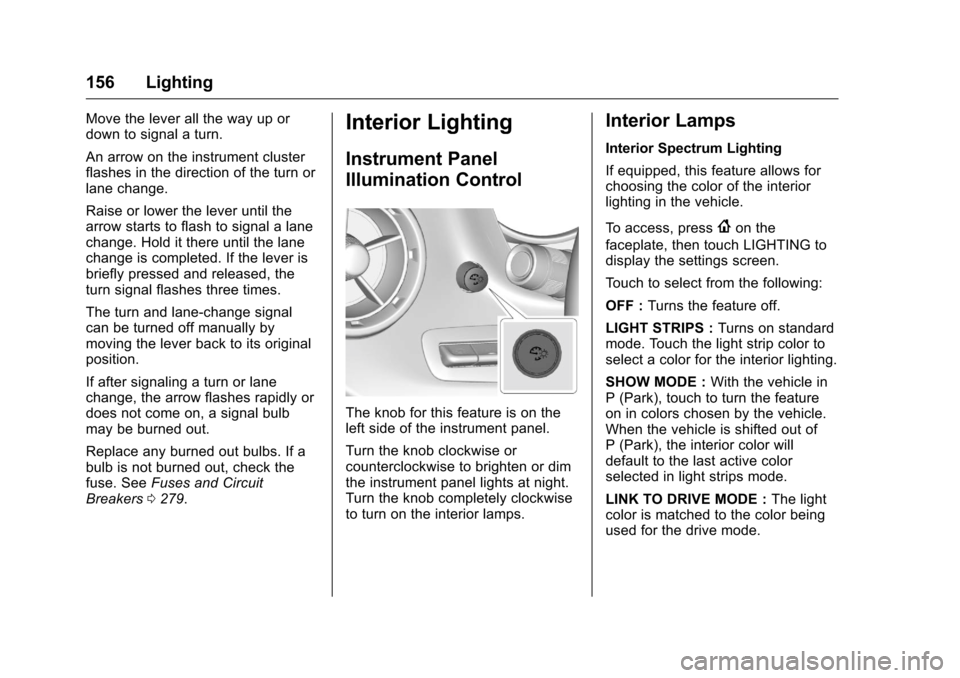
The knob for this feature is on the
left side of the instrument panel.
Turn the knob clockwise or
counterclockwise to brighten or dim
the instrument panel lights at night.
Turn the knob completely clockwise
to turn on the interior lamps.
Interior Lamps
Interior Spectrum Lighting
If equipped, this feature allows for
choosing the color of the interior
lighting in the vehicle.
To access, press
{on the
faceplate, then touch LIGHTING to
display the settings screen.
Touch to select from the following:
OFF : Turns the feature off.
LIGHT STRIPS : Turns on standard
mode. Touch the light strip color to
select a color for the interior lighting.
SHOW MODE : With the vehicle in
P (Park), touch to turn the feature
on in colors chosen by the vehicle.
When the vehicle is shifted out of
P (Park), the interior color will
default to the last active color
selected in light strips mode.
LINK TO DRIVE MODE : The light
color is matched to the color being
used for the drive mode.
Page 213 of 383
Chevrolet Camaro Owner Manual-Convertible (GMNA-Localizing-U.S./Cana-
da/Mexico-9702260) - 2016 - CRC - 10/28/15
212 Driving and Operating
If the vehicle has a manual
transmission, move the shift lever to
R (Reverse) and set the parking
brake after turning off the engine by
pressing and holding ENGINE
START/STOP.
If the RKE transmitter is not
detected inside the vehicle when it
is turned to OFF, the DIC displays a
message. SeeKey and Lock
Messages 0135.
Engine Heater
The engine coolant heater,
if equipped, can help in cold
weather conditions at or
below −18 °C (0 °F) for easier
starting and better fuel economy
during engine warm-up. Plug in the
coolant heater at least four hours
before starting the vehicle. An
internal thermostat in the plug end
of the cord will prevent engine
coolant heater operation at
temperatures above −18 °C (0 °F).
Using the Engine Coolant
Heater
1. Turn off the engine. 2. Open the hood and unwrap the
electrical cord.
V6 model
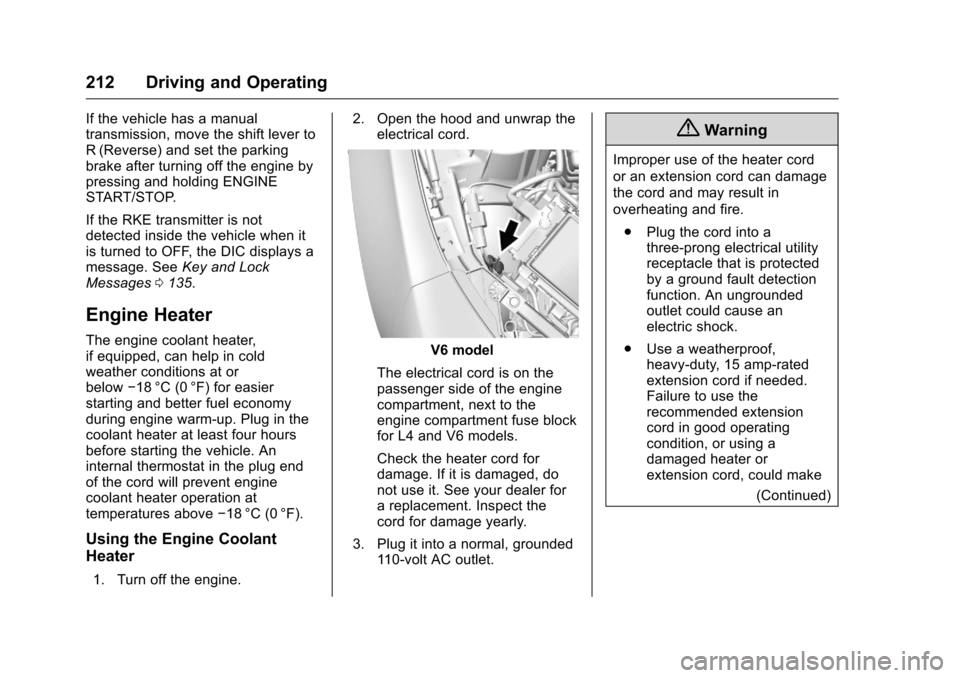
The electrical cord is on the
passenger side of the engine
compartment, next to the
engine compartment fuse block
for L4 and V6 models.
Check the heater cord for
damage. If it is damaged, do
not use it. See your dealer for
a replacement. Inspect the
cord for damage yearly.
3. Plug it into a normal, grounded 110-volt AC outlet.
{Warning
Improper use of the heater cord
or an extension cord can damage
the cord and may result in
overheating and fire.
. Plug the cord into a
three-prong electrical utility
receptacle that is protected
by a ground fault detection
function. An ungrounded
outlet could cause an
electric shock.
. Use a weatherproof,
heavy-duty, 15 amp-rated
extension cord if needed.
Failure to use the
recommended extension
cord in good operating
condition, or using a
damaged heater or
extension cord, could make
(Continued)
Page 249 of 383
Chevrolet Camaro Owner Manual-Convertible (GMNA-Localizing-U.S./Cana-
da/Mexico-9702260) - 2016 - CRC - 10/28/15
248 Vehicle Care
Vehicle Care
General Information
General Information . . . . . . . . . . 249
California Proposition65 Warning . . . . . . . . . . . . . . . . . 249
California Perchlorate Materials Requirements . . . . . 249
Accessories and Modifications . . . . . . . . . . . . . . . . 250
Vehicle Checks
Doing Your OwnService Work . . . . . . . . . . . . . . . 250
Hood . . . . . . . . . . . . . . . . . . . . . . . . . 251
Engine Compartment Overview . . . . . . . . . . . . . . . . . . . . 252
Engine Oil . . . . . . . . . . . . . . . . . . . . 257
Engine Oil Life System . . . . . . . 259
Automatic Transmission Fluid . . . . . . . . . . . . . . . . . . . . . . . . 260
Manual Transmission Fluid . . . 260
Hydraulic Clutch . . . . . . . . . . . . . . 260
Engine Air Cleaner/Filter . . . . . . 261
Cooling System . . . . . . . . . . . . . . 263
Engine Coolant . . . . . . . . . . . . . . . 264
Engine Overheating . . . . . . . . . . 267
Washer Fluid . . . . . . . . . . . . . . . . . 269
Brakes . . . . . . . . . . . . . . . . . . . . . . . 269
Brake Fluid . . . . . . . . . . . . . . . . . . . 270 Battery - North America . . . . . . 271
Rear Axle . . . . . . . . . . . . . . . . . . . . 272
Starter Switch Check . . . . . . . . . 272
Automatic Transmission Shift
Lock Control Function
Check . . . . . . . . . . . . . . . . . . . . . . . 273
Park Brake and P (Park) Mechanism Check . . . . . . . . . . 273
Wiper Blade Replacement . . . . 274
Windshield Replacement . . . . . 274
Headlamp Aiming
Headlamp Aiming . . . . . . . . . . . . 275
Bulb Replacement
Bulb Replacement . . . . . . . . . . . . 275
Halogen Bulbs . . . . . . . . . . . . . . . . 275
High Intensity Discharge (HID) Lighting . . . . . . . . . . . . . . . . . . . . . 275
Front Turn Signal Lamps (Passenger Side Only) . . . . . . 276
Taillamps, Turn Signal, and Stoplamps . . . . . . . . . . . . . . . . . . 276
License Plate Lamp . . . . . . . . . . 277
Replacement Bulbs . . . . . . . . . . . 278
Electrical System
Electrical System Overload . . . 278
Fuses and Circuit Breakers . . . 279
Engine Compartment Fuse Block . . . . . . . . . . . . . . . . . . . . . . . . 279 Rear Compartment Fuse
Block . . . . . . . . . . . . . . . . . . . . . . . . 282
Wheels and Tires
Tires . . . . . . . . . . . . . . . . . . . . . . . . . . 285
All-Season Tires . . . . . . . . . . . . . . 286
Winter Tires . . . . . . . . . . . . . . . . . . 286
Run-Flat Tires . . . . . . . . . . . . . . . . 286
Low-Profile Tires . . . . . . . . . . . . . 287
Summer Tires . . . . . . . . . . . . . . . . 288
Tire Sidewall Labeling . . . . . . . . 288
Tire Designations . . . . . . . . . . . . . 289
Tire Terminology andDefinitions . . . . . . . . . . . . . . . . . . 290
Tire Pressure . . . . . . . . . . . . . . . . . 292
Tire Pressure for High-Speed Operation . . . . . . . . . . . . . . . . . . . 294
Tire Pressure Monitor System . . . . . . . . . . . . . . . . . . . . . . 294
Tire Pressure Monitor Operation . . . . . . . . . . . . . . . . . . . 295
Tire Inspection . . . . . . . . . . . . . . . . 298
Tire Rotation . . . . . . . . . . . . . . . . . 298
When It Is Time for New Tires . . . . . . . . . . . . . . . . . . . . . . . . 300
Buying New Tires . . . . . . . . . . . . . 300
Different Size Tires and Wheels . . . . . . . . . . . . . . . . . . . . . . 302
Uniform Tire Quality Grading . . . . . . . . . . . . . . . . . . . . . 302
Page 254 of 383
Chevrolet Camaro Owner Manual-Convertible (GMNA-Localizing-U.S./Cana-
da/Mexico-9702260) - 2016 - CRC - 10/28/15
Vehicle Care 253
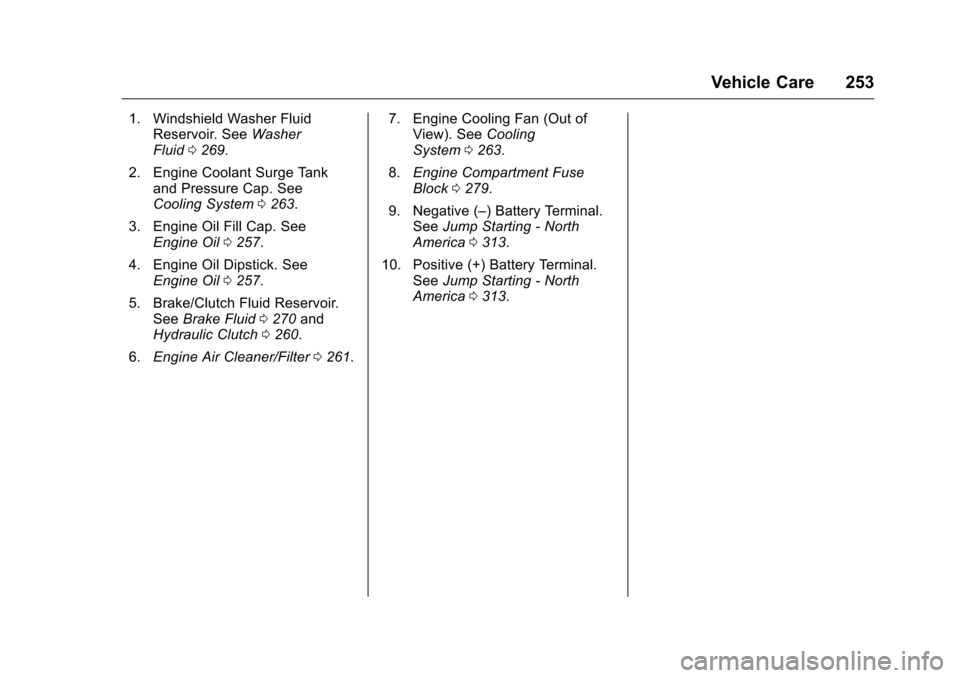
1. Windshield Washer FluidReservoir. See Washer
Fluid 0269.
2. Engine Coolant Surge Tank and Pressure Cap. See
Cooling System 0263.
3. Engine Oil Fill Cap. See Engine Oil 0257.
4. Engine Oil Dipstick. See Engine Oil 0257.
5. Brake/Clutch Fluid Reservoir. See Brake Fluid 0270 and
Hydraulic Clutch 0260.
6. Engine Air Cleaner/Filter 0261. 7. Engine Cooling Fan (Out of
View). See Cooling
System 0263.
8. Engine Compartment Fuse
Block 0279.
9. Negative (–) Battery Terminal. See Jump Starting - North
America 0313.
10. Positive (+) Battery Terminal. SeeJump Starting - North
America 0313.
Page 256 of 383
Chevrolet Camaro Owner Manual-Convertible (GMNA-Localizing-U.S./Cana-
da/Mexico-9702260) - 2016 - CRC - 10/28/15
Vehicle Care 255
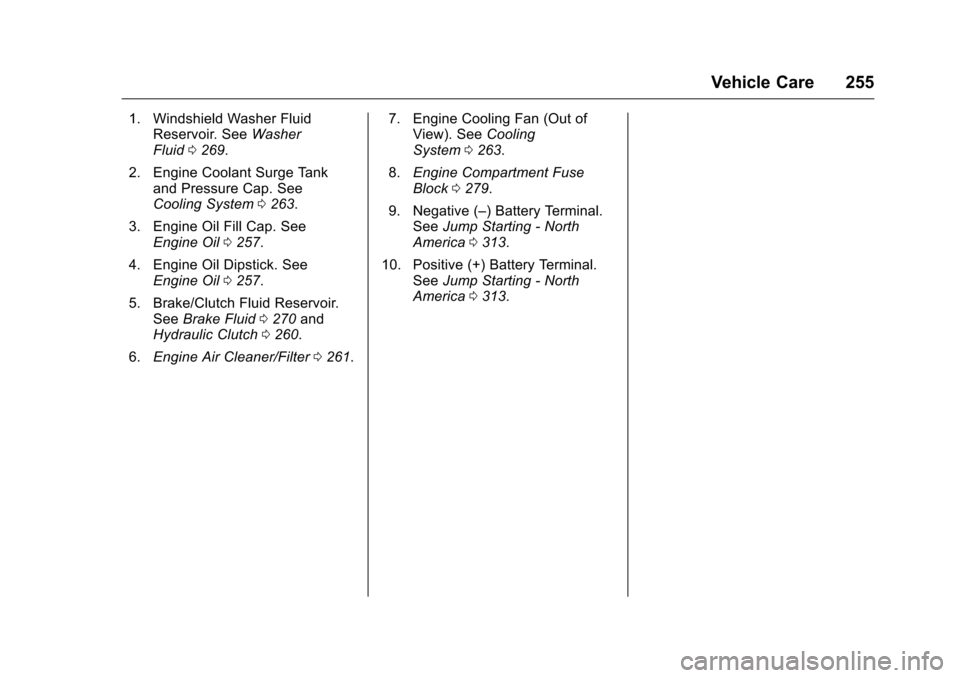
1. Windshield Washer FluidReservoir. See Washer
Fluid 0269.
2. Engine Coolant Surge Tank and Pressure Cap. See
Cooling System 0263.
3. Engine Oil Fill Cap. See Engine Oil 0257.
4. Engine Oil Dipstick. See Engine Oil 0257.
5. Brake/Clutch Fluid Reservoir. See Brake Fluid 0270 and
Hydraulic Clutch 0260.
6. Engine Air Cleaner/Filter 0261. 7. Engine Cooling Fan (Out of
View). See Cooling
System 0263.
8. Engine Compartment Fuse
Block 0279.
9. Negative (–) Battery Terminal. See Jump Starting - North
America 0313.
10. Positive (+) Battery Terminal. SeeJump Starting - North
America 0313.
Page 258 of 383
Chevrolet Camaro Owner Manual-Convertible (GMNA-Localizing-U.S./Cana-
da/Mexico-9702260) - 2016 - CRC - 10/28/15
Vehicle Care 257
1. Windshield Washer FluidReservoir. See Washer
Fluid 0269.
2. Engine Coolant Surge Tank and Pressure Cap. See
Cooling System 0263.
3. Engine Oil Dipstick. See Engine Oil 0257.
4. Engine Oil Fill Cap. See Engine Oil 0257.
5. Brake/Clutch Fluid Reservoir. See Brake Fluid 0270 and
Hydraulic Clutch 0260.
6. Engine Air Cleaner/Filter 0261.
7. Engine Cooling Fan (Out of View). See Cooling
System 0263.
8. Engine Compartment Fuse
Block 0279.
9. Negative (–) Battery Terminal. See Jump Starting - North
America 0313.
10. Positive (+) Battery Terminal. SeeJump Starting - North
America 0313.Engine Oil
To ensure proper engine
performance and long life, careful
attention must be paid to engine oil.
Following these simple, but
important steps will help protect
your investment:
.
Use engine oil approved to the
proper specification and of the
proper viscosity grade. See
“Selecting the Right Engine Oil”
in this section.
. Check the engine oil level
regularly and maintain the
proper oil level. See “Checking
Engine Oil” and“When to Add
Engine Oil” in this section.
. Change the engine oil at the
appropriate time. See Engine Oil
Life System 0259.
. Always dispose of engine oil
properly. See “What to Do with
Used Oil” in this section.
Checking Engine Oil
It is a good idea to check the engine
oil level at each fuel fill. In order to
get an accurate reading, the vehicle must be on level ground. The
engine oil dipstick handle is a loop.
See
Engine Compartment Overview
0 252 for the location of the engine
oil dipstick.
Obtaining an accurate oil level
reading is essential:
1. If the engine has been running recently, turn off the engine and
allow several minutes for the oil
to drain back into the oil pan.
Checking the oil level too soon
after engine shutoff will not
provide an accurate oil level
reading.
{Warning
The engine oil dipstick handle
may be hot; it could burn you.
Use a towel or glove to touch the
dipstick handle.
2. Pull out the dipstick and wipe it with a clean paper towel or
cloth, then push it back in all
the way. Remove it again,
keeping the tip down, and
check the level.
Page 279 of 383
Chevrolet Camaro Owner Manual-Convertible (GMNA-Localizing-U.S./Cana-
da/Mexico-9702260) - 2016 - CRC - 10/28/15
278 Vehicle Care
6. Reinstall the license plate lampby lifting it through the fascia
opening until the clip is in
place.
Replacement Bulbs
Exterior Lamp Bulb
Number
Front Turn Signal WY21W
License Plate W5WLL
Back-up W21W
Stop/Turn Signal W21W
Taillamps W5W
For replacement bulbs not listed
here, contact your dealer.
Electrical System
Electrical System
Overload
The vehicle has fuses and circuit
breakers to protect against an
electrical system overload.
When the current electrical load is
too heavy, the circuit breaker opens
and closes, protecting the circuit
until the current load returns to
normal or the problem is fixed. This
greatly reduces the chance of circuit
overload and fire caused by
electrical problems.
Fuses and circuit breakers protect
power devices in the vehicle.
Replace a bad fuse with a new one
of the identical size and rating.
If there is a problem on the road and
a fuse needs to be replaced, the
same amperage fuse can be
borrowed. Choose some feature of
the vehicle that is not needed to use
and replace it as soon as possible.
Headlamp Wiring
An electrical overload may cause
the lamps to go on and off, or in
some cases to remain off. Have the
headlamp wiring checked right away
if the lamps go on and off or
remain off.
Windshield Wipers
If the wiper motor overheats due to
heavy snow or ice, the windshield
wipers will stop until the motor cools
and will then restart.
Although the circuit is protected
from electrical overload, overload
due to heavy snow or ice may
cause wiper linkage damage.
Always clear ice and heavy snow
from the windshield before using the
windshield wipers.
If the overload is caused by an
electrical problem and not snow or
ice, be sure to get it fixed.