ECO mode CHEVROLET CAMARO 2017 6.G Owner's Manual
[x] Cancel search | Manufacturer: CHEVROLET, Model Year: 2017, Model line: CAMARO, Model: CHEVROLET CAMARO 2017 6.GPages: 391, PDF Size: 6.65 MB
Page 205 of 391
Chevrolet Camaro Owner Manual (GMNA-Localizing-U.S./Canada/Mexico-
9804281) - 2017 - crc - 4/25/16
204 Driving and Operating
The vehicle may straighten out.
Be ready for a second skid if it
occurs.
. Slow down and adjust your
driving according to weather
conditions. Stopping distance
can be longer and vehicle
control can be affected when
traction is reduced by water,
snow, ice, gravel, or other
material on the road. Learn to
recognize warning clues —such
as enough water, ice, or packed
snow on the road to make a
mirrored surface —and slow
down when you have any doubt.
. Try to avoid sudden steering,
acceleration, or braking,
including reducing vehicle speed
by shifting to a lower gear. Any
sudden changes could cause
the tires to slide.
Remember: Antilock brakes help
avoid only the braking skid.Track Events and
Competitive Driving
If the vehicle is an HP model, see
the additional items in the HP
Supplement.
Track events or competitive driving
may affect the vehicle warranty. See
the warranty manual before using
the vehicle for racing or other
competitive driving.
The Engine Sound Management
setting (if equipped) should not be
set to Stealth Mode during track
events and competitive driving. See
Driver Mode Control 0236.
Engine Oil
Caution
If you use the vehicle for racing or
other competitive driving, the
engine may use more oil than it
would with normal use. Low oil
levels can damage the engine.
For information on how to add oil,
seeEngine Oil 0264.
(Continued)
Caution (Continued)
Be sure to check the oil level
often during racing or other
competitive driving and keep the
level at or near the upper mark
that shows the proper operating
range on the engine oil dipstick.
2.0L (LTG) Turbo Engine
Keep the oil level at or near 1 L
(1 qt) above the upper mark on the
engine oil dipstick which shows the
proper operating range.
6.2L (LT1) Engine
Change the engine oil to 0W-40 or
5W-40 that meets the dexos2™
specification. If this oil is not
available, the following oils can be
used as an alternative: Valvoline
®
SYNPOWER MST 5W-40, Mobil®1
ESP Formula M 5W-40. See
Capacities and Specifications 0351.
Automatic Transmission Fluid
Have the transmission fluid set to
the track specific oil level prior to
track usage. Transmission fluid
Page 206 of 391
Chevrolet Camaro Owner Manual (GMNA-Localizing-U.S./Canada/Mexico-
9804281) - 2017 - crc - 4/25/16
Driving and Operating 205
should be changed after 30 hours of
track usage. Any transmission level
set or change should be performed
at your dealer.
Rear Axle Fluid
Axles must have 2 400 km
(1,500 mi) before being used in
track driving.
The rear axle fluid temperatures
may be higher than when driving in
severe conditions. Drain and refill
with new fluid after the first racing or
competitive driving event, and then
after every 24 hours of racing or
competitive driving. See
Recommended Fluids and
Lubricants0346.
Caution
During a first time track or racing
event, high rear axle
temperatures can occur. Damage
could be caused to the rear axle
and would not be covered by the
vehicle warranty. Do not drive as
(Continued)
Caution (Continued)
long or as fast the first time the
vehicle is driven on the track or
raced.
Brake Fluid
For track events or competitive
driving, it is recommended that the
brake fluid be replaced with a high
performance brake fluid that has a
dry boiling point greater than 279 °C
(534 °F). After conversion to the
high performance brake fluid, follow
the brake fluid service
recommendations outlined by the
fluid manufacturer. Do not use
silicone or DOT-5 brake fluids.
Brake Burnishing
To prepare the Camaro brake
systems for track events and racing,
complete the appropriate high
performance brake burnishing
procedure described below.
New brake pads must be burnished
before racing or competitive driving.
Caution
These procedures are specific to
the Camaro SS, or LT with Y4Q
Heavy Duty Cooling System that
is equipped with J55 brakes. This
procedure should not be run on
other Camaro models as damage
may result.
Caution
The new vehicle break-in period
should be completed before
performing the brake burnishing
procedure or damage may occur
to the powertrain/engine. See
New Vehicle Break-In0215.
When performed as instructed, this
procedure will not damage the
brakes. During the burnishing
procedure, the brake pads will
smoke and produce an odor. The
braking force and pedal travel may
Page 217 of 391
Chevrolet Camaro Owner Manual (GMNA-Localizing-U.S./Canada/Mexico-
9804281) - 2017 - crc - 4/25/16
216 Driving and Operating
Caution (Continued)
.Do not let the engine labor.
Never lug the engine in high
gear at low speeds. With a
manual transmission, shift
to the next lower gear. This
rule applies at all times, not
just during the break-in
period.
. Do not participate in racing
events, sport driving
schools, or similar activities
during this break-in period.
. Check engine oil with every
refueling and add if
necessary. Oil and fuel
consumption may be higher
than normal during the first
2 414 km (1,500 mi).
. To break in new tires, drive
at moderate speeds and
avoid hard cornering for the
first 322 km (200 mi). New
tires do not have maximum
traction and may tend
to slip.
(Continued)
Caution (Continued)
.New brake linings also need
a break-in period. Avoid
making hard stops during
the first 322 km (200 mi).
This is recommended every
time brake linings are
replaced.
. Should the vehicle be used
for racing or competitive
driving (after break-in), the
rear axle lubricant must be
replaced beforehand.
See Track Events and Competitive
Driving 0204.
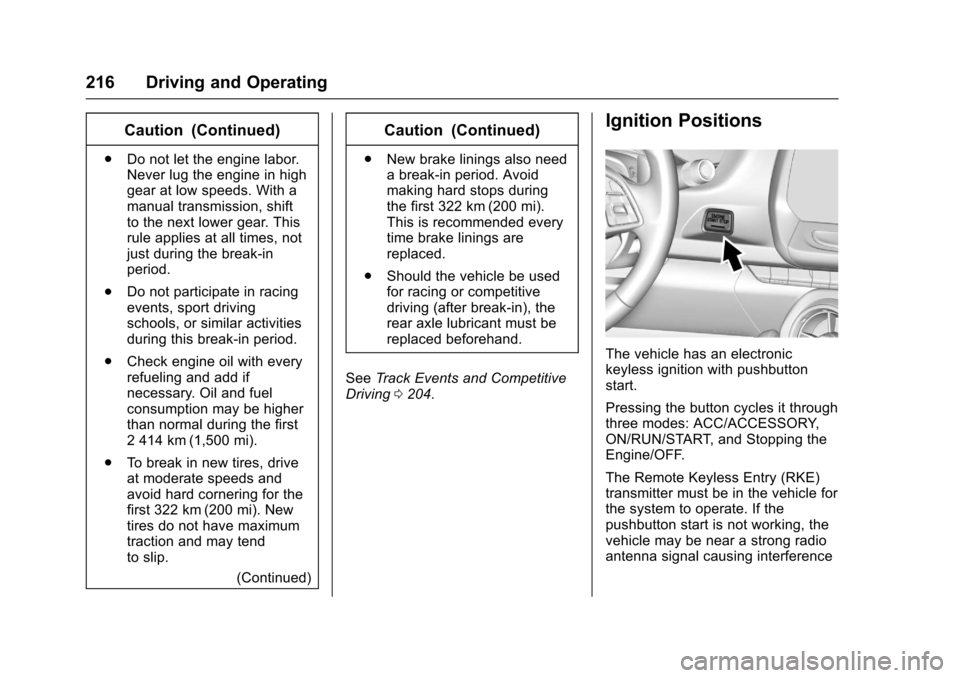
Ignition Positions
The vehicle has an electronic
keyless ignition with pushbutton
start.
Pressing the button cycles it through
three modes: ACC/ACCESSORY,
ON/RUN/START, and Stopping the
Engine/OFF.
The Remote Keyless Entry (RKE)
transmitter must be in the vehicle for
the system to operate. If the
pushbutton start is not working, the
vehicle may be near a strong radio
antenna signal causing interference
Page 218 of 391
Chevrolet Camaro Owner Manual (GMNA-Localizing-U.S./Canada/Mexico-
9804281) - 2017 - crc - 4/25/16
Driving and Operating 217
to the Keyless Access system. See
Remote Keyless Entry (RKE)
System Operation028.
To shift out of P (Park), the vehicle
must be in ON/RUN and the brake
pedal must be applied.
Stopping the Engine/OFF (No
Indicator Lights) : When the
vehicle is stopped, press ENGINE
START/STOP once to turn the
engine off.
If the vehicle is in P (Park), the
ignition will turn off, and Retained
Accessory Power (RAP) will remain
active. See Retained Accessory
Power (RAP) 0221.
Automatic Transmission
If the vehicle is not in P (Park), the
ignition will return to ACC/
ACCESSORY and display a
message in the Driver Information
Center (DIC). See Transmission
Messages 0142. When the vehicle
is shifted into P (Park), the ignition
system will switch to OFF. Manual Transmission
If the vehicle is stationary, the
ignition will turn off, and Retained
Accessory Power (RAP) will remain
active. See
Retained Accessory
Power (RAP) 0221.
Do not turn the engine off when the
vehicle is moving. This will cause a
loss of power assist in the brake
and steering systems and disable
the airbags.
If the vehicle must be shut off in an
emergency: 1. Brake using a firm and steady pressure. Do not pump the
brakes repeatedly. This may
deplete power assist, requiring
increased brake pedal force.
2. Shift the vehicle to N (Neutral). This can be done while the
vehicle is moving. After shifting
to N (Neutral), firmly apply the
brakes and steer the vehicle to
a safe location. 3. Come to a complete stop. Shift
to P (Park) with an automatic
transmission, or N (Neutral)
with a manual transmission.
Turn the ignition to OFF.
4. Set the parking brake. See Electric Parking Brake 0232.
{Warning
Turning off the vehicle while
moving may cause loss of power
assist in the brake and steering
systems and disable the airbags.
While driving, only shut the
vehicle off in an emergency.
If the vehicle cannot be pulled over,
and must be shut off while driving,
press and hold ENGINE START/
STOP for longer than two seconds,
or press twice within five seconds.
ACC/ACCESSORY (Amber
Indicator Light) : This mode allows
the use of some electrical
accessories when the engine is off.
Page 219 of 391
Chevrolet Camaro Owner Manual (GMNA-Localizing-U.S./Canada/Mexico-
9804281) - 2017 - crc - 4/25/16
218 Driving and Operating
With the ignition off, pressing the
button one time without the brake
pedal applied will place the ignition
system in ACC/ACCESSORY.
The ignition will switch from ACC/
ACCESSORY to OFF after
five minutes to prevent battery
rundown.
ON/RUN/START (Green Indicator
Light) :This mode is for driving and
starting. With the ignition off, and
the brake pedal applied, pressing
the button once will place the
ignition system in ON/RUN/START.
Once engine cranking begins,
release the button. Engine cranking
will continue until the engine starts.
See Starting the Engine 0218. The
ignition will then remain in ON/RUN.
Service Only Mode
This power mode is available for
service and diagnostics, and to
verify the proper operation of the
malfunction indicator lamp as may
be required for emission inspection
purposes. With the vehicle off, and
the brake pedal not applied,
pressing and holding the button for
more than five seconds will place the vehicle in Service Only Mode.
The instruments and audio systems
will operate as they do in ON/RUN,
but the vehicle will not be able to be
driven. The engine will not start in
Service Only Mode. Press the
button again to turn the vehicle off.
Starting the Engine
Place the transmission in the
proper gear.
Caution
If you add electrical parts or
accessories, you could change
the way the engine operates. Any
resulting damage would not be
covered by the vehicle warranty.
See
Add-On Electrical
Equipment 0254.
For an automatic transmission,
move the shift lever to P (Park) or
N (Neutral). To restart the vehicle
when it is already moving, use
N (Neutral) only.
Caution
Do not try to shift to P (Park) if the
vehicle is moving. If you do, you
could damage the transmission.
Shift to P (Park) only when the
vehicle is stopped.
For a manual transmission, place
the shift lever in Neutral with the
parking brake engaged. Hold the
clutch pedal down to the floor and
start the engine.
The RKE transmitter must be inside
the vehicle for the ignition to work.
Cell phone chargers can interfere
with the operation of the Keyless
Access system. Battery chargers
should not be plugged in when
starting or turning off the engine.
To start the vehicle: 1. For vehicles with an automatic transmission, press the brake
pedal, then press ENGINE
START/STOP on the
instrument panel. For vehicles
with a manual transmission,
Page 220 of 391
Chevrolet Camaro Owner Manual (GMNA-Localizing-U.S./Canada/Mexico-
9804281) - 2017 - crc - 4/25/16
Driving and Operating 219
press the clutch pedal first,
then press ENGINE
START/STOP.
If there is no RKE transmitter in
the vehicle or if there is
something causing interference
with it, the DIC will display a
message. SeeKey and Lock
Messages 0138.
2. When the engine begins cranking, let go of the button
and the engine cranks
automatically until it starts.
If the battery in the RKE
transmitter is weak, the DIC will
display a message. The vehicle
can still be driven.
See “Starting the Vehicle with a
Low Transmitter Battery” under
Remote Keyless Entry (RKE)
System Operation 028. If the
RKE transmitter battery is
dead, insert it into the rear
cupholder to enable engine
starting. See “NO REMOTE
KEY WAS DETECTED PLACE
KEY IN TRANSMITTER POCKET THEN START YOUR
VEHICLE”
underKey and Lock
Messages 0138.
3. Do not race the engine immediately after starting it.
Operate the engine and
transmission gently until the oil
warms up and lubricates all
moving parts.
4. If the engine does not start and no DIC message is displayed,
wait 15 seconds before trying
again to let the cranking motor
cool down.
If the engine does not start
after five to 10 seconds,
especially in very cold weather
(below −18 °C or 0 °F), it could
be flooded with too much
gasoline. Try pushing the
accelerator pedal all the way to
the floor while cranking for up
to 15 seconds maximum. Wait
at least 15 seconds between
each try, to allow the cranking
motor to cool down. When the
engine starts, let go of the
accelerator. If the vehicle starts
briefly but then stops again, repeat these steps. This clears
the extra gasoline from the
engine.
Caution
Cranking the engine for long
periods of time, by returning the
ignition to the START position
immediately after cranking has
ended, can overheat and damage
the cranking motor, and drain the
battery. Wait at least 15 seconds
between each try, to let the
cranking motor cool down.
Stopping the Engine
If the vehicle has an automatic
transmission, move the shift lever to
P (Park) and press and hold
ENGINE START/STOP on the
instrument panel, until the engine
shuts off. If the shift lever is not in
P (Park), the engine shuts off and
the vehicle goes into the accessory
mode. The DIC displays SHIFT TO
PARK. Once the shift lever is moved
to P (Park), the vehicle turns off.
If the vehicle has a manual
Page 224 of 391
Chevrolet Camaro Owner Manual (GMNA-Localizing-U.S./Canada/Mexico-
9804281) - 2017 - crc - 4/25/16
Driving and Operating 223
Parking
If the vehicle has a manual
transmission, before getting out of
the vehicle, move the shift lever into
R (Reverse), and firmly apply the
parking brake. Once the shift lever
has been placed into R (Reverse)
with the clutch pedal pressed in,
turn the ignition to OFF, and release
the clutch.
Parking over Things
That Burn
{Warning
Things that can burn could touch
hot exhaust parts under the
vehicle and ignite. Do not park
over papers, leaves, dry grass,
or other things that can burn.
Active Fuel Management®
Vehicles with V6 and V8 engines
and an automatic transmission have
Active Fuel Management. This
system allows the engine to operate
on either all or four of its cylinders,
depending on the driving conditions.
When less power is required, such
as cruising at a constant vehicle
speed, the system will operate in
four cylinder mode, allowing the
vehicle to achieve better fuel
economy. When greater power
demands are required, such as
accelerating from a stop, passing,
or merging onto a freeway, the
system will maintain full-cylinder
operation.
Extended Parking
It is better not to park with the
vehicle running. If the vehicle is left
while running, follow the proper
steps to be sure the vehicle will not
move and there is adequate
ventilation. SeeShifting Into Park
0 221 andEngine Exhaust 0224.
If the vehicle is left in P (Park) while
running and the Remote Keyless
Entry (RKE) transmitter is outside
the vehicle, the vehicle will turn off
after one hour.
If the vehicle is left in P (Park) while
running and the RKE transmitter is
inside, the vehicle will run for two
hours. At the end of the second
hour, the vehicle will turn off.
The timer will reset if the vehicle is
taken out of P (Park) while it is
running.
Page 227 of 391
Chevrolet Camaro Owner Manual (GMNA-Localizing-U.S./Canada/Mexico-
9804281) - 2017 - crc - 4/25/16
226 Driving and Operating
is already moving, use N (Neutral)
only. Also, use N (Neutral) when the
vehicle is being towed.
{Warning
Shifting into a drive gear while the
engine is running at high speed is
dangerous. Unless your foot is
firmly on the brake pedal, the
vehicle could move very rapidly.
You could lose control and hit
people or objects. Do not shift
into a drive gear while the engine
is running at high speed.
Caution
Shifting out of P (Park) or
N (Neutral) with the engine
running at high speed may
damage the transmission. The
repairs would not be covered by
the vehicle warranty. Be sure the
engine is not running at high
speed when shifting the vehicle.D :
This position is for normal
driving. It provides the best fuel
economy.
If more power is needed for
passing, and the vehicle is:
. Going less than 56 km/h
(35 mph), push the accelerator
pedal about halfway down.
. Going about 56 km/h (35 mph) or
more, push the accelerator all
the way down.
Powertrain Braking
When driving on steep descents
with the shift lever in D (Drive)
where frequent braking is required,
the transmission will shift down a
gear to help hold vehicle speed and
reduce brake wear. If the driver
continues to press the brake, the
transmission will downshift until
3 (Third) gear is reached.
If the brake is released for some
time, the transmission will upshift a
gear. If the road levels out and the
accelerator pedal is pressed, the
transmission will upshift until the
appropriate gear is reached.
Caution
If the vehicle does not shift gears,
the transmission could be
damaged. Have the vehicle
serviced right away.
Performance Shifting
While driving in Sport Mode (L4 and
V6), or Sport Mode and Track Mode
(V8), if Tap Shift has not been
activated, the transmission
determines when the vehicle is
being driven in a competitive
manner. The transmission may
remain in a gear longer than it
would in the normal driving mode
based on throttle input and vehicle
lateral acceleration. If there is a
rapid reduction in throttle from a
heavy throttle position at high rpm,
the transmission will maintain the
current gear up to near redline rpm.
While braking, the transmission will
automatically downshift to the next
lower gear keeping engine speed
above approximately 3000 rpm.
If the vehicle is then driven for a
short time at a steady speed, and
Page 228 of 391
Chevrolet Camaro Owner Manual (GMNA-Localizing-U.S./Canada/Mexico-
9804281) - 2017 - crc - 4/25/16
Driving and Operating 227
without high cornering loads, the
transmission will upshift one gear at
a time, until 8 (Eighth) gear. After
shifting to 8 (Eighth) gear, or coming
to a complete stop, the transmission
will return to normal Sport Mode
shifting.
Manual Mode
Driver Shift Control (DSC)Caution
Driving with the engine at a high
rpm without upshifting while using
Driver Shift Control (DSC), could
damage the vehicle. Always
upshift when necessary while
using DSC.
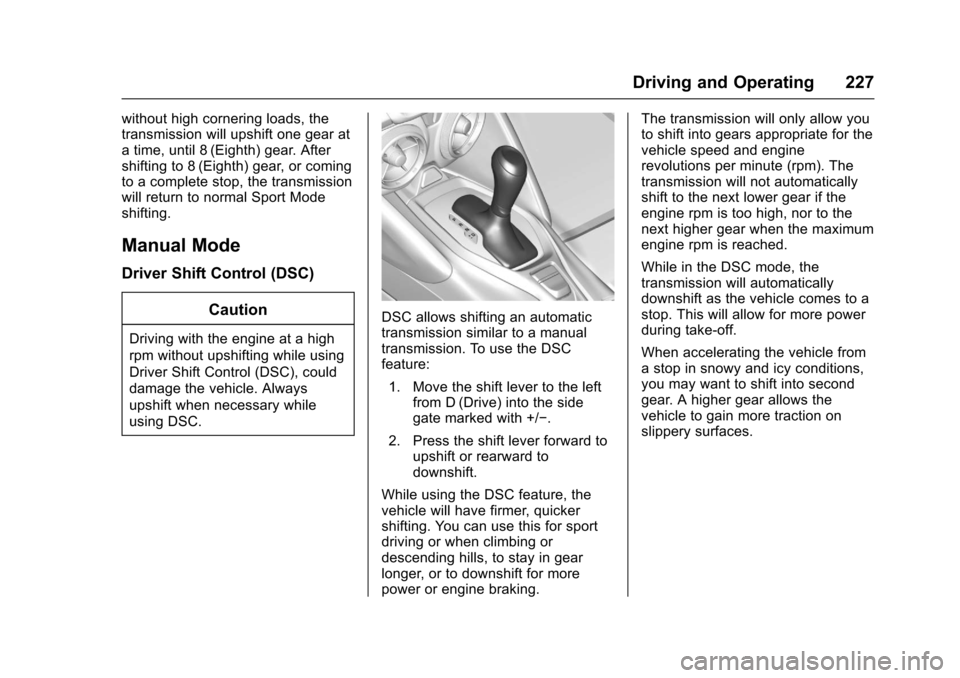
DSC allows shifting an automatic
transmission similar to a manual
transmission. To use the DSC
feature:1. Move the shift lever to the left from D (Drive) into the side
gate marked with +/−.
2. Press the shift lever forward to upshift or rearward to
downshift.
While using the DSC feature, the
vehicle will have firmer, quicker
shifting. You can use this for sport
driving or when climbing or
descending hills, to stay in gear
longer, or to downshift for more
power or engine braking. The transmission will only allow you
to shift into gears appropriate for the
vehicle speed and engine
revolutions per minute (rpm). The
transmission will not automatically
shift to the next lower gear if the
engine rpm is too high, nor to the
next higher gear when the maximum
engine rpm is reached.
While in the DSC mode, the
transmission will automatically
downshift as the vehicle comes to a
stop. This will allow for more power
during take-off.
When accelerating the vehicle from
a stop in snowy and icy conditions,
you may want to shift into second
gear. A higher gear allows the
vehicle to gain more traction on
slippery surfaces.
Page 229 of 391
Chevrolet Camaro Owner Manual (GMNA-Localizing-U.S./Canada/Mexico-
9804281) - 2017 - crc - 4/25/16
228 Driving and Operating
Tap Shift
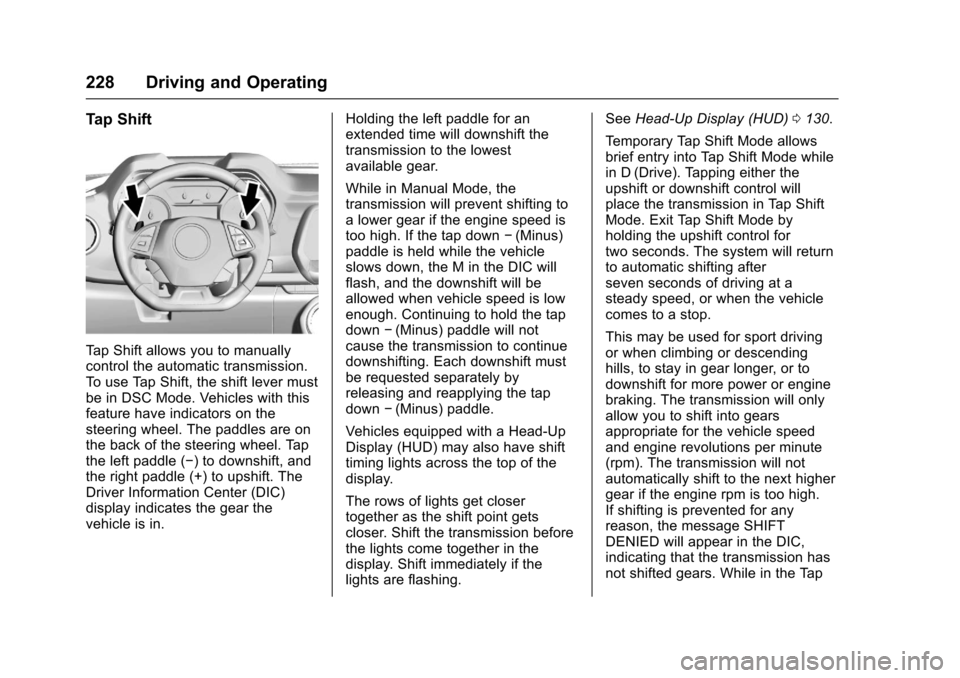
Tap Shift allows you to manually
control the automatic transmission.
To use Tap Shift, the shift lever must
be in DSC Mode. Vehicles with this
feature have indicators on the
steering wheel. The paddles are on
the back of the steering wheel. Tap
the left paddle (−) to downshift, and
the right paddle (+) to upshift. The
Driver Information Center (DIC)
display indicates the gear the
vehicle is in.Holding the left paddle for an
extended time will downshift the
transmission to the lowest
available gear.
While in Manual Mode, the
transmission will prevent shifting to
a lower gear if the engine speed is
too high. If the tap down
−(Minus)
paddle is held while the vehicle
slows down, the M in the DIC will
flash, and the downshift will be
allowed when vehicle speed is low
enough. Continuing to hold the tap
down −(Minus) paddle will not
cause the transmission to continue
downshifting. Each downshift must
be requested separately by
releasing and reapplying the tap
down −(Minus) paddle.
Vehicles equipped with a Head-Up
Display (HUD) may also have shift
timing lights across the top of the
display.
The rows of lights get closer
together as the shift point gets
closer. Shift the transmission before
the lights come together in the
display. Shift immediately if the
lights are flashing. See
Head-Up Display (HUD) 0130.
Temporary Tap Shift Mode allows
brief entry into Tap Shift Mode while
in D (Drive). Tapping either the
upshift or downshift control will
place the transmission in Tap Shift
Mode. Exit Tap Shift Mode by
holding the upshift control for
two seconds. The system will return
to automatic shifting after
seven seconds of driving at a
steady speed, or when the vehicle
comes to a stop.
This may be used for sport driving
or when climbing or descending
hills, to stay in gear longer, or to
downshift for more power or engine
braking. The transmission will only
allow you to shift into gears
appropriate for the vehicle speed
and engine revolutions per minute
(rpm). The transmission will not
automatically shift to the next higher
gear if the engine rpm is too high.
If shifting is prevented for any
reason, the message SHIFT
DENIED will appear in the DIC,
indicating that the transmission has
not shifted gears. While in the Tap