automatic transmission CHEVROLET CAMARO 2017 6.G Owner's Manual
[x] Cancel search | Manufacturer: CHEVROLET, Model Year: 2017, Model line: CAMARO, Model: CHEVROLET CAMARO 2017 6.GPages: 391, PDF Size: 6.65 MB
Page 226 of 391
Chevrolet Camaro Owner Manual (GMNA-Localizing-U.S./Canada/Mexico-
9804281) - 2017 - crc - 4/25/16
Driving and Operating 225
Automatic
Transmission
If the vehicle has a 10-speed
automatic transmission, see the
Camaro High Performance
supplement.
The Driver Information Center (DIC)
displays the current gear selected in
the lower right corner. When Sport
Mode is active, an S is displayed.
If Manual Mode is active, an M and
the current gear selected is
displayed next to the M.
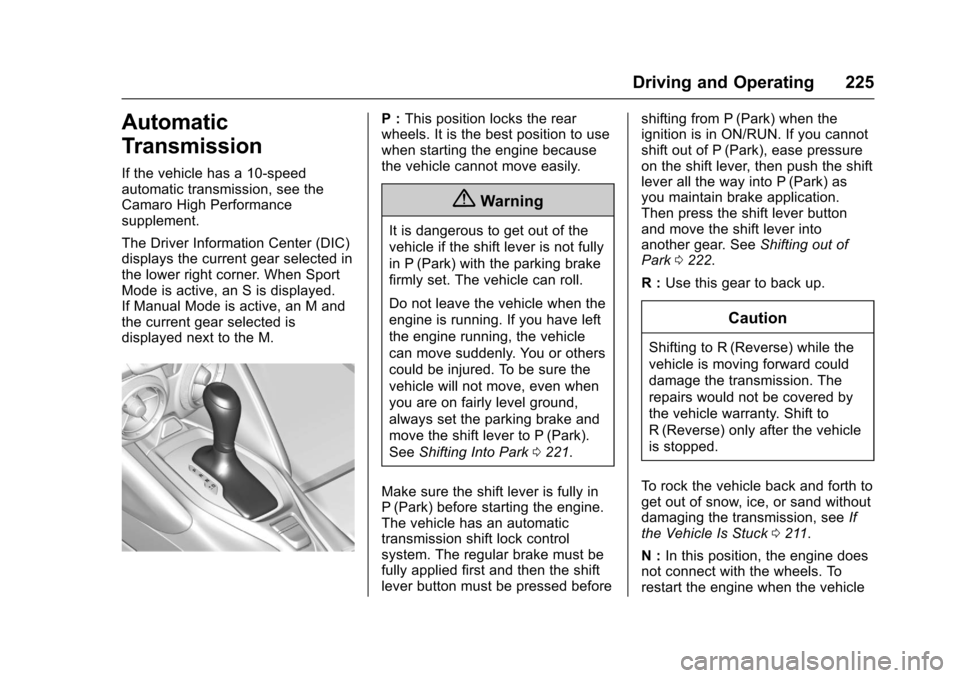
P :This position locks the rear
wheels. It is the best position to use
when starting the engine because
the vehicle cannot move easily.
{Warning
It is dangerous to get out of the
vehicle if the shift lever is not fully
in P (Park) with the parking brake
firmly set. The vehicle can roll.
Do not leave the vehicle when the
engine is running. If you have left
the engine running, the vehicle
can move suddenly. You or others
could be injured. To be sure the
vehicle will not move, even when
you are on fairly level ground,
always set the parking brake and
move the shift lever to P (Park).
See Shifting Into Park 0221.
Make sure the shift lever is fully in
P (Park) before starting the engine.
The vehicle has an automatic
transmission shift lock control
system. The regular brake must be
fully applied first and then the shift
lever button must be pressed before shifting from P (Park) when the
ignition is in ON/RUN. If you cannot
shift out of P (Park), ease pressure
on the shift lever, then push the shift
lever all the way into P (Park) as
you maintain brake application.
Then press the shift lever button
and move the shift lever into
another gear. See
Shifting out of
Park 0222.
R : Use this gear to back up.
Caution
Shifting to R (Reverse) while the
vehicle is moving forward could
damage the transmission. The
repairs would not be covered by
the vehicle warranty. Shift to
R (Reverse) only after the vehicle
is stopped.
To rock the vehicle back and forth to
get out of snow, ice, or sand without
damaging the transmission, see If
the Vehicle Is Stuck 0211.
N : In this position, the engine does
not connect with the wheels. To
restart the engine when the vehicle
Page 227 of 391
Chevrolet Camaro Owner Manual (GMNA-Localizing-U.S./Canada/Mexico-
9804281) - 2017 - crc - 4/25/16
226 Driving and Operating
is already moving, use N (Neutral)
only. Also, use N (Neutral) when the
vehicle is being towed.
{Warning
Shifting into a drive gear while the
engine is running at high speed is
dangerous. Unless your foot is
firmly on the brake pedal, the
vehicle could move very rapidly.
You could lose control and hit
people or objects. Do not shift
into a drive gear while the engine
is running at high speed.
Caution
Shifting out of P (Park) or
N (Neutral) with the engine
running at high speed may
damage the transmission. The
repairs would not be covered by
the vehicle warranty. Be sure the
engine is not running at high
speed when shifting the vehicle.D :
This position is for normal
driving. It provides the best fuel
economy.
If more power is needed for
passing, and the vehicle is:
. Going less than 56 km/h
(35 mph), push the accelerator
pedal about halfway down.
. Going about 56 km/h (35 mph) or
more, push the accelerator all
the way down.
Powertrain Braking
When driving on steep descents
with the shift lever in D (Drive)
where frequent braking is required,
the transmission will shift down a
gear to help hold vehicle speed and
reduce brake wear. If the driver
continues to press the brake, the
transmission will downshift until
3 (Third) gear is reached.
If the brake is released for some
time, the transmission will upshift a
gear. If the road levels out and the
accelerator pedal is pressed, the
transmission will upshift until the
appropriate gear is reached.
Caution
If the vehicle does not shift gears,
the transmission could be
damaged. Have the vehicle
serviced right away.
Performance Shifting
While driving in Sport Mode (L4 and
V6), or Sport Mode and Track Mode
(V8), if Tap Shift has not been
activated, the transmission
determines when the vehicle is
being driven in a competitive
manner. The transmission may
remain in a gear longer than it
would in the normal driving mode
based on throttle input and vehicle
lateral acceleration. If there is a
rapid reduction in throttle from a
heavy throttle position at high rpm,
the transmission will maintain the
current gear up to near redline rpm.
While braking, the transmission will
automatically downshift to the next
lower gear keeping engine speed
above approximately 3000 rpm.
If the vehicle is then driven for a
short time at a steady speed, and
Page 228 of 391
Chevrolet Camaro Owner Manual (GMNA-Localizing-U.S./Canada/Mexico-
9804281) - 2017 - crc - 4/25/16
Driving and Operating 227
without high cornering loads, the
transmission will upshift one gear at
a time, until 8 (Eighth) gear. After
shifting to 8 (Eighth) gear, or coming
to a complete stop, the transmission
will return to normal Sport Mode
shifting.
Manual Mode
Driver Shift Control (DSC)Caution
Driving with the engine at a high
rpm without upshifting while using
Driver Shift Control (DSC), could
damage the vehicle. Always
upshift when necessary while
using DSC.
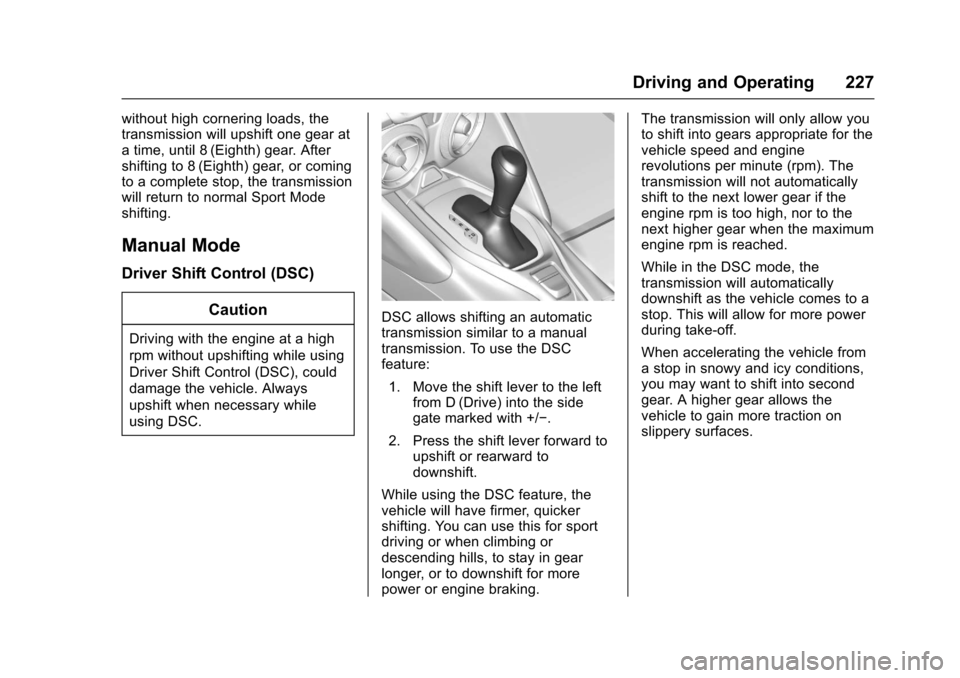
DSC allows shifting an automatic
transmission similar to a manual
transmission. To use the DSC
feature:1. Move the shift lever to the left from D (Drive) into the side
gate marked with +/−.
2. Press the shift lever forward to upshift or rearward to
downshift.
While using the DSC feature, the
vehicle will have firmer, quicker
shifting. You can use this for sport
driving or when climbing or
descending hills, to stay in gear
longer, or to downshift for more
power or engine braking. The transmission will only allow you
to shift into gears appropriate for the
vehicle speed and engine
revolutions per minute (rpm). The
transmission will not automatically
shift to the next lower gear if the
engine rpm is too high, nor to the
next higher gear when the maximum
engine rpm is reached.
While in the DSC mode, the
transmission will automatically
downshift as the vehicle comes to a
stop. This will allow for more power
during take-off.
When accelerating the vehicle from
a stop in snowy and icy conditions,
you may want to shift into second
gear. A higher gear allows the
vehicle to gain more traction on
slippery surfaces.
Page 229 of 391
Chevrolet Camaro Owner Manual (GMNA-Localizing-U.S./Canada/Mexico-
9804281) - 2017 - crc - 4/25/16
228 Driving and Operating
Tap Shift
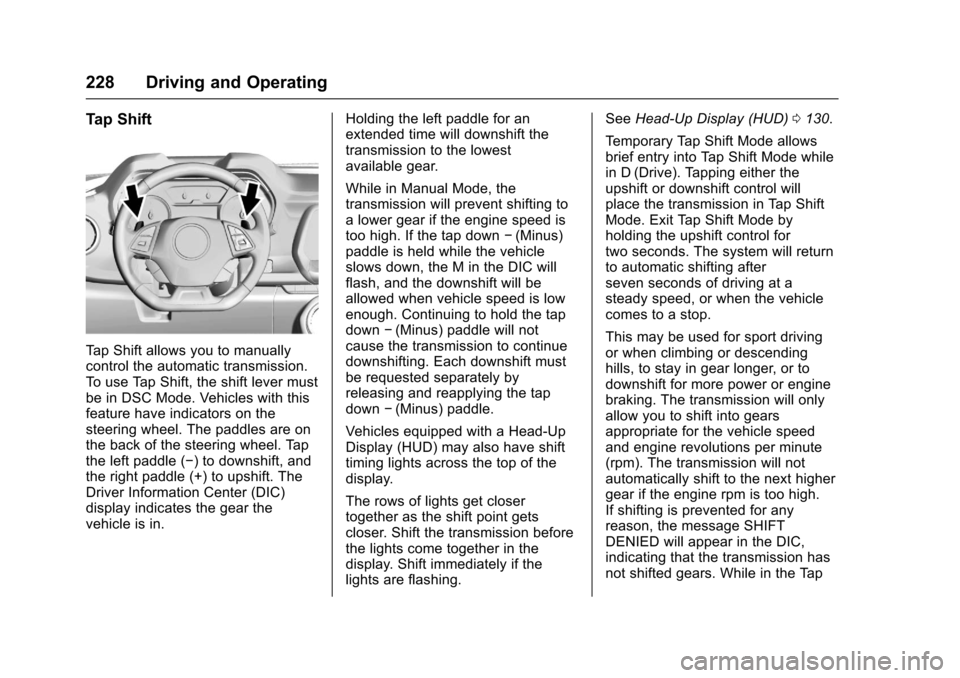
Tap Shift allows you to manually
control the automatic transmission.
To use Tap Shift, the shift lever must
be in DSC Mode. Vehicles with this
feature have indicators on the
steering wheel. The paddles are on
the back of the steering wheel. Tap
the left paddle (−) to downshift, and
the right paddle (+) to upshift. The
Driver Information Center (DIC)
display indicates the gear the
vehicle is in.Holding the left paddle for an
extended time will downshift the
transmission to the lowest
available gear.
While in Manual Mode, the
transmission will prevent shifting to
a lower gear if the engine speed is
too high. If the tap down
−(Minus)
paddle is held while the vehicle
slows down, the M in the DIC will
flash, and the downshift will be
allowed when vehicle speed is low
enough. Continuing to hold the tap
down −(Minus) paddle will not
cause the transmission to continue
downshifting. Each downshift must
be requested separately by
releasing and reapplying the tap
down −(Minus) paddle.
Vehicles equipped with a Head-Up
Display (HUD) may also have shift
timing lights across the top of the
display.
The rows of lights get closer
together as the shift point gets
closer. Shift the transmission before
the lights come together in the
display. Shift immediately if the
lights are flashing. See
Head-Up Display (HUD) 0130.
Temporary Tap Shift Mode allows
brief entry into Tap Shift Mode while
in D (Drive). Tapping either the
upshift or downshift control will
place the transmission in Tap Shift
Mode. Exit Tap Shift Mode by
holding the upshift control for
two seconds. The system will return
to automatic shifting after
seven seconds of driving at a
steady speed, or when the vehicle
comes to a stop.
This may be used for sport driving
or when climbing or descending
hills, to stay in gear longer, or to
downshift for more power or engine
braking. The transmission will only
allow you to shift into gears
appropriate for the vehicle speed
and engine revolutions per minute
(rpm). The transmission will not
automatically shift to the next higher
gear if the engine rpm is too high.
If shifting is prevented for any
reason, the message SHIFT
DENIED will appear in the DIC,
indicating that the transmission has
not shifted gears. While in the Tap
Page 230 of 391
Chevrolet Camaro Owner Manual (GMNA-Localizing-U.S./Canada/Mexico-
9804281) - 2017 - crc - 4/25/16
Driving and Operating 229
Shift Mode, the transmission will not
automatically downshift on hard
acceleration.
When accelerating the vehicle from
a stop in snowy and icy conditions,
you may want to shift into
2 (Second) gear. A higher gear ratio
allows you to gain more traction on
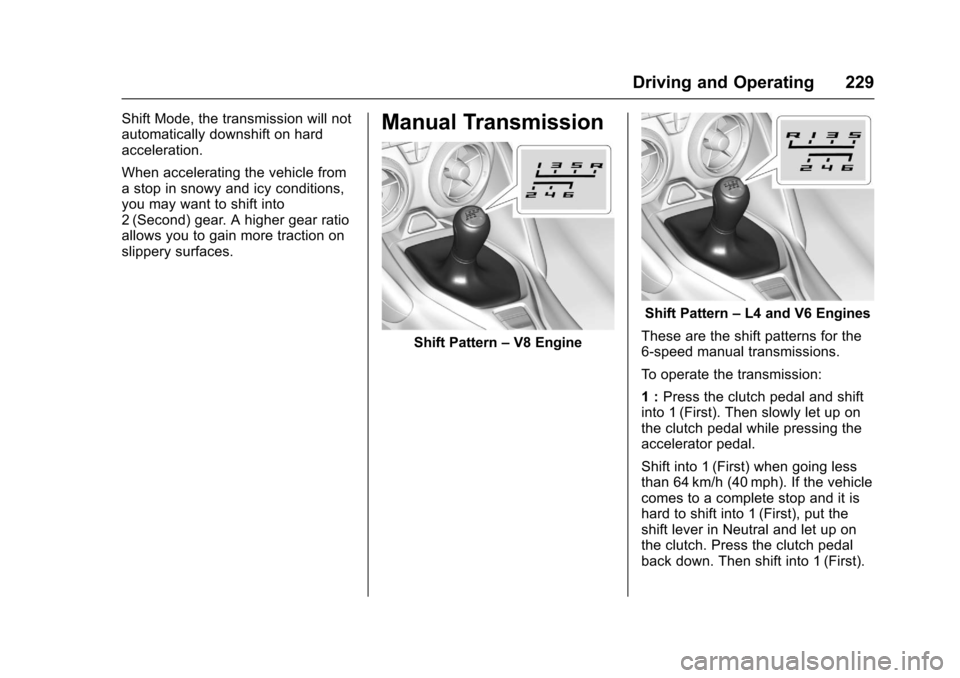
slippery surfaces.Manual Transmission
Shift Pattern–V8 Engine
Shift Pattern –L4 and V6 Engines
These are the shift patterns for the
6-speed manual transmissions.
To operate the transmission:
1 : Press the clutch pedal and shift
into 1 (First). Then slowly let up on
the clutch pedal while pressing the
accelerator pedal.
Shift into 1 (First) when going less
than 64 km/h (40 mph). If the vehicle
comes to a complete stop and it is
hard to shift into 1 (First), put the
shift lever in Neutral and let up on
the clutch. Press the clutch pedal
back down. Then shift into 1 (First).
Page 235 of 391
Chevrolet Camaro Owner Manual (GMNA-Localizing-U.S./Canada/Mexico-
9804281) - 2017 - crc - 4/25/16
234 Driving and Operating
If the amber parking brake warning
light is on, release the EPB by
pushing down on the EPB switch
and holding it down. Continue to
hold the switch until the red parking
brake status light is off. If either light
stays on after release is attempted,
see your dealer.
Automatic EPB Release
The EPB will automatically release if
the vehicle is running, placed into
gear, and an attempt is made to
drive away. Avoid rapid acceleration
when the EPB is applied, to
preserve parking brake lining life.
The EPB can also be used to
prevent roll back for vehicles with a
manual transmission taking off on a
hill. When no roll back is desired, an
applied EPB will allow both feet to
be used for the clutch and
accelerator pedals in preparation for
starting the vehicle moving in the
intended direction. In this case,
there is no need to push the switch
to release the EPB.
Brake Assist
This vehicle has a brake assist
feature designed to assist the driver
in stopping or decreasing vehicle
speed in emergency driving
conditions. This feature uses the
stability system hydraulic brake
control module to supplement the
power brake system under
conditions where the driver has
quickly and forcefully applied the
brake pedal in an attempt to quickly
stop or slow down the vehicle. The
stability system hydraulic brake
control module increases brake
pressure at each corner of the
vehicle until the ABS activates.
Minor brake pedal pulsation or
pedal movement during this time is
normal and the driver should
continue to apply the brake pedal as
the driving situation dictates. The
brake assist feature will
automatically disengage when the
brake pedal is released or brake
pedal pressure is quickly
decreased.
Hill Start Assist (HSA)
If equipped, Hill Start Assist (HSA)
may automatically activate when the
vehicle is stopped on a grade. This
feature is designed to prevent the
vehicle from rolling, either forward or
rearward, during vehicle drive off.
During the transition from releasing
the brake pedal to accelerating to
drive off on a grade, HSA holds the
braking pressure to prevent rolling.
HSA will not activate if the vehicle is
in a drive gear and facing downhill
or if the vehicle is facing uphill and
in R (Reverse).
Page 238 of 391
Chevrolet Camaro Owner Manual (GMNA-Localizing-U.S./Canada/Mexico-
9804281) - 2017 - crc - 4/25/16
Driving and Operating 237
changes the software calibration of
various sub-systems. Depending on
the option package, available
features, and mode selected, the
suspension, steering, and
powertrain will change calibrations
to achieve the desired mode
characteristics. If the vehicle is
equipped with Magnetic Ride
Control, selecting the various Driver
Modes adjusts the ride of the
vehicle to enhance the ride
performance for the road conditions
and the selected mode.
While in the Sport and/or Track
Modes, the vehicle monitors driving
behavior and automatically enables
Performance Shift Features when
spirited driving is detected. These
features maintain lower
transmission gears to increase
available engine braking and
improve acceleration response. The
vehicle will exit these features and
return to normal operation after a
short period when no spirited driving
is detected.
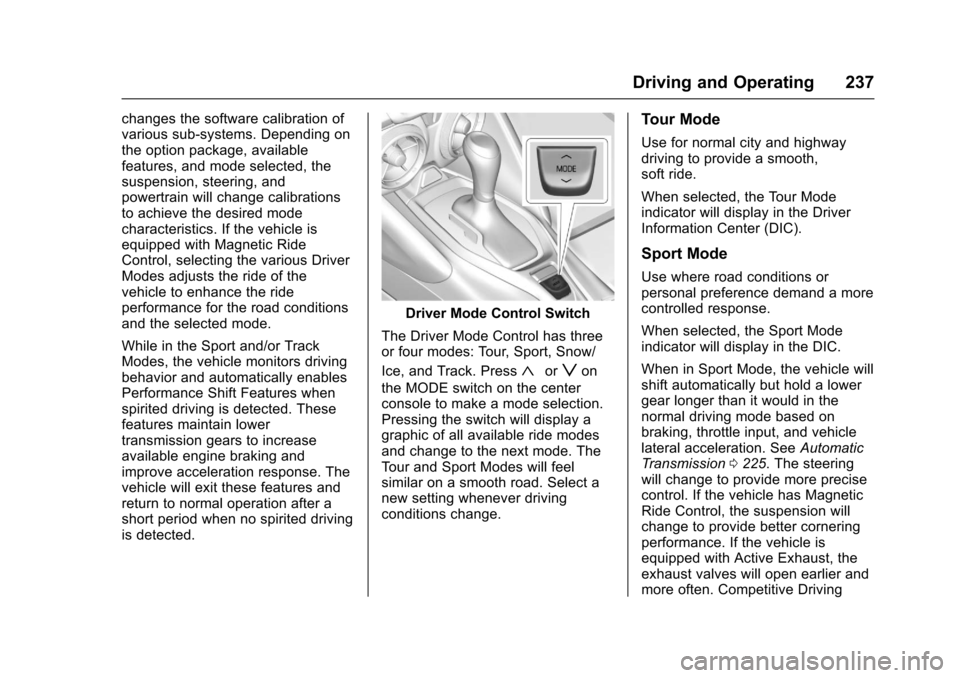
Driver Mode Control Switch
The Driver Mode Control has three
or four modes: Tour, Sport, Snow/
Ice, and Track. Press
«orzon
the MODE switch on the center
console to make a mode selection.
Pressing the switch will display a
graphic of all available ride modes
and change to the next mode. The
Tour and Sport Modes will feel
similar on a smooth road. Select a
new setting whenever driving
conditions change.
Tour Mode
Use for normal city and highway
driving to provide a smooth,
soft ride.
When selected, the Tour Mode
indicator will display in the Driver
Information Center (DIC).
Sport Mode
Use where road conditions or
personal preference demand a more
controlled response.
When selected, the Sport Mode
indicator will display in the DIC.
When in Sport Mode, the vehicle will
shift automatically but hold a lower
gear longer than it would in the
normal driving mode based on
braking, throttle input, and vehicle
lateral acceleration. See Automatic
Transmission 0225. The steering
will change to provide more precise
control. If the vehicle has Magnetic
Ride Control, the suspension will
change to provide better cornering
performance. If the vehicle is
equipped with Active Exhaust, the
exhaust valves will open earlier and
more often. Competitive Driving
Page 239 of 391
Chevrolet Camaro Owner Manual (GMNA-Localizing-U.S./Canada/Mexico-
9804281) - 2017 - crc - 4/25/16
238 Driving and Operating
Mode can be accessed through this
mode by pressing the button with
this
gicon twice.
Snow/Ice Mode
Use when more traction is needed
during slippery conditions. The
vehicle will upshift normally when
the vehicle is moving. The
acceleration will adjust to help
provide a smoother launch. The
transmission will also shift differently
to assist in maintaining traction.
When selected, the Snow/Ice Mode
indicator will display in the DIC.
This feature is not intended for use
when the vehicle is stuck in sand,
mud, ice, snow, or gravel. If the
vehicle becomes stuck, seeIf the
Vehicle Is Stuck 0211.
Track Mode
Use when maximum vehicle
handling is desired.
When selected, the Track Mode
indicator will display in the DIC.
When in Track Mode, the automatic
transmission and steering will
function similar to Sport Mode. The
accelerator pedal is adjusted to give
maximum control during the highest
level of spirited driving. The
Magnetic Ride Control will be set to
the optimum level for vehicle
responsiveness. If the vehicle is
equipped with Active Exhaust, the
exhaust valves will open.
Competitive Driving Mode can be
accessed through this mode by
pressing the button with this
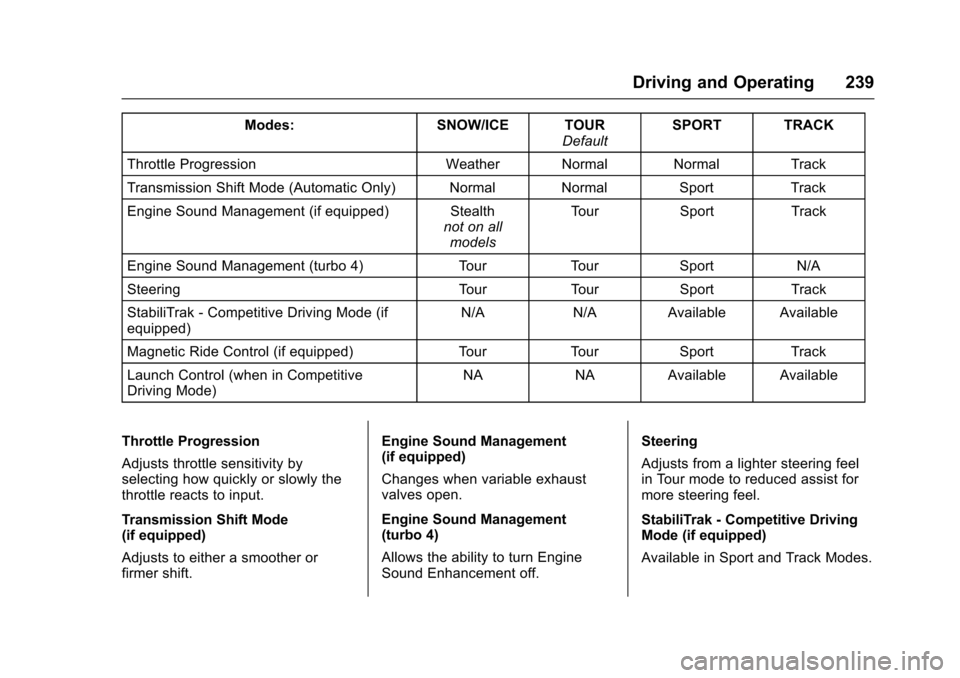
gicon. There are attributes that vary by
mode shown below. Not all vehicles
have all features, depending on the
vehicle options.
Page 240 of 391
Chevrolet Camaro Owner Manual (GMNA-Localizing-U.S./Canada/Mexico-
9804281) - 2017 - crc - 4/25/16
Driving and Operating 239
Modes:SNOW/ICE TOUR
DefaultSPORT TRACK
Throttle Progression Weather Normal Normal Track
Transmission Shift Mode (Automatic Only) Normal Normal SportTrack
Engine Sound Management (if equipped) Stealth not on all
models Tour
Sport Track
Engine Sound Management (turbo 4) TourTourSport N/A
Steering TourTourSport Track
StabiliTrak - Competitive Driving Mode (if
equipped) N/A
N/AAvailable Available
Magnetic Ride Control (if equipped) TourTourSport Track
Launch Control (when in Competitive
Driving Mode) NA
NAAvailable Available
Throttle Progression
Adjusts throttle sensitivity by
selecting how quickly or slowly the
throttle reacts to input.
Transmission Shift Mode
(if equipped)
Adjusts to either a smoother or
firmer shift. Engine Sound Management
(if equipped)
Changes when variable exhaust
valves open.
Engine Sound Management
(turbo 4)
Allows the ability to turn Engine
Sound Enhancement off.
Steering
Adjusts from a lighter steering feel
in Tour mode to reduced assist for
more steering feel.
StabiliTrak - Competitive Driving
Mode (if equipped)
Available in Sport and Track Modes.
Page 242 of 391
Chevrolet Camaro Owner Manual (GMNA-Localizing-U.S./Canada/Mexico-
9804281) - 2017 - crc - 4/25/16
Driving and Operating 241
This optional handling mode can be
selected by pressing the TCS/
StabiliTrak button on the console
two times. The appropriate message
displays in the Driver Information
Center (DIC). SeeRide Control
System Messages 0140.
When the TCS/StabiliTrak button is
pressed again, the TCS and
StabiliTrak systems are on. The
appropriate message displays
briefly in the DIC.
Launch Control
A Launch Control feature is
available, within Competitive Driving
Mode, to allow the driver to achieve
high levels of vehicle acceleration in
a straight line. Launch Control is a
form of traction control that
manages tire spin while launching
the vehicle. This feature is intended
for use during closed course race
events where consistent zero to
sixty and quarter mile times are
desirable. Launch Control is only available
when the following criteria are met:
.
Competitive Driving Mode is
selected.
. The vehicle is not moving.
. The steering wheel is pointing
straight.
Manual Transmissions
. The clutch is pressed and the
vehicle is in 1 (First) gear.
. The accelerator pedal is rapidly
applied to wide open throttle.
The Launch Control feature will
initially limit engine speed as the
driver rapidly applies the accelerator
pedal to wide open throttle. Allow
the engine rpm to stabilize.
A smooth, quick release of the
clutch, while maintaining the fully
pressed accelerator pedal, will
manage wheel slip. Complete shifts
are described in Manual
Transmission 0229. Automatic Transmissions
.
The brake pedal must be firmly
pressed to the floor, equivalent
to a panic brake event.
. The accelerator pedal is rapidly
applied to wide open throttle. (If
the vehicle rolls due to wide
open throttle, release the
throttle, press the brake pedal
more firmly, and re-apply the
accelerator to wide open
throttle.)
After the vehicle is launched, the
system continues in Competitive
Driving Mode.
Competitive Driving Mode and
Launch Control are systems
designed for a closed course race
track and not intended for use on
public roads. The systems are not
intended to compensate for lack of
driver experience or familiarity with
the race track.