service indicator CHEVROLET CAMARO 2018 User Guide
[x] Cancel search | Manufacturer: CHEVROLET, Model Year: 2018, Model line: CAMARO, Model: CHEVROLET CAMARO 2018Pages: 393, PDF Size: 5.77 MB
Page 131 of 393
Chevrolet Camaro Owner Manual (GMNA-Localizing-U.S./Canada/Mexico-
11348325) - 2018 - CRC - 10/23/17
130 Instruments and Controls
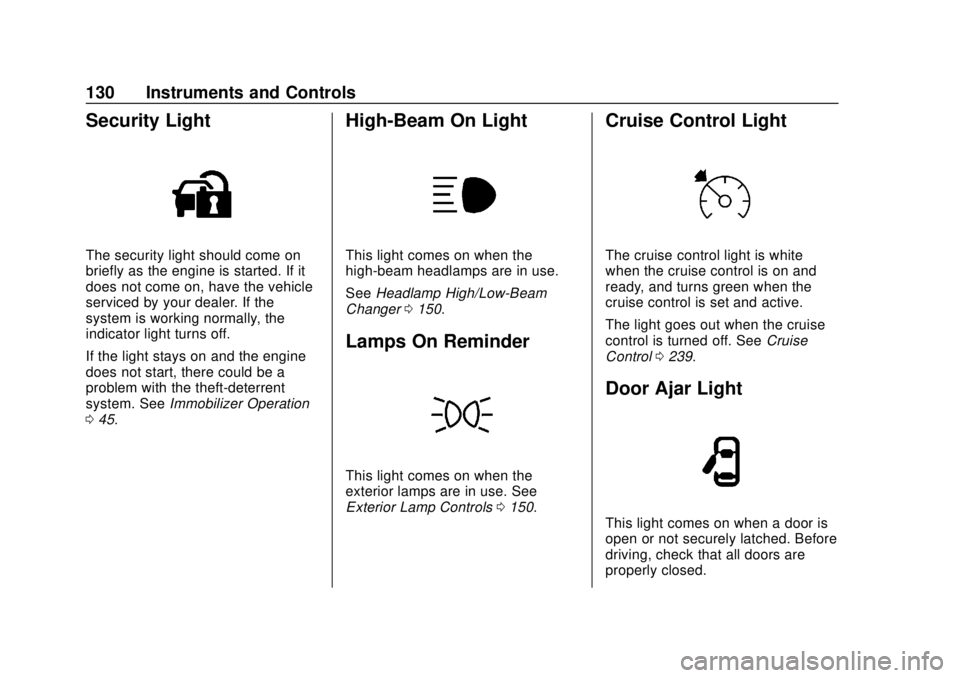
Security Light
The security light should come on
briefly as the engine is started. If it
does not come on, have the vehicle
serviced by your dealer. If the
system is working normally, the
indicator light turns off.
If the light stays on and the engine
does not start, there could be a
problem with the theft-deterrent
system. SeeImmobilizer Operation
0 45.
High-Beam On Light
This light comes on when the
high-beam headlamps are in use.
See Headlamp High/Low-Beam
Changer 0150.
Lamps On Reminder
This light comes on when the
exterior lamps are in use. See
Exterior Lamp Controls 0150.
Cruise Control Light
The cruise control light is white
when the cruise control is on and
ready, and turns green when the
cruise control is set and active.
The light goes out when the cruise
control is turned off. See Cruise
Control 0239.
Door Ajar Light
This light comes on when a door is
open or not securely latched. Before
driving, check that all doors are
properly closed.
Page 215 of 393
Chevrolet Camaro Owner Manual (GMNA-Localizing-U.S./Canada/Mexico-
11348325) - 2018 - CRC - 10/23/17
214 Driving and Operating
{Warning
Turning off the vehicle while
moving may cause loss of power
assist in the brake and steering
systems and disable the airbags.
While driving, only shut the
vehicle off in an emergency.
If the vehicle cannot be pulled over,
and must be shut off while driving,
press and hold ENGINE START/
STOP for longer than two seconds,
or press twice within five seconds.
ACC/ACCESSORY (Amber
Indicator Light) : This mode allows
the use of some electrical
accessories when the engine is off.
With the ignition off, pressing the
button one time without the brake
pedal applied will place the ignition
system in ACC/ACCESSORY.
The ignition will switch from ACC/
ACCESSORY to OFF after
five minutes to prevent battery
rundown. ON/RUN/START (Green Indicator
Light) :
This mode is for driving and
starting. With the ignition off, and
the brake pedal applied, pressing
the button once will place the
ignition system in ON/RUN/START.
Once engine cranking begins,
release the button. Engine cranking
will continue until the engine starts.
See Starting the Engine 0214. The
ignition will then remain on.
Service Mode
This power mode is available for
service and diagnostics, and to
verify the proper operation of the
malfunction indicator lamp as may
be required for emission inspection
purposes. With the vehicle off, and
the brake pedal not applied,
pressing and holding ENGINE
START/STOP for more than
five seconds will place the vehicle in
Service Mode. The instruments and
audio systems will operate as they
do in ON/RUN, but the vehicle will
not be able to be driven. The engine
will not start in Service Mode. Press
the button again to turn the
vehicle off.
Starting the Engine
Place the transmission in the
proper gear.
Caution
If you add electrical parts or
accessories, you could change
the way the engine operates. Any
resulting damage would not be
covered by the vehicle warranty.
See Add-On Electrical Equipment
0 251.
For an automatic transmission,
move the shift lever to P (Park) or
N (Neutral). To restart the vehicle
when it is already moving, use
N (Neutral) only.
Caution
Do not try to shift to P (Park) if the
vehicle is moving. If you do, you
could damage the transmission.
Shift to P (Park) only when the
vehicle is stopped.
Page 229 of 393
Chevrolet Camaro Owner Manual (GMNA-Localizing-U.S./Canada/Mexico-
11348325) - 2018 - CRC - 10/23/17
228 Driving and Operating
The rows of lights get closer
together as the shift point gets
closer. Shift the transmission before
the lights come together in the
display. Shift immediately if the
lights are flashing.
SeeHead-Up Display (HUD) 0134.
Active Rev Match
Vehicles equipped with a V8 engine
and a manual transmission have
Active Rev Match (ARM). ARM aids
in smoother shifting by matching the
engine speed to the next selected
gear. By monitoring shift lever and
clutch operation, ARM adjusts
engine speed to match a calibrated
value based on gear selection. On
upshifts and downshifts, engine
speed will be decreased and
increased to match vehicle road
speed and transmission gear
position. ARM is maintained while
the clutch pedal is pressed, but will
deactivate if the shift lever is left in
the Neutral position.
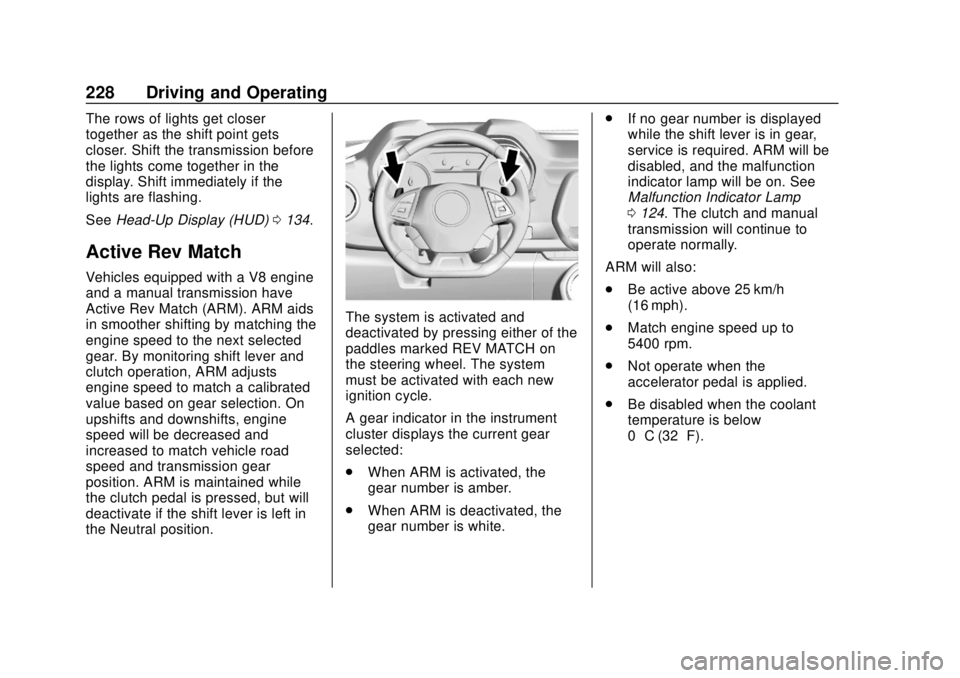
The system is activated and
deactivated by pressing either of the
paddles marked REV MATCH on
the steering wheel. The system
must be activated with each new
ignition cycle.
A gear indicator in the instrument
cluster displays the current gear
selected:
.
When ARM is activated, the
gear number is amber.
. When ARM is deactivated, the
gear number is white. .
If no gear number is displayed
while the shift lever is in gear,
service is required. ARM will be
disabled, and the malfunction
indicator lamp will be on. See
Malfunction Indicator Lamp
0124. The clutch and manual
transmission will continue to
operate normally.
ARM will also:
. Be active above 25 km/h
(16 mph).
. Match engine speed up to
5400 rpm.
. Not operate when the
accelerator pedal is applied.
. Be disabled when the coolant
temperature is below
0 °C (32 °F).
Page 252 of 393
Chevrolet Camaro Owner Manual (GMNA-Localizing-U.S./Canada/Mexico-
11348325) - 2018 - CRC - 10/23/17
Driving and Operating 251
Trailer Towing
General Towing
Information
The vehicle is neither designed nor
intended to tow a trailer.
Conversions and
Add-Ons
Add-On Electrical
Equipment
{Warning
The Data Link Connector (DLC) is
used for vehicle service and
Emission Inspection/Maintenance
testing. SeeMalfunction Indicator
Lamp 0124. A device connected
to the DLC —such as an
aftermarket fleet or
driver-behavior tracking device —
may interfere with vehicle
systems. This could affect vehicle
operation and cause a crash.
Such devices may also access
information stored in the vehicle’s
systems.
Caution
Some electrical equipment can
damage the vehicle or cause
components to not work and
would not be covered by the
vehicle warranty. Always check
with your dealer before adding
electrical equipment.
Add-on equipment can drain the
vehicle's 12-volt battery, even if the
vehicle is not operating.
The vehicle has an airbag system.
Before attempting to add anything
electrical to the vehicle, see
Servicing the Airbag-Equipped
Vehicle 083 and Adding Equipment
to the Airbag-Equipped Vehicle
0 83.
Page 273 of 393
Chevrolet Camaro Owner Manual (GMNA-Localizing-U.S./Canada/Mexico-
11348325) - 2018 - CRC - 10/23/17
272 Vehicle Care
not at the proper levels when the
system cools down again, see your
dealer.
Engine Overheating
The vehicle has several indicators
to warn of the engine overheating.
There is an engine coolant
temperature gauge on the
instrument cluster. SeeEngine
Coolant Temperature Gauge 0120.
The vehicle may also display a
message on the Driver Information
Center (DIC).
If the decision is made not to lift the
hood when this warning appears,
get service help right away. See
Roadside Assistance Program
0 359.
If the decision is made to lift the
hood, make sure the vehicle is
parked on a level surface.
Then check to see if the engine
cooling fan is running. If the engine
is overheating, the fan should be
running. If it is not, do not continue
to run the engine. Have the vehicle
serviced.
Caution
Do not run the engine if there is a
leak in the engine cooling system.
This can cause a loss of all
coolant and can damage the
system and vehicle. Have any
leaks fixed right away.
If Steam Is Coming from the
Engine Compartment
{Warning
Steam and scalding liquids from a
hot cooling system are under
pressure. Turning the pressure
cap, even a little, can cause them
to come out at high speed and
you could be burned. Never turn
the cap when the cooling system,
including the pressure cap, is hot.
Wait for the cooling system and
pressure cap to cool.
If Steam Is Coming from the
Engine Compartment with no
Overheat Warning
The hood extractor, if equipped, is
functional. It will allow water from
rain and car washes to enter the
engine compartment and contact
hot surfaces. If steam is coming
from the hood extractor with no
accompanying overheat warning, no
service is needed.
If No Steam Is Coming from
the Engine Compartment
If an engine overheat warning is
displayed but no steam can be seen
or heard, the problem may not be
too serious. Sometimes the engine
can get a little too hot when the
vehicle:
. Climbs a long hill on a hot day
. Stops after high-speed driving
. Idles for long periods in traffic
If the overheat warning is displayed
with no sign of steam: 1. Turn the air conditioning off.
Page 275 of 393
Chevrolet Camaro Owner Manual (GMNA-Localizing-U.S./Canada/Mexico-
11348325) - 2018 - CRC - 10/23/17
274 Vehicle Care
Caution (Continued)
.When using concentrated
washer fluid, follow the
manufacturer instructions for
adding water.
. Fill the washer fluid tank
only three-quarters full when
it is very cold. This allows
for fluid expansion if
freezing occurs, which could
damage the tank if it is
completely full.
Brakes
Disc brake pads have built-in wear
indicators that make a high-pitched
warning sound when the brake pads
are worn and new pads are needed.
The sound can come and go or can
be heard all the time when the
vehicle is moving, except when
applying the brake pedal firmly.
{Warning
The brake wear warning sound
means that soon the brakes will
not work well. That could lead to
a crash. When the brake wear
warning sound is heard, have the
vehicle serviced.
Caution
Continuing to drive with worn-out
brake pads could result in costly
brake repair.
Some driving conditions or climates
can cause a brake squeal when the
brakes are first applied or lightly
applied. This does not mean
something is wrong with the brakes.
If equipped with high performance
brake linings, there could be an
increased build-up of brake dust as
well as minor noises as compared
to standard brake linings. Properly torqued wheel nuts are
necessary to help prevent brake
pulsation. When tires are rotated,
inspect brake pads for wear and
evenly tighten wheel nuts in the
proper sequence to torque
specifications. See
Capacities and
Specifications 0351.
Brake pads should be replaced as
complete sets.
Brake Pedal Travel
See your dealer if the brake pedal
does not return to normal height,
or if there is a rapid increase in
pedal travel. This could be a sign
that brake service may be required.
Replacing Brake System Parts
Always replace brake system parts
with new, approved replacement
parts. If this is not done, the brakes
may not work properly. The braking
performance expected can change
in many other ways if the wrong
replacement brake parts are
installed or if parts are improperly
installed.
Page 345 of 393
Chevrolet Camaro Owner Manual (GMNA-Localizing-U.S./Canada/Mexico-
11348325) - 2018 - CRC - 10/23/17
344 Service and Maintenance
Hoses
Hoses transport fluids and should
be regularly inspected to ensure
that there are no cracks or leaks.
With a multi-point inspection, your
dealer can inspect the hoses and
advise if replacement is needed.
Lamps
Properly working headlamps,
taillamps, and brake lamps are
important to see and be seen on
the road.
.Signs that the headlamps need
attention include dimming, failure
to light, cracking, or damage.
The brake lamps need to be
checked periodically to ensure
that they light when braking.
. With a multi-point inspection,
your dealer can check the lamps
and note any concerns. Shocks and Struts
Shocks and struts help aid in control
for a smoother ride.
.
Signs of wear may include
steering wheel vibration, bounce/
sway while braking, longer
stopping distance, or uneven
tire wear.
. As part of the multi-point
inspection, trained dealer
technicians can visually inspect
the shocks and struts for signs
of leaking, blown seals,
or damage, and can advise
when service is needed.
Tires
Tires need to be properly inflated,
rotated, and balanced. Maintaining
the tires can save money and fuel,
and can reduce the risk of tire
failure.
. Signs that the tires need to be
replaced include three or more
visible treadwear indicators; cord
or fabric showing through the rubber; cracks or cuts in the
tread or sidewall; or a bulge or
split in the tire.
. Trained dealer technicians can
inspect and recommend the right
tires. Your dealer can also
provide tire/wheel balancing
services to ensure smooth
vehicle operation at all speeds.
Your dealer sells and services
name brand tires.
Vehicle Care
To help keep the vehicle looking like
new, vehicle care products are
available from your dealer. For
information on how to clean and
protect the vehicle’s interior and
exterior, see Interior Care 0330 and
Exterior Care 0325.
Page 371 of 393
Chevrolet Camaro Owner Manual (GMNA-Localizing-U.S./Canada/Mexico-
11348325) - 2018 - CRC - 10/23/17
370 OnStar
Status Indicator
The OnStar system status light is
next to the OnStar controls on the
manual rearview mirror.
If the status light is:
.Solid Green: System is ready.
. Flashing Green: On a call.
. Red: Indicates a problem.
. Off: System is active. Press
|
twice to speak with an OnStar
Advisor.
For the automatic dimming rearview
mirror, the status is provided
through the Display on Demand
Icons.
. Three Color Icons: The system
is enabled and active.
. No Icons: The vehicle is in
motion or the OnStar service
plan is inactive.
. Blinking: Button has been
pressed.
. Solid: On a call.
.
~: Indicates a problem. OnStar Commands
Press
|or call 1-888-4ONSTAR
(1-888-466-7827) to speak to an
Advisor.
Functionality of the Voice Command
button may vary by vehicle and
region.
Press
Qto:
Open the OnStar app on the
infotainment display. See the
infotainment manual for information
on how to use the OnStar app.
OR
. Make a call, end a call,
or answer an incoming call.
. Give OnStar Hands-Free Calling
voice commands.
. Give OnStar Turn-by-Turn
Navigation voice commands.
. Obtain and customize the Wi-Fi
®
network name or SSID, and
password, if equipped. Press
|to connect to an
Advisor to:
. Verify account information or
update contact information.
. Get driving directions.
. Receive a Diagnostic check of
the vehicle's key operating
systems.
. Receive Roadside Assistance.
. Manage Wi-Fi Settings,
if equipped.
Press
Uto get a priority connection
to an OnStar Advisor available
24/7 to:
. Get help for an emergency.
. Be a Good Samaritan or
respond to an AMBER Alert.
. Get assistance in severe
weather or other crisis situations
and find evacuation routes.
Page 384 of 393

Chevrolet Camaro Owner Manual (GMNA-Localizing-U.S./Canada/Mexico-
11348325) - 2018 - CRC - 10/23/17
Index 383
Charging System Light . . . . . . . . . 124
CheckEngine Light (MalfunctionIndicator) . . . . . . . . . . . . . . . . . . . . 124
Child Restraints Infants and Young Children . . . . . 86
Lower Anchors and Tethersfor Children . . . . . . . . . . . . . . . . . . . 91
Older Children . . . . . . . . . . . . . . . . . . 85
Securing . . . . . . . . . . . . . . . . . . . . 97, 99
Systems . . . . . . . . . . . . . . . . . . . . . . . . 89
Circuit Breakers . . . . . . . . . . . . . . . . 285
Cleaning Exterior Care . . . . . . . . . . . . . . . . . 325
Interior Care . . . . . . . . . . . . . . . . . . 330
Climate Control Systems
Automatic . . . . . . . . . . . . . . . . . . . . . 188
Dual Automatic . . . . . . . . . . . . . . . 191
Clock . . . . . . . . . . . . . . . . . . . . . . . . . . . 108
Cluster, Instrument . . . . . . . . . . . . . 113
Clutch, Hydraulic . . . . . . . . . . . . . . . 265
Collision Damage Repair . . . . . . . 362
Compartments Storage . . . . . . . . . . . . . . . . . . . . . . . 102
Compass . . . . . . . . . . . . . . . . . . . . . . . 108
Competitive Driving Mode . . . . . . 237
Compressor Kit, Tire Sealant . . . 313 Connections
OnStar . . . . . . . . . . . . . . . . . . . . . . . 372
Control Traction and ElectronicStability . . . . . . . . . . . . . . . . . . . . . 232
Control of a Vehicle . . . . . . . . . . . . . 198
Convenience Net . . . . . . . . . . . . . . . 103
Convertible Top . . . . . . . . . . . . . . . . . . 52
Convex Mirrors . . . . . . . . . . . . . . . . . . 46
Coolant Engine Temperature Gauge . . 120
Cooling . . . . . . . . . . . . . . . . . . . . 188, 191
Cooling System . . . . . . . . . . . . . . . . . 267
Courtesy Transportation Program . . . . . . . . . . . . . . . . . . . . . . . 361
Cruise Control . . . . . . . . . . . . . . . . . . 239
Light . . . . . . . . . . . . . . . . . . . . . . . . . . 130
Customer Assistance . . . . . . . . . . . 358 Offices . . . . . . . . . . . . . . . . . . . . . . . . 357
Text Telephone (TTY)Users . . . . . . . . . . . . . . . . . . . . . . . 358
Customer Information Service PublicationsOrdering Information . . . . . . . . 364
Customer Satisfaction
Procedure . . . . . . . . . . . . . . . . . . . . . 355D
Damage Repair, Collision . . . . . . . 362
Danger, Warning, and Caution . . . . 3
Data CollectionInfotainment System . . . . . . . . . . 368
OnStar . . . . . . . . . . . . . . . . . . . . . . . 368
Data Recorder Performance . . . . . . . . . . . . . . . . . . 173
Data Recorders, Event . . . . . . . . . 367
Daytime Running Lamps (DRL) . . . . . . . . . . . . . . . . . . 151
Defensive Driving . . . . . . . . . . . . . . . 197
Delayed Locking . . . . . . . . . . . . . . . . . 40
Devices Auxiliary . . . . . . . . . . . . . . . . . . . . . . 172
Diagnostics OnStar . . . . . . . . . . . . . . . . . . . . . . . 374
Distracted Driving . . . . . . . . . . . . . . . 197
Door Ajar Light . . . . . . . . . . . . . . . . . . . . . 130
Delayed Locking . . . . . . . . . . . . . . . . 40
Locks . . . . . . . . . . . . . . . . . . . . . . . . . . . 38
Power Locks . . . . . . . . . . . . . . . . . . . . 40
Drive Belt Routing, Engine . . . . . . 354
Driver Assistance Systems . . . . . 242
Driver Information
Center (DIC) . . . . . . . . . . . . . . . . . . 131
Driver Mode Control . . . . . . . . . . . . 234
Page 386 of 393

Chevrolet Camaro Owner Manual (GMNA-Localizing-U.S./Canada/Mexico-
11348325) - 2018 - CRC - 10/23/17
Index 385
Fuel (cont'd)Foreign Countries . . . . . . . . . . . . 248
Gauge . . . . . . . . . . . . . . . . . . . . . . . . .117
Low Fuel Warning Light . . . . . . . 129
Management, Active . . . . . . . . . . 219
Requirements, California . . . . . 248
Fuses Engine Compartment FuseBlock . . . . . . . . . . . . . . . . . . . . . . . . 285
Fuses and Circuit Breakers . . . 285
Rear Compartment Fuse Block . . . . . . . . . . . . . . . . . . . . . . . . 289
G
Garage Door Opener . . . . . . . . . . . 146Programming . . . . . . . . . . . . . . . . . 146
Gas Strut(s) . . . . . . . . . . . . . . . . . . . . 279
Gauges Boost . . . . . . . . . . . . . . . . . . . . . . . . . .118
Engine Coolant
Temperature . . . . . . . . . . . . . . . . 120
Engine Oil Pressure . . . . . . . . . . .119
Fuel . . . . . . . . . . . . . . . . . . . . . . . . . . .117
Odometer . . . . . . . . . . . . . . . . . . . . . .117
Speedometer . . . . . . . . . . . . . . . . . .117
Tachometer . . . . . . . . . . . . . . . . . . . .117
Trip Odometer . . . . . . . . . . . . . . . . .117
Voltmeter . . . . . . . . . . . . . . . . . . . . . 121 Gauges (cont'd)
Warning Lights and
Indicators . . . . . . . . . . . . . . . . . . . .112
General Information
Service and Maintenance . . . . . 335
Towing . . . . . . . . . . . . . . . . . . . . . . . . 251
Vehicle Care . . . . . . . . . . . . . . . . . . 253
Glove Box . . . . . . . . . . . . . . . . . . . . . . 102
GM Mobility Reimbursement Program . . . . . . . . . . . . . . . . . . . . . . . 359
H
Halogen Bulbs . . . . . . . . . . . . . . . . . . 281
Hands-Free Phone . . . . . . . . . . . . . 184
Hazard Warning Flashers . . . . . . . 152
Head Restraints . . . . . . . . . . . . . . . . . 59
Head-up Display . . . . . . . . . . . . . . . . 134
HeadlampsAiming . . . . . . . . . . . . . . . . . . . . . . . . 281
Automatic . . . . . . . . . . . . . . . . . . . . . 151
Bulb Replacement . . . . . . . . . . . . 281
Daytime Running
Lamps (DRL) . . . . . . . . . . . . . . . . 151
Flash-to-Pass . . . . . . . . . . . . . . . . . 151
High Intensity Discharge
(HID) Lighting . . . . . . . . . . . . . . . 281
High-Beam On Light . . . . . . . . . . 130
High/Low Beam Changer . . . . . 150 Headlamps (cont'd)
Lamps On Reminder . . . . . . . . . 130
Heated Steering Wheel . . . . . . . . . . . . . . . 107
Heated and Ventilated Front Seats . . . . . . . . . . . . . . . . . . . . . . . . . . 64
Heated Mirrors . . . . . . . . . . . . . . . . . . . 47
Heater Engine . . . . . . . . . . . . . . . . . . . . . . . . 216
Heating . . . . . . . . . . . . . . . . . . . . 188, 191
High-Beam On Light . . . . . . . . . . . . 130
High-Speed Operation . . . . . . . . . . 300
Hill and Mountain Roads . . . . . . . . 205
Hill Start Assist (HSA) . . . . . . . . . . 231
Home Page . . . . . . . . . . . . . . . . . . . . . 160
Hood . . . . . . . . . . . . . . . . . . . . . . . . . . . 255
Horn . . . . . . . . . . . . . . . . . . . . . . . . . . . . 107
How to Wear Seat Belts Properly . . . . . . . . . . . . . . . . . . . . . . . . 67
HVAC . . . . . . . . . . . . . . . . . . . . . . 188, 191
Hydraulic Clutch . . . . . . . . . . . . . . . . 265
I
Ignition Positions . . . . . . . . . . . . . . . 213
Immobilizer . . . . . . . . . . . . . . . . . . . . . . 45
Infants and Young Children, Restraints . . . . . . . . . . . . . . . . . . . . . . 86
Infotainment . . . . . . . . . . . . . . . . . . . . 157