radio controls CHEVROLET CAMARO 2018 Owner's Guide
[x] Cancel search | Manufacturer: CHEVROLET, Model Year: 2018, Model line: CAMARO, Model: CHEVROLET CAMARO 2018Pages: 393, PDF Size: 5.77 MB
Page 158 of 393
Chevrolet Camaro Owner Manual (GMNA-Localizing-U.S./Canada/Mexico-
11348325) - 2018 - CRC - 10/23/17
Infotainment System 157
Infotainment
System
Introduction
Infotainment . . . . . . . . . . . . . . . . . . 157
Theft-Deterrent Feature . . . . . . 158
Overview . . . . . . . . . . . . . . . . . . . . . 159
Home Page . . . . . . . . . . . . . . . . . . 160
Operation . . . . . . . . . . . . . . . . . . . . . 160
Software Updates . . . . . . . . . . . . 161
Radio
AM-FM Radio . . . . . . . . . . . . . . . . 162
Satellite Radio . . . . . . . . . . . . . . . . 163
Radio Reception . . . . . . . . . . . . . . 164
Antenna (Convertible Only) . . . 165
Backglass Antenna(Coupe Only) . . . . . . . . . . . . . . . 165
Multi-Band Antenna . . . . . . . . . . 166
Audio Players
Avoiding Untrusted Media Devices . . . . . . . . . . . . . . . . . . . . . 166
USB Port . . . . . . . . . . . . . . . . . . . . . 166
Auxiliary Devices . . . . . . . . . . . . . 172
Performance Data
Recorder (PDR)
Performance Data Recorder (PDR) . . . . . . . . . . . . . 173
Phone
Bluetooth (Overview) . . . . . . . . . 178
Bluetooth (InfotainmentControls) . . . . . . . . . . . . . . . . . . . . 179
Apple CarPlay and Android Auto . . . . . . . . . . . . . . . . 183
Hands-Free Phone . . . . . . . . . . . 184
Trademarks and License
Agreements
Trademarks and License Agreements . . . . . . . . . . . . . . . . . 186
Introduction
Infotainment
Base radio information is included in
this manual. See the infotainment
manual for information on other
available infotainment systems.
Read the following pages to
become familiar with the features.
{Warning
Taking your eyes off the road for
too long or too often while using
any infotainment feature can
cause a crash. You or others
could be injured or killed. Do not
give extended attention to
infotainment tasks while driving.
Limit your glances at the vehicle
displays and focus your attention
on driving. Use voice commands
whenever possible.
Page 161 of 393
Chevrolet Camaro Owner Manual (GMNA-Localizing-U.S./Canada/Mexico-
11348325) - 2018 - CRC - 10/23/17
160 Infotainment System
4.d
.Radio: Press and release to
go to the next station or
channel. Press and hold to
fast seek the next track or
strongest station or
channel.
. USB/Music/Pictures: Press
to go to the next content.
Press and hold to fast
forward.
5.
5
. Press and release to
access the phone screen,
answer an incoming call,
or access the device home
screen.
Home Page
Infotainment Display
Infotainment display icons show
when available. When a function is
unavailable, the button may gray
out. When a function is selected, the
button may highlight.
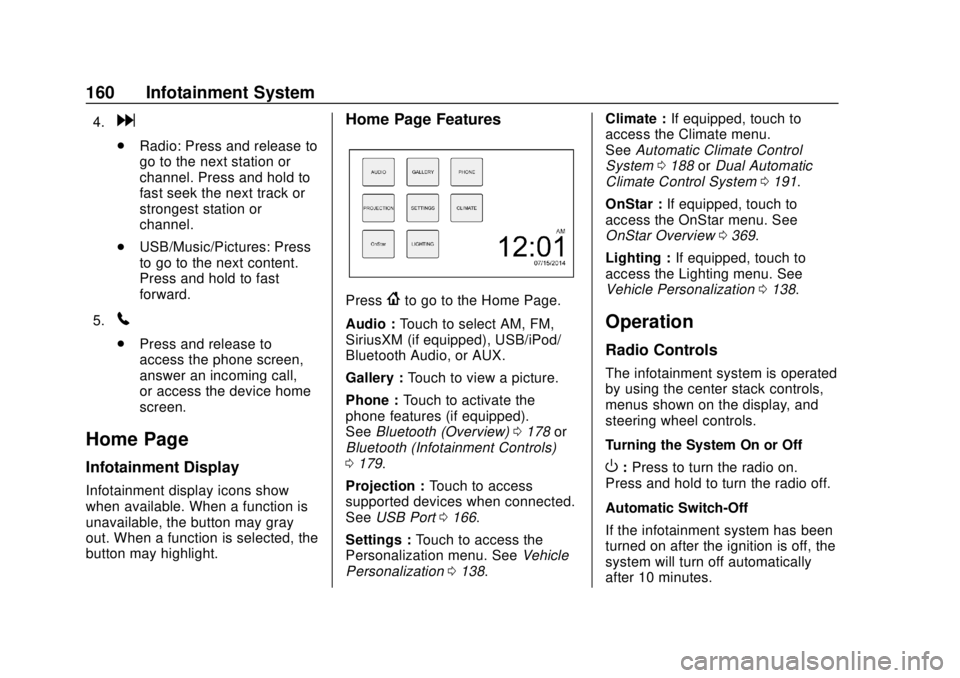
Home Page Features
Press{to go to the Home Page.
Audio : Touch to select AM, FM,
SiriusXM (if equipped), USB/iPod/
Bluetooth Audio, or AUX.
Gallery : Touch to view a picture.
Phone : Touch to activate the
phone features (if equipped).
See Bluetooth (Overview) 0178 or
Bluetooth (Infotainment Controls)
0 179.
Projection : Touch to access
supported devices when connected.
See USB Port 0166.
Settings : Touch to access the
Personalization menu. See Vehicle
Personalization 0138. Climate :
If equipped, touch to
access the Climate menu.
See Automatic Climate Control
System 0188 orDual Automatic
Climate Control System 0191.
OnStar : If equipped, touch to
access the OnStar menu. See
OnStar Overview 0369.
Lighting : If equipped, touch to
access the Lighting menu. See
Vehicle Personalization 0138.
Operation
Radio Controls
The infotainment system is operated
by using the center stack controls,
menus shown on the display, and
steering wheel controls.
Turning the System On or Off
O:Press to turn the radio on.
Press and hold to turn the radio off.
Automatic Switch-Off
If the infotainment system has been
turned on after the ignition is off, the
system will turn off automatically
after 10 minutes.
Page 171 of 393
Chevrolet Camaro Owner Manual (GMNA-Localizing-U.S./Canada/Mexico-
11348325) - 2018 - CRC - 10/23/17
170 Infotainment System
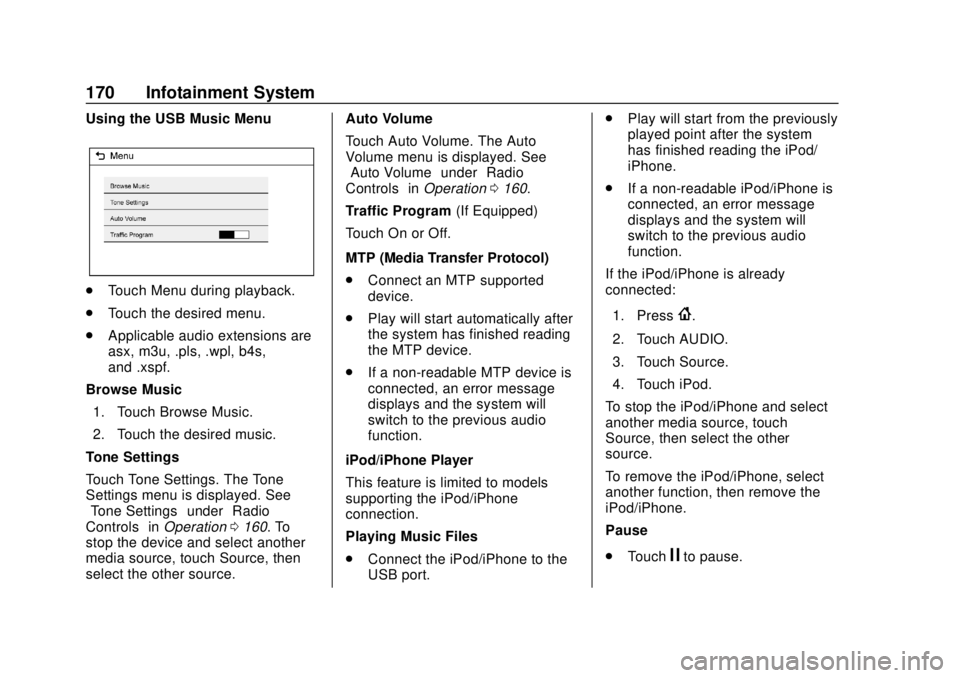
Using the USB Music Menu
.Touch Menu during playback.
. Touch the desired menu.
. Applicable audio extensions are
asx, m3u, .pls, .wpl, b4s,
and .xspf.
Browse Music 1. Touch Browse Music.
2. Touch the desired music.
Tone Settings
Touch Tone Settings. The Tone
Settings menu is displayed. See
“Tone Settings” under“Radio
Controls” inOperation 0160. To
stop the device and select another
media source, touch Source, then
select the other source. Auto Volume
Touch Auto Volume. The Auto
Volume menu is displayed. See
“Auto Volume”
under“Radio
Controls” inOperation 0160.
Traffic Program (If Equipped)
Touch On or Off.
MTP (Media Transfer Protocol)
. Connect an MTP supported
device.
. Play will start automatically after
the system has finished reading
the MTP device.
. If a non-readable MTP device is
connected, an error message
displays and the system will
switch to the previous audio
function.
iPod/iPhone Player
This feature is limited to models
supporting the iPod/iPhone
connection.
Playing Music Files
. Connect the iPod/iPhone to the
USB port. .
Play will start from the previously
played point after the system
has finished reading the iPod/
iPhone.
. If a non-readable iPod/iPhone is
connected, an error message
displays and the system will
switch to the previous audio
function.
If the iPod/iPhone is already
connected:
1. Press
{.
2. Touch AUDIO.
3. Touch Source.
4. Touch iPod.
To stop the iPod/iPhone and select
another media source, touch
Source, then select the other
source.
To remove the iPod/iPhone, select
another function, then remove the
iPod/iPhone.
Pause
. Touch
jto pause.
Page 172 of 393
Chevrolet Camaro Owner Manual (GMNA-Localizing-U.S./Canada/Mexico-
11348325) - 2018 - CRC - 10/23/17
Infotainment System 171
.Touchrto resume.
Changing to the Next/
Previous Song
. Touch
lto change to the
next song.
. Touch
gwithin two seconds of
the playback time to play the
previous file.
Returning to the Beginning of the
Current File
Touch
gafter two seconds of the
playback time.
Scanning Forward or Backward
Touch and hold
gorlduring
playback to rewind or fast forward.
Release to resume playback at
normal speed.
Playing Files Randomly
Touch
Zduring playback.
. ON: Plays all files randomly.
. OFF: Returns to normal
playback. Using the iPod Menu
.
Touch Menu during playback.
. Touch the appropriate
play mode.
Browse Music 1. Touch Browse Music.
2. Touch the desired music.
Tone Settings
Touch Tone Settings. The Tone
Settings menu is displayed. See
“Tone Settings” under“Radio
Controls” inOperation 0160.
Auto Volume
Touch Auto Volume. The Auto
Volume menu is displayed. See
“Auto Volume” under“Radio
Controls” inOperation 0160.
Picture System Information
The infotainment system can view
picture files stored on a USB
storage device and devices that
support Media Transfer
Protocol (MTP).
.
Supported file extensions: .jpg,
.bmp, .png, .gif. .
Animated GIF files are not
supported.
. Some files may not operate due
to a different recording format or
the condition of the file.
Viewing Pictures 1. Connect the USB device to the USB port.
2. Touch the screen to open to full screen. Touch the screen again
to return to the previous
screen.
If the USB device is already
connected:
1. Press
{.
2. Touch GALLERY.
Some features are disabled while
the vehicle is in motion.
Viewing a Slide Show
1. Touch
zfrom the picture
screen.
2. Touch the screen to cancel the slide show during the slide
show playback.
Page 292 of 393
Chevrolet Camaro Owner Manual (GMNA-Localizing-U.S./Canada/Mexico-
11348325) - 2018 - CRC - 10/23/17
Vehicle Care 291
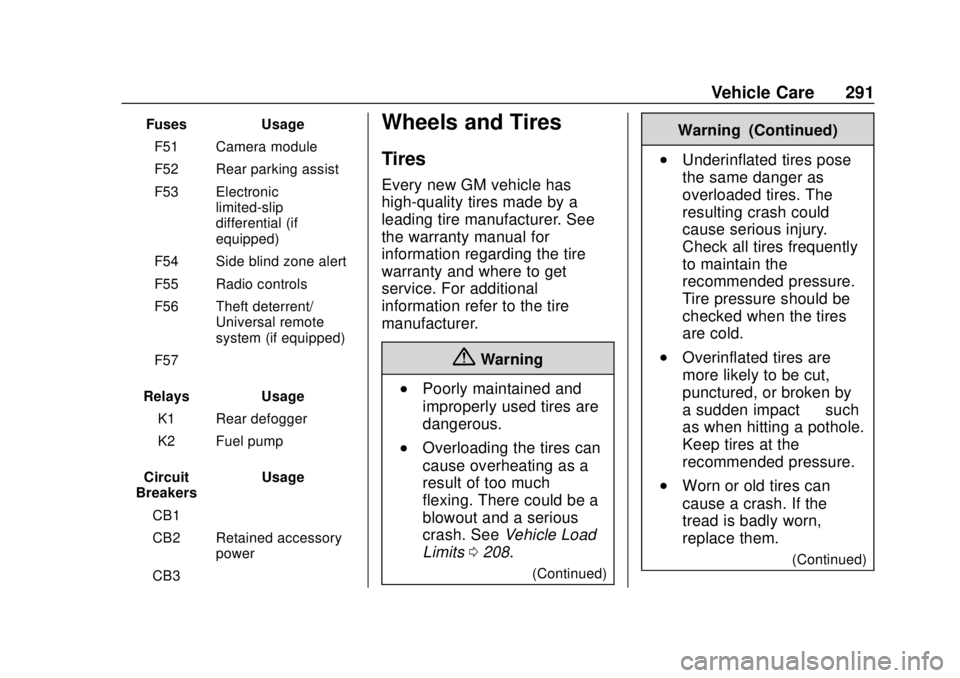
FusesUsage
F51 Camera module
F52 Rear parking assist
F53 Electronic limited-slip
differential (if
equipped)
F54 Side blind zone alert
F55 Radio controls
F56 Theft deterrent/ Universal remote
system (if equipped)
F57 –
Relays Usage
K1 Rear defogger
K2 Fuel pump
Circuit
Breakers Usage
CB1 –
CB2 Retained accessory power
CB3 –Wheels and Tires
Tires
Every new GM vehicle has
high-quality tires made by a
leading tire manufacturer. See
the warranty manual for
information regarding the tire
warranty and where to get
service. For additional
information refer to the tire
manufacturer.
{Warning
.Poorly maintained and
improperly used tires are
dangerous.
.Overloading the tires can
cause overheating as a
result of too much
flexing. There could be a
blowout and a serious
crash. See Vehicle Load
Limits 0208.
(Continued)
Warning (Continued)
.Underinflated tires pose
the same danger as
overloaded tires. The
resulting crash could
cause serious injury.
Check all tires frequently
to maintain the
recommended pressure.
Tire pressure should be
checked when the tires
are cold.
.Overinflated tires are
more likely to be cut,
punctured, or broken by
a sudden impact —such
as when hitting a pothole.
Keep tires at the
recommended pressure.
.Worn or old tires can
cause a crash. If the
tread is badly worn,
replace them.
(Continued)
Page 385 of 393

Chevrolet Camaro Owner Manual (GMNA-Localizing-U.S./Canada/Mexico-
11348325) - 2018 - CRC - 10/23/17
384 Index
DrivingCompetitive . . . . . . . . . . . . . . . . . . . 237
Defensive . . . . . . . . . . . . . . . . . . . . . 197
Drunk . . . . . . . . . . . . . . . . . . . . . . . . . 198
For Better Fuel Economy . . . . . . . 27
Hill and Mountain Roads . . . . . . 205
If the Vehicle is Stuck . . . . . . . . . 207
Loss of Control . . . . . . . . . . . . . . . 199
Off-Road Recovery . . . . . . . . . . . 199
Track Events andCompetitive . . . . . . . . . . . . . . . . . 200
Vehicle Load Limits . . . . . . . . . . . 208
Wet Roads . . . . . . . . . . . . . . . . . . . 205
Winter . . . . . . . . . . . . . . . . . . . . . . . . 206
Dual Automatic Climate Control System . . . . . . . . . . . . . . . . 191
E
Electric Parking Brake . . . . . . . . . . 229
Electric Parking Brake Light . . . . 126
Electrical Equipment,
Add-On . . . . . . . . . . . . . . . . . . . . . . . 251
Electrical System Engine Compartment FuseBlock . . . . . . . . . . . . . . . . . . . . . . . . 285
Fuses and Circuit Breakers . . . 285
Overload . . . . . . . . . . . . . . . . . . . . . 284 Electrical System (cont'd)
Rear Compartment Fuse
Block . . . . . . . . . . . . . . . . . . . . . . . . 289
Emergency
OnStar . . . . . . . . . . . . . . . . . . . . . . . 371
Engine Air Cleaner/Filter . . . . . . . . . . . . . 265
Check Light (MalfunctionIndicator) . . . . . . . . . . . . . . . . . . . . 124
Compartment Overview . . . . . . . 256
Coolant Temperature Gauge . . . . . . . . . . . . . . . . . . . . . . 120
Cooling System . . . . . . . . . . . . . . . 267
Drive Belt Routing . . . . . . . . . . . . 354
Exhaust . . . . . . . . . . . . . . . . . . . . . . 220
Heater . . . . . . . . . . . . . . . . . . . . . . . . 216
Oil Life System . . . . . . . . . . . . . . . 263
Oil Pressure Gauge . . . . . . . . . . .119
Oil Pressure Light . . . . . . . . . . . . 129
Overheating . . . . . . . . . . . . . . . . . . 272
Power Messages . . . . . . . . . . . . . 138
Running While Parked . . . . . . . . 221
Starting . . . . . . . . . . . . . . . . . . . . . . . 214
Entry Lighting . . . . . . . . . . . . . . . . . . . 154
Event Data Recorders . . . . . . . . . . 367
Exit Lighting . . . . . . . . . . . . . . . . . . . . 154
Extended Parking . . . . . . . . . . . . . . . 220
Extender, Seat Belt . . . . . . . . . . . . . . 70 Exterior Lamp Controls . . . . . . . . . 150
Exterior Lighting Battery
Saver . . . . . . . . . . . . . . . . . . . . . . . . . 155
F
FeaturesMemory . . . . . . . . . . . . . . . . . . . . . . . . . 11
Filter, Engine Air Cleaner . . . . . . . . . . . 265
Flash-to-Pass . . . . . . . . . . . . . . . . . . . 151
Flashers, Hazard Warning . . . . . . 152
Flat Tire . . . . . . . . . . . . . . . . . . . . . . . . 312
Floor Mats . . . . . . . . . . . . . . . . . . . . . . 333
Fluid Automatic Transmission . . . . . . 264
Brakes . . . . . . . . . . . . . . . . . . . . . . . . 275
Washer . . . . . . . . . . . . . . . . . . . . . . . 273
Frequency Statement Radio . . . . . . . . . . . . . . . . . . . . . . . . . 365
Front Seats Heated and Ventilated . . . . . . . . . . 64
Front Turn Signal Lamps . . . . . . . 281
Fuel . . . . . . . . . . . . . . . . . . . . . . . . . . . . 247 Additives . . . . . . . . . . . . . . . . . . . . . 248
Economy Driving . . . . . . . . . . . . . . . 27
Filling a Portable FuelContainer . . . . . . . . . . . . . . . . . . . 250
Filling the Tank . . . . . . . . . . . . . . . 249