warning CHEVROLET CAMARO 2018 Service Manual
[x] Cancel search | Manufacturer: CHEVROLET, Model Year: 2018, Model line: CAMARO, Model: CHEVROLET CAMARO 2018Pages: 393, PDF Size: 5.77 MB
Page 103 of 393
Chevrolet Camaro Owner Manual (GMNA-Localizing-U.S./Canada/Mexico-
11348325) - 2018 - CRC - 10/23/17
102 Storage
Storage
Storage Compartments
Storage Compartments . . . . . . . 102
Glove Box . . . . . . . . . . . . . . . . . . . . 102
Rear Storage . . . . . . . . . . . . . . . . . 102
Center Console Storage . . . . . . 103
Additional Storage Features
Convenience Net . . . . . . . . . . . . . 103
Storage
Compartments
{Warning
Do not store heavy or sharp
objects in storage compartments.
In a crash, these objects may
cause the cover to open and
could result in injury.
Glove Box
Open the glove box by lifting up on
the lever. Use the key to lock and
unlock the glove box.
Rear Storage
Rear Trunk Partition
If equipped with a convertible top,
there is a trunk partition to keep
cargo from getting in the way of the
convertible top. The trunk partition
must be in place for the convertible
top to move. If the trunk partition is
not properly in place, a message will
display and a chime sounds.
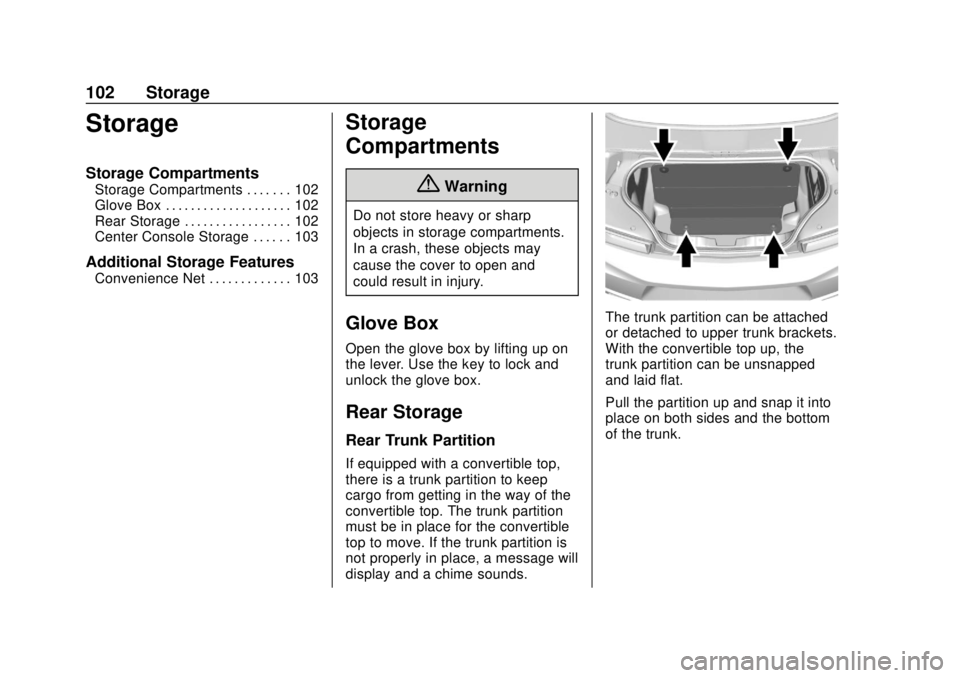
The trunk partition can be attached
or detached to upper trunk brackets.
With the convertible top up, the
trunk partition can be unsnapped
and laid flat.
Pull the partition up and snap it into
place on both sides and the bottom
of the trunk.
Page 105 of 393
Chevrolet Camaro Owner Manual (GMNA-Localizing-U.S./Canada/Mexico-
11348325) - 2018 - CRC - 10/23/17
104 Instruments and Controls
Instruments and
Controls
Controls
Steering Wheel Adjustment . . . 105
Steering Wheel Controls . . . . . . 106
Heated Steering Wheel . . . . . . . 107
Horn . . . . . . . . . . . . . . . . . . . . . . . . . . 107
Windshield Wiper/Washer . . . . 107
Compass . . . . . . . . . . . . . . . . . . . . . 108
Clock . . . . . . . . . . . . . . . . . . . . . . . . . 108
Power Outlets . . . . . . . . . . . . . . . . 110
Wireless Charging . . . . . . . . . . . . 110
Warning Lights, Gauges, and
Indicators
Warning Lights, Gauges, andIndicators . . . . . . . . . . . . . . . . . . . 112
Instrument Cluster . . . . . . . . . . . . 113
Speedometer . . . . . . . . . . . . . . . . . 117
Odometer . . . . . . . . . . . . . . . . . . . . . 117
Trip Odometer . . . . . . . . . . . . . . . . 117
Tachometer . . . . . . . . . . . . . . . . . . . 117
Fuel Gauge . . . . . . . . . . . . . . . . . . . 117
Boost Gauge (Uplevel Cluster Only) . . . . . . . . . . . . . . . . 118
Engine Oil Pressure Gauge (Uplevel Cluster Only) . . . . . . . 119 Engine Coolant Temperature
Gauge . . . . . . . . . . . . . . . . . . . . . . 120
Voltmeter Gauge (Uplevel Cluster Only) . . . . . . . . . . . . . . . . 121
Seat Belt Reminders . . . . . . . . . 122
Airbag Readiness Light . . . . . . . 122
Passenger Airbag Status
Indicator . . . . . . . . . . . . . . . . . . . . 123
Charging System Light . . . . . . . 124
Malfunction Indicator Lamp . . . 124
Brake System Warning Light . . . . . . . . . . . . . . . . . . . . . . . . 126
Electric Parking Brake Light . . . . . . . . . . . . . . . . . . . . . . . . 126
Service Electric Parking Brake Light . . . . . . . . . . . . . . . . . . . . . . . . 127
Antilock Brake System (ABS) Warning Light . . . . . . . . . . . . . . . 127
Traction Off Light . . . . . . . . . . . . . 127
StabiliTrak OFF Light . . . . . . . . . 128
Traction Control System (TCS)/ StabiliTrak Light . . . . . . . . . . . . . 128
Tire Pressure Light . . . . . . . . . . . 128
Engine Oil Pressure Light . . . . 129
Low Fuel Warning Light . . . . . . 129
Security Light . . . . . . . . . . . . . . . . . 130
High-Beam On Light . . . . . . . . . . 130
Lamps On Reminder . . . . . . . . . 130
Cruise Control Light . . . . . . . . . . 130
Door Ajar Light . . . . . . . . . . . . . . . 130
Information Displays
Driver Information Center (DIC) . . . . . . . . . . . . . . . . 131
Head-Up Display (HUD) . . . . . . 134
Vehicle Messages
Vehicle Messages . . . . . . . . . . . . 137
Engine Power Messages . . . . . 138
Vehicle Speed Messages . . . . . 138
Vehicle Personalization
Vehicle Personalization . . . . . . . 138
Universal Remote System
Universal Remote System . . . . 146
Universal Remote System Programming . . . . . . . . . . . . . . . 146
Universal Remote System Operation . . . . . . . . . . . . . . . . . . . 148
Page 109 of 393
Chevrolet Camaro Owner Manual (GMNA-Localizing-U.S./Canada/Mexico-
11348325) - 2018 - CRC - 10/23/17
108 Instruments and Controls
{Warning
In freezing weather, do not use
the washer until the windshield is
warmed. Otherwise the washer
fluid can form ice on the
windshield, blocking your vision.
Clear snow and ice from the wiper
blades and windshield before using
them. If frozen to the windshield,
carefully loosen or thaw them.
Damaged blades should be
replaced. See Wiper Blade
Replacement 0278.
Heavy snow or ice can overload the
wiper motor.
Wiper Parking
If the ignition is turned off while the
wipers are on LO, HI, or INT, they
will immediately stop.
If the windshield wiper lever is then
moved to OFF before the driver
door is opened or within 10 minutes,
the wipers will restart and move to
the base of the windshield. If the ignition is turned off while the
wipers are performing wipes due to
windshield washing, the wipers
continue to run until they reach the
base of the windshield.
Compass
The vehicle has a compass display
in the Driver Information
Center (DIC). The compass receives
its heading and other information
from the Global Positioning
System (GPS) antenna, StabiliTrak,
and vehicle speed information.
Avoid covering the GPS antenna,
located on the roof, for long periods
of time with objects that may
interfere with the antenna's ability to
receive a satellite signal. The
compass system is designed to
operate for a certain number of
miles or degrees of turn before
needing a signal from the GPS
satellites. When the compass
display shows CAL, drive the
vehicle for a short distance in an
open area where it can receive a
GPS signal. The compass system
will automatically determine when
the GPS signal is restored and
provide a heading again.
Clock
Base Radio
The infotainment system controls
are used to access the time and
date settings through the menu
system. See
Operation0160 on
how to use the menu system.
Setting the Time and Date
When Auto Set is enabled the time
cannot be manually set.
1. Press
{, then touch
SETTINGS.
2. Touch Time and Date, then Set Time or Set Date.
3. Touch + or −to adjust the
value.
4. Touch
RorQto adjust AM or
PM for 12 hour format.
5. Touch
0.
Page 112 of 393
Chevrolet Camaro Owner Manual (GMNA-Localizing-U.S./Canada/Mexico-
11348325) - 2018 - CRC - 10/23/17
Instruments and Controls 111
{Warning
Wireless charging can affect the
operation of an implanted
pacemaker or other medical
devices. If you have one, it is
recommended to consult with
your doctor before using the
wireless charging system.
The vehicle must be on, in ACC/
ACCESSORY, or Retained
Accessory Power (RAP) must be
active. The wireless charging
feature may not correctly indicate
charging when the vehicle is in RAP.
See Retained Accessory Power
(RAP) 0218.
The operating temperature is −20 °C
(−4 °F) to 60 °C (140 °F) for the
charging system and 0 °C (32 °F) to
35 °C (95 °F) for the phone.
{Warning
Remove all objects from the
charging pad before charging
your mobile device. Objects, such
as coins, keys, rings, paper clips,
or cards, between the phone and
charging pad will become very
hot. On the rare occasion that the
charging system does not detect
an object, and the object gets
wedged between the phone and
charger, remove the phone and
allow the object to cool before
removing it from the charging
pad, to prevent burns.
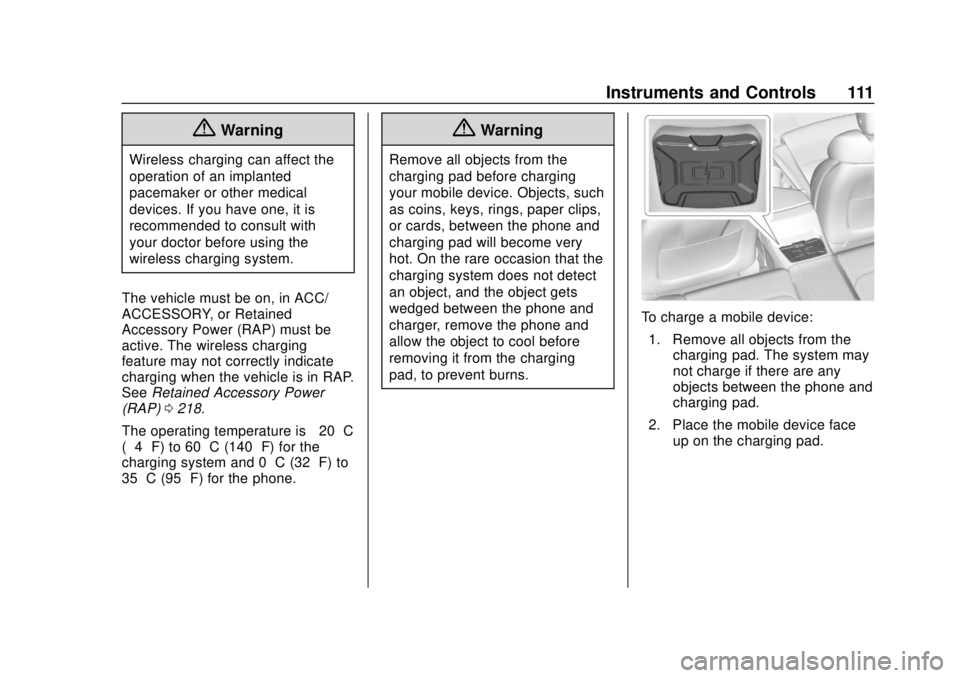
To charge a mobile device:
1. Remove all objects from the charging pad. The system may
not charge if there are any
objects between the phone and
charging pad.
2. Place the mobile device face up on the charging pad.
Page 113 of 393
Chevrolet Camaro Owner Manual (GMNA-Localizing-U.S./Canada/Mexico-
11348325) - 2018 - CRC - 10/23/17
112 Instruments and Controls
3. The$will appear on theVon
the infotainment display. This
indicates that the mobile device
is properly positioned and
charging. If a phone is placed
on the charging pad and
$does
not appear, remove the phone
from the pad, turn it
180 degrees, and wait
three seconds before placing/
aligning the phone on the pad
again.
Warning Lights,
Gauges, and
Indicators
Warning lights and gauges can
signal that something is wrong
before it becomes serious enough
to cause an expensive repair or
replacement. Paying attention to the
warning lights and gauges could
prevent injury. Some warning lights come on briefly
when the engine is started to
indicate they are working. When
one of the warning lights comes on
and stays on while driving, or when
one of the gauges shows there may
be a problem, check the section that
explains what to do. Waiting to do
repairs can be costly and even
dangerous.
Page 117 of 393
Chevrolet Camaro Owner Manual (GMNA-Localizing-U.S./Canada/Mexico-
11348325) - 2018 - CRC - 10/23/17
116 Instruments and Controls
acceleration, the performance time
will record the time. To reset the
timer, highlight Reset on the
performance timer menu and
press SEL.
G-Force :Gives the driver an
indication of the vehicle
performance in cornering. The
G-force is displayed in the center of
the DIC as a numerical value.
Lap Timer : Use to start, stop,
or reset the lap timer. A stopwatch
icon will be displayed when the lap
timer is active. Press SEL while the
Lap Timer page is active to start the
timer. If the lamp timer is active,
pressing SEL on any page will stop
the current lap timer and start a new
lap. Also, pressing and holding SEL
on any page will stop the lap timer.
Oil Temperature : Shows the
current oil temperature in either
degrees Celsius (°C) or degrees
Fahrenheit (°F).
Oil Pressure : Shows the current oil
pressure in either kilopascal (kPa) or
in pounds per square inch (psi). Transmission Fluid
Temperature :
Shows the
temperature of the transmission fluid
in either degrees Celsius (°C) or
degrees Fahrenheit (°F).
Audio
If equipped, while the audio app is
open, use
worxto change the
radio station or seek to the next or
previous track, depending on the
current audio source. Press
pto
enter the Audio menu. In the Audio
menu browse for music, select from
the favorites, or change the audio
source.
Phone
If equipped, press
pto enter the
Phone menu. In the Phone menu,
if there is no active phone call, view
recent calls, or scroll through
contacts. If there is an active call,
mute or unmute the phone or switch
to handset or hands-free operation. Navigation
If equipped, press
pto enter the
Navigation menu. This displays a
map or turn by turn directions.
If there is no active route, press
p
to resume the last route and turn the
voice prompts on/off. If there is an
active route, press SEL to cancel
route guidance or turn the voice
prompts on/off.
Options
Press SEL to enter the Options
menu. Use
worxto scroll
through items in the menu.
Units : Press
pwhile Units is
displayed to enter the Units menu.
Choose US or Metric units by
pressing SEL while the desired item
is highlighted.
Speed Warning : The Speed
Warning display allows the driver to
set a speed that they do not want to
exceed. To set the Speed Warning,
press
pwhen Speed Warning is
displayed. Enable the speed
warning and then use
worxto
Page 118 of 393
Chevrolet Camaro Owner Manual (GMNA-Localizing-U.S./Canada/Mexico-
11348325) - 2018 - CRC - 10/23/17
Instruments and Controls 117
adjust the value. Press SEL to set
the speed. Once the speed is set,
this feature can be turned off by
pressing SEL while viewing this
page. If the selected speed limit is
exceeded, a pop-up warning is
displayed with a chime.
Display Option (Uplevel) :Press
SEL while Display Option is
highlighted to change the
configuration of the uplevel cluster.
See “Reconfigurable Instrument
Cluster” earlier in this section.
Info Pages : Press
pwhile Info
Pages is highlighted to select the
items to be displayed in the DIC info
displays. See Driver Information
Center (DIC) 0131.
Software Info : Press
pwhile
Software Info is highlighted to
display open source software
information.
Speedometer
The speedometer shows the
vehicle's speed in either kilometers
per hour (km/h) or miles per
hour (mph).
Odometer
The odometer shows how far the
vehicle has been driven, in either
kilometers or miles.
Trip Odometer
The trip odometer shows how far
the vehicle has been driven since
the trip odometer was last reset.
The trip odometer is accessed and
reset through the Driver Information
Center (DIC). See Driver
Information Center (DIC) 0131.
Tachometer
The tachometer displays the engine
speed in revolutions per
minute (rpm).
Caution
If the engine is operated with the
rpm’s in the warning area at the
high end of the tachometer, the
vehicle could be damaged, and
the damage would not be covered
by the vehicle warranty. Do not
operate the engine with the rpm’s
in the warning area.
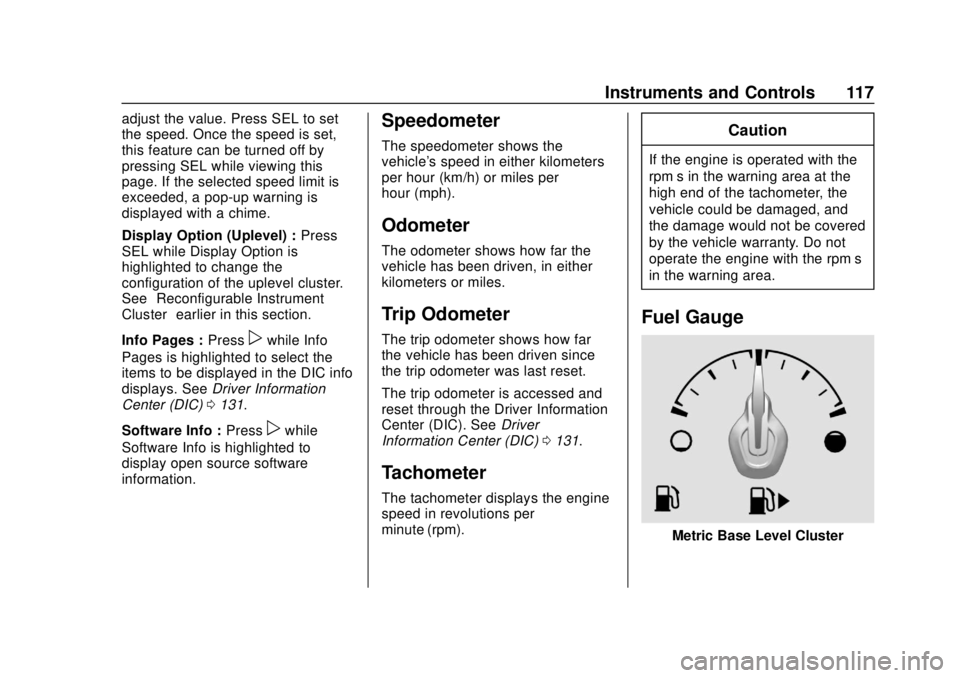
Fuel Gauge
Metric Base Level Cluster
Page 120 of 393
Chevrolet Camaro Owner Manual (GMNA-Localizing-U.S./Canada/Mexico-
11348325) - 2018 - CRC - 10/23/17
Instruments and Controls 119
English
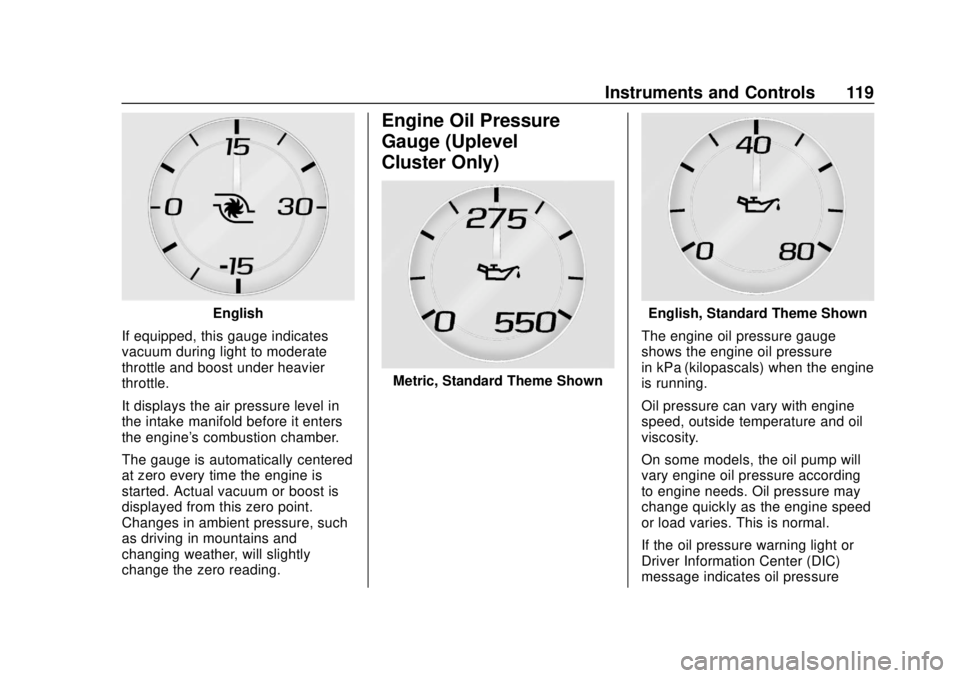
If equipped, this gauge indicates
vacuum during light to moderate
throttle and boost under heavier
throttle.
It displays the air pressure level in
the intake manifold before it enters
the engine's combustion chamber.
The gauge is automatically centered
at zero every time the engine is
started. Actual vacuum or boost is
displayed from this zero point.
Changes in ambient pressure, such
as driving in mountains and
changing weather, will slightly
change the zero reading.
Engine Oil Pressure
Gauge (Uplevel
Cluster Only)
Metric, Standard Theme Shown
English, Standard Theme Shown
The engine oil pressure gauge
shows the engine oil pressure
in kPa (kilopascals) when the engine
is running.
Oil pressure can vary with engine
speed, outside temperature and oil
viscosity.
On some models, the oil pump will
vary engine oil pressure according
to engine needs. Oil pressure may
change quickly as the engine speed
or load varies. This is normal.
If the oil pressure warning light or
Driver Information Center (DIC)
message indicates oil pressure
Page 122 of 393
Chevrolet Camaro Owner Manual (GMNA-Localizing-U.S./Canada/Mexico-
11348325) - 2018 - CRC - 10/23/17
Instruments and Controls 121
English Uplevel Cluster
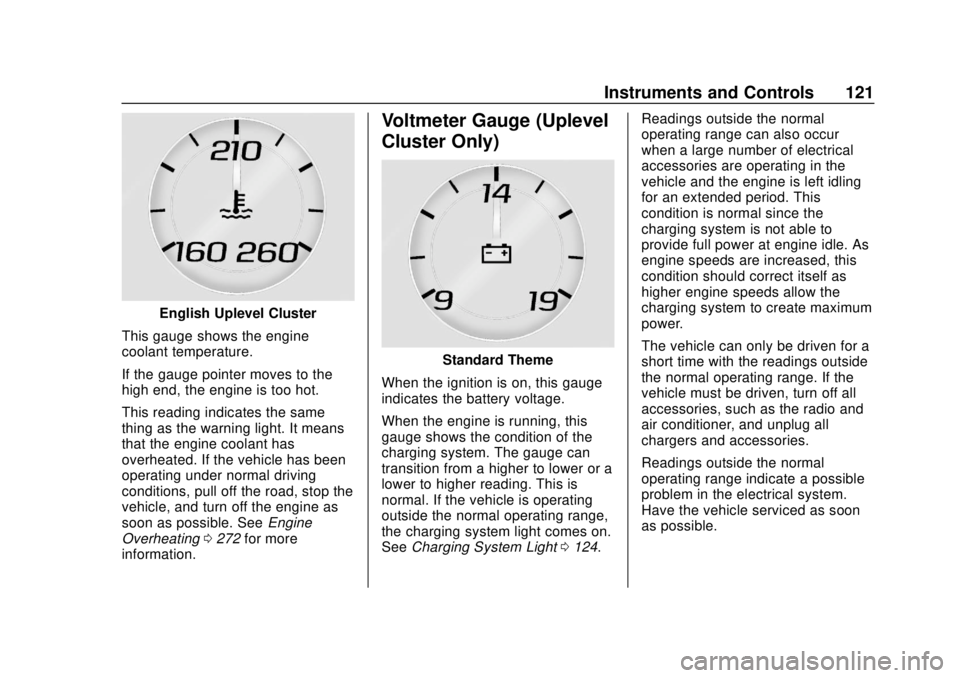
This gauge shows the engine
coolant temperature.
If the gauge pointer moves to the
high end, the engine is too hot.
This reading indicates the same
thing as the warning light. It means
that the engine coolant has
overheated. If the vehicle has been
operating under normal driving
conditions, pull off the road, stop the
vehicle, and turn off the engine as
soon as possible. See Engine
Overheating 0272 for more
information.
Voltmeter Gauge (Uplevel
Cluster Only)
Standard Theme
When the ignition is on, this gauge
indicates the battery voltage.
When the engine is running, this
gauge shows the condition of the
charging system. The gauge can
transition from a higher to lower or a
lower to higher reading. This is
normal. If the vehicle is operating
outside the normal operating range,
the charging system light comes on.
See Charging System Light 0124. Readings outside the normal
operating range can also occur
when a large number of electrical
accessories are operating in the
vehicle and the engine is left idling
for an extended period. This
condition is normal since the
charging system is not able to
provide full power at engine idle. As
engine speeds are increased, this
condition should correct itself as
higher engine speeds allow the
charging system to create maximum
power.
The vehicle can only be driven for a
short time with the readings outside
the normal operating range. If the
vehicle must be driven, turn off all
accessories, such as the radio and
air conditioner, and unplug all
chargers and accessories.
Readings outside the normal
operating range indicate a possible
problem in the electrical system.
Have the vehicle serviced as soon
as possible.
Page 124 of 393
Chevrolet Camaro Owner Manual (GMNA-Localizing-U.S./Canada/Mexico-
11348325) - 2018 - CRC - 10/23/17
Instruments and Controls 123
The airbag readiness light comes on
for several seconds when the
vehicle is started. If the light does
not come on then, have it fixed
immediately.
{Warning
If the airbag readiness light stays
on after the vehicle is started or
comes on while driving, it means
the airbag system might not be
working properly. The airbags in
the vehicle might not inflate in a
crash, or they could even inflate
without a crash. To help avoid
injury, have the vehicle serviced
right away.
If there is a problem with the airbag
system, a Driver Information Center
(DIC) message may also come on.
Passenger Airbag Status
Indicator
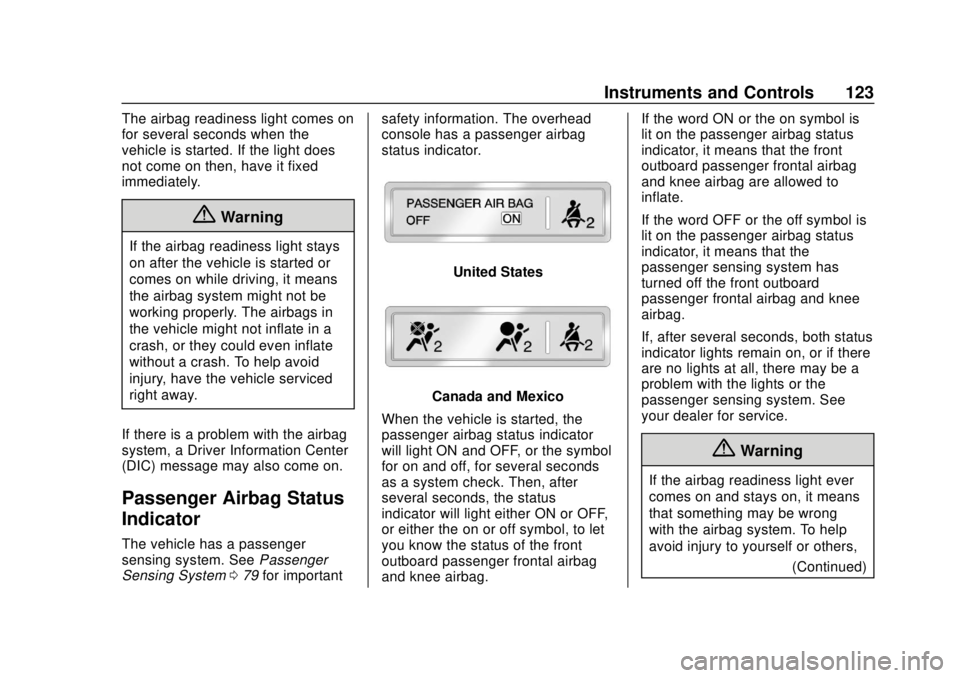
The vehicle has a passenger
sensing system. See Passenger
Sensing System 079 for important safety information. The overhead
console has a passenger airbag
status indicator.
United States
Canada and Mexico
When the vehicle is started, the
passenger airbag status indicator
will light ON and OFF, or the symbol
for on and off, for several seconds
as a system check. Then, after
several seconds, the status
indicator will light either ON or OFF,
or either the on or off symbol, to let
you know the status of the front
outboard passenger frontal airbag
and knee airbag. If the word ON or the on symbol is
lit on the passenger airbag status
indicator, it means that the front
outboard passenger frontal airbag
and knee airbag are allowed to
inflate.
If the word OFF or the off symbol is
lit on the passenger airbag status
indicator, it means that the
passenger sensing system has
turned off the front outboard
passenger frontal airbag and knee
airbag.
If, after several seconds, both status
indicator lights remain on, or if there
are no lights at all, there may be a
problem with the lights or the
passenger sensing system. See
your dealer for service.
{Warning
If the airbag readiness light ever
comes on and stays on, it means
that something may be wrong
with the airbag system. To help
avoid injury to yourself or others,
(Continued)