transmission CHEVROLET CAMARO 2018 Owner's Manual
[x] Cancel search | Manufacturer: CHEVROLET, Model Year: 2018, Model line: CAMARO, Model: CHEVROLET CAMARO 2018Pages: 393, PDF Size: 5.77 MB
Page 6 of 393
Chevrolet Camaro Owner Manual (GMNA-Localizing-U.S./Canada/Mexico-
11348325) - 2018 - CRC - 10/23/17
In Brief 5
In Brief
Instrument Panel
Instrument Panel . . . . . . . . . . . . . . . . 6
Initial Drive Information
Initial Drive Information . . . . . . . . . . 8
Remote Keyless Entry (RKE)System . . . . . . . . . . . . . . . . . . . . . . . . 8
Remote Vehicle Start . . . . . . . . . . . 9
Door Locks . . . . . . . . . . . . . . . . . . . . . 9
Trunk Release . . . . . . . . . . . . . . . . . . 9
Windows . . . . . . . . . . . . . . . . . . . . . . . 10
Seat Adjustment . . . . . . . . . . . . . . . 10
Memory Features . . . . . . . . . . . . . . 11
Heated and Ventilated Seats . . . 12
Head Restraint Adjustment . . . . 12
Seat Belts . . . . . . . . . . . . . . . . . . . . . 12
Passenger Sensing System . . . 13
Mirror Adjustment . . . . . . . . . . . . . . 13
Steering Wheel Adjustment . . . . 14
Interior Lighting . . . . . . . . . . . . . . . . 14
Exterior Lighting . . . . . . . . . . . . . . . 14
Windshield Wiper/Washer . . . . . . 15
Climate Controls . . . . . . . . . . . . . . . 16
Transmission . . . . . . . . . . . . . . . . . . 17
Vehicle Features
Infotainment System . . . . . . . . . . . 19
Radio(s) . . . . . . . . . . . . . . . . . . . . . . . 19
Satellite Radio . . . . . . . . . . . . . . . . . 20
Portable Audio Devices . . . . . . . . 20
Bluetooth . . . . . . . . . . . . . . . . . . . . . . 20
Steering Wheel Controls . . . . . . . 21
Cruise Control . . . . . . . . . . . . . . . . . 22
Driver Information Center (DIC) . . . . . . . . . . . . . . . . . 22
Lane Change Alert (LCA) . . . . . . 23
Rear Vision Camera (RVC) . . . . 23
Rear Cross Traffic Alert (RCTA) System . . . . . . . . . . . . . . . . . . . . . . . 23
Parking Assist . . . . . . . . . . . . . . . . . 23
Power Outlets . . . . . . . . . . . . . . . . . 23
Universal Remote System . . . . . 24
Sunroof . . . . . . . . . . . . . . . . . . . . . . . . 24
Convertible . . . . . . . . . . . . . . . . . . . . 25
Performance and Maintenance
Traction Control/Electronic Stability Control . . . . . . . . . . . . . . 25
Tire Pressure Monitor . . . . . . . . . . 25
Fuel (3.6L V6 Engine) . . . . . . . . . . 26
Fuel (2.0L L4 Turbo Engine and 6.2L V8 Engine) . . . . . . . . . . . . . . 26
Fuel (6.2L V8 Supercharged Engine) . . . . . . . . . . . . . . . . . . . . . . . 26
E85 or FlexFuel . . . . . . . . . . . . . . . . 26 Engine Oil Life System . . . . . . . . 26
Car Wash Guidelines . . . . . . . . . . 27
Driving for Better Fuel
Economy . . . . . . . . . . . . . . . . . . . . . 27
Roadside Assistance
Program . . . . . . . . . . . . . . . . . . . . . . 27
Page 8 of 393

Chevrolet Camaro Owner Manual (GMNA-Localizing-U.S./Canada/Mexico-
11348325) - 2018 - CRC - 10/23/17
In Brief 7
1.Air Vents 0194.
2. Instrument Panel Illumination
Control 0153.
3. Exterior Lamp Controls 0150.
Turn Signal Lever. See Turn
and Lane-Change Signals
0 153.
Headlamp High/Low-Beam
Changer 0150.
4. Tap Shift (If Equipped). See Manual Mode 0224.
Active Rev Match 0228 (If
Equipped).
5. Instrument Cluster 0113.
6. Windshield Wiper/Washer
0107.
7. Infotainment 0157.
8. Light Sensor. See Automatic
Headlamp System 0151. 9.
Automatic Climate Control
System 0188 orDual
Automatic Climate Control
System 0191 (If Equipped).
Heated and Ventilated Front
Seats 064 (If Equipped).
10. Shift Lever. See Automatic
Transmission 0221 orManual
Transmission 0226.
11. Power Outlets 0110.
12. Electric Parking Brake 0229.
13. Traction Control/Electronic
Stability Control 0232.
Driver Mode Control 0234.
14. Hazard Warning Flashers
0152.
15. ENGINE START/STOP Button. SeeIgnition Positions 0213.
16. Steering Wheel Controls 0106.
Driver Information Center (DIC)
Controls. See Driver
Information Center (DIC) 0131. 17. Audio Controls. See
Steering
Wheel Controls 0106.
18. Horn 0107.
19. Steering Wheel Adjustment
0105.
20. Cruise Control 0239.
Heated Steering Wheel 0107
(If Equipped).
21. Head-Up Display (HUD) 0134
(If Equipped).
22. Data Link Connector (DLC) (Out of View). See Malfunction
Indicator Lamp 0124.
Hood Release (Out of View).
See Hood 0255.
Page 18 of 393
Chevrolet Camaro Owner Manual (GMNA-Localizing-U.S./Canada/Mexico-
11348325) - 2018 - CRC - 10/23/17
In Brief 17
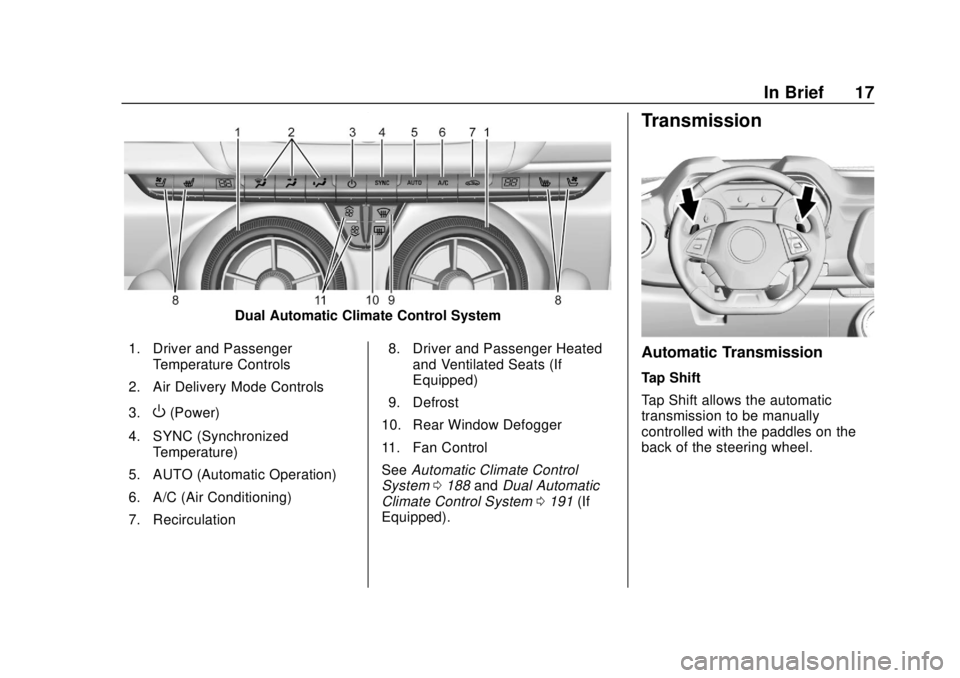
Dual Automatic Climate Control System
1. Driver and Passenger Temperature Controls
2. Air Delivery Mode Controls
3.
O(Power)
4. SYNC (Synchronized Temperature)
5. AUTO (Automatic Operation)
6. A/C (Air Conditioning)
7. Recirculation 8. Driver and Passenger Heated
and Ventilated Seats (If
Equipped)
9. Defrost
10. Rear Window Defogger
11. Fan Control
See Automatic Climate Control
System 0188 andDual Automatic
Climate Control System 0191 (If
Equipped).
Transmission
Automatic Transmission
Tap Shift
Tap Shift allows the automatic
transmission to be manually
controlled with the paddles on the
back of the steering wheel.
Page 19 of 393
Chevrolet Camaro Owner Manual (GMNA-Localizing-U.S./Canada/Mexico-
11348325) - 2018 - CRC - 10/23/17
18 In Brief
A Driver Information Center (DIC)
display indicates the gear the
vehicle is in.
To use:1. Move the shift lever to D (Drive).
2. Move the shift lever left into the side gate marked with +/−.
3. Tap the left paddle (−) to downshift, and the right
paddle (+) to upshift.
See Manual Mode 0224.Manual Transmission
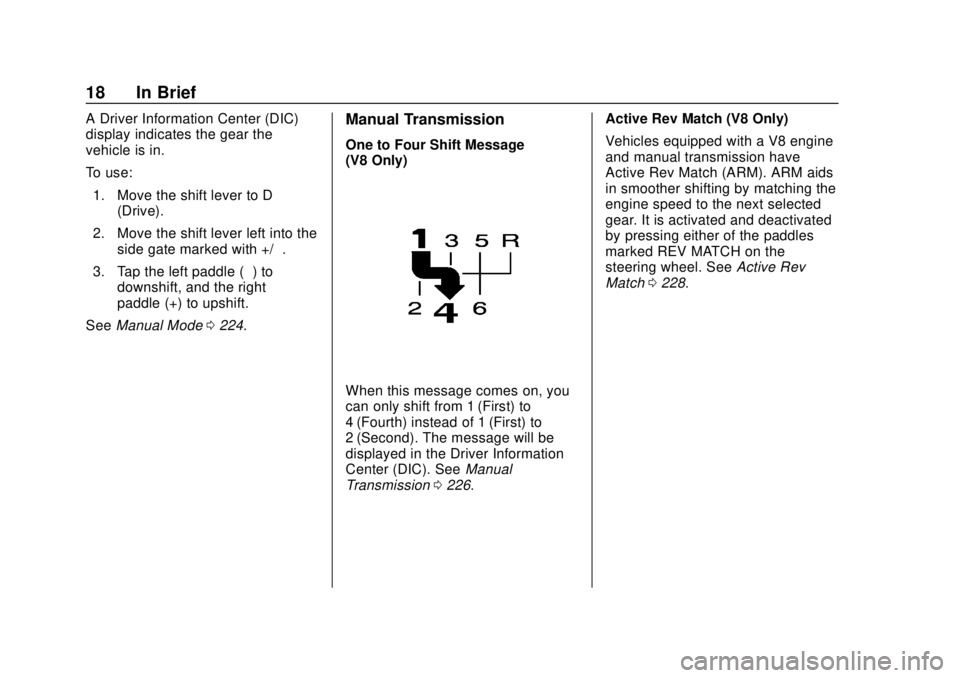
One to Four Shift Message
(V8 Only)
When this message comes on, you
can only shift from 1 (First) to
4 (Fourth) instead of 1 (First) to
2 (Second). The message will be
displayed in the Driver Information
Center (DIC). See Manual
Transmission 0226. Active Rev Match (V8 Only)
Vehicles equipped with a V8 engine
and manual transmission have
Active Rev Match (ARM). ARM aids
in smoother shifting by matching the
engine speed to the next selected
gear. It is activated and deactivated
by pressing either of the paddles
marked REV MATCH on the
steering wheel. See
Active Rev
Match 0228.
Page 41 of 393
Chevrolet Camaro Owner Manual (GMNA-Localizing-U.S./Canada/Mexico-
11348325) - 2018 - CRC - 10/23/17
40 Keys, Doors, and Windows
5. Check that the cap is secure.
Free-Turning Locks
The door key lock cylinder turns
freely when either the wrong key is
used, or the correct key is not fully
inserted. The free-turning door lock
feature prevents the lock from being
forced open. To reset the lock, turn
it to the vertical position with the
correct key fully inserted. Remove
the key and insert it again. If this
does not reset the lock, turn the key
halfway around in the cylinder and
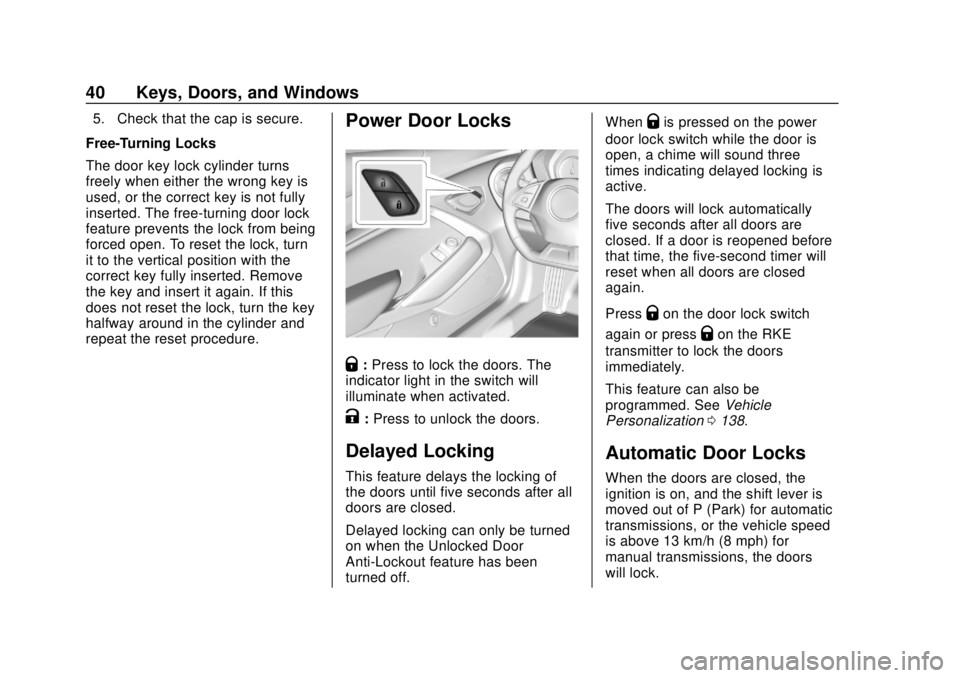
repeat the reset procedure.Power Door Locks
Q: Press to lock the doors. The
indicator light in the switch will
illuminate when activated.
K: Press to unlock the doors.
Delayed Locking
This feature delays the locking of
the doors until five seconds after all
doors are closed.
Delayed locking can only be turned
on when the Unlocked Door
Anti-Lockout feature has been
turned off. When
Qis pressed on the power
door lock switch while the door is
open, a chime will sound three
times indicating delayed locking is
active.
The doors will lock automatically
five seconds after all doors are
closed. If a door is reopened before
that time, the five-second timer will
reset when all doors are closed
again.
Press
Qon the door lock switch
again or press
Qon the RKE
transmitter to lock the doors
immediately.
This feature can also be
programmed. See Vehicle
Personalization 0138.
Automatic Door Locks
When the doors are closed, the
ignition is on, and the shift lever is
moved out of P (Park) for automatic
transmissions, or the vehicle speed
is above 13 km/h (8 mph) for
manual transmissions, the doors
will lock.
Page 42 of 393
Chevrolet Camaro Owner Manual (GMNA-Localizing-U.S./Canada/Mexico-
11348325) - 2018 - CRC - 10/23/17
Keys, Doors, and Windows 41
To unlock the doors:
.Press
Kon a power door lock
switch.
. If equipped with an automatic
transmission, shift the
transmission into P (Park).
. If equipped with a manual
transmission, turn the vehicle off
when parked.
Automatic door locking cannot be
disabled. Automatic door unlocking
can be enabled through vehicle
personalization. See Vehicle
Personalization 0138.
Lockout Protection
If the vehicle is on or in ACC/
ACCESSORY and the power door
lock switch is pressed with the
driver door open, all the doors will
lock and only the driver door will
unlock.
If the vehicle is off and locking is
requested while a door is open,
when all doors are closed the
vehicle will check for RKE
transmitters inside. If an RKE transmitter is detected and the
number of RKE transmitters inside
has not reduced, the driver door will
unlock and the horn will chirp three
times.
Lockout Protection can be manually
overridden with the driver door open
by pressing and holding
Qon the
power door lock switch.
Unlocked Door Anti-Lockout
If Unlocked Door Anti-Lockout has
been turned on and the vehicle is
off, the driver door is open, and
locking is requested, all the doors
will lock and the driver door will
remain unlocked. Push the lock
button on the door or the RKE
transmitter a second time to lock the
driver door. The Unlocked Door
Anti-Lockout feature can be turned
on or off. See Vehicle
Personalization 0138.
Doors
Trunk
{Warning
Exhaust gases can enter the
vehicle if it is driven with the
liftgate, trunk/hatch open, or with
any objects that pass through the
seal between the body and the
trunk/hatch or liftgate. Engine
exhaust contains carbon
monoxide (CO) which cannot be
seen or smelled. It can cause
unconsciousness and even death.
If the vehicle must be driven with
the liftgate, or trunk/hatch open:
. Close all of the windows.
. Fully open the air outlets on
or under the instrument
panel.
. Adjust the climate control
system to a setting that
brings in only outside air
(Continued)
Page 43 of 393
Chevrolet Camaro Owner Manual (GMNA-Localizing-U.S./Canada/Mexico-
11348325) - 2018 - CRC - 10/23/17
42 Keys, Doors, and Windows
Warning (Continued)
and set the fan speed to the
highest setting. See
“Climate Control Systems”
in the Index.
. If the vehicle has a power
liftgate, disable the power
liftgate function.
For more information about
carbon monoxide, see Engine
Exhaust 0220.
Trunk Release
To open the trunk from outside of
the vehicle:
.
Press
Xtwice quickly on the
Remote Keyless Entry (RKE)
transmitter.
. Press the touch pad in the area
above the license plate after
unlocking all doors. .
For Keyless Access, press the
touch pad in the area above the
license plate when the
transmitter is within 1 m (3 ft) of
the rear of the vehicle.
For automatic transmissions, the
vehicle must be in P (Park). For
manual transmissions, the vehicle
must be off, or stationary with the
parking brake set.
From inside the vehicle, press|
on the lower portion of the
driver door.
Emergency Trunk Release
Handle
Caution
Do not use the emergency trunk
release handle as a tie-down or
anchor point when securing items
in the trunk as it could damage
the handle.
There is a glow-in-the-dark
emergency trunk release handle on
the trunk lid. This handle will glow
Page 64 of 393
Chevrolet Camaro Owner Manual (GMNA-Localizing-U.S./Canada/Mexico-
11348325) - 2018 - CRC - 10/23/17
Seats and Restraints 63
To turn Auto Memory Recall on or
off, see "Vehicle Personalization
Settings" previously in this section
andVehicle Personalization 0138.
For vehicles equipped with an
automatic transmission, the
transmission must be in P (Park) to
initiate Auto Memory Recall. Auto
Memory Recall will complete if the
vehicle is shifted out of P (Park)
prior to reaching the stored memory
position.
For vehicles equipped with a
manual transmission, the parking
brake must be set to initiate Auto
Memory Recall. Auto Memory
Recall will complete if the parking
brake is released prior to reaching
the stored memory position.
To stop Auto Memory Recall
movement, turn the ignition off or
press any of the following memory
controls:
. Power seat
. Memory SET, 1, 2, or
B
.Power mirror, with the driver or
passenger side mirror selected
If the stored memory seat position
does not automatically recall or
recalls to the wrong positions, the
driver ’s RKE transmitter number
(1 or 2) may not match the memory
button number that positions were
saved to. Try storing the position to
the other memory button or try the
other RKE transmitter.
Easy Exit Recall
Easy Exit Recall is not linked to an
RKE transmitter. The position stored
to
Bis used for all drivers. To turn
Easy Exit Recall on or off, see
"Vehicle Personalization Settings"
previously in this section and
Vehicle Personalization 0138.
If turned on, the positions saved to
Bare automatically recalled when
one of the following occurs:
. The vehicle is turned off and the
driver door is opened within a
short time. .
The vehicle is turned off with the
driver door open.
To stop Easy Exit Recall movement,
press any of the following memory
controls:
. Power seat
. Memory SET, 1, 2, or
B
.Power mirror, with the driver or
passenger side mirror selected
Obstructions
If something has blocked the driver
seat while recalling a memory
position, the recall may stop.
Remove the obstruction and try the
recall again. If the memory position
still does not recall, see your dealer
for service.
Page 117 of 393
Chevrolet Camaro Owner Manual (GMNA-Localizing-U.S./Canada/Mexico-
11348325) - 2018 - CRC - 10/23/17
116 Instruments and Controls
acceleration, the performance time
will record the time. To reset the
timer, highlight Reset on the
performance timer menu and
press SEL.
G-Force :Gives the driver an
indication of the vehicle
performance in cornering. The
G-force is displayed in the center of
the DIC as a numerical value.
Lap Timer : Use to start, stop,
or reset the lap timer. A stopwatch
icon will be displayed when the lap
timer is active. Press SEL while the
Lap Timer page is active to start the
timer. If the lamp timer is active,
pressing SEL on any page will stop
the current lap timer and start a new
lap. Also, pressing and holding SEL
on any page will stop the lap timer.
Oil Temperature : Shows the
current oil temperature in either
degrees Celsius (°C) or degrees
Fahrenheit (°F).
Oil Pressure : Shows the current oil
pressure in either kilopascal (kPa) or
in pounds per square inch (psi). Transmission Fluid
Temperature :
Shows the
temperature of the transmission fluid
in either degrees Celsius (°C) or
degrees Fahrenheit (°F).
Audio
If equipped, while the audio app is
open, use
worxto change the
radio station or seek to the next or
previous track, depending on the
current audio source. Press
pto
enter the Audio menu. In the Audio
menu browse for music, select from
the favorites, or change the audio
source.
Phone
If equipped, press
pto enter the
Phone menu. In the Phone menu,
if there is no active phone call, view
recent calls, or scroll through
contacts. If there is an active call,
mute or unmute the phone or switch
to handset or hands-free operation. Navigation
If equipped, press
pto enter the
Navigation menu. This displays a
map or turn by turn directions.
If there is no active route, press
p
to resume the last route and turn the
voice prompts on/off. If there is an
active route, press SEL to cancel
route guidance or turn the voice
prompts on/off.
Options
Press SEL to enter the Options
menu. Use
worxto scroll
through items in the menu.
Units : Press
pwhile Units is
displayed to enter the Units menu.
Choose US or Metric units by
pressing SEL while the desired item
is highlighted.
Speed Warning : The Speed
Warning display allows the driver to
set a speed that they do not want to
exceed. To set the Speed Warning,
press
pwhen Speed Warning is
displayed. Enable the speed
warning and then use
worxto
Page 126 of 393
Chevrolet Camaro Owner Manual (GMNA-Localizing-U.S./Canada/Mexico-
11348325) - 2018 - CRC - 10/23/17
Instruments and Controls 125
Caution
Modifications to the engine,
transmission, exhaust, intake,
or fuel system, or the use of
replacement tires that do not
meet the original tire
specifications, can cause this light
to come on. This could lead to
costly repairs not covered by the
vehicle warranty. This could also
affect the vehicle’s ability to pass
an Emissions Inspection/
Maintenance test. See
Accessories and Modifications
0254.
If the light is flashing : A
malfunction has been detected that
could damage the emission control
system and increase vehicle
emissions. Diagnosis and service
may be required.
To help prevent damage, reduce
vehicle speed and avoid hard
accelerations and uphill grades. If the light continues to flash, find a
safe place to park. Turn the vehicle
off and wait at least 10 seconds
before restarting the engine. If the
light is still flashing, follow the
previous guidelines and see your
dealer for service as soon as
possible.
If the light is on steady :
A
malfunction has been detected.
Diagnosis and service may be
required.
Check the following:
. If fuel has been added to the
vehicle using the capless funnel
adapter, make sure that it has
been removed. See “Filling the
Tank with a Portable Gas Can”
under Filling the Tank 0249.
The diagnostic system can
detect if the adapter has been
left installed in the vehicle,
allowing fuel to evaporate into
the atmosphere. A few driving
trips with the adapter removed
may turn off the light. .
Poor fuel quality can cause
inefficient engine operation and
poor driveability, which may go
away once the engine is warmed
up. If this occurs, change the
fuel brand. It may require at
least one full tank of the proper
fuel to turn the light off. See Fuel
0 247.
If the light remains on, see your
dealer.
Emissions Inspection and
Maintenance Programs
If the vehicle requires an Emissions
Inspection/Maintenance test, the
test equipment will likely connect to
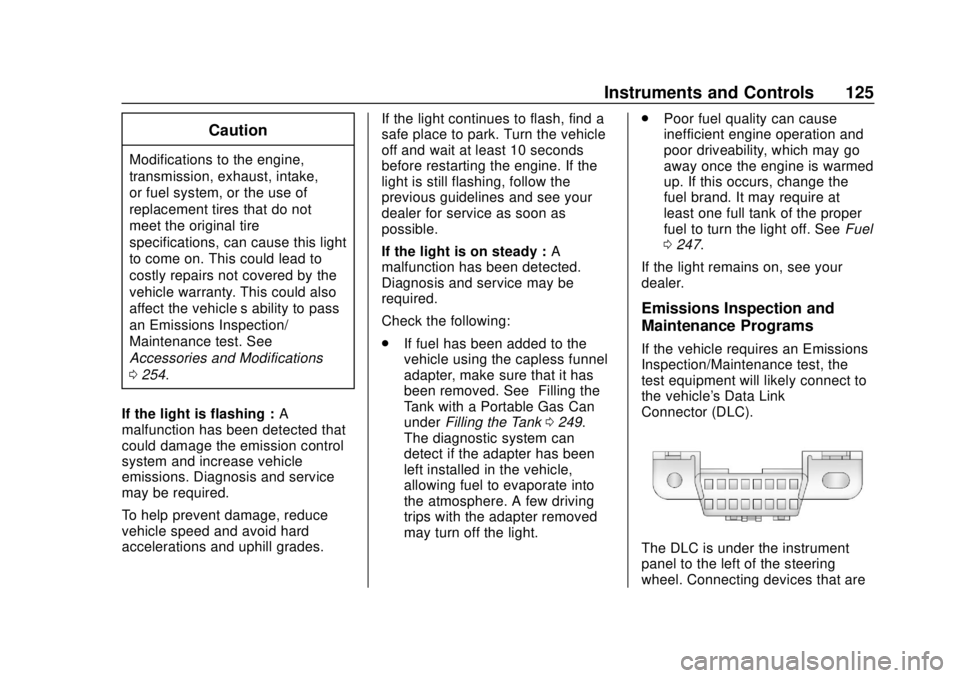
the vehicle's Data Link
Connector (DLC).
The DLC is under the instrument
panel to the left of the steering
wheel. Connecting devices that are