brake CHEVROLET CAMARO 2019 High Performance Owner Manual
[x] Cancel search | Manufacturer: CHEVROLET, Model Year: 2019, Model line: CAMARO, Model: CHEVROLET CAMARO 2019Pages: 54, PDF Size: 1.15 MB
Page 12 of 54

Chevrolet Camaro High Performance Owner Manual Supplement (GMNA-
Localizing-U.S./Canada/Mexico-12461812) - 2019 - crc - 11/7/18
Infotainment System 11
.Track
. Performance Timing
No Overlay:
No vehicle data displays on top of
the recorded video. Vehicle data is
still available with the video when
accessed in the toolbox software.
Sport:
Displays these vehicle metrics:
. Vehicle Speed: Up to three digits
are displayed in km/h or MPH
depending on vehicle settings.
. Engine Rotations Per Minute
(RPMs): The vertical line and
triangle show current RPMs. As
the RPMs increase, the backfill
follows. .
Transmission State (Current
Gear): Automatic and manual
transmissions display 1, 2, etc.
. Lateral G-Force Graphic: Left
and Right G-Forces are
displayed. The graphic fills to the
left or the right depending on the
measure value. The measured
G-Force displays as a number at
the top of the graphic.
. Event Odometer: This displays
the distance driven since the
recording began.
Track:
Displays these vehicle metrics:
. Vehicle Speed: Same as Sport. .
GPS Tracking Map: Shows the
vehicle’s current position relative
to a known route.
. Engine Rotations Per Minute
(RPMs): The vertical line and
triangle indicate current RPMs.
As the RPMs increase, the
backfill follows.
. Transmission State (Current
Gear): Same as Sport.
. Friction Bubble Graphic: Lateral
and longitudinal G-Forces are
displayed as a dot within a
bubble. A red dot displays when
the vehicle starts braking and
turns green when the vehicle
accelerates. The dot is white
when the vehicle is not moving.
A white dot is the default.
. Brake and Throttle Graphic:
Displays the percentage value of
brake and throttle pedal position
from 0–100%.
. Steering Angle: The graphic fills
from the center to the left or right
depending on the direction of
Page 23 of 54
Chevrolet Camaro High Performance Owner Manual Supplement (GMNA-
Localizing-U.S./Canada/Mexico-12461812) - 2019 - crc - 11/7/18
22 Driving and Operating
Caution
Using these wheel alignment
settings may cause excessive tire
wear. Only use these wheel
alignment settings for racing or
competitive driving. Excessive tire
wear is not covered under the
vehicle warranty.
Automatic
Transmission
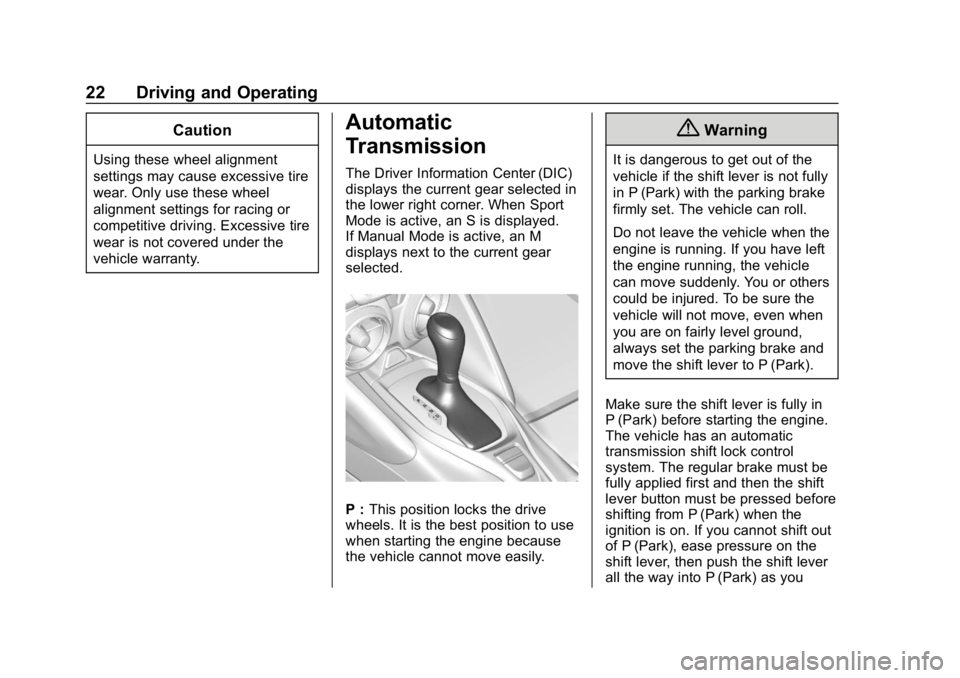
The Driver Information Center (DIC)
displays the current gear selected in
the lower right corner. When Sport
Mode is active, an S is displayed.
If Manual Mode is active, an M
displays next to the current gear
selected.
P :This position locks the drive
wheels. It is the best position to use
when starting the engine because
the vehicle cannot move easily.
{Warning
It is dangerous to get out of the
vehicle if the shift lever is not fully
in P (Park) with the parking brake
firmly set. The vehicle can roll.
Do not leave the vehicle when the
engine is running. If you have left
the engine running, the vehicle
can move suddenly. You or others
could be injured. To be sure the
vehicle will not move, even when
you are on fairly level ground,
always set the parking brake and
move the shift lever to P (Park).
Make sure the shift lever is fully in
P (Park) before starting the engine.
The vehicle has an automatic
transmission shift lock control
system. The regular brake must be
fully applied first and then the shift
lever button must be pressed before
shifting from P (Park) when the
ignition is on. If you cannot shift out
of P (Park), ease pressure on the
shift lever, then push the shift lever
all the way into P (Park) as you
Page 24 of 54
Chevrolet Camaro High Performance Owner Manual Supplement (GMNA-
Localizing-U.S./Canada/Mexico-12461812) - 2019 - crc - 11/7/18
Driving and Operating 23
maintain brake application. Then
press the shift lever button and
move the shift lever into
another gear.
R :Use this gear to back up.
Caution
Shifting to R (Reverse) while the
vehicle is moving forward could
damage the transmission. The
repairs would not be covered by
the vehicle warranty. Shift to
R (Reverse) only after the vehicle
is stopped.
N : In this position, the engine does
not connect with the wheels. To
restart the engine when the vehicle
is already moving, use
N (Neutral) only.
{Warning
Shifting into a drive gear while the
engine is running at high speed is
dangerous. Unless your foot is
firmly on the brake pedal, the
vehicle could move very rapidly.
You could lose control and hit
people or objects. Do not shift
into a drive gear while the engine
is running at high speed.
Caution
Shifting out of P (Park) or
N (Neutral) with the engine
running at high speed may
damage the transmission. The
repairs would not be covered by
the vehicle warranty. Be sure the
engine is not running at high
speed when shifting the vehicle. D :
This position is for normal
driving. If more power is needed for
passing, press the accelerator
pedal down.
Caution
If the vehicle does not shift gears,
the transmission could be
damaged. Have the vehicle
serviced right away.
Performance Shifting
While driving in Sport Mode and
Track Mode, if Tap Shift has not
been activated, the transmission
determines when the vehicle is
being driven in a competitive
manner. The transmission may
remain in a gear longer than it
would in the normal driving mode
based on throttle input and vehicle
lateral acceleration. If there is a
rapid reduction in throttle from a
heavy throttle position at high rpm,
the transmission will maintain the
current gear up to near redline rpm.
While braking, the transmission will
automatically downshift to the next
Page 25 of 54
Chevrolet Camaro High Performance Owner Manual Supplement (GMNA-
Localizing-U.S./Canada/Mexico-12461812) - 2019 - crc - 11/7/18
24 Driving and Operating
lower gear keeping engine speed
above approximately 3000 rpm.
If the vehicle is then driven for a
short time at a steady speed, and
without high cornering loads, the
transmission will upshift one gear at
a time, until 10 (Tenth) gear. After
shifting to 10 (Tenth) gear, or coming
to a complete stop, the transmission
will return to normal Sport Mode
shifting.Ride Control Systems
Competitive Driving Mode
Competitive Driving Mode,
Performance Traction Management,
and Launch Control are systems
designed to allow increased
performance while accelerating and/
or cornering. This is accomplished
by regulating and optimizing the
engine, brakes, and suspension
performance. These modes are for
use at a closed course race track
and are not intended for use on
public roads. They will not
compensate for driver inexperience
or lack of familiarity with the race
track. Drivers who prefer to allow
the system to have more control of
the engine, brakes, and suspension
are advised to turn the normal
Traction Control System (TCS) and
StabiliTrak/Electronic Stability
Control (ESC) on.
Caution
Attempting to shift when the drive
wheels are spinning and do not
have traction may cause damage
to the transmission. Damage
caused by misuse of the vehicle
is not covered by the vehicle
warranty. Do not attempt to shift
when the drive wheels do not
have traction.
Competitive Driving Mode allows full
engine power while StabiliTrak/ESC
helps maintain directional control of
the vehicle by selective brake
application. In this mode, TCS is off
and Launch Control is available.
Adjust your driving style to account
for the available engine power. See
“Launch Control” later in this
section.
Do not use cruise control in
performance driving situations.
When StabiliTrak/ESC is in a
performance driving state by
pressing
Ytwice for Competitive
Page 28 of 54
Chevrolet Camaro High Performance Owner Manual Supplement (GMNA-
Localizing-U.S./Canada/Mexico-12461812) - 2019 - crc - 11/7/18
Driving and Operating 27
events where consistent zero to
60 and quarter mile times are
desirable.
Launch Control is only available
when the following criteria are met:
.Competitive Driving Mode is
selected or any of the
Performance Traction
Management modes are
selected. The traction off light
comes on in the instrument
cluster and the appropriate
Driver Information Center (DIC)
message displays.
. The vehicle is not moving.
. The steering wheel is pointing
straight.
Manual Transmissions
. The clutch is fully pressed and
the transmission is in
1 (First) gear.
. The accelerator pedal is rapidly
applied and held to wide open
throttle. Launch Control will initially limit
engine speed as you rapidly apply
the accelerator pedal to wide open
throttle. Allow the engine rpm to
stabilize. A smooth, quick release of
the clutch, while maintaining the
fully pressed accelerator pedal, will
manage wheel slip.
Automatic Transmissions
.
The brake pedal is firmly
pressed to the floor, equivalent
to a panic brake event.
. The accelerator pedal is rapidly
applied to wide open throttle.
If the vehicle rolls due to wide
open throttle, release the
throttle, press the brake pedal
more firmly, and re-apply the
accelerator to wide open throttle.
Launch Control will initially limit
engine speed as you rapidly apply
the accelerator pedal to wide open
throttle. Allow the engine rpm to
stabilize. A smooth, quick release of
the brake pedal, while maintaining
the fully pressed accelerator pedal,
will manage wheel slip. After the vehicle is launched, the
system continues in Competitive
Driving Mode or PTM.
Competitive Driving Mode, PTM,
and Launch Control are systems
designed for a closed course race
track and not intended for use on
public roads. The systems are not
intended to compensate for lack of
driver experience or familiarity with
the race track.
Custom Launch Control may be
available through the Settings
menu, if equipped. See
“Custom
Launch Control” in Track Events
and Competitive Driving in the
owner ’s manual.
Limited-Slip Differential
The Electronic Limited-Slip
Differential (eLSD) is a hydraulically
actuated clutch system. It can
infinitely vary the clutch
engagement between 0 and
200Y(147 lb ft) of breakaway
torque between the rear wheels.
It responds to full engagement
Page 34 of 54

Chevrolet Camaro High Performance Owner Manual Supplement (GMNA-
Localizing-U.S./Canada/Mexico-12461812) - 2019 - crc - 11/7/18
Vehicle Care 33
1. Windshield Washer FluidReservoir.
2. Engine Coolant Surge Tank and Pressure Cap.
3. Engine Oil Dipstick.
4. Engine Oil Fill Cap.
5. Brake/Clutch Fluid Reservoir.
6. Engine Air Cleaner/Filter.
7. Engine Cooling Fan (Out of View).
8. Engine Compartment Fuse Block.
9. Negative (–) Battery Terminal.
10. Positive (+) Battery Terminal.Engine Oil
To ensure proper engine
performance and long life, careful
attention must be paid to engine oil.
Following these simple, but
important steps will help protect
your investment:
. Use engine oil approved to the
proper specification and of the
proper viscosity grade. See
“Selecting the Right Engine Oil”
in this section.
. Check the engine oil level
regularly and maintain the
proper oil level. See “Checking
Engine Oil” and“When to Add
Engine Oil” in this section.
. Change the engine oil at the
appropriate time. See “Engine
Oil Life System” in the owner’s
manual.
. Always dispose of engine oil
properly. See “What to Do with
Used Oil” in this section.
Checking Engine Oil
Check the engine oil level regularly,
every 650 km (400 mi), especially
prior to a long trip. The engine oil
dipstick handle is a loop. See
Engine Compartment Overview 032
for the location.
{Warning
The engine oil dipstick handle
may be hot; it could burn you.
Use a towel or glove to touch the
dipstick handle.
If a low oil Driver Information Center
(DIC) message displays, check the
oil level.
Follow these guidelines:
. To get an accurate reading, park
the vehicle on level ground.
Check the engine oil level after
the engine has been off for at
least two hours. Checking the
engine oil level on steep grades
or too soon after engine shutoff
can result in incorrect readings.
Accuracy improves when