cruise control CHEVROLET CAMARO 2019 Owner's Manual
[x] Cancel search | Manufacturer: CHEVROLET, Model Year: 2019, Model line: CAMARO, Model: CHEVROLET CAMARO 2019Pages: 375, PDF Size: 6.16 MB
Page 6 of 375
Chevrolet Camaro Owner Manual (GMNA-Localizing-U.S./Canada/Mexico-
12461811) - 2019 - crc - 11/5/18
In Brief 5
In Brief
Instrument Panel
Instrument Panel . . . . . . . . . . . . . . . . 6
Initial Drive Information
Initial Drive Information . . . . . . . . . . 8
Remote Keyless Entry (RKE)System . . . . . . . . . . . . . . . . . . . . . . . . 8
Remote Vehicle Start . . . . . . . . . . . 9
Door Locks . . . . . . . . . . . . . . . . . . . . . 9
Trunk Release . . . . . . . . . . . . . . . . . . 9
Windows . . . . . . . . . . . . . . . . . . . . . . . 10
Seat Adjustment . . . . . . . . . . . . . . . 10
Memory Features . . . . . . . . . . . . . . 11
Heated and Ventilated Seats . . . 12
Head Restraint Adjustment . . . . 12
Seat Belts . . . . . . . . . . . . . . . . . . . . . 12
Passenger Sensing System . . . 13
Mirror Adjustment . . . . . . . . . . . . . . 13
Steering Wheel Adjustment . . . . 14
Interior Lighting . . . . . . . . . . . . . . . . 14
Exterior Lighting . . . . . . . . . . . . . . . 14
Windshield Wiper/Washer . . . . . . 15
Climate Controls . . . . . . . . . . . . . . . 16
Transmission . . . . . . . . . . . . . . . . . . 17
Vehicle Features
Infotainment System . . . . . . . . . . . 18 Steering Wheel Controls . . . . . . . 18
Cruise Control . . . . . . . . . . . . . . . . . 19
Driver Information
Center (DIC) . . . . . . . . . . . . . . . . . 19
Forward Collision Alert (FCA)
System . . . . . . . . . . . . . . . . . . . . . . . 20
Lane Change Alert (LCA) . . . . . . 20
Rear Vision Camera (RVC) . . . . 20
Rear Cross Traffic Alert (RCTA) System . . . . . . . . . . . . . . . . . . . . . . . 20
Park Assist . . . . . . . . . . . . . . . . . . . . 20
Power Outlets . . . . . . . . . . . . . . . . . 21
Sunroof . . . . . . . . . . . . . . . . . . . . . . . . 21
Convertible . . . . . . . . . . . . . . . . . . . . 22
Performance and Maintenance
Traction Control/Electronic Stability Control . . . . . . . . . . . . . . 22
Tire Pressure Monitor . . . . . . . . . . 22
Fuel (3.6L V6 Engine) . . . . . . . . . . 23
Fuel (2.0L L4 Turbo Engine and 6.2L V8 Engine) . . . . . . . . . . . . . . 23
Fuel (6.2L V8 Supercharged Engine) . . . . . . . . . . . . . . . . . . . . . . . 24
E85 or FlexFuel . . . . . . . . . . . . . . . . 24
Engine Oil Life System . . . . . . . . 24
Car Wash Guidelines . . . . . . . . . . 24
Driving for Better Fuel Economy . . . . . . . . . . . . . . . . . . . . . 25
Roadside Assistance Program . . . . . . . . . . . . . . . . . . . . . . 25
Page 8 of 375

Chevrolet Camaro Owner Manual (GMNA-Localizing-U.S./Canada/Mexico-
12461811) - 2019 - crc - 11/5/18
In Brief 7
1.Air Vents 0167.
2. Instrument Panel Illumination
Control 0150.
3. Exterior Lamp Controls 0147.
Turn Signal Lever. See Turn
and Lane-Change Signals
0 150.
Headlamp High/Low-Beam
Changer 0147.
4. Tap Shift (If Equipped). See Manual Mode 0201.
Active Rev Match 0205 (If
Equipped).
5. Instrument Cluster 0115.
6. Windshield Wiper/Washer
0109.
7. Infotainment 0154.
8. Light Sensor. See Automatic
Headlamp System 0148.
9. Automatic Climate Control
System 0160 orDual
Automatic Climate Control
System 0163 (If Equipped).
Heated and Ventilated Front
Seats 066 (If Equipped). 10. Shift Lever.
SeeAutomatic Transmission
0 199 orManual Transmission
0 203.
11. Power Outlets 0111.
12. Electric Parking Brake 0207.
13. Traction Control/Electronic
Stability Control 0209.
Driver Mode Control 0211.
14. Hazard Warning Flashers
0149.
15. ENGINE START/STOP Button. SeeIgnition Positions 0191.
16. Steering Wheel Controls 0109.
Driver Information Center (DIC)
Controls. See Driver
Information Center (DIC) 0133.
17. Audio Controls. See Steering
Wheel Controls 0109.
18. Horn 0109.
19. Steering Wheel Adjustment
0109 (Out of View).
20. Cruise Control 0217. Heated Steering Wheel
0109
(If Equipped).
Forward Collision Alert (FCA)
System 0224 (If Equipped).
21. Head-Up Display (HUD) 0137
(If Equipped).
22. Data Link Connector (DLC) (Out of View). See Malfunction
Indicator Lamp 0126.
Hood Release (Out of View).
See Hood 0237.
Page 20 of 375
Chevrolet Camaro Owner Manual (GMNA-Localizing-U.S./Canada/Mexico-
12461811) - 2019 - crc - 11/5/18
In Brief 19
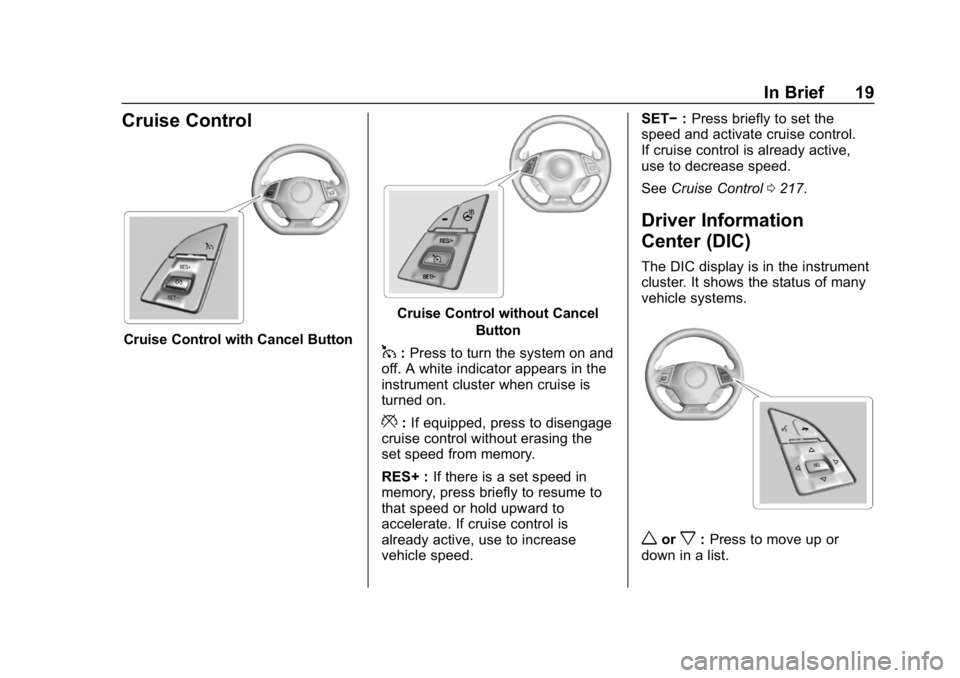
Cruise Control
Cruise Control with Cancel Button
Cruise Control without CancelButton
1:Press to turn the system on and
off. A white indicator appears in the
instrument cluster when cruise is
turned on.
*: If equipped, press to disengage
cruise control without erasing the
set speed from memory.
RES+ : If there is a set speed in
memory, press briefly to resume to
that speed or hold upward to
accelerate. If cruise control is
already active, use to increase
vehicle speed. SET−
:Press briefly to set the
speed and activate cruise control.
If cruise control is already active,
use to decrease speed.
See Cruise Control 0217.
Driver Information
Center (DIC)
The DIC display is in the instrument
cluster. It shows the status of many
vehicle systems.
worx:Press to move up or
down in a list.
Page 26 of 375
Chevrolet Camaro Owner Manual (GMNA-Localizing-U.S./Canada/Mexico-
12461811) - 2019 - crc - 11/5/18
In Brief 25
Caution (Continued)
tires and wheels. See "Washing
the Vehicle" underExterior Care
0 308.
Driving for Better Fuel
Economy
Driving habits can affect fuel
mileage. Here are some driving tips
to get the best fuel economy
possible.
.
Set the climate controls to the
desired temperature after the
engine is started, or turn them
off when not required.
. Avoid fast starts and accelerate
smoothly.
. Brake gradually and avoid
abrupt stops. .
Avoid idling the engine for long
periods of time.
. When road and weather
conditions are appropriate, use
cruise control.
. Always follow posted speed
limits or drive more slowly when
conditions require.
. Keep vehicle tires properly
inflated.
. Combine several trips into a
single trip.
. Replace the vehicle's tires with
the same TPC Spec number
molded into the tire's sidewall
near the size.
. Follow recommended scheduled
maintenance.
Roadside Assistance
Program
U.S.: 1-800-243-8872
TTY Users (U.S. Only):
1-888-889-2438
Canada: 1-800-268-6800
New Chevrolet owners are
automatically enrolled in the
Roadside Assistance Program.
See Roadside Assistance Program
0 341.
Page 109 of 375
Chevrolet Camaro Owner Manual (GMNA-Localizing-U.S./Canada/Mexico-
12461811) - 2019 - crc - 11/5/18
108 Instruments and Controls
Instruments and
Controls
Controls
Steering Wheel Adjustment . . . 109
Steering Wheel Controls . . . . . . 109
Heated Steering Wheel . . . . . . . 109
Horn . . . . . . . . . . . . . . . . . . . . . . . . . . 109
Windshield Wiper/Washer . . . . 109
Compass . . . . . . . . . . . . . . . . . . . . . 110
Clock . . . . . . . . . . . . . . . . . . . . . . . . . 111
Power Outlets . . . . . . . . . . . . . . . . 111
Wireless Charging . . . . . . . . . . . . 111
Warning Lights, Gauges, and
Indicators
Warning Lights, Gauges, andIndicators . . . . . . . . . . . . . . . . . . . 114
Instrument Cluster . . . . . . . . . . . . 115
Speedometer . . . . . . . . . . . . . . . . . 119
Odometer . . . . . . . . . . . . . . . . . . . . . 119
Trip Odometer . . . . . . . . . . . . . . . . 119
Tachometer . . . . . . . . . . . . . . . . . . . 119
Fuel Gauge . . . . . . . . . . . . . . . . . . . 119
Boost Gauge (Uplevel Cluster Only) . . . . . . . . . . . . . . . . 121
Engine Oil Pressure Gauge (Uplevel Cluster Only) . . . . . . . 121 Engine Coolant Temperature
Gauge . . . . . . . . . . . . . . . . . . . . . . 122
Voltmeter Gauge (Uplevel Cluster Only) . . . . . . . . . . . . . . . . 123
Seat Belt Reminders . . . . . . . . . 124
Airbag Readiness Light . . . . . . . 125
Passenger Airbag Status
Indicator . . . . . . . . . . . . . . . . . . . . 125
Charging System Light . . . . . . . 126
Malfunction Indicator Lamp . . . 126
Brake System Warning Light . . . . . . . . . . . . . . . . . . . . . . . . 128
Electric Parking Brake Light . . . . . . . . . . . . . . . . . . . . . . . . 129
Service Electric Parking Brake Light . . . . . . . . . . . . . . . . . . . . . . . . 129
Antilock Brake System (ABS) Warning Light . . . . . . . . . . . . . . . 130
Vehicle Ahead Indicator . . . . . . 130
Traction Off Light . . . . . . . . . . . . . 130
StabiliTrak OFF Light . . . . . . . . . 131
Traction Control System (TCS)/ StabiliTrak Light . . . . . . . . . . . . . 131
Tire Pressure Light . . . . . . . . . . . 131
Engine Oil Pressure Light . . . . 132
Low Fuel Warning Light . . . . . . 132
Security Light . . . . . . . . . . . . . . . . . 132
High-Beam On Light . . . . . . . . . . 133
Lamps On Reminder . . . . . . . . . 133
Cruise Control Light . . . . . . . . . . 133 Door Ajar Light . . . . . . . . . . . . . . . 133
Information Displays
Driver Information
Center (DIC) . . . . . . . . . . . . . . . . 133
Head-Up Display (HUD) . . . . . . 137
Vehicle Messages
Vehicle Messages . . . . . . . . . . . . 140
Engine Power Messages . . . . . 141
Vehicle Speed Messages . . . . . 141
Vehicle Personalization
Vehicle Personalization . . . . . . . 141
Page 134 of 375
Chevrolet Camaro Owner Manual (GMNA-Localizing-U.S./Canada/Mexico-
12461811) - 2019 - crc - 11/5/18
Instruments and Controls 133
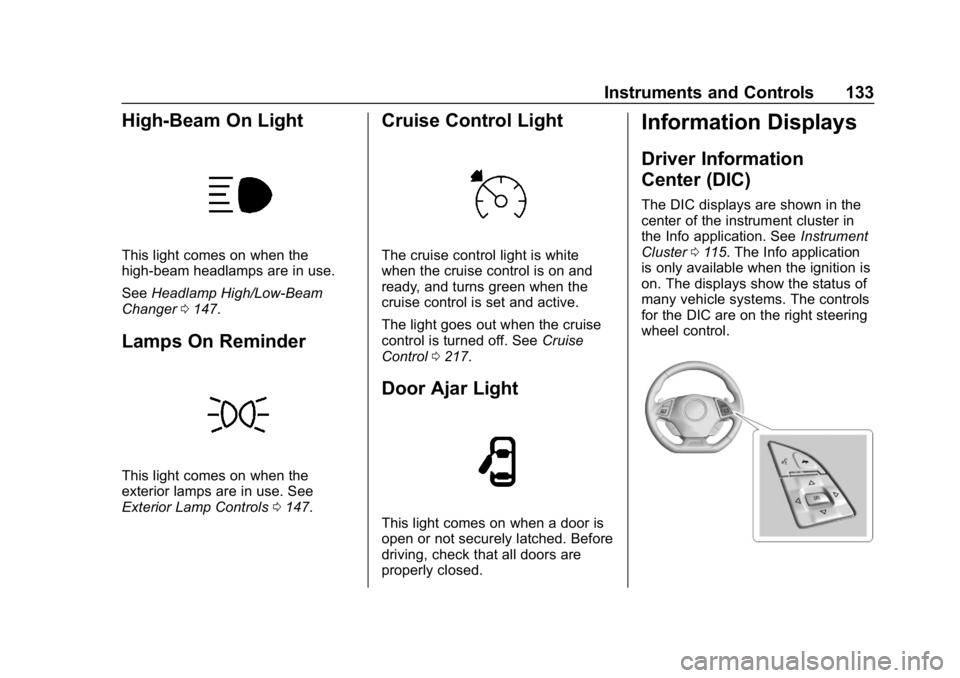
High-Beam On Light
This light comes on when the
high-beam headlamps are in use.
SeeHeadlamp High/Low-Beam
Changer 0147.
Lamps On Reminder
This light comes on when the
exterior lamps are in use. See
Exterior Lamp Controls 0147.
Cruise Control Light
The cruise control light is white
when the cruise control is on and
ready, and turns green when the
cruise control is set and active.
The light goes out when the cruise
control is turned off. See Cruise
Control 0217.
Door Ajar Light
This light comes on when a door is
open or not securely latched. Before
driving, check that all doors are
properly closed.
Information Displays
Driver Information
Center (DIC)
The DIC displays are shown in the
center of the instrument cluster in
the Info application. See Instrument
Cluster 0115. The Info application
is only available when the ignition is
on. The displays show the status of
many vehicle systems. The controls
for the DIC are on the right steering
wheel control.
Page 139 of 375
Chevrolet Camaro Owner Manual (GMNA-Localizing-U.S./Canada/Mexico-
12461811) - 2019 - crc - 11/5/18
138 Instruments and Controls
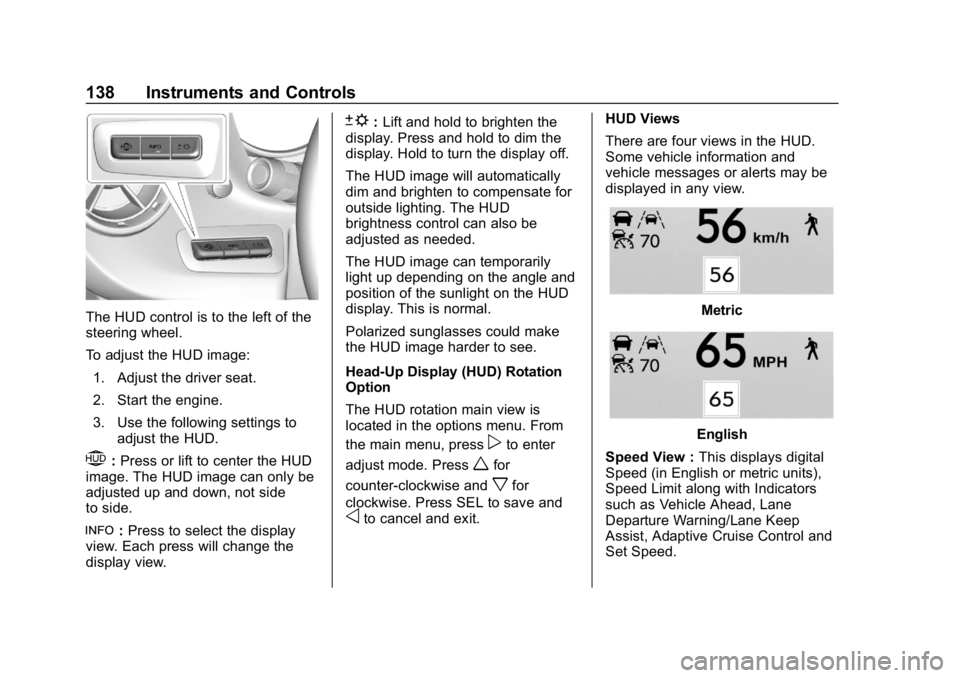
The HUD control is to the left of the
steering wheel.
To adjust the HUD image:1. Adjust the driver seat.
2. Start the engine.
3. Use the following settings to adjust the HUD.
$:Press or lift to center the HUD
image. The HUD image can only be
adjusted up and down, not side
to side.
!: Press to select the display
view. Each press will change the
display view.
D: Lift and hold to brighten the
display. Press and hold to dim the
display. Hold to turn the display off.
The HUD image will automatically
dim and brighten to compensate for
outside lighting. The HUD
brightness control can also be
adjusted as needed.
The HUD image can temporarily
light up depending on the angle and
position of the sunlight on the HUD
display. This is normal.
Polarized sunglasses could make
the HUD image harder to see.
Head-Up Display (HUD) Rotation
Option
The HUD rotation main view is
located in the options menu. From
the main menu, press
pto enter
adjust mode. Press
wfor
counter-clockwise and
xfor
clockwise. Press SEL to save and
oto cancel and exit. HUD Views
There are four views in the HUD.
Some vehicle information and
vehicle messages or alerts may be
displayed in any view.
Metric
English
Speed View : This displays digital
Speed (in English or metric units),
Speed Limit along with Indicators
such as Vehicle Ahead, Lane
Departure Warning/Lane Keep
Assist, Adaptive Cruise Control and
Set Speed.
Page 142 of 375
Chevrolet Camaro Owner Manual (GMNA-Localizing-U.S./Canada/Mexico-
12461811) - 2019 - crc - 11/5/18
Instruments and Controls 141
.Brakes
. Steering
. Ride Control Systems
. Driver Assistance Systems
. Cruise Control
. Lighting and Bulb Replacement
. Wiper/Washer Systems
. Doors and Windows
. Seat Belts
. Airbag Systems
. Engine and Transmission
. Tire Pressure
. Engine Air Filter Life
. Battery
Engine Power Messages
ENGINE POWER IS REDUCED
This message displays when the
vehicle's propulsion power is
reduced. A reduction in propulsion
power can affect the vehicle's ability
to accelerate. If this message is on,
but there is no observed reduction in performance, proceed to your
destination. The performance may
be reduced the next time the vehicle
is driven. The vehicle may be driven
while this message is on, but
maximum acceleration and speed
may be reduced. Anytime this
message stays on, or displays
repeatedly, the vehicle should be
taken to your dealer for service as
soon as possible.
Vehicle Speed Messages
SPEED LIMITED TO
XXX KM/H (MPH)
This message shows that the
vehicle speed has been limited to
the speed displayed. The limited
speed is a protection for various
propulsion and vehicle systems,
such as lubrication, thermal,
suspension, Teen Driver if
equipped, or tires.
Vehicle
Personalization
The following are all possible
vehicle personalization features.
Depending on the vehicle, some
may not be available.
For System, Apps, and Personal
features and functions, see
“Settings”
in the infotainment
manual.
To access the vehicle
personalization menu:
1. Touch the Settings icon on the Home Page of the infotainment
display.
2. Touch Vehicle to display a list of available options.
3. Touch to select the desired feature setting.
4. Touch
9orRto turn a feature
off or on.
5. Touch
zto go to the top level
of the Settings menu.
Page 170 of 375
Chevrolet Camaro Owner Manual (GMNA-Localizing-U.S./Canada/Mexico-
12461811) - 2019 - crc - 11/5/18
Driving and Operating 169
Driving and
Operating
Driving Information
Distracted Driving . . . . . . . . . . . . 170
Defensive Driving . . . . . . . . . . . . . 171
Drunk Driving . . . . . . . . . . . . . . . . . 171
Control of a Vehicle . . . . . . . . . . . 171
Braking . . . . . . . . . . . . . . . . . . . . . . . 171
Steering . . . . . . . . . . . . . . . . . . . . . . 172
Off-Road Recovery . . . . . . . . . . . 172
Loss of Control . . . . . . . . . . . . . . . 173
Track Events and CompetitiveDriving . . . . . . . . . . . . . . . . . . . . . . 173
Driving on Wet Roads . . . . . . . . 183
Hill and Mountain Roads . . . . . 184
Winter Driving . . . . . . . . . . . . . . . . 184
If the Vehicle Is Stuck . . . . . . . . 186
Vehicle Load Limits . . . . . . . . . . . 186
Starting and Operating
New Vehicle Break-In . . . . . . . . . 190
Ignition Positions . . . . . . . . . . . . . 191
Starting the Engine . . . . . . . . . . . 192
Engine Heater . . . . . . . . . . . . . . . . 194
Retained Accessory Power (RAP) . . . . . . . . . . . . . . . . 195
Shifting Into Park . . . . . . . . . . . . . 196 Shifting out of Park . . . . . . . . . . . 196
Parking (Manual
Transmission) . . . . . . . . . . . . . . . 197
Parking over Things That Burn . . . . . . . . . . . . . . . . . . . 197
Active Fuel Management . . . . . 197
Extended Parking . . . . . . . . . . . . 197
Engine Exhaust
Engine Exhaust . . . . . . . . . . . . . . 198
Running the Vehicle While Parked . . . . . . . . . . . . . . . . . . . . . . 199
Automatic Transmission
Automatic Transmission . . . . . . 199
Manual Mode . . . . . . . . . . . . . . . . . 201
Manual Transmission
Manual Transmission . . . . . . . . . 203
Active Rev Match . . . . . . . . . . . . . 205
Brakes
Antilock BrakeSystem (ABS) . . . . . . . . . . . . . . . 206
Electric Parking Brake . . . . . . . . 207
Brake Assist . . . . . . . . . . . . . . . . . . 209
Hill Start Assist (HSA) . . . . . . . . 209
Ride Control Systems
Traction Control/Electronic Stability Control . . . . . . . . . . . . . 209
Driver Mode Control . . . . . . . . . . 211 Competitive Driving Mode (SS,
ZL1 and 1LE
Models Only) . . . . . . . . . . . . . . . . 215
Limited-Slip Rear Axle . . . . . . . . 217
Cruise Control
Cruise Control . . . . . . . . . . . . . . . . 217
Driver Assistance Systems
Driver Assistance Systems . . . 220
Assistance Systems for Parking or Backing . . . . . . . . . . 222
Forward Collision Alert (FCA) System . . . . . . . . . . . . . . . . . . . . . . 224
Side Blind Zone Alert (SBZA) . . . . . . . . . . . . . . . . 226
Lane Change Alert (LCA) . . . . . 226
Fuel
Top Tier Fuel . . . . . . . . . . . . . . . . . 228
Recommended Fuel (3.6L V6 Engine) . . . . . . . . . . . . . . . . . . 229
Recommended Fuel (2.0L L4 Turbo Engine and 6.2L
V8 Engine) . . . . . . . . . . . . . . . . . . 229
Recommended Fuel (6.2L V8 Supercharged Engine) . . . . . . 229
Prohibited Fuels . . . . . . . . . . . . . . 229
Fuels in Foreign Countries . . . 230
Fuel Additives . . . . . . . . . . . . . . . . 230
Filling the Tank . . . . . . . . . . . . . . . 230
Page 184 of 375
Chevrolet Camaro Owner Manual (GMNA-Localizing-U.S./Canada/Mexico-
12461811) - 2019 - crc - 11/5/18
Driving and Operating 183
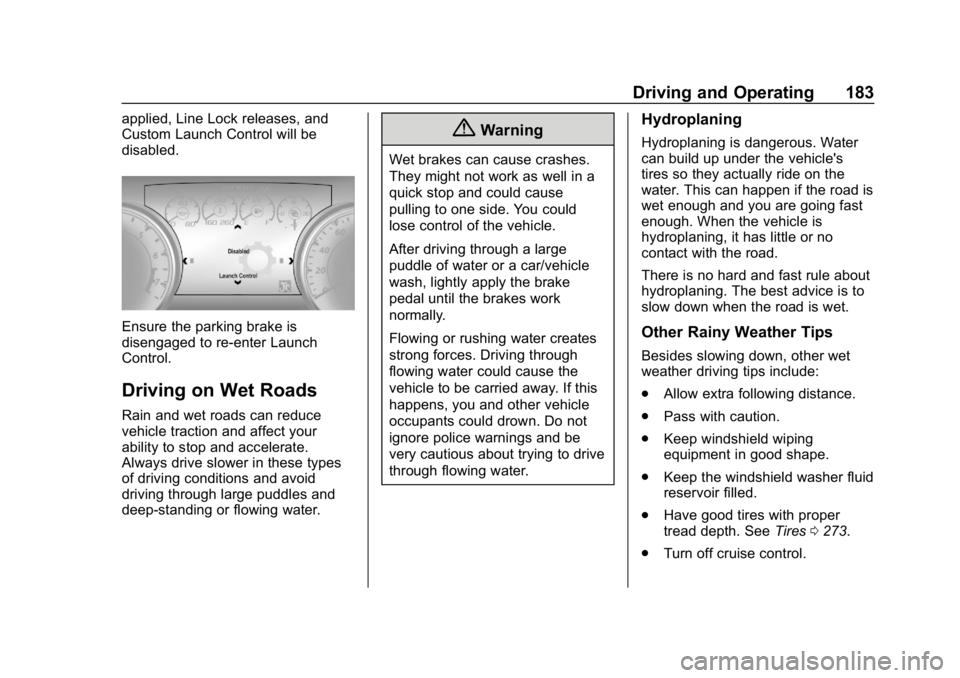
applied, Line Lock releases, and
Custom Launch Control will be
disabled.
Ensure the parking brake is
disengaged to re-enter Launch
Control.
Driving on Wet Roads
Rain and wet roads can reduce
vehicle traction and affect your
ability to stop and accelerate.
Always drive slower in these types
of driving conditions and avoid
driving through large puddles and
deep-standing or flowing water.
{Warning
Wet brakes can cause crashes.
They might not work as well in a
quick stop and could cause
pulling to one side. You could
lose control of the vehicle.
After driving through a large
puddle of water or a car/vehicle
wash, lightly apply the brake
pedal until the brakes work
normally.
Flowing or rushing water creates
strong forces. Driving through
flowing water could cause the
vehicle to be carried away. If this
happens, you and other vehicle
occupants could drown. Do not
ignore police warnings and be
very cautious about trying to drive
through flowing water.
Hydroplaning
Hydroplaning is dangerous. Water
can build up under the vehicle's
tires so they actually ride on the
water. This can happen if the road is
wet enough and you are going fast
enough. When the vehicle is
hydroplaning, it has little or no
contact with the road.
There is no hard and fast rule about
hydroplaning. The best advice is to
slow down when the road is wet.
Other Rainy Weather Tips
Besides slowing down, other wet
weather driving tips include:
.Allow extra following distance.
. Pass with caution.
. Keep windshield wiping
equipment in good shape.
. Keep the windshield washer fluid
reservoir filled.
. Have good tires with proper
tread depth. See Tires0273.
. Turn off cruise control.