light CHEVROLET CAMARO 2019 Owner's Manual
[x] Cancel search | Manufacturer: CHEVROLET, Model Year: 2019, Model line: CAMARO, Model: CHEVROLET CAMARO 2019Pages: 375, PDF Size: 6.16 MB
Page 2 of 375
Chevrolet Camaro Owner Manual (GMNA-Localizing-U.S./Canada/Mexico-
12461811) - 2019 - crc - 11/5/18
ContentsIntroduction . . . . . . . . . . . . . . . . . . . . . . 2
In Brief . . . . . . . . . . . . . . . . . . . . . . . . . . . 5
Keys, Doors, and Windows . . . . . 26
Seats and Restraints . . . . . . . . . . . 59
Storage . . . . . . . . . . . . . . . . . . . . . . . 106
Instruments and Controls . . . . . . 108
Lighting . . . . . . . . . . . . . . . . . . . . . . . 147
Infotainment System . . . . . . . . . . 154
Climate Controls . . . . . . . . . . . . . . 160
Driving and Operating . . . . . . . . . 169
Vehicle Care . . . . . . . . . . . . . . . . . . 234
Service and Maintenance . . . . . 318
Technical Data . . . . . . . . . . . . . . . . 333
Customer Information . . . . . . . . . 337
Reporting Safety Defects . . . . . . 348
OnStar . . . . . . . . . . . . . . . . . . . . . . . . 351
Connected Services . . . . . . . . . . . 359
Index . . . . . . . . . . . . . . . . . . . . 363
Page 4 of 375
Chevrolet Camaro Owner Manual (GMNA-Localizing-U.S./Canada/Mexico-
12461811) - 2019 - crc - 11/5/18
Introduction 3
{Danger
Danger indicates a hazard with a
high level of risk which will result
in serious injury or death.
{Warning
Warning indicates a hazard that
could result in injury or death.
Caution
Caution indicates a hazard that
could result in property or vehicle
damage.
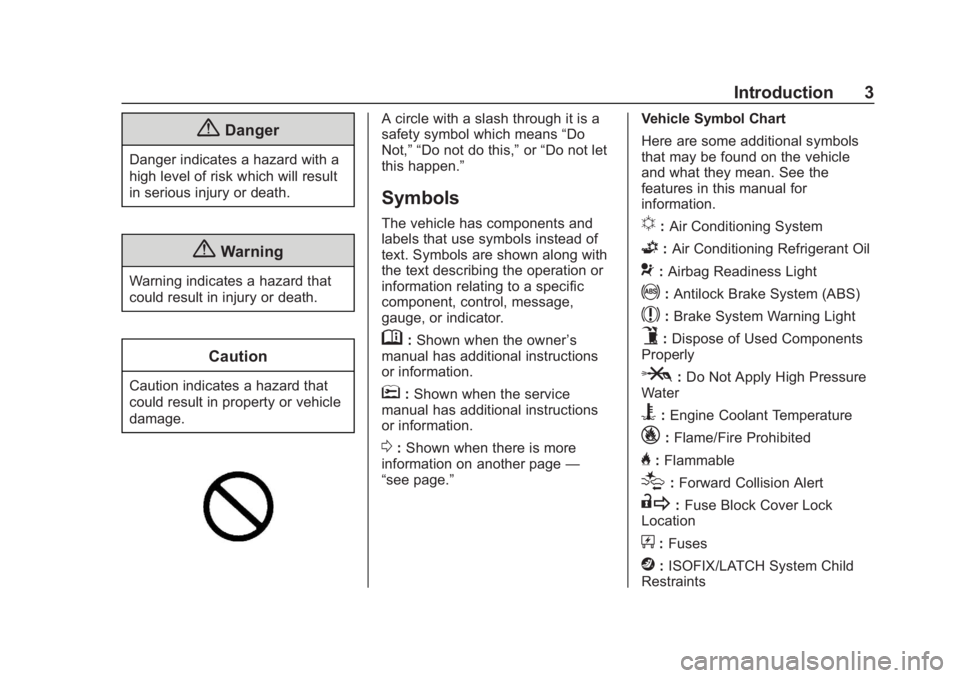
A circle with a slash through it is a
safety symbol which means“Do
Not,” “Do not do this,” or“Do not let
this happen.”
Symbols
The vehicle has components and
labels that use symbols instead of
text. Symbols are shown along with
the text describing the operation or
information relating to a specific
component, control, message,
gauge, or indicator.
M: Shown when the owner ’s
manual has additional instructions
or information.
*: Shown when the service
manual has additional instructions
or information.
0: Shown when there is more
information on another page —
“see page.” Vehicle Symbol Chart
Here are some additional symbols
that may be found on the vehicle
and what they mean. See the
features in this manual for
information.
u:
Air Conditioning System
G:Air Conditioning Refrigerant Oil
9:Airbag Readiness Light
!:Antilock Brake System (ABS)
$:Brake System Warning Light
9:Dispose of Used Components
Properly
P: Do Not Apply High Pressure
Water
B: Engine Coolant Temperature
_: Flame/Fire Prohibited
H:Flammable
[:Forward Collision Alert
R: Fuse Block Cover Lock
Location
+: Fuses
j:ISOFIX/LATCH System Child
Restraints
Page 6 of 375
Chevrolet Camaro Owner Manual (GMNA-Localizing-U.S./Canada/Mexico-
12461811) - 2019 - crc - 11/5/18
In Brief 5
In Brief
Instrument Panel
Instrument Panel . . . . . . . . . . . . . . . . 6
Initial Drive Information
Initial Drive Information . . . . . . . . . . 8
Remote Keyless Entry (RKE)System . . . . . . . . . . . . . . . . . . . . . . . . 8
Remote Vehicle Start . . . . . . . . . . . 9
Door Locks . . . . . . . . . . . . . . . . . . . . . 9
Trunk Release . . . . . . . . . . . . . . . . . . 9
Windows . . . . . . . . . . . . . . . . . . . . . . . 10
Seat Adjustment . . . . . . . . . . . . . . . 10
Memory Features . . . . . . . . . . . . . . 11
Heated and Ventilated Seats . . . 12
Head Restraint Adjustment . . . . 12
Seat Belts . . . . . . . . . . . . . . . . . . . . . 12
Passenger Sensing System . . . 13
Mirror Adjustment . . . . . . . . . . . . . . 13
Steering Wheel Adjustment . . . . 14
Interior Lighting . . . . . . . . . . . . . . . . 14
Exterior Lighting . . . . . . . . . . . . . . . 14
Windshield Wiper/Washer . . . . . . 15
Climate Controls . . . . . . . . . . . . . . . 16
Transmission . . . . . . . . . . . . . . . . . . 17
Vehicle Features
Infotainment System . . . . . . . . . . . 18 Steering Wheel Controls . . . . . . . 18
Cruise Control . . . . . . . . . . . . . . . . . 19
Driver Information
Center (DIC) . . . . . . . . . . . . . . . . . 19
Forward Collision Alert (FCA)
System . . . . . . . . . . . . . . . . . . . . . . . 20
Lane Change Alert (LCA) . . . . . . 20
Rear Vision Camera (RVC) . . . . 20
Rear Cross Traffic Alert (RCTA) System . . . . . . . . . . . . . . . . . . . . . . . 20
Park Assist . . . . . . . . . . . . . . . . . . . . 20
Power Outlets . . . . . . . . . . . . . . . . . 21
Sunroof . . . . . . . . . . . . . . . . . . . . . . . . 21
Convertible . . . . . . . . . . . . . . . . . . . . 22
Performance and Maintenance
Traction Control/Electronic Stability Control . . . . . . . . . . . . . . 22
Tire Pressure Monitor . . . . . . . . . . 22
Fuel (3.6L V6 Engine) . . . . . . . . . . 23
Fuel (2.0L L4 Turbo Engine and 6.2L V8 Engine) . . . . . . . . . . . . . . 23
Fuel (6.2L V8 Supercharged Engine) . . . . . . . . . . . . . . . . . . . . . . . 24
E85 or FlexFuel . . . . . . . . . . . . . . . . 24
Engine Oil Life System . . . . . . . . 24
Car Wash Guidelines . . . . . . . . . . 24
Driving for Better Fuel Economy . . . . . . . . . . . . . . . . . . . . . 25
Roadside Assistance Program . . . . . . . . . . . . . . . . . . . . . . 25
Page 8 of 375

Chevrolet Camaro Owner Manual (GMNA-Localizing-U.S./Canada/Mexico-
12461811) - 2019 - crc - 11/5/18
In Brief 7
1.Air Vents 0167.
2. Instrument Panel Illumination
Control 0150.
3. Exterior Lamp Controls 0147.
Turn Signal Lever. See Turn
and Lane-Change Signals
0 150.
Headlamp High/Low-Beam
Changer 0147.
4. Tap Shift (If Equipped). See Manual Mode 0201.
Active Rev Match 0205 (If
Equipped).
5. Instrument Cluster 0115.
6. Windshield Wiper/Washer
0109.
7. Infotainment 0154.
8. Light Sensor. See Automatic
Headlamp System 0148.
9. Automatic Climate Control
System 0160 orDual
Automatic Climate Control
System 0163 (If Equipped).
Heated and Ventilated Front
Seats 066 (If Equipped). 10. Shift Lever.
SeeAutomatic Transmission
0 199 orManual Transmission
0 203.
11. Power Outlets 0111.
12. Electric Parking Brake 0207.
13. Traction Control/Electronic
Stability Control 0209.
Driver Mode Control 0211.
14. Hazard Warning Flashers
0149.
15. ENGINE START/STOP Button. SeeIgnition Positions 0191.
16. Steering Wheel Controls 0109.
Driver Information Center (DIC)
Controls. See Driver
Information Center (DIC) 0133.
17. Audio Controls. See Steering
Wheel Controls 0109.
18. Horn 0109.
19. Steering Wheel Adjustment
0109 (Out of View).
20. Cruise Control 0217. Heated Steering Wheel
0109
(If Equipped).
Forward Collision Alert (FCA)
System 0224 (If Equipped).
21. Head-Up Display (HUD) 0137
(If Equipped).
22. Data Link Connector (DLC) (Out of View). See Malfunction
Indicator Lamp 0126.
Hood Release (Out of View).
See Hood 0237.
Page 11 of 375
Chevrolet Camaro Owner Manual (GMNA-Localizing-U.S./Canada/Mexico-
12461811) - 2019 - crc - 11/5/18
10 In Brief
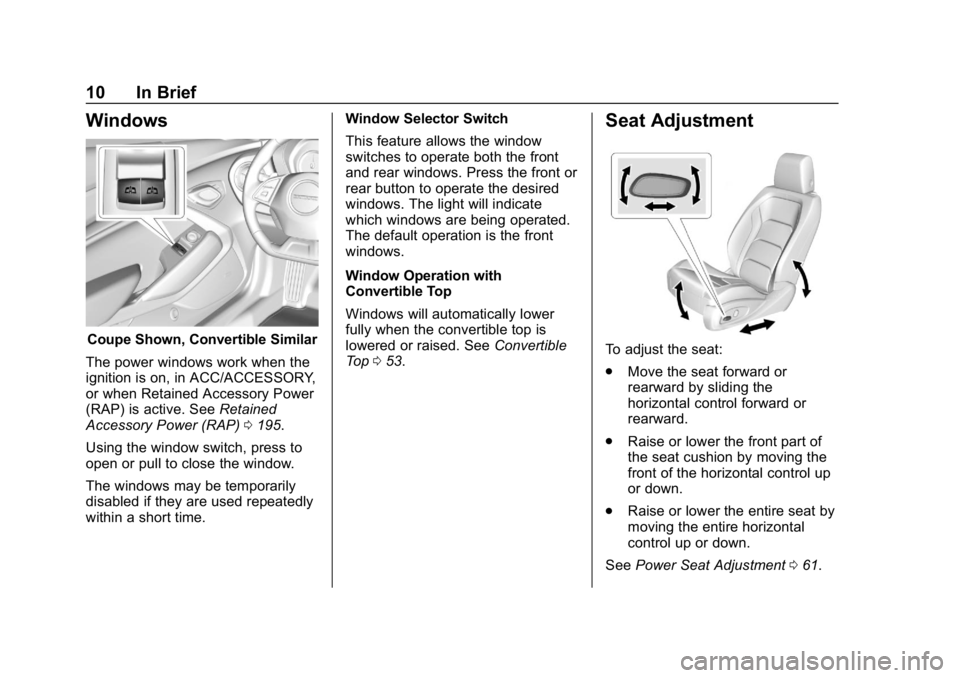
Windows
Coupe Shown, Convertible Similar
The power windows work when the
ignition is on, in ACC/ACCESSORY,
or when Retained Accessory Power
(RAP) is active. See Retained
Accessory Power (RAP) 0195.
Using the window switch, press to
open or pull to close the window.
The windows may be temporarily
disabled if they are used repeatedly
within a short time. Window Selector Switch
This feature allows the window
switches to operate both the front
and rear windows. Press the front or
rear button to operate the desired
windows. The light will indicate
which windows are being operated.
The default operation is the front
windows.
Window Operation with
Convertible Top
Windows will automatically lower
fully when the convertible top is
lowered or raised. See
Convertible
Top 053.
Seat Adjustment
To adjust the seat:
.
Move the seat forward or
rearward by sliding the
horizontal control forward or
rearward.
. Raise or lower the front part of
the seat cushion by moving the
front of the horizontal control up
or down.
. Raise or lower the entire seat by
moving the entire horizontal
control up or down.
See Power Seat Adjustment 061.
Page 13 of 375
Chevrolet Camaro Owner Manual (GMNA-Localizing-U.S./Canada/Mexico-
12461811) - 2019 - crc - 11/5/18
12 In Brief
Heated and Ventilated
Seats
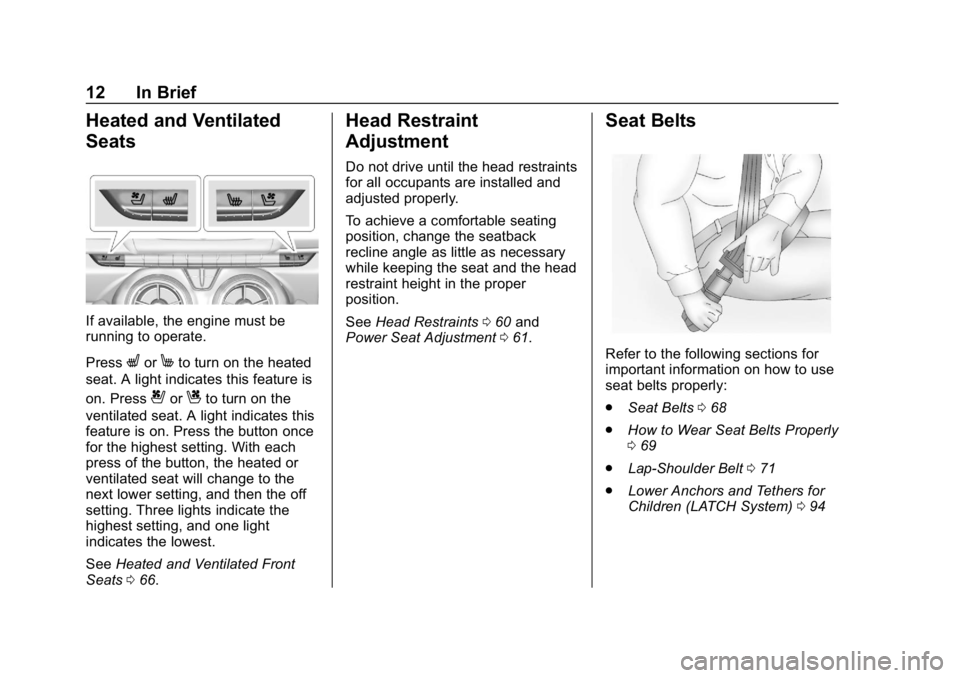
If available, the engine must be
running to operate.
Press
LorMto turn on the heated
seat. A light indicates this feature is
on. Press
{orCto turn on the
ventilated seat. A light indicates this
feature is on. Press the button once
for the highest setting. With each
press of the button, the heated or
ventilated seat will change to the
next lower setting, and then the off
setting. Three lights indicate the
highest setting, and one light
indicates the lowest.
See Heated and Ventilated Front
Seats 066.
Head Restraint
Adjustment
Do not drive until the head restraints
for all occupants are installed and
adjusted properly.
To achieve a comfortable seating
position, change the seatback
recline angle as little as necessary
while keeping the seat and the head
restraint height in the proper
position.
See Head Restraints 060 and
Power Seat Adjustment 061.
Seat Belts
Refer to the following sections for
important information on how to use
seat belts properly:
.
Seat Belts 068
. How to Wear Seat Belts Properly
069
. Lap-Shoulder Belt 071
. Lower Anchors and Tethers for
Children (LATCH System) 094
Page 14 of 375
Chevrolet Camaro Owner Manual (GMNA-Localizing-U.S./Canada/Mexico-
12461811) - 2019 - crc - 11/5/18
In Brief 13
Passenger Sensing
System
United States
Canada and Mexico
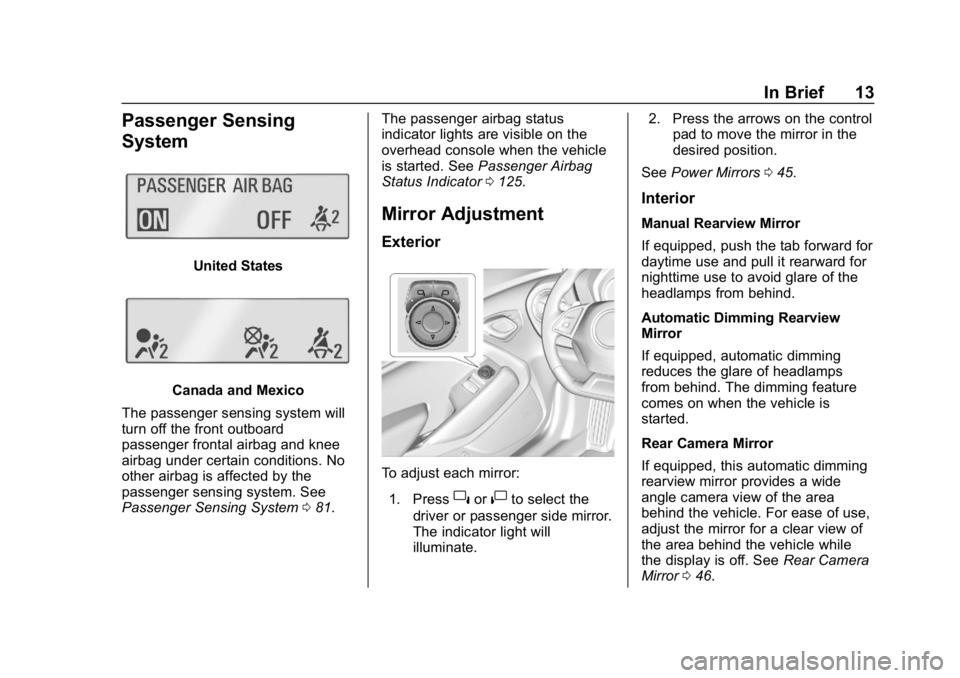
The passenger sensing system will
turn off the front outboard
passenger frontal airbag and knee
airbag under certain conditions. No
other airbag is affected by the
passenger sensing system. See
Passenger Sensing System 081. The passenger airbag status
indicator lights are visible on the
overhead console when the vehicle
is started. See
Passenger Airbag
Status Indicator 0125.
Mirror Adjustment
Exterior
To adjust each mirror:
1. Press
}or|to select the
driver or passenger side mirror.
The indicator light will
illuminate. 2. Press the arrows on the control
pad to move the mirror in the
desired position.
See Power Mirrors 045.
Interior
Manual Rearview Mirror
If equipped, push the tab forward for
daytime use and pull it rearward for
nighttime use to avoid glare of the
headlamps from behind.
Automatic Dimming Rearview
Mirror
If equipped, automatic dimming
reduces the glare of headlamps
from behind. The dimming feature
comes on when the vehicle is
started.
Rear Camera Mirror
If equipped, this automatic dimming
rearview mirror provides a wide
angle camera view of the area
behind the vehicle. For ease of use,
adjust the mirror for a clear view of
the area behind the vehicle while
the display is off. See Rear Camera
Mirror 046.
Page 15 of 375
Chevrolet Camaro Owner Manual (GMNA-Localizing-U.S./Canada/Mexico-
12461811) - 2019 - crc - 11/5/18
14 In Brief
Steering Wheel
Adjustment
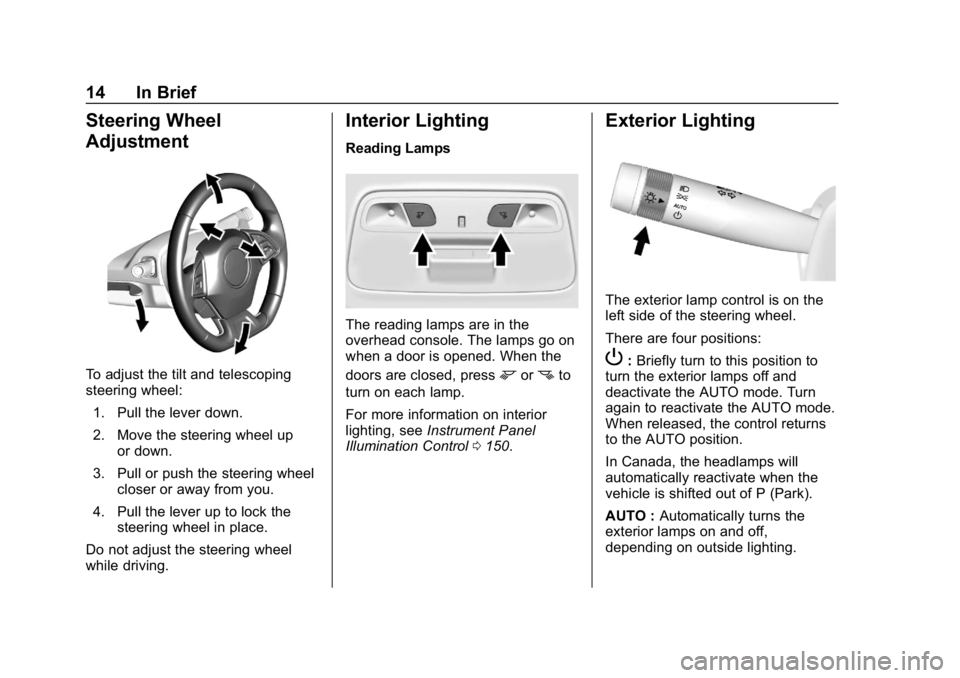
To adjust the tilt and telescoping
steering wheel:1. Pull the lever down.
2. Move the steering wheel up or down.
3. Pull or push the steering wheel closer or away from you.
4. Pull the lever up to lock the steering wheel in place.
Do not adjust the steering wheel
while driving.
Interior Lighting
Reading Lamps
The reading lamps are in the
overhead console. The lamps go on
when a door is opened. When the
doors are closed, press
mornto
turn on each lamp.
For more information on interior
lighting, see Instrument Panel
Illumination Control 0150.
Exterior Lighting
The exterior lamp control is on the
left side of the steering wheel.
There are four positions:
P:Briefly turn to this position to
turn the exterior lamps off and
deactivate the AUTO mode. Turn
again to reactivate the AUTO mode.
When released, the control returns
to the AUTO position.
In Canada, the headlamps will
automatically reactivate when the
vehicle is shifted out of P (Park).
AUTO : Automatically turns the
exterior lamps on and off,
depending on outside lighting.
Page 16 of 375
Chevrolet Camaro Owner Manual (GMNA-Localizing-U.S./Canada/Mexico-
12461811) - 2019 - crc - 11/5/18
In Brief 15
;:Turns on the parking lamps
including all lamps, except the
headlamps.
5: Turns on the headlamps
together with the parking lamps and
instrument panel lights.
See:
. Exterior Lamp Controls 0147.
. Daytime Running Lamps (DRL)
0148.
Windshield Wiper/Washer
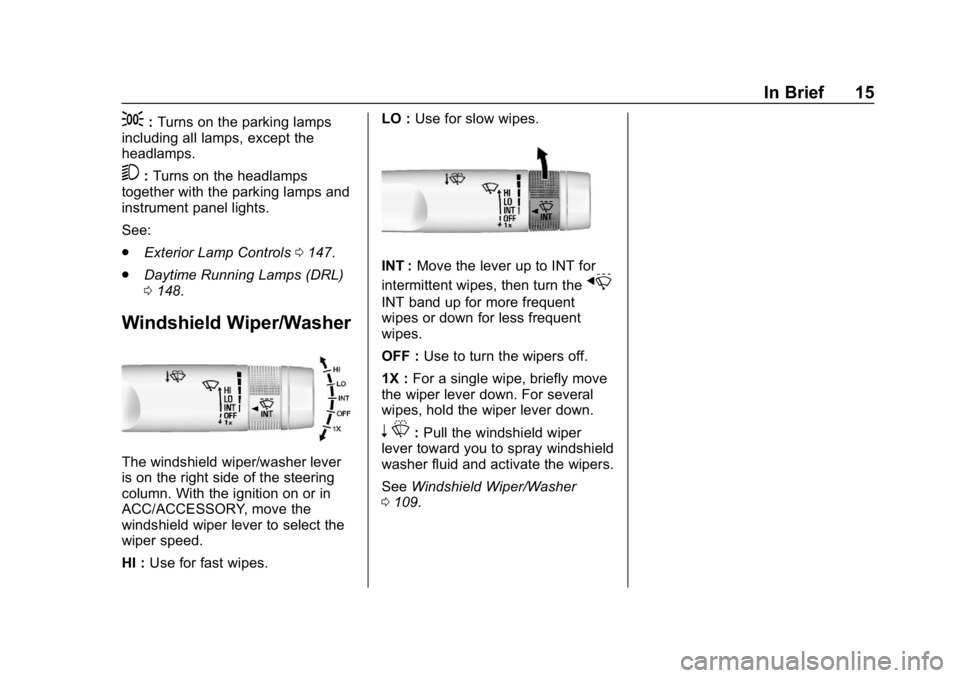
The windshield wiper/washer lever
is on the right side of the steering
column. With the ignition on or in
ACC/ACCESSORY, move the
windshield wiper lever to select the
wiper speed.
HI : Use for fast wipes. LO :
Use for slow wipes.
INT : Move the lever up to INT for
intermittent wipes, then turn the
x
INT band up for more frequent
wipes or down for less frequent
wipes.
OFF : Use to turn the wipers off.
1X : For a single wipe, briefly move
the wiper lever down. For several
wipes, hold the wiper lever down.
n L: Pull the windshield wiper
lever toward you to spray windshield
washer fluid and activate the wipers.
See Windshield Wiper/Washer
0 109.
Page 21 of 375
Chevrolet Camaro Owner Manual (GMNA-Localizing-U.S./Canada/Mexico-
12461811) - 2019 - crc - 11/5/18
20 In Brief
oorp:Pressoto open
application menus on the left. Press
pto open interaction menus on the
right.
SEL : Press to select a menu item.
Press and hold to reset values on
certain screens.
See Driver Information Center (DIC)
0 133.
Forward Collision Alert
(FCA) System
If equipped, FCA may help avoid or
reduce the harm caused by
front-end crashes. FCA provides a
green indicator,
V, when a vehicle
is detected ahead. This indicator
displays amber if you follow a
vehicle much too closely. When
approaching a vehicle ahead too
quickly, FCA provides a red flashing
alert on the windshield and rapidly
beeps.
See Forward Collision Alert (FCA)
System 0224.
Lane Change Alert (LCA)
If equipped, the LCA system is a
lane-changing aid that assists
drivers with avoiding lane change
crashes that occur with moving
vehicles in the side blind zone (or
spot) areas or with vehicles rapidly
approaching these areas from
behind. The LCA warning display
will light up in the corresponding
outside mirror and will flash if the
turn signal is on. The Side Blind
Zone Alert (SBZA) system is
included as part of the LCA system.
See Side Blind Zone Alert (SBZA)
0 226 andLane Change Alert (LCA)
0 226.
Rear Vision
Camera (RVC)
If equipped, RVC shows a view of
the area behind the vehicle on the
infotainment display when the
vehicle is shifted into R (Reverse) to
aid with parking and low-speed
backing maneuvers. See
Assistance Systems for Parking
or Backing 0222.
Rear Cross Traffic Alert
(RCTA) System
If equipped, the RCTA system uses
a triangle with an arrow on the
infotainment display to warn of
traffic behind your vehicle that may
cross your vehicle's path while in
R (Reverse). In addition, beeps will
sound.
See Assistance Systems for Parking
or Backing 0222.
Park Assist
If equipped, Rear Park Assist (RPA)
uses sensors on the rear bumper to
assist with parking and avoiding
objects while in R (Reverse).
It operates at speeds less than
8 km/h (5 mph). RPA may show a
warning triangle on the infotainment
display and/or a graphic on the
instrument cluster to provide the
object distance. In addition, multiple
beeps may occur if very close to an
object.