odometer CHEVROLET CAMARO 2019 Owner's Manual
[x] Cancel search | Manufacturer: CHEVROLET, Model Year: 2019, Model line: CAMARO, Model: CHEVROLET CAMARO 2019Pages: 375, PDF Size: 6.16 MB
Page 109 of 375
Chevrolet Camaro Owner Manual (GMNA-Localizing-U.S./Canada/Mexico-
12461811) - 2019 - crc - 11/5/18
108 Instruments and Controls
Instruments and
Controls
Controls
Steering Wheel Adjustment . . . 109
Steering Wheel Controls . . . . . . 109
Heated Steering Wheel . . . . . . . 109
Horn . . . . . . . . . . . . . . . . . . . . . . . . . . 109
Windshield Wiper/Washer . . . . 109
Compass . . . . . . . . . . . . . . . . . . . . . 110
Clock . . . . . . . . . . . . . . . . . . . . . . . . . 111
Power Outlets . . . . . . . . . . . . . . . . 111
Wireless Charging . . . . . . . . . . . . 111
Warning Lights, Gauges, and
Indicators
Warning Lights, Gauges, andIndicators . . . . . . . . . . . . . . . . . . . 114
Instrument Cluster . . . . . . . . . . . . 115
Speedometer . . . . . . . . . . . . . . . . . 119
Odometer . . . . . . . . . . . . . . . . . . . . . 119
Trip Odometer . . . . . . . . . . . . . . . . 119
Tachometer . . . . . . . . . . . . . . . . . . . 119
Fuel Gauge . . . . . . . . . . . . . . . . . . . 119
Boost Gauge (Uplevel Cluster Only) . . . . . . . . . . . . . . . . 121
Engine Oil Pressure Gauge (Uplevel Cluster Only) . . . . . . . 121 Engine Coolant Temperature
Gauge . . . . . . . . . . . . . . . . . . . . . . 122
Voltmeter Gauge (Uplevel Cluster Only) . . . . . . . . . . . . . . . . 123
Seat Belt Reminders . . . . . . . . . 124
Airbag Readiness Light . . . . . . . 125
Passenger Airbag Status
Indicator . . . . . . . . . . . . . . . . . . . . 125
Charging System Light . . . . . . . 126
Malfunction Indicator Lamp . . . 126
Brake System Warning Light . . . . . . . . . . . . . . . . . . . . . . . . 128
Electric Parking Brake Light . . . . . . . . . . . . . . . . . . . . . . . . 129
Service Electric Parking Brake Light . . . . . . . . . . . . . . . . . . . . . . . . 129
Antilock Brake System (ABS) Warning Light . . . . . . . . . . . . . . . 130
Vehicle Ahead Indicator . . . . . . 130
Traction Off Light . . . . . . . . . . . . . 130
StabiliTrak OFF Light . . . . . . . . . 131
Traction Control System (TCS)/ StabiliTrak Light . . . . . . . . . . . . . 131
Tire Pressure Light . . . . . . . . . . . 131
Engine Oil Pressure Light . . . . 132
Low Fuel Warning Light . . . . . . 132
Security Light . . . . . . . . . . . . . . . . . 132
High-Beam On Light . . . . . . . . . . 133
Lamps On Reminder . . . . . . . . . 133
Cruise Control Light . . . . . . . . . . 133 Door Ajar Light . . . . . . . . . . . . . . . 133
Information Displays
Driver Information
Center (DIC) . . . . . . . . . . . . . . . . 133
Head-Up Display (HUD) . . . . . . 137
Vehicle Messages
Vehicle Messages . . . . . . . . . . . . 140
Engine Power Messages . . . . . 141
Vehicle Speed Messages . . . . . 141
Vehicle Personalization
Vehicle Personalization . . . . . . . 141
Page 120 of 375
Chevrolet Camaro Owner Manual (GMNA-Localizing-U.S./Canada/Mexico-
12461811) - 2019 - crc - 11/5/18
Instruments and Controls 119
configuration of the uplevel cluster.
See“Reconfigurable Instrument
Cluster” earlier in this section.
Launch Control : The Launch
Control display allows the driver to
adjust the parameters of the Launch
Control System. See Track Events
and Competitive Driving 0173.
Head-Up Display (HUD)
Rotation : This feature allows for
adjusting the angle of the HUD
image. Press SEL on the steering
wheel controls while Head-Up
Display Rotation is highlighted to
enter Adjust Mode. Press
worx
to highlight OK, then press SEL to
save the setting. Cancel can also be
selected to cancel the setting. The
vehicle must be on P (Park).
Info Pages : Press
pwhile Info
Pages is highlighted to select the
items to be displayed in the DIC info
displays. See Driver Information
Center (DIC) 0133.
Software Info : Displays open
source software information.
Speedometer
The speedometer shows the
vehicle's speed in either kilometers
per hour (km/h) or miles per
hour (mph).
Odometer
The odometer shows how far the
vehicle has been driven, in either
kilometers or miles.
Trip Odometer
The trip odometer shows how far
the vehicle has been driven since
the trip odometer was last reset.
The trip odometer is accessed and
reset through the Driver Information
Center (DIC). See Driver
Information Center (DIC) 0133.
Tachometer
The tachometer displays the engine
speed in revolutions per
minute (rpm).
Caution
If the engine is operated with the
rpm’s in the warning area at the
high end of the tachometer, the
vehicle could be damaged, and
the damage would not be covered
by the vehicle warranty. Do not
operate the engine with the rpm’s
in the warning area.
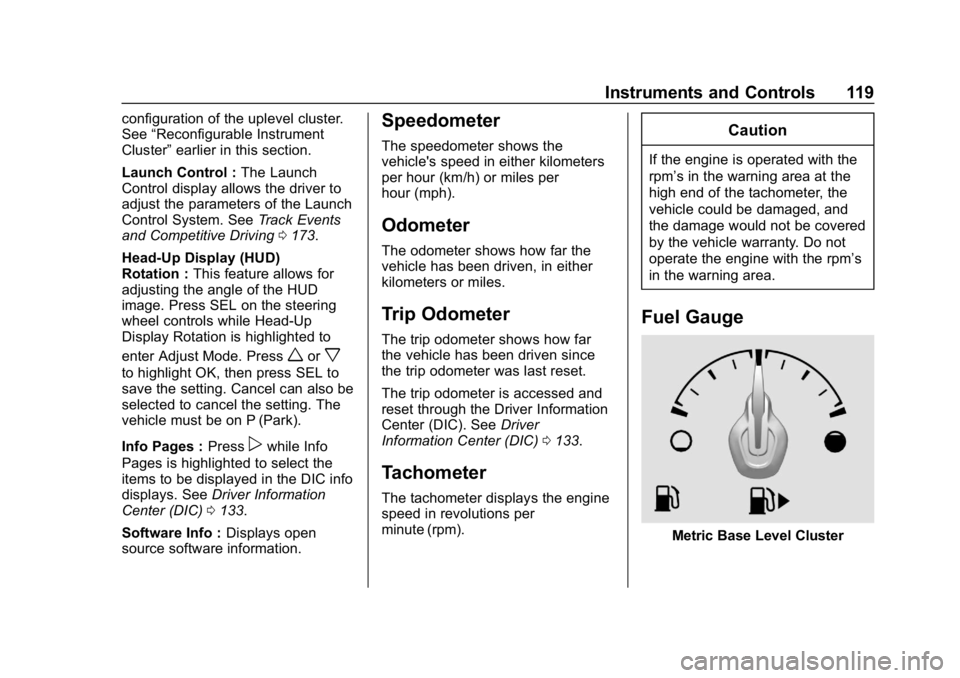
Fuel Gauge
Metric Base Level Cluster
Page 135 of 375
Chevrolet Camaro Owner Manual (GMNA-Localizing-U.S./Canada/Mexico-
12461811) - 2019 - crc - 11/5/18
134 Instruments and Controls
worx:Press to move up or
down in a list.
oorp: Pressoto open
application menus on the left. Press
pto open interaction menus on the
right.
SEL : Press to select a menu item.
Press and hold to reset values on
certain screens.
DIC Info Pages
The following is the list of all
possible DIC info displays.
Depending on the vehicle, some
may not be available. Some items
may not be turned on by default but
can be turned on through the
Options app.
Current Speed : Displays the
vehicle speed in either kilometers
per hour (km/h) or miles per
hour (mph).
Trip A or B/Average Fuel
Economy : Trip displays the current
distance traveled, in either
kilometers (km) or miles (mi), since
the trip odometer was last reset. The trip odometer can be reset by
pressing and holding SEL while this
display is active.
Average Fuel Economy displays the
approximate average liters per
100 kilometers (L/100 km) or miles
per gallon (mpg). This number is
calculated based on the number of
L/100 km (mpg) recorded since the
last time this menu item was reset.
This number reflects only the
approximate average fuel economy
that the vehicle has right now, and
will change as driving conditions
change. The Average Fuel
Economy can be reset by pressing
and holding SEL while this display
is active.
Average Speed: Displays the
average speed of the vehicle in
kilometers per hour (km/h) or miles
per hour (mph). This average is
calculated based on the various
vehicle speeds recorded since the
last reset of this value. The average
speed can be reset by pressing and
holding SEL while this display is
active.
Fuel Range (Base Cluster) :
Fuel
Range displays the approximate
distance the vehicle can be driven
without refueling. LOW will be
displayed when the vehicle is low
on fuel. The fuel range estimate is
based on an average of the
vehicle's fuel economy over recent
driving history and the amount of
fuel remaining in the fuel tank.
Fuel Information (Base Cluster) or
Fuel Range/Instantaneous Fuel
Economy (Uplevel Cluster) : Fuel
Range displays the approximate
distance the vehicle can be driven
without refueling. LOW will be
displayed when the vehicle is low
on fuel. The fuel range estimate is
based on an average of the
vehicle's fuel economy over recent
driving history and the amount of
fuel remaining in the fuel tank.
Instantaneous Fuel Economy
displays the current fuel economy in
either liters per 100 kilometers (L/
100 km) or miles per gallon (mpg).
This number reflects only the
approximate fuel economy that the
Page 158 of 375
Chevrolet Camaro Owner Manual (GMNA-Localizing-U.S./Canada/Mexico-
12461811) - 2019 - crc - 11/5/18
Infotainment System 157
Delete Recording :Touch to delete
the video. A confirmation screen
displays. Touch Yes to delete or No
to cancel.
Pause/Play : Touch to play or
pause the video. The button will
change when touched.
/: Touch to display the previous
screen.
Exit : Touch to exit the current
display.
Choose Video Overlay
Touch Choose Video Overlay to
display the menu.
Select one:
. No Overlay
. Sport .
Track
. Performance Timing
No Overlay:
No vehicle data displays on top of
the recorded video. Vehicle data is
still available with the video when
accessed in the toolbox software.
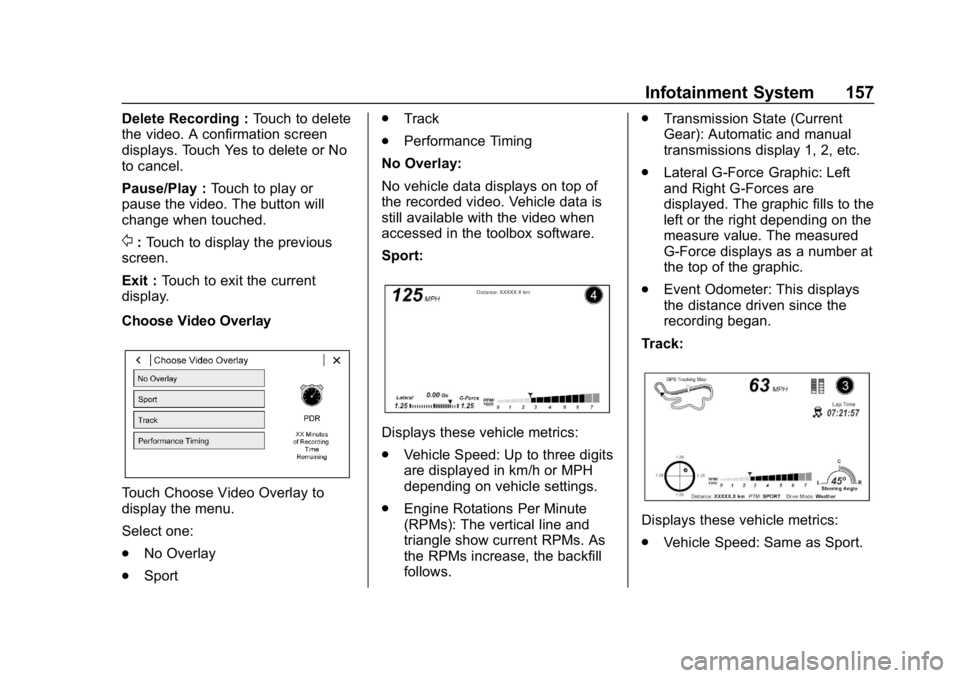
Sport:
Displays these vehicle metrics:
. Vehicle Speed: Up to three digits
are displayed in km/h or MPH
depending on vehicle settings.
. Engine Rotations Per Minute
(RPMs): The vertical line and
triangle show current RPMs. As
the RPMs increase, the backfill
follows. .
Transmission State (Current
Gear): Automatic and manual
transmissions display 1, 2, etc.
. Lateral G-Force Graphic: Left
and Right G-Forces are
displayed. The graphic fills to the
left or the right depending on the
measure value. The measured
G-Force displays as a number at
the top of the graphic.
. Event Odometer: This displays
the distance driven since the
recording began.
Track:
Displays these vehicle metrics:
. Vehicle Speed: Same as Sport.
Page 159 of 375
Chevrolet Camaro Owner Manual (GMNA-Localizing-U.S./Canada/Mexico-
12461811) - 2019 - crc - 11/5/18
158 Infotainment System
.GPS Tracking Map: Shows the
vehicle’s current position relative
to a known route.
. Engine Rotations Per Minute
(RPMs): The vertical line and
triangle indicate current RPMs.
As the RPMs increase, the
backfill follows.
. Transmission State (Current
Gear): Same as Sport.
. Friction Bubble Graphic: Lateral
and longitudinal G-Forces are
displayed as a dot within a
bubble. A red dot displays when
the vehicle starts braking and
turns green when the vehicle
accelerates. The dot is white
when the vehicle is not moving.
A white dot is the default.
. Brake and Throttle Graphic:
Displays the percentage value of
brake and throttle pedal position
from 0–100%.
. Steering Angle: The graphic fills
from the center to the left or right
depending on the direction of steering. The numerical steering
angle displays below the
graphic.
. StabiliTrak/Electronic Stability
Control (ESC) Active Indicator:
The graphic only displays if the
active handling systems are
activated.
. Performance Traction
Management (PTM) Mode:
Displays the current PTM mode.
The options are Wet, Dry, Sport
1, Sport 2, or Race.
. Current Lap Time: Displays the
elapsed lap time if the finish line
is defined and the vehicle has
crossed the defined finish line at
least once.
. Event Odometer: Displays the
distance driven since the
recording began.
. Drive Mode: Displays the
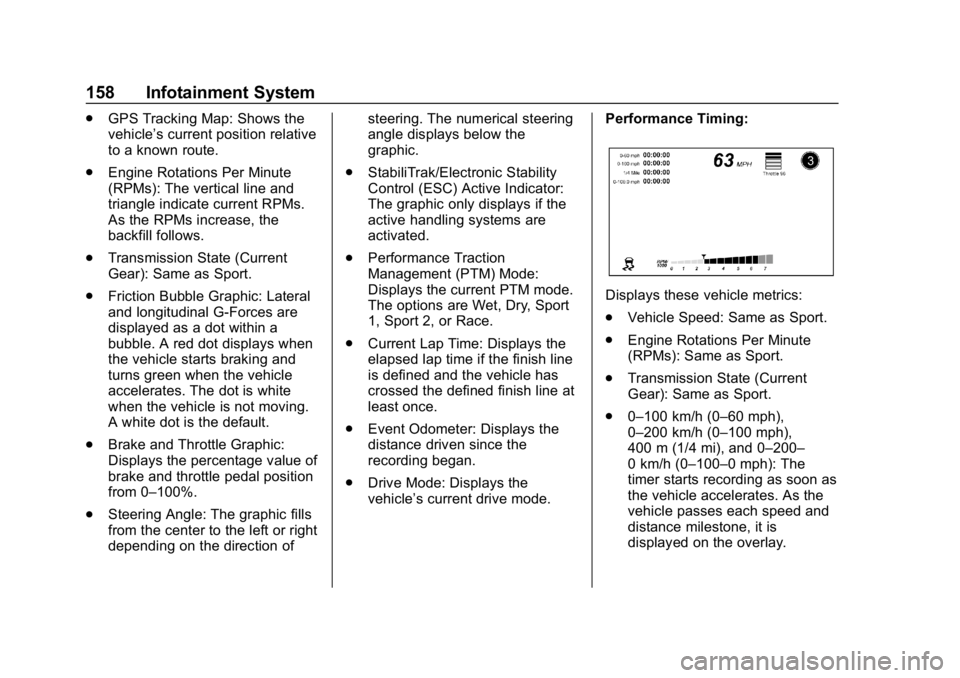
vehicle’s current drive mode. Performance Timing:
Displays these vehicle metrics:
.
Vehicle Speed: Same as Sport.
. Engine Rotations Per Minute
(RPMs): Same as Sport.
. Transmission State (Current
Gear): Same as Sport.
. 0–100 km/h (0–60 mph),
0–200 km/h (0–100 mph),
400 m (1/4 mi), and 0–200–
0 km/h (0–100–0 mph): The
timer starts recording as soon as
the vehicle accelerates. As the
vehicle passes each speed and
distance milestone, it is
displayed on the overlay.
Page 295 of 375
Chevrolet Camaro Owner Manual (GMNA-Localizing-U.S./Canada/Mexico-
12461811) - 2019 - crc - 11/5/18
294 Vehicle Care
Replace wheels, wheel bolts, wheel
nuts, or Tire Pressure Monitor
System (TPMS) sensors with new
GM original equipment parts.
{Warning
Using the wrong replacement
wheels, wheel bolts, or wheel
nuts can be dangerous. It could
affect the braking and handling of
the vehicle. Tires can lose air,
and cause loss of control, causing
a crash. Always use the correct
wheel, wheel bolts, and wheel
nuts for replacement.
Caution
The wrong wheel can also cause
problems with bearing life, brake
cooling, speedometer or
odometer calibration, headlamp
aim, rear differential, bumper
height, vehicle ground clearance,
and tire or tire chain clearance to
the body and chassis.See
If a Tire Goes Flat 0294 for
more information.
Used Replacement Wheels
{Warning
Replacing a wheel with a used
one is dangerous. How it has
been used or how far it has been
driven may be unknown. It could
fail suddenly and cause a crash.
When replacing wheels, use a
new GM original equipment
wheel.
Tire Chains
{Warning
Do not use tire chains. There is
not enough clearance. Tire chains
used on a vehicle without the
proper amount of clearance can
cause damage to the brakes,
suspension, or other vehicle
parts. The area damaged by the
(Continued)
Warning (Continued)
tire chains could cause loss of
control and a crash. Use another
type of traction device only if its
manufacturer recommends it for
the vehicle's tire size combination
and road conditions. Follow that
manufacturer's instructions. To
avoid vehicle damage, drive
slowly and readjust or remove the
traction device if it contacts the
vehicle. Do not spin the wheels.
If traction devices are used, install
them on the rear tires.
If a Tire Goes Flat
If the vehicle has run-flat tires, there
is no need to stop on the side of the
road to change a flat tire. See
Run-Flat Tires0275.
Page 333 of 375
Chevrolet Camaro Owner Manual (GMNA-Localizing-U.S./Canada/Mexico-
12461811) - 2019 - crc - 11/5/18
332 Service and Maintenance
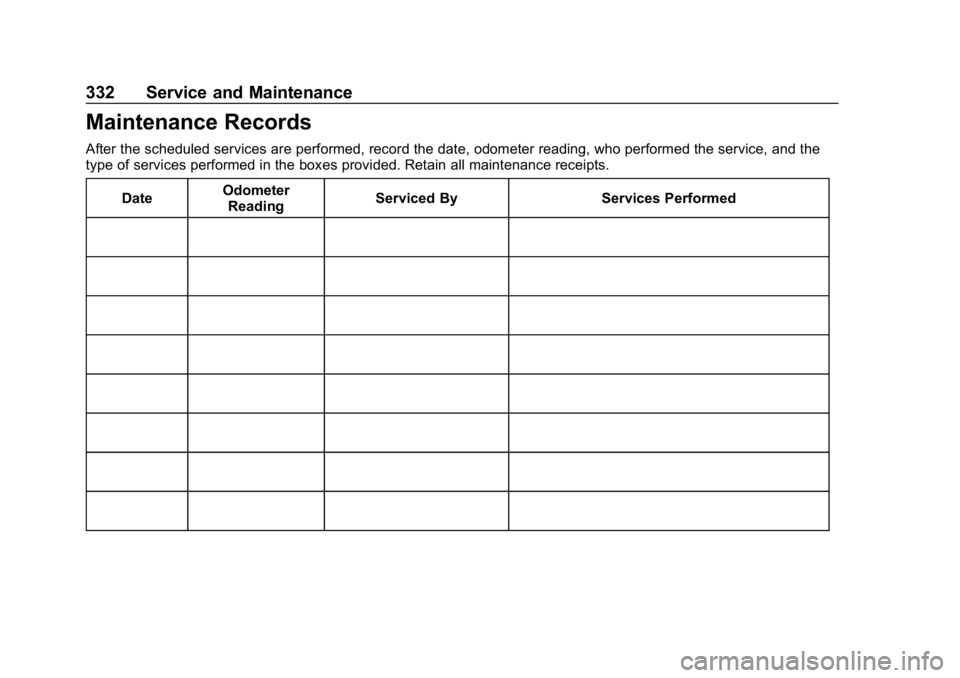
Maintenance Records
After the scheduled services are performed, record the date, odometer reading, who performed the service, and the
type of services performed in the boxes provided. Retain all maintenance receipts.Date Odometer
Reading Serviced By Services Performed
Page 342 of 375
Chevrolet Camaro Owner Manual (GMNA-Localizing-U.S./Canada/Mexico-
12461811) - 2019 - crc - 11/5/18
Customer Information 341
.Locate owner resources such as
lease-end, financing, and
warranty information.
. Retrieve your favorite articles,
quizzes, tips, and multimedia
galleries organized into the
Featured Articles and Auto Care
Sections.
. Download owner ’s manuals.
. Find the
Chevrolet-recommended
maintenance services.
GM Mobility
Reimbursement Program
This program is available to
qualified applicants for cost
reimbursement, up to certain limits,
of eligible aftermarket adaptive
equipment required for the vehicle, such as hand controls or a
wheelchair/scooter lift for the
vehicle.
To learn about the GM Mobility
program, see www.gmmobility.com
or call the GM Mobility Assistance
Center at 1-800-323-9935. Text
Telephone (TTY) users, call
1-800-833-9935.
General Motors of Canada also has
a Mobility program. See www.gm.ca
or call 1-800-GM-DRIVE
(800-463-7483) for details. TTY
users call 1-800-263-3830.
Roadside Assistance
Program
For U.S.-purchased vehicles, call
1-800-243-8872. (Text Telephone
(TTY): 1-888-889-2438.)
For Canadian-purchased vehicles,
call 1-800-268-6800.
Service is available 24 hours a day,
365 days a year.
Calling for Assistance
When calling Roadside Assistance,
have the following information
ready:
.
Your name, home address, and
home telephone number
. Telephone number of your
location
. Location of the vehicle
. Model, year, color, and license
plate number of the vehicle
. Odometer reading, Vehicle
Identification Number (VIN), and
delivery date of the vehicle
. Description of the problem
Coverage
Services are provided for the
duration of the vehicle’s powertrain
warranty.
In the U.S., anyone driving the
vehicle is covered. In Canada, a
person driving the vehicle without
permission from the owner is not
covered.
Page 368 of 375

Chevrolet Camaro Owner Manual (GMNA-Localizing-U.S./Canada/Mexico-
12461811) - 2019 - crc - 11/5/18
Index 367
G
Gas Strut(s) . . . . . . . . . . . . . . . . . . . . 263
GaugesBoost . . . . . . . . . . . . . . . . . . . . . . . . . 121
Engine CoolantTemperature . . . . . . . . . . . . . . . . 122
Engine Oil Pressure . . . . . . . . . . 121
Fuel . . . . . . . . . . . . . . . . . . . . . . . . . . .119
Odometer . . . . . . . . . . . . . . . . . . . . . .119
Speedometer . . . . . . . . . . . . . . . . . .119
Tachometer . . . . . . . . . . . . . . . . . . . .119
Trip Odometer . . . . . . . . . . . . . . . . .119
Voltmeter . . . . . . . . . . . . . . . . . . . . . 123
Warning Lights and Indicators . . . . . . . . . . . . . . . . . . . .114
General Information Service and Maintenance . . . . . 318
Towing . . . . . . . . . . . . . . . . . . . . . . . . 232
Vehicle Care . . . . . . . . . . . . . . . . . . 235
Glove Box . . . . . . . . . . . . . . . . . . . . . . 106
GM Mobility Reimbursement Program . . . . . . . . . . . . . . . . . . . . . . . 341
H
Halogen Bulbs . . . . . . . . . . . . . . . . . . 265
Hazard Warning Flashers . . . . . . . 149
Head Restraints . . . . . . . . . . . . . . . . . 60
Head-up Display . . . . . . . . . . . . . . . . 137 Headlamps
Aiming . . . . . . . . . . . . . . . . . . . . . . . . 264
Automatic . . . . . . . . . . . . . . . . . . . . . 148
Bulb Replacement . . . . . . . . . . . . 265
Daytime Running
Lamps (DRL) . . . . . . . . . . . . . . . . 148
Flash-to-Pass . . . . . . . . . . . . . . . . . 148
High Intensity Discharge
(HID) Lighting . . . . . . . . . . . . . . . 265
High-Beam On Light . . . . . . . . . . 133
High/Low Beam Changer . . . . . 147
Lamps On Reminder . . . . . . . . . 133
Heated Steering Wheel . . . . . . . . . . . . . . . 109
Heated and Ventilated Front Seats . . . . . . . . . . . . . . . . . . . . . . . . . . 66
Heated Mirrors . . . . . . . . . . . . . . . . . . . 45
Heater Engine . . . . . . . . . . . . . . . . . . . . . . . . 194
Heating . . . . . . . . . . . . . . . . . . . . 160, 163
High-Beam On Light . . . . . . . . . . . . 133
High-Speed Operation . . . . . . . . . . 283
Hill and Mountain Roads . . . . . . . . 184
Hill Start Assist (HSA) . . . . . . . . . . 209
Hood . . . . . . . . . . . . . . . . . . . . . . . . . . . 237
Horn . . . . . . . . . . . . . . . . . . . . . . . . . . . . 109
How to Wear Seat Belts Properly . . . . . . . . . . . . . . . . . . . . . . . . 69 HVAC . . . . . . . . . . . . . . . . . . . . . . 160, 163
Hydraulic Clutch . . . . . . . . . . . . . . . . 248
I
Ignition Positions . . . . . . . . . . . . . . . 191
Immobilizer . . . . . . . . . . . . . . . . . . . . . . 43
Indicator
Vehicle Ahead . . . . . . . . . . . . . . . . 130
Infants and Young Children, Restraints . . . . . . . . . . . . . . . . . . . . . . 89
Information Publication Ordering . . . . . . . . . . 346
Infotainment . . . . . . . . . . . . . . . . . . . . 154
Infotainment System . . . . . . . . . . . . 350
Instrument Cluster . . . . . . . . . . . . . . 115
Interior Lamps . . . . . . . . . . . . . . . . . . 151
Interior Rearview Mirrors . . . . . . . . . 46
Introduction . . . . . . . . . . . . . . . . . . . . . . . 2
J
Jump Starting - North America . . . . . . . . . . . . . . . . . . . . . . . 303
K
Keyless Entry
Remote (RKE) System . . . . . . . . . 27
Keys . . . . . . . . . . . . . . . . . . . . . . . . . . . . . 26
Page 370 of 375

Chevrolet Camaro Owner Manual (GMNA-Localizing-U.S./Canada/Mexico-
12461811) - 2019 - crc - 11/5/18
Index 369
MessagesEngine Power . . . . . . . . . . . . . . . . 141
Vehicle . . . . . . . . . . . . . . . . . . . . . . . 140
Vehicle Speed . . . . . . . . . . . . . . . . 141
Mirror Rear Camera . . . . . . . . . . . . . . . . . . . 46
Mirrors
Automatic Dimming . . . . . . . . . . . . . 45
Automatic DimmingRearview . . . . . . . . . . . . . . . . . . . . . . 46
Convex . . . . . . . . . . . . . . . . . . . . . . . . . 45
Heated . . . . . . . . . . . . . . . . . . . . . . . . . 45
Manual Rearview . . . . . . . . . . . . . . . 46
Power . . . . . . . . . . . . . . . . . . . . . . . . . . 45
Tilt in Reverse . . . . . . . . . . . . . . . . . . 46
Mirrors, Interior Rearview . . . . . . . . 46
Mode . . . . . . . . . . . . . . . . . . . . . . . . . . . 211
Driver Control . . . . . . . . . . . . . . . . . .211
Monitor System, Tire Pressure . . . . . . . . . . . . . . . . . . . . . . 283
N
NavigationConnected Services . . . . . . . . . . 359
Net, Convenience . . . . . . . . . . . . . . 107
New Vehicle Break-In . . . . . . . . . . . 190
O
Odometer . . . . . . . . . . . . . . . . . . . . . . . 119 Trip . . . . . . . . . . . . . . . . . . . . . . . . . . . .119
Off-Road Recovery . . . . . . . . . . . . . . . . . . . . . 172
Oil Engine . . . . . . . . . . . . . . . . . . . . . . . . 243
Engine Oil Life System . . . . . . . 246
Engine Oil Pressure Gauge . . . 121
Pressure Light . . . . . . . . . . . . . . . . 132
Older Children, Restraints . . . . . . . 88
Online Owner Center . . . . . . . . . . . 340
OnStar . . . . . . . . . . . . . . . . . . . . . . . . . 350
OnStar Additional Information . . . . . . . . . . . . . . . . . . . . 353
OnStar Emergency . . . . . . . . . . . . . 352
OnStar Overview . . . . . . . . . . . . . . . 351
OnStar Security . . . . . . . . . . . . . . . . 353
Outlets Power . . . . . . . . . . . . . . . . . . . . . . . . . 111
Overheating, Engine . . . . . . . . . . . . 255
P
Park Shifting Into . . . . . . . . . . . . . . . . . . . 196
Shifting Out of . . . . . . . . . . . . . . . . 196
Park Assist . . . . . . . . . . . . . . . . . . . . . 222 Parking . . . . . . . . . . . . . . . . . . . . . . . . . 197
Brake and P (Park)
Mechanism Check . . . . . . . . . . 261
Extended . . . . . . . . . . . . . . . . . . . . . 197
Over Things That Burn . . . . . . . 197
Parking or Backing Assistance Systems . . . . . . . . . . 222
Passenger Airbag Status Indicator . . . . . . . . . . . . . . . . . . . . . . 125
Passenger Compartment Air Filter . . . . . . . . . . . . . . . . . . . . . . . . . . 167
Passenger Sensing System . . . . . 81
Perchlorate Materials Requirements, California . . . . . . 236
Performance Data Recorder (PDR) . . . . . . . . . . . . . . . 154
Personalization Vehicle . . . . . . . . . . . . . . . . . . . . . . . 141
Power Door Locks . . . . . . . . . . . . . . . . . . . . . 38
Mirrors . . . . . . . . . . . . . . . . . . . . . . . . . . 45
Outlets . . . . . . . . . . . . . . . . . . . . . . . . 111
Protection, Battery . . . . . . . . . . . . 152
Retained Accessory (RAP) . . . 195
Seat Adjustment . . . . . . . . . . . . . . . . 61
Windows . . . . . . . . . . . . . . . . . . . . . . . 49
Pregnancy, Using Seat Belts . . . . 73