lights CHEVROLET CAMARO 2021 User Guide
[x] Cancel search | Manufacturer: CHEVROLET, Model Year: 2021, Model line: CAMARO, Model: CHEVROLET CAMARO 2021Pages: 354, PDF Size: 8.86 MB
Page 111 of 354

Chevrolet Camaro Owner Manual (GMNA-Localizing-U.S./Canada/Mexico-
14583589) - 2021 - CRC - 10/1/20
110 Lighting
be affected when the light sensor sees a
change in lighting lasting longer than the
delay.
If the vehicle is started in a dark garage, the
automatic headlamp system comes on
immediately. If it is light outside when the
vehicle leaves the garage, there will be a
slight delay before the automatic headlamp
system changes to the DRL. During that
delay, the instrument cluster may not be as
bright as usual. Make sure the instrument
panel brightness control is in the full bright
position. SeeInstrument Panel Illumination
Control 0111.
Lights On with Wipers
If the windshield wipers are activated in
daylight with the engine on, and the
exterior lamp control is in AUTO, the
headlamps, parking lamps, and other
exterior lamps come on. The transition time
for the lamps coming on varies based on
wiper speed. When the wipers are not
operating, these lamps turn off. Move the
exterior lamp control to
Por;to
disable this feature.
Hazard Warning Flashers
|: Press to make the front and rear turn
signal lamps flash on and off. This warns
others that you are having trouble. Press
again to turn the flashers off.
The hazard warning flashers turn on
automatically if the airbags deploy.
Turn and Lane-Change Signals
Move the lever all the way up or down to
signal a turn.
An arrow on the instrument cluster flashes
in the direction of the turn or lane change.
Raise or lower the lever until the arrow
starts to flash to signal a lane change. Hold
it there until the lane change is completed.
If the lever is briefly pressed and released,
the turn signal flashes three times.
The lever returns to its starting position
whenever it is released.
If after signaling a turn or lane change the
arrow flashes rapidly or does not come on, a
signal bulb may be burned out.
Have any burned out bulbs replaced. If a
bulb is not burned out, check the fuse. See
Electrical System Overload 0260.
Page 112 of 354
Chevrolet Camaro Owner Manual (GMNA-Localizing-U.S./Canada/Mexico-
14583589) - 2021 - CRC - 10/1/20
Lighting 111
Interior Lighting
Instrument Panel Illumination
Control
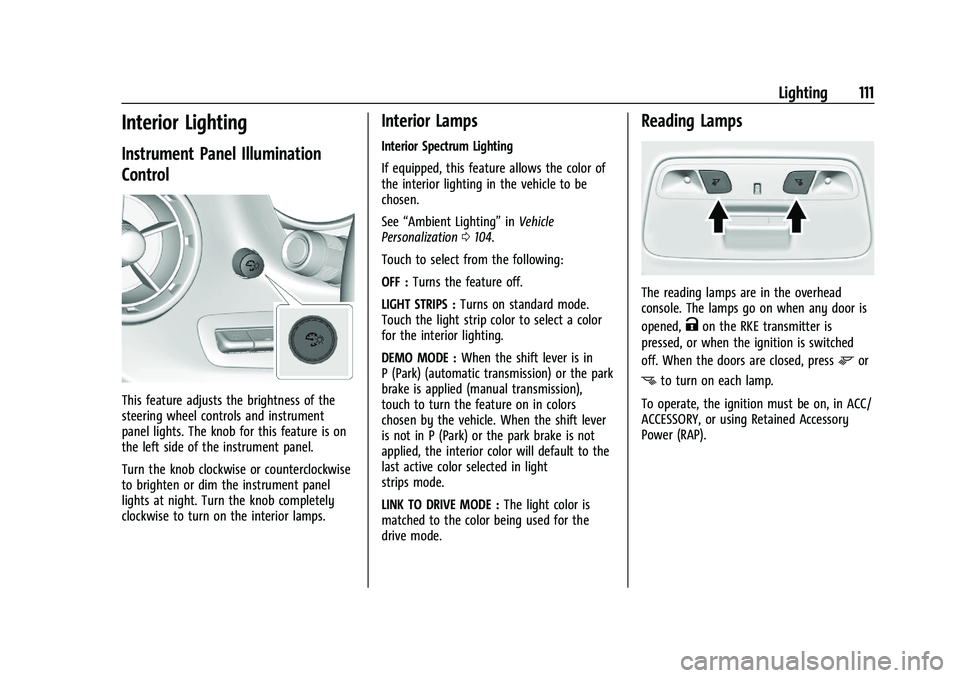
This feature adjusts the brightness of the
steering wheel controls and instrument
panel lights. The knob for this feature is on
the left side of the instrument panel.
Turn the knob clockwise or counterclockwise
to brighten or dim the instrument panel
lights at night. Turn the knob completely
clockwise to turn on the interior lamps.
Interior Lamps
Interior Spectrum Lighting
If equipped, this feature allows the color of
the interior lighting in the vehicle to be
chosen.
See“Ambient Lighting” inVehicle
Personalization 0104.
Touch to select from the following:
OFF : Turns the feature off.
LIGHT STRIPS : Turns on standard mode.
Touch the light strip color to select a color
for the interior lighting.
DEMO MODE : When the shift lever is in
P (Park) (automatic transmission) or the park
brake is applied (manual transmission),
touch to turn the feature on in colors
chosen by the vehicle. When the shift lever
is not in P (Park) or the park brake is not
applied, the interior color will default to the
last active color selected in light
strips mode.
LINK TO DRIVE MODE : The light color is
matched to the color being used for the
drive mode.
Reading Lamps
The reading lamps are in the overhead
console. The lamps go on when any door is
opened,
Kon the RKE transmitter is
pressed, or when the ignition is switched
off. When the doors are closed, press
mor
nto turn on each lamp.
To operate, the ignition must be on, in ACC/
ACCESSORY, or using Retained Accessory
Power (RAP).
Page 113 of 354

Chevrolet Camaro Owner Manual (GMNA-Localizing-U.S./Canada/Mexico-
14583589) - 2021 - CRC - 10/1/20
112 Lighting
Lighting Features
Entry Lighting
Some exterior lamps and interior lamps turn
on briefly at night, or in areas with limited
lighting, when
Kis pressed on the Remote
Keyless Entry (RKE) transmitter. After about
30 seconds the exterior lamps turn off.
Entry lighting can be disabled manually by
turning the ignition on or to ACC/
ACCESSORY, or by pressing
Qon the RKE
transmitter. When any door is opened or
remote unlock pressed, all interior lights
turn on and then interior lamps dim to off
after 20 seconds.
The entry lighting feature for exterior
lighting can be changed. See “Vehicle
Locator Lights” underVehicle Personalization
0 104.
Exit Lighting
Some exterior lamps come on at night or in
areas with limited lighting when the driver
door is opened after the ignition is
turned off.
The interior lamps come on after the
ignition is turned off or any door is opened. The exterior and interior lamps remain on
after the door is closed for a set amount of
time then automatically turn off.
Exit lighting for exterior lights can be
changed. See
Vehicle Personalization 0104.
Theater Dimming
This feature allows for a three to five
second fade out of the interior lamps
instead of having them turn off
immediately.
Battery Load Management
The vehicle has Electric Power Management
(EPM) that estimates the battery's
temperature and state of charge. It then
adjusts the voltage for best performance
and extended life of the battery.
When the battery's state of charge is low,
the voltage is raised slightly to quickly bring
the charge back up. When the state of
charge is high, the voltage is lowered
slightly to prevent overcharging. If the
vehicle has a voltmeter gauge or a voltage
display on the Driver Information Center
(DIC), you may see the voltage move up or
down. This is normal. If there is a problem,
an alert will be displayed. The battery can be discharged at idle if the
electrical loads are very high. This is true for
all vehicles. This is because the generator
(alternator) may not be spinning fast
enough at idle to produce all of the power
needed for very high electrical loads.
A high electrical load occurs when several of
the following are on, such as: headlamps,
high beams, rear window defogger, climate
control fan at high speed, heated seats,
engine cooling fans, trailer loads, and loads
plugged into accessory power outlets.
EPM works to prevent excessive discharge of
the battery. It does this by balancing the
generator's output and the vehicle's
electrical needs. It can increase engine idle
speed to generate more power whenever
needed. It can temporarily reduce the power
demands of some accessories.
Normally, these actions occur in steps or
levels, without being noticeable. In rare
cases at the highest levels of corrective
action, this action may be noticeable to the
driver. If so, a DIC message might be
displayed and it is recommended that the
driver reduce the electrical loads as much as
possible.
Page 177 of 354

Chevrolet Camaro Owner Manual (GMNA-Localizing-U.S./Canada/Mexico-
14583589) - 2021 - CRC - 10/1/20
176 Climate Controls
Remote Start Climate Control Operation, If
Equipped :The climate control system may
run when the vehicle is started remotely,
depending on the outside temperature. See
Remote Vehicle Start 014. The rear defog
may come on during remote start based on
cold ambient conditions. The rear defog
indicator light does not come on during a
remote start. When enabled, the front
heated seats, if equipped, will turn on
automatically if it is cold outside. See
Vehicle Personalization 0104. The heated
seat indicator lights do not come on during
a remote start.Dual Automatic Climate Control System
The heating, cooling, defrosting, and ventilation for the vehicle can be controlled with this
system.
1. Driver and Passenger Temperature Controls
2. Air Delivery Mode Controls
3.
O(Power)
4. SYNC (Synchronized Temperature)
5. AUTO (Automatic Operation) 6. A/C (Air Conditioning)
7. Recirculation
8. Driver and Passenger Heated and
Ventilated Seats (If Equipped)
9. Defrost
10. Rear Window Defogger
11. Fan Control
Page 180 of 354
Chevrolet Camaro Owner Manual (GMNA-Localizing-U.S./Canada/Mexico-
14583589) - 2021 - CRC - 10/1/20
Climate Controls 179
Do not drive the vehicle until all windows
are clear.
Caution
Do not use a razor blade or sharp object
to clear the inside rear window. Do not
adhere anything to the defogger grid
lines in the rear glass. These actions may
damage the rear defogger. Repairs would
not be covered by the vehicle warranty.
LorM(If Equipped) :PressLorMto
heat the driver or passenger seat.
Press
{orC, if equipped, to ventilate the
driver or passenger seat. See Heated and
Ventilated Front Seats 039.
Remote Start Climate Control Operation, If
Equipped : The climate control system may
run when the vehicle is started remotely,
depending on the outside temperature. See
Remote Vehicle Start 014. The rear defog
may come on during remote start based on
cold ambient conditions. The rear defog
indicator light does not come on during a
remote start. When enabled, the front
heated seats, if equipped, will turn on automatically if it is cold outside. See
Vehicle Personalization
0104. The heated
seat indicator lights do not come on during
a remote start.
Air Vents
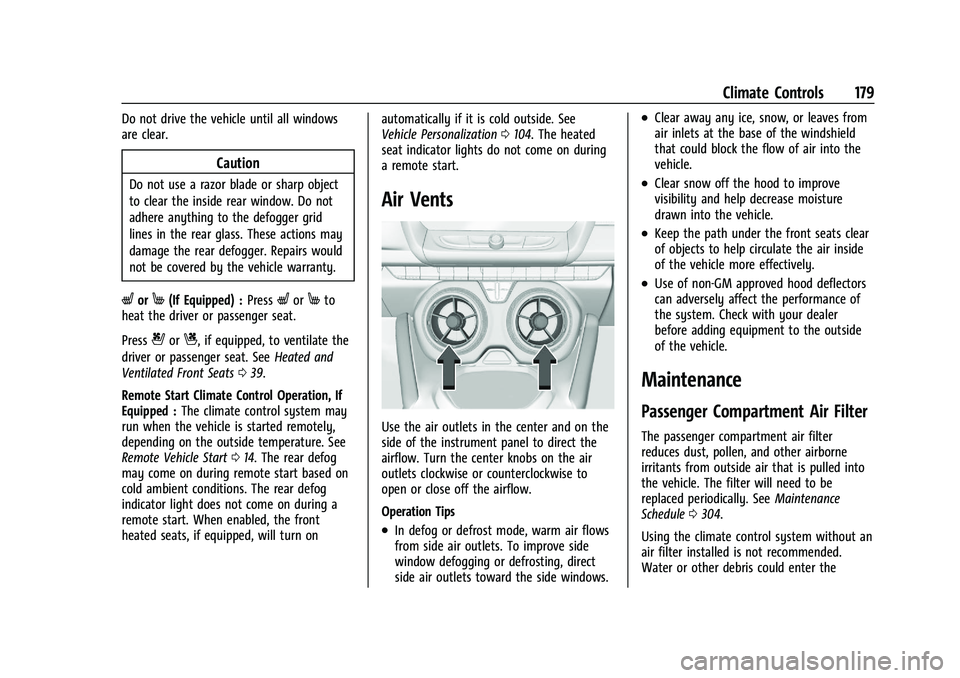
Use the air outlets in the center and on the
side of the instrument panel to direct the
airflow. Turn the center knobs on the air
outlets clockwise or counterclockwise to
open or close off the airflow.
Operation Tips
.In defog or defrost mode, warm air flows
from side air outlets. To improve side
window defogging or defrosting, direct
side air outlets toward the side windows.
.Clear away any ice, snow, or leaves from
air inlets at the base of the windshield
that could block the flow of air into the
vehicle.
.Clear snow off the hood to improve
visibility and help decrease moisture
drawn into the vehicle.
.Keep the path under the front seats clear
of objects to help circulate the air inside
of the vehicle more effectively.
.Use of non-GM approved hood deflectors
can adversely affect the performance of
the system. Check with your dealer
before adding equipment to the outside
of the vehicle.
Maintenance
Passenger Compartment Air Filter
The passenger compartment air filter
reduces dust, pollen, and other airborne
irritants from outside air that is pulled into
the vehicle. The filter will need to be
replaced periodically. See Maintenance
Schedule 0304.
Using the climate control system without an
air filter installed is not recommended.
Water or other debris could enter the
Page 201 of 354

Chevrolet Camaro Owner Manual (GMNA-Localizing-U.S./Canada/Mexico-
14583589) - 2021 - CRC - 10/1/20
200 Driving and Operating
Stopping the Engine/OFF (No Indicator
Lights) :When the vehicle is stopped, press
ENGINE START/STOP once to turn the
engine off.
If the vehicle is in P (Park), the ignition will
turn off, and Retained Accessory Power (RAP)
will remain active. See Retained Accessory
Power (RAP) 0203.
Automatic Transmission
If the vehicle is not in P (Park), the ignition
will return to ACC/ACCESSORY and display a
message in the Driver Information Center
(DIC). When the vehicle is shifted into
P (Park), the ignition system will turn OFF.
Manual Transmission
If the vehicle is stationary, the ignition will
turn off, and Retained Accessory Power (RAP)
will remain active. See Retained Accessory
Power (RAP) 0203.
Do not turn the engine off when the vehicle
is moving. This will cause a loss of power
assist in the brake and steering systems and
disable the airbags.
If the vehicle must be shut off in an
emergency: 1. Brake using a firm and steady pressure.
Do not pump the brakes repeatedly. This
may deplete power assist, requiring
increased brake pedal force.
2. Shift the vehicle to N (Neutral). This can be done while the vehicle is moving.
After shifting to N (Neutral), firmly apply
the brakes and steer the vehicle to a
safe location.
3. Come to a complete stop. Shift to P (Park) with an automatic transmission,
or Neutral with a manual transmission.
Turn the ignition off.
4. Set the parking brake. See Electric
Parking Brake 0213.
{Warning
Turning off the vehicle while moving may
cause loss of power assist in the brake
and steering systems and disable the
airbags. While driving, only shut the
vehicle off in an emergency.
If the vehicle cannot be pulled over, and
must be shut off while driving, press and
hold ENGINE START/STOP for longer than
two seconds, or press twice within
five seconds. ACC/ACCESSORY (Amber Indicator Light) :
This mode allows the use of some electrical
accessories when the engine is off.
With the ignition off, pressing the button
one time without the brake pedal applied
will place the ignition system in ACC/
ACCESSORY.
The ignition will switch from ACC/
ACCESSORY to OFF after five minutes to
prevent battery rundown.
ON/RUN/START (Green Indicator Light) :
This
mode is for driving and starting. With the
ignition off, and the brake pedal applied,
pressing the button once will place the
ignition system in ON/RUN/START. Once
engine cranking begins, release the button.
Engine cranking will continue until the
engine starts. See Starting the Engine 0201.
The ignition will then remain on.
Service Mode
This power mode is available for service and
diagnostics, and to verify the proper
operation of the malfunction indicator lamp
as may be required for emission inspection
purposes. With the vehicle off, and the
brake pedal not applied, pressing and
holding ENGINE START/STOP for more than
five seconds will place the vehicle in Service
Page 210 of 354

Chevrolet Camaro Owner Manual (GMNA-Localizing-U.S./Canada/Mexico-
14583589) - 2021 - CRC - 10/1/20
Driving and Operating 209
the steering wheel. The paddles are on the
back of the steering wheel. Tap the left
paddle (−) to downshift, and the right
paddle (+) to upshift. The Driver Information
Center (DIC) display indicates the gear the
vehicle is in.
Holding the left paddle for an extended time
will downshift the transmission to the
lowest available gear.
While in Manual Mode, the transmission will
prevent shifting to a lower gear if the
engine speed is too high. If the tap down
−(Minus) paddle is held while the vehicle
slows down, the M in the DIC will flash, and
the downshift will be allowed when vehicle
speed is low enough. Continuing to hold the
tap down −(Minus) paddle will not cause
the transmission to continue downshifting.
Each downshift must be requested
separately by releasing and reapplying the
tap down −(Minus) paddle.
Head-Up Display (HUD)
Vehicles equipped with a Head-Up Display
(HUD) may also have performance shift
timing lights across the top of the display. The rows of lights get closer together as the
maximum shift point gets closer. Shift the
transmission before the lights come together
in the display. Shift immediately if the lights
are flashing.
See
Head-Up Display (HUD) 0100.
Temporary Tap Shift Mode allows brief
entry into Tap Shift Mode while in D (Drive).
Tapping either the upshift or downshift
control will place the transmission in Tap
Shift Mode. Exit Tap Shift Mode by holding
the upshift control for two seconds. The
system will return to automatic shifting
after seven seconds of driving at a steady
speed, or when the vehicle comes to a stop.
This may be used for sport driving or when
climbing or descending hills, to stay in gear
longer, or to downshift for more power or
engine braking. The transmission will only
allow you to shift into gears appropriate for
the vehicle speed and engine revolutions per
minute (rpm). The transmission will not
automatically shift to the next higher gear if
the engine rpm is too high. If shifting is
prevented for any reason, the gear displayed
in the DIC will blink several times, indicating
that the transmission has not shifted gears. While in the Tap Shift Mode, the
transmission will not automatically
downshift on hard acceleration.
Manual Transmission
Shift Pattern
–V8 Engine
Page 212 of 354

Chevrolet Camaro Owner Manual (GMNA-Localizing-U.S./Canada/Mexico-
14583589) - 2021 - CRC - 10/1/20
Driving and Operating 211
To stop, let up on the accelerator pedal and
press the brake pedal. Just before the
vehicle stops, press the clutch pedal and the
brake pedal, and shift to Neutral.
Neutral :Use this position when starting or
idling the engine. The shift lever is in
Neutral when it is centered in the shift
pattern, not in any gear.
R : To back up, press the clutch pedal to the
floor and shift into R (Reverse). Let up on
the clutch pedal slowly while pressing the
accelerator pedal.
One to Four Shift Message (V8 Only)
When this message comes on, the vehicle
can only be shifted from 1 (First) to
4 (Fourth) instead of 1 (First) to 2 (Second).
The message will display in the Driver
Information Center (DIC).
Complete the shift into 4 (Fourth) to turn off
this feature. This helps to get the best
possible fuel economy.
After shifting to 4 (Fourth), downshift to a
lower gear, if desired.
Caution
Forcing the shift lever into any gear
except 4 (Fourth) when the 1-4 SHIFT
message comes on may damage the
transmission. Shift only from 1 (First) to
4 (Fourth) when the message comes on.
This message will come on when:
.The engine coolant temperature is higher
than 76 °C (169 °F).
.The vehicle is accelerating from a stop
and going 24 to 31 km/h (15 to 19 mph).
.The vehicle is at 33% throttle or less.
Once displayed, the message will remain in
the DIC for two seconds, even if the
conditions for skip shift are no longer
satisfied. Vehicles equipped with a Head-Up Display
(HUD) may also have performance shift
timing lights across the top of the display.
The rows of lights get closer together as the
maximum shift point gets closer. Shift the
transmission before the lights come together
in the display. Shift immediately if the lights
are flashing.
See
Head-Up Display (HUD) 0100.
Active Rev Match
Vehicles equipped with a V8 engine and a
manual transmission have Active Rev Match
(ARM). ARM aids in smoother shifting by
matching the engine speed to the next
selected gear. By monitoring shift lever and
clutch operation, ARM adjusts engine speed
to match a calibrated value based on gear
selection. On upshifts and downshifts,
engine speed will be decreased and
increased to match vehicle road speed and
transmission gear position. ARM is
maintained while the clutch pedal is pressed,
but will deactivate if the shift lever is left in
the Neutral position.
Page 220 of 354

Chevrolet Camaro Owner Manual (GMNA-Localizing-U.S./Canada/Mexico-
14583589) - 2021 - CRC - 10/1/20
Driving and Operating 219
Launch Control (when in Competitive
Driving Mode)
Available only in Sport and Track Modes for
maximum“off-the-line” acceleration when in
Competitive Driving Mode.
For more information, see Track Events and
Competitive Driving 0185.
Competitive Driving Mode (SS,
ZL1 and 1LE Models Only)
Competitive Driving Mode and Launch
Control are systems designed to allow
increased performance while accelerating
and/or cornering. This is accomplished by
regulating and optimizing the engine,
brakes, and suspension performance. These
modes are for use at a closed course race
track and are not intended for use on public
roads. They will not compensate for a
driver’s inexperience or lack of familiarity
with the race track. Drivers who prefer to
allow the system to have more control of
the engine, brakes, and suspension are
advised to turn the normal TCS and
StabiliTrak/Electronic Stability Control (ESC)
systems on.
Caution
Attempting to shift when the drive
wheels are spinning and do not have
traction may cause damage to the
transmission. Damage caused by misuse
of the vehicle is not covered by the
vehicle warranty. Do not attempt to shift
when the drive wheels do not have
traction.
Competitive Driving Mode allows full engine
power while the StabiliTrak/ESC system
helps maintain directional control of the
vehicle by selective brake application. In this
mode, TCS is off and Launch Control is
available. Adjust your driving style to
account for the available engine power. See
“Launch Control” later in this section.
These lights are on when the vehicle is in
the Competitive Driving Mode.
This optional handling mode can be selected
by pressing the TCS/StabiliTrak/ESC button
on the console two times. The appropriate
message displays in the Driver Information
Center (DIC).
Page 227 of 354
Chevrolet Camaro Owner Manual (GMNA-Localizing-U.S./Canada/Mexico-
14583589) - 2021 - CRC - 10/1/20
226 Driving and Operating
detected, three beeps sound from the left or
right, depending on the direction of the
detected vehicle.
SeeRadio Frequency Statement 0331.
Turning the Features On or Off
RPA and RCTA can be turned on or off. See
“Collision/Detection Systems” underVehicle
Personalization 0104.
To turn the rear Park Assist symbols or
guidance lines on or off, see “Rear Camera”
under Vehicle Personalization 0104.
Forward Collision Alert (FCA)
System
If equipped, the FCA system may help to
avoid or reduce the harm caused by
front-end crashes. When approaching a
vehicle ahead too quickly, FCA provides a
red flashing alert on the windshield and
rapidly beeps. FCA also lights an amber
visual alert if following another vehicle too
closely.
FCA detects vehicles within a distance of
approximately 60 m (197 ft) and operates at
speeds above 8 km/h (5 mph).
{Warning
FCA is a warning system and does not
apply the brakes. When approaching a
slower-moving or stopped vehicle ahead
too rapidly, or when following a vehicle
too closely, FCA may not provide a
warning with enough time to help avoid
a crash. It also may not provide any
warning at all. FCA does not warn of
pedestrians, animals, signs, guardrails,
bridges, construction barrels, or other
objects. Be ready to take action and
apply the brakes. See Defensive Driving
0 182.
FCA can be disabled with the FCA steering
wheel control.
Detecting the Vehicle Ahead
FCA warnings will not occur unless the FCA
system detects a vehicle ahead. When a
vehicle is detected, the vehicle ahead indicator will display green. Vehicles may
not be detected on curves, highway exit
ramps, or hills, due to poor visibility; or if a
vehicle ahead is partially blocked by
pedestrians or other objects. FCA will not
detect another vehicle ahead until it is
completely in the driving lane.
{Warning
FCA does not provide a warning to help
avoid a crash, unless it detects a vehicle.
FCA may not detect a vehicle ahead if
the FCA sensor is blocked by dirt, snow,
or ice, or if the windshield is damaged.
It may also not detect a vehicle on
winding or hilly roads, or in conditions
that can limit visibility such as fog, rain,
or snow, or if the headlamps or
windshield are not cleaned or in proper
condition. Keep the windshield,
headlamps, and FCA sensors clean and in
good repair.