center console CHEVROLET CAMARO 2021 Owner's Manual
[x] Cancel search | Manufacturer: CHEVROLET, Model Year: 2021, Model line: CAMARO, Model: CHEVROLET CAMARO 2021Pages: 354, PDF Size: 8.86 MB
Page 12 of 354
Chevrolet Camaro Owner Manual (GMNA-Localizing-U.S./Canada/Mexico-
14583589) - 2021 - CRC - 10/1/20
Keys, Doors, and Windows 11
1. Remove the key from the RKEtransmitter.
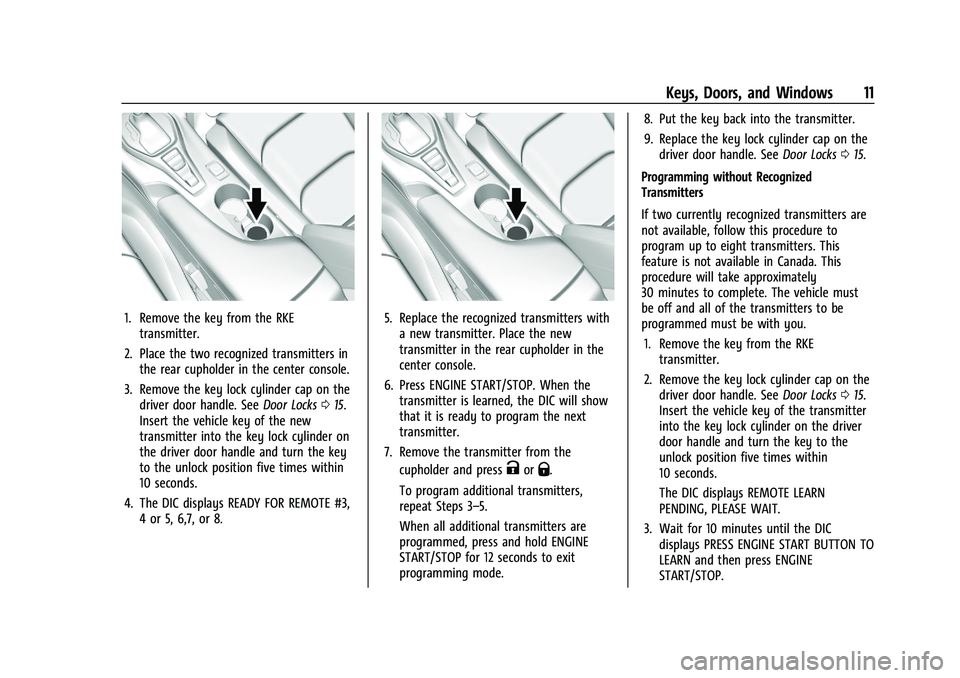
2. Place the two recognized transmitters in the rear cupholder in the center console.
3. Remove the key lock cylinder cap on the driver door handle. See Door Locks015.
Insert the vehicle key of the new
transmitter into the key lock cylinder on
the driver door handle and turn the key
to the unlock position five times within
10 seconds.
4. The DIC displays READY FOR REMOTE #3, 4 or 5, 6,7, or 8.5. Replace the recognized transmitters witha new transmitter. Place the new
transmitter in the rear cupholder in the
center console.
6. Press ENGINE START/STOP. When the transmitter is learned, the DIC will show
that it is ready to program the next
transmitter.
7. Remove the transmitter from the cupholder and press
KorQ.
To program additional transmitters,
repeat Steps 3–5.
When all additional transmitters are
programmed, press and hold ENGINE
START/STOP for 12 seconds to exit
programming mode. 8. Put the key back into the transmitter.
9. Replace the key lock cylinder cap on the
driver door handle. See Door Locks015.
Programming without Recognized
Transmitters
If two currently recognized transmitters are
not available, follow this procedure to
program up to eight transmitters. This
feature is not available in Canada. This
procedure will take approximately
30 minutes to complete. The vehicle must
be off and all of the transmitters to be
programmed must be with you. 1. Remove the key from the RKE transmitter.
2. Remove the key lock cylinder cap on the driver door handle. See Door Locks015.
Insert the vehicle key of the transmitter
into the key lock cylinder on the driver
door handle and turn the key to the
unlock position five times within
10 seconds.
The DIC displays REMOTE LEARN
PENDING, PLEASE WAIT.
3. Wait for 10 minutes until the DIC displays PRESS ENGINE START BUTTON TO
LEARN and then press ENGINE
START/STOP.
Page 13 of 354
Chevrolet Camaro Owner Manual (GMNA-Localizing-U.S./Canada/Mexico-
14583589) - 2021 - CRC - 10/1/20
12 Keys, Doors, and Windows
The DIC display will again show REMOTE
LEARN PENDING, PLEASE WAIT.
4. Repeat Step 2 two additional times. After the third time, all previously known
transmitters will no longer work with the
vehicle. Remaining transmitters can be
relearned during the next steps.
The DIC display should now show READY
FOR REMOTE # 1.
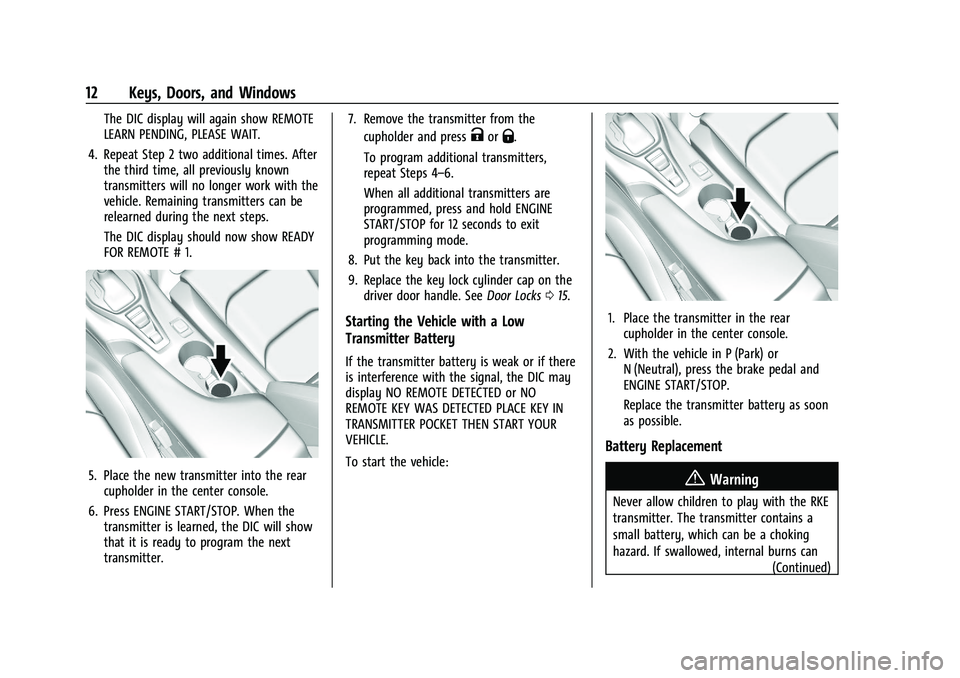
5. Place the new transmitter into the rearcupholder in the center console.
6. Press ENGINE START/STOP. When the transmitter is learned, the DIC will show
that it is ready to program the next
transmitter. 7. Remove the transmitter from the
cupholder and press
KorQ.
To program additional transmitters,
repeat Steps 4–6.
When all additional transmitters are
programmed, press and hold ENGINE
START/STOP for 12 seconds to exit
programming mode.
8. Put the key back into the transmitter.
9. Replace the key lock cylinder cap on the driver door handle. See Door Locks015.
Starting the Vehicle with a Low
Transmitter Battery
If the transmitter battery is weak or if there
is interference with the signal, the DIC may
display NO REMOTE DETECTED or NO
REMOTE KEY WAS DETECTED PLACE KEY IN
TRANSMITTER POCKET THEN START YOUR
VEHICLE.
To start the vehicle:
1. Place the transmitter in the rear
cupholder in the center console.
2. With the vehicle in P (Park) or N (Neutral), press the brake pedal and
ENGINE START/STOP.
Replace the transmitter battery as soon
as possible.
Battery Replacement
{Warning
Never allow children to play with the RKE
transmitter. The transmitter contains a
small battery, which can be a choking
hazard. If swallowed, internal burns can
(Continued)
Page 23 of 354
Chevrolet Camaro Owner Manual (GMNA-Localizing-U.S./Canada/Mexico-
14583589) - 2021 - CRC - 10/1/20
22 Keys, Doors, and Windows
When trying to start the vehicle, the
security light comes on briefly when the
ignition is turned on.
If the engine does not start and the security
light stays on, there is a problem with the
system. Turn the vehicle off and try again.
If the RKE transmitter appears to be
undamaged, try another transmitter. Or, you
may try placing the transmitter in the rear
cupholder in the center console. See
“Starting the Vehicle with a Low Transmitter
Battery”underRemote Keyless Entry (RKE)
System Operation 07.
If the engine does not start with the other
transmitter or when the transmitter is in the
rear cupholder in the center console, your
vehicle needs service. See your dealer who
can service the theft-deterrent system and
have a new transmitter programmed to the
vehicle.
Do not leave the transmitter or device that
disarms or deactivates the theft-deterrent
system in the vehicle.Exterior Mirrors
Convex Mirrors
{Warning
A convex mirror can make things, like
other vehicles, look farther away than
they really are. If you cut too sharply
into the right lane, you could hit a
vehicle on the right. Check the inside
mirror or glance over your shoulder
before changing lanes.
The passenger side mirror is convex shaped.
A convex mirror's surface is curved so more
can be seen from the driver seat.
Power Mirrors
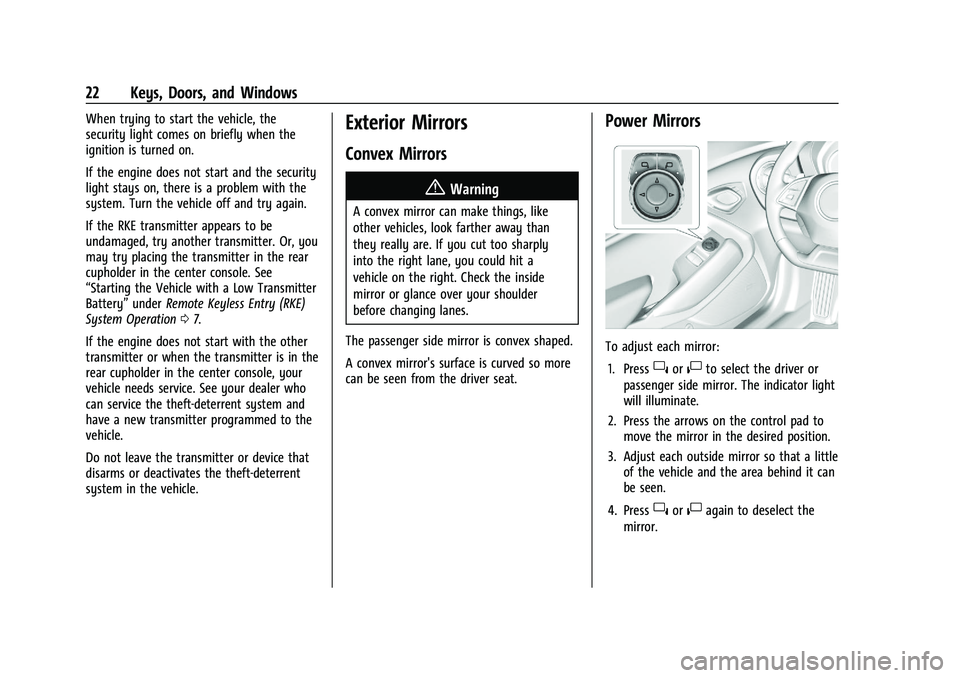
To adjust each mirror: 1. Press
}or|to select the driver or
passenger side mirror. The indicator light
will illuminate.
2. Press the arrows on the control pad to move the mirror in the desired position.
3. Adjust each outside mirror so that a little of the vehicle and the area behind it can
be seen.
4. Press
}or|again to deselect the
mirror.
Page 29 of 354
Chevrolet Camaro Owner Manual (GMNA-Localizing-U.S./Canada/Mexico-
14583589) - 2021 - CRC - 10/1/20
28 Keys, Doors, and Windows
3. Partially open the window to beprogrammed. Then close it and continue
to pull the switch briefly after the
window has fully closed.
4. Open the window and continue to press the switch briefly after the window has
fully opened.
Window Operation with Convertible Top
Windows will automatically lower fully
when the convertible top is lowered or
raised. See Convertible Top 029.
The rear windows should always be raised
before the front windows to ensure the
best seal.
Remote Window Operation
If equipped, this feature allows the windows
to be opened remotely.
If enabled, press and hold
Kon the RKE
transmitter. See Vehicle Personalization
0 104.
Window Indexing
If the window freezes to the door:
1. Push the top of the window inward while opening the door. 2. Clear all snow and ice from the door and
glass.
3. Open the window completely and then close it.
4. Close the door.
When fully closed, indexing automatically
lowers the window a small amount when
the door is opened. When the door is
closed, the window will raise to its previous
position. If either window does not index
properly, it could be due to loss of power.
Before seeing your dealer for service,
program the power windows.
Sun Visors
Pull the sun visor down to block glare.
Detach the sun visor from the center mount
to pivot to the side window and,
if equipped, extend along the rod.
Roof
Sunroof
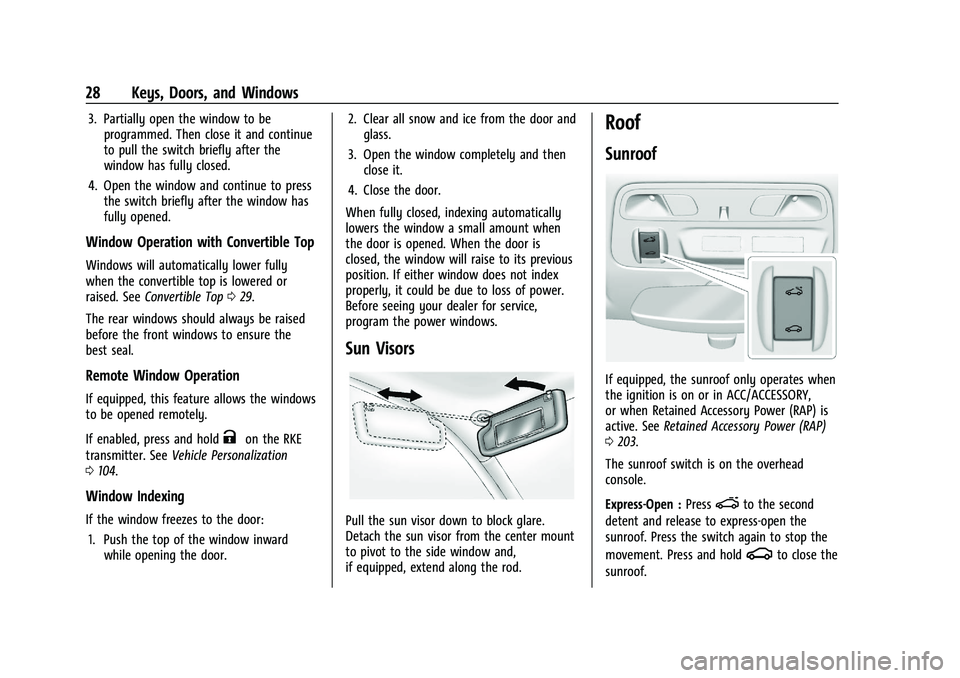
If equipped, the sunroof only operates when
the ignition is on or in ACC/ACCESSORY,
or when Retained Accessory Power (RAP) is
active. See Retained Accessory Power (RAP)
0 203.
The sunroof switch is on the overhead
console.
Express-Open : Press
eto the second
detent and release to express-open the
sunroof. Press the switch again to stop the
movement. Press and hold
gto close the
sunroof.
Page 31 of 354
Chevrolet Camaro Owner Manual (GMNA-Localizing-U.S./Canada/Mexico-
14583589) - 2021 - CRC - 10/1/20
30 Keys, Doors, and Windows
Caution (Continued)
.Do not operate the convertible top
multiple times in a short period of
time without starting the engine to
avoid draining the vehicle battery.
.Do not open or store the convertible
top when it is dirty or wet. This could
result in stains, mildew, or other
damage.
.Only store the vehicle with the top
fully closed.
Caution
When the convertible top is open, there
are sliding covers next to the rear seat on
each side of the vehicle. Do not press
down on or move these covers as
damage may occur to the covers or the
convertible top.
Opening the Convertible Top
Using the Overhead Console Switch 1. Remove all objects from the top of the tonneau cover and forward of the rear
trunk partition. Place the partition in the
rear storage area in the upright position.
Fasten both sides of the partition to the
posts just below the tonneau cover. See
Rear Storage 074.
2. Close the trunk.
3. Start the vehicle or place it in ACC/ ACCESSORY.
4. When possible, operate the convertible top when the vehicle is stopped. The top
can be operated while driving below
50 km/h (31 mph) and will stop if that
speed is exceeded. The top operation will
take approximately 25 seconds. Make
sure the top operation can be completed
before that speed is reached.
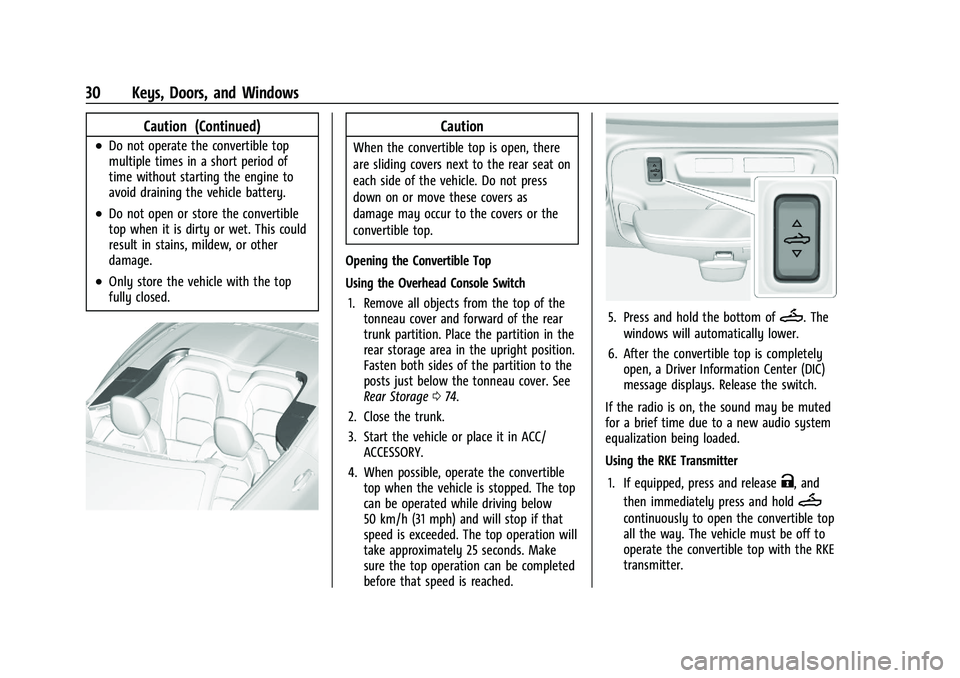
5. Press and hold the bottom ofM. The
windows will automatically lower.
6. After the convertible top is completely open, a Driver Information Center (DIC)
message displays. Release the switch.
If the radio is on, the sound may be muted
for a brief time due to a new audio system
equalization being loaded.
Using the RKE Transmitter
1. If equipped, press and release
K, and
then immediately press and hold
M
continuously to open the convertible top
all the way. The vehicle must be off to
operate the convertible top with the RKE
transmitter.
Page 75 of 354
Chevrolet Camaro Owner Manual (GMNA-Localizing-U.S./Canada/Mexico-
14583589) - 2021 - CRC - 10/1/20
74 Storage
Storage
Storage Compartments
Storage Compartments . . . . . . . . . . . . . . . . . 74
Glove Box . . . . . . . . . . . . . . . . . . . . . . . . . . . . . . 74
Rear Storage . . . . . . . . . . . . . . . . . . . . . . . . . . . 74
Center Console Storage . . . . . . . . . . . . . . . . . 75
Additional Storage Features
Convenience Net . . . . . . . . . . . . . . . . . . . . . . . . 75
Storage Compartments{
Warning
Do not store heavy or sharp objects in
storage compartments. In a crash, these
objects may cause the cover to open and
could result in injury.
Glove Box
Open the glove box by lifting up on the
lever. Use the key to lock and unlock the
glove box.
Rear Storage
Rear Seat Trunk Access (Coupe)
If equipped, there is access to the trunk
from inside of the vehicle.
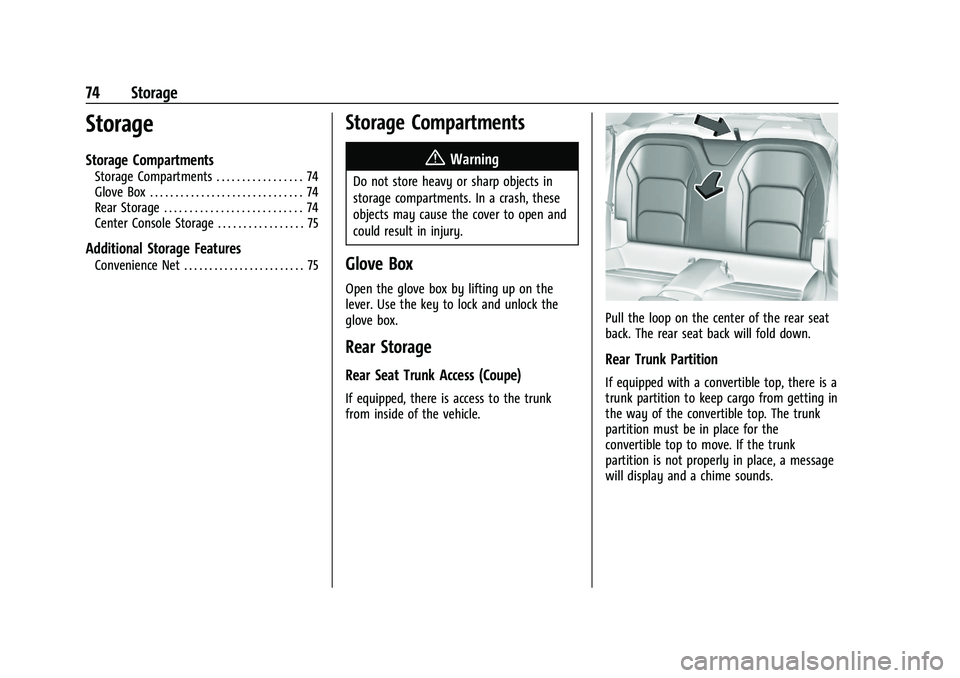
Pull the loop on the center of the rear seat
back. The rear seat back will fold down.
Rear Trunk Partition
If equipped with a convertible top, there is a
trunk partition to keep cargo from getting in
the way of the convertible top. The trunk
partition must be in place for the
convertible top to move. If the trunk
partition is not properly in place, a message
will display and a chime sounds.
Page 76 of 354
Chevrolet Camaro Owner Manual (GMNA-Localizing-U.S./Canada/Mexico-
14583589) - 2021 - CRC - 10/1/20
Storage 75
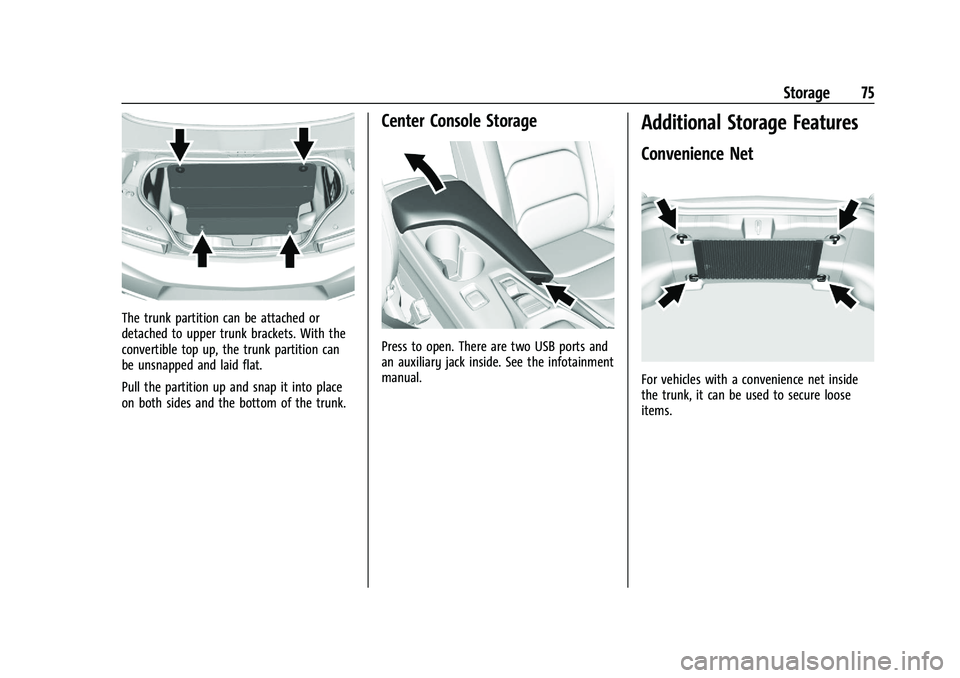
The trunk partition can be attached or
detached to upper trunk brackets. With the
convertible top up, the trunk partition can
be unsnapped and laid flat.
Pull the partition up and snap it into place
on both sides and the bottom of the trunk.
Center Console Storage
Press to open. There are two USB ports and
an auxiliary jack inside. See the infotainment
manual.
Additional Storage Features
Convenience Net
For vehicles with a convenience net inside
the trunk, it can be used to secure loose
items.
Page 80 of 354
Chevrolet Camaro Owner Manual (GMNA-Localizing-U.S./Canada/Mexico-
14583589) - 2021 - CRC - 10/1/20
Instruments and Controls 79
Power Outlets
The vehicle has an accessory power outlet
on the center floor console in front of the
cupholders. It can be used to plug in
electrical equipment, such as a cell phone or
an MP3 player.
The accessory power outlet does not work
when the ignition is turned off and the
driver door is opened. This helps to preserve
the battery life of the vehicle.
Certain power accessory plugs may not be
compatible with the accessory power outlet
and could overload vehicle and adapter
fuses. If a problem is experienced, see your
dealer.
Caution
Adding any electrical equipment to the
vehicle may damage it or keep other
components from working as they
should. The repairs would not be covered
by the vehicle warranty. Do not use
equipment exceeding
maximum amperage rating of
15 amperes. Check with your dealer
before adding electrical equipment.When adding electrical equipment, be sure
to follow the proper installation instructions
included with the equipment. See
Add-On
Electrical Equipment 0233.
Caution
Hanging heavy equipment from the
power outlet can cause damage not
covered by the vehicle warranty. The
power outlets are designed for accessory
power plugs only, such as cell phone
charge cords.
Wireless Charging
If equipped, the vehicle has wireless
charging in the storage bin at the back of
the floor console. The system operates at
145 kHz and wirelessly charges one Qi
compatible smartphone. The power output
of the system is capable of charging at a
rate up to 1 amp (5W), as requested by the
compatible smartphone. See Radio
Frequency Statement 0331.
{Warning
Wireless charging can affect the
operation of an implanted pacemaker or
other medical devices. If you have one, it
is recommended to consult with your
doctor before using the wireless charging
system.
The vehicle must be on, in ACC/ACCESSORY,
or Retained Accessory Power (RAP) must be
active. The wireless charging feature may
not correctly indicate charging when the
vehicle is in RAP. See Retained Accessory
Power (RAP) 0203.
The operating temperature is −20 °C (−4 °F)
to 60 °C (140 °F) for the charging system
and 0 °C (32 °F) to 35 °C (95 °F) for the
smartphone.
{Warning
Remove all objects from the charging pad
before charging your compatible
smartphone. Objects, such as coins, keys,
rings, paper clips, or cards, between the
smartphone and charging pad will
become very hot. On the rare occasion
(Continued)
Page 91 of 354
Chevrolet Camaro Owner Manual (GMNA-Localizing-U.S./Canada/Mexico-
14583589) - 2021 - CRC - 10/1/20
90 Instruments and Controls
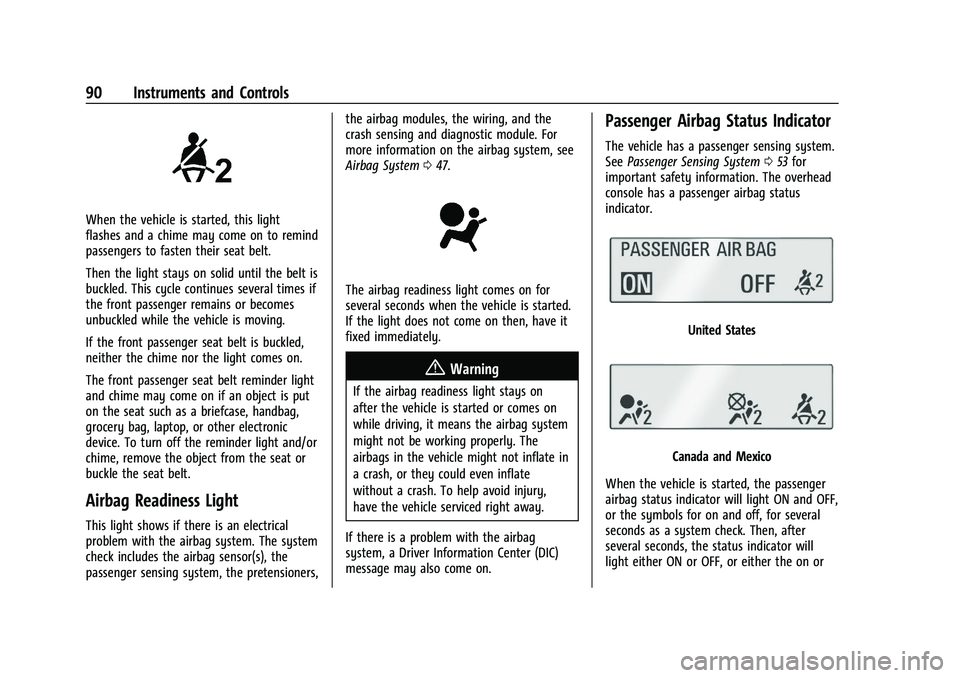
When the vehicle is started, this light
flashes and a chime may come on to remind
passengers to fasten their seat belt.
Then the light stays on solid until the belt is
buckled. This cycle continues several times if
the front passenger remains or becomes
unbuckled while the vehicle is moving.
If the front passenger seat belt is buckled,
neither the chime nor the light comes on.
The front passenger seat belt reminder light
and chime may come on if an object is put
on the seat such as a briefcase, handbag,
grocery bag, laptop, or other electronic
device. To turn off the reminder light and/or
chime, remove the object from the seat or
buckle the seat belt.
Airbag Readiness Light
This light shows if there is an electrical
problem with the airbag system. The system
check includes the airbag sensor(s), the
passenger sensing system, the pretensioners,the airbag modules, the wiring, and the
crash sensing and diagnostic module. For
more information on the airbag system, see
Airbag System
047.
The airbag readiness light comes on for
several seconds when the vehicle is started.
If the light does not come on then, have it
fixed immediately.
{Warning
If the airbag readiness light stays on
after the vehicle is started or comes on
while driving, it means the airbag system
might not be working properly. The
airbags in the vehicle might not inflate in
a crash, or they could even inflate
without a crash. To help avoid injury,
have the vehicle serviced right away.
If there is a problem with the airbag
system, a Driver Information Center (DIC)
message may also come on.
Passenger Airbag Status Indicator
The vehicle has a passenger sensing system.
See Passenger Sensing System 053 for
important safety information. The overhead
console has a passenger airbag status
indicator.
United States
Canada and Mexico
When the vehicle is started, the passenger
airbag status indicator will light ON and OFF,
or the symbols for on and off, for several
seconds as a system check. Then, after
several seconds, the status indicator will
light either ON or OFF, or either the on or
Page 125 of 354
Chevrolet Camaro Owner Manual (GMNA-Localizing-U.S./Canada/Mexico-
14583589) - 2021 - CRC - 10/1/20
124 Infotainment System
SiriusXM Satellite Radio Service
If equipped, SiriusXM Satellite Radio Service
provides digital radio reception. Tall
buildings or hills can interfere with satellite
radio signals, causing the sound to fade in
and out. In addition, traveling or standing
under heavy foliage, bridges, garages,
or tunnels may cause loss of the SiriusXM
signal for a period of time. Some cellular
services may interfere with SXM reception
causing loss of signal.
Mobile Device Usage
Mobile device usage, such as making or
receiving calls, charging, or just having the
mobile device on may cause static
interference in the radio. Unplug the mobile
device or turn it off if this happens.
Multi-Band Antenna
The roof antenna is for AM, FM, SiriusXM
Satellite Radio, OnStar, and GPS (Global
Positioning System). Keep clear of
obstructions for clear reception. If the
vehicle has a sunroof, and it is open,
reception can also be affected.
Audio Players
Avoiding Untrusted Media Devices
When using media devices such as SD cards,
USB devices, and mobile devices, consider
the source. Untrusted media devices could
contain files that affect system operation or
performance. Avoid use if the content or
origin cannot be trusted.
USB Port
Audio stored on a USB device may be
listened to.
The vehicle may be equipped with two USB
ports in the center console. These ports are
for data and charging.
Caution
To avoid vehicle damage, unplug all
accessories and disconnect all accessory
cables from the vehicle when not in use.
Accessory cables left plugged into the
vehicle, unconnected to a device, could be
damaged or cause an electrical short if
the unconnected end comes in contact
with liquids or another power source such
as the accessory power outlet.
Playing from a USB
A USB mass storage device can be connected
to the USB port.
Audio extensions supported by the USB may
include:
.MP3
.AAC
.OGG
.3GP
Gracenote
When plugging in a USB device, Gracenote
service builds voice tags for music. Voice
tags allow artists, albums with hard to
pronounce names, and nicknames to be used
to play music through voice recognition,
if equipped.
While indexing, infotainment features may
be available.
My Media Library
MyMedia is only available when more than
one indexed device is connected. It allows
access to content from all indexed media
sources. MyMedia will show as an available
source in the Source page.