automatic transmission CHEVROLET CAMARO 2022 User Guide
[x] Cancel search | Manufacturer: CHEVROLET, Model Year: 2022, Model line: CAMARO, Model: CHEVROLET CAMARO 2022Pages: 357, PDF Size: 7.99 MB
Page 166 of 357
Chevrolet Camaro Owner Manual (GMNA-Localizing-U.S./Canada/Mexico-
14583589) - 2021 - CRC - 3/24/20
Infotainment System 165
2. Create a Personal Identification Number(PIN) by choosing a four-digit PIN.
Re-enter the PIN to confirm. To change
the PIN, touch Change PIN.
The PIN is required to:
.Register or unregister keys.
.Change Teen Driver settings.
.Change or clear the Teen Driver PIN.
.Access or delete Report Card data.
Register keys to activate Teen Driver and
assign restrictions to the key:
Any vehicle key can be registered, up to a
maximum of eight keys. Label the key to
tell it apart from the other keys.
For a pushbutton start system: 1. Start the engine.
2. For automatic transmissions, the vehicle must be in P (Park). For manual
transmissions, the vehicle must be
stopped with the parking brake set.
3. From the Settings menu, touch Vehicle and then Teen Driver.
4. Enter the PIN.
5. Place the Remote Keyless Entry (RKE) transmitter key you wish to register in
the transmitter pocket. The key does not need to be the one that started the
vehicle. See
Remote Keyless Entry (RKE)
System Operation 07for transmitter
pocket location.
6. From the Teen Driver menu, touch Setup Keys.
.If the transmitter key has not
previously been registered, the option
to add the key displays. Touch Setup
and a confirmation message displays.
Teen Driver restrictions will be
applied whenever this key is used to
operate the vehicle.
.If the transmitter key has already
been registered, the option to
remove the key displays. If Remove is
touched, the transmitter key is no
longer registered. A confirmation
message displays, and Teen Driver
restrictions will not be applied if this
transmitter key is used to operate
the vehicle.
In vehicles with a pushbutton start system,
if a Teen Driver and a non-Teen Driver key
are both present at start up, the vehicle will
recognize the non-Teen Driver key to start
the vehicle. The Teen Driver settings will not
be active. For a keyed ignition system:
1. Start the engine.
2. For automatic transmissions, the vehicle must be in P (Park). For manual
transmissions, the vehicle must be
stopped with the parking brake set.
3. From the Settings menu, touch Vehicle and then Teen Driver.
4. Enter the PIN.
5. Touch Setup Keys. The system displays instructions for registering or
unregistering a key. A confirmation
message displays.
Manage Settings
Audio Volume Limit : Allows the audio
volume limit to be turned on or off. Touch
Set Audio Volume Limit to choose the
maximum allowable audio volume level.
Set Audio Volume Limit : Allows a
maximum radio volume to be set. Use the
arrows to choose the maximum allowable
level for the audio volume.
Teen Driver Speed Limiter : Limits the
maximum speed of the vehicle. When the
speed limiter is turned on and the vehicle is
Page 185 of 357
Chevrolet Camaro Owner Manual (GMNA-Localizing-U.S./Canada/Mexico-
14583589) - 2021 - CRC - 3/24/20
184 Driving and Operating
Driving and Operating
Driving Information
Driving for Better Fuel Economy . . . . . . . 185
Distracted Driving . . . . . . . . . . . . . . . . . . . . . 185
Defensive Driving . . . . . . . . . . . . . . . . . . . . . . 185
Impaired Driving . . . . . . . . . . . . . . . . . . . . . . 186
Control of a Vehicle . . . . . . . . . . . . . . . . . . . 186
Braking . . . . . . . . . . . . . . . . . . . . . . . . . . . . . . . . 186
Steering . . . . . . . . . . . . . . . . . . . . . . . . . . . . . . . 186
Off-Road Recovery . . . . . . . . . . . . . . . . . . . . . 187
Loss of Control . . . . . . . . . . . . . . . . . . . . . . . . 187
Track Events and CompetitiveDriving . . . . . . . . . . . . . . . . . . . . . . . . . . . . . . 188
Driving on Wet Roads . . . . . . . . . . . . . . . . . 196
Hill and Mountain Roads . . . . . . . . . . . . . . 197
Winter Driving . . . . . . . . . . . . . . . . . . . . . . . . . 197
If the Vehicle Is Stuck . . . . . . . . . . . . . . . . . 198
Vehicle Load Limits . . . . . . . . . . . . . . . . . . . . 199
Starting and Operating
New Vehicle Break-In . . . . . . . . . . . . . . . . . . 202
Ignition Positions . . . . . . . . . . . . . . . . . . . . . . 203
Starting the Engine . . . . . . . . . . . . . . . . . . . 204
Engine Heater . . . . . . . . . . . . . . . . . . . . . . . . . 205
Retained Accessory Power (RAP) . . . . . . . 207
Shifting Into Park . . . . . . . . . . . . . . . . . . . . . 207
Shifting out of Park . . . . . . . . . . . . . . . . . . . 207
Parking (Manual Transmission) . . . . . . . . 208
Parking over Things That Burn . . . . . . . . 208 Active Fuel Management . . . . . . . . . . . . . . 208
Extended Parking . . . . . . . . . . . . . . . . . . . . . 208
Engine Exhaust
Engine Exhaust . . . . . . . . . . . . . . . . . . . . . . . . 209
Running the Vehicle While Parked . . . . 209
Automatic Transmission
Automatic Transmission . . . . . . . . . . . . . . . 209
Manual Mode . . . . . . . . . . . . . . . . . . . . . . . . . . 211
Manual Transmission
Manual Transmission . . . . . . . . . . . . . . . . . . 213
Active Rev Match . . . . . . . . . . . . . . . . . . . . . . 215
Brakes
Antilock Brake System (ABS) . . . . . . . . . . . 215
Electric Parking Brake . . . . . . . . . . . . . . . . . . 216
Brake Assist . . . . . . . . . . . . . . . . . . . . . . . . . . . . 217
Hill Start Assist (HSA) . . . . . . . . . . . . . . . . . . 217
Ride Control Systems
Traction Control/Electronic Stability
Control . . . . . . . . . . . . . . . . . . . . . . . . . . . . . . 218
Driver Mode Control . . . . . . . . . . . . . . . . . . . 219
Competitive Driving Mode (SS, ZL1 and 1LE Models Only) . . . . . . . . . . . . . . . . . . . . 223
Limited-Slip Rear Axle . . . . . . . . . . . . . . . . . 224
Cruise Control
Cruise Control . . . . . . . . . . . . . . . . . . . . . . . . . 225
Driver Assistance Systems
Driver Assistance Systems . . . . . . . . . . . . . 227
Assistance Systems for Parking or Backing . . . . . . . . . . . . . . . . . . . . . . . . . . . . . . 228
Forward Collision Alert (FCA) System . . . . . . . . . . . . . . . . . . . . . . . . . . . . . . 230
Side Blind Zone Alert (SBZA) . . . . . . . . . . . 231
Lane Change Alert (LCA) . . . . . . . . . . . . . . . 232
Fuel
Top Tier Fuel . . . . . . . . . . . . . . . . . . . . . . . . . . 233
Recommended Fuel (3.6L V6 Engine) . . . . . . . . . . . . . . . . . . . . . . . . . . 234
Recommended Fuel (2.0L L4 Turbo Engine and 6.2L V8 Engine) . . . . . . . . . . 234
Recommended Fuel (6.2L V8 Supercharged Engine) . . . . . . . . . . . . . . . . 234
Prohibited Fuels . . . . . . . . . . . . . . . . . . . . . . . 234
Fuels in Foreign Countries . . . . . . . . . . . . . 235
Fuel Additives . . . . . . . . . . . . . . . . . . . . . . . . . 235
Filling the Tank . . . . . . . . . . . . . . . . . . . . . . . . 235
Filling a Portable Fuel Container . . . . . . . 237
Trailer Towing
General Towing Information . . . . . . . . . . . 237
Conversions and Add-Ons
Add-On Electrical Equipment . . . . . . . . . . . 237
Page 190 of 357
Chevrolet Camaro Owner Manual (GMNA-Localizing-U.S./Canada/Mexico-
14583589) - 2021 - CRC - 3/24/20
Driving and Operating 189
3.6L (LGX) V6 Engine
Change the engine oil to 0W-40 or 5W-40
that meets the dexos2 specification. If this
oil is not available, the following oil can be
used as an alternative: Valvoline SYNPOWER
MST 5W-40.
For LS/LT 1LE, add 0.9 L (1.0 qt) of oil over
the nominal fill level for a track event. After
the competitive driving, remove the excess
oil so that the level on the dipstick is not
above the upper mark that shows the
proper operating range.
During track usage, do not follow the Engine
Oil Life System status. Change the engine oil
after four hours of accumulative track usage.
Fuel
Use premium unleaded gasoline with a
posted octane rating of 93 at a track event.
Unleaded gasoline with a posted octane
rating of 91 may be used, but performance
will be degraded.
Automatic Transmission Fluid
Have the transmission fluid set to the track
specific oil level prior to track usage.
Transmission fluid should be changed afterevery 15 hours of track usage. Any
transmission level set or change should be
performed at your dealer.
Manual Transmission Fluid
Manual transmission fluid should be
changed after every 15 hours of track usage.
Rear Axle Fluid
Axles must have 2 400 km (1,500 mi) before
being used in track driving.
The rear axle fluid temperatures may be
higher than when driving in severe
conditions. Drain and refill with new fluid
after the first racing or competitive driving
event, and then after every 24 hours of
racing or competitive driving. See
Recommended Fluids and Lubricants
0318.
Caution
During a first time track or racing event,
high rear axle temperatures can occur.
Damage could be caused to the rear axle
and would not be covered by the vehicle
warranty. Do not drive as long or as fast
the first time the vehicle is driven on the
track or raced.
Brake Fluid
For track events or competitive driving, it is
recommended that the brake fluid be
replaced with a high performance brake fluid
that has a dry boiling point greater than
279 °C (534 °F). After conversion to the high
performance brake fluid, follow the brake
fluid service recommendations outlined by
the fluid manufacturer. Do not use silicone
or DOT-5 brake fluids.
Brake Burnishing
To prepare the Camaro brake systems for
track events and racing, complete the
appropriate high performance brake
burnishing procedure described below.
New brake pads must be burnished before
racing or competitive driving.
Caution
These procedures are specific to the
Camaro SS, or LT with Y4Q Heavy Duty
Cooling System that is equipped with J55
brakes. This procedure should not be run
on other Camaro models as damage may
result.
Page 193 of 357
Chevrolet Camaro Owner Manual (GMNA-Localizing-U.S./Canada/Mexico-
14583589) - 2021 - CRC - 3/24/20
192 Driving and Operating
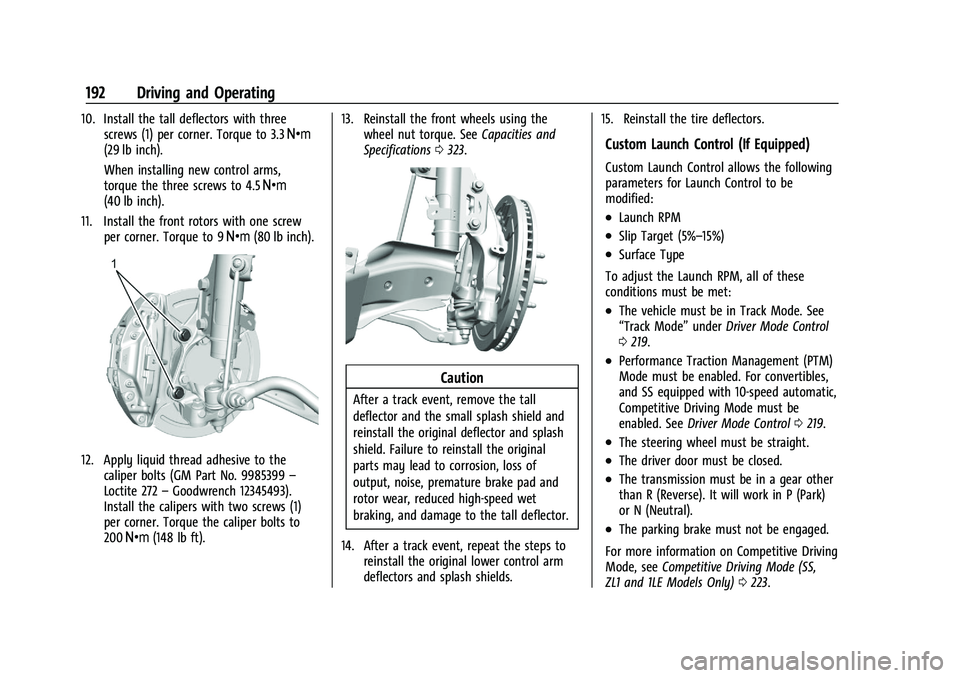
10. Install the tall deflectors with threescrews (1) per corner. Torque to 3.3 Y
(29 lb inch).
When installing new control arms,
torque the three screws to 4.5 Y
(40 lb inch).
11. Install the front rotors with one screw per corner. Torque to 9 Y(80 lb inch).
12. Apply liquid thread adhesive to the
caliper bolts (GM Part No. 9985399 –
Loctite 272 –Goodwrench 12345493).
Install the calipers with two screws (1)
per corner. Torque the caliper bolts to
200 Y (148 lb ft). 13. Reinstall the front wheels using the
wheel nut torque. See Capacities and
Specifications 0323.
Caution
After a track event, remove the tall
deflector and the small splash shield and
reinstall the original deflector and splash
shield. Failure to reinstall the original
parts may lead to corrosion, loss of
output, noise, premature brake pad and
rotor wear, reduced high-speed wet
braking, and damage to the tall deflector.
14. After a track event, repeat the steps to reinstall the original lower control arm
deflectors and splash shields. 15. Reinstall the tire deflectors.
Custom Launch Control (If Equipped)
Custom Launch Control allows the following
parameters for Launch Control to be
modified:
.Launch RPM
.Slip Target (5%–15%)
.Surface Type
To adjust the Launch RPM, all of these
conditions must be met:
.The vehicle must be in Track Mode. See
“Track Mode” underDriver Mode Control
0 219.
.Performance Traction Management (PTM)
Mode must be enabled. For convertibles,
and SS equipped with 10-speed automatic,
Competitive Driving Mode must be
enabled. See Driver Mode Control 0219.
.The steering wheel must be straight.
.The driver door must be closed.
.The transmission must be in a gear other
than R (Reverse). It will work in P (Park)
or N (Neutral).
.The parking brake must not be engaged.
For more information on Competitive Driving
Mode, see Competitive Driving Mode (SS,
ZL1 and 1LE Models Only) 0223.
Page 195 of 357
Chevrolet Camaro Owner Manual (GMNA-Localizing-U.S./Canada/Mexico-
14583589) - 2021 - CRC - 3/24/20
194 Driving and Operating
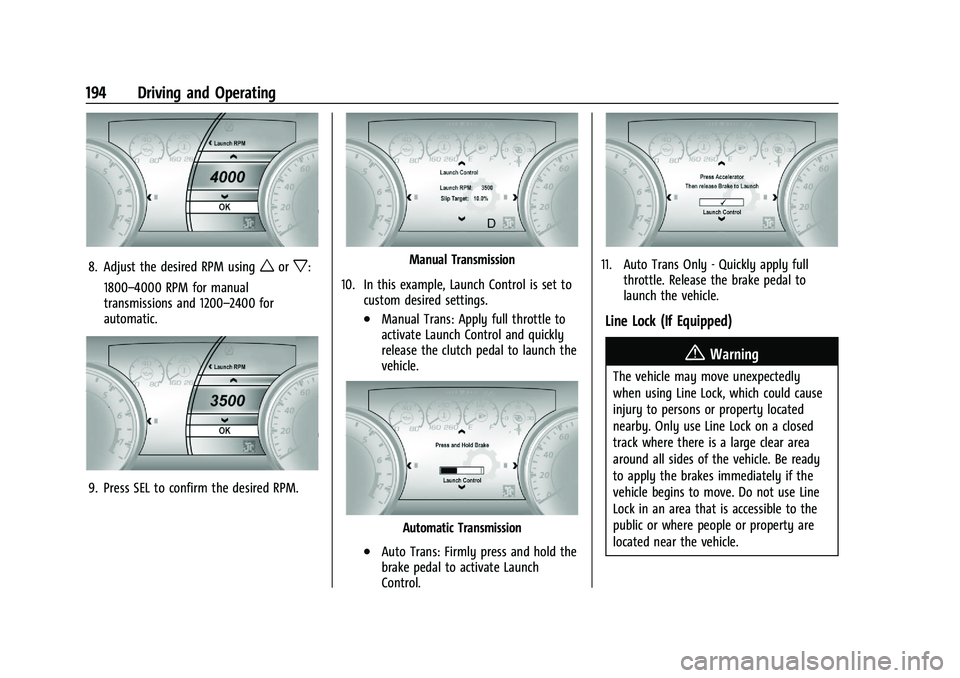
8. Adjust the desired RPM usingworx:
1800–4000 RPM for manual
transmissions and 1200–2400 for
automatic.
9. Press SEL to confirm the desired RPM.
Manual Transmission
10. In this example, Launch Control is set to custom desired settings.
.Manual Trans: Apply full throttle to
activate Launch Control and quickly
release the clutch pedal to launch the
vehicle.
Automatic Transmission
.Auto Trans: Firmly press and hold the
brake pedal to activate Launch
Control.
11. Auto Trans Only - Quickly apply fullthrottle. Release the brake pedal to
launch the vehicle.
Line Lock (If Equipped)
{Warning
The vehicle may move unexpectedly
when using Line Lock, which could cause
injury to persons or property located
nearby. Only use Line Lock on a closed
track where there is a large clear area
around all sides of the vehicle. Be ready
to apply the brakes immediately if the
vehicle begins to move. Do not use Line
Lock in an area that is accessible to the
public or where people or property are
located near the vehicle.
Page 196 of 357
Chevrolet Camaro Owner Manual (GMNA-Localizing-U.S./Canada/Mexico-
14583589) - 2021 - CRC - 3/24/20
Driving and Operating 195
Caution
Attempting to shift when the drive
wheels are spinning and do not have
traction may cause damage to the
transmission. Damage caused by misuse
of the vehicle is not covered by the
vehicle warranty. Do not attempt to shift
when the drive wheels do not have
traction.
Line Lock allows for locking the front brakes
independently of the rear brakes. This allows
the rear tires to spin when the throttle is
applied.
To enter Line Lock, all of these conditions
must be met:
.The vehicle must be in Track Mode.
.Performance Traction Management (PTM)
Mode must be enabled. For convertibles,
Competitive Driving Mode must be
enabled.
.The steering wheel must be straight.
.The driver door must be closed.
.The vehicle must be in D (Drive) for an
automatic transmission or 1 (First) gear
for a manual transmission.
.The parking brake must not be engaged.
.The vehicle must be stopped on level
ground. The accelerator pedal must not
be applied.
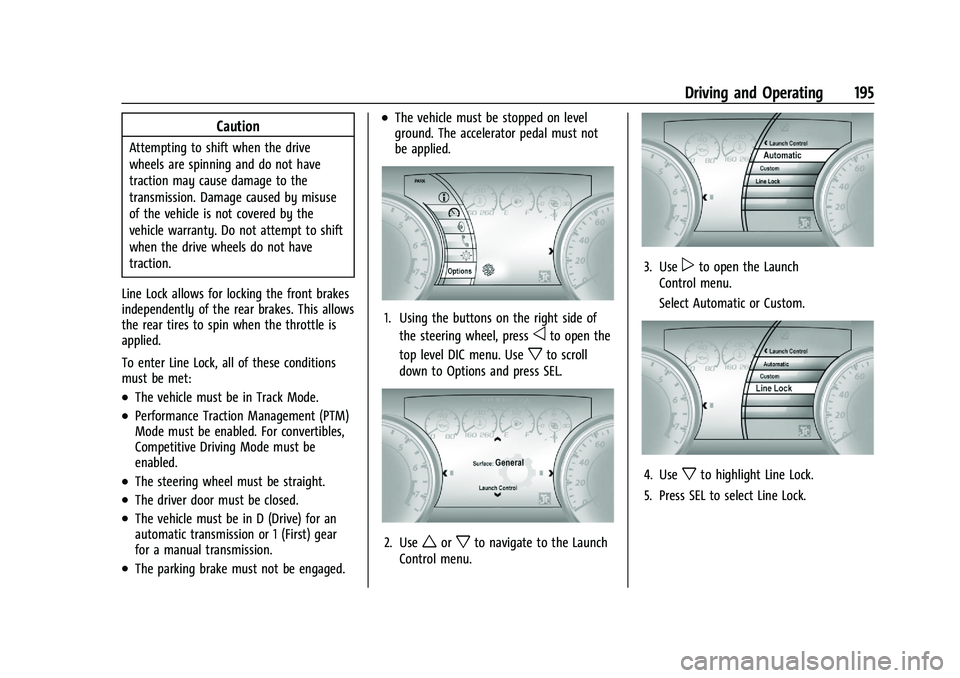
1. Using the buttons on the right side of the steering wheel, press
oto open the
top level DIC menu. Use
xto scroll
down to Options and press SEL.
2. Useworxto navigate to the Launch
Control menu.
3. Usepto open the Launch
Control menu.
Select Automatic or Custom.
4. Usexto highlight Line Lock.
5. Press SEL to select Line Lock.
Page 204 of 357
Chevrolet Camaro Owner Manual (GMNA-Localizing-U.S./Canada/Mexico-
14583589) - 2021 - CRC - 3/24/20
Driving and Operating 203
Ignition Positions
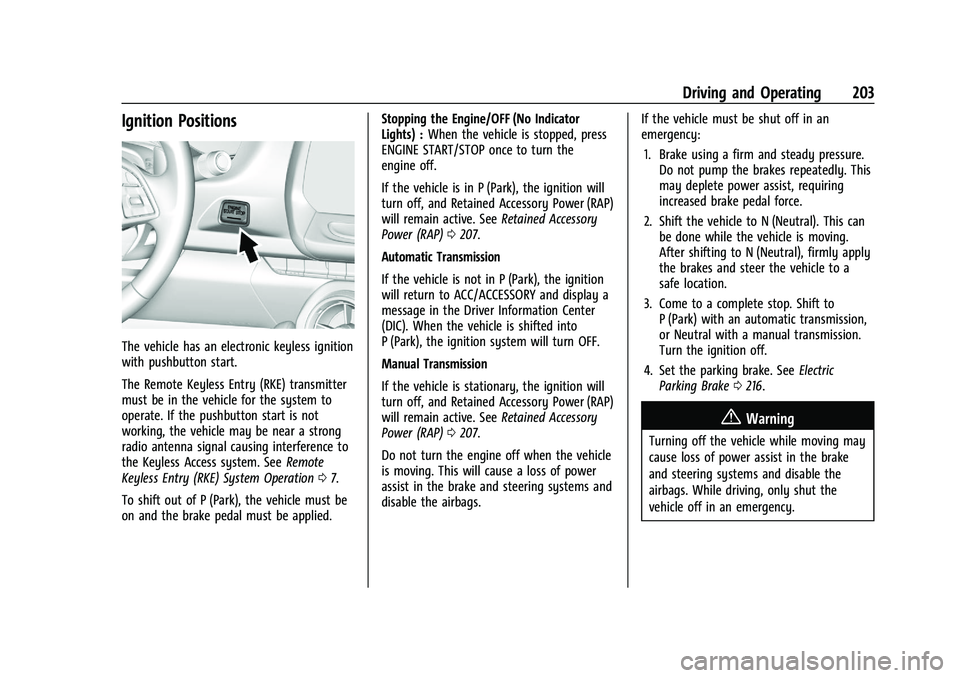
The vehicle has an electronic keyless ignition
with pushbutton start.
The Remote Keyless Entry (RKE) transmitter
must be in the vehicle for the system to
operate. If the pushbutton start is not
working, the vehicle may be near a strong
radio antenna signal causing interference to
the Keyless Access system. SeeRemote
Keyless Entry (RKE) System Operation 07.
To shift out of P (Park), the vehicle must be
on and the brake pedal must be applied. Stopping the Engine/OFF (No Indicator
Lights) :
When the vehicle is stopped, press
ENGINE START/STOP once to turn the
engine off.
If the vehicle is in P (Park), the ignition will
turn off, and Retained Accessory Power (RAP)
will remain active. See Retained Accessory
Power (RAP) 0207.
Automatic Transmission
If the vehicle is not in P (Park), the ignition
will return to ACC/ACCESSORY and display a
message in the Driver Information Center
(DIC). When the vehicle is shifted into
P (Park), the ignition system will turn OFF.
Manual Transmission
If the vehicle is stationary, the ignition will
turn off, and Retained Accessory Power (RAP)
will remain active. See Retained Accessory
Power (RAP) 0207.
Do not turn the engine off when the vehicle
is moving. This will cause a loss of power
assist in the brake and steering systems and
disable the airbags. If the vehicle must be shut off in an
emergency:
1. Brake using a firm and steady pressure. Do not pump the brakes repeatedly. This
may deplete power assist, requiring
increased brake pedal force.
2. Shift the vehicle to N (Neutral). This can be done while the vehicle is moving.
After shifting to N (Neutral), firmly apply
the brakes and steer the vehicle to a
safe location.
3. Come to a complete stop. Shift to P (Park) with an automatic transmission,
or Neutral with a manual transmission.
Turn the ignition off.
4. Set the parking brake. See Electric
Parking Brake 0216.
{Warning
Turning off the vehicle while moving may
cause loss of power assist in the brake
and steering systems and disable the
airbags. While driving, only shut the
vehicle off in an emergency.
Page 205 of 357
Chevrolet Camaro Owner Manual (GMNA-Localizing-U.S./Canada/Mexico-
14583589) - 2021 - CRC - 3/24/20
204 Driving and Operating
If the vehicle cannot be pulled over, and
must be shut off while driving, press and
hold ENGINE START/STOP for longer than
two seconds, or press twice within
five seconds.
ACC/ACCESSORY (Amber Indicator Light) :
This mode allows the use of some electrical
accessories when the engine is off.
With the ignition off, pressing the button
one time without the brake pedal applied
will place the ignition system in ACC/
ACCESSORY.
The ignition will switch from ACC/
ACCESSORY to OFF after five minutes to
prevent battery rundown.
ON/RUN/START (Green Indicator Light) :This
mode is for driving and starting. With the
ignition off, and the brake pedal applied,
pressing the button once will place the
ignition system in ON/RUN/START. Once
engine cranking begins, release the button.
Engine cranking will continue until the
engine starts. See Starting the Engine 0204.
The ignition will then remain on. Service Mode
This power mode is available for service and
diagnostics, and to verify the proper
operation of the malfunction indicator lamp
as may be required for emission inspection
purposes. With the vehicle off, and the
brake pedal not applied, pressing and
holding ENGINE START/STOP for more than
five seconds will place the vehicle in Service
Mode. The instruments and audio systems
will operate as they do in ON/RUN, but the
vehicle will not be able to be driven. The
engine will not start in Service Mode. Press
the button again to turn the vehicle off.
Starting the Engine
Place the transmission in the proper gear.
Caution
If you add electrical parts or accessories,
you could change the way the engine
operates. Any resulting damage would
not be covered by the vehicle warranty.
See
Add-On Electrical Equipment 0237.
Automatic Transmission
Move the shift lever to P (Park) or
N (Neutral). To restart the vehicle when it is
already moving, use N (Neutral) only.
Caution
Do not try to shift to P (Park) if the
vehicle is moving. If you do, you could
damage the transmission. Shift to P (Park)
only when the vehicle is stopped.
Manual Transmission
The shift lever should be in Neutral and the
parking brake engaged. Hold the clutch
pedal down to the floor, press the brake
pedal, and start the engine.
Starting the Vehicle
The RKE transmitter must be inside the
vehicle for the ignition to work.
Cell phone chargers can interfere with the
operation of the Keyless Access system.
Battery chargers should not be plugged in
when starting or turning off the engine.
To start the vehicle: 1. For vehicles with an automatic transmission, press the brake pedal, then
press ENGINE START/STOP on the
instrument panel. For a manual
transmission, place the shift lever in
Neutral with the parking brake engaged.
Page 206 of 357
Chevrolet Camaro Owner Manual (GMNA-Localizing-U.S./Canada/Mexico-
14583589) - 2021 - CRC - 3/24/20
Driving and Operating 205
Hold the clutch pedal down to the floor,
press the brake pedal, then press ENGINE
START/STOP.
If there is no RKE transmitter in the
vehicle or if there is something causing
interference with it, the Driver
Information Center (DIC) will display a
message.
2. When the engine begins cranking, let go of the button and the engine cranks
automatically until it starts. If the
battery in the RKE transmitter is weak,
the DIC will display a message. The
vehicle can still be driven.
See “Starting the Vehicle with a Low
Transmitter Battery” underRemote
Keyless Entry (RKE) System Operation 07
. If the RKE transmitter battery is dead,
insert it into the rear cupholder to
enable engine starting.
3. Do not race the engine immediately after starting it. Operate the engine and
transmission gently until the oil warms
up and lubricates all moving parts.
4. If the engine does not start and no DIC message is displayed, wait 15 seconds
before trying again to let the cranking
motor cool down. If the engine does not start after five to
10 seconds, especially in very cold
weather (below
−18 °C or 0 °F), it could
be flooded with too much gasoline. Try
pushing the accelerator pedal all the way
to the floor while cranking for up to
15 seconds maximum. Wait at least
15 seconds between each try, to allow
the cranking motor to cool down. When
the engine starts, let go of the
accelerator. If the vehicle starts briefly
but then stops again, repeat these steps.
This clears the extra gasoline from the
engine.
Caution
Cranking the engine for long periods of
time, by returning the ignition to the
START position immediately after
cranking has ended, can overheat and
damage the cranking motor, and drain
the battery. Wait at least 15 seconds
between each try, to let the cranking
motor cool down.
Stopping the Engine
If the vehicle has an automatic transmission,
move the shift lever to P (Park) and press
and hold ENGINE START/STOP on the instrument panel, until the engine shuts off.
If the shift lever is not in P (Park), the
engine shuts off and the ignition goes to
ACC/ACCESSORY. The DIC displays SHIFT TO
PARK. Once the shift lever is moved to
P (Park), the vehicle turns off.
If the vehicle has a manual transmission,
before getting out of the vehicle, shift to
1 (First) or R (Reverse) and apply the parking
brake. Then turn off the ignition off by
pressing ENGINE START/STOP and release
the clutch pedal when the engine has
stopped.
If the RKE transmitter is not detected inside
the vehicle when it is turned off the DIC
displays a message.
Engine Heater
{Warning
Do not plug in the engine block heater
while the vehicle is parked in a garage or
under a carport. Property damage or
personal injury may result. Always park
the vehicle in a clear open area away
from buildings or structures.
Page 209 of 357
Chevrolet Camaro Owner Manual (GMNA-Localizing-U.S./Canada/Mexico-
14583589) - 2021 - CRC - 3/24/20
208 Driving and Operating
The shift lock release is always functional
except in the case of an uncharged or low
voltage (less than 9 volt) battery.
If the vehicle has an uncharged battery or a
battery with low voltage, try charging or
jump starting the battery. SeeJump Starting
- North America 0297 for more information.
To shift out of P (Park): 1. Apply the brake pedal.
2. Release the parking brake. See Electric
Parking Brake 0216.
3. Press the shift lever button.
4. Move the shift lever.
If unable to shift out of P (Park): 1. Fully release the shift lever button.
2. While holding down the brake pedal, press the shift lever button again.
3. Move the shift lever.
If the shift lever will not move from P (Park),
consult your dealer or a professional towing
service.Parking (Manual Transmission)
{Warning
If the vehicle has a manual transmission,
never get out of the vehicle without first
moving the shift lever into 1st or
R (Reverse), setting the parking brake and
turning the ignition off. The vehicle can
roll, which could cause serious injury or
death.
Parking over Things That Burn
{Warning
Things that can burn could touch hot
exhaust parts under the vehicle and
ignite. Do not park over papers, leaves,
dry grass, or other things that can burn.
Active Fuel Management
Vehicles with V6 and V8 engines and an
automatic transmission have Active Fuel
Management. This system allows the engine
to operate on either all or four of its
cylinders, depending on the driving
conditions. When less power is required, such as
cruising at a constant vehicle speed, the
system will operate in four cylinder mode,
allowing the vehicle to achieve better fuel
economy. When greater power demands are
required, such as accelerating from a stop,
passing, or merging onto a freeway, the
system will maintain full-cylinder operation.
Extended Parking
It is best not to park with the vehicle
running. If the vehicle is left running, be
sure it will not move and there is adequate
ventilation. See
Shifting Into Park 0207 and
Engine Exhaust 0209.
If the vehicle is left parked and running with
the Remote Keyless Entry (RKE) transmitter
outside the vehicle, it will continue to run
for up to half an hour.
If the vehicle is left parked and running with
the RKE transmitter inside the vehicle, it will
continue to run for up to an hour.
The vehicle could turn off sooner if it is
parked on a hill, due to lack of
available fuel.
Automatic Transmission
The timer will reset if the vehicle is taken
out of P (Park) while it is running.